1
Wave - CP300 - Control
C
Pan
nel - Users Manual v1.4 rev 3
14. Con
nnecting th
he Wave to Da Vinci R
Resolve
14.1 Connecttion
onnect and install
i
the CP300
C
Wave
puter using tthe USB ca
able.
e to the Resolve comp
Co
ve
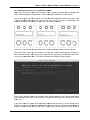
14.2 Configuring Resolv
hen Resolve
e is running
g click Prefe
erences and
d the following window will appearr.
Wh
Ch
hoose Tang
gent Device
es Wave fro
om the menu and click Save.
nt Note
14.3 Importan
ease note th
hat, when configured to
o use the Wave
W
panel, Resolve taakes exclusive
Ple
con
ntrol of the panel. This is even tru e when Res
solve is not running.
Wh
hen you want to use the Wave pa nel with ano
other applic
cation then yyou will nee
ed to
return to the above
a
windo
ow and cho ose None as
a the pane
el option.
10