1
Wave - CP300 - Control
C
Pan
nel - Users Manual v1.4 rev 3
ur Wave pa
anel
15.3 Configuring Color to use you
ake sure yo
ou have ins
stalled the T
Tangent Co
olor Support package aand configu
ured the
Ma
Pa
anel Control Mapper as
s described in the Insta
alling the software sect ion above.
Yo
ou need to plug
p
your Wave
W
panel into your Mac
M with the
e USB cablee it came with.
w
This
is jjust a stand
dard USB cable
c
so yo
ou can use your own if you wish. If everything is ok
you
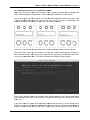
u should se
ee the follow
wing (or sim
milar) on the Waves’ dis
splays:
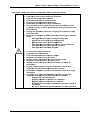
If yyou don’t se
ee the above
e then referr to the Trou
uble-shootin
ng section oof this manu
ual.
No
ow start Collor. When you
y start Co
olor you ma
ay get a po
op-up dialogg window similar to
window onc
the
e one shown below. Do
on’t worry iff you don’t as
a you can get to this w
ce Color
is rrunning as explained
e
la
ater. This iss the Color Control
C
Surfface Setup window.
The Control Surface
S
men
nu in the mi ddle of the window allo
ows you to choose what panel
you
u are using Color with.. If this isn’tt set to Tangent Color PlugIn thenn do this now. Then
pre
ess Yes.
If yyou don’t se
ee the Conttrol Surface
e Setup win
ndow then in
n Color go to the Setu
up room.
Click on the User
U
Prefs ta
ab at the bo
ottom and th
hen click on
n Show Conntrol Surface
e Dialog
wh
hich is at the
e top right of
o the User Prefs. Don
n’t forget you will have to load or create
c
a
12