1
The MIC user interface will remember the last adjustment settings when the system is closed and
re-opened, but you may have several formats of microfilm that requires different setting for
optimum performance, note these settings and keep them close to system for reference.
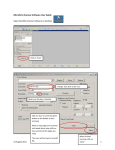
Video Resolution
Video resolution is optimum at 2592x1944 (5MP). Adjusting to the next setting down
2048x1536 (3MP) will provide a faster refresh rate ( less latent movement of image) and
almost the same scan / print result so try that setting if you prefer a faster refresh rate when
searching for images.
After image is located, the Video Resolution can be maximized with the slider in an instant. All
digital microform viewer/scanners have a measure of image latency which gets a little getting
used to. After several uses you will become accustomed to the operation of the unit.
Install Snagit Software, check all boxes during install, accept
license agreement, check 30 Day Eval (A full license code is
provided on the DVD label for future use).
Snagit will launch after installed so review the following
section to set up Snagit for optimum functionality, speed and
ease of use.
10