1
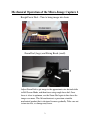
Mechanical Operation of the Micro-Image Capture 2
Rough Focus Dial – Turn to bring image into focus
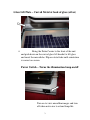
Zoom Dial (large) and Fixing Knob (small)
Adjust Zoom Dial to get image to the approximate size desired while
in Full Screen Mode, and then focus using rough focus dial. Once
focus is close to optimum, use the Zoom Dial again to fine focus the
image even more. This lift mechanism is a precision scientific
mechanical product that is designed to move gradually. Take care not
to turn too fast, as damage may occur.
2