1
Audio Cabling for the ADC-8732B
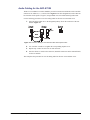
The R1C-8732 and R2C-8732 Rear Modules provide four audio terminal blocks with removable
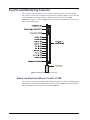
connectors for Audio In 1, 2, 3, and 4 (refer to Figure 2.3 for cable designations). Each connector
has locations for the positive, negative, and grounded wires of a balanced analog audio cable.
Use the following procedure to wire the analog audio for the R1C-8732 and R2C-8732:
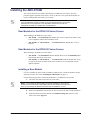
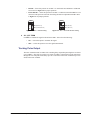
1. Insert an analog audio wire to the designated polarity slot on the connector of the rear
module. Figure 2.5
Figure 2.5 Connector Wiring for R1C-8732 and R2C-8732 Input Sockets
2. Use a tweaker screwdriver to tighten the corresponding capture screw.
3. Repeat steps 1 and 2 for each wire on each connector.
4. Once the cables are wired to the connectors, install the connectors on the terminal blocks
for the rear module.
This completes the procedure for wire the analog audio for the R1C-8732 and R2C-8732.
ADC-8732B User Manual (Iss. 02A)
Installation • 2–7