1
FEATURES
Large-screen, high-definition plasma display
panel
The 42-inch color plasma display panel, with a resolution of 1024 (H)
x 1024(V) pixels, creates a high-definition, large-screen (aspect ratio
: 16:9) and low-profile flat display. Free from electromagnetic
interferences from geomagnetic sources and ambient power lines,
the panel produces high-quality display images free from color
misconvergence and display distortion.
Multimedia input support
Two mini D-sub terminals have been provided for RGB input. It is
possible to switch between RGB signals and component signals*
from the Menu screen; therefore, use is possible with equipment
ranging from personal computers to imaging devices. A speaker
output terminal has also been provided.
* It is possible when the VIDEO unit of an option is inserted.
Multiscan converter and Flexible Control LSI
A wide range of personal computer signals can be handled, from 640
x 400, 640 x 480 VGA to 1600 x 1200 UXGA.
Easy-to-use remote controller and on screen
display system
The remote controller included eases the work of setting display
controls. Further, the on-screen display system, displays the status of
signal reception and display control settings in an easy-to-view
fashion.
Power saving system
The International ENERGY STAR® power saver feature saves power
consumption automatically when input signals are not available.
When connected to a VESA DPMS-compliant PC, the monitor cuts its
power consumption while it is idle.
About the Optional Video Unit
The following functions can be obtained by connecting the optional
video unit.
(1) A composite/S terminal and component terminal have been
added. A composite video output terminal is also provided for use
as a loop-through function.
(2) A wide range of devices other than personal computers can also
be connected.
(3) A component input is attained at a D-Sub terminal (RGB1, RGB2).
(4) The SCART signal of the European standard becomes possible.
Options
Ask your local retail dealer for further details.
1. Desktop stand: CMPAD05
2. Wall-mount unit:
Horizontal mount: CMPAK05
Vertical/horizontal mount: CMPAK15
These are brackets used to mount this device on a wall.
3. Ceiling-suspension unit: CMPAT05
4. Plasma monitor speaker: CMPAS04 (width:10.2mm)]
This is a two-way speaker with one 2.5cm dome type tweeter and
two 8cm round type woofers.
5. Video unit: CMPAV14
An expansion unit for viewing video with this device.
CONTENTS
FEATURES ....................................................2
SAFETY GUIDELINES ..................................3
STANDARD ACCESSORIES ..........................7
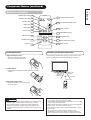
Component Names ......................................8
Main Unit..............................................................................8
Remote controller ................................................................9
Loading Batteries ................................................................9
Handling the Remote Controller ..........................................9
INSTALLATION INSTRUCTIONS ................10
Installation..........................................................................10
Anti-tumble measures........................................................10
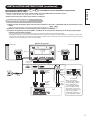
Connecting to a PC ..........................................................11
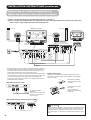
Connecting to a Video Imaging Device ............................12
Power Cord Connection ....................................................13
Mounting the Video Unit ..................................................13
Mounting the Speaker Unit ..............................................13
OPERATING INSTRUCTIONS ....................14
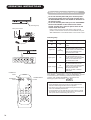
Turning Power On and Off ................................................14
Input Switching ..................................................................15
Volume Adjustment............................................................15
Audio Mute ........................................................................15
Size Switching ..................................................................16
Displaying Two Screens ....................................................16
Input Signal Screen Display ..............................................16
Automatic Adjustment of Screen Position and the Clock ..17
Independent Operation of Multiple Monitors ....................17
Using the Menu Screen ....................................................17
PICTURE MENU ................................................................18
SOUND MENU ..................................................................19
DISPLAY MENU ................................................................20
FUNCTION MENU ............................................................22
OTHER MENU ..................................................................23
OTHER FEATURES ....................................24
Automatic Store ................................................................24
Signal Check ....................................................................24
Power Save Mode..............................................................25
TWO SCREEN TABLE..................................25
IMAGE RETENTION OF PLASMA DISPLAY ......26
NOTES ........................................................26
TROUBLESHOOTING ..................................27
Symptoms That Seemingly Appear to be Failures ............27
Actions to Correct Abnormal Displays ..............................29
PRODUCT SPECIFICATIONS ......................30
Signal Input........................................................................31
Recommended Signal List ................................................31
Notes about This Manual
• The information in this manual is subject to change without notice.
• While meticulous care has been taken in the preparation of this manual, you are requested to notify your dealer or us should you have any
comments, views or questions about our product.
• Fully understand the prerequisites to using the product, such as hardware and software specifications and constraints, in using the
product. We are not held liable for damages caused by improper handling of the product.
• Reproduction of this manual in whole or in part without our prior written permission is prohibited.
• The product names mentioned in this manual may be trademarks or registered trademarks of their respective owners.
2