1
3.
Common Functions
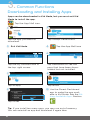
Downloading and Installing Apps
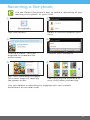
Apps can be downloaded in Kid Mode, but you must exit Kid
Mode to install the app.
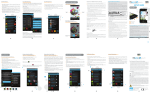
Tap the App Mall icon.
1
Tap the app you want to
download.
2
Tap Accept Permissions.
3 Exit Kid Mode.
4
5
6
Tap the My Account icon in
the top right corner.
7
Tap an app.
9
Tap the App Mall icon
Tap downloads to see the
apps that have been downloaded but not installed.
8
Tap Install.
10 Use the Parent Dashboard
app to make the app available in Kid Mode. See the Editing Available Apps Section.
Tap Install.
Tip: If you install too many apps, you may run out of memory.
You can uninstall an app and download it again later.
10