1
2.
Initial Setup
Charging
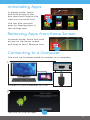
Fully charge your FunTab Pro for 6 hours before the first use.
Use the included 5V Charger.
The battery indicator will
show that your device is
charging.
Note: Charging by the USB port on your computer will be slow.
We recommend using the included wall charger.
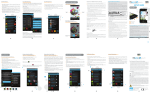
Connecting to Wi-Fi®
1
2
2
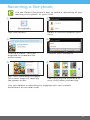
First tap the clock, then
tap the settings icon.
1
3
Tap Wi-Fi.
4
Slide OFF to the right to turn
on Wi-Fi.
Tap to select your network.
5
6
Enter your password.
When connected tap back.
(Located in the lower left corner)
If you accidently exit Kid Mode during setup, tap the Kid
Mode icon on the desktop to resume initial setup.
6