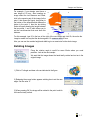
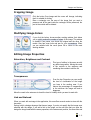
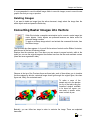
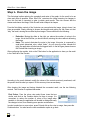
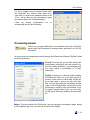
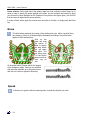
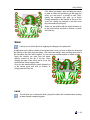
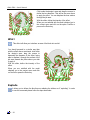
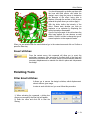
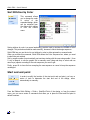
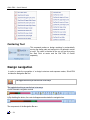
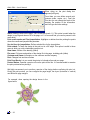
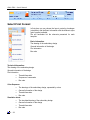
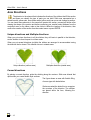
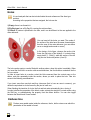
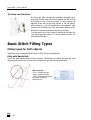
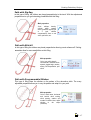
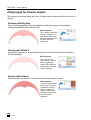
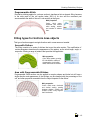
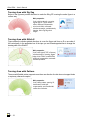
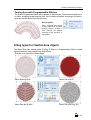
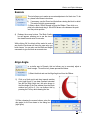
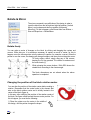
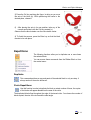
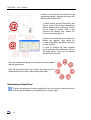
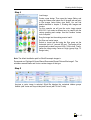
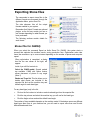
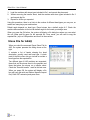
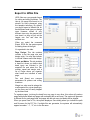
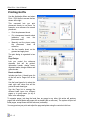
1
User’s Manual Stitch ERA –Users Manual © Sierra Technology Group S.A., 2010 This work has been registered according to the law. All rights reserved. Total or partial reproduction of this software, its physical media and/or its manuals, by any procedure and/or for any purpose whatsoever, is strictly prohibited. Stitch ERA software can only be run on a computer by those authorized to do so by means of a License Agreement. Every use beyond the license or the lack of such license is a violation to the author’s Intellectual Property rights, constituing a crime according to local laws and international treaties protecting Copyrights. This manual is not for sale. It is available at no charge to users that acquire the license to use Stitch ERA. Information on this manual is subject to change without notice. Due to ongoing product updates, features and other functions may have been modified, replaced or added, including but not limited to manuals, operating guides, quick guide charts, help/training material, etc. Although a big effort was made to ensure this manual is complete and correct, Sierra do not warranty that the products behavoir reflect the descriptions contained in this manual. Functions and operations available are limited according to the level of software acquired. This manual has been created with the only purpose of making easier the learning process of this product. Sierra, Stitch ERA, Embroidery Office, and Embroidery Explorer are registered trademarks of Sierra Technology Group S.A. Other brands and their products are trademarks or registered trademarks of their respective holders. 1st edition. Printed in Buenos Aires, December 2010 Edited by Sierra Technology Group S.A. Rivera Indarte 565 (1406), Buenos Aires, Argentina. Ver 11.00-01-EN Editorial Welcome Thank you and congratulations for choosing a product from our multimedia garment decoration suite, Design Era. We have put our best effort developing this product, as we have been doing for the last 20 years, to always offer you the most advanced and competitive system on the market. We hope you enjoy it. About this Manual Stitch Era is a multimedia garment decoration product. It includes a full featured embroidery design system and an optional powerful module focused on garment decoration with thermofixed materials like rhinestones and sequins. Stitch Era allows you to create impressive designs quicly and easily. The advanced user interfase, unique in the market for this kind of product, is based on contextual ribbons that displays, all the time, just the tools you need to work with the selected object, no matter it is a raster image, a vector graphics, an embroidery or a hotfix object. This manual was written for users of Stitch Era and Stitch Era Universal. Users of Stitch Era Universal need to consider that some features described in this document may be not present or may be limited in that version. Similarly, Hotfix functionality is an optional feature, not included in the standard version, and it is available for Stitch Era only. Chapters 1 and 2 are dedicated to introduce the product, basically, the user’s interface, the screen elements and the visualization tools. Chapter 3 includes information about the tools for working with artwork graphics: raster images and vector files and objects. Chapter 4 presents the basic tools to work with expanded designs (also called machine format designs). For beginner users, this is the first step into the embroidery world. Chapter 5 is dedicated to a couple of very powerfull Stitch Era objects: Texts and Monograms. The basic notions about embroidery objects creation and stitch fill types are addressed in Chapter 6 Chapter 7 and 8 goes deeper into embroidery object properties, and introduces the tools to work with groups of objects. Chapter 9 describes the tools for assisted and automatic embroidery design creation from artwork graphics. Chapters 10, 11 and 12 are fully dedicated to hotfix design, including hotfix objects, texts and output formats. Chapter 1 Stitch Era Basics Contents: Starting Stitch Era ......................................................................................... 2 Basic User Interface Elements ......................................................................... 2 Start Page and System tab ................................................................. 2 Application button and Application menu .............................................. 4 Quick Access Toolbar ......................................................................... 4 The Working Area.............................................................................. 4 Ribbon Bar ....................................................................................... 6 Shortcuts ......................................................................................... 7 Standard Ribbon Shortcuts.............................................................. 8 Application shortcuts ...................................................................... 8 Getting Help ..................................................................................... 9 Options and Preferences..................................................................... 9 Stitch ERA – User's Manual Starting Stitch Era When you start Stitch Era from the desktop shortcut icon or from the programs list of the start menu you can see the software splash screen. If it is the first time you run the application, it will appear the welcome screen as shown in the picture of the right, showing at the button the legal notes. Take a couple of minutes to read it, and if you agreed with the terms and conditions of the license, then click 'Yes' to complete the Stitch ERA load. Check in the “Please, do not ask me again" box, if you want to avoid this step in the next time you run the program. Basic User Interface Elements Start Page and System tab Once the system is loaded, the default screen will be displayed. This is a special screen called “Start Page” 1–2 Stitch ERA Basics If your computer is connected to the internet, the Start Page allows you to get access to on-line videos and Quick Guides and to keep informed with the lastest news and promotions available for Stitch Era suite. If your computer is not connected to internet Stitch Era will show you a default, off-line start page. When you work with the system, the start page will not be visible, because your workspace will occupy almost the entire screen. However you may return to the start page any time you need by clicking the tab with the home icon (shown above) Start Page Ribbon bar: The System tab At the top area of the screen, you will find a very important component of Stitch Era user interface, the ribbon bar. This is a dynamic component, that changes “contextually” : Although it contains most of the commands and controls you will need to work, it will display just the ones required for the object you are working with and for the activity you are performing. When the Start Page is displayed, it’s also displayed the System tab at the ribbon bar: 12- 3- 4- From the File group, you can create a new document or open an existing one. Product and Release group displays relevant information about your system: version, serial number and update status. Clicking the small mark, at the bottom right of the group, lets you access to the System Info box, with complete details about the installation: Optional modules, components, etc. The License group shows the basic user registration information you provided when install the system. Having this at hand could be usefull when you need to login to the User’s area on the product website. A link included in this group lets you access to the product website where you’ll find assistance as a user, specific tutorials and tips to get more from yopu system. The Activation group presents the current activation status and the list of machines where you have activated the system (up to three different machines). Please, review the Installation Guide for more information about Activation process and Multiple Activation Feature (MAF) 1-3 Stitch ERA – User's Manual Application button and Application menu At the left top corner of the screen there is a round button called Application button that lets you launch another important element of the user interface, the Application menu. The Application menu contains all the commands related with the system input and output: • Creating, saving and opening designs • Exporting designs as machines format files for cutters and automatic rhinestone setting machines. • Printing designs • Sending information direct to machines or cutters The menu also includes a command to access the system preferences box, to close the current design and to exit the system Quick Access Toolbar At the right of the Application button, you will find a strip with a collection of icons. This is a special toolbar called Quick Access toolbar. It contains very frequent used commands like Save, Undo/Redo, Clipboard (Cut, Copy, Paste and Delete) and Generate (recalculate hotfix objects). This handy element is always visible and avoids you to switch ribbon tabs or access the Application menu for accessing these commands. The Working Area The term Working Area or workspace refers to area within the screen where the design task are done. Basically, it’s a large rectangular region called graphic view, surrounded by a collection of elements containing the commands and controls you need to display, create and edit your hotfix designs. As mentioned, when you open Stitch Era, the Start Page is displayed. To take a look to the workspace elements we will need an active design document. So, we will create a new one using a quick method: Just click the tab located at the right of the Start Page tab. Stitch Era will create a new, blank document and displays the workspace. 1–4 Stitch ERA Basics The main elements you’ll find in the screen (numbered in the above image) are: 1- Document tabs: As you may note, a new tab named Design1 appeared when you clicked the New document tab and this last one is still present. You may click the new document tab again to create as many documents as you need because Stitch Era has a multi-docuent interface. All them will be listed in this area. Switching among documents just requires a click on the corresponding tab to activate it. Each tab has a small “X” icon at the right, that is a shortcut to the Close Document command. 2- Create and Edit tools: Artwork images, Embroidery and Hotfix objects creation and selection tools are included at the top of the side toolbar. The whole toolbar dinamically changes according to the selected object. 3- Color palette / Needle bar / Hotfix palette: The system will show one of these elements according to the selected object. 4- Rulers: These will serve as a measurement parameter in determining the inclusion of the guidelines. 5- Working Area or Main Graphic View: Most of the creation process will take place within it. 6- Display controls. 3D Simulation, Grid, Guidelines, Zoom and zoom options, Pan Tool, Zoom Bar. 7- References Controls: Tools to control the visualization of differente reference elements: Objects, Stitches, Stitch Marks, Hotfix beads. 8- Status bar. With different information related to the file, the chosen creation tool, etc. 1-5 Stitch ERA – User's Manual Most of the screen area is occupied by the graphics view. At the left and top of it, the system displays a couple of rulers that help you be aware of the design size, distances and position of the objects all the time. At the top left corners, an icon showing the systems units lets you access the Units and Measure quick menu. Using it, you may quicly change the system units (metric or inches), launch the measure tool and calibrate the ruler to match your screen. Ruler calibration is usefull because, once calibrated, objects in the screen will be displayed with their real size anytime your zoom level is 100%. To calibrate the ruler you will need a real phisical ruler or a piece of paper with a known size around 100 mm (4 inches). Access the units and Measure menu and click Ruler Calibration. The small group shown at the left will be displayed and the zoom level will be adjusted to 100%. Put the real ruler over the screen, below the virtual ruler and match the 0 coordinate (horizontal or vertical) with the 0 of the real ruler. Press the button < or > to match the real ruler 100 mm (or 4 inch) with the same mark of the real ruler. Then press the green button. Your ruler will be calibrated. Note that this procedure may not be required if your display is propertly installed because it reports its size and the system matchs the ruler accordingly. Ribbon Bar The ribbon bar is the key element of the user interface. As mentioned, it contextually changes according to the selected object to display the tools and controls that applies to that object. Commands and controls within the ribbon are grouped according to their function into tabs. Some tabs are fixed, always visible, and some are dynamic, that is, are displayed when the tools they contain could be used. Within tabs, commands are organized into named Groups, according with their function. Tabs that apply to a particular object are grouped and marked with a color to signal you all them contain tools suitable for the selected objects. For example, when a vector artwork image is selected, the ribbon has the aspected showed in the picture below: 1–6 Stitch ERA Basics Note the colored marks Artwork (grouping the tabs Vector and Layout) and Convert (grouping just one tab named To HotFix). This schema means that two different activities are possible with the selected object: Vector edition, using commands in the Vector and Layout tabs, and Vector Convertion, using the tools located in To Hotfix tab. As shown in the picture, the Vector tab is activated by default. You may also note that some commands are dimmed gray. This means that those commands could not be used with the current object. For example: look at the selector with three rectangular icons, at the bottom left of the Format group. This selector controls if the vector object has background fill only (the selected option), border only, or both. So, due the selected vector has no border, the Border Color and Thickness commands are disabled. There are several types of controls in the ribbon bar: Buttons: Clicking on them launches the command they represent Toggle buttons: Clicking on them you change a state. For example turn grid on/off Combo buttons: When clicked, a menu or gallery is displayed. Theses buttons has a small down arrow at the left or bottom. Option groups: let you select an option among a few predefined ones. Edit boxes: Allow you set a value, either by typing it and pressing enter or by using the small arrows buttons (called “spins”) to increment/decrement the displayed value. If your mouse has a wheel, you may also click them to activate and the use the wheel to increment/decrement the value Minimizing the Ribbon To save screen space, you may minimize the ribbon by double clicikng any of its tabs or by using the command located in menu at the right of the Quick Access Toolbar. 1. Click Customize Quick Access Toolbar (the small arrow at the left) 2. In the list, click Minimize the Ribbon. 3. To use the Ribbon while it is minimized, click the tab you want to use, and then click the option or command . 4. To restore the ribbon to its normal state, repeat the steps. You may also use the the shortcut to minimize/restore the ribbon: Ctrl+F1 Shortcuts Shortcuts are keyboard sequences that triggers a command exactly as if you were activated them with the button or control in the user interface. One of the most known one is Ctrl+C, the shortcut for Copy command, available in most of the Windows applications. 1-7 Stitch ERA – User's Manual Standard Ribbon Shortcuts When you pulse or press for a while the Alt (left) key, the system displays the standard ribbon shortcuts, as small legends near each command. Typing the characters in the keyboard activates the corresponding command. In the example at the left, typing Y3 activates the View tab as if you were clicked on it. Application shortcuts The following table list the application shortcuts: Ctrl + A 1–8 Selects all objects Ctrl + C Copy selected object to clipboard Ctrl + O Opens a design from disk Ctrl + S Saves design to disk Ctrl + Alt + S Saves design with a different name Ctrl + V Paste from clipboard Ctrl + X Deletes selected object Ctrl + Z Undo F1 Context Help F3 Hide / Show vectors F4 Hide / Show images F5 Redraw F6 Zoom Area Ctrl + F6 Zoom Total F7 Toggles 3D / Normal View F8 Shows/ Hides Object Inspector window F9 Generate hotfix object Ctrl + F9 Forces hotfix generation for all objects Del Delete selected object / element Stitch ERA Basics Getting Help Stitch Era provides a context help system for the object properties. To get help on a property, select it and press F1 A floating window containing a brief description of the property will appear. Use the small “X” incon located at the top right of the box to close it. Options and Preferences There are several aspects of the user interface and system behavior you may configure according to your preferences. The Options and Prefences box groups all the configurable items in Stitch Era. Use the application button, select Preferences and click on Options and Preferences item. The system will display the box shown in the picture at the right. The left panel contain a tree list with the main configurable topics while the right panel lets you set the options according to your preferences. Once you finish, press Ok to save your changes or Cancel to discard them. The Default Settings button restore the factory settings for the topic displayed on the right panel, while the button Reset All to Defaults, set the factory values for all the system options. For example, to set the Stitch Era interface language, select the Application item in the left panel. Then, click on the Language row in the right panel, press the arrow button and select the desidered language in the list. Press Ok to confirm the changes. Language interface change will take effect the next time you open the application. 1-9 Chapter 2 Stitch Era User’s Interface Contents: The View Ribbon Bar ...................................................................................... 3 Zoom Tools ...................................................................................... 3 Zoom with the Mouse Wheel............................................................ 3 Zoom Area .................................................................................... 3 Zoom Total ................................................................................... 4 Pan .............................................................................................. 4 Zoom In ....................................................................................... 4 Zoom Out ..................................................................................... 4 Actual size Zoom ........................................................................... 5 Dynamic Zoom .............................................................................. 5 More Zoom Options........................................................................ 5 Normal & 3D View Modes ................................................................... 6 Additional Views ................................................................................ 7 Simulation View Window ................................................................. 7 Satellite View ................................................................................ 8 Hoops .............................................................................................. 9 Grid ............................................................................................... 10 Guidelines ...................................................................................... 11 Cross Cursor ................................................................................... 12 Snap to Grid ................................................................................... 12 Embroidery References .................................................................... 13 Show/Hide .................................................................................. 13 Measure ......................................................................................... 14 Objects Display and Locking.............................................................. 14 The interface for different objects .................................................................. 15 Vector and raster artwork images ...................................................... 15 Edit Palette.................................................................................. 16 Fill color and Border color.............................................................. 16 Design Background....................................................................... 16 Color bar for Vector objects ........................................................... 16 Embroidery Objects.......................................................................... 16 Creation tools .............................................................................. 17 Selection Tool .............................................................................. 17 Stitches Edition ............................................................................ 17 Needle Pallete and thread colors .................................................... 18 Optimize needles.......................................................................... 18 Active Needle............................................................................... 18 Background Color ......................................................................... 18 Hotfix Objects ................................................................................. 19 Selection Tool .............................................................................. 19 Creation tools .............................................................................. 19 Edit HotFix .................................................................................. 19 Hotfix Catalog .............................................................................. 19 Button Background Color............................................................... 20 Hotfix Bar.................................................................................... 20 Stitch Era User’s Interface The View ribbon tab has all the common visualization tools of every type of object that you are working with Stitch Era. The options of this tools area are displayed in all the interface to make you work more agile, that is why in this manual you can have deep explanations of the usage of every one of them and then will show the place from where you can access every one without going to the View ribbon tab. The most part of the work with hotfix designs is made on the Main Working Window, meanwhile the other views, panels and windows are auxiliary. The View Ribbon Bar Stitch Era offers several ways of viewing the same document at the Main Job, where the design edit process takes place. Next we will describe some of the windows and views of the Application. Zoom Tools Zoom with the Mouse Wheel If your mouse has a scroll wheel, you can use the scroll wheel to zoom out/in by scrolling forward / backward from you. Mouse wheel scroll should zoom in/out over mouse pointer location. Zoom Area Selecting the magnifier icon you enable or disable the Zoom Area (F6). It enlarges the visualization of a working area sector. It is useful for examining a certain design area closely. In order to use this tool, you have to define a rectangle that includes the area you wish to enlarge. For this to happen, follow these steps: , or use the 1) Enable the Zoom Area command from the Ribbon view, Tool bar mode shortcut key F6. 2) Mark a corner of the rectangle, clicking on it, for example, on the upper left corner. Do not release the button. 3) Drag the pointer towards the opposite rectangle corner, for example, the lower right corner. 4) Release the button. The content of the marked rectangle will be shown on screen. 2-3 Stitch ERA – User's Manual Zoom Total Allows you to see the whole design in the maximum size possible. To use it, press the corresponding button on the Ribbon View or Menu Mode View. Shortcut: Ctrl + F6 Pan Panning is the action of moving the design area manually, without using the scroll bars. It is useful when creating or modifying a part of the design and you have to continue in another part which is not visible on the Main Window. Remember that panning does not modify the Zoom level. To pan the design select it from the ribbon view, them drag the image (pulling it) until the desired area appears inside the working window (that is, visible on screen), and then release the mouse button. Auto Pan You have a Auto Panning mechanism on the Working window. Note that in the entire working window perimeter there’s a border less intense that the background color. This region is called Auto Panning Area. Note that when you place the mouse pointer within the Auto Panning Area, it changes its traditional shape. Keeping the pointer in this area for a few moments will start the auto panning in the direction indicated by the mouse cursor. From Quick Access Button > Options & Preferences > Working window tab, you can control the size of the Auto Panning Area, the time that the mouse has to remain in it to start the panning, and the speed it must have. Form the Stitch Era button > Options and Preferences > tab Working Window, you can establish the bounds of the working area setting the max dimensions of the design (in width and height) adjusting the working area to the new values of Max Width and Max Height. Stitch Era will not allow you move the mouse pointer beyond the bound area defined for those values, and will show a warning message when exporting the design if objects are outside the maximum area. Zoom In Enlarges (approaches) the work area visualization Zoom Out Reduces the work area visualization in a proportion defined by the Zoom Out Factor in Quick Access Button > Options & Preferences > Zoom Settings tab. 2–4 Stitch Era User’s Interface Actual size Zoom This button shows the actual size of the current design Also by clicking on the arrow at the right of this icon, you can select one of the zoom presets. The zoom presets that you can chose from are 25%, 50%, 75%, 100%, 150%, 200% and 500%. From Setup > Options & Preferences > Zoom Settings tab, you can modify features such as Zoom In and Zoom Out factors, enable or disable the use of mouse wheel, etc. Dynamic Zoom It enables a practical method of performing quick operations of approach or distance. To use this tool select the Dynamic Zoom tool from the list, over the job area click and drag. The point in which you clicked is considered the Zoom center, and the image starts to distance if you drag upwards, or to approach if you drag downwards.. More Zoom Options Several zoom options are available in the zoom menu you may unfold by clicking the More button at the group Zoom in the View ribbon Zoom Scale They are fixed scale zoom factors. Zoom 1:1 shows the design on the working area in a size approximate to the real one. Zoom 2:1 corresponds to the visualization of the design in a double size. The rest of the options increase the design’s approach on screen. Zoom Previous Returns to the last visualization scale. It is very useful when toggling between a close and a distant view, repeating this function Maximize Object Enlarges the design, maximizing and centering the selected object. If there’s no object selected, it performs a Zoom Total action. Shortcut: Shift + F6 Zoom Limits Reduces (distances) the work window visualization to the maximum value available 2-5 Stitch ERA – User's Manual Hoops Border Approaches or distances the working area visualization until the Hoop is positioned in the visible area limits. It is not enabled unless you select a Hoop. All the zoom and pan options and are available at the bottom of the main working window. This allows you, as mentioned before, speed your work in the program. Remember also that all these tasks may be controlled by shortcuts customized, as mentioned in the previous chapter. a - Zoom+ Options b - Pan tool c - Zoom bar Normal & 3D View Modes Stitch ERA provides a mechanism to visualize the designs on screen as an embroidery or hotfix simulation , in the scale they are, and without the need to call the Simulation Window. For that to happen, select the icon True View on the Ribbon View or from the bottom left of the window. The design shown on screen will be then viewed in a more realistic way. (at the bottom of the working area) 3D Simulation Properties Select View > Draw Mode group and Setup > 3D Light and Quality Setings. 2–6 Stitch Era User’s Interface You can control the Brightness and the Quality (stitch definition) of the on-screen simulation. The changes you make from the control bars are automatically visualized on the design presented on screen. Additional Views Simulation View Window It is the embroidery design simulation on the Main View. Even though the result is not perfect, it lets you appreciate in a realistic way which would be the result of the design, after being sewn on the embroidery machine. Shortcut (Ctrl + F7). In the panel you will have the chance to configure some options. For this you have to open the context menu clicking inside the panel with the right button of the mouse. Then you will be able to perform different operations (zoom, print, etc.). The simulation adjustments, available to improve the visualization of this View, are accessible to the user from the Properties command. Opening the context menu of this panel, you will also have access to the following commands: Zoom Options Similar option of the available from the toolbar but applied to the design presentation in the panel of the Simulation View. Print Prints the design showed in the Simulation View. Simulation Palette Allows modifying the needle color, directly from the Simulation View. You can access to this control from the Ribbon View, like shows the right image 2-7 Stitch ERA – User's Manual Auto Redraw Synchronizes the Graphic and the Simulation View Each time you generate stitches (design modification) in the Graphic View, the Simulation View redraws the design, showing the changes produced. It is not advisable to disable this button. Synchronize with Main View When activating this option, the location of the design in the Graphic View and Simulation View synchronize. Both the Zoom level modifications and the design panning in the Graphic View, will be automatically reflected in the Simulation View. Simulation Properties From this control you can define the Simulation View parameters, the value of these adjustments will be applied on the active simulation view: • • • • • Light angle Brightness Contrast Quality Maximum stitch length without trims (value in mm.) In order to modify the values for Brightness, Contrast and Quality, simply move the corresponding sliding control. To change the value assigned to the maximum stitch length without trims, type in the value in the corresponding box.. In order to change the light angle, drag the dot located on the border of the circle of the box’s upper part (left figure). Apply these adjustments over the Simulation View by pressing the Apply button. You can also save the new values in the system for the following simulations (saving them as default values), by pressing the padlock button. Satellite View This view allows you to have complete control of the area you are working on. It is a small window that shows the complete design.. 2–8 Stitch Era User’s Interface On the right side of the figure, you can appreciate both the Satellite View window and the rectangle that corresponds to the visible area of the Main Job window If the design is not visualized completely in the Graphic View, a rectangle in the Satellite View window appears. This corresponds to the visible area in the Main Job window. To pan the visible area from the Satellite View. Enable the view more comfortable to you. Make a Zoom Area on the zone on the Main window where you wish to work on. The rectangle indicating the visible area of the main window appears on the Satellite View. Move the pointer inside it. It turns into a hand. Drag the rectangle to the desired zone and see how the main window changes (lower figures). Hoops You have the possibility of showing on the design area, the Hoop’s figure that will be used at the moment of embroidering. In this way, you will be able to conveniently adjust the location of the embroidery inside it. The hoop has the purpose of having a reference, taking into account the hoop you will use for the embroidery. 2-9 Stitch ERA – User's Manual To select a determined hoop, go to the option on the Embroidery Tab > System Library > Hoops > Select Hoops and choose, from the dialog box, the most suitable for your needs from the Hoop Name list (left figure) When applying the Hoops visualization tool, no aspect of the design is modified. Defining new hoops There is a tool for creating new hoops which also allows you to adjust the parameters of the ones that already come defined by default. You can also specify a security margin from the border, which will appear on screen as a dotted line. To open the Hoop editor use the sequence Embroidery Tab > System Library > Hoops > Hoops database. A window appears below, in which you must complete all the information required for the new hoop: name, brand, shape, dimensions, etc. Grid The grid consists of a series of lines or dots (visible or not) that are useful to align and place objects accurately on the design area. If the grids are not active, you will be able to move the nodes freely. Activate the grid to create sections limiting the areas where the nodes can be inserted. In this way, the mouse pointer will automatically fit within the closest grid. For a better visualization, the grid will have the opposite color to that of the background Grid Setup You may customize the configuration of the grid either manually and interactively or by defining the exact values from the corresponding dialog box On Screen Grid Setup: the cursor will turn into a ruler. You must then specify the grid size by clicking on any place in the working area and dragging the mouse without releasing the button until achieving the desired grid size. You will be able to see the grid size from the status bar. The grid size can be seen interactively (if the visualization is enabled) in the working area while dragging the mouse. Release the mouse button to achieve a suitable size. 2 – 10 Stitch Era User’s Interface Grid Settings: In this type of configuration you will not only be able to define the grid size, but its color, layout (Below or Over), style (Dot, Cross, Plus, Line, etc) and the subgrid layout too. Guidelines Also known as reference lines. They are used for an accurate alignment and placement of objects, as they allow you to insert the objects over these lines. You may define whether to visualize them or not from the “Show Guidelines” control in Ribbon View There are two types of reference lines: horizontal and vertical (observe the right figure). In order to insert a guideline proceed as follows: 1) Place the mouse pointer on one of the side rulers (vertical or horizontal) 2) Drag it; a blue dotted line will follow the pointer movement. 3) When you reach the desired position, release the mouse button. Repeat the operation as many times as guidelines you need. Once a guideline has been added you can move it or delete it. In order to delete a guideline, drag the mouse to the yellow rectangle over the ruler, press the right mouse button and select Delete reference line. Or you can delete all the guidelines of the present document using the command at the ribbon view: Delete All Guidelines To drag a guideline, place the mouse on the reference line at the level of the yellow rectangle on the ruler. The mouse pointer turns into a line with two ends (right figure). While keeping the left button pressed, drag the triangle so as to move the reference line up to the desired position. Once there, release the mouse button. 2 - 11 Stitch ERA – User's Manual Cross Cursor You can set Stitch ERA to display a large cross cursor instead of a simple arrow. Access to Options & Preferences > Workspace > General > Check the option Use large Cross Cursor Snap to Grid When you activate Snap to Grid the mouse pointer will automatically fit within the closest grid. With Snap to Hot Points you may adjust the position of the nodes according to the geometry of sections already created and others elements, either at the time of creating them or while being edited, since when creating and dragging the node you may place it in different adjustment sectors of the destination section (center, border, etc.) known as insertion points. When the pointer is close to an insertion point, this is highlighted to indicate that it is the destination where the node will be placed. See picture below. From the Ribbon View > Snap tab you can define whether to activate the creation mode, or deactivate it completely. You may also define the elements that will participate in the adjustment, enabling or disabling the node dragging function, the center of the section, borders, middle points, intersections, quadrant, etc. In order to activate or deactivate all of the insertion options quickly, click on Release Snaps option. 2 – 12 Stitch Era User’s Interface Embroidery References The visualization controls explained now, are available in the ribbon View (1), below the options ribbon (2) and in the status bar (3). All of them work as switches, turn on (show) and turn off (hide). Show/Hide 3D Draw View Enable/disable the realistic view way of the design on screen. Needle Marks Shows or hides needle marks, that is to say, the place where embroidery machine stitches. On some occasions it is useful to show the needle marks to have a more accurate view of the design. Others it will be convenient to hide them and obtain more speed in the design drawing. Stitches Shows or hides generated stitches. On some occasions it is useful to hide the stitches to edit the parts of a design only viewing on screen the necessary references. Connectors Shows or hides the connectors or jumps between sections. They connect the section’s outgoing points with the incoming points of the subsequent sections. Commands Shows or hides the design commands how give orders to be carried out by the embroidery machine. Hoop: Shows or hides the Hoop from the Main Job View. 2 - 13 Stitch ERA – User's Manual Design Start/End Shows or hides the point in which the design starts (Start) and where it ends (End). Wireframe Shows/ hides sections references. Measure It measures the distance, angle and difference between the coordinates of two points in the Main Window, no matter the visualization scale of the design. Hereunder you will see an example of how to use the measuring tool: 1) Run the Measuring option from the Ribbon or from the corner quick access (cm). 2) Place the mouse button on the first point (1) and drag it to the second point (2) 3) During the displacement, the application will show you the distance information (3). To exit the Measuring mode, press the Escape key Objects Display and Locking Embroidery Show, hide or block the embroideries sections. 2 – 14 Vectors Images Hotfix Show, hide or block the vectors. Show, hide or block the images. Show, hide or block the hotfix sections. Stitch Era User’s Interface The interface for different objects Vector and raster artwork images Stitch Era provides you with tools for multiple works without changing the window, this is why we will explain the changes that you will see according the type of selected object in the working area, raster images and/or vectors, hotfix or embroidery and stitches. When you open, copy or import an image inside the main window of the Application the Options Ribbon changes displaying the tools to work with an image. When you open, copy or import or create a vector figure inside the main window of Stitch Era the Options Ribbon changes displaying the tools to operate with vectors. Selection Tool The selection button is the tool that allows you to point any object (images, vectors, embroidery sections or hotfix sections) inside the application allowing that the Options Ribbon changes according the selection. Remember the mentioned before, any object selection (vectors, images, embroidery, stitches, hotfix) call the right ribbon that brings the specific tools for the selected object. Also when you select a group of elements the ribbon will change immediately to the distribution ribbon that allows to access the operations with blocks of objects. Stitch Era provides you different modes to select objects. This modes will be described in detail in chapters of blocks of objects of vectors and blocks of embroidery sections. If you keep the button pressed will display the selection modes. 2 - 15 Stitch ERA – User's Manual Select by rectangle (for every object) Select by outline (for every object) Select by color (for embroidery) Select by properties (for embroidery) Select all sections (for embroidery) Select all vectors (for vectors) Select all objects (for every object) Unselect objects (for every object) Invert selection (for every object) Edit Palette With this button access the possibility to change the color palette when working with vector figures. If you keep pressed the button for a while it will display a list of options that allows you to save the palette, load saved palettes previously and configure one by default every time that you work with vectors. Fill color and Border color The first color button (pail) points the background color of the vector figure. The second color button (pen) points the border color of the vector figure. Doing a click en every one of them you can edit the color of the vector object. Design Background With this button you can configure the color or fabrics that you wish to see in the back of the document. Color bar for Vector objects The first button of the color bar of vectors proposes to remove the background or the border of the vector according the mouse button pressed. The buttons of the palettes has a similar behavior to the first one, only that this one adds color depending of the mouse button pressed. Embroidery Objects When you select the Embroidery tab, the options ribbon allows to Access directly to the tools to create embroidery. 2 – 16 Stitch Era User’s Interface When you open, copy or import embroidery design in machine format the Options Ribbon changes to provides the tools for this types of embroidery design. Creation tools The tools button allows you to display a full menu to create different sections of embroidery. In the chapters related to embroidery creation will describe in detail every tool ant he respective fillings. Create Paths: with backstitch, with zz, with stitch E and with programmable stitch Create Columns: with zz, with stitch E, with patterns and with programmable stitch Create rigid Areas: with patterns, with programmable stitch, with applique, with cross stitch, with radial filling and with texture Create Areas with rotated fillings: with zz, with stitch E, with patterns, and with programmable stitch Create Text Create Monograms Create Manual Stitches Selection Tool The selection tool for embroidery objects is identical than the one for vector objects. The tool is able to recognize the object type and triggers the contextual interface to display the ribbon and controls that apply to the selected object. Stitches Edition This button allows you to access to the options ribbon of embroideries in machine format, also known as expanded designs (dst, jef, pes...etc, etc) 2 - 17 Stitch ERA – User's Manual Keeping pressed the button it displays a menu list that will be explain in the chapter dedicated to stitches edition, in the subsection Stitches Blocks. Select All Stitches Select Stitches by Rectangle Select Stitches by Outline Select Start End of Block Pointed Command Separated Block Pointed Color Unselect Stitches Needle Pallete and thread colors With this button you can Access the possibility to edit the colors in the needles bar predetermined in your embroidery design selecting thread color charts of brands or simply editing the color of this needle on the same way that the image processors software of the market actually do. Keeping pressed the button for a while it will display a menu of options that allows you to save the palette, load palettes saved previously and configure one by default for every time that you work with embroidery, same way to remove from your list. Optimize needles Remember that when working with embroidery the application shows the colors of the needles. This button allows you to use the colors that you wish from the needles bar and put them contiguous before saving or exporting an embroidery design. Active Needle This button points the needle/color you can start to work with in the creation of a section or the neddle/color selected Background Color If you rotate the mouse wheel over the button of the background color, you can lighten or darken the configured color. Also allows to edit the color or add a simulation of fabric for the background. The needles bar displays the colors and order of the needles of an embroidery. If it has a white color border, it shows an embroidery section of this needle selected and the angle in the left shows the quantity of needles used for this embroidery. 2 – 18 Stitch Era User’s Interface Hotfix Objects When you select the ribbon tab Hotfix the Options Ribbon changes and offers the creation tools for this kind of designs. If you select any of the tools for the creation of Hotfix, will visualize a hotfix bar in the same place of the color bar for vectors and the needles bar for embroidery. Selection Tool Again, the same selection tool is able to select also hotfix objects. Has the same functionality as for the vectors and embroidery objects. Creation tools Displays the menu of the options to create with Hotfix. Create Path with Hotfix Create Area with Hotfix: Area with radial disposition of hotfix, Area with flexible disposition of hotfix and Area with fixed filling of hotfix. Create Text with Hotfix. Manual Creation with Hotfix Edit HotFix With this button you have the opportunity to move manually the hotfix of a path or fill. Hotfix Catalog Clicking in this button displays the window that allows you to choose the hotfix to show in the hotfix bar. 2 - 19 Stitch ERA – User's Manual Button Background Color It works the same way as for the other objects. A quick way to change the background color is to rotate the mouse wheel over it. With this technique lighten or darken the color of the actual document Hotfix Bar In this bar visualize the different types of stones. If you double click with the mouse in any of them, you access the hotfix catalog and add or remove stones to see in the palette. In this palette you set an order for the stones, so of you change the Stone nº 1 (star) any section of hotfix that has the star, will change to the new stone. 2 – 20 Chapter 3 Images and Vectors Contents: Raster Images............................................................................................... 3 Image Formats .............................................................................. 3 Loading Images from disk ............................................................... 3 Adquiring Images from scanners...................................................... 4 Getting Images from clipboard ........................................................ 5 Loading Images from the Image Gallery ........................................... 5 Editing Raster Images ........................................................................ 6 Changing image size ...................................................................... 6 Rotating Images ............................................................................ 7 Mirror/Rotate................................................................................. 8 Scale, rotate and move images manually .......................................... 8 Cropping Image ............................................................................. 9 Modifying Image Colors .................................................................. 9 Editing Image Properties................................................................. 9 Reloading Images ........................................................................ 10 Saving Images ............................................................................ 10 Deleting Images .......................................................................... 11 Converting Raster Images into Vectors............................................... 11 Step 1- Clean the image ............................................................... 12 Step 2) Vectorize ......................................................................... 13 Vector Images............................................................................................. 14 Vector Formats ............................................................................ 14 Loading Vector Images from disk ................................................... 15 Getting Vectors from Corel Draw.................................................... 15 Getting Vectors from Adobe Illustrator............................................ 16 Getting Vectors from Clipboard ...................................................... 16 Stitch Era – Users Manual Loading Vectors from Images Gallery.............................................. 17 Creating Vector Objects .................................................................... 17 Closed Shapes ............................................................................. 17 Open Shapes ............................................................................... 18 Vectors based on TrueType texts.................................................... 18 Saving Vector Images to disk......................................................... 18 Editing Vector Objects ...................................................................... 19 Vector Objects Selection ............................................................... 19 Selecting several vector objects ..................................................... 19 Scale and Rotate graphically .......................................................... 20 Accurate Size & position control ..................................................... 20 Editing vector colors ..................................................................... 21 Working with vector nodes ............................................................ 22 Reshaping Vector Objects.............................................................. 23 Modifying Vector Objects Sequence ................................................ 23 Aligning Vector Objects ................................................................. 24 Repeting Vector Objects ................................................................ 24 Group & Ungroup Vectors .............................................................. 25 Vector Object Operations .................................................................. 26 3–2 Images and Vectors Stitch Era lets you open and manipulate raster images and vector images of several formats to use them as a design reference or to convert them to hotfix objects. This chapter describes the available tools to open and modify raster and vector images, to create vector objects directly within the system and to convert raster images into vectors for automatic hotfix creation. Raster Images Raster images or bitmaps may be thought as a grid of colored points (called píxels). As larger the number of columns and rows of the grid, larger resolution will have the image and it will look better, and how many colors are available for the points (known as “Color Depth”) also affects image quality. For example, an image composed of 200 columns and 100 rows with points of just two possible colors, black and white is a monocromatic 200x100 pixels image. Image Formats The following formats are compatible with Stitch Era. • • • • • • Bitmaps (bmp) JPEG (jpg) PCX (pcx) Targa (tga) Clipboard Format (CLP) Gif without compression (gif) Loading Images from disk A way of inserting background images is to use those created using a graphics program, taken from a clip-art, or downloaded from the Internet. From the Artwork ribbon, the application you have the possibility to handle the different classes of images that you can insert inside the working area. To Open an image click on the icon Open Image from the box Raster 3-3 Stitch Era – Users Manual The Open window appears, showing the images available on disk in different formats. In the lower part of the window the box Files of type allows you to select the image format. To load an image: • 1-Select drive and folder on the left side. • 2-On the right side, click on the image. • 3-Click on Open Adquiring Images from scanners From the Artwork ribbon, use the button Capture Image. The corresponding scanner dialog box will open. Complete the information required (mainly resolution and color mode). Taking into account that it depends on the scanner installed, the normal process follows these steps: 1) Pre-scan to preview position and center image. 2) Select the area to be scanned. 3) Capture the selected area. Once the scan is complete, the image will appear on the Stitch Era’s active document. Bear in mind the following parameters; they are very important when obtaining an image from a scanner: Resolution: It is normally measured in dpi (dots per inch or points per inch) and it defines the brightness of the digitized image. The higher the number, the neater the image, but it will also use more system’s memory. Except on 5x5 cm. or smaller images, a 300-dpi resolution is correct. Color Mode: You can capture an image in color or black and white. If you capture it in color, you must indicate the number of colors to be used. On most cases, a 256-colors mode is enough; if you use more color, the resulting image will be better viewed but will take more memory. If you wish to capture the image in black and white, you can use 256 shades of gray. Take into account the following recommendations when scanning images: Only scan the area of the image that you will work on. This will result in smaller, manageable images. 3–4 Images and Vectors Use low resolution settings. On most cases, a 300-dpi resolution is enough. If you are going to work with the Photo type, the image used must have a high contrast level. Scanner Setup The scanner is a device that reads the images printed on paper or fabric. Stitch Era works directly with any Twain-compatible scanner already installed on your Windows system. Most scanners come with Twain-interface software. Refer to your scanner manuals to obtain further information on the controllers and how to install them. Once a scanner has been configured, you will not need to repeat this process, unless another device is used in replacement, or Stitch Era is reinstalled. Since you may have more than one Twain device installed on your system (for example a scanner and a desktop digital camera), it will be necessary to indicate Stitch Era which device to use. Proceed as follows: 1) Select Setup > Select Hardware > Scanner setup. 2) A Select Source dialog box opens, showing all the available Twain sources. Click on the source that corresponds to the device to be used and press Select. Getting Images from clipboard To paste a bitmap (for the supported formats of Stitch Era) you have to make a copy of the image from any graphic application that support images. In this moment the icon Paste Bitmap will enable and clicking over it, the image will be presented in the working area. Loading Images from the Image Gallery The galleries allows you to work with images (those supported for the system) in an agile way. Displayed by clicking over the tabs, located in the left side of the main window. It displays the pane with a preview of the elements, organized by categories. In this way, you will operate easily with multiple elements. 3-5 Stitch Era – Users Manual When you open the image gallery displays a divided pane. The superior pane has three tabs that allows you to select the type of image that you wish to import. You can choose among: a) raster images, b) vectors c) all the images. From the superior pane navigate among the folders, while the inferior pane will show the dynamic mode the thumbnails. Once identified the image, select and drag and drop to the working area of the document. You have the option to change the size of the image when dropping in the working area. To change the size of the image in the moment of inserting in the working are: do doble click in the design, point with mouse the working area and you check that the cursor icon changed. Draw a rectangle with the mouse and then leave the button of the mouse. By this way you will specify not only the position, but the dimensions. Pressing the key Ctrl at the moment of dragging will assure that the image will no change its proportions. Editing Raster Images Raster images may be modify with Stitch Era to better suite your needs. You may scale them, rotate, trim, change its colors and even convert them into vector images. When you select an image, the Image and Layout context ribbons are displayed. Changing image size This option allows you to precisely adjust the size of a reference image, altering its original size according to the correct measure of the image segment. This allows you to work with an image with the same dimensions that the final design should have. The suggested method is the following 1) Click on the Measure and Scale icon. Click on any point of the image and drag it. Stitch Era will trace a line from the point to the mouse’s position. 2) Release the mouse buttons. The Image Scaling window displays the length of the traced line and allows you to define the new value. Type in the corresponding size. 3) Clicking on OK, the image will be scaled so that the traced line has the indicated new size. You can also use the Width and Height controls to give an exact size to the entire image. 3–6 Images and Vectors For example, if your design must have a max height of 50 mm., after inserting an image select the tool Measure and Scale, click in the superior part of the image (in the point 1 that shows the figure), drag down to the bottom of the silhouette and release the button in the point 2, then the box dialog Scale will open showing the length between the two points, 1 and 2, while allows you to set the new dimension that must have this distance. For this example, type 50 in the box of the right of the row Height and click Ok, the entire the image is scaled in a way that the whole segment 1-2 measure reach 50 mm. Also you can use the controls height and width to give an exact size for the whole image. Rotating Images Fixing the rotation angle is useful for some Works where you need precision. Look at the next sample: We want that the image shows the hand totally vertical and not as in the original image. 1) Click in Fix Angle and draw a line as indicated in the figure 2) Releasing the mouse button appears a dialog box to set the new angle. Set the value “0” 3) When pressing OK, the image will be rotated to the point in which the hand is totally vertical. 3-7 Stitch Era – Users Manual Mirror/Rotate The application gives you the possibility to rotate an image to specific angles and to mirror vertically and horizontally in the working window. Display the menu from the button Mirror/Rotate to obtain the specific angles. Scale, rotate and move images manually Press the Selection button, point the mouse over the image and click. The image will be selected with a surrounding rectangle with the corners and center highlighted. You can manipulate the corners and center to expand, compress, move and rotate the image freely. Also you can use the command rescale, to a precise adjustment. Do the necessary changes over the image before starting to create the design. If you have created sections and changes the size, move or rotate the image, it will result very difficult to change the sections to be adjusted to the new reference image. Click on the image and drag any of its corner nodes so as to adjust size proportionally. When dragging a determined corner node, the scaling will leave the opposite corner fixed in its position (right figure). If you drag while pressing the Shift key, the scaling will be performed keeping the center of the image in its position, while all the corners scale following the movement of the mouse. But, if you drag the pivot of any of the sides, you can change only one of the dimensions (horizontal or vertical depending on the dragged side), as shown in the left figure. If you hold down the Shift key while dragging, you will be able to move both vertical and horizontal sides in a symmetric way. If you take the mouse pointer next to the central zone, note that the cursor changes its shape (left figure). In this situation you can move the image freely dragging it to any place in the design area. While holding down the Ctrl key, click and drag any corner node to rotate the image. Observe how the image border is modified as well as the mouse pointer (right figure). To finish this operation, simply release the mouse button. 3–8 Images and Vectors Cropping Image Click the button Crop Image and the cursor will change, indicating that it is suitable for cutting. Draw a rectangle over the area of the image that you want to preserve and all the part inside the rectangle will be preserved, the part in the outside will be deleted. Modifying Image Colors If you click the button, shows another working window, that allows you to quickly reduce the number of colors of the image. The window is divided in two panes, one shows the original and the other the results. Also has zoom tools and pan for your convenience. When you are satisfied with the result press Ok to return to the main working window. Editing Image Properties Saturation, Brightness and Contrast This type of edition is the same as with any basic image editor. Moving the crank of the controls to the extremes and combining the controls to edit the Art Transparence From the box Properties you can modify the level of visualization of the image you have in the working area. If you reduce the percentage of transparence to the minimum the image will tend to disappear Move the crank to the extremes to check the level of visibility which you want to work with. Link and Embeed When you work with an image in the application, this one offers several modes to store with the document Saving to disk a design document that has an image, if you do not specify that the image save attached with the design, if will add a link to the image, so the next time that you open the design the image loads with the same properties; at the same exact position, the same size and 3-9 Stitch Era – Users Manual rotation angle. To do this, the image must remain in the disk with the same name and in the same location (folder) when it was added to the design From the option Attach to Design you indicate to save a copy of the image inside the design. In this way, if you transfer the design to another computer, it will not be necessary to take the image too, since it will be included in the document itself. If you specify that the image is not to be attached to the design, when saving in disk a design document that contains an image, Stitch Era will add a link to the image, so the next time you open the design the image will load with the same position, size and rotation angle. For this to happen, the image that you insert as reference must be kept on the disk with the same name and in the same folder where it was when it was added to the design. Form the option Embedded you can save a copy of the image inside the design. This way, if you move the design to another computer it won’t be necessary to move the image too, as it will be included in the document itself. Reloading Images This tool bring back the original image without the modification you had done over it. Saving Images If you are planning to work with an image taken from the scanner in several sessions, you must save the image on your disk, so that it will be available the next time you open the design. To save an image: • Select the image. • Click on Save, over the Ribbon Image. • In the Save box, choose folder, name and format with which you want to save the image and press Save. 3 – 10 Images and Vectors It is recommended to use the default Image folder to save the images, even to save the new graphic files that you copy or produce. Deleting Images If you want to delete an image from the active document, simply select the image from the select object mode and press the Delete key. Converting Raster Images into Vectors Stitch Era includes a complete vectorization tool to convert a raster image into vector objects. Vector objects are preferred because are better suited for automatic design creation To work on a bitmap image select it and activate the command Vectorize, from the Ribbon Image. The Vectorizer box then appears. In it you will find a series of controls on the Ribbon Vectorizer, while the rest of the box will show a preview Displays then the vectorizer box. From there you can access to several controls, while in the views you can see the original image as the resultant one from the filter and resultants vectors (these last ones organized in tabs). Observe at the top of the Previews there are three tabs, each of them allows you to visualize the three stages by which a vectorized image should go through: the original figure, the clean figure and, finally, the vectorized result To make a zoom of the sample set out in the preview (in any of the tabs) using the command window available in its lower left corner: you can make a specific zoom, zoom in whole or pan. Basically, you can follow two steps in order to vectorize the image. These are explained hereunder: 3 - 11 Stitch Era – Users Manual Step 1- Clean the image This first stage implies reducing the complexity and noise of the graph, for the result to be as clean and clear as possible. Since Stitch Era vectorizes the image scanning its changes in tone, this first task is important in order to obtain good results. Take into account that the cleaner and clearer the image, Stitch Era will better interpret its shapes. From the first sliding controls of the Vectorizer you can optimize the image, trying to leave it as clean as possible, clearly defining its shapes and borders and getting out the colors mix that “dirty” the result, causing the so called impure images. These controls are the following: • Reduction: Moving the slider to the right you reduce the number of colors in the image, this is the first filter you should control, reducing the colors without deforming the image. • Holes: This control eliminates the noise in the image, this noise is composed by small pixels dissociate color, called “holes”. As you move the slider towards the right, the application will eliminate the biggest holes. In the left figure please observe the Preview after inserting an image. After configuring the controls, click on the Filter button for the application to show you the result in the Clean tab of the Preview According to the result obtained, modify the values of the controls previously mentioned, until the product look like what you expect. Do this as many times as necessary. After cleaning the image and having obtained the convenient result, use the two following controls. Their function is explained hereunder: Final Colors: From the colors view select those tones that are similar, and click on the Combine button for them to merge. It is convenient to reduce the number of colors of the image when possible, in this way the application will be able to distinguish easily the changes in tone, thus obtaining more precise vectorizations. In order to select two or more colors, press Ctrl and click on the color to merge, then press the Combine button. You also have the undo combination option to go back 3 – 12 Images and Vectors Transparent: Stitch Era automatically scans the image and captures the background color of the image so as not to include it in the vectorization since, when vectorizing the background color of the image it will form a figure that will “frame” the result. Please observe the image on the right; it is a bitmap inserted as image in Stitch Era which background is gray You should apply one or other method depending on the result you wish to achieve. Step 2) Vectorize Here you should transform the image (free from noise) in vector figures. Once you have created the vector-based figures, you will be able to work on them freely: you will be able to scale them, modify their shape changing the nodes, change their color, etc. The creative possibilities, when the original bitmap image is vector-based, are many. It all depends on your imagination. For this to happen you must configure well the items that define the characteristics of the created vector (right figure). These are described hereunder: Max Error: This control defines the curvature degree that the trace will have. It increases or reduces the precision the vector curve will have with regard to the original bitmap Sharpness: If you increase this value, the number of nodes that the created vector-based figure has will decrease, thus obtaining a sharpened result These two controls define the curvature degree that the vector will have. High values of these controls results in rounded outlines. If these items have small values, the trace of the vectorbased figures will adjust to the outlines of the bitmap image. Min Area: It eliminates the small surfaces, according to the value specified in the sliding control. It is useful to exclude the smaller elements from the vectorization. Observe the result that the chosen values will produce when vectorizing the bitmap image from the Vector tab in the Preview frame. If you click on the OK button you will confirm the values entered to create the vector figures. These will reproduce the shape presented in the Vector tab of the Preview. 3 - 13 Stitch Era – Users Manual Vector Images Stitch Era allows you to work with vectorbased images, a type of object that allow easy and better edition, shape operations and better convertion into hotfix objects. Vectors may be also imported from popular applications like Corel DRAW and Adobe Illustrator. The vector images are files that contains information of objects, with their shapes and fillings. The shapes are stored a s a sequence of nodes tied by lines (vectors) that defines their shapes. This kind of images allows the scale without losing definition. Also is easier to change colors and other properties of every shape and these conditions give versatility, reason which are preferred by. Vector Formats The following formats are compatible with Stitch Era: 3 – 14 • Windows MetaFiles (wmf) • Enhanced MetaFiles (emf) • CorelDraw (cdr) • Corel Presentation Exchange (cmx) • Adobe Ilustrator (ai) • EO Imaging Images and Vectors To use the formats cdr and cmx you will have to have installed in your system Corel Draw (R) and the file opened in the application. To use the format ai you will have to have installed in your system Adobe Illustrator (R) and the file opened in the application. Loading Vector Images from disk A way of inserting background vectors is to use those created using a graphics program, taken from a clip-art, or downloaded from the Internet. Designs ERA allows you to load vectors from disk through the button Open File on the Ribbon Home. The Open window appears, showing the images available on disk in different formats. In the lower part of the window the box Files of type allows you to select the image format. To load an image: 1) Select drive and folder on the left side. 2) On the right side, click on the image. 3) Click on Open. If you want to delete a vector from the active document, simply select the image from the select object mode and press the Delete key. Getting Vectors from Corel Draw Stitch Era is compatible with Corel Draw versions 10, 11, 12, X3 and X4 if this application is installed in the computer. From the tools Get from Corel Draw, available from the drop down options on the Get From button in Ribbon Home & Vector, you can insert in the working area a drawing created in Corel Draw. From the button Get from Corel Draw, in the Vector box of the ribbon Artwork, you can insert in the working area a drawing created with Corel. Follow these steps: a) Open the document of Corel that you wish to insert in Stitch Era. b) Click in the button Get from Corel Draw. c) Displays a dialog box that warns you of the import action, in case that you have multiple documents, the dialog box allows you to choose. 3 - 15 Stitch Era – Users Manual Copy and Paste from Corel Draw It is also possible to copy a drawing from Corel Draw, and paste it from the clipboard to the working area of the Stitch Era document; it will remain inserted as background vector. Getting Vectors from Adobe Illustrator Proceeds the same way as with Corel Draw. Getting Vectors from Clipboard When copying a sketch selected from Corel Draw, you can paste it normally or you may choose among the options available from the menu Paste special in the ribbon. We will describe each of them hereunder: Paste in Place: Pastes the sketch in a sequential order or where the cursor is currently placed within the sequence of figures. Paste Windows Metafile: Pastes the sketch made in Corel Draw in the working area as a group of vector-based figures; the conformation of such figures will correspond to each of the drawings made in Corel They can be uncombined and ungrouped so as to work with them independently.. Paste Enhanced Metafile: Similar to the previous, the difference is that this type of vector format has a better level of detail, thus it is recommended for certain sketches with a high level of elements, or when it is necessary to obtain more precision. You can also decompress it in different vector-based figures Paste Bitmap: Inserts the drawing in BMP format; this will allow you to work with the different types of traces available in the application. 3 – 16 Images and Vectors Loading Vectors from Images Gallery When you click on the tab Image a Vector Gallery opens and displays a divided pane. The top pane has three tabs that allows you to select the image you want to import. You can choose between: a) raster images, b) vectors c) all images. From the top pane navigate between folders, while the bottom pane dynamically displays the views of the images. Once identified, select and drag to the document workspace. You have the option to change the size of the vector in the time to take it to the main working window, using the same procedure as for raster images. Creating Vector Objects With Stitch Era you can create vector figures in different ways: from the Ribbon Art as the Ribbon Vector you can choose Shapes to create, also you have the possibility to choose among freehand or Bezier curves. The geometrics figures available to insert are classified in closed figure, open figure and text figure. Also you can create manually vector figures with bezier curves or freehand. Bézier: This tool is based on the sketch possibilities that allow Bezier curves FreeHand: To trace freely open figures, drawing directly in the working area. Also you can choose to create perfect figures where the application will improve automatically your outline. Closed Shapes If you want to insert any of these shapes: select from the Artwork ribbon or Vector the one that adjust better to your needs. Press the left button of the mouse over the point area of the working area and drag without releasing, while doing this the shape will be showing in the area. Pressing the key Ctrl at the moment of dragging it will generate perfect squares (if you work with rectangles) or perfects circles (if you work with ellipses). Once the silhouette has the size and shape desired, release the mouse button. immediately after you create a figure, the same will be available for you to adjust the size and the shape. 3 - 17 Stitch Era – Users Manual Open Shapes The gallery of Open Figures displays organized in several categories to make easier the search and selection of a shape and among the categories proposed you can find angled corners and squared, borders, frames and finials. To insert any of the open figures: select from the ribbon Artwork or from the tab Vector the desired figure. Press the left button of the mouse on a point in the work area and drag without releasing, while you are dragging you can see the silhouette of the figure. Pressing the key Ctrl at the dragging time will generate provided figures. The open figures respond successfully to the path conversions with backstitch and path with hotfix, if you want to put other type of filling you have to edit them. Vectors based on TrueType texts Pressing this button opens a dialog box that allows you to type text or lines of text, including selecting the font and size, alignment and presentation. Press the green check. Press CTRL + Enter to create multi-line texts. Saving Vector Images to disk You can work on vector figures and using the many tools that provides application to modify the vector graphics and then save directly from the application. Distribution tab > Export button. Save the file under format. EMF, compatible with all programs working on vector graphics. When you import or open vector images composed of many vectors, you must ungroup to start editing each one of them. If these vector shapes are not removed before saving the document is saved with the design. This is useful to change in later editions created forms. 3 – 18 Images and Vectors Editing Vector Objects Vector Objects Selection All vector figures inserted in Stitch Era are editable, such transformations are done using them together or modifying nodes individually. To select any object located in the main work area press this button, click on the object you want. Immediately see a box on it that lets you manually resize, while the Ribbon changes to provide the tools you need to edit the object. Holding down the button will display options for selection: Select by rectangle From left to right: Select the objects that are fully From left to right: Select the objects "crossed" by the rectangle. included in the box Select by outline Draw an outline "node to node" around the figure you want to select. When you finish surround the object, press ENTER or mouse middle button and the object will be selected. This mode of selection is really useful when you have overlapping figures. Select all objects Select all objects (vectors, images, embroidery and / or stone that are in the work area. Invert actual selection Change the selection excluding selected items and selected those that were previously outside the selection. Selecting several vector objects To select several figures close between each other you can click on the working area and, without releasing the mouse button, move until the dotted box embosses the figures you wish to work on (next figures). . 3 - 19 Stitch Era – Users Manual You can also select more than one figure by pressing the Ctrl key and clicking on the elements you are going to work on. Instead, if you press the Shift key at the time of clicking two figures, you will select all those objects that are between both figures in the corresponding sequence. Scale and Rotate graphically In certain figures (triangle and rounded rectangle) the modification points appear active (left image). These allow you to change the original shape. The vector-based figures (either created from Stitch Era or imported from Corel Draw) are liable to transform, modify their curves, merge and convert to embroidery sections. You can expand, compress, rotate and move images manually, in the same way you can do it with any other image (right figure). Press the Ctrl key to rotate the figure or modify its rotation pivot. Press the Shift key to modify the size of the figure fixing its center. If necessary, before you continue working with the figure, adjust its aspect and location, since by dragging the corners you can proportionally modify the height and width at the same time, while by dragging the pivots you expand or compress the figure in one direction (either the height or the width). To move the figure to another location of the working area, simply place the mouse pointer to the center of the figure and when this pointer changes its shape (cross with four arrows), click and drag towards the desired position. In order to perform modifications in more than one figure at the same time, simply select the figures that will be involved in the modification and perform all actions on all of them at the same time. These figures are placed following the order in which they were created, reason why some will be on top of others. Accurate Size & position control Once you have the image on the screen, whether it was in the disk or scanned, you can perform certain operations such as expand / compress, slant or rotate the image To access these tools, select a vector and press the Distribution tab. 3 – 20 Images and Vectors Since this button commands the movement on the vertical axis and the horizontal axis of the figure. Take the center line marking the upper left box surrounds the figure. From this button you can control exactly the size of the vector figure as the proportionality of the change in size with the button with a padlock icon. When this occurs with background color (as in the figure) the changes you make will be proportional, ie just put one of the measures. If it is not "painted" you must manually change both. The options to rotate a vector by setting the angle of rotation work the same way as for bitmap images. Editing vector colors The box Format from the ribbon Vector allows you to add, remove, or change the color of the border or padding of figures to create, or modify created. You can choose to create an array filled only with only the outline or both. From the same box you can change the thickness of the border. This utility is useful for cases where it must operate on several figures that are one above the other. Observe the left picture, that has predefined color figures. In the right figure please note that the color of each figure has been modified, improving considerably the visualization of the elements. Setting colors from the color pallete The color bar or color pallete may be used to set or change the border and fill color of vector objects. With a vector object selected, clicking any color within the pallete will fill that object with the pointed color. Clicking the color with the right mouse button, sets the border color for that object. 3 - 21 Stitch Era – Users Manual The first element in the color pallete is a special item. It represents the “No color” entry and may be used to remove the border and fill color of vector objects. Clicking the no color item eliminates the vector fill color Clicking the no color item with the right mouse button, eliminates the vector border Managing Color Palettes Edit this Palette: Allows you to access a dialog box with options to select and edit a color palette. Load, Save and Delete a color palette: Get a dialog box that lets you work with color palettes. Set this Palette as Default: Each time you open a document vector, this color palette appears. Working with vector nodes The vector-based figures are made of nodes, that behave similarly to those that make the embroidery sections. Once the vector-based figure has been created you can modify the nodes that give shape to it as well as the layout of each node’s handles Once the figure has been converted into curves you will be able to alter its geometry, modifying the location of its nodes and the layout of its handles. You can also eliminate nodes, create new ones, etc. Operate on the nodes in a similar way to that used when you work on the nodes of an embroidery section. These options are available from the context menu Node types The following properties of the nodes of a vector path that will determine the line that passes through the node. The types of nodes that form the figure of a section affects the geometry of it. Straight: Displayed with square marks, Curved : Displayed with circular marks, produce curved lines between nodes produce straight lines between nodes Normal: Displayed with white marks, Corner: displayed with cyan nodes, produce smooth curves. produces abrupt changes in curvature. Symmetrical: force the same curvature Uniform: curvature at both sides of teh at both sides of the node. Dragging one node may be different. Handles may be moved independently, but both remain of the handles, force to move the other aligned. symmetrically. Both handles remain aligned 3 – 22 Images and Vectors Reshaping Vector Objects Vector Split This tool allows you to split a vector object using an arbitrary line (defined by a sequence of nodes). Once the splitting line is defined, press the Enter key, to execute the operation. This tool is also available from the context menu. Remove Holes Automatically deletes the holes of the selected vector object. This tool is also available from the context menu, Modifying Vector Objects Sequence When working with multiple vector objects will often find that an object is covering up another. When editing vector figures from the ribbon Vector > Order button, or from the contextual menu, you can change the order of vector figures. This is because the figures are stacked in the order they were created, and those recently created in the cover the previous ones. The possibilities are: • Bring to Front: It sends the selected element to the front, before the rest of the objects, placing it in the forefront. • Send to Back: It places the selected object behind the rest of the objects. • Bring Forward: The figure selected moves one level forward. • Send Backward: The figure selected moves one level backwards. 3 - 23 Stitch Era – Users Manual Aligning Vector Objects The Align group in the Layout tab contains tools for aligning objects respect other objects inside the block and the hole block respect the design. To Object: This tools aligns the objects inside the block to left, right, top and bottom, using as reference the leftmost, rightmost, upper and lower object of the block. You can also align the objects centre horizontally, vertically or both. To Design: Contains tools for align the hole block with respect to the design, that is, with respect to all other objects not included in the block. Center tool: Moves the centre of the block to the system origin point (0,0) Repeting Vector Objects Duplicate The following functions allow you to duplicate one or more times the selected figure. You can access these commands from Ribbon Layout > Repetitions box > Duplicate Pressing the button more times copy again the selected object for the first time. Matrix Repetitions Apply this function to duplicate the block a certain number of times, copies will block fitting into a mold shaped cells. Duplicate blocks are arranged in each cell of the array, you define the number of rows, columns, and horizontal and vertical distance of the cells in the matrix. To work with this tool, follow the procedure below: 1) Select a block and activate this feature. Box appears shown in Fig. 2) In the Matrix box set the number of rows and columns, and the distance between them. 3 – 24 Images and Vectors By accepting the input values the result will appear in the work area, the blocks will repeat a number of times depending on the values entered. In the example of Fig. this transformation was applied to define a number of rows equal to 2 while the value corresponds to 5 columns. Select a vector (Star) and from the Distribution tab press Matrix Repetitions. Group & Ungroup Vectors Group It is possible to group two or more vector-based figures to be considered a unit. In this way, it will be possible to move them, apply the same transformations in shape and other changes to all the figures in the group at the same time.. It is also possible to merge other groups already created, thus creating nested groups . In order to create a group select the figures so as to activate the Group command from the Ribbon or from the context menu. To ungroup the figures that form a group, select the group and then choose the option Ungroup. Ungroup This option is very important whenever you insert wmf or emf images, since it is made up by a series of grouped vector-based images. In order to edit any of these figures, you must first apply this function. While using this tool, activating it from the Ribbon or context menu, you will be able to drag the different elements independently. For this to happen, select the desired element to drag it later. Also you can modify its aspect: modify the height and width, reduce, enlarge, rotate (pressing the key Ctrl). 3 - 25 Stitch Era – Users Manual Vector Object Operations These tools get two or more vectors and produce a new one that is the result of the applied operation. Most of these operations require that the initial vectors are partially or totally overlapped. The available operations and an example of the resulting object are listed below All the examples will use the couple of vector objects shown in the picture at the right. Vectors are partially overlapped and the triangular shape is over the rectangular one. This will be important for some operation where the vector order produce different results. 3 – 26 Addition Substraction Intersection Exclusion Trim Simplify Chapter 4 Stitch Edition Contents Working with embroidery files .......................................................................... 3 Condensed Files ................................................................................. 3 Expanded Files ................................................................................... 3 Machine Codes and diskettes............................................................ 3 Diskettes codes .............................................................................. 4 The Open command............................................................................ 5 Loading Designs using the Galleries ...................................................... 6 Designs Gallery............................................................................... 6 Motifs Gallery ................................................................................. 6 Saving Expanded Designs.................................................................... 7 Editing expanded designs ................................................................................ 7 Selecting and working with Stitches ...................................................... 8 Move ............................................................................................. 8 Move ............................................................................................. 8 Move (Without compensation) .......................................................... 9 Insert ............................................................................................ 9 Insert (without compensation)........................................................ 10 Delete ......................................................................................... 11 Delete (without compensation) ....................................................... 11 Converting Stitches to/from Jumps ................................................. 11 Working with Commands................................................................... 11 Edit Control.................................................................................. 12 Insert Control ............................................................................... 12 Delete ......................................................................................... 12 Converting Stops to/from Color Changes ......................................... 12 Using the Go To tool...................................................................... 13 Stitch Blocks .................................................................................... 13 Selecting blocks............................................................................ 13 Block List ..................................................................................... 16 Recognition & Block Processing........................................................... 17 Detect.......................................................................................... 18 Editing stitch blocks .......................................................................... 20 Recognize..................................................................................... 20 Resize.......................................................................................... 20 Processing blocks .......................................................................... 21 Converting Stitch Blocks to Wireframe ............................................. 22 Transforming Blocks ...................................................................... 23 Regular Transformation.................................................................. 24 Stitch Effects.................................................................................... 26 Grid............................................................................................. 27 Sphere......................................................................................... 27 Noise ........................................................................................... 28 Speed .......................................................................................... 28 Wind............................................................................................ 29 Lens ............................................................................................ 29 Whirl ........................................................................................... 30 Explode........................................................................................ 30 Invert stitches .............................................................................. 31 Finishing Tools.................................................................................. 31 Filter Small stitches ....................................................................... 31 Sort Stitches by Color .................................................................... 32 Start and end point ....................................................................... 32 Centering Tool .............................................................................. 34 Design navigation ............................................................................. 34 Printing Designs............................................................................................ 35 Basic printing ................................................................................... 35 Advanced printing ............................................................................. 37 Print Format Ribbon....................................................................... 37 Select Print Format........................................................................ 38 Information Setup ......................................................................... 39 Information to Print ....................................................................... 40 Accessories to Print ....................................................................... 41 Print Information........................................................................... 41 Printing as Catalog (Embroidery Explorer)............................................ 42 Stitch Edition Working with embroidery files Condensed Files Condensed files contain the structure and objects of the design. It's like having the skeleton of the building. All the references required to make an embroidered design, like shapes, nodes, directions, entry and exit points, type of filling stitches, controls, etc. are stored within them. Are not commonly read by the embroidery machines, and are dependent on the software with which they were created. The Stitch ERA Condensed files have the extension DSG. Expanded Files Expanded files are much simpler files that store just stitch information. They can be read by embroidery machines because it contains coordinates corresponding to the movements of the machine, information about color changes and other commands (or controls) that the machine can execute (like thread trims, and stop orders). Stitch and control information may be stored into expanded files with different structures, called Machine Codes or Machine Formats. Several formats are currently used in the embroidery market and different machine brands use different formats. Usually, most embroidery machines can read more than one format and Stitch Era reads most of the commercial formats available nowdays. This chapter is dedicated to introduce the tools to work with expanded designs. Machine Codes and diskettes Some machines are still using diskettes to get the design information. Most modern machines use USB storage devices, memory cards or get the designs using some type of connection with a computer. In order the machines read a design from a disk, it needs to be prepared using a special procedure called formatting. Different machine codes requires different formatting, so, at the time to format a disk, you will need to select the machine code you will use. In order to format a diskette, open Embroidery Explorer from the Quick Access Botton, to format the diskette with the desired code. When you format a diskette, you are preparing it so as to store designs on it. You must indicate the code in which you want to prepare it and from then on, you will be able to save designs on that same diskette, but only in that code. The formatting process takes some time, in some cases it can take several minutes. Consider the following: • By formatting a disk, all the information in it is lost. • To change a diskette code, you must format it in the new code. Use the appropriate diskette type (2DD o 2HD) according to the code 4-3 Stitch ERA – User's Manual Diskettes codes Hereunder we will describe the codes supported by Stitch ERA. Here, we mention the diskette format they require, the compatibility with Windows file system (that allows saving in the hard disk) and the admissible characteristics in the embroidery names. Code Native Expanded Diskette format 3.5 “ DD/HD Hard Disk Support Yes Tajima 3.5 “ DD/HD Yes Tajima (ext) 3.5 “ DD/HD Yes Barudan FDR* 3.5 “ DD No File Extension Type .eys Available characters for embroidery names 8 alphanumeric .dst 8 alphanumeric Read/Write .dsb, dsz 8 alphanumeric Read 8 alphanumeric Read/Write Read/Write Barudan FMC* 3.5 “ DD No Barudan HD* 3.5 “ DD No 8 alphanumeric Read/Write 8 alphanumeric Read/Write Z.S.K.* 3.5 “ DD No 8 numeric Read/Write Code Diskette format Hard Disk Support File Extension Available characters for embroidery names Type Toyota 3.5 “ DD/HD Happy 3.5 “ DD/HD Yes .10O 8 alphanumeric Read/Write Yes .tap 8 alphanumeric Melco Exp. 3.5 “ DD/HD Read/Write Yes .exp 8 alphanumeric Read/Write Mitsubishi 3.5 “ HD Yes .100… 8 alphanumeric Read/Write Expanded old 3.5 “ DD/HD Yes .dat 8 alphanumeric Read/Write Bits and Volts Brother PES 3.5 “ DD/HD 3.5 “ DD/HD Yes Yes .bro .pes 8 alphanumeric 8 alphanumeric Read Read/Write Read/Write .u01 Brother PHB 3.5 “ DD/HD Yes .phb 8 alphanumeric Brother PHC 3.5 “ DD/HD Yes .phc 8 alphanumeric Read/Write Brother PEC 3.5 “ DD/HD Yes .pec 8 alphanumeric Read/Write Singer/Compucon 3.5 “ DD/HD Yes .xxx 8 alphanumeric Read Elna/Janome 3.5 “ DD/HD Yes .sew 8 alphanumeric Read/Write GMI Ela 3.5 “ DD/HD Yes .ela 8 alphanumeric Read/Write Siruba 3.5 “ DD/HD Yes .plt 8 alphanumeric Read/Write Sunstar SWF 3.5 “ DD/HD Yes .sst 8 alphanumeric Read/Write Pfaff KSM 3.5 “ DD/HD Yes .ksm 8 alphanumeric Read/Write Pfaff PCM Pfaff PCS 3.5 “ DD/HD 3.5 “ DD/HD Yes Yes .pcm .pcs 8 alphanumeric 8 alphanumeric Read/Write Read/Write Pfaff PCD 3.5 “ DD/HD Yes .ped 8 alphanumeric Read/Write Juki Ams 3.5 “ DD/HD Yes .m3 8 alphanumeric Read/Write Husqvarna 3.5 “ DD/HD Yes .hus 8 alphanumeric Read/Write Husqvarna Viking 3.5 “ DD/HD Yes .vip 8 alphanumeric Read/Write Wilcom T01, T03, T04, T05 Inbro 3.5 “ DD/HD Yes .t01, .t02, .t03, .t05 8 alphanumeric Read 3.5 “ DD/HD Yes .inb 8 alphanumeric Read/Write Komtekct 3.5 “ DD/HD Yes .cem 8 alphanumeric Read/Write Alphanumeric: Indicates all the letters from A-Z (normally capital letters only, although Stitch ERA turns them into capital letters if you type in small letters) and the numbers from 0 to 9. Within the valid alphanumeric characters to create the name of an expanded design you can 4–4 Stitch Edition include letters, numbers, and the middle dash. Although it is not recommended, some other characters are accepted. The blank space is not a valid character. Codes marked with * are not supported on 64 bits Operating Systems and on computers with USB floppy drives You can work with the codes indicated in the table either from diskettes or hard disk (for those ones that can support it). In some codes, the name you assign is not really the name of the file you will use (the name of the file is usually a sequential name that the application assigns automatically), but it is a reference that is saved together with the design and that you can view in a field of the information. In these cases, there might be several designs with the same identification in the same unit. Nevertheless, we suggest you avoid the repetition of such names. The Open command To load an existing expanded design into Stitch Era, you may use several methods. One of them is the Open command: From Start Page Ribbon > From Stitch Era Button > File > Open (folder symbol) Open (folder symbol) In any of the choices will open a dialog box that allows you to search the place where the files are and have the option of looking at the files with different views and data before opening: Large Icons, small icons and list (common on Windows) The view "details" gives the number of stitches The small and larger image view, gives the design drawing. The small view + details and view larger image + details provides the drawing details of the design, number of stitches, number of colors, quantity and type of controls, layout size, plus the date and time. 4-5 Stitch ERA – User's Manual Loading Designs using the Galleries The galleries are panels that let you work with repositories (embroidery designs, frames, ornaments, pictures, etc...) swiftly and effectively. The galleries are displayed by clicking on their tabs, located on the left side of the main window. Appears with the preview pane of the elements, organized by categories. In this way, you can easily operate with multiple elements. Designs Gallery When you open this gallery you see a divided panel. The top panel has three tabs that lets you select the type of embroidery design format, you can choose between: a) system format design, b) machine format design c) all formats. From the top pane navigate between folders and in the lower pane dynamically show views of the design. Having identified the design point and drag the document workspace. You also have the option to change the design size when you insert it into the workspace, double-click design, go with the mouse to the workspace and verify that the cursor changed shape. Draw a rectangle with the mouse and then release the mouse button. Dialog box appears asking if you want to keep the needle design and original colors. When you press OK, the design will be presented with the dimensions chosen by you. Thus specify not only its position but also its dimensions. Press the Ctrl key when the drag will ensure that the design will not change its proportions. Motifs Gallery This panel shows the pre ornaments, frames, shapes, signs, balloons, etc…, Others can acquire (distinguished with a padlock icon), or you can create yourself. Stitch ERA includes a series of embroidery designs with different shapes and aspect. These are sorted out in categories based on the different representations. To insert any of these designs, open the gallery of motifs, select a category from the dropdown menu and locate the desired shape and proceed the same way as for the designs. 4–6 Stitch Edition Saving Expanded Designs Save the design using the Save as command, select the unit, select the code in which you are exporting and give an allowed name to such design. If you wish, you can select a new machine profile; otherwise, the default profile will be used. You can also change the profile properties (See ‘Profiles’ further on in this same chapter). In order to export a design to a diskette, it must be previously formatted in the exportation code, and it must have enough space to save it. Editing expanded designs Stitch Editing is the process of opening, modifying and saving expanded embroidery files (machine format files). (see below) The stitch editing is the only way to work when you want to edit a design file format expanded Tajima, Barudan, Brother or any of those supported by the application. Open a design file in expanded format, check that the Expanded to Condensed option is not enabled, since the design would be edited as sections. In this case we will edit the design from the stitches mode In order to select a stitch for its edition, you only need to click on it from the Graphic View. Stitch ERA highlights the stitch and draws a small rectangle and an arrow in its bottom end indicates the direction of the stitch (right figure). If it is necessary to advance or go back few stitches from the selected one to the desired stitch, use the cursor arrows in the keyboard. Once you have selected the stitch, you have a series of functions to use on it (move, delete, insert new stitches, etc.). These commands are available from the Ribbon Stitch Editing or the context menu. 4-7 Stitch ERA – User's Manual Selecting and working with Stitches Once the design is open, activate the stitches editing mode and define the stitch which you wish to use, so as to work on it later. After selecting it you will be able to displace it, delete it, create new stitches, etc. You can create a block of stitches selecting several stitches; you can make this selection on all the stitches or a series of them (adjoining or non-adjoining). The selected stitches are known as a block; you can create effects on a block, apply transformations, etc. Move Basically, you can move the stitches selected on the basis of two edition modes move with stitch compensation (Keep in Place default mode) and move without stitch compensation modes. Remember the following issues, both in the selection and in the edition of stitches: At all times you can use the Undo command, which will allow you to correct any mistake when working with the stitches. Remember that you can use the auto increase and auto decrease modes during the edition. Move In order to move the selected stitch drag (without releasing the mouse button) the point to the desired position. Stitch ERA will automatically compensate the design in a way that the resulting effect will be to move the pick point, without altering the rest (observe the right figure). Move with compensation is the default mode for working with stitches. 4–8 Stitch Edition Move (Without compensation) In order to activate this function, unselect the check box Keep in Place, then drag the stitches. This mode allows you to move a stitch without compensating the rest of the design. In general, the rest of the design will be displaced when moving the selected stitch. Once you activate this mode, the application remains in this job working mode. Insert Once you have selected the stitch as from which you will make the insertion, activate the Insert stitch command and click on the places where you want the pick points of the new stitches. Examples: In the following sequence of figures you can observe an original embroidery design formed by three stitches that make an inverted “V”. Note that, as from the last stitch, every mouse click inserts new ones, forming a garland. 4-9 Stitch ERA – User's Manual On the other hand, in the next sequence you can see a garland formed by Zig-Zag stitches. Note that the shape of such column is “bent”. When inserting stitches as from the (a) stitch, the necessary pick points are defined so as to complete the entire figure. The application will compensate the design at all times so as to avoid the displacement of the remaining stitches. When you finish with the insertion press Enter to confirm. Insert (without compensation) Unselect the check box Keep in Place and click on the places where you wish to establish the pick points of the new stitches. This command is similar to the previous one, but in this case the new stitches will not be compensated. 4 – 10 Stitch Edition Delete Use this command in order to delete the selected stitch keeping the rest of the design compensated. You can activate this from the Delete Stitches command or just pressing the Delete key. Delete (without compensation) In the same way as in the previous case, this command allows you to delete stitches but without compensating the rest of the design. You can activate this from unselecting the Keep in Place check box command. Converting Stitches to/from Jumps You can transform a jump stitch into a stitch and vice versa. For this to happen, simply select the element to convert from the Embroidery View and activate the desired function (Convert Jumps to Stitches or Convert Stitches to Jumps). As a result, the selected element will transform into the opposite (either a jump or a stitch). Remember that the jump stitch is the movement of the pantograph and rotation of the sewing head without the needle moving down. It is used to move the head from one point in a design to another or to create stitches that are longer than the machine would normally allow. Working with Commands Commands, also known as machine controls, are used to tell the machine the way in which a design should be embroidered. Different makes have created their own commands. 4 - 11 Stitch ERA – User's Manual From the Edit Stitches command, you can apply several commands: color changes, thread cuts, speed changes, start and end of borer, insertion of sequins, etc. You will also be able to modify the commands applied or delete them. Observe in the left figure how the commands are viewed from the Graphic View. These are circled in black for their better identification. Remember that the embroidery machine must recognize the command for this to be reflected at the time of embroidering. Edit Control When the selected stitch is a command, you can use the Change Command Control, with which you will be able to change the type of command. Insert Control This allows you to insert a machine command following the selected stitch. From the Insert Command option select that you wish to insert (right figure). Similar to the Insert command function, allows you to insert a machine control besides the selected stitch. Delete Also, in order to delete controls you can use the Delete Control tool. Converting Stops to/from Color Changes You can transform a stop control into a color change and vice versa. Simply select the control and activate the desired function. When activating any of these functions, all the color changes or stops (according to the command you selected) of the embroidery design will turn into its opposite control. 4 – 12 Stitch Edition Using the Go To tool From these options you will be able to easily browse by the stitches of the design. If you know the number of the stitch you wish to select, use the command Go to Stitch Number If you wish to select the first and last stitch, use the command First / Last Stitch. If you wish to select a command toggle between the commands with Stitch use Next / Previous Command. Use the commands Increase / Decrease mode (in 1 or 2 stitches) for the application to automatically select the stitch preceding or following (+1 / -1 or +2 / -2) the selected one. Stitch Blocks A block is a range of stitches, selected in order to work on all of them at the same time. The procedure to work with blocks of stitches basically consists in: 1) Selecting the Block: Stitch ERA has several and versatile ways to select blocks of adjoining and non-adjoining stitches, using the traditional methods (rectangle, outline, color, etc) and through advanced modes such as range, auto-detect of sections (running stitches, Zig-Zags, fill pattern), etc. 2) Working with the block: Once you have selected a block, you have a powerful group of commands to work with it in order to displace it, rotate it, deform it with different effects or altering features such as the width of Zig-Zags, density, type of fill pattern, etc. You can access the following options from the Ribbon Stitch Editing > Block Select & recognition. Selecting blocks Select all Use this command in order to select all the stitches. In this way a block with the complete design will be formed. 4 - 13 Stitch ERA – User's Manual Select by rectangle Using this selection mode you form a block that includes the stitches within a rectangle. In order to make the selection, follow these steps 1) Activate the command. 2) Mark the first corner of the rectangle by clicking on the graphic window. 3) Drag the mouse while the dotted rectangle forms, and take the cursor for this rectangle to close a section of the design (left figure), until including the area that contains the desired stitches. Then, release the button. 4) If the block has non-adjoining stitches, check the corresponding ranges in the Block Conformation box and click on OK. 5) Stitch ERA will form a block with the selected stitches, which will be drawn highlighted, and with a dotted box surrounding them (right figure). 1) Activate the command. 2) Mark the first corner of the rectangle by clicking on the graphic window. 3) Drag the mouse while the dotted rectangle forms, and take the cursor for this rectangle to close a section of the design (left figure), until including the area that contains the desired stitches. Then, release the button. 4) If the block has non-adjoining stitches, check the corresponding ranges in the Block Conformation box and click on OK. 5) Stitch ERA will form a block with the selected stitches, which will be drawn highlighted, and with a dotted box surrounding them (right figure). Remember that the Block Conformation box only appears if there are groups of non-adjoining stitches. 4 – 14 Stitch Edition Select Stitches by outline This method allows you to create a block with the stitches included in the interior of a polygon that you define. In order to make the selection follow the procedure described hereunder: 1) Activate the command. 2) Mark the start point of the outline by clicking in the Graphic View. 3) Click on different points. You will observe how they connect through straight lines forming a polygon (left figure). 4) Once the polygon includes the desired area, use the context menu and click on Confirm, or simply press the Enter key. Stitch ERA will create a block with the selected stitches. 5) If the block has non-adjoining stitches, check the corresponding ranges in the options of Block Conformation. Remember that this box, also known as Block List, only appears if there are groups of nonadjoining stitches. 6) The modifications will be applied to the design. Select Start and End of Block Use this command in order to select all the stitches. In this way a block with the complete design will be formed. Pointed Command Separated Block They are a group of adjoining stitches delimited by machine controls. 4 - 15 Stitch ERA – User's Manual Activate the command, select this mode and click on a stitch from the graphic view. Stitch ERA will form a block with all the stitches between the selected and the previous control and between the selected and the next control. Pointed color They are a group of adjoining stitches of a same color. Activate the command and click on a stitch of the desired color. A block will be formed with all those adjoining stitches (either in front of or behind the selected stitch) and having the same color. Cleaning a selection Use this command to unselect the active block. Block List When you select any of the detection tools, it is possible that the block created includes groups of non-adjoining stitches. In those cases, Stitch ERA opens the Block List box, where it displays a row with each group of adjoining stitches, for you to decide which one you wish to include. Those stitches that have not been checked in this list will not be considered by the new block. The Graphic View will update with the choice you make, so as to identify each group of stitches in the design. • • • • The “Sel” column contains the boxes that you must check or uncheck in order to form the desired block. Check the rows of the desired stitches to form the block with them. The From and To columns indicate the range of stitches that form each of the design’s sections. The Stitches column shows the number of stitches of each section. The Kind column indicates the type of section to which the rows refers (the ZZ type corresponds to sections of the Zig-Zag type, RS to paths with running stitches and FP to fill patterns). 4 – 16 Stitch Edition From the button bar of the Block Composition dialog box, you have access to the following commands: Add range Adds to the list of Block Composition, the stitch that follows the last one selected, in the sequence of stitches. Delete range Deletes from the stitch list, the one selected in the Block Composition box. Select all Forms a block with all the stitches that form the design. Unselect all Unselects the active block. Detection parameters Activates the Detection Parameters box. Click on the Detection Parameters button in order to open the box explained hereunder. In it you will be able to configure the default values of stitch types recognition. Recognition & Block Processing Select the type of section you wish to detect, or choose the AutoDetect all Sections option if you wish to find all the design’s types of sections. The available options are the following: 4 - 17 Stitch ERA – User's Manual Detect Detect all sections Stitch ERA, in its stitch edition mode, has tools to recognize shapes which will allow you to select blocks with the stitches of the running stitches, Zig-Zags or fill patterns of a design. Use Detect All sections in order to open the Block List box. Here, the application will list all the detected sections; check the ranges you wish to include in the block. Check or uncheck the boxes of the “Sel” column to include or not the different sections. The Type column shows the type of section the row refers to. When you have selected the desired sections, close de window. From the Detection Parameters button you can define the values with which the application recognizes the different sections. Detect Running stitches Allows you to select a block with the running stitches in the design. Detect Zig-Zags Stitches Allows you to create a block with the Zig-Zags in the design. Detect Pattern Stitches Allows you to create a block with those fill patterns that form the design. 4 – 18 Stitch Edition Sensitivity Control In some cases, (low density embroidery or with very irregular stitches) it may be useful to adjust the stitch detector of Stitch ERA, indicating to be more or less flexible at the time of detecting the different types of sections. For this to happen, activate the Detection Parameters function (highlighted in the right figure) from the Block List box. Detection Parameters: The Detection Parameters box has separated sections in order to adjust the detection parameters for running stitches, Zig-Zags and fill patterns (next figure). The following table summarizes the available controls. Zig-Zag Width Density This control allows you to indicate the minimum width a Zig-Zag should have to be recognized as such. Use this control in order to adjust the minimum density a Zig-Zag should have to be recognized. Running stitch Stitch length This control allows you to adjust the minimum stitch length a running stitch should have for Stitch ERA to recognize it as such. Fill pattern Fill line length A fill pattern is formed by several parallel lines known as Fill Pattern Lines (these lines are the ones whose stitches form the fill pattern). The Fill line length control allows you to adjust the minimum length a fill line should have to be considered as part of the fill pattern. 4 - 19 Stitch ERA – User's Manual Stitches in fill line Number of fill pattern lines Density Establishes the minimum number of stitches a fill line should have to be considered as part of the fill pattern. Allows you to indicate the application the minimum amount of fill lines a Fill Pattern should have to be recognized. Use this control in order to adjust the minimum density a fill pattern should have to be recognized as such. While you adjust the parameters you can use the detection buttons available in each section, in order to verify the result of the changes carried out. Once adjusted, you can save them using the Save button at the right of the drop down list on the top side of the box. If you wish to return to the original parameters, select the Default option in the Predefined drop down list. If you wish to use the last saved parameters, select User. Add to the selection Once you have defined a block (the application draws the block defined highlighting the stitches and with a dotted rectangle), you will be able to add a new group of stitches to it, just by choosing a selection mode and keeping the “Ctrl” key pressed while you define the rectangle, polygon, indicate a section or color, etc. Once you have finished with this second selection, Stitch ERA will add it to the first one, forming a new block that includes the selected regions. You can repeat this process as many times as necessary. Editing stitch blocks Recognize They are a section’s group of stitches (running stitch, Zig-Zag or fill pattern). Activate the mode and click on a stitch of the desired section. Stitch ERA will recognize and automatically select the section and will form a block with its stitches. Resize Through this box you can set a horizontal or vertical variation percentage (next figure). 4 – 20 Stitch Edition For this to happen, move the slider located under the “Horizontal” and “Vertical” fields, either left or right while you observe the measures shown in the % box. You can also vary the percentage by typing the desired value in the corresponding box. Check the Density Compensation box to automatically level the block’s density. Processing blocks It allows you to make modifications in the selected block, both for Zig-Zag sections and Field fill patterns or running stitches, specifically, as if for the entire block. You can access the corresponding controls through the different tabs (General, Zig-Zag, Pattern and Running Stitches). General: From this tab, you can filter (delete) the small stitches, according to the value entered. You can also modify the density (in percentages) and the outline (either in percentages or in [mm] millimeters) Zig-Zag: It allows you to clean the outline (making the stitches be closer one to the other), specify a random outline value or outline width. All this can be to either sides or only to one side of the ZigZag. You can also modify the total density and the angle of the Zig-Zag stitches, add a division in the percentage or a specific value in millimeters. From the option Change Pattern Type, you can modify the Zig-Zag in the chosen field from the drop down list. Pattern: This tab is similar to the Zig-Zag tab. Here, you can specify a change in shape, density or field fill pattern type. Also, you can turn the section into Zig-Zag. 4 - 21 Stitch ERA – User's Manual Running stitches: From the option Repeat you can control the number of repetitions for this type of section. Converting Stitch Blocks to Wireframe This tool converts the stitches of the selected block into sections. The application automatically recognizes the type of block’s stitches and converts each of these stitches type into the most appropriate section type. This tool will be useful if, for example, you wish to change the properties of the stitches of an expanded design, or the way in which you create a group of stitches. Hereunder it follows an example. 1) In the first figure (left) you can observe a block of stitches, which is formed by all of the design’s stitches. The Convert Into Sections command was applied to such block. 2) In the right figure, one of the sections formed as from the sections’ blocks edition mode was chosen. 3) In the next figure, such section was selected to edit its properties from the Objects Inspector in the Doc Map. Likewise, you can work on every section that the application has formed. 4 – 22 Stitch Edition Recognizing Sections After converting an expanded design into sections, you will be able to easily recognize that the application has automatically formed the design’s sections. For this to happen, simply click on the Shift key from the selection object mode when moving the cursor along the design You will then note that all of the design’s sections are marked as semi-transparent, except for those sections which are pointed with the cursor. You can observe this in the two figures above. Transforming Blocks Blocks can be subject to several deformations. In order to apply any of these commands follow the sequence of Ribbon Stitch Editing. Once you have finished with the block selection step, you will have access to a powerful group of tools to work on it. You will be able to: • • • • Copy, Cut, Paste and Paste Special: In order to use the options of the Windows Clipboard. Transform block: in order to deform it regular or irregularly. Mirror / Rotate: In order to rotate or mirror a block horizontally or vertically. Apply effects: In order to deform the block as a lens, whirl, grid, etc. Modify dimensions: Proportionally, in order to maintain the density or disproportional, without maintaining it. Modify sections: Changes the features of the component sections such as density, number of running stitches repetitions, width of Zig-Zags and type of fills. Most of these functions are in the Ribbon Stitch Editing. In the following paragraphs we will go through details of how to use each command. 4 - 23 Stitch ERA – User's Manual Copy, Cut, Paste and Paste Special Use the Copy command to place a copy of the block on the clipboard in Stitch ERA keeping the original block. Use Cut to copy the block to the clipboard and remove the design at the same time. When you paste into a new document block is displayed on the workspace. To paste the block in the same design follow this sequence: a) select the point from which pasted the new block of stitches you just copied or cut, b) select Paste: To place the block after the insertion point (the selected stitch) c) or Paste in place: to hit the block after the insertion point, but at the same place where design copied or cut the block. These commands are available on the Quick Access Toolbar and context menu Copy, Cut, Paste and Paste in Place: To use the options in the Windows Clipboard. Regular Transformation Horizontal or Vertical Mirroring It allows you to mirror the block defined according to the horizontal or vertical axis. These operations are carried out with no need to pick or move corners or mid points. Example: In the following figures the original design is presented in the first figure to which the different transformations described will be applied. In the middle figure observe the result of applying a horizontal mirror to the original design. In the right figure, a vertical mirror was applied to the original design. 4 – 24 Stitch Edition Rotate 90º, 180º and 270º It allows you to rotate the block defined, according to an angle previously set. These operations are carried out with no need to pick or move corners or mid points. Select the rotation option according to the result you wish to obtain and then choose the angle you wish to apply so as to rotate the block. Move blocks In order to move the block, simply position the mouse pointer inside the rectangle (the pointer will change its shape) and drag it to the desired position. You will see that the rectangle moves together with the pointer. When you release the buttons, the block will remain in the new position. Deform blocks In order o deform the block proportionally, click on one of the block’s transformation nodes in the corners and drag it to the desired position. To deform the block in one of its dimensions, drag the nodes placed at the mid points of its sides. The mouse pointer will change its shape depending on the corner or midpoint you place it. Rotate blocks When you press the Ctrl key, you activate the rotation mode. At this point the four corner transformation nodes will transform resulting in a round shape, while a rotation center will also appear. In order to rotate a block to a certain angle, press the Ctrl key (observe that the mouse pointer changes its shape) and drag the corner nodes (next figures). You can change the position of the block’s axis before rotating. Remember that the block’s axis is located in the center of the block. If you modify the central axis of a block, the figure rotates on the basis of its axis new position. For this, you should follow this procedure: 4 - 25 Stitch ERA – User's Manual 1) Place the pointer on the axis, in the center of the design while you press the Ctrl key, until the pointer changes its shape. 2) Continue pressing the Ctrl key and drag, in that way you move the block’s axis. When you position the axis in the desired location, drop it. 3) After placing the axis in its new position, take one of the corners and rotate it. Remember that you should not release the Ctrl key. The block will rotate on the basis of its new rotation axis. 4) In order to finish with the process, release the Ctrl key; in this way the block remains in its new layout. Stitch Effects Stitch ERA allows you to distort a block following complex geometrical patters by means of the so-called effects. In the next paragraphs you will find a description of these effects and the instructions to use them. All the effects are available both from the Ribbon Stitch Editing > Transform > Effects and the sub-menu Effects of the context menu. Remember that the Undo command is always available, in case you wish to undo after having applied an effect to a block. 4 – 26 Stitch Edition Grid This effect allows you to place the block on the rectangular grid. In order to form this grid, open the context menu and add or delete rows or columns (left figure next), according to the result you wish to obtain. The rows and columns entered will be arranged along or across the block, forming a grid. By clicking with the mouse on the grid’s points (i.e. the intersection between rows and columns), you deform it and the block’s stitches transform as well (observe the right figure next). Drag the grid’s points to obtain the desired shape. When you proceed to deform the grid, Stitch ERA will calculate the stitches, showing the result on the Graphical View. In order to finish, select the context menu again and click on the option Confirm, or simply press the Enter key. Sphere This effect will allow you to deform the block, giving it a spherical shape. In order to use this command, please follow the steps hereunder: Move the mouse towards the Graphical View area, exactly where you wish to set the center of the sphere. Click and drag the mouse. Stitch ERA will draw a circle while you are dragging the mouse, thus defining the sphere’s diameter. Release the buttons when you are satisfied with the result. If you wish to modify the position of the sphere, place the mouse pointer inside the circle and drag to displace it. If you wish to correct the diameter, drag the mouse pointer towards the outlines of the circle and drag it. 4 - 27 Stitch ERA – User's Manual Power selector: On the right side of the sphere, there is a knob vertically located. Drag it up or down in order to specify the power applied to the effect. As you configure the intensity to apply you will see the result displayed on the Graphical View (observe the upper figure, you will note that the cursor is displacing the power selector). In order to finish, select again the context menu and click on Confirm, or simply press the Enter key. Noise This effect alters randomly the location of the stitches pick point, within a specific factor, thus creating, a block or of stitches slightly disordered (according to the power factor applied to the transformation). Click on the block and drag the mouse in order to specify the area where you will apply the effect. You can either move it to the block’s area you wish or even vary its size. At the power sector, please specify the degree of the changes to apply. Once you are satisfied with the result obtained, go to the context menu and click on Confirm or press the Enter key. Speed It allows you to give the block a scanning effect, towards the direction you wish. 4 – 28 Stitch Edition Click within the design’s area and drag the mouse in order to define the area where you will apply the effect; you can move it or modify its size. Then, specify the orientation (left, right, up or down) clicking repeatedly on the triangle on the top of the effect box. Specify the intensity of the effect from the power selector (left figure). When you are satisfied with the result obtained, go to the context menu and click on Confirm, or press the Enter key. Wind It allows you to deform the block, applying the changes to the pick points. Its application on the block is similar to the Speed effect, since you have to define the angle and the intensity of the effect from the sliders. Click inside the design’s area and drag the mouse to the area where the effect will be applied. You can move it to another position or modify its size. Apply the intensity you wish from the power selector located on the left of the box, when defining the angle of the effect; that is to say, the wind direction from the upper slider. Once you are satisfied with the result obtained, go to the context menu and click on Confirm, or simply press the Enter key. Lens This will allow you to deform the block, giving it the effect that is obtained when viewing an area through a magnifying glass. 4 - 29 Stitch ERA – User's Manual Click inside the design’s area and drag the mouse to define the lens diameter. This will be the zone where to apply the effect. You can displace the lens surface through the job area. With the slider, define the intensity of the effect. When you are satisfied with the result obtained, go to the context menu and click on the option Confirm or press on the Enter key. Whirl This effect will allow you to deform an area of the block into a whirl. You should proceed in a similar way than with the effect above mentioned: click within the design’s area, drag the mouse to determine the diameter of the effect, being able to displace it through the surface of the job area towards the place where you wish to apply it. With the slider, define the intensity of the effect. When you are satisfied with the result obtained, go to the context menu and click on Confirm or press the Enter key. Explode It allows you to deform the block’s area, radiating the stitches as if “exploding”. In order to use this command please follow the steps hereunder: 4 – 30 Stitch Edition You should proceed in a similar way than with the Lens and Whirl effects: click within the design’s area, drag the mouse to determine the diameter of the effect, being able to displace it through the surface of the job area towards the place where you wish to apply it. With the slider, define the intensity of the effect. Please state whether you wish an implosion or an explosion by displacing the control upwards or downwards. Over the top left margin of the circle where the effect was applied you can observe a small red dot. Check it in order to change the type of normal explosion to the expansive mode. When you are satisfied with the result obtained, go to the context menu and click on Confirm or press the Enter key. Invert stitches From the context menu, this command will allow you to revert the embroidery sequence. After executing it, the first stitch of the block will become the last stitch and vice versa. Stitch ERA automatically adds the necessary displacements to maintain the block in place and compensate the design. Finishing Tools Filter Small stitches It allows you to remove the design’s stitches, which displacement value is within a given range. In order to work with this tool, you must follow this procedure: 1) When activating the command, a dialog box where you can specify the filter limit will appear. 2) Enter the value and click OK to start the filtering. 4 - 31 Stitch ERA – User's Manual Sort Stitches by Color This command allows you to change the order of colors of the expanded design, which can be activated from the ribbon stitch editing or from the context menu. Sorting stitches by color is a normal embroidery practice used to minimize the number of color changes. This procedure should be made carefully, because it affects the design sequence. Stitch ERA lets you use the tool to sort stitches by color in either automatic or manual mode. When you activate this command, Stitch ERA shows the Color Sequence box, where you need to select the sort method: Sort by needle number (to automatically sort sections starting with the ones using needle 1, then 2, etc) or Manual, to use the graphic list to manually move (drag and drop or select and use arrow keys) objects according to the color sequence you want to get. Finally, press Ok to close the box accepting the new sequence or cancel to keep the sequence unchanged. Start and end point In order to modify the location of the start point and end point, you have a series of tools to determine the start and end of the design, either automatically or manually. From the Ribbon Stitch Editing > Finish > Start/End Point of the design, or from the context menu, you can use a series of commands that allow you to place the Start and End point in default locations. 4 – 32 Stitch Edition Icons of the Start Point / End Point of the design: When the option Start_End on the Ribbon View is activated, Stitch ERA draws the icons of the Start and End points on the Graphical View. When activating the option Show Start/ End of the Design, two small icons will appear in the Graphic View. These icons are the symbols for the Start (arrow upwards) or the End (arrow downwards) of the design. Observe these two icons on the figure. Location of the start and end points As from these options you have a series of commands that allow you to place the start and end points in predefined locations commonly used. In order to use any of these commands, it is enough to select them by clicking on them. This makes the mentioned points move to the indicated location. Also, you can change its position manually, by means of the commands Move Start Manually and Move End Manually. You have to simply activate the command and drag the Start and End point up to the desired position. 4 - 33 Stitch ERA – User's Manual Centering Tool This command produce a design centering by automatically moving the design start and end point to its geometric center at once. The result is identical to the one you get by moving the Start Point at center and the End Point to Center separately Design navigation In order to make the recognition of a design’s structure and sequence easier, Stitch ERA includes the Navigation Bar tool The toggle button lets you see the bar in two ways The toggle button lets you see the bar in two ways: a) with automatic navigation controls b) By disabling the button, the controls disappear and extends the navigation bar. The components of the Navigation Bar are: 4 – 34 Stitch Edition a) Control Activation of Navigation View b) You can have it as color list reference, because all the design colors appear in it. c) When dragging the navigation bar button with the mouse, Stitch ERA draws the stitches in normal brightness for you to see how the design sequence progresses. d) Edit Stitch where you stay with C e) In the buttons bar, there are commands to move from the design’s start to end; between sections, between colors, between controls, etc. f) Transparent navigation g) From the Play button, you can make the system redraw the design automatically; in doing so, this button will turn into a pause button that while being pressed, it stops the redrawing for a while. h) Redrawing Speed Control. Printing Designs Stitch ERA has two ways of running the printing of embroidery: Standard printing and Formats printing. The standard printing has restrictions in the configurations of printing templates, while in the second case, formats and printed information can be totally personalized by the user. Basic printing In order to print the active document design, run the Print function from the Quick Access Button > Print. 4 - 35 Stitch ERA – User's Manual When doing so, the print dialog box appears (left figure). From there you can define several print features (scale, copies, etc.). From the Print box you can change the scale of the drawing, the position of the information and font type and other settings. Scale: Drawing’s scale on the page. 100% is real size (scale 1:1). This option is useful when the design is very big and does not fit in the page, or if it is too small and you need to present it with more detail. Print needle marks and Print jumpstitches: Highlights or deletes from the printing the points where the needle and jumpstitches penetrate. Use dot lines for jumpstitches: Defines a dotted line for the jumpstitches. Print rotated: To rotate the design in the print out in a 90º angle. This option is useful in those cases in which you wish a landscape type print out. Draw frame: Outline of the drawing (frame) File name: Full name and position of the design file in the page, including path (folder) Customer and Owner: Information on the customer and the company. Font: Changes font and size of letters Print Page Border: Let you control the printout of a border all around your page Preview button: Presents a preview of how the print will be like. It is recommended to examine the print preview before printing it. We highly recommend you to perform a preview of the design before confirming the print out. During the print preview, you can configure the page length, the layout (horizontal or vertical) and define the page margins. For example, when opening the design shown in the figure below: 4 – 36 Stitch Edition And pressing the Preview button from the Print dialog box, the design will be presented as shown like this (right figure) Advanced printing Printing of designs with formats allows a wide range of varieties, giving you the possibility to perform your printings in a personalized way. If you wish a print out with formats select the Print Formats option, available from the Quick Access Button > Print The Advance Print Format box will then appear. The application supports many preset formats and styles for you to use them in design presentations of different purposes, as for example: show the technical information of the design, the presentation page with simulation, etc. Also, you can access an advanced configuration in order to change the printing appearance in detail. Print Format Ribbon By clicking the Print Formats box, you have different configuration options rising from the ribbon. 4 - 37 Stitch ERA – User's Manual Select Print Format In first place you can choose the layout: portrait or landscape (orientation) and the Basic Information with the different styles (print formats) available. We will hereunder list the elements presented for each template. Basic Information: The drawing of the embroidery design General information of the design File information Bar code Technical Information: The drawing of the embroidery design General information of the design File information • Thread information • Sequence of commands • Bar code Color Sequence: • The drawings of the embroidery design, separated by colors • General information of the design • Thread information • Bar code Simulation sheet: • • • • 4 – 38 The simulated drawing of the embroidery design General information of the design Thread information Bar code Stitch Edition Complete Technical information: The drawing of the embroidery design General information of the design File information • Sequence of commands • Thread information • Statistics information • Bar code Color Variations: • • • • The drawing of the embroidery design General information of the design Thread information Bar code Information Setup General information This view displays information referred to the design to print. The application allows you to change the content of all the items related to the file information, but these changes can be only made for the printing, not in the design. That means that you can change the name or number of stitches in the printing, but that does not imply a change in the design, you only modify the information to be printed. 4 - 39 Stitch ERA – User's Manual Machine Commands This view displays and allows changing the commands (controls) of the design. From this view you can, for example, reestablish the original commands, in those cases that they have been modified when converting to the current code. Shows and allows you to change: Thread Consume Stitch Statistics The needle sequence Number of stitches per color Thread length per color The color assigned to each needle (description or code of any color chart). Shows and allows you to change (although it is not recommended): The needle sequence Number of stitches per color Thread length per color Number of stitches in every stitch length range. Information to Print From Print Ribbon > Information Setup > Information to print, you can define the information you wish to print (design information, file information, functions, threads and statistics), and the order in which such information will appear. 4 – 40 Stitch Edition If you check or uncheck the verification boxes you disable or enable the printing of each of the items. These changes can be applied to all the printing styles. You have five tabs; each of them embosses all the information that will be grouped in the print out and organized in tables. To change the order in which this information is presented in the printing, take any of the items and drag it to the new position. If you prefer the printing not to include the table borders, uncheck the Box option from each of the tabs. Accessories to Print Uncheck the Rectangle on Outline option; in this way you remove the box where the embroidery is drawn. So as, uncheck the Bar Code option if you want to remove it. Palette Change the thread’s color palette of the print out. Font If you wish, change the type and size of the fonts used in the printing to present the information. To do so, select Font, Style and Size from the corresponding fields. You will see an example in the Sample window. Print Information From Print Information you can Setup Page size, source, orientation, margins. So as, you can activate the Preview on the same window and pressing the Print Preview Form button the design will be presented in an independent window. At last, you can confirm the printing, accepting all the changes carried out in the configuration. 4 - 41 Stitch ERA – User's Manual We highly recommend you to perform a preview of the design before confirming the print out. During the print preview, you can configure the page length, the layout (horizontal or vertical) and define the page margins. Printing as Catalog (Embroidery Explorer) Stitch ERA Embroidery Explorer is a companion application that let you organize, copy, move, rename, etc. your embroidery designs. It looks and behaves quite similar to Windows (R) Explorer but it is fully specialized to embroidery files. You can access Embroidery Explorer from the bottom area of the menu that is presented when you press the Application Button. Once loaded, you will find a tree panel at the left side with your units and folders and a right panel with the embroidery files stored inside them. Try the several available views (you can switch the view mode using the toolbar button). You can select multiple files by clicking on them while pressing the Control key (you can also select a range of files by using the Shift + Click standard Windows procedure) The mouse right button let you display the context menu where you will find, among other options, the Print command. When you call the Print command with multiple files selected, the Multiple Print box appears. Multiple Print produce a basic catalog type print (a row and columns arrangement). You can select the number of rows and columns you want for your catalog printout and what type of information will be included for each design. You can also set your printer options and define the page size and margins 4 – 42 Chapter 5 Texts and Monograms Contents: Texts ........................................................................................................... 3 Inserting texts in 3 steps.................................................................... 3 Setting Text properties from the Ribbon ............................................... 5 Properties in detail............................................................................. 6 Font and Text ................................................................................ 6 Spacing, Trims & Lock Stitches ........................................................ 9 Width and Height ........................................................................... 9 Spacing ........................................................................................ 9 Examples .................................................................................... 10 Trims and Locks........................................................................... 11 Managing Stitch Types ..................................................................... 11 Stitch Types ................................................................................ 11 Customized fonts ......................................................................... 12 Using Effects................................................................................... 13 Editing texts ................................................................................... 15 The text box and its nodes ............................................................ 16 Character control nodes................................................................ 17 Arranging Texts............................................................................... 17 Text transformation grips.............................................................. 17 Text Layouts ................................................................................... 18 Rotate ........................................................................................ 19 Upper / Lower Arc ........................................................................ 20 Double Arc .................................................................................. 20 Line (defined by user) .................................................................. 21 Irregular Box ............................................................................... 21 User Distortion............................................................................. 22 Team Names (Optional Feature) ..................................................... 22 Team Names Design Creation Modes .............................................. 23 Import List .................................................................................. 24 Monograms ................................................................................................. 25 Inserting Monograms ....................................................................... 25 Editing Monograms .......................................................................... 25 Using the Object Manager with Text and Monograms ........................ 26 Objects tree................................................................................. 26 Object Inspector .......................................................................... 27 Texts and Monograms Texts The lettering design is activated when pressing the corresponding button that appears in the Ribbon Embroidery in the Section box. In this way, the Ribbon Lettering will be displayed, as a solution to create outstanding font designs. Inserting texts in 3 steps The best way to create a lettering design is by following the recommended sequence given by the application. Here we will introduce a model step by step and further you will find the most advanced options in detail to get the most out of this tool: 1- Select font and height First you must select the font to be used, either a previously digitized or a True Type one. To do so, select one of these two options from the Ribbon Lettering > Select Font. Digitized fonts You have a “pre-digitized” font library. These are fonts specially created to be used in embroideries, according to the most common requirements: cursive or “script” type letters, “block” type letters or Sans-serif, letters with ornamentations or “serif”, etc. TrueType fonts These are fonts that are installed by the Windows operating system, and that are available from most of the applications installed on the computer. Stitch ERA allows the use of these fonts to be converted into sections of embroidery designs and can set its properties similar to digitized sources. 5-3 Stitch ERA – User's Manual Fonts list Once you have chosen the font type, you can unfold a list where you will find all the available fonts. Choose any of the listed fonts. Before typing the text you can define its height, if the letter will be bold and or Cursive. 2- Insert text In the Text field type the words to be included in the design, giving it a format in a similar way as when using a text editor: define the text alignment (left, centered, right or justified) and the color. If you want to create a paragraph with several text lines press Ctrl + Enter to start a new line and continue typing the text characters. 3- Select Stitch Type By clicking on the option Stitch Type you can modify the fill properties of a predigitized font or choose the total fill for the TrueType ones. (Column, Border, Body + Border). 5–4 Texts and Monograms Setting Text properties from the Ribbon A - Texts Modifications: Character Table: You can add characters and / or symbols from the table of special characters Alignment: From here controls the alignment of the text the same way as it does from a word processor Spell Check: From the dialog, the application suggests a word that appears in the text box on the tape. To apply the changes, press ENTER B - Text area Modifications: Letter Spacing: controls the separation between the letters Line spacing: Controls the space between lines of text embroidered if any. To create a leading, must press CTRL + DEL after a line, in the text box from the ribbon Lettering. Spacing between words: From the dialog, the application suggests a word that will appear in the text box on the tape. To apply the changes, press ENTER C - Adjustments to the embroidery text: Apply trims: You can override this by choosing the option "NO", you can apply trims between letters or between words. The machine will cut thread, where finds this control. Apply locks: It has the same options as above, but as the application allows you to make multicolored text also provides controls for this situation. - Apply locks to every color - Apply locks to letters and colors - Apply locks to words and colors 5-5 Stitch ERA – User's Manual Properties in detail To edit the properties of a text once you have inserted it in the work area, you can access the Text Properties from the context menu. You can also access it from the button located on the lower right corner of the Select Font box, Text and Spacing one, and Trims and Lock Stitches. This window has all the items and controls for defining the text properties, also mostly shown on the Ribbon Lettering. The other Ribbon Lettering boxes: Stitch Type, Arrange, Effects and Team Names have and independent configuration window with there own features. Font and Text From the Filter drop down menu you can also make the system show you only those fonts that meet certain features 5–6 Texts and Monograms If you have decided to work with digitized fonts, you can apply a filter to visualize only the ones that meet a certain size. To do so, choose one of the available options from the Filter drop down menu. In the case of working with TrueType fonts, you will be able to filter by family of letters (symbols, serif, Sansserif, etc.). If you do not want to apply any filter, simply do not select any of the options in that item. Character Map It shows the available characters in the selected font, since not all the fonts have all the characters available (small caps, accents, symbols, etc.). Remember checking that the selected font has all the characters needed to complete the text available. When clicking on any character, it will appear on a bigger size square, to allow a better visualization. Double-clicking on a character, will automatically take it to the edition area, this is specially useful when you need to enter unusual characters which are not available through the keyboard., mainly used in creation of letters based on TrueType fonts. Color list The color list allows you to establish the color of each selected letter, word or line. You can choose the desired color before typing the character in the editor box, or select the words and afterwards apply the color. Adding a multicolor text 1) Before making this procedure, remember that you have to insert and define all the colors that you wish to apply. Leave the color used most of the times activated. 2) Open the Lettering box, and define the font type to be used, either digitized or TrueType. 5-7 Stitch ERA – User's Manual 3) Then type in the text edition box. This text will have the color of the color option that we enabled. 4) Select the word or letter you want to modify the color to. From the color list, choose the one you want to assign to the selected text. 5) Continue inserting the rest of the text parameters. Sort colors This tool is very useful when designing a text that has two or more colors, and you wish to lower the number of color changes. When this tool is enabled, all the sections of the same color will be embroidered before the next color change. Spell check After adding the words in the Text box, you can make a search for orthographic errors by clicking on the Spell Check button. In the figure observe the Spelling dialog box. It works in a similar way to Microsoft Word spell check tool. When activating the command, a box showing the terms unrecognized will appear; at the same time that it will show a list of the suggested words. Besides you will be able to add terms to the dictionary, enlarging the number of recognized words by your system, or ignore the replacement. In the box will appear one by one all the unrecognized words, accompanying each one with a series of suggested words, ignore buttons (if the text is well-written), change (to replace it by the suggested text that you have selected) or add to a list of recognized words. You can configure several options of this utility, customizing its way of operation. To do so drop down the options from the activation button and select Configuration. A dialog box will appear showing several configuration options (language, dictionaries, etc.). 5–8 Texts and Monograms Spacing, Trims & Lock Stitches Click on the arrow to mark the circle Have in mind that for the present font yo can define height and width, but if you work with a TrueType, the Width value will be disabled. Width and Height To modify text height and width Spacing Encloses a series of options related to the text spacing. Defines the spacing value (in mm.) existing between Letters, Words and Text Lines. Also, you can activate or deactivate the Left/Right margin and the Kerning. Its options are the following: Options are the following: • Letter: Expands or compresses the text horizontally, according to the value introduced. • Word: Expands or compresses the space between words, measured according to the percentage introduced, corresponding 40% to the normal spacing (default). 5-9 Stitch ERA – User's Manual • Lines: Increases or reduces the spacing between text lines, and it is measured according to the percentage introduced, corresponding 120% to the normal spacing (default). • Kerning: This option is only available for digitized fonts. It is the spacing between the letters joints. The Kerning box allows the activation of automatic spacing, and the value in the box adjusts its factor accordingly Your options are: • Letter: Expands or compresses text horizontally, depending on the value entered. • Word: Expands or compresses the space between words, as measured by the percentage entered, corresponding to 40% at normal spacing (default). • Lines of text: Enlarges or shrinks the space between lines of text, measured by the percentage entered, corresponding to 120% the normal spacing (default). • Kerning: This option is only available for digitized sources. Is the spacing between the junctions of the letters. Kerning box to activate the automatic spacing, and the value of the table sets the same factor. • Use Margin I/D: This option is only available for digitized sources. Specifies to use the left and right alignment of the letters. Examples Stitch ERA Stitch ERA This is the result of increasing spacing between letters and words. Stitch ERA Here you can observe the result of increasing the value of spacing between lines. This feature is only applicable to texts with two or more lines. Stitch ERA Result of using kerning over the “Y” and the “o”. Observe that in the first figure this feature has not been used, whereas in the second example a kerning over the text was used. In the latter, spacing between these two letters is less (it is not the case of the rest of the letters). 5 – 10 Texts and Monograms Trims and Locks Lock Stitches To define the insertion of a lock stitch in characters, words and color changes, from the item Use, you define if you use this feature and at what moment it must be applied. The Lock Stitch Types can be Classic, Sequin, Star, Twist, Cross and Arrow. Trims (Thread Cut) This option is used to apply thread cuts in letters or words. Managing Stitch Types Stitch Types This property applies to TrueType fonts as the Digitized, respecting the quality of both types of letters. When working with TrueType fonts if you click on the center button will appear a gallery that allows you to quickly access and preview filled with different styles. The system offers a flexible working method, as simply choose the desired stitch type from a list of possible alternatives. If you do not modify any of the options discussed below, the application will use the default or last used in the workshop. The items explained next appear when clicking on the option Stitch Type in the Lettering ribbon and on its lower right corner. From here you can modify the fill properties. The system offers a working method of agile operation, in which you just have to choose the desired stitch type from a list of possible choices. 5 - 11 Stitch ERA – User's Manual First, choose one of the available fill types, grouped in the following tabs: Body: This option defines Area type stitches with a pattern, generally converting each setter in a single section. Border: Running stitches or Zig-Zag forming the outline of each letter. Column: Several sections with Column type stitches are formed, which reproduce the geometry of the original text. Body + Border: Combines both stitch types, allowing new possibilities. If you do not modify any of the options hereunder, the application will use the default values or those values used in the last job section. Customized fonts If after having selected a Stitch Type you do not achieve the desired result, you can modify the characteristics of the stitches. The Preview always shows a partial result while you are defining the fill stitches characteristics. From the Body and Border tabs, you can modify the stitch properties until you get the desired result. The items that appear here depend on the stitch type selected, and are organized in a similar way as they are presented in the Object Inspector. From this tool, similar to the Object Inspector, you will be able to modify the properties of the text stitches, also allowing you to save the changes for a later use. 5 – 12 Texts and Monograms Using Effects In this group you will find a list of options to apply different effects. These effects will allow you to modify the texts appearance in a simple way. Choose on of the options from the right field, where you have a series of controls to set the configuration parameters of the selected effect. Have in mind that, if you want that the effect applied on the text has the required highlight, it is necessary to specify at least two needle colors in the design. This is because it is convenient that the effect does not have the same color than the one applied to the letters. The available effects are Offset: It applies a border within the text limits. The displacement value specifies the thickness of such border; it can also define the Color and Type: body (first right image) or text border (far right image). Perspective: This option allows you to apply a 3D perspective on the text to create a depth effect, simulating 3D images. Its main parameter is the Size (when increasing or reducing the Size value, the text will approach or recede from the vanishing point). Other characteristics are Ref. X and Y (horizontal and vertical coordinates of the vanishing point), Color and Type: body (first right image) or text border (second right image). Perspective Orthogonal: It produces a similar result to the abovementioned; however, in this case you must specify the direction towards which the text volume is projected. Then, the lines that form the text outlines are projected towards a direction that will be given by the angle, but they do not converge (i.e.: do not merge) in a vanishing point, instead they are parallel one to the other. Shadow: Produces a "shadow" effect according to its horizontal and vertical coordinates. From the X and Y displacement parameters, define the desired slant. The rest of the properties are similar to those already mentioned. 5 - 13 Stitch ERA – User's Manual To apply any of the effects created, simply choose the one from the list that meets your expectations. From the preview, you will have a partial result of the effect achieved. In the upper right sector of the box the system shows a list, being its items, the effects applied and the text. Both elements are showed in layers, one over the other. In the columns you will find the values of the effects parameters; from there you will be able to modify the values for the chosen effect. In all the effects you can apply an Overlap to achieve a stitch overlapping and avoid the creation of zones free of stitches due to the thread tension. If you want a major control over the effect parameters, you will be able to operate on the tabs in a similar way as if working from the Object Inspector. Once you have successfully configured an effect, you will be able to save the values of its parameters; this will allow you to use them in other opportunities Save effects After modifying all the stitch properties for the effect you consider convenient, you will be able to save the effect by pressing the Save button, a box will appear where you must type a descriptive name. This effect will be saved together with the new configuration, both the parameters for the effects and the properties for its stitches. Setting the effect stitches order You will be able to change the level location of the effects by the buttons up - down, (they can remain above or below the text layer or of other levels of effects). This will vary the result obtained. Beside, some effects can be applied on several layers. In the figure, a Shadow effect was applied to a text, increasing the number of Stages (layers) to 4. To achieve an optimum visualization of the effect, each layer was assigned a different color. 5 – 14 Texts and Monograms Increasing the value of Stages you can define particular features for each of the fill levels. The best way to apply this type of effects is by testing repeatedly the effect achieved until reaching the result you want to obtain. Explode and Explode into Chars Stitch Era manages texts as special section packages that could be manipulated with specific tools, allowing you to modify the font, layout, etc. However, sometimes it is required to break the text object into its components. To do this, the system offers two functions: Explode and Explode into Chars. Explode into Chars converts the text object in a set of package objects, one for each letter in the original text. Explode lets you break a text object into its basic section components. Once a text is exploded, you will get a collection of normal sections, that could be manipulated as any other section you may create. Both functions are available from the context menu when you select a text object. Confirming the text insertion When accepting the changes, Stitch ERA inserts the text within the design area, activating the selected transformation. If you want, you can modify the text box to apply the selected transformation. Once the adjustment of the final shape of the effect is confirmed, click on Reprocess This. The application will create all the stitches that correspond to that text. Editing texts After the creation of a text (sometimes you can do before) is always the possibility to change or redesign by many editing tools. Since the text is a complex element itself, for using the editing tools to benefit you need to know which elements of the text be modified and what results we get after editing these items. 5 - 15 Stitch ERA – User's Manual The text box and its nodes When inserting letters in the working area, Stitch ERA surrounds the text with a dotted rectangle known as text box, and activates certain points for you to control graphically the text transformation. In the figure, you can observe that the text outline is surrounded by dotted lines, forming a rectangle around the text. The number of lines as well as dots and their functions, depend on the option chosen on the Text Transformation field. Note the dots on the right of the text (a) and the small arrows on each character (b). The dots (a) are known as "text transformation nodes” and control the shape and layout of the text box (a). These text transformation nodes allow you to modify the aspect of the dotted rectangle known as “base line” or text “wrapping” (depending on the transformation type chosen). When doing so, the text layout is modified, as it adapts to the shape of the text box. These modifications are known as line or wrapping transformations. Also, points (b) are known as "character control nodes", which enable the individual control of each letter, as you can adjust interactively the character position within the text box: its size (right top node), its vertical position (central node) or its horizontal position (bottom node), etc. In the next paragraphs you will find further information about the use and possibilities of some changes available. The rest of the options, including those created by the user, have a similar performance to those explained hereunder. 5 – 16 Texts and Monograms Character control nodes All transformations allow some or all changes of location or size of individual text characters, thanks to the character control nodes In the figure the control nodes on one of the characters are circled. Their respective functions are explained hereunder: Horizontal displacement: This is defined by the node that is placed in the basis of the character. When dragging this node, the character will be moved horizontally along the basis of the text, approaching or receding the letter from the rest. Vertical displacement: It corresponds to the node placed at the center of the character and enables the upward or downward movement. Size modification: It corresponds to the node placed at the right upper part of the character and allows you to reduce or increase the letter size without modifying the total size of the text. In the changes based on a box deformation (regular, irregular and user) only the horizontal displacement or the size modification options are available. Arranging Texts Text transformation grips Let’s use the example of the transformation staircase to explain the main elements to consider. Allows you to arrange the text unevenly, with a “step” effect (from top to bottom or vice versa). Letters remain in a vertical position, altering the arrangement among them. During these modifications, the right and bottom sides of a rectangle will appear, and two corners will be activated as well as a middle point on the sides and a node in each letter. To apply this transformation, proceed as follows once you have inserted the text box in the working area: 1) Capture the chosen text node: 5 - 17 Stitch ERA – User's Manual Corner A Node (text transformation): When dragging the corner up or down, it modifies the steps slant, changing the relative positioning between letters. Mid point B Node (text transformation): When dragging the corner left or right, it produces an increase or reduction of the spacing between letters. The size of letters is not modified. Corner C Node (text transformation): When dragging the corner to any side, it expands or compresses the entire text proportionally. Character control nodes: they modify the layout and size of each letter as from these nodes. 2) At the same time, when dragging the text box, this will be moved along the working area, until dropping it in the desired position. 3) Once the desired shape is achieved, use the context menu and click on Confirm. Then, create the stitches by clicking on the Ctrl + F9 keys. Text Layouts As mentioned above the text processing nodes can modify the appearance of dotted rectangle called "baseline" or "wrapping" of text (depending on the chosen transformation.) Doing so will adjust the text layout, as they adjust to the new form of the text box. These changes are called transformations line or envelope. From the options in this group you can change the shape and arrangement of the text. From here the changes are activated, where the text is aligned according to a predetermined geometric shape. Once you select a transformation, you can modify it from the box nodes. Each predefined transformation format has different control nodes that behave differently when they are moved. . 5 – 18 Texts and Monograms Rotate It allows you to modify the text following the geometrical shape established by the deformation of the rectangular text box that surrounds it. Such transformation allows you to enlarge and compress, drag and rotate the texts. When selecting this effect, the four corners activate, as well as the four middle points and a rotation center. You can observe them in the figure. The following text transformation nodes will appear in the figure: Corner A Nodes: To control the corners, by applying a proportional scaling. Corner B Nodes: For horizontal scaling. Corner C Nodes: For vertical scaling D spacing Nodes: For the control of spacing along the text box, these nodes allow you to modify the spacing between letters. By dragging the corners you expand and compress the text proportionally in both axis at the same time; whereas, if you drag the mid points, it is possible to expand or compress the text to a single dimension. When pressing the Ctrl. key, the text box changes its mode into rotation mode, while four nodes appear to control the text rotation. If you wish to rotate the text, drag the rotation point by pressing the Ctrl key. You can drag any corner (1) to rotate the text to the required angle. In the left figure, you can observe the shape that the mouse pointer takes when positioning on any of the nodes pressing the Ctrl key. From the rotation point, you can modify the axis on which the text rotates. For this to happen, place the mouse pointer on the central node of the box (2) when pressing the Ctrl key, then drag. In the figure, you can observe the shape that the mouse pointer takes when positioning on the central node of the box and pressing the Ctrl key. 5 - 19 Stitch ERA – User's Manual Upper / Lower Arc It allows you to curve the text in an upward or downward arc shape; letters modify their layout (although not their font type) based on this bending. You can manually move each of the letters, displacing the node horizontally, making the letter move in an imaginary curved line. When activating any of these two changes, a text box with two corners, three mid points and a character control node in each letter will appear. To use this transformation, take into account the function of the box nodes: Corner A Node: Allows you to adjust the height of the curved box, keeping the upper side fixed and displacing the lower one. Mid point B Node: Allows you to control the center angle of the arc, enlarging or compressing the text and maintaining the inside and outside radius. Corner C Node: When dragging the entire box, this moves on its radius, zooming in or out of the arc center, modifying its width proportionally. Mid point D Node: Allows you to control the height of the curved box, maintaining the lower side fixed and displacing the upper side. Corner E Node: Allows you to expand and/ or compress the box, combining the properties of points B and D at the same time. Corner F Node: Allows you to rotate the box around the arc center. Center G Node: Allows you to modify the arc radius, maintaining the height and width of the box. Double Arc It allows you to curve two text lines at the same time: the upper line upwards and the lower line downwards. Letters modify their layout based on that bending. Both arcs are synchronized, so that the changes performed in one of them are also reflected in the other. When applying these changes, the same text box nodes used for upper and lower arc transformations activate. Therefore, the purpose of each handle is the same in both cases. Remember that this transformation is only available for texts with two lines. 5 – 20 Texts and Monograms Line (defined by user) This option allows you to move the text based on an arbitrary shaped line. Every change described previously is based on the text layout according to a default geometrical form (line and arc). In this transformation you define that line (with straight or curved segments according to your selection) and Stitch ERA creates the text, curving it according to the line. To work on such changes, you must follow the steps below: 1) Once the transformation is activated, make several clicks in the working area to establish different nodes, these give direction to the base line. To draw the base line you can insert curve or straight nodes. By default, nodes will be straight, but pressing the Shift key you will create curved lines. After confirming (pressing Enter) the inserted text will appear, following the shape of the base line. 2) You can modify the line’s shape from the nodes; the text will follow those changes. If you want to modify the line that acts as guide line, please consider the following: You can change the nodes properties (straight, curve, corner) by positioning the mouse pointer on them and clicking on the right mouse button. You can add a node by placing the mouse pointer on the line where you wish to insert that node (the cursor turns into a cross arrow). Then, press the Insert key. If you wish to eliminate a node, place the mouse pointer on it and click on Delete. You can move the letters along the baseline. For this to happen, drag any of the character control nodes that are placed on the base of the letter. Once the desired shape is determined, click on Enter for Stitch ERA to insert the text following the defined shape. Irregular Box It allows you to modify the text without the need to follow a specific geometric shape. This type of modification is wrapping type. When selecting this effect, the four corners and mid points are activated. These nodes can change their properties (free, straight and curve), allowing different deformations of the box, by only right-clicking on them. 5 - 21 Stitch ERA – User's Manual User Distortion This effect allows defining the upper and lower sides of a box and distorting the text according to it. The definition of the sides is made in a similar way to the definition of a user-defined baseline, that is to say, it has straight and curve nodes and corners that can be moved, deleted and inserted while applying this effect. Make the lower line, click on Tab and continue with the upper line. Press Enter to generate text. Team Names (Optional Feature) Stitch ERA includes, as an optional feature, a tool for design creation with different texts based in a list of words. This tool is perfect to apply in those cases where a big amount of designs of the same type have to be carried out and where the only thing that changes is the text content but not its shape or layout in the working area. We illustrate its use through the following example: 1) Type the names that correspond to the table fields, one in each line. In the Text field enter First Name in the first line, then type Last Name in the second line. 2) Configure the text features. 3) Click OK and generate the text. 4) Click on the Team Name button which is at the end of the Ribbon Lettering. 5 – 22 Texts and Monograms A window will open displaying a table with columns that are labeled as the lines you entered in the text window. 5) Enter the data in each of the lines and columns, such as shown in the figure. From the Behavior field you can select the configuration options such as text alignment. 6) Define a visualization mode and a behavior and then click OK. Team Names Design Creation Modes There are three possible creation modes for the data entered: • • • Templates separated with Stop Templates on grid An embroidery for each template Please specify the selected mode as from the drop down box that appears in the top of the window. Based on the selected mode, you obtain a different result. Templates separated with a Stop The texts are shown overlapped on screen. To visualize them better, open the object manager. Each text is separated from the following by a stop control. 5 - 23 Stitch ERA – User's Manual Templates on grid In this mode, the texts are shown in a grid that appears on screen When selecting this option, a field appears in the Team Names box were you can configure the amount of lines and columns, columns and rows, the horizontal and vertical separation, the sequence and Sort colors. An embroidery for each template An embroidery is automatically created for each row entered in the table. You must choose the name, code and location where you wish to export the embroideries. Import List To enter the required information, you may import a data table from a text type file separated by commas or tabs, MS Excel or MS Access. To do so, click on the option Import List in the main window. The Import Table wizard will appear on screen; follow the instructions given. Click on the Next button to continue and follow the instructions given by the Wizard. When the Wizard requests it select the file to import, in its correct format. Then specify the columns in the destination database to which each column of the imported files corresponds. When finishing the process, you have all the imported data in the Team Names list. 5 – 24 Texts and Monograms Monograms Stitch ERA enables the text insertion in the shape of monograms. These correspond to designs with an exclusive style, generally formed by one, two or three capital letters. Para ingresar este elemento, seleccione la pestaña Bordado y haga un click en el elemento denominado Monograma To insert this element, in the ribbon Embroidery click on the Monogram button in the insertion box. The Monogram options ribbon will appear. From there you will be able to choose a template style of the monogram and its characters, colors with their sizes. Inserting Monograms To begin with, choose the desired style from the Select Template button. Type the desired characters in the Characters box and press Enter. You can also modify height and width values at the corresponding fields. Press Enter so that the monogram appears in the working window. Editing Monograms Once the monogram has been inserted you will be able to perform changes in it, either partially or totally. 5 - 25 Stitch ERA – User's Manual With the Selection button click on the monogram, and make some of the following: a) Change the style of monogram alternating between the various options from the gallery of Monograms Ribbon b) Clicking on one of the monogram, you will have the option to apply transformations, resize, etc. c) With a new click, you can alter the location of the nodes that define the shape, change the entry and exit points, directions, etc. d) From the context menu (right mouse) can exploit the monogram and get the sections. e) Also from the context menu can turn the monogram into stitches. Using the Object Manager with Text and Monograms Objects tree The Object Manager shows up at the right side of Stitch ERA. These utilities offer you alternatives for the visualization of the element being created or edited, or to visualize the sequence view, or to block or show/hide some of their parts or features. Once you have the text in the Graphical View, you will be able to edit freely the shape of each character; to do so just click on the character; the nodes that define its shape will appear. You have the chance of editing characters as if they were sections: you will be able to drag nodes, create new ones, etc. 5 – 26 Texts and Monograms Object Inspector In this window you can visualize or modify, from the different edition modes, several aspects of the active design, though its most important function is the total control of the main properties of the sections, since you will be able to control many parameters that affect the generation of stitches. These properties define fill type, and the values of underlay, controls and available effects. The window is organized in different panels, which we will describe next: The correct use and configuration of the sections’ properties will be one of the decisive factors in order to achieve satisfactory results in less time, getting the most out of Stitch ERA Object Inspector organization From the edition mode the Object Inspector shows, from its different tabs and drop down panels, all the properties that can be used in the selected section. These properties depend on the type of section you are selecting, and they are organized according to their functionality. Editing a Column section, you will find on the Body tab: • Stitch Fill: controls the section’s main properties. • Adjustments & Compensations: Controls the fabric underlay, the pull compensation, the stitches overlap, internal paths, etc • Stitch Effects: Different distortions that can be applied to the stitches. • Connections & Functions: Manages the optimization and lock stitches of the entry and exit points, the machine controls, the cut at the end of the section, etc. 5 - 27 Chapter 6 Creating Embroidery Designs Contents: Object types and creation tools ....................................................................... 3 Creation Tools................................................................................... 3 Embroidery objects types ................................................................... 3 Paths............................................................................................ 3 Columns ....................................................................................... 4 Uniform Area................................................................................. 4 Turning Areas................................................................................ 4 Flexible Area ................................................................................. 5 Elements of the Embroidery Objects .................................................... 5 Main Reference .............................................................................. 5 Nodes........................................................................................... 5 Area Directions ............................................................................ 12 Entry and Exit points .................................................................... 13 Holes.......................................................................................... 14 Emboss line................................................................................. 14 Cut line....................................................................................... 15 Basic Stitch Filling Types .............................................................................. 16 Filling types for Path objects.......................................................... 16 Filling types for Column objects ..................................................... 18 Filling types for Uniform Area objects ............................................. 19 Filling types for Turning Area objects.............................................. 21 Filling types for Flexible Area objects .............................................. 23 Advanced Stitch Filling types......................................................................... 24 Filling types for Path objects.......................................................... 24 Filling types for Column objects...................................................... 24 Filling types for Uniform Area objects.............................................. 25 Filling types for Turning Areas objects............................................. 26 Filling types for Flexible Area objects .............................................. 27 Adjustment & Compensation ............................................................. 27 Underlay ..................................................................................... 27 Pull Compensation........................................................................ 28 Short Stitches .............................................................................. 28 Borderline....................................................................................... 28 Object creation examples.................................................................. 29 Example 1: Digitizing a Path section ............................................... 29 Example 2: Digitizing a Column Section .......................................... 29 Example 3: Digitizing a Turning Area Section ................................... 30 Example 4: Creating an Uniform Area with a hole and emboss line ..... 32 Creating Embroidery Designs Object types and creation tools Each of the sections that can be used in creating embroidery has properties and characteristics of their own. The choice of tool used depends on the figure from which to start the capture and the desired stitch type. In general, the creation tools have similar characteristics (not equal) to each other. For example: In the one case where you can create open figures using the tool Path, however in the case of sections of the type Column should always add pairs of nodes to create a section of this type. Creation Tools To create sections using the manual creation mode is by pressing the button Tools of the bar. Menu is displayed offering creation tools available on the system with the potential fillings of each: Stitches, Paths, Columns, Areas, and Lettering, Monograms and Manual Stitches. Then define the geometry of the section in the workspace. This way of working is known as manual tracing method. You also access to the creation tools since: Embroidery Tab > (changing the ribbon, choose the type of section) > Click by Click and start building in the area of work. Embroidery objects types To help you choose the right tool must first know the different sections, its elements and the stitches that will generate at creation and must also know the more frequent use of each section. Paths What are the Paths? Are sections that present a continuous sequence of nodes aligned and is the only type of embroidery section that may result in a figure open or a closed figure. Main Reference (nodes from 1 to 6) Entry Point (7) Exit Point (8) 6-3 Stitch ERA – User's Manual Columns What are the Columns? Are sections that are constructed by placing pairs of nodes, if the sections of road are linear sequences of nodes columnar sections are sequences of pairs of nodes Main Reference (nodes from 1 to 8) Pairs of nodes (1, 2 / 3, 4...etc...) Entry Point (9) Exit Point (10) The column supports relief lines Uniform Area What are the Uniform Areas? Are sections that are constructed by placing nodes placed in sequence (like a path) and closing at the end. The main feature is that this type of section is one way to guide the same way all the filling stitches. Main Reference (nodes from 1 al 10) Entry Point (12) Exit Point (13) Direction line (11) The uniform areas support relief lines, cut lines and holes. Turning Areas What are the Turning Areas ? Are sections that are constructed by placing nodes in sequence (like a path) and closing at the end. The main feature is that this section requires at least two directions to turn progressive orientation of the stitches Main reference (nodes from 1 to 10) Entry Point (11) Exit Point (12) Direction lines (13, 14, etc...) The turning areas supports relief lines, cut lines and holes 6–4 Creating Embroidery Designs Flexible Area What are the Flexible Areas ? Are sections that are constructed by placing nodes in sequence (like a path) and closing at the end. The main feature is that this section allows you to set the directions accompanying the figure, so it has access to addresses curves that guide the stitches in that regard. Main Reference (nodes from 1 to 10) Entry Point (11) Exit Point (12) Direction along the figure (13,) The flexible areas support holes Elements of the Embroidery Objects Main Reference The main reference for any section of embroidery is basically the contour of the shape. When you want to create a section of any kind always have to draw the outline to be filled with stitches. In this outline we call a Principal Reference Section of Embroidery. Note that when you want to create a section (of any kind) should be placed nodes Nodes Nodes of the Main Reference Nodes are points through which passes a line that defines the contour. Operating with nodes The following properties determine the trajectory that the line that goes through the node will have, both in the Bézier curves and the Circular Arcs. The type of nodes that form the figure of a section conditions its geometric shape. Straight Type: Curve Type: Represented by square nodes. Normal Type: Represented by circular nodes. Corner Type: Represented by white nodes. Represented by light blue nodes. 6-5 Stitch ERA – User's Manual Toggling between Straight and Curved In order to toggle between the straight / curved mode in the middle of the creation of a section press the Shift key before creating a node. For example, if the activated mode is the Straight, while you keep the Shift key pressed the mode changes to Curve. You can also modify the mode of a section already created. To do so, select one or mode nodes and toggle between straight or curved nodes from the buttons in the ribbon. This will modify the state of the node. Examples: You can make sections combining different types of nodes. In the following figures, the variation between sections is given by the configuration of their nodes properties (straight or curved). Section formed by Straight Nodes Section formed by Curved Nodes Section formed by the combination of Curved and Straight Nodes Normal / Corner property When you define a node as Corner, you not only determine the geometry of the figure (the node should form a border with acute angles), but also you will apply stitches specially prepared to fill that section with stitches that will adjust well to the corner’s shapes. For what was previously said, this property not only determines the geometric shape of the trace created, but also determines the way in which the filling of the section will be made. Remember this issue always, since it is unnecessary to take into account the Normal /Corner property when working with Bezier curves (considering that in this capture method you can easily generate the shape of a corner without toggling any command), but the application will have difficulties when trying to fill the stitches of such section area. 6–6 Creating Embroidery Designs Toggling between Normal and Corner You can toggle between the Normal / Corner modes while you define the shape of the section. Use the Ctrl key to do so. For example, if the Normal mode is activated, while you keep the Ctrl key pressed, the mode changes momentarily to Corner. Example: In the following section we will use a Path with curved nodes. We will modify the mode of one of its nodes to appreciate the result. Section formed by Normal Nodes (a). In these types of nodes, the corresponding button on the toolbar appears deactivated. The right figure shows a section formed by the combination of Normal Nodes (a) and a Corner type Node (b). In the corner nodes, the corresponding button on the toolbar appears activated. Observe that the following figures have different types of nodes (a, b and c). These correspond to: a) Straight / Normal b) Curves / Normal c) Curves / Corner In order to create the examples shown, we used a Running Stitch Path. Nodes color Through the color assigned to the different types of nodes, Stitch ERA will help you visualize the elements of the design during all the working stages. 6-7 Stitch ERA – User's Manual • • • • Nodes that belong to the section’s outlines are white in the case of normal nodes or light blue for the corner nodes, whether curved or straight. Curved nodes: circular figures. Straight nodes: square figures. Cut lines: square figures. Other elements are also represented with highlighted points, such as: • The direction lines nodes are yellow. • The entry point is a green diamond. • The exit point is a red diamond. • The cut lines nodes are blue. Other node properties More configuration and node edition options are available from the context menu, the toolbar or the toolbox panel, by clicking on the right mouse button while having at least one node selected. If you have selected only one node when activating a function, this will only be applied to that node. However, you may also activate a function on the group of nodes previously selected. There are three modes available for the corner type nodes placed in the main outlines. The Corner Swept option is active by default. You can configure different corner types, mainly Zigzag Paths or Columns, E stitch and some patterns. Remember that if you are not working over a corner, these modes are disabled. Observe the list hereunder, where you will find the available functions when selecting nodes. Bear in mind that if you have several nodes marked, it may be possible that some of these options do not appear. Insert nodes This function allows you to insert a node between the one selected and the previous one. The new node is located halfway between them and has the same features of the selected one. This function is available when you have selected only one node. 6–8 Creating Embroidery Designs Add node This command is used to add several nodes to a reference. The added nodes will appear before the selected node and are captured by the mouse pointer (i.e.: they move with it) until you click to fix their position. Delete nodes This operation deletes the selected nodes from the reference. Another way of deleting nodes is by pressing the Delete key, thus achieving the same result over the selected nodes. Rotate elements Allows you to rotate the figure from the selected node. After selecting this command, mark the node and rotate it. Corners > Corner Swept This is the default option for grouping the stitches in the corners. On the right figure you can observe that the stitches type (zigzag in this case) stretch to form the outliner, producing some parts with high density stitches. Corners > Corner Mitered In this mode, the stitches type of the section is split in the vertex of the corner. In the right figure, you can observe that the stitches’ density shown in the previous figure has disappeared. Corners > Corner Capped In this type of corners, stitches tend to be perpendicular to the corner, such as shown on the right figure. Also, the stitch density in this kind of corner is not very high. Corners > Auto Corner Activate this option whenever you wish the application to set by default the corner type assigned to a node. 6-9 Stitch ERA – User's Manual Open and Close These options allow you to modify the selected section, opening or closing a figure. Node Properties It opens the Node Properties dialog box. This option is very useful to define certain features such as the exact node coordinates, whether the node is straight or curve, and the corner model if it is a node of this type. When you are editing nodes of a Split Line or Variable Density Points, the Edit, Delete, Insert and Add commands may show slightly different names, however, its operation mode is identical to the one described for the outline nodes. Using the node handles Both for the creation (whether with Bezier or Circular Arcs curves) and edition of outlines and sections of references, you have shape control elements known as handles. The handles are little control points associated to each node that allow you to define the angle slant of the line that passes through them. A node can have one, two or no handles, depending on its properties (Straight / Curved and Normal / Corner). 6 – 10 Creating Embroidery Designs Handles in Circular Arcs curves: Normal and Curved Nodes These nodes have two symmetric and aligned handles. If you drag one of them, the other one will move symmetrically. When moving any of the handles, the other one also displaces, accompanying its movements. That allows you to adjust the geometry to both sides keeping the smoothness of the curvature. Handles in Circular Arcs curves: Corner and Curved Nodes Nodes defined as corner have handles that are not aligned, that is, they are not 180º apart from each other. Please note in the right figure that the angle formed by both handles is acute. Example of handle edition In a normal node (with two handles) both keep aligned and of a fixed length maintaining the smoothness of the curvature. Please note the result of dragging a handle in the left figure. However, to modify only one of the handles, drag it while keeping the Ctrl key pressed. Note that only this handle changes direction and the node turn into Corner mode (right figure). You can define the direction of the handles when creating the outlines of the section. If at the moment of clicking to locate a node you drag the mouse (without releasing its left button), a handle moves in the direction of the dragging. Its angle is set when releasing the button. 6 - 11 Stitch ERA – User's Manual Area Directions The direction is the element that indicates the direction of the stitches that fill the section and these can classify the type of parts you can build. Stitch was represented as a dotted line with yellow ends, since these nodes (yellow ends) can move and change its position. You can insert these elements in the same time creates the section, proceed as follows: after drawing the shape of the section and before confirming your creation select Address from the contextual menu or the ribbon, make a few clicks to define the location of the direction, then confirm the creation of the section from the context menu or press ENTER. Unique directions and Multiple directions When you put unique directions to all the stitches, they will locate in parallel to that direction, such a situation is more frequent in uniform areas When you put several directions (multiple) the stitches are arranged to accommodate turning the direction that is closest. This situation occurs in rotated areas. Unique direction (uniform area) Multiples directions (rotated area) Curved directions By placing a curved direction, guide the stitching along the contours. Stitch was allowed that option when you create flexible style sections. The figure shows an area with flexible filling of macro type with backstitches. We have marked the dotted line to recognize the curvature of the direction. The stitches are placed within the form, following the direction. 6 – 12 Creating Embroidery Designs Entry and Exit points The first section stitch is generated from a reference called entry point, since this element determines where in the section the thread will come in from. Likewise, the exit point defines the place by which the thread comes out of the section; the stitches end in the closest place to the exit point. The entry point is represented with a green diamond (a), while the exit point with a red one (b). While you are creating a section you can insert these elements; for this, trace the shape of the section and before confirming the creation select Entry Point from the context menu or the ribbon, and click where you wish to place this reference. Follow the same steps with the exit point and then confirm the creation of the section. On the example of the left figure, you can see the representations of these elements in the shape of small diamonds. If they are not defined manually at the time of creating sections, such elements are defined by the application, generally at the points closer to the ends of the sections. This entry and exit points are known as “defined by the application”. Every time you generate a design, the symbol showb at the left will appear somewhere in it. Please note that all the designs have this mark. That symbol indicates the exact place where the last stitch for that design will be made. It always appears in the last section of the design sequence and is generally close to the exit point. You can relocate the place of the entry and exit points of the sections. The possibilities are: By user The user assigns manually the location of those points. You can drag the entry and exit points to place them in another location, but in the case that these are located over a node, you will have difficulties to drag them, since you will tend to drag the node. To solve this problem, press the Alt key to drag the point in question, ignoring the node. Optimized by the system The system connects the sections by the closest point. When the property indicates Optimized, in the Connections & Functions tab of the Object Inspector, the application assesses which is the most convenient position in order to achieve a close connection between the consecutive sections. 6 - 13 Stitch ERA – User's Manual Holes It is a closed path that can be included inside the main reference of the Area type sections. According to the properties that are assigned, the hole can be: 1) Empty: there is no thread in it. 2) Zig-Zag type: has a Zig-Zag fill, covering the entire surface. 3) Pattern: A pattern is produced in the hole, and it can be different to the one applied to the main reference. You can insert all the holes you want. The nodes of the outline of the hole have the same characteristics than the ones of the main reference (you can define curve or straight and normal or corner) In the design of the figure, observe the section that forms the right wing of the butterfly. It contains three empty holes (1, 2 and 3), while the section of the left wing has two holes with pattern (4 and 5). The hole can be empty or can be filled with another pattern, when this option is available. When you insert the first hole in a section with several directions, the first direction created will be the only one active. In order to insert holes in a section, select the Hole command from the context menu or the ribbon, and click repeatedly inside the section, where you wish to place the hole. Take into account the following considerations: If you insert more than one hole and they intercross (that is, have an area in common), you obtain the equivalent to a hole formed by the joint of each one. When finishing the insertion of a hole, the first and last node automatically joins, closing it. In order to define the properties of the hole’s nodes, activate the straight or curved modes using the Shift key, or predetermining the property from the ribbon buttons. You can also toggle between the Normal and Corner modes. Emboss line Produce new needle marks inside the reference, that is, define a trace over which the penetration of the needle is forced. 6 – 14 Creating Embroidery Designs Observe in the following figures that the marks produced by the split line, (highlighted in the first figure) make a split effect in the embroidery, interrupting the continuity of the fill. Cut line The cut lines are two blue dots joined by a line that goes through the main reference which divides the section in two, thus creating a subsection within a same section. The area limited by the specified outline (and the holes, if necessary) will be filled with the type of stitches the application judges more appropriate for its geometrical shape, choosing among Zig-Zag areas and pattern type stitch areas. Auto-Fill type sections automatically insert cut lines according to the geometry of the main reference. In the lower figures observe three examples of auto fill sections. Take into account that you can insert more than one cut line per section In order to apply a cut line when creating a section, trace the main reference, from the ribbon or from the context menu, select Cut Line and insert, inside the section area, a pair of nodes for each cut line you wish to create. To finish, open the context menu and select Process & Confirm (Ctrl + Enter). 6 - 15 Stitch ERA – User's Manual Cut Line and Direction A cut line can, also, influence the orientation of stitches as if they were direction lines. For this to happen, edit the cut line by clicking on one of its blue nodes. A round yellow dot appears at the side of the node (shown in the left figure); when clicking on it you will modify the cut line attribute, also turning it into a direction line. This will result in stitches of the subsection oriented according to the cut line direction. You can specify a cut line to also be a direction line from the very beginning of the section. To do so, create cut lines but pressing the Shift key. Basic Stitch Filling Types Filling types for Path objects Type Path sections support different types of stitch. They are listed below: Path with Backstitch This is the most popular filling of these sections. The stitches are placed one after the other along the path laid out and you can set its properties to get more design possibilities. Main properties: Color, running stitch type length, stitches repetitions, short or long steps, adjustment of stitches in between references, etc. 6 – 16 Creating Embroidery Designs Path with Zig-Zag In this type of filling, the stitches are placed perpendicular to the track. With the adjustments properties set on you get interesting possibilities with this filling. Main properties: Color, stitches density, column width, random effect, centered, regular type or Z type, stitches compensation, short or mid stitch, split stitch, etc. Path with Stitch E In this type of filling the stitches are placed perpendicular forming a main reference E. Setting properties allow for more possibilities on this filling. Main properties: Color, type, stitch density, column width, centered on the artwork, jagged edge, random effect, pull compensation, split stitch. Path with Programmable Stitches This type of filling place the stitches on the pattern of the decorative stitch. The many adjustable properties allows you to vary the pattern and adapt it to your path. Main properties: Colors, stitch name, horizontal and vertical stitch scaling, stitch spacing, rotation and number of stitches lines, adjust stitches to the shape (distortion) 6 - 17 Stitch ERA – User's Manual Filling types for Column objects The columns are sections made with a pair of nodes and the most popular filling is known as Zig Zag. Columns with Zig-Zag Place the stitches perpendicular to the borderlines of the main reference and properties settings allow different effects with this filling. Main properties: Color, density of stitches or spacing, normal type or Z type, random effect, width pull compensation, short or mid stitch, automatic stitches split. Column with Stitch E Operates the same way as above but does not form a Z but an E from a section borderline to the other borderline. Main properties: Color, type (E, EE or square stitches), stitches density, jagged edge, random effect, width pull compensation, automatic stitches separation. Column with Pattern Stitches placed in the direction of the section and drawing the pattern chosen Main properties: Color, type (mathematical pattern, graph, manual, combined or masking), density of stitches or spacing, random effect, width pull compensation, automatic stitches separation 6 – 18 Creating Embroidery Designs Programmable Stitch Decorative stitching applied to a column section is transformed into a dynamic filling, because in the wide parts of the cell section takes 100% of its size and the narrowest part accommodates the width of the cell. Look carefully at the figure. Main properties: Colors, stitch name, horizontal and vertical stitch scaling, rotation and number of stitches lines. Filling types for Uniform Area objects This type of section supports a single direction and in some cases not needed. Area with Pattern The filling consists of a series of stitches that cover the entire section. The modification of certain parameters transforms the appearance of the pattern, as the stitch length, angle, or sequence. Offering a range of patterns that provides the Application. Main properties: Color, library pattern, spacing, fill, hole features, width pull compensation, avoid small width, outline free of stitches. Area with Programmable Stitches Programmable Stitch sections can be applied to complex shapes and holes but will have a single direction and appearance of the stitches can be changed with the percentage of the cell, and other properties accessible from the Object Inspector or the ribbon. l Main properties: Colors, stitch name, horizontal and vertical scaling, spacing between stitches, rotation and number of files. It only supports the first direction. 6 - 19 Stitch ERA – User's Manual Area with Applique This type of stitching done sprints on the borderline of the section, and it needs an extra fabric. It is attached to the garment produced by the stitching on the borderline, usually with stitches Zig-Zag type. Main properties: Color, Reference, Cut enabled, running stitches, Zig-Zag. When creating this type of sections, you define the appliqué’s shape reproducing its geometry, and embroidering a section with this type of fill, the machine first applies an artwork, reproducing the figure with running stitches; then, it inserts a machine stop to allow the embroiderer layout the garment. Afterwards, you can proceed with the fastening embroidery. In the right figure, observe the result of working with an appliqué. Area with Cross Stitch These are stitches with the shape of a cross. All the crosses have the same size and are linked one to the other covering the entire section’s area, resulting in an apparent manual embroidery. Define the stitches size according to the effect you desire. Main properties: Color and size of the cross stitch. It only supports the first direction. Width, Height: and Repetition Clipping. Area with Radial Fill This is an artistic fill method that creates a series of concentric paths, projecting the section’s shape towards its center. 6 – 20 Creating Embroidery Designs Main properties: Color, length, repetitions, type (spiral or concentric), variable density. This fill type does not support directions. In the previous figures you can observe the result after applying this stitch type in different sections. Bear in mind that the path varies according to the configuration chosen, since this may be either Spiral or Concentric Area with Texture This filling is used to create designs with more complex fantasies decorative stitches, in general the textures do not vouch for only a geometrical pattern. Main properties: Colors, name, horizontal and vertical scaling, displacement, rotation, stitches length, repetition, random border, cut length. It does not support directions. In order to apply this fill type, you simple select the appropriate texture (wood, clouds, etc.) and establish some parameters referred to its aspect (scale, displacement, angles, etc.). From the Graphic View you will be able to visualize the changes made. Filling types for Turning Area objects The completed sections of this type of stitches placed following the directions that are closer, so they look more to accommodate the shape of the section. 6 - 21 Stitch ERA – User's Manual Turning Area with Zig Zag Notice in the figure as provide directions to make the filling ZZ covering the entire figure in a uniform way Main properties: Color, stitches density or spacing, regular type or Z type, random effect, width pull compensation, short or mid stitch, automatic stitches separation, variable density drawing, with a Zig-Zag stitch length. Turning Area with Stitch E Figure shows the stitches guided directions to cover the figure and form an E on one side of the central path. In the properties box of the tape you are offered opportunities to change the drawing side of the Stitch E. Main properties: Color, stitch type (E, EE or Square), stitches density or spacing, jagged edge of the E stitch, random effect, width pull compensation, automatic stitches separation. Turning Area with Pattern The area with flexible pattern supports more than one direction line but does not support holes or a primary reference complex. Main properties: Color, library pattern, spacing, fill, hole features, width pull compensation, avoid small width, outline free of stitches. 6 – 22 Creating Embroidery Designs Turning Area with Programmable Stitches The Elastic Programmable Stitch will be applied on sections with a simple section shape and no holes, accepting several direction lines. Also, stitches will deform according to the area’s geometry and the layout of the direction lines Main properties: Color, horizontal and vertical scaling, stitch name, horizontal spacing, rotation, number of lines. Stitches are oriented according to the directions of the sections. Filling types for Flexible Area objects The Macro filled type, whether paths, Zig-Zag, E Stitches or Programmable Stitches, needle piques produced in rows parallel to the direction line. Note the curved direction of these fillings. Macro Running Stitch Macro Path with ZZ Macro Path with E Stitch Macro Path with Prog. Stit. 6 - 23 Stitch ERA – User's Manual Advanced Stitch Filling types Many of these fillings also need special machines or devices attached to the embroidery machine. Filling types for Path objects Path with Sequin Main properties: Thread color, density or spacing between sequins, diameter, style and maximum stitches length, inicial offset, stitches repetition, adjust to path, exclusion margin. Path with Chenille Main properties: Color, Stitch Length, Minimum Angle Filling types for Column objects Column with Fur with ZZ filling The stitches are oriented according to the section direction, while the end effects will be determined from the Object Inspector: side in which is going to be applied and transformation percentage Main Properties: Colors, density, random effect (side and value). 6 – 24 Creating Embroidery Designs Column with Fur with Pattern filling Main Properties: Colors, name pattern, density, random effect (side and value). Filling types for Uniform Area objects Uniform Area with Spiral with Sequin filling They are stitches for sequins arranged according to the location of the radial stitches. The correct functioning of this design depends on the sequin device, since it must allow the location of sequins in any angle. Main Properties: Combines the properties of the Radial Stitch with the ones from the Sequin stitch. Does not support directions. Uniform Area with Chenille This fill produces needle picks that form a soft tufted cord. Main properties: Color, Stitch Length, Spacing, Margin: Distance from the edge at which no Underlay stitching will be placed., Trim Length, Minimum Angle: Border Finishing: You can observe the resulting effect for this stitch type in the figure. 6 - 25 Stitch ERA – User's Manual Filling types for Turning Areas objects Turning Area with Fur ZZ The effect lines have similar characteristics to a direction line. These fillings does not support holes nor a primary reference too complex. Using a combination of the supported options, the filling offers multiple possibilities, facilitating the creation of stunning embroidery. Main Properties Colors, density, random effect (side and value). The stitches are oriented according to the section direction, while the end effects will be determined from the Object Inspector: side in which is going to be applied and transformation percentage Turning Area with Fur Pattern Not only support more than one direction, but also supports the inclusion of multiple lines of effect. Each line defines a needle exchange, which allows multiple colors defined in the section. Main Properties Colors, density, random effect (side and value). The stitches are oriented according to the section direction, while the end effects will be determined from the Object Inspector: side in which is going to be applied and transformation percentage These types of filling introduce a random effect one side, or both, making irregular ends of the section. 6 – 26 Creating Embroidery Designs Filling types for Flexible Area objects Flexible Area with Sequin Notice in the figure that the black line indicates the direction curve was applied Main properties: Style, diameter, spacing, margin, repetition, device’s layout, maximum stitch length, adjust to path. Note the curve direction and how have been targeted the sequins. Adjustment & Compensation Sections have some properties like complex types of stitches. These properties are Underlay, Pull Compensation, Short Stitches or adjustment (to create stitches with the purpose of tightening the fabric thus avoiding deformation) and the Border (to produce stitches in the borderline of the section). All this adjustment are applied and configured from the Ribbon bar. Underlay Some sections allow you to create automatically the stitches underlay. The underlay is used to tighten the fabric enough to avoid its deformation when the section is completed with the stitches of the main fill. If the parameters are the suitable ones, the stitches in the underlay stitches remain hidden under the main fill. The fill properties of the base or underlay (including the underlay fill type) are found in the Underlay and Compensations tab in the Object Inspector. These properties are described in the chapter that refers to the Object Inspector. 6 - 27 Stitch ERA – User's Manual Pull Compensation According to several factors, such as the stitch density, the type of fabric, the thread pull, etc., there could be fabric shrinks, causing visible variations in the stitches length. This group of properties has the purpose of correcting these defects. Basically, they make a stretching on the edges of the stitches. Short Stitches Short Stitches allow you to compensate the lack and the heaps of stitches. This group of properties is very useful in zones of sharp curves (or differences in lengths) that leave as many spaces without thread as spaces with thread heaps. Even if the short stitches attributes are activated, they are only executed if the section being worked on really needs it. The Levels are the number of short stitches to be introduced when there is a sharp curve in any area of the section. Borderline Some sections allow the automatic creation of a path over its outline, producing stitches in the border of the section. This is a way of providing the section with a better finish than the standard one. When a section type has a main fill that allows you to use an automatic outline, the ribbon bar shows the Border box. This box contains the fill properties of the outline (including the fill type and color of the outline).The options for these filling type are similar to the options for a Path fill. Border with Zig-Zag 6 – 28 Border with E stitch Creating Embroidery Designs Object creation examples Now that you know thoroughly the types of sections you can create and the tools you need will show an example of manual creation of the most used sections in the manual scan. Example 1: Digitizing a Path section 1) Select the Path creation tool 2) Verify that the Curved button is activated, in order to produce curved nodes. 3) Verify that the Normal button is activated, in order to produce normal nodes. . 4) Then, enter the following sequence of nodes. 5) Click on the design’s area for the first node 1 to 5, following the suggested shape. 6) When creating node 6, do not forget to press the Ctrl key for a corner node. 7) When creating nodes 7 and 8 do not release the Ctrl key and also press the Shift key, in this way you create a straight and a corner node 9. 8) Release the keys before creating node 9. 9) Continue the sequence as shown in the figure, up to node 12. 10) For node 13, press the Ctrl. key, you will create a straight corner. Example 2: Digitizing a Column Section You may define straight, curved, corner nodes, etc by working with the nodes properties. Besides, this type of section accepts split lines. You must proceed as follows: 1) Select the Column creation tool. 2) Verify that the Curved button is activated in order to produce curve nodes. 3)Verify that the Normal button is activated, in order to produce normal nodes. Then, enter the following sequence of nodes. 6 - 29 Stitch ERA – User's Manual 4) Enter the nodes 1 and 2, following the order and layout shown in the diagram. In this way, you would create the first pair of nodes. 5) Place the nodes 3 and 4 in the corresponding location. With this second pair of nodes, the column begins to take shape.5) Enter node 5, press the Ctrl key while laying out point 6 (corner) and then release this key 6) Insert the nodes pair 7 and 8, then 9 and 10. 7) Insert the start (11) and end (12) points. 8) Go to the context menu or ribbon and click on Confirm or press Enter. Then, create new stitches by pressing ctrl+F9. Example 3: Digitizing a Turning Area Section You may use the straight, curved, normal and corner properties to give the desired shape to the outline of an area section; this type of section also admits Emboss Line, except for the Texture fill type. If you do not do so, Stitch ERA will automatically fix the start and end points and at least one direction. Consideration for the capture During the creation of area sections, you should take into account some necessary requirements, since there are certain conditions to be met. You should bear in mind the following points: • • • • • It is recommended that the direction line(s) cut the outline at list in one point. The outline does not have to cross over itself. When entering two or more direction lines, these lines do not have to intercept within the section. When entering two or more direction lines, observe that they do not force the stitches to rotate more than 180°. If you need to produce an ef fect of this type, add a middle direction line. The order you follow to create the stitches that define a direction is not important. When designing an area type section you must enter the nodes that define the area’s outline or the main artwork, and then insert holes, split lines, directions, etc. If you do not enter at least one direction line, a horizontal direction line will be automatically inserted. In the same way, if you do not insert the start and end points manually, these points will appear directly in the first and last node of the main artwork. Remember that you access to the selected section properties from the Ribbon or deeper from the Object Inspector, and from there you can change the values. Correct geometry Observe that the following figures answer to all the requirements for the correct geometry of the sections in an Area section. 6 – 30 Creating Embroidery Designs Incorrect geometry In the first figure below, observe that the outline crosses over itself. In the second figure, you can see that within the section, the two direction lines cross over each other. When creating a section such as the one shown in the right picture, a big concentration of stitches on the upper part occurs; this can lead to some inconveniences when embroidering the design. Observe that the directions contribute to the concentration of stitches. Creating simple turning areas: 1) Select the Area creation tool 2) Verify that the Curve button is activated in order to produce curved nodes. 3) Verify that the Normal node is activated, in order to produce normal nodes. Then, enter the following sequence of nodes: 4) Enter the graph’s node sequence by clicking on the design’s area from the first node (1 to 7) 6 - 31 Stitch ERA – User's Manual 5) From the context menu, select the Direction command and draw the line between points 8 and 9. Then draw the second direction line between points 10 and 11 6) From the context menu, select the start point and click next to point 1 7) ) Then select the end point (also from the context menu) and click next to point (4) 8) Click on Confirm from the ribbon or context menu or press Enter. The section uses two directions. The second example shows the procedure to make a hole and how a split line is inserted. Example 4: Creating an Uniform Area with a hole and emboss line 1) Select the Area creation tool. 2) Verify that the Curve button is activated in order to produce curved nodes. 3) Verify that the Normal node is activated, in order to produce normal nodes. Then, enter the following sequence of nodes: 4) Enter nodes 1 and 2 in the sequence shown on the following figures. 5) In node 3, click on the Ctrl key 6) Follow the same steps for capture nodes 4, 5 and 6. 7) In node 7, click on the Ctrl key 8) Then enter nodes 8, 9 and 10 6 – 32 Creating Embroidery Designs 9) In order to capture node 11, click on the Ctrl key again 10) In nodes 12 and 13, press on Shift 11) In node 14, press both the Ctrl and Shift keys 12) Follow the sequence, capturing node 15. Finally, finish the figure returning to node 1. 13) Run the Holes command from the ribbon or from the context menu. Then, enter the nodes 16, 17, 18 and 19, which correspond to that hole. 14) Now, you can proceed to insert the direction, the start and end points and a split line. For this to happen, enter the following Sequence. 15) Open the context menu, select the Start and End point and click on an area close to point 22. Follow the same procedure with the End Point, placing it on point 23 in the figure. 16) Again, from the context menu, run Direction and click on 20 and 21. 17) Activate the context menu and choose Add Split Line, setting the nodes from 24 to 27. 18) Click on Confirm from the context menu or press Enter. Create stitches with ctrl + F9 key. 6 - 33 Chapter 7 The Object Inspector Contents: Properties of embroidery sections .................................................................... 2 The Object Inspector...................................................................................... 2 Body Tab.......................................................................................... 3 Stitch Fill group ............................................................................. 3 Adjustments and Compensation Group ............................................. 7 Stitch Effects Group ....................................................................... 9 Connections and Controls Group .................................................... 10 Borderline Tab ................................................................................ 10 More Tab........................................................................................ 10 Size and Order Group ................................................................... 11 Connections and Functions Group .................................................. 11 Stitch ERA – User's Manual Properties of embroidery sections Now you know in depth the types of sections used to create embroidery. All sections detailed in the previous chapter different properties arise that you need to know to get higher quality embroidery and more ample resources in the design. The properties of embroidery section are in two places in the application. a) The Options Ribbon • b) The ribbon is dynamic, ie changes depending on the type of object you draw in the working window. Working with embroidery works the same way: if you select a column type section of the ribbon, it changes to the Body tab and this ribbon is all that can be used to edit the column. If you select a type section area, the Body tab appears but with the properties of the type section area. The Object Inspector • The Object Inspector is also dynamic (responds to what is selected in the work) as the ribbon and has more parameters and more properties to control. Therefore it is used by by professional embroidery. The Object Inspector If you do not select any element in the design area, the Object Inspector will not show anything. You may keep the Object Inspector open, roll up or roll down, while you work so as to interact between it and the different sections you are designing. In order to open the Object Inspector, click on the Object Manager panel or press the F8 key. List of properties It is the table on which you visualize the values of properties. Some items are groups of properties, which can expand as a tree to be edited and are highlighted with the sign. If for a couple of seconds you leave the cursor on any field heading, a box appears showing you all the possible values for that property, as shown in the right figure. This happens in all the panels. After clicking over each command of the object inspector, and pressing F1 a context window help will appear to give you a description synthetic and a example plot. 7–2 The Object Inspector Get direct help in the Object Inspector Stitch Era offers this tool for you to get the property definition to edit and some advice on desirable values for that property. For help on each of the items available, click on the name of the property in question and press F1, it will open a new help window with information about the chosen property in the language you are working on the application. Tab Body, Borderline and More The Object Inspector has 3 tabs: Body, Borderline and More and each is divided into panels, each panel comprises properties as the object of embroidery that you have selected. Body Tab From this tab defines the main fill settings of the selected section in the workspace, the properties appear divided into panels: Stitch Fill: This panel gathers the most important items, such as fill type, density of stitches, color, etc. Adjustment & Compensation: Useful values so as to correct offsets to fabric shrinking. Stitch Effects: To define changes applied to stitches. Connections & Functions: In order to configure the properties of the Entry and Exit points, insert locks, commands and thread cuts. Stitch Fill group Remember that both the Ribbon and the Object Inspector are dynamic so always refer to the section type is selected in the main work and therefore show you only properties that belong to that section. 7-3 Stitch ERA – User's Manual Types of fillings Main fillings on Paths Basic Fillings (Running Stitch, E Stitch, Zig-Zag, Programmable Stitch) Advanced Fillings (Sequin and Chenille) Main fillings on Columns Basic Fillings (Zig Zag, Stitch E, Pattern, Programmable Stitch) Advanced Fillings (Fur with Zig Zag, Fur with Pattern) Main fillings on Uniform Areas Basic Fillings (Pattern, Programmable Stitch, Applique, Cross Stitch, Radial, Texture) Advanced Fillings (Radial of Sequin, Chenille) Main fillings on Rotated Areas Basic Fillings (Zig Zag, Pattern Stitch E, Programmable Stitch) Advanced Fillings (Fur with Zig Zag, Fur with Pattern) Main fillings on Flexible Areas Basic Fillings (Macro with Running Stitch, Macro with ZZ, Macro with Stitch E, Macro with Programmable Stitch) Advanced Fillings (Macro with Sequin) Note that the types of filling (not the same as the types of sections) are relatively few, but the combination with the type of section makes the amount of possibilities that you have will be enlarged. If you remember the quality of each type of filling, you will operate on the ribbon or in the Object Inspector with greater ease. Properties of Basic Fillings types Running Stitch The backstitches are stitches placed one after the other along the outline of the figure as if it were a common fashion. Given these characteristics arise the properties you can control, from the ribbon > Body (of the selected section) > Fill button (the selected section type) ie. Stitch length, repetition (as often happens the needle for each stitch) repeat type, adjustment of the stitch on the road or the reference (this is used when the length of the stitch chosen does not match the figure he wants to outline) etc. 7–4 The Object Inspector Zig Zag This type of stitch the type found in sections of Path, Column and Area, also found in sections of areas filled flexible macro ZZ. Knowing the properties of these stitches can understand the properties of all these sections. Stitches Zig Zag (ZZ from now on) are placed next to each other so perpendicular to the main reference form a regular Z or similar. Given these characteristics arise the properties you can control for quality in embroidery or to achieve design effects. In stitches ZZ has to control the density of the stitches, ie how will the chop together the stitches. If ZZ stitches are on a path section type, you can control the width of the column that is generated. And if you want these to be located exactly in the middle of it or separated a little in relation to it. Pattern In this type of filling stitches are grouped into mathematical patterns, charts, manuals or in combination. When using this filling type, the application repeats the pattern of the original module as many times as necessary to complete the section you have created. So the properties controlled by the Object Inspector helps you extend this pattern regularly in the figure you have chosen. The first option offered by the Object Inspector in this panel is to edit the type of pattern you want. Also in this type of filling manipulates the density of stitches which will be found as well as defining whether the borderline will be formed by stitching parallel to it or that the stitches form acute angles at the borderline. If you work with holes in uniform areas, the controls appear to play the hole. Programmable Stitches These decorative stitches are formed by a small pattern locked in a cell. When you apply the decorative stitches Stitch Era repeat this cell to complete the section that drew. Many variations can be achieved by manipulating the cell of the decorative stitch (width and height), arrangement (the wish to separate each cell, and whether to rotate etc...) Additionally you can decide if you want to fit perfectly on the borderline of the section or that stitches protrude or otherwise they are further into the obviously main reference for the areas (because the areas are closed figures). Textures and Cross Stitches This type of filling is based on a predesigned layer of stitches of Backstitch patterns with which you are applying to the figure you drew. In general the textures are better in the sections of large sizes. This type of stitches you can control the disposition, ie the angle of rotation, horizontal and vertical separation, the scale and length of stitch. This last item should be used with care because some drawings of the textures are complex and change in size means that if you change the stitch length affects all grounds, large and small of the texture applied. In the case of cross-stitch works as a decorative stitch, so you can modify the properties are the width and height of cell, replicates, and cutting the borderline. 7-5 Stitch ERA – User's Manual Appliques This filling is another case in which not only fills an area with stitches but used materials that are combined with the stitches. The properties that gives the application are specifically designed to make an area of applied automatically. So you have to control the following parameters. Reference: This control makes the machine will mark the location and shape of the fabric you wish to insert. So here it controls such as the stitch length, apply a command to stop the machine stops or not, if you want to mark the hole where the section contains this element, etc... Backstitch: this controls the sewing fabric applied to the garment, sometimes known as seam grip and of course the parameters that gives the application have to do with this time of applying Zig Zag: This parameter has two uses, low density can be used to reinforce the first stitching or you can use as sewing and decorative end that hides the borderline of the fabric applied. Within this list, Stitch was offered a gallery of fabrics from which to choose. To view the simulated material must go to the 3D view on the screen and uncheck the section applied area. Properties of Advanced Filling types Sequin The sequins are sewn ornaments planes in clothing and many textile items. As you may know, these (the sequins) have different sizes, shapes and colors to give striking decorative effects. Sequin embroidery machine must have a special device. Stich Era proposes to use these ornaments with the knowledge we have about embroidery, so the properties of filled with sequins have to do strictly with them. Among the properties that can be adjusted from the filled panel is the spacing between the strands of radially applied sequins in uniform areas, the controls according to the diameter of the sequins and the effect you want, for example if you want it overlap or who resign or take the exact measure of the sequins you're using. You can also choose the type of stitches with which you sew the sequins, etc. Chenille This fill mode is designed to be used with embroidery machine that includes chenille heads features. There are two chenille stitch types: Chain and Loop. Stitch ERA automatically sets the mode to chain for paths sections and for section borderlines and to Loop mode for area sections. Chain mode is a simple running, with no repetitions. Loop mode is implemented as a rectangular grid with properties to control the grid size. Chenille fill requires that changes in the sew direction be smooth, because abrupt direction changes produce an undesidered mode switch between chain and loop. This issue is due to the special shape of the chenille needle. A property called Minimun angle is used to ensures smooth direction changes. Spacing: This property controls the grid size. Smaller values produce more dense filling. 7–6 The Object Inspector Minimun Angle: Use this property to get smooth fill direction changes. The angle the property refers to is the interior angle shown in the figure at the rigth. Smaller values means more abrupt direction changes are allowed. Margin: This property controls the distance between the fill and the section boundary. Usually, to get a better finish, the chenille fill ends a couple of millimeters inside the area. Border Finishing: This property control the insertion of surrounding fill tracks that enhance the edge finishing of the chenille section. You can set the property to add up to three lines that will be spaced the same value the main grid is. The better value largely depends on the chenille thread used, so it is recommended to perform some tests with the machine to define it. Adjustments and Compensation Group The operations performed from this panel can also be done from the tape, but it is first necessary to clarify some concepts of work and embroidery. From this panel will give you the tools to correct errors or shifts that may occur at the time of embroidery, for example, the type of material, the density used, the amount of backing to use, etc... So depending on the filling and use the application section that shows you edit certain properties. The dynamic condition of the Object Inspector lets you display the properties to adjust to what is selected in the main work. Running Stitch In this type of filling the property is the adjustment of the curve itself, on which the application allows the stitches still generated as is the drawing of the main reference (for that will change the stitch length in some parts of travel) or to respect the stitch length you set the whole way. Zig Zag and Pattern In any section you find these fillings the application will offer the settings by the same criteria. The Pull Compensation adjustment is essential in these filled as other because it tends to control the shrinkage experienced by the fabric when sewn to it you can choose several ways to compensate for this shrinkage: 7-7 Stitch ERA – User's Manual Short Stitches: When you verify that the section has been designed is likely to pile up points in any part of the section (or curved corners can be very pronounced) the application allows you to distribute these resentments piled without having to affect the overall density of that section. Internal path: All the filling that you applied automatically often need to make connections between them under the main filling or base layer, so that the program adds a few stitches that connect different parts of the sections. The settings can be applied to this internal path is the stitch length, the place where you want to add, center or borderline, and if you choose the borderline can control the rate of approach to the borderline of the section Underlay: In this item different underlay filling are grouped. The important thing is that you understand when to apply them. In general, the fabric on which is embroidered are flexible in relation to other materials which also apply embroidery. So the densely fillings with stitches such as zz and patterns need a layer of embroidery stitches before the main filling. This layer tends to give a certain rigidity (hence it overboard before the main filling) to support then the main filling stitches. If displays the button of Modes filling of the item you will check that you have several possibilities to adjust the underlay and once you choose the mode you want to make your underlay will be deployed to control more properties throughout the layer. Exclusion range: avoid very small stitches on the borderline because they provoke an irregular border and messy. Overlapping: You define how many fill lines will be overlapped to avoid unfilled spaces Adjustments for Sequin and Texture fill Wonder why two such different types of fillings have similar adjustments. Note that sequins fillings and textures use running stitches. The sequin filling use different path of running stitches to sew the sequins on the fabric, and embroidery with texture are embroidered with fancy stitching. So the settings are similar and for example do not need any underlay. In the sequin fillings the application will provide some parameters to control the internal connections between the paths that make the filling. Adjustments in Macro fill This type of filling is a combination of the basics, so setting the properties offered are largely to do with them. So if the filling is quilted macro settings that will allow the application has to do with the backstitches, so does the zz macro filling, E and programmable stitches. You should also note that in these types of fillings the number of stitches to be inserted is spread (based on fantasy without high concentrations of stitches) for that reason does not need an underlay. 7–8 The Object Inspector Stitch Effects Group From this panel you have access to design resources implementing significant changes to the filling of the section that is selected in the main working window. The effects of stitches Stitch that Era allow to do with the type of section in addition to the filling type, ie the effects applied to the sections of path type will not be equal to the effects applied to sections of type area. Stitch Effects for path sections The paths are the only type of section that are open sections, ie both ends are at stake and a body of stitches. Stitch Era provides controls to modify this and get amazing effects. Start and End: From here you can change the shape of the end of the beginning of the open figure and choose from many pre-made proposals and editable at a time. Modulation: This control lets you change the segment between the beginning and end of the open figure with several preconfigured options, as well as controls to further modify the preconfigured options. In the case of mathematical filled (E and ZZ) have more options for effects on the stitches. Random Effect: Produces an irregular borderline with the percentage you set, you can also choose whether to apply to a particular borderline of the section or both. Stitch Angle: This effect can tilt the stitches of this type of filling. Variable Density: With this effect automatically obtains a gradient of 1, 2 or 3 colors, you can choose between preset offered by the program or modify controls at your disposal. All the effects of stitching on all the sections are on the ribbon and display galleries with previews of the same views. Stitch Effects for paths with Programmable Stitches These sections may be open figures, can be modified by the effects of beginning, end and modulation. However we suggest that you use with care because programmable stitches starts from a small stitch pattern (drawing) that are repeated throughout the section. When you apply some of these effects is changed that picture by changing the size of the stitches, and that can cause some loss of quality in the embroidery of that section. Stitch Effects for columns and area sections Both types of sections filled with ZZ, E, and pattern have the potential to be affected by the effects of variable density, and random effects, and how your sections are not open figures, the effects of beginning, end and no modulation place in this section. The support sections filled with sequins, macros, have no effect on texture stitching 7-9 Stitch ERA – User's Manual Connections and Controls Group This panel allows you to insert and modify locks of all sections you have created or edited in the workspace. These controls are also available from the Ribbon to each section selected in the workspace. Borderline Tab With this tab you can create a borderline to a column section type and area, as well as edit, adjust and apply effects. And if the sections with holes from this tab automatically creates such borderlines, if you want you can disable it. All the panes of this tab offer the same criteria to set and modify those presented in the Body tab and have been explained above. You will note that when working on this tab, Borderline, create or modify only the borderline of the section that is currently selected and not the body itself. To apply adjustments or effects section itself switch to the tab body and shows you the body of the section that is selected. All borderline options in the Object Inspector tab will be presented at the borderline of the Options ribbon, except that from the tab borderline and its ribbon, you can separate the borderlines of these sections, an option also on the contextual menu of the selection. More Tab From this tab you access the parameters for controlling the direct relationship with the design and the machine. 7 – 10 The Object Inspector Size and Order Group Size: You can control the size of the section, ie putting different values adjust the size of the section and sees in the work window. Order: Is the order in that section will be embroidered into the design and allows you to modify that order will be reflected in the Manager tree view objects. Connections and Functions Group From this panel you can modify the properties (layout, optimization, locking, etc.) of both the Entry and Exit points. It also allows you to insert Commands, Locks and thread cuts. Remember that in some cases, certain values of this panel can be graphically modified from the main window, such as the entry and exit points. From here you control a major item of embroidery which are points of entry and exit, and other commands that can be inserted from the program for controlling the embroidery machine. Re-read Chapter 4 to understand the commands you can apply by the software and what kind of control applies over the embroidery machine. 7 - 11 Chapter 8 Blocks and Object Manager Contents: Blocks .......................................................................................................... 2 Creating Blocks ................................................................................. 3 Select All ...................................................................................... 3 Unselect objects ............................................................................ 3 More ............................................................................................ 3 Creating Blocks using the Ctrl key ................................................... 5 Selecting a range of objects ............................................................ 5 Block Operations ............................................................................... 6 Block Scale and Rotation................................................................. 7 Accurate Scaling and Rotation ......................................................... 8 Rescale......................................................................................... 9 Align Angle.................................................................................... 9 Rotate & Mirror............................................................................ 10 Repetitions.................................................................................. 11 Alignment....................................................................................... 14 Object to Object .......................................................................... 14 Object to design .......................................................................... 15 Advanced Block Tools....................................................................... 16 Grouping .................................................................................... 16 Branching ................................................................................... 16 Branch off ................................................................................... 18 Disconnect .................................................................................. 18 The Object Manager ..................................................................................... 18 Groups, Packs & Branched Packs ....................................................... 18 Stitch ERA – User´s Manual Blocks A block is a group of one or more vectors / sections that merge to be temporarily treated as a unit. You can use this type of edition to make, for example, the same modifications to a group of sections. Generally, this is necessary when there are several sections forming an only figure, such as explained below. The job sequence to create blocks is the following. 1) 2) Select the sections or images that will form the block, from the Select Object mode Work on the block by using the necessary commands in the Ribbon Block to modify it (expand, rotate, etc.). 3) Accept the modifications and unselect the block and save it. Stitch ERA highlights the sections included in the block with dotted lines. Then, modification points will appear in its corners and centers, surrounding the selected block. . On the figures you can see that the design has 6 sections. In the last figure, observe the frame that Stitch ERA displays after creating a block with all its sections. 8–2 Blocks and Object Manager Creating Blocks Select All If you wish to select all the sections of the active document, click on the Select All button Available in the Ribbon Block. Unselect objects Use this command to unselect the active block. More Select by Rectangle In this mode, you define a rectangle and the system select the objects included in it. Select the tool, move the pointer to the working area, click and drag. The system will draw a rectangle following your mouse move. If you drag left to right, the selection will include all objects totally included within the rectangle. If you drag right to left, the selection will include objects totally and partially included in the rectangle. Select by Outline This tool enables you to mark several sections with the possibility to enclose elements within the selected area. The block is formed by all sections totally included within the area. Having pressed this button, click repeatedly around the sections to select. Press the Enter key to end the process. When the object were totally surrounded, hit ENTER (or use the mouse middle button). The selection will include all objects totally included inside the defined outline . 8-3 Stitch ERA – User´s Manual Select by Color This tool allows you to create a block with all the design sections that have the same color. Without making any selection click on Select by Color, and then click on any of the sections that have the desired color. A block with all the sections that share the same color is created. Select by Properties With this tool you create a block from a selection based on the section type, the color and the stitch type. Stitch ERA forms a block with all the sections, which boxes have been checked. Afterwards, work on the block as you normally do. While activating this command a box similar to the figure below appears. The left window shows a tree with all the section types of the design. If you have already selected sections and wish to add elements to the selection by means of the Block Selection by Properties, check the Keep Current Section option, before clicking OK. Click on the [+] symbols on the left of each type, to open the branch corresponding to that type. In this way, you obtain a list with all the existing design types for that kind of section. In the same way, expanding the branch of every stitch type, you will find a numbered list of sections, along with the color that corresponds to each one. On the right side of the list, a group of checkboxes allow you to select in every tree level, from the most internal branch, that selects only a specific section, to the most external one, that selects all sections of a specific type. Invert Current Selection After creating a block with a group of sections of a design, use the command Edit > Invert Selection to obtain a block containing all the sections, except for those that were already selected. This command is only available when there is a block already defined. 8–4 Blocks and Object Manager Creating Blocks using the Ctrl key You may create blocks by manually selecting the objects you want to include while hold the Ctrl key. Use the following pocedure 1) Activate the Selection tool 2) Click on the first section of the group that you wish to select 3) Keeping the Ctrl key pressed, click on each section that you want to add to the block. In the same way that you can add new sections to the block by pressing the Ctrl key and clicking on the section you wish to include in the block; to remove a section already included, press Ctrl + and click on it. You can also work in a similar way with ranges of sections, using Shift + click. Selecting a range of objects A range of sections is a consecutive group of sections within the sequence of sections. You can select a range of sections to define a block; for this to happen: 1) Select the Select Object mode 2) Click on the first section of the chosen range. 3) While keeping the Shift key pressed, click on the last section of the chosen range. While In the selection of selecting a range of sections, the block will contain all the existing sections between the first to the last one selected, including both of them. 8-5 Stitch ERA – User´s Manual Sections sequence of a design: It has to do with the order in which sections are created; the sections will be embroidered by following this same order. In other words, it is the order in which the group of stitches and controls are executed in the embroidery machine. Stitch ERA takes the order in which you create the sections as the design sequence. Block Operations It is possible to take some actions with a selected block, such as: copying it, to paste it in another document, delete it, etc. All this command operation are possible to use the by clipboard. The following operations are available from the Ribbon Home and they can also be reached from the context menu. Delete Block Use this command to delete a group of sections without modifying the rest of the design. First of all, it is necessary to select a block. Then, access the context menu and click on the Delete Block button or press the Delete key. Cut This command copies the block selected into the clipboard and deletes it from the current document without modifying the rest of the design. The block cut remains in the clipboard. Activate the command from the toolbar or click on Ctrl + X. Copy This command copies the block into the clipboard, without altering the current design or deleting the original block. Click on the Copy command from the toolbar or click on Ctrl + C so that the clipboard holds the selected block. Then, paste it wherever you want. Paste This command copies the clipboard content in the active document. To use this command, you must have previously copied or cut a block. Click on the Paste command. Paste in the toolbar or press the Ctrl + V keys. Paste in Place This command copies the clipboard content in the active document, but exactly in the same place of the copied object (original). Access this command from the Ribbon Home > Paste > Paste in Place. 8–6 Blocks and Object Manager After pasting from the clipboard to the active document, it is possible that the block is not on the right place. Move the inserted block to the chosen place. To do so, place the mouse pointer inside the rectangle (the pointer will change its shape into a cross) and drag it. This does not modify the position of the block in the sequence, just its physical position. Block Scale and Rotation Scaling is the variation of the block size. Basically there are two types of scaling: • • Proportional: It does not produce any deformation in the sections that form the block. Non proportional: It makes a size change of the block but with changes in the shape of the sections that form it. Proportional scaling This function allows increasing or reducing the selected block size without changing its proportions (without deforming the design). In the right figure, it can be observed that while dragging any of the corners (A,C,E,G of the figure) outside the shape of the rectangle, a proportional expansion of the block took place, keeping the opposite corner in the same position. In the same way, if the corner is dragged towards the center of the rectangle a proportional compression takes place. In the left figure, note that when making any change in the size of the block some values appear next to the mouse pointer. These values correspond to the modification percentage and the new sizes (height and width) of the block. When you release the mouse buttons, Stitch ERA will show the expanded or compressed block. Press Enter to confirm the modification. 8-7 Stitch ERA – User´s Manual In the proportional scaling, by keeping the Shift key pressed when dragging one of the corners, you make a proportional expansion or compression but maintaining the center fixed instead of the appositive corner. This is very useful when you wish to change a block size keeping it in its place. Non proportional scaling It allows you to change one of the block dimensions, horizontal or vertical, distorting it towards that direction. In the right figure, observe that while dragging the centers B and F towards the outside of the rectangle, an expansion in the horizontal axis occurs, keeping the opposite side in its place and maintaining the vertical size of the box. If dragging towards the center of the rectangle, a compression in the horizontal axis occurs. In the same way, while dragging D and H, the block expands or compresses in its vertical axis and keeps the size of the horizontal axis. In the non proportional scaling, by keeping the Shift key pressed when dragging, you make a proportional expansion or compression maintaining the center position fixed (I). This is an useful option to increase or reduce one of the block dimensions keeping it in its place. Accurate Scaling and Rotation The changes in Scaling and Rotation allow you to establish the size and slant of a block in a graphical and interactive way on the graphic view. In those cases where it is required to alter the dimensions or angle of a block in an accurate way, you count on these two tools to specify a block size or angle and then establish the value you wish to set. 8–8 Blocks and Object Manager Rescale This tool allows you to make an accurate adjustment of a block size. To do so, please follow these instructions: 3) If necessary, use the Zoom level that allows viewing the block in detail. This action is highly recommended. 2) Select a block. Select Rescale toll from the Ribbon. Them click on a point in the block and drag it. Stitch ERA draws a line between the point and the pointer position. 4) Release the mouse buttons. The Block Scaling box will appear, allowing you to see the size of the drawn line and enter a new value. While clicking OK, the block will be scaled in such a way that the line drawn will have the new value you have chosen. You can also use the Width and Height commands to give the block an accurate size. Align Angle In a similar way to Rescale, this tool allows you to accurately adjust a block’s angle. To use this tool, please proceed as follows: 1) Select the block and use the Align Angle tool from the Ribbon. 5) Click on a block point and drag towards another point (right figure). If you draw a perfect horizontal line with the Align Angle tool, the value shown in the New Angle of the Line window (from the Block rotation box) will be 0. You can achieve this by pressing the Ctrl key while drawing the line. 3) When releasing the mouse buttons, enter the new angle for the line drawn in the dialog box (right figure) 8-9 Stitch ERA – User´s Manual Rotate & Mirror The mirror command is a modification of the design in order to invert the block from the left-right and right-left position (Vertical Mirror), and up-down and down-up position (Horizontal Mirroring). For this to happen, select those tools from Ribbon > Size and Shape box > Rotate/Mirror. Rotate freely You can make a series of changes on the block by clicking and dragging the centers and corners. While doing so, it is sometimes necessary to capture a corner or center, for this to happen, move the mouse pointer onto the element to capture, for example, a corner. When the pointer is over the corner, the drawing will change its shape, and then you must drag the corner. To freely rotate a block, simply drag any of the corners keeping the Ctrl key pressed. The rotation is made around the central node (I). While releasing the mouse buttons, Stitch ERA shows the rotated block according to the chosen angle. The block dimensions are not altered when the above operation is completed. Changing the position of the block rotation center You can alter the position of the rotation center before making a rotation. Remember that the central node is the element that acts as the block rotation center and is initially located in the center of the block (figure a). In this way, after modifying the position of the rotation center of the block, the figure rotates around the new center position. For this to happen, you must do the following: 1) Place the pointer over the center in the middle of the design, until the pointer changes the shape. 8 – 10 Blocks and Object Manager 2) Press the Ctrl key and drag the figure. In doing so you move the axis of the block (b). While positioning the center in the desired place, release it. 6) After placing the axis in its new position, take any of the corners and rotate it with the Ctrl key pressed (c). Observe that the block rotates over the new rotation center. 4) To finish the process, press the Enter key so that the block remains in its new place. Repetitions The following functions allow you to duplicate one or more times the selected block. You can access these commands from the Ribbon Block or from the context menu. Duplicate This command performs a copy and paste of the selected block in only one step. It always works on the active document. Circle Repetitions Use this function in order to duplicate the block a certain number of times; the copies of the blocks will appear blended on the area of the circle. The duplicated blocks flow throughout the edge of the traced circle. You choose the number of blocks copied, the size of the circle and the slant angle. 8 - 11 Stitch ERA – User´s Manual In order to work with this tool follow the steps explained hereunder, changing the values until obtaining the desired result: 1) Select a block, activate this function, and click on a point in the working area and drag without releasing the mouse button. A circle will be drawn on screen. When it has achieved the desired size, release the button of the mouse (figure 1). 2) When you release the mouse button, the Radius box appears. Here define the number of repetitions, the radius of the circle and the angle (2). In order to visualize the result obtained before confirming the modifications, click on the Apply button. Once you are satisfied with the result, press OK. The result obtained will appear in the design document together with the original block. Take into account that when you uncheck the Rotate item, the duplicated blocks will remain vertical among each other. Kaleidoscope Repetitions This tool also produces a circular repetitions but lets you control the size and position of all the repeated objects by manipulating just a couple of grips. 8 – 12 Blocks and Object Manager Observe en la figura los puntos de desplazamiento, ellos modificarán la relación de los bloques con el centro del círculo de referencia. Size Grip: dragg this control to resize all the objects of the repetition simultaneously and using the same scale factor. Position Grip: use this control to move all the objects at the same time regarding the center of the repetition. Curve Repetitions Use this function in order to duplicate the block a certain number of times; the copies of the block will appear blended over the curve area you traced. The duplicated blocks flow throughout the traced line. You choose the number of blocks copied, the baseline and the position of the blocks regarding the baseline, measured in percentage. In order to work with this tool follow the steps explained hereunder: 1) Select a block, activate this function, click several times on the working area; in each mouse click you will insert a node. You can create curved or straight nodes by clicking on the Shift and Ctrl keys respectively. Press the Enter key when you have defined the baseline; the box shown in the figure will appear. 2) In the Radial box define the number of repetitions, the position and whether they rotate or not throughout the baseline. Observe the figures above. In the first figure Repetition was set to 0% Position, in the second figure the Position value is 50%, while in the third figure the value is 100%. Matrix Repetitions Use this function in order to duplicate the block a certain number of times; the copies of the block will appear adjusted to a mold in the shape of cells. 8 - 13 Stitch ERA – User´s Manual The duplicated blocks adapt to each matrix cell. You define the number of rows, columns and the horizontal and vertical distance from the matrix cells. In order to work with this tool follow the steps explained hereunder: 1) Select a block and activate this function. The figure shown in the right will appear. 2) In the Matrix box define the number of rows and columns and the distance between them. When you accept the values entered, the result will appear in the working area; the block will be reproduced a certain number of times depending on the values entered. In the example of the left figure we have applied this transformation defining a number of rows equal to 3, while the Columns value corresponds to 6. Alignment Also, in the block context menu or from the Ribbon there is a group of alignment tools available. These utilities are divided into two groups: • • Object to Object Object to Design Object to Object Allows you to align the block sections to left, right, top, bottom and center in both axis or in either of the two. The alignment function considers the section which is closer to the left, right, upper or lower borders or the maximum size in order to perform the corresponding alignments. On the next figures you can see a block which is aligned to the left (a), top (b) and centered (c). 8 – 14 Blocks and Object Manager Object to design This function allows you to place the block on the left, right, top, bottom or center, in both directions or in either of the two. These tools do not alter the position of the sections inside the block; instead, they move the whole block. In the figures below, you can observe a block of two sections inside a bigger design (a), then, a block with an alignment to the right side (b), centered (c) and finally, to the bottom side (d). Alignment example: In example (1), the center of the circular section is in the origin of the design. Using the Edit Block tool, a block with its three internal sections was created (2). 8 - 15 Stitch ERA – User´s Manual Then, the Align Top command was applied (3). Finally, the block was centered according to the design (4) using the Align Centered command. Advanced Block Tools To maintain permanently a group of sections in a block, there is an function known as Grouping, which can be accessed either from the context menu or from the Ribbon Grouping The groups creation does not alter the sections sequence, it only links them in terms of their physical position within the design. In order to group two or more sections: 1) Create a block with the sections, which may or may not be next in the section sequence. 2) Select the command Group from the Ribbon. As from here, each time that you click on any of the grouped sections Stitch ERA will automatically select the whole group. You can delete a section from a group without ungrouping, just selecting any element of that group and delete it. You will observe that the group has all the original sections with the exception of the one deleted. To ungroup a group select any of its sections (Stitch ERA will select the entire group) and activate the command Ungroup from the Ribbon or from the context menu. Branching A branch is a group of sections linked in a particular way: having only one entry and exit point, and the stitches are generated by taking the group as if it were only one section. The sections that make up a branch are layed out 8 – 16 Blocks and Object Manager automatically one after the other in the sections sequence. Their layout is controlled automatically by the system. You can be accessed either from the context menu or from The Ribbon Block. In the next figure, there are four sections of the Area type, which were created randomly. To connect them in a branch, you must follow these steps: 1) Enable the Setect Object mode , and create a block that contains all sections. 2) In the Ribbon or context menu, select Branch. 3) Move the pointer towards the (A) zone and click to set the entry point for the entire branch. In the same way, move the pointer towards the (B) zone and click to set the exit point. The group of sections has been connected in a branch. Stitch ERA generates the stitches taking into account the entry and exit points of all the group, optimizing the runs. The embroidery sequence for the previous design is the following: You can create branches by using any type of section and combination. Use any stitch type, except programmed stitches and Variable Density stitches with more than one density curve. The connection of sections into branches does not affect their physical position, although they do affect their location in the design sequence, which is automatically controlled by Stitch ERA. The sections that are connected through branches appear in the Doc Map view a box sign. 8 - 17 Stitch ERA – User´s Manual Branch off In order to disconnect a branch please proceed as follows: Select the entire branch and select Branch Off command from the Ribbon Block or contextual menu. Disconnect If you want to disconnect a Branch and keep with the embroidery secuence established by Branch, you must use the Disconnect command. The Object Manager The Object Tree shows up as a docked window at the right side of your screen. These utilities offer you alternatives for the visualization of the element being created or edited: Images, Vectors and Sections, either to see it with more detail, or to visualize the sequence view, or to block or show/hide some of their parts or features. There is an icon for every section and vector type. The icon color for an specific section match the section color (fill and border) except for multicolor fill types The Object Tree view is strictly hierarchical and displays the object packs (simple sets of sections or connected sets) with their contents. Some options to control the tree look are available at the context menu: - Small caption / Large caption: Let you control how many information is displayed for each element. - Collapse all / Expand all: Expands or contracts the entire tree. Groups, Packs & Branched Packs In Stitch ERA terminology, groups are sets of object geometrically linked. This means that all the objects in a group will be moved, scaled and transformed together, as a whole. Objects in a group may be in any position within the embroidery sequence and not be consecutives. Groups are not shown in the Object Manager in a special way. Just all the sections belonging to a group are highlighted when you select one of them. A more advanced concept related with section grouping is the Section Packs. Section packs are groups with members that lay consecutives within the embroidery sequence. Section packs are 8 – 18 Blocks and Object Manager shown in the Object Manager as one element, with its members inside it. Section packs are created automatically by Lettering and Monogram. You can also create your own by dragging a section (or multiple sections) and dropping it over other one. The stitches generated for each element of a Section Pack are not related. In a section pack, the embroidery order inside it is defined by the position (in the sequence) of its components. Finally, you can use the Branch tool to connect the stitches generated for a section pack so the whole pack has just one start and end point and the stitch order inside it becomes controlled by the system. Although the section components are display in an order, the embroidery sequence may not proceed as displayed. Select and Drag-Drop in the Object Tree The tree panel of the Object manager is a powerful element at the time to select sections and explore the design sequence. The context menu allows you to perform many of the block operations and the drag-drop schema is useful to modify the design sequence and to create section packs. The tree may also be used as a feedback element when you select elements within the graphic view Editing the Sequence Dragging an element (while doing it, move the mouse pointer slightly at the left until a blue horizontal line appears) let you change its position within the embroidery sequence . Creatings Packs To create packs, drag an element (or a set of them) and drop it over another one. Stitch Era will create a pack formed by the entire element you dragged and the element where you drop over. Figure 1 Dragging an object contained in a pack outside it, extract it from the pack. Figure 2 Figure 1 Figure 2 8 - 19 Stitch ERA – User´s Manual Branched Packs Finally, you can use the Branch tool to connect the stitches generated for a section pack so the whole pack has just one start and end point and the stitch order inside it becomes controlled by the system. Although the section components are display in an order, the embroidery sequence may not proceed as displayed. 8 – 20 Chapter 9 Assited and Automatic Digitizing Contents: Automatic Digitizing ....................................................................................... 2 Art to Stitch...................................................................................... 2 Basic Setting ................................................................................. 3 Color Setting ................................................................................. 4 Needle settings.............................................................................. 4 Stitch Setting ................................................................................ 5 Image to Photo-Stitch ........................................................................ 6 Step by step operation ................................................................... 7 Photo-Stitching Features................................................................. 7 Image to Cross Stitch ........................................................................ 9 Creating Objects from vector images.............................................................. 12 Conversion modes ........................................................................... 12 Automatic Conversion to Area object .............................................. 12 Automatic Conversion to Path object .............................................. 13 Assisted Conversion ..................................................................... 13 Automatic Conversion using Styles................................................. 14 Using Styles ................................................................................ 15 Digitizing modes.............................................................................. 16 Manual Digitizing ......................................................................... 16 Asisted Digitizing: Autotrace.......................................................... 16 Automatic Digitizing: Autocomplete................................................ 18 Digitizing using Geometric Shapes ................................................. 18 Stitch ERA – User's Manual This chapter introduces the tools available in Stitch ERA for assisted and automatic embroidery design creation from artwork images. Automatic Digitizing Art to Stitch Art to Stitch is a tool that allows you to automatically convert all of your images and vectors to embroidery designs. The system automatically recognizes open and close shapes, using the most adequate type of stitch for each of them. You will be able to modify the choice performed by the system. It works both with pixel-based images (bit maps) and vector-based images, automatically creating the necessary sections. Suggestions for the correct use of Art to Stitch The image attributes are the key to obtaining the expected result. These are some suggestions to get optimal results when using A2S: • The system will recognize areas with pure colors only. Avoid color gradation and mixing colors in the images. • The automatic vectorization works perfectly with borders of clearly defined colors. Use images with well-defined shapes and borders. • Avoid small areas. • Image Resolution is very important too. Use values around 250 pixels per inch (100 pixels per centimeter). If you do not take into account these suggestions, the application might show and error message. Given the case, correct the image and try again. The Convert ribbon tab When you select a raster or vector image, the ribbon displays the tab corresponding to the object type and an extra tabs under a group called Convert. Within the tab To Embroidery you will find the automatic tools for converting the selected object into an embroidery design. 9–2 Assited and Automatic Digitizing Basic Setting On Basic Setting tab you have to choose the criterion for the automatic sorting of the sections. There are seven check box options that will be enabled according the type of image or vector and each characteristics: The examples shown here are the same manner as in the dialog box of A2S. Object to fill 1. Fill Areas and Borderlines 2. Fill Areas Only 3. Fill Borderline Only Artwork Processing 4. Artwork Unaltered - No processing 5. Process Major Overlaps 6. Process All Overlaps 7. Remove Small Holes And Inlets 9-3 Stitch ERA – User's Manual Color Setting 1) Preview box: from where you can see the result(s) obtained. 2) Previews tabs: show the Original, Filtered and both arts. 3) Reduce up to: allow you to reduce the number of colors in the image, this is the first filter you should control, reducing the colors without deforming the image. Small areas filter: eliminates the noise in the image, this noise is composed by small pixels dissociate color, called “holes”. As you increase this control, the application will eliminate the biggest holes. 4) Choose colors: From the colors view select those tones that are similar, and click on the Combine button for them to merge. It is convenient to reduce the number of colors of the image when possible, in this way the application will be able to distinguish easily the changes in tone. In order to select two or more colors in the color view, press Ctrl and click on the color to merge, then press the Combine button. If the result must be better, use the undo combination buttons. 5) Transparent color: you have a drop down list with the colors of the image where you have to select the background color for the image so that the system understands the figure to create. Needle settings From this tab you can select the strategy to assign the artwork colors to your needle palette. You have four check box strategies: 9–4 Assited and Automatic Digitizing 1. Use free needles (skip those already in use) and redefine their colors according to the artwork colors. 2. Do not use (skip) the lowers needles. Start using needle # and redefine needle colors according to the artwork colors. Using this strategy a new needle palette will show you at bottom of the box. 3. Do not use (skip) the lower needles. Start using needle # but don’t change needle colors (design colors may result strange) 4. Assign artwork colors to needles and/or change needle colors manually From Color Assignment box you can change manually the color needles by click on the select one. Stitch Setting Stitch Setting : from here you choose the pattern type by click on the pattern image and determinate the running stitch length. Besides, from advance settings button you can modify the fill mode, underlay and compensation options. Fabric Settings: Drop down and choose the fabric type for the design. From advance settings button you access to material editor. Shape Recognition: Minimum ZZ width: Running Stitches will be created for shapes thinner than this value. Maximum ZZ width: Pattern fill stitches will be created for shapes thicker than this value While pressing the OK button, the automatic trace of all geometrical images in design is performed, based on the configurations setup. The design will be finished. Hide the reference image and observe the results. 9-5 Stitch ERA – User's Manual Image to Photo-Stitch To access this tool, follow the same procedure you used to access Art to Stitch. Image to Photo Stitch is available in the Convert – To Embroidery tab This operating mode performs an automatic trace of the image captured and creates Photo stitches, based on the embroidery design preferred by the user. There are many advantages offered by this tool, for example: • • • • • Works with black and white images, gray scale and color images. Produces monochromatic and multi-color embroideries. Multiple photographic effects in each mode. Enables to choose controls and parameters: adjust quality and speed levels, contrast of black and other colors, resolution (spacing between tracking lines, width of cells and margins), compensations and small stitches filters, stitches’ width and density, etc. To change adjustments in order to obtain other results, you must only change the properties of stitch creation and generate them again. Considerations on the images to use It is necessary that you take into account the characteristics of the chosen image, as based on its particulars, (color count, definition, contrast, etc.) results will be the expected ones or not. Optimum images could be those that meet with the following: • • • 9–6 Images with big shade contrasts (for instance, a black and white image) Should not be less than 16 cm width It is advisable to have objects or a specific element (for example, a dog, football ball, etc.) in the foreground Assited and Automatic Digitizing • • The foreground must be very well defined. Try with images with no background, as this will produce a blurred and undefined result (especially if it is a landscape, a dark background or similar). Select the image carefully. As the resulting embroidery is not an image, it will neither have the same resolution nor definition of the original image. Do not use landscape or background images as you will not achieve the desired result. Use foreground images always, otherwise, you will miss the small details. Step by step operation Once selected image with the criteria previously considered, we are going to follow a series of steps to get stitches type photo from controls on the Ribbon Photo: 1. 2. 3. 4. 5. Select the method of applying a section area layout and with the desired format on the image imported (recommend using clipart figures) Choose the stitch mode from the drop-down list. Choose apply a border if desired. Apply the changes by pressing the Enter or the Generate key. Move the sliding knobs contrast, modifies separation, height and width of the cells. Re-apply until the outcome is expected for you. Observe the result obtained, to do so it is advisable to hide the image temporarily by clicking on Show / Hide Image. Remember that the result obtained will depend on the properties assigned, and these are not same for all the images. Adjust parameters to the properties and perform several attempts until reaching the desired result. Photo-Stitching Features From the drop down list choose the “photo” mode you wish to use. The mode will determine the result of the creation of stitches on the image chosen. The values of the remaining parameters are defined according to the option chosen in this item. In the lower figures observe the result of using different modes for a same design; they can use one or several needle colors. 9-7 Stitch ERA – User's Manual Row margin Distance of the stitches during each sweeping (either Zig-Zag or running stitch type). This value impacts on the design’s density and the number of stitches the design has. In the following figures you can appreciate a design created with a spacing of 2, and the same design after applying a 0.5 spacing. Cell width and height Size of the cells produced in each sweeping. Each cell corresponds to an area of the reference image and can be filled with Zig-Zag type stitches or running stitches, according to the color contrast in each part of the image. Increase or reduce these values according to the concentration of stitches you wish to obtain: the smaller these parameters are, the smaller cell width and bigger the design’s number of stitches. 9–8 Assited and Automatic Digitizing In the left figure observe the stitches when configuring a cell width with a 2 mm value. In the right figure you can appreciate the same design but with a cell width value of 0.9. Color contrast According to the configuration define in this property and the base image color contrast, the application will associate tones with types of stitches, creating a sweeping in running stitches or Zig-Zag stitches in each sector of the photo area layer. From this options you can define the sensitivity the creation of stitches will have according to the different color contrasts of the image. Once you have created the stitches, the application will relate the brightness of each pixel in the image with a length, a density and a type of stitch. We will hereunder explain the controls and visualization elements of this box: 1) Gradient level visualization box, from maximum brightness to minimum brightness. 2) Relation slider control between types of stitches – brightness level. 3) Relation slider control between variation of Zig-Zag sweeping width – brightness level. Image to Cross Stitch This option automatically creates a Cross Stitch-based design, according to the contours formed by the color count of the picture. To access this tool, follow the same procedure you used to access Art to Stitch. Image to X-Stitch is available in the Convert – To Embroidery tab Remember that the images to be used from this mode should not be less than 16 cm wide. From the stitches’ editor you will be able to modify the result obtained, since the application offers a complete editor of this type of stitches. Hereunder we will describe the sections of the corresponding window: 9-9 Stitch ERA – User's Manual The Ribbon CrossStitch have: (1) Control panel of cells, (2) Control panel of Size, (3) Needle and Colors, (4) Generation button, (5) Edition tools (selection), (6) Clipboard tools (undo and redo), (7) Drawing toolbar, (8) Fill mode option, (9) View, (10) Accept and return to main window. At the bottom of X-Stitch window is the status bar which displays design’s information. When the main view shows the stitches that represent the reference image, you will be able to edit them: delete stitches, insert them, change their color, etc. Once you have finished the operation, press the Return button so that the result is displayed in Stitch ERA’s working area Operating mode The working area contains boxes with a network pattern. From the different drawing tools you can work on them to apply either Cross stitches or back stitches. These back stitches insert stitches by the borderline of the boxes. Observe these two types of stitches in the right figure. Color selection From the boxes up to the color bar you can visualize the colors defined as primary and secondary. In order to establish the foreground color, click on the desired color box. This color will be used for lines, shape borders and text. It is represented by the upper square (i.e. it is “over” the square with the background color). In order to establish the background color, right-click on the desired color, which will be used to fill the inside of the closed shapes. The background color replaces the image area that was either cut or moved. It is represented by the lower square (i.e. it is “under the square of the main color). 9 – 10 Assited and Automatic Digitizing Drawing tools Use the different tools in the drawing bar to draw the finishing of the design. Such tools are explained hereunder: Select Rectangle: It is used to enclose part of a design within a rectangle, to copy it, move it or work on it. Select Area: From here, you can define the mode for working on all of the design’s elements (default operation mode), either on the stitches only or on the borderline only (back stitches) Pen and Line: It is used to draw or create straight lines. Depending on the button you press, right or left, it will take the color of the foreground or background. In order to choose the thickness of the line, select any of the Line options from the Fill Mode box (A). Rectangle, Ellipse and Polygon: They are used to draw geometric lines. With the left button, you select the foreground color and with the right button you select the background. For the filled or empty option, select any of the alternatives presented in the Fill Mode box (B). (A) Font: Used to introduce a text. When activated, the window where you have to introduce the text, font, size, etc pops up. This is similar to any Windows application that allows the insertion of texts. (B) Fill with Color: It is used to refill a sector with stitches or make a selection with the same color. Depending whether you press the left or right button, it will take the color of the foreground or the background. Fill with Eraser: It is used to delete an area with stitches or a selection of stitches with the same color. Pick Color: It picks colors from a design; for this to happen you have to click on the stitches chosen. Clicking on the left mouse button you select the foreground color and clicking on the right mouse button, you select the foreground. Stitches type: From the list choose the type of stitches; there are three options: Cross stitch or borderline (back stitches) diagonal or stepped, being these two last ones different ways to work on the borderline of the boxes. The difference on the borderline between the two types of traces, is the way in which stitches behave when creating slant lines. The two possible options are diagonal or stepped. Eraser: From here, choose the size of the stitch eraser. 9 - 11 Stitch ERA – User's Manual Creating Objects from vector images Conversion modes Stitch ERA allows you to convert all types of vector-based artwork images into a section, thus simplifying the creation process. When you select a vector object, the Convert – To Embroidery ribbon offers : • • • (a)Convert Vector to area/path section (Automatic) (b) Convert Vector to area/ path section (Assisted Mode) (c) Convert using a predefined Style Automatic Conversion to Area object When the selected vector has a body fill, Stitch Era allows automatic area object creation. You may select different fill types to use for the created object. Take a look to the following examples, where two different fill modes were used. 9 – 12 Assited and Automatic Digitizing Automatic Conversion to Path object When you select a vector object with border (in this example, the vector has border only), Stitch Era allows you to automatically create a Path object. Look the example: it shows the result obtained selecting Path with Zig-Zag. Assisted Conversion When you use the automatic tools, Stitch Era creates a complete object for you, including direction lines, entry and exit points, etc. Assisted mode creates automatically the object boundaries (including the holes, if any) and lets you the chance to create the direction lines, entry and exit points, emboss lines, etc. • Select the vector object to get access to the convert tab. In the tab To Embroidery, set the mode to Assisted. • Select the area type and fill mode you want to use • Seleccione un vector para obtener las herramientas de la cinta y elija Modo Asistido. • Elija el tipo de Area a la cual desea convertir su vector. Stitch Era will create the object boundary, the ribbon will switch to Area object, and the system will be ready to accept a direction line definition. You may define the direction or you may press Enter, to let the system create an horizontal, default direction. Entry point Exit Point Direction Lines Choose Assisted Mode Select Section type Main reference created automatically You enter the rest of the elements 9 - 13 Stitch ERA – User's Manual Automatic Conversion using Styles It is a list of fill styles available in the system’s library. Styles are components that contain a complete definition of all their fill properties for the different section types. The only feature not defined in a selected Style is the color that the new section will have. Its election is independent of the specified style Only by selecting a style from the gallery, you define the features that the next section you create will have. In the style gallery toolbar, the first button allows to show the style components according to the section type: path, column or area. It also allows to show the styles alltogether, since this might help to find the desired one. Add to favorites If you right click on any Style icon, you will see the context menu. From here you can execute related commands to the selected style: delete it, edit its Properties or add it to Favorites.. When choosing this last option, the style defined is copied to the list of favorite styles. Later on, you will be able to click on the Favorites button, to visualize only the styles that were designed as Favorites. Views It drops down a list with the visualization options available and the filters that allow you to choose among the styles created by the user and those already available in the application. Creation of a new style If you wish to keep a fill for its later use, you should create a new style with it. Follow these steps: 1) Select the configured section with the desired fill. 9 – 14 Assited and Automatic Digitizing 2) Inside the Style window, click on Save Style. 3) A dialog box appears, showed in the next figure. Introduce the new style’s name, and define from the boxes whether the new style will be saved (it is then said that the style is permanent, otherwise it is temporary) or will be included or not as a Favorite. Stitch ERA automatically builds the simulated style sample (icon). When the style is temporary, it will no longer appear in the following program sessions. If you create a style that will be used several times in the future, do not check the box “Don’t save, it is a temporary style”. Using Styles Stitch ERA provides predefine path and area sections styles. Look at this samples, both are make Path Styles. 9 - 15 Stitch ERA – User's Manual Digitizing modes The previous paragraphs described methods to create objects almost automatically from vector images. Those methods are called “Conversions” However, there are other methods to create embroidery objects from artwork images. This section describes them Manual Digitizing The term Manual Digitizing means that objects creation is accomplish by tracing the artwork shapes manually. You need to select the proper creation tool (path and area basically) and place the nodes using the background image as reference and trying to reproduce the features of the shapes in the artwork. Selecting the object type you will use and setting the fill mode properties may be done before or during creation or, after creation, in a task known as edition. Usually, the basic settings are done during creation and then adjusted (edited). This process is repeated for each shape in the artwork. Asisted Digitizing: Autotrace Autotrace is a time saving tool that automates the process of tracing the artwork. Instead of manually placing the nodes to capture the shapes in the artwork, the system automatically detects them (based on its color) and creates the objects reference for you. To use this feature you just need to select Autotrace within the Digitizing Method group, located at the left side of the embroidery objects ribbons. Autotrace is disabled if no image was loaded. When used with raster images (pixel based images), the key for sucess is the image quality: The minumin recommended image size is around 125 pixels per inch (5 pixels per milimeter). So, if your design have to measure 4” x 4”, the image size should be at least 500 x 500 pixels. Image colors have to be “solid” for proper recognition. Sometimes, a region that seems to be light blue is made of a mixture of blue and white pixels. - Shape borders should be well defined. Usually, the process of scaling an image, introduces an effect called blur that is not good for automatic recognition. A shape border in a good image is a clean edge with different colors at both sides, while in a blured image you can note a graded transition between colors. Shadows and light effects are also bad for automatic tracing. Take a look to a brief example about Autotrace usage. We will use a raster image called ASR025 included with the system and scaled to 5” (125 mm) wide. 9 – 16 Assited and Automatic Digitizing Step 1 - Select creation tool We will digitize the indian face using an Uniform Area with fill pattern. Step 2- Select tracing mode In the group Digitizing Methods, at the left side of the Area ribbon, select Autotrace. When you move the mouse pointer into the working area, you’ll note a special mouse cursor. Step 3 – Trace Move the mouse pointer over the shape representing the indian face and click on it. The shape borderline will be recognized and will be surrounded by a flashing dashed line. In the group Area Fill, set the properties according to your needs Hit the enter key. The object will completed and the system will generate the stitches Step 4 – Continue creating. Once the first object is created, the system will be ready for the next one. Move the pointer to red shape above the face, click on it and hit enter. Repeat the process with all red shapes in the artwork. Hide the image to check the result. To do it, just click on the green dot near the word Images at the top-right of the working area. During tracing, you have the chance to modify the recognized region before creating the object main reference. The context menu lets you expand and contract the recognized shape. These tools are usefull to create objects slightly smaller or larger than the artwork shape. You can also remove small regions and inlets and smooth abrupt shape changes using the tool Remove Narrow Regions. 9 - 17 Stitch ERA – User's Manual Filtering example: Note how narrow inlets were removed by the filter. Autotrace helps you to create one reference at a time. If the shape you are tracing has a hole, once you created the main reference, you need to select Hole and then use the autotrace again to capture the hole reference. Even more, you may switch to manual mode on the fly and, eventually, create the hole reference manually. Automatic Digitizing: Autocomplete Autocomplete is a full automatic digitizing tool. Althought the procedure to use Autocomplete is almost identical than the Autotrace procedure, it creates all the object references at a time, that is, the main reference and the references for all holes the shape has. Even more, Autocomplete lets you trace several shapes at a time, creating several objects, of the same type and fill mode: Once the first shape was traced, press and hold the Ctrl key and trace another one. When you press Enter, two objects will be created at the same time. Digitizing using Geometric Shapes Creating objects from Geometric shapes is another semi-automatic digitizing method. It helps you to create the object references (main reference and holes) from a library of opened and closed geometric shapes. Both libraries are available for path objects and just the closed shapes library is available for area objects. Using this tools is very simple. See the example below. 9 – 18 Assited and Automatic Digitizing Creating a path with a geometric shape Step 1 – Select the path tool and set the Digitizing Mode to manual. For this example, we will use a path with running stitches. Step 2 - Click on Open Shapes. Within the gallery, scroll down to the category named Square Corners and select the shape showed in the picture at the right. Move the pointer into the working area and drag. The shape will appear and will start to scale up following the mouse move. Set a size around 200 x 140 mm. You may press and hold down the Ctrl key to scale the shape proportiionally. Step 3 – Release the mouse button and hit Enter. You have just created a path object with an aspect simmilar to the one showed in the picture at the right. 9 - 19 Chapter 10 Creating Hotfix Designs Contents: Stitch Era Hotfix Objects................................................................................. 2 About Nodes ..................................................................................... 2 Paths ............................................................................................... 4 Areas ............................................................................................... 5 Areas with Radial Hotfix .................................................................. 5 Areas with Flexible Hotfix................................................................ 6 Areas with Grid Hotfix..................................................................... 7 Manual Hotfix.................................................................................... 8 Hotfix Texts ...................................................................................... 8 Creating Hotfix objects ................................................................................... 8 Manual Digitizing ........................................................................... 9 Asisted Digitizing: Autotrace............................................................ 9 Automatic Digitizing: Autocomplete................................................ 11 Digitizing using Geometric Shapes ................................................. 12 Converting Artwork images into Hotfix............................................ 12 Editing Hotfix objects ................................................................................... 14 Object Selection tools ...................................................................... 14 Hotfix piece edition tool.................................................................... 15 Working with Hotfix Objects Blocks.................................................... 16 Object Manager and Object Inspector............................................................. 18 Object Manager ........................................................................... 18 Object Inspector .......................................................................... 19 Hotfix pieces library ..................................................................................... 19 Bead bar behavior for existing and new designs............................... 22 Cleaning overlapped pieces ........................................................................... 23 Stitch Era Hotfix Objects Stitch Era offers four type of hotfix objects to create your hotfix designs: paths, areas, texts and manual beads. Choosing what object type is better, depends on the design feature you are working on: open shapes should be digitized with paths, closed filled shapes with areas, etc. Every object type has specific features, properties, and a specific tool to create it. The Insert group In the Hotfix ribbon contains the tools to create hotfix objects. These tools are also available from the vertical toolbar at the left of the working area: by clicking the Create Hotfix button, the menu showed at the right in the above picture, unfolds and lists the object types and fill modes available for them. About Nodes The following paragraphs introduce the Stitch Era objects, their elements, fill modes, and properties. The object’s boundary (what we call the object’s “main reference”) are built by inserting a sequence of points called “nodes”. Nodes are more than simple points; they have some properties that let you control how the system connects them: with a straight line, with a smooth curve or with a sharp curve. Once a creation tool is activated, the ribbon changes to display the properties and controls that apply to that specific object. All creation ribbons contain a group called Nodes that let you control node’s properties. There are two basic node types: Straight Nodes: Represented in the screen with square marks, instruct the system to use a straight line to connect them with the previous one. Curve Nodes: Represented by a circular mark, instruct the system to use a curve to connect them with the previous one. There is an extra property for both type of nodes, althought it effect is more visible for curve nodes: Normal Nodes: Curvature of the segments at both sides of the node is the same. Normal nodes are displayed in white color Corner Nodes: Displayed in cyan color, the curvature of the segments at both sides of the node may be different, letting you get a sharp point in the shape. Note: If you switch a straight node between Normal and Corner you will not see any difference in the shape (just the node color will change). However, it may have impact on the beads placement because the system will always try to place a bead at the corner nodes. Curve nodes have also a special control that lets you define the curvature of the segments at both sides of them. These controls, called “handles”, are small segments with a dot at the end that you can move (by dragging them with the mouse) to set how the curved segments behave at the node. The picture at the left shows the same curved node with three different positions of the handles. Handles may be moved near or far the node to get a sharper or smoother curve and may be rotated around the node to change concavity. There is a property for normal curve nodes that adds some extra control for the handles: Symmetric: Force that both handels are of the same size, making the curvature of the segments at both sides of the node, equal. When you move one of the handles, the opposite ones is automatically moved at the same distance with respect of the node. Uniform: Both handles may be set at different distances with respect of the node, although they are forced to remain aligned. When the curve node is marked as a corner, its handles may be set at different distances from the node and may have different directions. The picture shows the same corner curve node with different positions of its handles. Note that handles may be set at any distance from the node and they are not aligned. Stitch Era – User’s Manual Paths Paths are linear objects, with beads arranged along them. They are simply defined by a sequence of nodes. It may be opened or closed, may have smooth or sharp curved segments (controlled by the properties of its nodes) and also may intersect themselves. One basic fill mode is available for this type of object: beads are arranged along the path, trying to keep the same distance between them. The properties to control this placement (the fill mode properties in Stitch Era terminology) are: Beads Spacing: Controls the space between beads. A distance of 0 (zero) means that beads are “touching” its neighbours Fitting mode: This property controls how beads are spreaded along the path. Four options are available (from left to right) Path: This is the default and more common option. Beads are uniformly placed along the path, but considering: Always a bead is placed in the position of the first and last node Always a bed is placed at the nodes where direction of the segments changes abruptely. References: The system places beads at the position of nodes only. The value entered for Distance value is ignored Path + References: The system places beads at the position of the nodes and fits additional ones between them using the entered Distance value. Paths + Corners: Simmilar to the Path option, but with an extra rule: Always a bead is placed at the corner nodes. Angle mode: Non round beads may be oriented, that is, place rotated (respect its center) at different angles. Orientation may be fixed (all beads at the same angle) or may be variable, considering the path direction. This property has there are three options that let you control beads orientation (from left to right): Perpendicular: Beads are oriented following a variable direction perpendicular to the path. Tangent: Beads are oriented considering a direction tanget to the path. Fixed: This is the default option. All beads are placed at a the fixed angle indicated in Angle Value Angle value: Available only for Angle Mode = Fixed, indicates the angle used to rotate the beads. The default value is 0 (zero). Angle is measured respect the document horizontal axis. 10 – 4 Creating Hotfix Designs Bead Type: This control lets you select the bead you will use for the object. Clicking on it unfolds the current bead palletes that allows you to select any of the pieces cointained on it. Note: The distance between beads is not exactly preserved all the time. In order to fit beads properly, the system smoothly adapt the distance using the entered value as a mean value. Areas The term Area refers to an object defined by a closed boundary. Normally, beads are placed in the inner region of the area and, optionally, also along its boundary. Stitch Era defines some additional elements for the area objects: Holes: Are regions inside the main reference, where no beads are placed. Once the main reference was created, select Hole from the Element group at the ribbon, to add a hole to the area object. Holes are closed shapes, so, if you created an open shape, the system will close it automatically. Direction lines: Are special geometric references, used in some filll modes, to guide the beads placement. Directions are open shapes, build with straight and/or curve nodes in a process very simmilar to the Path object creation. To add a direction you just need to click the Direction button located at the Element group in the ribbon bar. Area objects support a combination of fill modes, one for the inner region and one for the borderline. Borderlines are simply processed as closed paths. For the inner region, there are three fill modes available, where the basic difference among them is the style the beads are arranged, producing different visual effects. Areas with Radial Hotfix Radial Hotfix is a fill mode designed to produce the better possible coverage of the area region. The placement algorithm tries to generate the most uniform placement possible, considering the shape, the bead size and the specified beads separation. The picture at the left shows an Area object main reference, with two corner nodes, in cyan, and two normal curve nodes. At the right, the same object with radial hotfix and borderline. 10 - 5 Stitch Era – User’s Manual When creating and editing area objects, the ribbon displays to tabs named Body and Border. Body tab contains all the controls to set the properties for the inner region fill and Border tab, for the borderline. Controls in the border are the same you find for a path object. The properties to control the radial fillmode (Body tab) are: Beads Spacing: Controls the space between beads. A distance of 0 (zero) means that beads are “touching” its neighbours. If bead type is sequin, a negative value, that produce some overlap, is allowed Margin: Set a distance from the borderline where no beads are placed Initial Layout: Radial fill is based on a special algorithm that starts from an initial placement and then moves the beads to set them equidistant. Initial Layout property lets you select two possible starting placements. The Radial option tends to produce a placement that slightly follows the shape of the object and the Hexagon option produces a more uniform, shape independent, placement. As in all fill modes, you can select the bead you will use with the control at the right of the Area Fill group. This control always displays a real view of the bead type currently selected for the object. Areas also let you change the fill mode on the fly. Pressing the control at the left of the group, unfolds a menu with the available fill modes. Areas with Flexible Hotfix Flexible Hotfix is a powerfull fill mode that allows you to create a beads placement that is guided by an almost arbitraty direction line. This fill mode requires that a new element be defined, the direction line. It’s a simple, open line, built from a sequence of nodes (straight and curves). Basically, the placement is generated using a set of imaginary lines (with the same shape than the direction line). Beads are then placed along these line in a row by row basis. So, this fill mode includes properties not only to control beads spacing along the “imaginary” rows but rows spacing as well. Once you complete the input of the main reference, look at the Elements group in the area ribbon and click on the Direction icon. Then just start creating a line that cross the main reference, like in the picture below Direction line is not mandatory; you may enter it or not. In the last case, the system use an internal, not visible, horizontal straight line. 10 – 6 Creating Hotfix Designs The Body tab of Flexible fill shows the following properties: Beads Spacing: Controls the space between beads along a row. A distance of 0 (zero) means that beads are “touching” its neighbours. If bead type is sequin, a negative value, that produce some overlap, is allowed Rows spacing: Controls the spacing between rows. Margin: Set a distance from the borderline where no beads are placed You can select the bead you will use with the control at the right of the Area Fill group. This control always displays a real view of the bead type currently selected for the object. Areas also let you change the fill mode on the fly. Pressing the control at the left of the group, unfolds a menu with the available fill modes. Areas with Grid Hotfix Grid Hotfix fill mode produces a regular, column by row based, beads placement. Better suited for large or very geometric shapes, it does not require additional geometric references and allows you to control column and row spacing, beads angle, etc. Properties available in the Body tab for this fill mode are: Columns spacing: controls horizontal beads separation Rows spacing: controls vertical beads separation Beads Offset: Sets an initial displacement for placement of beads in even rows. Grid fill mode produces regular, vertically and horizontally aligned placement., but sometimes, shapes require a bit irregular placement. Offset helps this avoiding the vertical aligment. The value is a percentage. Best effect is obtained with 50% offset. Beads angle: Set the rotation (around its centre) angle of the beads. Usefull for non round pieces. 10 - 7 Stitch Era – User’s Manual Border mode: Instructs the system how to plave beads at the object boundaries. Inside option (left), forces to remove the beads that are not completely inside the object boundaries. Outside option (right) allows beads that are placed crossing the object boundaries. Placement Tolerance: Usually, if columns and rows spacing values are considered strictly, some beads do not fit and should not be placed. However, sometimes the placement would look better if some pieces in that situation were allowed. Tolerance controls how strictly the system behaves in these “limit” situations. A value of 0% (zero) means no tolerance at all, and larger values relaxes the placement rule allowing some “limit” pieces to be included. Manual Hotfix This tool lets you insert one, isolated, hotfix piece anywhere in your design. Very usefull to add some special pieces, sometimes large ones, normally used in very low quantities, or to complete the placement generated by the system for a given object. To add manual pieces, just activate the tool, select a bead from the bead bar and click where you need to place the bead. When the Manual Hotfix tool is active, the ribbon shows position, angle and bet type properties that let you control, accuratelly, the bead placement. Hotfix Texts Texts are very powerfull objects that allows you to easily create legends with hotfix pieces. Stitch Era lets you to create hotfix text using a set of detailed, pre-digitized fonts, and also using the TrueType ® fonts installed in your computer. Stitch Era Text features includes a complete manipulation of size, orientation, spacing (charactes, words, lines) of texts and characters inside texts, text layout effects (like arc, bridge, diamomd, etc) and more. Due extense possibilities text objects offer, we have prepare an special chapter,the next one, totally dedicated to texts object. Creating Hotfix objects Producing a hotfix design, from the idea o the garment, basically involves: Artwork: Some kind of drawing, sketch, image or good specification related with the art behind the design. 10 – 8 Creating Hotfix Designs - - Planning: You need to know the size of your design and what hotfix pieces will be used. The knowledge about how the design will be transferred to the garment (machine, stencil, manual) may also help. Object Creation: As mentioned, this task known as “Digitizing” refers to the process to convert the artwork into objects and set the properties that control the beads placement. Export the design: Once the design is finished, you need to produce some type of output to move the design from the computer to the garment. In this section we will focus on the Object Creation task or Digitizing. We will assume that an artwork image (of any type, unless specified) is displayed as screen background. The chapter Images and Vectors contains detailed information about the Stitch Era tools for working with artwork files. Manual Digitizing The term Manual Digitizing means that objects creation is accomplish by tracing the artwork shapes manually. You need to select the proper creation tool (path and area basically) and place the nodes using the background image as reference and trying to reproduce the features of the shapes in the artwork. Selecting the bead type you will use and setting the fill mode properties may be done before or during creation or, after creation, in a task known as edition. Usually, the basic settings are done during creation and then adjusted (edited). This process is repeated for each shape in the artwork. Asisted Digitizing: Autotrace Autotrace is a time saving tool that automates the process of tracing the artwork. Instead of manually placing the nodes to capture the shapes in the artwork, the system automatically detects them (based on its color) and creates the objects reference for you. To use this feature you just need to select Autotrace within the Digitizing Method group, located at the left side of the path and area hotfix object ribbons. Autotrace is disabled if no image was loaded. When used with raster images (pixel based images), the key for sucess is the image quality: The minumin recommended image size is around 125 pixels per inch (5 pixels per milimeter). So, if your design have to measure 4” x 4”, the image size should be at least 500 x 500 pixels. Image colors have to be “solid” for proper recognition. Sometimes, a region that seems to be light blue is made of a mixture of blue and white pixels. Shape borders should be well defined. Usually, the process of scaling an image, introduces an effect called blur that is not good for automatic recognition. A shape border in a good image is a clean edge with different colors at both sides, while in a 10 - 9 Stitch Era – User’s Manual blured image you can note a graded transition between colors. Shadows and light effects are also bad for automatic tracing. Take a look to a brief example about Autotrace usage. We will use a raster image called ASR025 included with the system and scaled to 5” (125 mm) wide. Step 1 - Select creation tool We will digitize the indian face using an Area with Radial Hotfix. Due the shape size is not so large, we will select a small, 4 SS, round rhinestone crystal red. Step 2- Select tracing mode In the group Digitizing Methods, at the left side of the Area with Flexible Hotfix, select Autotrace. When you move the mouse pointer into the working area, you’ll note a special mouse cursor. Step 3 – Trace Move the mouse pointer over the shape representing the indian face and click on it. The shape borderline will be recognized and will be surrounded by a flashing dashed line. In the group Area Fill, set the Bead spacing to 1 mm and select Radial as initial layout. Also set the margin to 0. Hit the enter key. The object will completed and the system will generate the beads placement Step 4 – Continue creating. Once the first object is created, the system will be ready for the next one. Move the pointer to red shape above the face, click on it and hit enter. Repeat the process with all red shapes in the artwork. Hide the image to check the result. To do it, just click on the green dot near the word Images at the top-right of the working area. 10 – 10 Creating Hotfix Designs During tracing, you have the chance to modify the recognized region before creating the object main reference. The context menu lets you expand and contract the recognized shape. These tools are usefull to create objects slightly smaller or larger than the artwork shape. You can also remove small regions and inlets and smooth abrupt shape changes using the tool Remove Narrow Regions. Filtering example: Note how narrow inlets were removed by the filter. Autotrace helps you to create one reference at a time. If the shape you are tracing has a hole, once you created the main reference, you need to select Hole and then use the autotrace again to capture the hole reference. Even more, you may switch to manual mode on the fly and, eventually, create the hole reference manually. Automatic Digitizing: Autocomplete Autocomplete is a full automatic digitizing tool. Althought the procedure to use Autocomplete is almost identical than the Autotrace procedure, it creates all the object references at a time, that is, the main reference and the references for all holes the shape has. Even more, Autocomplete lets you trace several shapes at a time, creating several objects, of the same type and fill mode: Once the first shape was traced, press and hold the Ctrl key and trace another one. When you press Enter, two objects will be created at the same time. 10 - 11 Stitch Era – User’s Manual Digitizing using Geometric Shapes Creating objects from Geometric shapes is another semi-automatic digitizing method. It helps you to create the object references (main reference and holes) from a library of opened and closed geometric shapes. Both libraries are available for path objects and just the closed shapes library is available for area objects. Using this tools is very simple. See the example below. Creating a path with a geometric shape Step 1 – Select the path tool and set the Digitizing Mode to manual. For this example, we will use a round nailhead with a diameter of 3 mm (around 1/8”). Set Bead spacing to 1 mm, Angle Mode to fixed with Angle Value of 0 (zero) degrees. Set beads fitting to Path. Step 2 - Click on Open Shapes. Within the gallery, scroll down to the category named Square Corners and select the shape showed in the picture at the right. Move the pointer into the working area and drag. The shape will appear and will start to scale up following the mouse move. Set a size around 200 x 140 mm. You may press and hold down the Ctrl key to scale the shape proportiionally. Step 3 – Release the mouse button and hit Enter. You have just created a path object with an aspect simmilar to the one showed in the picture at the right. Converting Artwork images into Hotfix Converting vector artwork objects into hotfix objects is a fast and automatic process that lets you get a complete and editable hotfix design in seconds. 10 – 12 Creating Hotfix Designs Step 1 Load Image Create a new design. Then open the Image Gallery and using the folders panel select the All Images tab and point to Era Images vector folder. (see Note). You can find details aboutthis in chapter 3, Working with Images and Vectors. For this example, we will use the vector image named ASV-035. If you select a different one, be careful with the vectors grouping and overlap. Use the Combine Vectors tools if required. Drag the image into the working area to load it. Set Size and center image Switch to Layout tab and using the Size group set the horizontal size to 4“ (around 100 mm). The image will be proportionally scaled to around 4.00 x 3.64 inches. Finally, center the image using Center at Origin (group Align, To Design tools) Note: The default installation path for Stitch Era sample images is: Documents and “Settings\All Users\Shared Documents\Shared Pictures\Era Images”. The subfolders named Raster and Vector contains images of that type. Step 2 Anyyime a vector image is selected, Stitch Era displays the contextual ribbons groups Artwork (with Vector and Layout tabs) and Convert (with To Hot Fix tab). 10 - 13 Stitch Era – User’s Manual Select Convert – To Hotfix tab and inside it, click Area with Hotfix to unfold the menu and finally select Area with Radial Hotfix. Stitch Era will create area objects for each shape in the vector artwork automatically. In our example, three area objects. Vector artwork will still be selected, so, click outside it to unselect and view the hotfix objects created. All objects will be created using the active bead (by default, the first in the bead bar). Step 3 Finally, we will edit each hotfix object to change the bead type. One by one, we will select them and, while selected, click on the bead bar the piece we want to use for that object. The next section introduces you to Stitch Era editing tools Editing Hotfix objects Once created, modifying the hotfix objects is a very simple task. You just need to activate the selection tool and click on the object you want to edit. Stitch Era will highlight the object, display its nodes and refresh the ribbon, toolbars and other views to grant you access to the object properties and geometric elements. Selected objects are surround by a set of special handles that allows you to move, scale and rotate it. Also, within the ribbon bar, appears a tab named Layout with aligment and repetition tools among others. Selecting the objects for editing is a topic by itself. The following paragraphs introduce the available selection tools. Object Selection tools The first button in the vertical toolbar, located at the left of the working area, is the selection tool. Pressing the button activates a powerfull, multiple function, selection tool: 10 – 14 Creating Hotfix Designs If you click on an object, it is selected If you click and drag left to right, the tool lets you select by rectangle. A shaded rectangular box, with one corner fixed at the position you start dragging and the opposite located in the current mouse pointer position, is displayed on the screen. When you release the mouse buttons, all objects totally inside the rectangle are selected. If you click and drag right to left, the tool lets you select by “crossing rectangle”. In this mode, objects totally or partially included in the rectangle are selected. If press and hold the Ctrl key, a click on an object adds it to the selection set. Once an object is added, a new click on it removes it from the selection set. The selection tool button has an small triangle mark on the bottom-right corner. Clicking on it (and also doing a long click anywhere on the button) unfolds the selection menu, with extra selection tools: Select by Rectangle: Is the default mode mentioned in the above paragraph Select by Outline: In this mode, you create, click by click, a free shaped outline surrounding the objects you need to select. Once did it, access the context menu and select Ok to instruct the system to select all objects included inside the defined outline. Select All: Automatically selects all objects in the design Invert Selection: Creates an inverted selection set, that is: all currently selected objects are unselected and all currently unselected objects are selected. Hotfix piece edition tool This tool lets you modify an individual hotfix piece, no matter if the piece belongs to an object filling or is a manual hotfix piece. Once the tool is activated and a bead selected: Drag to move the piece Press and hold Ctrl key to display the rotation handles. Drag them (always holding Ctrl) to rotate the piece. Rotation centre may be also dragged to move it where required. Press Delete key to remove the piece Press Shift key and drag to initiates an on the fly piece insertion. 10 - 15 Stitch Era – User’s Manual - Click on the bead bar or use the beads gallery within the ribbon to change the bead type. You can also use the Position and Angle controls within the ribbon to accuratelly edit the bead. Working with Hotfix Objects Blocks Any time you use the selection tools, the resulting selection set (even if it contains just one object) is considered as an object block. As described previously on Object Selection Tools, you can create a block using any of the selection methods. Once created, Stitch Era draws a dashed box around the objects. The box has eight grips or handles (in the corners and in the middle of each side). Drag any corner handle to produce a proportional scaling of the block, keeping the opposite corner in place. Press and hold the Shift key and drag a corner handle to produce a proportional scaling but keeping the block centre in its place. Drag any side handle to scale horizontally or vertically, keeping the opposite side in its place. Press and hold the Shift key and drag any side handle to scale horizontally or vertically but keeping the block centre in its place. Press and hold the Control key and drag the corners to rotate the block around the rotation centre. Holding Ctrl you can also drag to move the rotation centre where you need. Scale proportional Non proportional scaling Rotate Note: During these operations, a floating legend (called tooltip) with current size, size change and angle is displayed to help you to work more accuratelly. 10 – 16 Creating Hotfix Designs When an object or block is selected, Stitch Era activates the tab Layout within the ribbon (this tab is the default when the block contains multiple objects). The Layout tab contains a set of tools specially prepared for block operations: Scale and Shape group Rescale: This tool lets you define a segment in the object and then indicate to system the size you need that segment to be. So, you can scale your block considering the size you need for an specifc shape on it (the height of a given shape, the diameter of a circle, etc) Proceed tis way: 1 – Define the block 2 – Activate the Rescale tool. Move the mouse pointer into the working area and click to set one end of the reference segment and drag to set the end point. 3- When the mouse button is released, the scale box will appear. The measured length of the defined segment will be highlighted and ready to accept your input. Just enter the size you wish and press Ok. The block will be scaled so as the segment you defined now measures the size you entered. Rotation Angle: This tool operates quite simmilar to rescale. Once activated the system waits you define a segment (click for start point and drag for end point ). Then, the rotation box appears with the measured angle highlighted and ready for input. You just need to enter the desidered angle and press Ok. The block will be rotated so as the defined segment has the entered angle. This tool is very usefull at the time of aligning a shape with the axes. Define the angle reference segment aligned with the shape and then set the new angle to 0 or 90 degrees. Rotate/Mirror : Simple tools that produce common fixed angle rotation (90, 180, 270 degress) and mirrors (vertical and horizontal) Position and Size Groups This groups contain controls that let you set the position and size of object blocks accuratelly. Just enter the desidered value in the boxes and hit enter. Align Group This group contains tools for aligning objects respect other objects inside the block and the hole block respect the design. To Object: This tools aligns the objects inside the block to left, right, top and bottom, using as reference the leftmost, rightmost, upper and lower object of the block. You can also align the objects centre horizontally, vertically or both. To Design: Contains tools for align the hole block with respect to the design, that is, with respect to all other objects not included in the block. Center tool: Moves the centre of the block to the system origin point (0,0) 10 - 17 Stitch Era – User’s Manual Object Manager and Object Inspector The object Manager is a special, technical view, that displays a “map” of your designs, showing all the objects it contains: vector images, raster images and hotfix objects. At the right of the working area, a vertical tab named Object Manager lets you open a group with two panels: the Object Manager itself at the top and the Object Inspector at the bottom. Object Manager is an important tool to check what objects the design has and it’s also a method to select objects while Object Inspector is a detailed object’s properties editor. Object Manager The Object Manager (OM) is a special type of list known as a “tree list”, much similar to the one used to display disk units, folders, sub-folders and files. The main items (the “parent” items, using the tree list language) are the basic object types Stitch Era works with: Images, Vectors and Hotfix objects. Inside them, a list of items (the “child” items) represent the loaded images, vector artwork objects and hotfix objects respectively. Selecting any child item within OM, produces the syncronized selection of the object it represents within the graphic view and, viceversa, selecting an object within the graphic view, selects the corresponding item within the OM. Object selection is just one of many operations available from the OM: You ca copy, paste, and delete objects one by one or by blocks: hold the Ctrl key and click items to create multiple selection sets; click an item, hold the Shift key and click a second one to select all items between them in the list. Drag items (within the same parent group) to re-arrange their order within the sequence (remember that object sequence may be meaningless for rhinestones, rhinestuds and nailheads but may be important for sequins and spangles and also for vector objects). The icons beside each parent group let you Block and Hide that object type: Blocking an object type makes impossible to select, delete or modify any object of that type; hidding an object type make that type invisible. 10 – 18 Creating Hotfix Designs Object Inspector The Object Inspector is a complete browser and editor for object’s filling properties. I’ts organized as a categorized list with items arranged in rows. Each row controls a property. For hotfix Area objects, Object Inspector (OI) displays separated tabs for body and borderline fillings; for path objects, just the borderline tab is displayed Rows in OI has two columns: one with the property name and icon and one with the property value. Clicking the property value activates the property editor to modify the value. Once activated, properties may display: A down arrow to select the value among fixed options. A spin button to increase/decrease value or type in directly. Hotfix pieces library The vertical toolbar that appears at the left of the working area displays a collection of hotfix beads you can easily pick to create your hotfix objects. This collection, that also appears as galeries within the hotfix objects ribbon, and that is quite simmilar to a color pallete, is called Hotfix Pallete or bead bar. To choose what hotfix pieces you’ll see in the bead bar, you need to use a large set of hotfix pieces called Hotfix Catalog. Using the catalog you can define and change the bead bar, create new ones and save and open them from disk. So, the Hotfix Catalog is also the management tool for bead bars 10 - 19 Stitch Era – User’s Manual Clicking the Hotfix Catalog button in the vertical toolbar opens the catalog window. Inside it, there are two main panels: the bead bar at the left and the library at the right The main idea behind this box is that you build your bead pallete, or bead bar by selecting the pieces you want to use from the beads library. The following paragraphs explain how to do that and also describe the panels and related tools in depth. Beads Library The Beads Library is a collection of thousands of hotfix pieces organized by type that you can easily browse to choose the pieces you’ll use in your design. Bead type selection: Tabs located at the top of the panel let you access the catalog by bead type: rhinestones, rhinestuds, nailheads, etc. Just activate the tab corresponding to the type you want to browse and the list will show the available pieces of that type. Views: Two libarary view stlyes are available: Icons (the default) and list. Use the controls located at the top right corner to switch between them. Controls for the Icon View Filters: A group of filters by category, shape, size and color help you to narrow your search within the library. You can set one or more than one filter at a time. The system will display the pieces that match all the specified filters. Favorites: Items within the library list have two special controls located at the right side. One of them, the star icon, is the Favorite mark. When you click on it, the corresponding piece is marked as Favorite. You can easily list all pieces marked as favorites using the star icon located at the right of the filters control. 10 – 20 Creating Hotfix Designs Add / Remove from bread bar: Also within the list elements, an arroe icon at the right allows you easily add to and remove pieces from the bead bar. If a piece is listed with a left pointing arrow, means it’s not currently included in the bead bar and you can click the arrow to do it. Instead, if the piece is listed with a right pointing arrow, means it’s already included in the bead bar and clicking the arrow will remove it. Controls for the List View Sorting: Small triangle marks besides the column header texts let you sort the list by that column. Autofilter: This option activates a by-column basis filter, very simmilar to the one used in spreadsheets. Just click the blue mark in the column headers to unfold a list of values found in that column. Then select the values you want to be included in the filtered list. Favorites: As in the icon view, this control filters the list showing just the pieces marked as favorites. When the filter is not activated, favorites pieces are listed with blue text. Bead bar This panel is just a more detailed view of the bead pallete displayed at the left of the working area. It’s an ordered list of hotfix pieces, you can freely arrange by reordering, adding and removing elements. The list must have at least one element and may have as many elements as you need. Changing order: To arrange the order of the pieces, just drag the piece you want to arrange and drop it at the desidered position. While dragging, you’ll see blue horizontal marks appearing and disappearing between the items; they are indicating the position the piece will take if you drop it in that moment. You can also use the context menu to move a piece up or down into the list, one position at a time. Removing pieces: Just click on the item you want to remove, access the context menu and select Remove. You can also drag the piece outside the list (into the right panel for example). Adding pieces: Simply, pick the piece you want to add from the library, drag it into the list and drop it at the desidered position. Be carefull to drop it between items and not over an item. Replacing pieces: If you need to replace a piece for a different one you may proceed to remove it and then to add the new one or you may take a shortcut: pick the new piece from the library, drag it into the list and drop it over the piece you want to replace. 10 - 21 Stitch Era – User’s Manual Clearing the bead bar: By default, the system shows a predefined bead bar to let you start working. However, you may want to create an entire new one, starting from zero. This tool, located at the bottom left side of the catalog window, clears the entire bead bar, producing an empty, fresh list. Save the bead bar: Once you create your own bead bar, or modify an existing one, you can save it to disk for permanent storage. To do it, click the Save command and in the save dialog box, enter a name for your bead bar and click Ok. Load a bead bar from disk: Previously saved bead bars may be loaded using the Open command. When you activate the command, the system displays a list with the names of all previously saved bead bars. Just select the one you want to load and click Ok Deleting a bead bar from disk: Use this command to permanently delete saved bead bars. Just activate the command, select the bead bar you want to delete from the displayed list and click Ok. Set as Default: The current bead bar may, that is, the one curretly displayed in the left panel, may be set as the default bead bar. This means that every time you create a new design, that bead bar will be automatically loaded and displayed in the vertical toolbar. Bead bar behavior for existing and new designs Stitch Era maintains bead bars in a per-design basis. That is, everytime you save a design, the hotfix pieces pallete is packed and saved inside it. So, when you open a previously saved design, no matter what you current bead bar is, the bead bar you was using when you saved the design is automatically loaded. Stitch Era allows you to open a previously saved bead bar at any time. In this case, the current bead bar is replaced by the loaded one, keeping the bead’s order: piece #1 of the old bar is replaced by piece #1 of the new one, old #2 by new #2 and so on. When you create a new design, the system loads the default bead bar. You can set what bead bar should be used as the default one, using the Set as default command, inside the hotfix catalog window. 10 – 22 Creating Hotfix Designs Cleaning overlapped pieces Most materials used in garment decoration with hotfix beads do not allow overlapped pieces. The exception to this rule are the sequin beads type, enough thin and flat to allow overlap. Rhinestones, rhinestuds and nailheads instead, are too thick and curve to allow overlap. When objects are overlapped, totally or partially, beads calculated for them are probably overlapped too. The system will not display any warning about this situation until you try to export the design using any of the output formats. At that moment a message will notify you that the design has overlapped pieces. Stitch Era includes a tool to automatically cleans overlapped pieces called Hotfix Conflict Window. To launch the tool, you need to use the button located in the Hotfix ribbon. This tool requires you know some details about your design, basically, the order of the objects in the design sequence. When objects A and B are overlapped, one of them, let’s suppose A, is over B. This implies the idea of object‘s sequence: A over B is different than B over A. Most of the time this situation doesn’t care for hotfix designs, however, it cares when overlap conflict exists and when you use overlapped sequins. The object sequence is visible with the Object Manager view: the top most object in the list is the first object created and the rest of them are over it . So, the rule is: All the objects following a given one are over it. The Conflict Window contains a tree list where each main item represents a conflict between two objects and the items description declares what object is over what other. If you expand the tree to explore the sublist associated to each main object, you’ll find the overlapped beads, one by one. The check marks at the left of the items let you include/exclude them from cleaning. At the same time, the graphic view shows red crosses for each bead in conflict that are checked in the list. The toolbar at the top of the box lets you Clean, Refresh the list, Check all items, Uncheck all Items, Expand all list and Collapse all list (mentioned in order from left to right). Check the conflicts you want to solve and press the Clean button. The system will remove the beads in conflict from the back object, preserving the beads of the front object. When all conflicts were solved or when there is no conflicts in the design, the Conflict List will appear empty. 10 - 23 Chapter 11 Hotfix Texts Contents: Hotfix Text.................................................................................................... 2 Stitch Era Text Objects....................................................................... 2 Text object types ........................................................................... 2 Creating Texts: Text ribbon ................................................................ 2 Example: Creating simple text in 3 steps .......................................... 3 Step 1- Select the font and text height.................................................................. 3 Step 2- Set fill mode properties ............................................................................ 3 Step 3- Enter the text............................................................................................ 4 Editing Texts..................................................................................... 4 Editing Text Properties.................................................................... 4 The Text dialog box .............................................................................................. 5 Editing Text Geometry .................................................................... 5 Text Transformations ......................................................................... 6 Transformation types ..................................................................... 6 Using Transformations .................................................................... 7 Stair ...................................................................................................................... 7 Arc ........................................................................................................................ 7 Irregular Box ......................................................................................................... 8 User line and User Distortion................................................................................ 8 Exploding Texts................................................................................. 9 Stitch Era – User’s Manual Hotfix Text This tool lets you create a hotfix object based on text characters using a library of predefined fonts or the TrueType fonts you may have installed in your computer. Texts are very powerful objects. This chapter will introduce the extense list of features available in Stitch Era texts. Stitch Era Text Objects When you create a path or area, you build the object shape using any of the creation methods: manual, assisted, etc. Shapes for Text objects, instead, are built from characters you type, with no need for graphic input: you just need to select the font, set the size (usually the text height) and fill mode, and type the characters: Stitch Era creates shapes for each letter and applies the specified fill mode to them. Text object types There are two basic text types: those based on digitized fonts and those based on TrueType fonts. Digitized fonts: Are quality pre-built fonts, included with the system. These type of fonts were created, character by character, using special groups of basic objects (generally paths) and tested for a range of sizes and bead types. When you create a text using a predigitized font, the system uses those pre-built basic objects to generate the placement of beads. TrueType fonts: Text based on TrueType fonts are built “on the fly”, using the shapes contained in the font to automatically create objects for each character you type. Then, all objects created for a given text are packed properly to allow easy manipulation and edition. It’s important to know that not all TrueType fonts have the same quality, and not all of them are good for hotfix. Proper selection of text size (basically, related with the bead type you will use) is the key for getting good results. Creating Texts: Text ribbon The Text ribbon contains most of the commands and properties you will use to create your hotfix text objects. The following paragraphs contain a brief description of them, group by group. Font : This group contains controls to select the font type (digitized or TrueType), the font itself and the text height. For TrueType fonts, you can also select the font style: Bold and Italic. Text: Inside this group you will find the box where you will type your text characters, the character table (especially useful for digitized fonts, to know what characters are available in the currently selected font), the alignment options (for multi-line texts), and the spell checker. For 11 – 2 Hotfix Text TrueType fonts you may also activate the preview mode, forcing the system to display the typed characters using the selected font, instead of the default one. Spacing: This group includes controls to manage text spacing among letters, words and lines Body Fill – Border Fill: These groups controls the fill mode of the text object. Depending upon the selected font, both groups or just one of them will be displayed. Usually, both groups are presented for TrueType fonts and just one, Border Fill is displayed for digitized fonts. Arrange: This group contains the commands to change the text layout, allowing you to arrange it following simple layouts like arc (upper, lower or both for multi-line texts), stair, etc. or more elaborated templates like bridge, diamond, etc. Example: Creating simple text in 3 steps In this example, we will create a 40 mm height hotfix text with the word “Sierra” using the digitized font BlockLetter and a golden rhinestud, 2 mm diameter. See the procedure below for a basic guide for creating texts: Step 1- Select the font and text height In the Font group, click Digitized Font. Then, click the Font button to open the font gallery and select the font named BlockLetter. The system includes a standard pack with 10 digitized fonts. Additional fonts may be available at special prices upon request. Click the height control and type in 40 if you are using Metric system or 1.6 if you are using Imperial system. Step 2- Set fill mode properties The font we have selected is based on path objects. Due this, the system displays a Border Fill group with the same fill mode properties you find in a path object. Set bead spacing to 0.5 mm and select a gold rhinestud of 2 mm diameter. 11 - 3 Stitch Era – User’s Manual Step 3- Enter the text Using the box in the Text group, type in the word “Sierra” (with upper and lower case letters). The system will play an error beep if the character you are typing is not available in the selected font. You may also use the Character table button to check what characters are available. Alignment controls will be enabled if the text has more than 1 line. To enter multi-line texts you need to press “Ctrl + Enter” key combination to move the text cursor to a new line. When you finish typing, press Enter. Stitch Era will create the object text, displays it within the working area with a box around it and set it ready for edition. The handles on the letters and around the text let you change the text position, size and rotation (use Ctrl to rotate) and letters size, position and spacing, graphically, by just dragging them. Editing Texts One of the most useful features of text objects features is the persistence: Once a text object is created it is preserved with all its properties and you may edit the font, size, words, fill mode, bead type, size, position, etc. Anytime you select a text object, Stitch Era highlights it, shows the text handles and displays the text ribbon, allowing edition of text properties and geometric aspect. Editing Text Properties The text ribbon is the main tool to edit text properties. Any property displayed there may be changed and the object in the graphic view will immediately reflect that change. Using the Font group you may edit the font, style and height; using the Text group you may change the letters and alignment; the Spacing group lets you modify the characters, words and lines spacing; the Fill mode group (Body, Border or both of them) allows edition of bead type and fill style and finally, the Arrange group, allows changes in text layout and effects. The Object Inspector may be also used to edit the fill mode properties. 11 – 4 Hotfix Text The Text dialog box At the bottom right corner of the Text group you may note a small icon. Clicking on it displays a dialog box with text properties related with the font and characters. The box contains pictures that clearly show the meaning of many of the text properties. Editing Text Geometry As mentioned, when you select a text object, Stitch Era displays a box and a set of handles on each letter and around the text. Most of the handles around the text box operates in the same way that the handles around any other object: dragging the corner handles scale the object proportionally, keeping the opposite corner in place and dragging the handles located at the middle of the sides, scale the object horizontally or vertically, keeping the opposite side in place. If you hold the shift key while dragging, the position of the object centre is preserved instead, and if you hold the Ctrl key, you may rotate the object and change the position of the rotation centre. 11 - 5 Stitch Era – User’s Manual Text objects has an additional handle located on the left side, between the lower and middle handles: The spacing handle. Dragging it you may proportionally scale the letters and words spacing. Handles on letters allow control of letter size and position in a per-letter basis. Dragging the handle near the letter baseline (A) moves the letter horizontally; the middle handle (B) moves the letter vertically and the corner handle (C) scales the letter. The example, letter “S” was scaled up using the corner handle and move a bit down with middle handle. Text Transformations In the previous section was presented a simple geometry edition tool that basically allows you to scale and rotate texts. This section introduces tools that let you produce more flexible geometry manipulation: the text transformations. Transformation types Stitch Era allows two basic types of text transformation: Envelope Transformations: Are based on the distortion of the box that contains the text. For example, bending the box containing the text produces an arc layout. Characters are distorted according to the envelope distortion. Line Transformations: Are based on the distortion of the line where characters lie. For example, tipping the baseline produce a stair layout. Characters are not distorted; just their position is modified. In addition to this classification, Stitch Era organizes the transformation in two groups: Defaults and Templates. Default transformations are simple, basic transformations like Rotation, Irregular, Arc (upper and lower) and Stair. Using the default transformations you may build envelope and line distortions with any shape. Templates: Although using the default transformations you may create transformations of any shape, the system includes a set of pre-built shapes, so you don’t have to do it by yourself. They are called Templates. Shapes like Bridge, Panoramic, etc. are included within the templates. 11 – 6 Hotfix Text Using Transformations All transformations have a number of handles or grips to control them. Depending upon the transformation, the system displays different handles that produce different effects. The following examples describes how behave the handles of some default transformations. Stair Stair transformation has three basic handles located at the right side of the text. Handle A controls the angle of the baseline. Drag it down to get a descending stair; drag it up to get an ascending one. Handle B changes text spacing proportionally. Handle C produces a proportional scaling. When you move the mouse out of the handles, a four arrows pointer shape indicates that you may drag to move the whole text. Arc Lets you bend the text in an arc shape. The handles to control this transformation are: Handle A: controls the vertical size of the transformation box, keeping the superior arc in place and moving the lower one. Handle B: Controls the horizontal size of the box, but preserving the arc shape. Handle C: Controls the distance of the box from the arc centre. Handle D: Also controls the vertical size of the box, but it preserves the lower arc and move the upper one. Handle E: Scales the whole box, combining the effects of handles B and D. Handle F: Rotates the box around the arc centre. Handle G: Controls the arc radius. 11 - 7 Stitch Era – User’s Manual Irregular Box Allows free distortion, with no predefined geometric shape. When you select this transformation, the system activates handles at the corners and at middle point of the sides. Handles in this transformation have three states: free, straight and curve. State may be changed on the fly by clicking them with the mouse right button. Changing handles state allow you to get different box distortions, like the one showed in the picture above. User line and User Distortion These transformations are available at the time of creating the text object only. When you edit a previously created text, none of them are available. To use these transformations, you need to select them after typing the text but before pressing Enter. The User Line, allows you to freely create the baseline where text characters lies. Each click sets a straight node of the baseline; Shift + click, sets a curve node. The tab key deletes the last node. Hit Enter to finish baseline definition. Stitch Era will create the text placing the characters along the baseline. The User Distortion lets you create two lines, one at the base and one at the top, using the same procedure that the one for User Line. Both lines define a box used to distort the text. The first line you enter will be the box base line. Hit enter to continue with the box top line and hit Enter again to finish. 11 – 8 Hotfix Text Exploding Texts The term Exploding is used to make reference to the action of converting text objects into its primitive basic objects: paths and areas. Once a text object is exploded, edition as text is no more possible but, you get total control over the shapes and properties of the objects used to build the text characters. To explode a text object: 1- Select the text 2- Access the context menu and select Split Hotfix Text command 11 - 9 Chapter 12 Hotfix Output Contents: Stitch Era Outputs.............................................................................2 Exporting Stone files.........................................................................3 Stone File for CAMS®....................................................................3 Stone File for AAS®.......................................................................4 Export to HPGL File........................................................................5 Sequin File for CSM®.....................................................................6 Sequin File for AAS®.....................................................................6 Sending information to Cutters........................................................7 Printing Hotfix ..............................................................................8 Stitch Era – User’s Manual At the time to set a hotfix design on a garment, you will need to use any of the known hotfix technique methods. From the manual method to the automatic setting machines, you will need to get information about the beads type and position for your design. At this point, the output formats become important. This chapter is dedicated to the output methods available in Stitch Era. Basically, there are outputs for stones, outputs for sequins and outputs for spangles. In case of stones, some outputs are prepared for direct to garment technique and others for transfer technique. Please note that most of the output methods are optional features. Your system may have one or two of them activated but not all of them. Stitch Era Outputs The following table lists all the output modes available : Output Format Intended for Hotfix Stone file for CAMS® SRT file format for CAMS® stone machines. File should be transported using the pen drive interface Hotfix Stone file for AAS® DST file format for AAS® stone setting machines (direct to garment and transfer) Hotfix HPGL File PLT file with standard HPGL format for use with cutters and milling machines to create stencils. May require some postprocessing with machine specific software. Hotfix Sequin file for CSM® DST file format for CSM® sequin setting machines. Hotfix Sequin File for AAS® DST file format for AAS® sequin setting machines Send To Cutter Interface for Cutter and milling machines installed as Windows Printer Devices to create stencils. May require software driver provided by the equipment manufacturer Print Hotfix Standard printer output to be used a reference, generally for manual stone placement. Note: Mentioned brands and trademarks belong to their respective owners. The term Stone is used to refer to Rhinestones and other type of hotfix pieces the specific machine may support like rhinestuds and nailheads. 12 – 2 Hotfix Output Exporting Stone files The commands to export stone files to the different formats are accessed through the Application Menu, option Save File. The side submenu lists all the output formats enabled in your system. Remember that Output Formats are optional plugins, so the list may contain just one or two formats depending on what formats you have purchased. The following sections contain details for each format. Stone File for CAMS® When you select the command Export as Hotfx Stone File (CAMS), the system starts a process that optimize the machine travels, saving production time. Optimization make take some few seconds or up to some minutes depending on the number of pieces and computer speed. When optimization is completed, a dialog box like the one shown at the right, will appear. Inside it you will find controls to: Select the CAMS model: Several models are available. CAMS with Option feature allows placement of pieces in any angle (Note 1) Beads and Trays list: This list allows you to decide what pieces are included in the exported file and set the machine tray and default angle for each bead type. For any bead type (row) in the list: • Click on the first column to include or exclude a bead type from the exported file. • Click the tray column and select the machine tray you will use for the bead type • Click the Angle column and set the default bead angle The number of trays available depends on the machine model. If the design uses more different bead types than trays in your machine has, you will need to export more than one file with different beads each one: 3 Stitch Era – User’s Manual 1- Load the machines with stone types included in file 1 and execute the placement. 2- Without removing the transfer sheet, load the machine with stone types included in file 2 and execute the file 3- Repeat for all files you exported. Using this procedure, there is no limits to the number of different bead types you may use, no matter how many trays your machine has. Default angle depends on bead type. Round stones has a default angle of 0. Check the machine documentation to find out teh default angle for the beads your design uses. When you press the Ok button, the system will display a file dialog box where you can select the unit, folder and file name for the exported file. Once saved, you will need to copy the exported file (.srt) to a USB pendrive and read it in the machine. Stone File for AAS® When you select the command Export Stone File for AAS, the system presents the dialog shown at the right. It contains a list of beads showing the bead description, quantity used and bead type. A check mark in the first column lets you include or exclude a bead type from the exported file. Two different type of AAS machines are supported: those that set the stones direct to the garment and those that place the stones on a transfer sheet. Check the “Use with transfer” mark for this last case. When you press OK, the system will display a file box with your disk units and folders. Name the export file (it’ll be .DST extension) and press Save. 12 – 4 Hotfix Output Export to HPGL File HPGL files are a very popular format for cutting and milling machines. The idea is you export this format to cut stencils for hotfix placement using the template technique. By default, you should export a different file for each different bead type your design uses. However, stones of very different sizes may be grouped into one stencil, as long as you set the largest one first and then the smallest one. When you select the command Export HPGL file, the system opens the dialog shown at the right. It’s organized in two tabs: Page Design: This tab contains controls to set the page size and design origin. You may also indicate to include a frame around the design Beads and Marks: This tab includes a bead list, where you define what bead types are included in the exported file and select the Pen number, speed and margin, and a list of Pages where you organize what beads are included in each page. Pen and Speed are common parameters for plotters and milling machines. Margin is a value used to enlarge the mark exported for a given bead type, so the piece can be easily trapped by the stencil hole To organize pages, just drag the bead from any page to any other: this action will produce pages with several beads and pages with no beads (with a red cross). The system will generate a different file for each page listed, but pages with the red cross (no beads) will be skipped. When you press Save to File, the system displays a Save dialog where you indicate the path and file name for the PLT file. If multiple files are generates, the systems will automatically append a number “-1”, “-2”, etc. to the file name. 5 Stitch Era – User’s Manual Sequin File for CSM® When you select the command Export Sequin File for CSM, the system presents the dialog shown at the right. It contains a list of beads showing the bead description, quantity used and bead type. A check mark in the first column lets you include or exclude a bead type from the exported file. By default, the system automatically includes the hotfix sequin types and excludes all others. When you press OK, the system will display a file box with your disk units and folders. Name the export file (it’ll be .DST extension) and press Save. Sequin File for AAS® When you select the command Export Sequin File for AAS, the system presents the dialog shown at the right. It contains a list of beads showing the bead description, quantity used and bead type. A check mark in the first column lets you include or exclude a bead type from the exported file. By default, the system automatically includes the hotfix sequin types and excludes all others. When you press OK, the system will display a file box with your disk units and folders. Name the export file (it’ll be .DST extension) and press Save. 12 – 6 Hotfix Output Sending information to Cutters Vinyl and laser cutters are the preferred tools to create stencils for hotfix application. Most of them includes a Windows driver, so they are usually installed as printing devices. The drivers also allow control of pen speed, pressure or power, media size, etc. From the Application menu, select Send and then Send to Cutter. The system will open the dialog shown at the right. It’s organized in two tabs: Page Design: This tab contains controls to set the origin. You may also indicate to include a frame around the design. Media size should be set from the driver. Beads and Marks: This tab includes a bead list, where you define what bead types are included in the exported file and select the Pen number, speed and margin, and a list of Pages where you organize what beads are included in each page. Pen and Speed are common parameters for plotters and milling machines. Margin is a value used to enlarge the mark exported for a given bead type, so the piece can be easily trapped by the stencil hole To organize pages, just drag the bead from any page to any other: this action will produce pages with several beads and pages with no beads (with a red cross). The system will generate a different file for each page listed, but pages with the red cross (no beads) will be skipped. When you press Send to Cutter, the system will display the standard Print dialog where you need to select the cutter device and, through the Properties button, set media size, pen properties, etc. When you accept the Print dialog, a small box will prompt you to click Ok when the device were ready. Load and align the media in the device and press ok to start cutting. This sequence will be repeated for each page in the output. 7 Stitch Era – User’s Manual Printing Hotfix Use the Application Menu and select Print – Print Hotfix to access the box shown at the right. This command lets you print placement sheets to use them, for example, as a reference for manual placement: • Print the placement sheet. • Put a transparent transfer sheet (adhesive up) over the placement sheet. • Manually set the pieces using the placement sheet as reference. • Set the transfer sheet on the garment and apply heat. The print dialog is organized in two tabs: Page Design: Lets you control the reference elements that will be printed: information header, design frame, alignment marks, design rotation and general scale. Beads and Marks: Includes two lists: A bead types list at the left and a Pages List at the right. Use the bead types list to select the mark style and colors that will be printed for each bead type. Use the Page list to arrange the different bead types into different pages or to group some (or all) of them in the same page. To organize pages, just drag the bead from any page to any other: this action will produce pages with several beads and pages with no beads (with a red cross). The system will print all listed pages, except those with the red cross (no beads). You may preview your print and adjust the page and printer using the controls in this box. 12 – 8