1
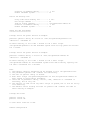
Duration of command running ........... 1 sec
Enable shutdown system................ on
Action for Battery Low:
Delay time since Battery Low ......... 5 sec.
Run script command ................... On
Path of script command ............... /etc/pwrstatd-lowbatt.sh
Duration of command running ........... 1 sec
Enable shutdown system................ on
Setup the UPS and Daemon
========================
# Setup action for power failure as example
pwrstate -pwrfail -delay 60 -active on -cmd /etc/pwrstatd-powerfail.sh
-duration 1 -shutdown on
As above setting, it will take 1 second to run a shell script
/etc/pwrstatd-powerfail.sh and shutdown system since utility power has failure
for 1 minute.
# Setup action for power failure as example
pwrstate -lowbatt -delay 5 -active on -cmd /etc/pwrstatd-lowbatt.sh
-duration 1 -shutdown on
As above setting, it will take 1 second to run a shell script
/etc/pwrstatd-lowbatt.sh and shutdown system since UPS's battery capacity has
low then a threshold for 5 seconds.
Note.
1. The battery capacity Threshold can be chnaged in file /etc/pwrstatd.conf.
2. The parameter -pwrfail and -lowbatt are exclusively.
3. The unit of options -delay is second.
4. Both shell script /etc/pwrstatd-powerfail.sh and /etc/pwrstatd-lowbatt.sh
were copied in installation procedure.
5. Least one of parameter -delay, -active, -cmd, -duration or -shutdown is
necessary, but on only one.
6. The options of -cmd can be any shell script in system, but it will be run by
root authority.
7. The default action setting for both of -pwrfail and -lowbatt are same as
above setting of example.
# Setup UPS alarm
pwrstat -alarm on
pwrstat -alarm off
To turn UPS's alarm On or Off.
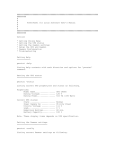
Daemon Configuration