1
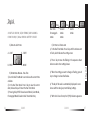
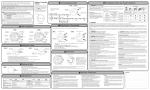
C/ SETTING THE DATE
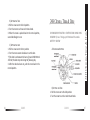
1. Pull the crown out to the 1st position.
2. Turn the crown counter-clockwise to set the date.
*If the date is set between the hours of around 9:00 PM and
1:00 AM, the date may not change on the following day.
3. After the date has been set, push the crown back to the
normal position.
D/ USING THE CHRONOGRAPH
This chronograph is able to measure and display time in 1/1
second united up to maxinum of 59 minutes 59 seconds.
The chronograph second hand keeps continuously for 59 minutes 59 seconds after starting.
Measuring time with the chronograph :
1. The chronograph can be started and stopped each time
button «A» is pressed.
2. Pressing button «B» resets the chronograph and the chro-
06
ZEADES
nograph second hand and chronograph minute hand return
to zero position.
E/ CHRONOGRAPH RESET (INCL. AFTER REPLACING BATTERY)
This procedure shoud be performed when the chronograph
second hand does not return to zero position after the chronograph has been reset, and including after the battery has
been replaced.
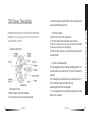
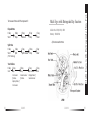
1. Pull the crown out to the 2nd position.
2. Press button «A» to set the chronograph second hand to
the zero position. The chronograph hand can be advanced
rapidly by continuously pressing button «A».
3. Once the hand have been zeroed, return the crown to the
normal position.
24H Chrono,Time & Date
3. When the crown is pushed back to the normal position,
small second hand begins to run.
* Do not push crown to normal position while the chronograph second hand returns to zero position. It stops on the way when crown
are returned to normal position and its position is recognized as zero
position.
ZEADES
07