1
VisualDCT User's Manual
#!
http://www.slac.stanford.edu/comp/unix/package/epics/extensions/vdc...
Connector("speed/OUT","$(slmot1.speed)",617,577,16777215,"",0)
Listing 5: An example of complete DB file.
VisualDCT has powerful parser which has ability to parse already existing DBs, files which have been created or modified with other
tool. It also detects syntax errors in databases, including DBDs. Defective visual composition data or its absence are safely handled
and do not raise any critical error, VisualDCT simply automatically layouts all objects without any visual data. What is more,
VisualDCT preserves comments and record/field order in the record instance database, which offers the ability to edit your
databases in other tools or manually without making any harm to the databases and VisualDCT.
5.3. Visual representation of objects
5.3.1. Record
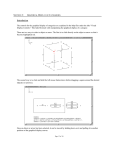
Figure 1: Record
Record is represented as a write square with its type and name written inside. Below the line inside the record there is an area
where all fields values are shown, selection of fields depends on its visibility property.
There are three types of fields that can appear as part of the record (white squares below the record): VARIABLE (data), INPUT ,
OUTPUT and FORWARD fields. Variable fields hold a piece of data, such as the VAL or HIHI fields. Since the variable fields can be
populated by other record's output fields and read by other record's input fields, a field node will appear below the record. Additionally
indication of data flow direction using arrows makes fields easy to distinguish:
circle - VARIABLE fields
out-arrow - OUTPUT and FORWARD fields
in-arrow - INPUT fields
A multi-point wire can be drawn between any two linkable fields simply by adding connectors (moveable small squares on a link
line). If a link is an inter-group link (link between two fields which are not in the same group), the link is represented as a line going in
the screen with the target link name shown by side.
5.3.2. Group
Figure 2: Group
Group is represented as a white square with its name inside. Double click over it descends into it.
5.3.3. Template Instance
4 of 10
5/12/05 3:46 PM