1
V1.5 Creation on Jun01st2012
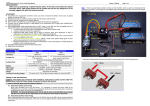
6. Select “LED_Reventon_V1.0.pgd” and click OK.
7. Click “Yes” to start the update.
8. The process time is around 1.5 minute. The Speed Passion Reventon PC Interface program will show a process bar to
display the status of the update firmware.
9. When the firmware update is complete, a message box will pop up confirming completion. Close the Speed Passion
Reventon PC Interface program and unplug the USB cable from the program card to finish the update. If the pop up box
does not display “Download Success”, please repeat the process again from step 2. Ensure the selection of the firmware is
correct. Selecting the LCD firmware instead of LED to update the program card will cause the update to be unsuccessful.
King-Golden Limited
Page 21