1
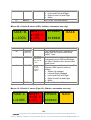
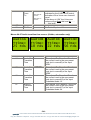
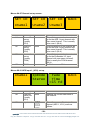
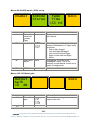
Menus 56-59 Voice over 1 activation menus
Pgm ON
Fr100%
To 25%
Menu Num.
56
VO1 ON
Fr 0%
To100%
Heading
Pgm
From
To
Automation
Menu level “A”
0=Off, 1=On
Menu level “B”
0Æ1023
Menu level “C”
0Æ1023
57
Menu level “A”
0=Off, 1=On
VO1
From
To
Menu level “B”
0Æ1023
Menu level “C”
0Æ1023
58
59
none
none
BACK
BACK
Function
Press this button and two digipots
indicated by the lit LED’s will control:
Activation of the PGM Level
If the above is “ON” the Programme
volume will go from this level to…….
….. this level
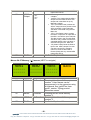
Press this button and two digipots
indicated by the lit LED’s will control:
Activation of the Voice over channel 1
Level.
If the above is “ON” the Voice over
volume will go from this level to…….
….. this level
Go To the Top Level Menus
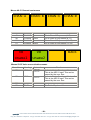
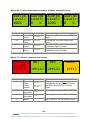
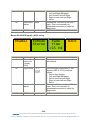
Menus 60-63 Voice over 2 activation menus
Pgm ON
Fr100%
To 25%
Menu Num.
60
VO2 ON
Fr 0%
To100%
Heading
Pgm
From
To
Automation
Menu level “A”
0=Off, 1=On
Menu level “B”
0Æ1023
Menu level “C”
0Æ1023
BACK
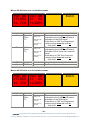
Function
Press this button and two digipots
indicated by the lit LED’s will control:
Activation of the PGM Level
If the above is “ON” the Programme
volume will go from this level to…….
….. this level
- 19 eyeheight Unit 34 Park House Watford Business Park Greenhill Crescent Watford Herts GB WD18 8PH
Reg. No. 2855535 Telephone: +44 (0) 1923 256 000 Fax: +44 (0) 1923 256 100 email: [email protected]