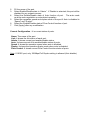
1
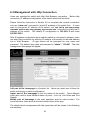
Intelligent Switch
User's Manual
Rev 1.00
1
We make no warranties with respect to this documentation and disclaim any
implied warranties of merchantability, quality, or fitness for any particular purpose.
The information in this document is subject to change without notice. We reserve
the right to make revisions to this publication without obligation to notify any
person or entity of any such changes.
Trademarks or brand names mentioned herein are trademarks or registered
trademarks of their respective companies.
2
About this manual …
This manual is a general manual for different models of our Intelligent Switch.
They are similar in operation but have different hardware configurations.
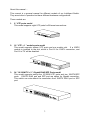
These models are
1.
8 * UTP ports model
This model supports eight UTP ports for Ethernet connections.
2.
16 * UTP + 1 * module ports model
This model supports sixteen UTP ports and one module slot. If a 100FX
module is inserted to the slot, which is Port 16 for 100FX connection, and
Port 16 of TX will be disabled.
3.
24 * 10/100M TX + 2 * Gigabit RJ45/SFP Ports model
This model supports twenty-four 10/100M UTP ports and two 1000TX/SFP
ports. 1000TX RJ45 port and SFP port are option for Gigabit connection.
This switch can auto-detect the connection from 1000TX RJ45 port or SFP
port.
3
Contents
1. INTRODUCTION..........................................................................................1
1.1 PACKAGE CONTENTS ...................................................................................1
2. WHERE TO PLACE THE INTELLIGENT SWITCH..............................2
3. CONFIGURE NETWORK CONNECTION................................................3
3.1 CONNECTING DEVICES TO THE INTELLIGENT SWITCH .................................3
3.2 CONNECTING TO ANOTHER ETHERNET SWITCH/HUB ..................................3
3.3 APPLICATION................................................................................................4
4. ADDING MODULE........................................................................................5
5. LEDS & RESET BUTTON ............................................................................7
5.1 LEDS DEFINED ............................................................................................7
5.2 RESET BUTTON.............................................................................................8
6. MANAGE / CONFIGURE THE SWITCH ..................................................9
6.1 INTRODUCTION OF THE MANAGEMENT FUNCTIONS .......................................9
6.2 MANAGEMENT WITH CONSOLE CONNECTION.............................................12
6.3 MANAGEMENT WITH HTTP CONNECTION ...................................................44
6.4 ABOUT TELNET INTERFACE ........................................................................72
6.5 ABOUT SNMP INTERFACE .........................................................................72
7. SOFTWARE UPDATE AND BACKUP .....................................................73
A. PRODUCT SPECIFICATIONS ................................................................74
B. COMPLIANCES .........................................................................................77
C. WARRANTY...............................................................................................78
1. Introduction
There are three models for the Intelligent Switch Series – 8 FE UTP ports model,
16 FE UTP + 1 100BaseFX (module) ports model and 24 FE UTP + 2
GE(TX/SFP) ports model. This Intelligent switch is a Layer2 management switch
with lots of advanced network functions including VLAN, trunking, spanning tree,
mirror port, IP multicast, rate limit and port configuration. It supports console,
telnet, http and SNMP interface for switch management.
IEEE 802.1x is
supported for port security application. Layer3 IP limit and Layer4 service filter
are supported for security applications. These functions can meet most of the
management request for current network.
1.1 Package Contents
z
z
z
z
z
One Intelligent Switch
One AC power cord (* for AC power model)
One console cable
Two rack-mount kits and screws (*for 16+1FX/24+2GE models only)
This user's manual
1
2. Where To Place the Intelligent Switch
This Intelligent Switch can be placed on a flat surface (your desk, shelf or table).
Place the Intelligent Switch at a location with these connection considerations in
mind:
z The switch configuration does not break the rules as specified in Section 3.
z The switch is accessible and cables can be connected easily to it.
z The cables connected to the switch are away from sources of electrical
interference such as radio, computer monitor, and light fixtures.
z There is sufficient space surrounding the switch to allow for proper ventilation
(the switch may not function according to specifications beyond the
temperature range of 0 to 50 degrees C).
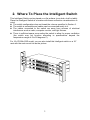
For 16+1FX/24+2GE model, you can also install this Intelligent switch on a 19"
rack with the rack-mount kits as the picture.
2
3. Configure Network Connection
3.1 Connecting Devices to the Intelligent Switch
[ Connection Guidelines: ]
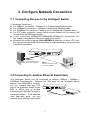
z For 10BaseT connection : Category 3 or 5 twisted-pair Ethernet cable
z For 100BaseTX connection : Category 5 twisted-pair Ethernet cable
z For 1000BaseTX connection: Category 5e or 6 twisted-pair Ethernet cable
z For UTP cable connection, always limit the cable distance to 100 meters (328
ft) as defined by IEEE specification
z If your switch has 100BaseFX/1000BaseSX/1000BaseLX connections, you
can connect long distance fiber optic cable to the switch.
z Because this switch supports Auto MDI/MDI-X detection on each UTP port,
you can use normal straight through cable for both workstation connection and
hub/switch cascading.
100BaseTX :
Cat-5 Twisted-pair cable
Max. 100m (328?feet)
FS
10BaseT :
Cat-3,4,5 Twisted-pair cable
Max. 100m (328?feet)
PC
3.2 Connecting to Another Ethernet Switch/Hub
This Intelligent Switch can be connected to existing 10Mbps / 100Mbps /
1000Mbps hubs/switches. Because all UTP ports on the Intelligent Switch
support Auto MDI/MDI-X function,
you can connect from any UTP
port of the Intelligent Switch to the
MDI or MDI-X port of another
hub/switch with Straight Through or
Max. 100m (328?feet)
Crossover cables. If the switches
TO: MDI or MDI-X port
have fiber-optic ports, you can
cascade them with fiber optic cable.
3
3.3 Application
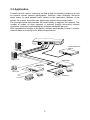
A switch can be used to overcome the hub-to-hub connectivity limitations as well
as improve overall network performance. Switches make intelligent decisions
about where to send network traffic based on the destination address of the
packet. As a result, the switch can significantly reduce unnecessary traffic.
The example below demonstrates the switch ability to segment the network. The
number of nodes on each segment is reduced thereby minimizing network
contention (collisions) and boosting the available bandwidth per port.
With management function of the switch, network administrator is easy to monitor
network status and configure for different applications.
FS
Another Ethernet
Switch
FS
Hub/Switch
Hub/Switch
Power User
Workgroup
Workgroup
4
4. Adding Module
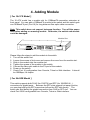
[ For 16+1FX Model ]
The 16+1FX model has a module slot for 100BaseFX-connection extension at
front panel. You can add a 100BaseFX module to the switch and this switch gets
one 100BaseFX port (Port 16) for long distance fiber optic cable connection.
Note: This switch does not support hot-swap function. Turn off the power
first before adding or removing module. Otherwise, the switch and module
could be damaged.
Module Slot
Please follow the steps to add the module to the switch.
1. Turn off the switch first.
2. Loosen the screws of slot cover and remove the cover from the module slot.
3. Slide in the module into the module slot.
4. Tighten the screws of the module to the switch.
5. Connect the fiber optic cable to the FX port of the module.
6. Power on the switch.
7. Check Port 16 configuration from Console, Telnet or Web interface. It should
be 100Mbps, full duplex.
[ For 24+2GE Model ]
This switch supports both RJ-45 (for 1000TX) and SFP (for 1000SX/LX/…)
connectors for gigabit ports. Because the SFP slots support hot-swap function,
you can plug/unplug the SFP transceiver to/from the SFP slot directly. The
switch can auto-detect the gigabit connection from RJ45 or SFP slot. You can
check Port 25/26 configuration from Console, Telnet or Web interface.
5
SFP Slot
Follow the step for module adding and removing.
[ Add SFP Transceiver ]
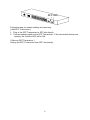
1. Plug in the SFP Transceiver to SFP slot directly.
2. Connect network cable to the SFP Transceiver. If the connected devices are
working, the Link/Act LED will be ON.
[ Remove SFP Transceiver ]
Unplug the SFP Transceiver from SFP slot directly.
6
5. LEDs & Reset Button
5.1 LEDs Defined
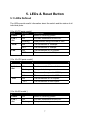
The LEDs provide useful information about the switch and the status of all
individual ports.
[ For 8*UTP ports model ]
LED
STATUS
CONDITION
Power
ON
Switch is receiving power.
Link /
Act
ON
Port has established a valid link.
Flashing
Data packets being received or sent.
100M
ON
The connection is 100Mbps.
OFF
The connection is 10Mbps.
ON
The connection is Full Duplex.
OFF
The connection is Half Duplex.
FDX
[ For 16+1FX ports model ]
LED
STATUS
CONDITION
Power
ON
Switch is receiving power.
Link /
Act
ON
Port has established a valid link.
Flashing
Data packets being received or sent.
Green
The connection speed is 100Mbps.
Yellow
The connection speed is 10Mbps.
ON
The connection is Full Duplex.
FDX
OFF
[ For 24+2G model ]
LED
STATUS
ON
Power
Link /
Act
The connection is Half Duplex.
CONDITION
Switch is receiving power.
ON
Port has established a valid link.
Flashing
Data packets being received or sent.
7
5.2 Reset Button
24+2G model has a reset button for system reset. Using a pen or pencil to push
the button, the switch will reset itself.
Note: 8-port model and 16-port model do not have this button. It is supported on
24+2G model only.
8
6. Manage / Configure the switch
6.1 Introduction of the management functions
This switch is a L2 management switch. It supports in-band management
function from SNMP, Http and Telnet interface. It also supports out-band
management function from RS232 console interface.
Besides, it supports
network configuration functions, like VLAN, Trunking, Port Mirror, QoS, spanning
tree and software backup/update. Users can configuration these functions for
different network applications. The following is a brief introduction about these
functions before the detail operation sections.
1. VLAN (Virtual LAN)
VLAN can divide the switch to several broadcast domains to prevent network
traffic between different user groups. This switch supports 802.1Q tag-based
VLAN and Port-based VLAN. Users with the same VLAN ID can transfer data
to each other. The network traffic will be blocked if they have different VLAN ID.
2. Trunk
If two switches are cascaded together, the bottleneck will happen at the
cascading connection.
If more cables could be used for the cascading
connection, it will reduce the bottleneck problem. In normal case, switches will
become unstable because of traffic looping when more than one cable is
connected between them. If the switches support trunk function, they can treat
these cables as one connection between them. The traffic looping will not
happen between these cables and the switches will work stable with bigger
bandwidth between them.
This switch supports trunk function and users can configure it with the following
steps.
a. Enable trunk function.
b. Select the port partition for trunk.
c. Assign ports to a trunk. For example, assign Port 1,2,3 for Trunk 1.
Notes: About redundant application
The trunk connection supports redundant function. If any trunk cable is broken,
the traffic going through that cable will be transferred to another trunk cable
automatically. For example, if user port Port 6 is assigned to Port 1 in a Trunk
and Port 1 connection breaks, Port 2 will take over the traffic for Port 6
automatically. (It could be used for redundant application.)
3. Spanning Tree Protocol / Rapid Spanning Tree Protocol
Spanning tree is a protocol to prevent network loop in network topology. If
network loop happens, it will cause switches in the network unstable because
more and more traffic will loop in the network.
If network loop happens,
spanning tree protocol will block one connection in the loop automatically. But
it will also cause a period of delay (30 seconds for STP and shorter time for
9
RSTP) if any network connection is changed because of the network topology
detection operation of the protocol.
Because there could be more than one switch in the network, users can
configure this function for their network spanning tree application.
4. Port Mirror
This switch operates in store-and-forward algorithm so it is not possible to
monitor network traffic from another connection port. But the port mirror
function could copy packets from some monitored port to another port for
network monitor.
5. QoS
For Quality of Service request in a network, packets could be classified to
different forwarding priorities. For real-time network traffic (like video, audio), it
needs higher priority than normal network traffic. With the definition of packet
priority, it could have 8 priority levels (from 0 to 7). This switch supports four
priority level queues on each port (*two priority queues only for 24+2G model).
It could be configured for port-based, 802.1P tagged based, ToS/DiffServ, or L4
Services for IP packets. User can define the mapping (0 – 7) to the priority
queues.
6. Static Mac ID in ARL table
The switch can learn the Mac address from user’s packets and keep these Mac
address in the ARL table for store-and-forward table lookup operation. But
these Mac addresses will be deleted from ARL table after some time when
users do not send any packets to the switch. This operation is called aging and
the time is called aging time. It is about 5 minutes normally (it could be
changed by users.) If users want to keep a Mac address always in ARL table
for some port, they can assign the Mac address to ARL table. These Mac ID
are called Static Mac address.
This switch supports static Mac address
assignment.
The static Mac address assignment will also limit the Mac
address could be used on the assigned port only with the port security
configuration function. For example, assigning “00-00-e2-11-22-33” to Port 5
will always keep this Mac ID alive on Port 5 but also limit this Mac address could
work on Port 5 only.
Note: About Static Mac Address Filter-in (port binding) function
There is a “Mac/IP Security” function for port security. If it is set, only these
static Mac addresses can access network through the assigned port. The
other Mac addresses will be forbidden for network access through that port.
This function can be used for port binding security application. Please refer to
Section 6.2 / 6.3 for the details of the Mac address filter-in operation of the
switch.
7. Mac/IP Security Function
IP conflict problem always cause trouble for MIS people. ARP Spoofing is a
network attack by fake IP-Mac Addresses. And some other security requests
need to limit Mac/IP address of the connecting devices on each switch port.
10
This function is supported on L3 switch and some advanced L2 switch. And
this switch also supports it for such security request.
You can assign Mac/IP addresses on each port. And enable Mac-limit, IP-limit,
or both to get this function working on the switch.
Notes:24+2G model do not support IP Security function.
8. IEEE 802.1x Port Security Function
If the 802.1x function is enabled, the switch will act as an authenticator for
users accessing network through the switch. It will need a RADIUS server for
the authentication function. Users will be asked for username and password
before network access. If the RADIUS server authenticates it, the switch will
enable the port for network access. This function is very useful for network
security application to prevent illegal users access network through the switch.
This switch supports MD5, TLS and PEAP authentication types.
9. Rate Control
This function can limit the burst traffic rate for physical ports. The traffic could
be ingress traffic or egress traffic.
This function can limit the network
bandwidth usage by different users.
10.
IP Multicast with IGMP Snooping
IP multicast function can forward packets to a group of users connected on
different ports. The user group is learned by the switch from the packets from
IGMP active router with IGMP snooping function. It is often used for video
applications.
11. L4 Services Security
For some network environments, some network applications are not allowed.
For such request, L4 Services filter function need to be supported. And such
function is supported on L4 switch and some advanced L2 switch.
This switch supports it by filtering some fixed/popular network applications.
You just need to select the services that will be filter-out and enable this
function. You can get the details by checking the security function in the
switch.
12. Software Backup/Update
This switch supports backup and update functions for its internal software and
its network configuration. It could be done in three ways.
a. From console when booting : doing by Xmodem protocol and by terminal
program for boot code and run-time code updating.
b. From console/Telnet when running : doing by TFTP protocol and it will need a
TFTP server in network for run-time code and configuration backup/update.
c. From web browser : doing by http protocol and by web browser for run-time
code and configuration backup/update.
11
6.2 Management with Console Connection
Please follow the steps to complete the console hardware connection first.
1. Connect from the console port of the switch to COM port of PC with the
console cable.
2. Start the terminal program of Windows. Create a new connection and select
COM port of PC used for the console. Set the configuration of the terminal as
[38400,8,N,1]. (You can find the terminal program in [Start] -> [Programs] ->
[Accessory Programs] -> [Communication] -> [Terminal]. If you cannot find it,
please install it from your Windows Installation Disk. Please refer to your
Windows user manual for the installation.)
3. Power on the switch.
If everything is correct, the booting screen will appear in the terminal program
when the switch is powered on. It will stop at the following screen after some
initializing messages.
------------------------------------------------------------------------------------------------------Booting Program Version 1.04.02, built at 10:57:19, Dec 30 2005
RAM: 0x00000000-0x00800000, 0x0000cc78-0x007f3000 available
FLASH: 0x05800000 - 0x05900000, 16 blocks of 0x00010000 bytes each.
==> enter ^C to abort booting within 3 seconds ......
Start to run system initialization task.
[System Configuration]
Company Name :
Model Name
: Intelligent Switch
MAC Address : 00:11:22:64:99:79
Firmware version: 0.00.10
Press <ENTER> key to start
------------------------------------------------------------------------------------------------------Press Enter key, user name and password will be requested. The default user
name and password is "admin" / ”123456”.
After login the switch, a prompt will be shown. Because this switch supports
command-line for console interface, you can press “?” or “help” to check the
command list first.
Note: Management with Telnet connection has the same interface as console
connection.
12
With help command, you can find the command list as follow.
------------------------------------------------------------------------------------------------------>help
[Command List]
?.............. Help commands
backup......... backup run-time firmware or configuration file
del............ Del commands
default........ Restore to factory default setting
exit........... Logout
help........... Help commands
logout......... Logout
ping........... Ping a specified host with IP address
reset.......... Reset system
set............ Set commands
show........... Show commands
upgrade........ Upgrade run-time firmware or configuration file
whoami......... Display current login user name
>
------------------------------------------------------------------------------------------------------Here is the detail about these commands.
1. Backup command
This switch supports TFTP protocol for firmware and configuration update and
backup. You should select backup firmware or configuration first. And provide
the IP address of the TFTP server and the backup file name for the backup
operation.
Enter “backup” at the prompt, the command syntax will be shown.
>backup
Syntax: backup [firmware | config] ip filename
For example, “back config 192.168.1.80 abcd” will backup the configuration to
TFTP server 192.168.1.80 and its file name is “abcd”.
2. Del command
The “del” command can delete a specified security entry or Destroy a specified
802.1Q VLAN.
Enter “del” at the prompt, the command syntax will be shown.
>del
[Command List]
?.............. Help commands
help........... Help commands
security....... Delete a specified security entry
1qvlan......... Destroy a specified 802.1Q VLAN
¾ Delete a specified security entry . . .
>del security
Del security [Index]
13
[Index] is the index of the security entry that will be deleted. You can check it
with “show security” command.
¾ Delete a 802.1Q VLAN . . .
>del vlan1q
Valid VLAN ID: 1 - 4094
Syntax: del 1qvlan [VLANID#]
This command will delete the 802.1Q VLAN with the VLAN ID. For example,
“del vlan1q 5” will delete the 802.1Q VLAN with VLAN ID 5.
3. Default command
This command is used to restore factory default settings.
Enter “default” at the prompt, you will be ask to confirm with Yes/No.
>default
All current setting will be lost after restoring default!
Are you sure to restore default setting now?(Y/N)
If “y” is entered, the switch configuration will be set to factory default and
reboot. If “n” is entered, just leave and no any action will go.
4. Exit command
This is a logout command – the same as “logout” command.
5. Help command
This is a help command (the same as “?” command) and the switch will prompt
with command list.
6. Logout command
This is a logout command – the same as “exit” command.
7. Ping command
User can use this command to ping another network device to verify the
network connection and activity. (It is similar to the ping command in MS-DOS.)
Enter “ping” at the prompt, the command syntax will be shown.
>ping
Syntax: ping [-n count] [-l length] [-t] [-w timeout] ip
-n count : Number of echo requests to send.
-l length : Send buffer size, and length is between 64~8148
-t
: Ping the specified host until stopped by <ESC> key.
-w
: Timeout in milliseconds to wait for each reply.
ip
: IP address (xxx.xxx.xxx.xxx)
For example, “ping 192.168.1.80”. “Ctrl-C” can be used to break continuous
ping operation.
8. Reset command
14
This command is used to reset switch.
Enter “reset” at the prompt, you will be asked to confirm the action.
>reset
Are you sure to reset switch now?(Y/N)
If “y” is entered, the switch will reboot. If “n” is entered, just leave and no any
action will go.
9. Set command
This command can be used to configure most functions of the switch. Lots of
sub-commands are needed for this command.
Enter “set” at the prompt, the sub-command list will be shown.
>set
[Command List]
?.............. Help commands
help........... Help commands
1qvlan......... Set 802.1Q VLAN Configuration
admin.......... Set administrator name and password
age............ Set switch age
automode....... Set Auto Negotiation or Auto Detect mode
dot1x.......... Set 802.1x Configuration
guest.......... Set name and password for Guest
http........... Set HTTP Protocol setting
idle........... Set idle time for CLI session.
icmpb.......... Set ICMP Blocking function
igmp........... Set IGMP configuration
isolated....... Set Isolated VLAN setting
metrovlan...... Set metro vlan configuration
mgr............ Set management IP configuration
mirror......... Set mirror configuration
net............ Set network configuration
port........... Set switch port configuration
prompt......... Set prompt for CLI
pvlan.......... Set members of Port-based VLAN groups
qos............ Set QoS configuration
ratecontrol.... Set Rate Control configuration
security....... Set Security Configuration
snmp........... Set snmp configuration
sta............ Set Spanning Tree setting
stat........... Set Port Statistics setting
stormcontrol... Set Storm Control configuration
telnet......... Set TELNET Protocol setting
time........... Set time configuration
trunk.......... Set TRUNK function configuration
9.1 set ? and set help command
These two commands will show the sub-command list for set command.
9.2 set 1qvlan command
This command is used to configure 802.1Q VLAN of the switch.
Its syntax is . . .
15
>set 1qvlan
[Command List]
enable......... Set 802.1Q enabled.
disable........ Set 802.1Q disabled.
create......... Create new 802.1Q vlan with specified VLAN ID and VLAN Name.
gvrp........... Set GVRP Protocol.
mgrpvid........ Set the Port VLANID of management port.
modify......... Modify the setting of a 802.1Q VLAN.
pvid........... Set the Port VLANID of specified port.
enable and disable sub-commands are used to enable/disable 802.1Q
VLAN function of the switch.
create sub-command is used to create a static 802.1Q VLAN. For
example, “set 1qvlan create ABC 20” will create a static 802.1Q VLAN with
name “ABC” and ID 20.
gvrp sub-command is used to enable/disable GVRP function.
Its syntax is ...
>set 1qvlan gvrp
Syntax: set 1qvlan gvrp [1|0] <1:enable,0:disable>
mgrpvid sub-command is used to select the VLAN group that is allowed to
management the switch. Only the users in the selected VLAN can manage
the switch by Http, Telnet and SNMP. For example, “set 1qvlan mgrpvid 5”
will allow the users in the VLAN with VLAN ID 5 to manage the switch
remotely.
modify sub-command is used to modify a static 802.1Q VLAN setting.
Its syntax is . . .
>set 1qvlan modify
Syntax : set 1qvlan modify [+|-] [port#] VLANID [1:<tagged>|0:<untagged>]
Examples : Set 1qvlan modify +1+5-7 2 1
Description: Add port 1,5 to VLAN 2 as tagged port and
remove port 7 from VLAN 2
pvid sub-command is used to set Port VLAN ID. The Port VLAN ID is used
as the VLAN ID for tag adding when untagged packet is translated to
tagged packet. For example, “set 1qvlan pvid 3 10” will set the PVID of
Port 3 as 10.
9.3 set admin command
This command can be used to modify the user name and password for
administrator.
9.4 set age command
This command is used to change the aging time of the switch.
Its syntax is . . .
>set age
Syntax: set age [level value].
[level]: 0 : Disable aging operation
1~32767 : Aging time in ( level * 55 )seconds.
The aging time is 330(=6*55) seconds default and its valid range is (1 ~
32767) *55 seconds. If [level] is set to 0, the aging function will be disabled.
(Notes: It is different from static Mac ID in ARL table. The connection port
16
is fix for a static Mac ID, but the connection port could be changed for a
Mac ID with no aging.)
9.5 set automode command
This command is used to set the auto mode function of connection ports.
There are two modes for it – an(auto negotiation) and ad(auto detection).
an mode – if the auto function of a port is disabled in port configuration, the
switch will disable its auto-negotiation function. That is the real force-mode
setting of the port.
ad mode – if the auto function of a port is disabled in port configuration, the
switch will not disable its auto-negotiation function but just modify its autonegotiation attribute for the speed/duplex mode setting.
If the connected device is auto-negotiation enabled and you want to set the
speed of the connection (for example, 10M/Half), you can select “ad” mode.
If the connected device is in forced mode (for example, 10M/Half) and it is
auto-negotiation disabled, you can use “an” mode and set the port to the
same configuration as the device in port configuration function.
You can select an mode or ad mode depending on your applications. In
most of the connection cases, ad mode is suggested.
Its syntax is …
>set automode
AN: Auto Negotiation, AD: Auto Detect.
9.6 set dot1x command
This command is used to configure the 802.1x function of the switch.
Its syntax is . . .
>set dot1x
[Syntax]set dot1x [arg_1 data_1] [arg_2 data_2] ... [arg_n data_n]
[Argument List]
disable........ Set 802.1x disable
enable......... Set 802.1x enable
transparent.... Set 802.1x transparent
re_au.......... Set 802.1x Re-authentication
reauthtime..... Set 802.1x Re-authentication Timeout Period
reauthcnt...... Set 802.1x Re-authentication Max Count
reqcnt......... Set 802.1x Max Request Count
svrtime........ Set 802.1x Server Timeout Period
supptime....... Set 802.1x Supplicant Timeout Period
quiettime...... Set 802.1x Quiet Timeout Period
txtime......... Set 802.1x Tx Timeout Period
rsip........... Set Radius Server Address
authport....... Set Authenticate Port of Radius Server
shkey.......... Set 802.1x Security Key
portauth....... Set 802.1x port auth mode
17
disable sub-command is used to disable 802.1x function. 802.1x protocol
packets will also not be forwarded.
enable sub-commands is used to enable 802.1x authentication function.
transparent sub-command is used to set the operation of 802.1x function
to transparent mode. In this mode, the switch will forward 802.1x protocol
packets but no authentication function.
re_au sub-command is used to enable the re-authentication function of the
switch. When the re-authentication time is up, the switch will start the reauthentication process.
reauthtime sub-command is used to set the timeout period of the reauthentication process.
reauthcnt sub-command is used to set max count for re-authentication
request in the re-authentication process. If the max count is met, it will
become un-authentication state. The valid value is 1~10.
reqcnt sub-command is used to set max request timeout count between
the switch and RADIUS server before authentication fail. The valid value is
1~10.
svrtime sub-command is used to set the request timeout value between
the switch and RADIUS server. The valid value is 0~65535.
supptime sub-command is used to set the timeout value between the
switch and users (called “supplicant” in 802.1x) after first identification. The
valid value is 0~65535.
quiettime sub-command is used to set the quiet time value between the
switch and the user before next authentication process when authentication
fail.
txtime sub-command is used to set the timeout value for the identification
request from the switch to users. The request will be re-tried until the
reauthcnt is met. After that, authentication fail message will be sent. The
valid value is 0~65535.
rsip sub-command is used to set the IP address of RADIUS server.
authport sub-command is used to set the handshaking port number
between the switch and RADIUS server. It could be different for different
RADIUS servers.
shkey sub-command is used to set the security key between the switch and
RADIUS server.
portauth sub-command is used to set the authentication mode for a
physical port. Its syntax is . . .
set dot1x portauth [port#] [auto|fa|fu|no]
- auto: the authentication mode of the port depending on the
authentication result of the port
- fa (force-authenticated): will force the port always being authentication
successful in 802.1x process and the real authentication result will be
ignored.
- fu (force-unauthenticated): will force the port always being authentication
unsuccessful in 802.1x process and the real authentication result will be
ignored.
- no (none): 802.1x function will not be executed on the port, i.e. disabled
on the port.
18
Note: This switch supports MD5, TLS and PEAP authentication types.
9.7 set guest command
This command is used to change the username and password of guestright user. The “guest-right user” can view the setting of switch only, and
cannot do any modification.
Its syntax is …
>set guest
Input Guest Username:
Input Guest Password:
Confirm Password:
9.8 set http command
This command is used to change the http operation mode of the switch.
Because hacker or worm/virus (like ColdRed) often attacks http server, this
command is provided to disable http to prevent it. (If this switch is installed
in public Internet without any firewall protection, we suggest users to
disable the http interface and use Telnet or SNMP instead.)
You can also use this command to set the http interface to security mode.
Its syntax is . . .
>set http
Syntax : Set http enable
Description: Enable http protocol function.
Syntax : Set http disable
Description: Disable http protocol function.
Syntax : Set http ssl
Description: Enable https protocol function.
9.9 set idel command
This command is used to set idle time for console connection. If no any key
operation in this idle time, the switch logout automatically for security.
Its syntax is . . .
>set idle
Syntax: Set idle [time]
[time]: 30~3600 seconds
For example, “set idle 300” will change the idle time to 300 seconds. It is 10
minutes default. Its valid range is 30 ~ 3600 seconds.
9.10 set icmpb command
This command is used to enable/disable the ping-reply function. For some
attacking from Internet, they will ping first. You can disable the ping-reply
function by this command for security. And the switch will not reply any
ping requests. (ping command is an ICMP request. “icmpb” means ICMP
Block.)
19
Its syntax is . . .
>set icmpb
Syntax: set icmpb [1:enable|0:disable]
9.11 set igmp command
This command is used to enable/disable IGMP snooping function for IP
multicast operation.
Its syntax is . . .
>set igmp
[Command List]
enable......... Enable igmp snooping function
disable........ Disable igmp snooping function
9.12 set isolated command
This command can set isolation enabled/disabled for each connection port.
If a port is set as isolated port, it cannot communicate with other isolated
ports. But it still can communicate with other un-isolated ports if they are in
the same VLAN.
For example, Port 1,2,3 are set as isolated ports.
Port 1,2,3 cannot
communicate with each other, but they can communicate with other unisolated ports – e.g. Port 4,5,6. This function is often used to isolated ports
in the same VLAN.
Its syntax is …
>set isolated
Syntax: set isolated [port#] [0:disable|1:enable]
9.13 set metrovlan command
Metro Mode VLAN is a special case of Port-based VLAN. Every port of the
switch cannot communicate with each other except the uplink ports. It is a
very popular VLAN configuration for switch.
The switch supports two uplink ports and you can assign any port for it.
After uplink is assigned, other ports of the switch cannot communicate with
each other except the uplink ports.
Its syntax is ...
>set metrovlan
Syntax: set metrovlan [1:enable|0:disable]
Syntax: set metrovlan uplinkport [index#] [port#]
enable/disable : this can enable/disable the Metro Mode VLAN function.
uplinkport : this command can setup the uplink port. Two uplink ports are
supported and they can be selected by index 1 or 2. Then give the port
number. For example, “set metrovlan uplinkport 1 16”.
9.14 set mgr command
This command is used to configure the administrator groups and their
access rights for managing this switch.
The administrators could be
20
specific IP addresses or in a specific IP subnet. Different administrators
could have different rights to manage this switch. This is for security of this
management switch. (Four user groups are supported for this function.)
Its syntax is …
>set mgr
[Syntax]set mgr [arg_1 data_1] [arg_2 data_2] ... [arg_n data_n]
[Argument List]
enable......... Set enabled for a specified set.
disable........ Set disabled for a specified set.
ipaddr......... Set IP and net mask for a specified set.
mode........... Set mode for a specified set.
protocol....... Set protocol for a specified set.
enable sub-command is used to enable a administrator (groups) setting.
Its syntax is …
>set mgr enable
Index should be < 1-4 >.
syntax: set mgr enable [index#]
disable sub-command is used to disable a administrator (groups) setting.
Its syntax is …
>set mgr disable
Index should be < 1-4 >.
syntax: set mgr disable [index#]
ipaddr sub-command is used to set the specified IP addresses or subnet.
Its syntax is …
>set mgr ipaddr
Index should be < 1-4 >.
syntax: set mgr ipaddr [index#] [IP Addr] [Net Mask]
The “index#” is the entry of the setup item. Then are the IP address and
net mask.
The net mask should be 255.255.255.255 if it is for some
specified IP address (administrator).
If the net mask is not
255.255.255.255, it will be for some subnet user group.
mode sub-command is used to set the access mode for the specified
administrator(s).
Its syntax is …
>set mgr mode
Incorrect index! Index should be < 1-4 >.
syntax: set mgr mode [index#] [Access Mode]
Access Mode should be [1:View] or [2:Modify]
The “index#” is the entry of the setup item. The “Access type” could be “1”
for View Only and “2” for View and Modify rights.
protocol sub-command is used to enable/disable the remote management
protocols for the specified administrator(s).
Its syntax is …
>set mgr protocol
Index should be < 1-4 >.
syntax: set mgr protocol [index#] [1|0:http] [1|0:telnet] [1|0:snmp].
21
The “index#” is the entry of the setup item. And then are the enable/disable
of Http, Telnet, and SNMP protocols one after another.
9.15 set mirror command
This command is used to configure mirror function of the switch.
following is the sub-command for it.
The
>set mirror
[Command List]
enable......... Enable mirror function
disable........ Disable mirror function
capture........ Set capture port of mirror function
monitored...... Set monitored ports of mirror function
enable .. this command is used to enable the mirror operation.
disable .. this command is used to disable the mirror operation.
capture .. this command is used to set the capture port for mirror operation.
The monitored traffic will be copied to this port.
monitored .. this command is used to set the monitored port for mirror
operation. The traffic of this port will be copied to capture port.
9.16 set net command
This command is used to configure IP address of the switch.
Its syntax is . . .
>set net
[Syntax]set net [arg_1 data_1] [arg_2 data_2] ... [arg_n data_n]
[Argument List]
dhcp........... Set DHCP client
ip............. Set IP Address
netmask........ Set netmask
gateway........ Set gateway IP address
This switch supports DHCP client function. If you set DHCP enable, it will
try to get IP configuration from DHCP server when it boots up. You can use
“show net” command to check the DHCP setting and current IP
configuration of the switch. If DHCP is enable and the switch cannot find a
DHCP server in the network, a message “BOOTP/DHCP failed on eth0” will
be shown and it will use “192.168.1.5 / 255.255.255.0” as its IP
configuration.
If you set DHCP disable, you can set the IP configuration with ip, netmask
and gateway commands. For example, “set net ip 192.168.1.250 netmask
255.255.255.0 gateway 192.168.1.154” will set these parameters as the IP
address configuration of the switch.
After the command, you can use
“show net” to verify the setting.
9.17 set port command
This command is used to change the connection configuration of ports.
Its syntax is . . .
22
>set port 2
[Syntax]set port [port#] [arg_1 data_1] [arg_2 data_2] ... [arg_n data_n]
[Argument List]
name........... Set port name [string]
admin.......... Set port admin mode [enable|disable]
speed.......... Set port speed [auto|10|100]
duplex......... Set port duplex type [full|half]
flowctrl....... Set port flow mode [enable|disable]
User can configure the following items for each port.
a. Name of a port with “name” sub-command.
b. Enable/Disable a port with “admin” sub-command.
c. Operation auto/speed of a port with “speed” sub-command.
d. Duplex mode of a port with “duplex” sub-command.
e. Flow Control function of a port with “flowctrl” sub-command.
For example, “set port 1 name YYY admin enable speed 10 duplex half”
command will enable Port 1 and set it to 10Mbps/Half Duplex and name it
as “YYY”.
Note: For 100FX ports, only 100Mbps/Full duplex setting is allowed.
9.18 set prompt command
This command is used to set the prompt of command line interface.
It syntax is . . .
>set prompt
Synatx: set prompt [New Prompt]
For example, you can change the prompt to “AliceHome”. And it will
become “AliceHome>” for the prompt at command line interface.
9.19 set pvlan command
This command is used to set the configuration for port-based VLAN. This
switch supports both 802.1Q VLAN and port-based VLAN. If you want to
apply port-based VLAN for the switch, you can use this command to
configure it.
Its syntax is …
>set pvlan
Syntax : Set pvlan [1:enable|0:disable]
Examples : Set pvlan enable
Description: Enable the Port-based VLAN function.
Syntax : Set pvlan name [vlan#] [vlan name]
Examples : Set pvlan name 1 vlan_1
Description: Set name of vlan 1 as "vlan_1".
Syntax
: Set pvlan [+/-] [port#] [vlan#]
23
Examples : Set pvlan +1+2+3+4+5-7 1
Description: Add port 1,2,3,4,5 to VLAN 1 and
remove port 7 from VLAN 1
Note: If a port does not belong to any VLAN, that port will be isolated from
other ports – including the internal management interface of the switch.
9.20 set qos command
This switch supports port-based priority, 802.1P priority, DiffServ priority,
and L4 Service priority operation. For 8/16 ports model, there are four
priorities (P0~P3) for each port. For 24+2G model, there are two
priorities(P0~P1) for each port. And the traffic scheduling for each port
could be SP(Strict Priority) for high priority queue or WRR (Weighted Round
Robin with 4:3:2:1) for the priority queues.
You can enable/disable the priority operation of port-based/802.1P/DiffServ
/L4-Service on each port. If all of the priority operations are enabled for a
port, the priority decision will follow – “TCP/UDP Service-based > IP
DiffServ-based > 802.1p-based > Port-based” rule.
This command is used to configure QoS function of the switch.
Its syntax is . . .
>set qos
[Syntax]set QoS [arg_1 data_1] [arg_2 data_2] ... [arg_n data_n]
[Argument List]
enable......... Enable QoS function.
diffserv....... Set Diff/Service of QoS of specified port.
disable........ Disable QoS function.
dot1p.......... Set 802.1p Tag-based QoS of specified port.
dsmapping...... Set Diff/Serv Mapping of QoS function.
priority....... Set Port-based QoS of specified port.
scheduling..... Set QoS scheduling Method.
service........ Set priority of TCP/UDP port service of QoS function.
smart.......... Set the Smart Flow Control of QoS function.
srvp........... Set TCP/UDP port-based QoS of specified port.
userp.......... Set user difned port range of QoS function.
enable - this command is used to enable QoS function.
diffserv - this command is used to enable/disable IP DiffServ priority
function on ports. Its syntax is …
>set qos diffserv
Syntax: Set QoS diffserv [port#] [1:enable|0:disable]
disable - this command is used to disable QoS function.
dot1p - enable/disable 802.1P priority function on ports.
Its syntax is …
>set qos dot1p
Syntax: Set qos dot1p [port#] [1:enable|0:disable]
dsmapping – set the priority mapping of the seven DiffServ values ..
001010/ 010010/ 011010/ 100010/ 101110/ 110000/ 111000. (You can get
the DiffServ values to index mapping by “show qos” command.)
Its syntax is …
>set qos dsmapping
24
Valid index: 1 ~ 7.
Syntax: Set QoS dsmapping [DS index] [0:none|1:low|2:mid|3:high]
priority - this command is used to configure port-based priority.
Its syntax is …
>set qos priority
Syntax: Set QoS priority [port#] [0:none|1:low|2:mid|3:high]
scheduling – set the traffic scheduling method between priority queues. It
could be SP(strict-priority) or WRR(weigh-round-robin). If SP, the higher
priority will always get bandwidth service before lower priority. If WRR, the
bandwidth is shared between priorities with 4:3:2:1 ratio.
Its syntax is …
>set qos scheduling
Syntax: set qos scheduling [1:SP|0:WRR]
service – set the priority of those popular network services. (there are three
services could be defined by user.)
Its syntax is …
>set qos service
Valid service index: 1 ~ 23.
Syntax: Set QoS service [service index#] [0:none|1:low|2:mid|3:high]
List of service name:
1) FTP(20,21)
2) SSH(22)
3) TELNET(23)
4) SMTP(25)
5) DNS(53)
6) TFTP(69)
7) HTTP(80,8080)
8) POP3(110)
9) NEWS(119)
10) SNTP(123)
11) NETBIOS(137~139) 12) IMAP(143,220)
13) SNMP(161,162) 14) HTTPS(443)
15) MSN(1863)
16) XRD_RDP(3389) 17) QQ(4000,8000)
18) ICQ(5190)
19) YAHOO(5050) 20) DHCP(67,68)
21) User Defined 1
22) User Defined 2 23) User Defined 3
smart – this function can enable/disable the Smart Flow Control function.
Flow Control can prevent packet loss, but it also cause high priority packets
cannot enter switch. It may need to disable flow control for QoS request.
This Smart Flow Control function can pause flow control function 1.5
seconds temporary when it receive high priority packet. Then recover.
Its syntax is …
>set qos smart
Syntax: set qos smart [1:on|0:off]
srvp – this command is used to enable/disable L4 Services priority function
on ports.
Its syntax is …
>set qos srvp
Syntax: set qos srvp [port#] [1:enable|0:disable]
userp – this switch allow user to define three L4 service port range for QoS
operation. And this command is used to define the L4 service port range.
Its syntax is …
>set qos userp
Valid index: 1 ~ 3.
Syntax: Set QoS userp [define index#] [Min. port no.] [Max. port no.]
9.21 set ratecontrol command
This command is used to set the maximum traffic rate to/from physical ports
of the switch.
25
Its syntax is . . .
>set ratecontrol
Syntax 1 : Set ratecontrol [0:disable|1:enable]
Examples : To Enable/Disable rate control function
Syntax 2 : Set ratecontrol stepsize [0:low|1:high]
Examples : Set ratecontrol stepsize 1
Description: Set High step size for rate control function.
(high:512Kbps, low:32Kbps)
Syntax 3 : Set ratecontrol [ingress|egress] [port#] [Degree:1-255]
Examples : Set ratecontrol ingress 1 10
Description: Set ingress rate control of port 1 with 10*32K=320K(Low throttle).
with 10*512K=5120K(High throttle)
There are high/low rate control step size – high is 512Kbps/step, low is
32Kbps/step. You can follow the steps to set rate control on each port.
a. Enable rate control function by “set ratecontrol 1” command.
b. Select the rate control step size by “set ratecontrol stepsize x” (x=0 or 1)
command.
c. Set the step number for ingress/egress traffic on ports by “set
ratecontrol [ingress|egress] [port#] [Degree:1-255]” command.
9.22 set security command
This switch supports Mac/IP limit security on ports and L4 services filter-out
security function. You can use this command to setup this function.
Its syntax is …
>set security
[Command List]
entry.......... Set Static MAC Address of arl function
limit.......... Set access limit function of specify port
servicefilter.. Enable/Disable service filter-out function
service........ Set the filter status of specify service
entry – this command is used to set the static Mac/IP address on port for
access limit. Its syntax is …
>set security entry
Set security entry [xx-xx-xx-xx-xx-xx] [xxx.xxx.xxx.xxx] [port#]
You can set Mac address or IP address only, or both on some specific port.
If only Mac address or IP address will be set, keep another item as “0”. For
example, “set security entry 00-11-22-33-44-55 0.0.0.0 3” will set static Mac
address only at Port 3 and “set security entry 0-0-0-0-0-0 192.168.1.10 3” will
set static IP address only at Port 3.
limit – this command can be used to enable/disable Mac ID limit / IP
address limit on a port. So that other Mac ID or IP addresses will be rejected
by the port.
If you want to set both Mac/IP limit, please enter the command twice but with
different mac/ip parameter.
Its syntax is …
>set security limit
26
Set security limit [mac|ip] [port#] [1:enable|0:disable]
servicefilter – this command is used to enable/disable L4 services filter-out
function. Its syntax is …
> set security servicefilter
Syntax: Set security servicefilter [1:enable|0:disable]
service – this command is used to select those L4 services that will be filterout by the switch.
Its syntax is …
> set security service
Valid service index: 1 ~ 23.
Syntax: Set security service [service index#] [1:enable|0:disable]
List of service name:
1) FTP(20,21)
2) SSH(22)
3) TELNET(23)
4) SMTP(25)
5) DNS(53)
6) TFTP(69)
7) HTTP(80,8080)
8) POP3(110)
9) NEWS(119)
10) SNTP(123)
11) NETBIOS(137~139) 12) IMAP(143,220)
13) SNMP(161,162) 14) HTTPS(443)
15) MSN(1863)
16) XRD_RDP(3389) 17) QQ(4000,8000)
18) ICQ(5190)
19) YAHOO(5050)
20) DHCP(67,68)
21) User Defined 1
22) User Defined 2
23) User Defined 3
There are three user defined services. You can check it by “show qos”
command, and set it by “set qos userp” command.
9.23 set snmp command
This command is used to configure SNMP function of the switch.
Its syntax is . . .
>set snmp
[Syntax]set snmp [arg_1 data_1] [arg_2 data_2] ... [arg_n data_n]
[Argument List]
name........... Set system name
location....... Set system location
contact........ Set system contact name
getcommunity... Set GET community
setcommunity... Set SET community
trapcommunity.. Set TRAP community of specified trap
trapip......... Set TRAP IP address of specified trap
User can use the command to configure the following items for SNMP
operation.
a.
b.
c.
d.
e.
f.
g.
Name of the switch with “name” sub-command.
Location of the switch with “location” sub-command.
Contact for the switch with “contact” sub-command.
GET Community string with “getcommunity” sub-command
SET Community string with “setcommunity” sub-command.
TRAP Community string with “trapcommunity” sub-command.
TRAP IP Address with “tapip” sub-command.
For example, “set snmp name ABC location AAA-1F contact Jack” command
will set these SNMP information to switch.
27
9.24 set sta command
This command is used to configure spanning tree protocol of the switch.
Its syntax is . . .
>set sta
[Command List]
?.............. Help commands
help........... Help commands
enable......... Enable Spanning Tree function
disable........ Disable Spanning Tree function
bridge......... Set Spanning Tree bridge configuration
port........... Set Spanning Tree port configuration
a. set sta ? and set sta help commands will show the sub-command list
b. set sta enable and set sta disable commands will enable/disable
spanning tree function of the switch.
c. set sta bridge command is used to configure spanning tree for switch.
Its syntax is . . .
>set sta bridge
[Argument List]
priority....... Set bridge priority.
hello.......... Set bridge hello time
age............ Set bridge maximum age
delay.......... Set bridge forward delay time
priority (0~65535) : Bridge priority is for selecting the root device, root
port, and designated port. The device with the highest priority (lowest
value) becomes the STA root device. If all devices have the same
priority, the device with the lowest MAC address will then become the root
device.
hello (0~65535) : the period to send the spanning tree maintenance
packet if the switch is the root of the spanning tree. Default is 2 seconds.
age (6~40) : the spanning tree aging time if no spanning tree
maintenance packet is received. It will cause the spanning tree to recreate. Default is 20 seconds.
delay (4~30): the maximum waiting time before changing states (i.e.,
listening to learning to forwarding). This delay is required because every
device must receive information about topology changes before it starts to
forward frames. In addition, each port needs time to listen for conflicting
information that would make it return to a blocking state; otherwise,
temporary data loops might result.
d. set sta port command is used to configure for ports of the switch.
Its syntax is . . .
>set sta port
Syntax: set sta port [port#] [cost=xxxx] [priority=xxxx]
>set sta port 1
[Argument List]
enable......... Set port enable
28
disable........ Set port disable
priority....... Set port priority
cost........... Set port path cost
enable/disable : enable/disable spanning tree function on the port.
cost (1~65535) : It is used to determine the best path between devices if
looping happens. Lower values will be forwarded and should be assigned
to ports with fast connections. Higher values will be blocked and should
be assigned to ports with slow connections. The suggestion values are
100(50~600) for 10M, 19(10~60) for 100M and 4(3~10) for 1000M
connections.
priority (0~255) : If the path cost for all ports on a switch are the same,
the port with the highest priority (lowest value) will be forwarded when
looping happens. If more than one port have the same highest priority, the
port with lowest port number will be forwarded.
9.25 set stat command
This switch supports two statistic counters for each port. And the counters
could work with different modes. You can find those modes in the
command syntax…
>set stat mode
Syntax : Set stat mode [1|2|3|4]
Description: Mode 1) Receive Packet Count & Transmit Packet Count
Mode 2) Transmit Packet Count & Collision Count
Mode 3) Receive Packet Count & Drop Packet Count
Mode 4) Receive Packet Count & CRC error Packet Count
With this command, you can set the working mode of the counters.
9.26 set stormcontrol command
This switch supports broadcast storm control function. It is done by limit
the maximum broadcast packet rate at a time period (500us for 100M, 5ms
for 10M). With this command, you can configure the storm control function
of the switch. And this control function can be enabled by port.
Its syntax is …
>set stormcontrol
Syntax : set stormcontrol packetrate [packet number]
Examples 1 : Set stormcontrol packetrate 10
Description: 10 broadcast frames allowed in one period. (100M: 500us, 10M: 5ms)
Syntax : set stormcontrol [all|none|byport|port] [port#] [1|0]
Examples 1 : Set stormcontrol all
Description: Enable storm control for all port.
Examples 2 : Set stormcontrol none
Description: Disable storm control for all port.
Examples 3 : Set stormcontrol byport
Description: Set storm control according to each port setting.
Examples 4 : Set stormcontrol port 1 1
Description: Enable storm control for port 1.
9.27 set telnet command
29
This command can be used to enable/disable telnet function of the switch.
And change the service port of telnet function. (It is Port 23 by default.)
Its syntax is …
>set telnet
Syntax : Set telnet enable
Description: Enable telnet protocol function.
Syntax : Set telnet disable
Description: Disable telnet protocol function.
Syntax : Set telnet port xx
Description: Set telnet port_no function.
9.28 set time command
This command is used to set the system time of the switch. The time could
be manual setting or got from time server.
Its syntax is . . .
>set time
[Syntax]set time [arg_1 data_1] [arg_2 data_2] ... [arg_n data_n]
[Argument List]
by............. Set time by [1:Time Server|0:Manually]
server......... Set time server [Time server IP]
zone........... Set time zone [Time zone index]
current........ Set time current [yyyy/mm/dd-HH:MM:SS]
Setup steps:
[If you will get time from Time Server…]
1. Assign the IP address of Time Server by “set time server [Time server
IP]” command. For example, “set time server 192.43.244.18”
2. Assign time zone of your location by “set time zone [Time zone index]”
command. (You can find the time zone index by entering “set time zone”
at console. The console will prompt the time zone list.) For example, “set
time zone 37”.
3. Select time setting from Time Server by “set time by 1” command. It will
take about 1 minute for the switch to get time from Time Server.
[If you will assign time manually…]
1. Select time setting manually by “set time by 0” command.
2. Assign current date and time by “set time current [yyyy/mm/ddHH:MM:SS]” command. For example, “set time current 2007/06/0114:30:20”.
After the setting, you can check current time by “show time” command.
9.29 set trunk command
This switch supports two trunk groups (Trunk 1 & 2) maximum. They are
disabled and null trunk groups default. Users can use this command to
configure trunk function of the switch.
Its syntax is . . .
>set trunk
30
Syntax : Set trunk [enable|disable]
Description: Enable/Disable trunk function.
Syntax : Set trunk hash [0:Port ID|1:SA|2:DA|3:SADA]
Description: Set the hash algorithm of trunk function.
Syntax : Set trunk [1|2] [1:enable|0:disable]
Examples : set trunk 1 1
Description: Enable trunk 1.
Syntax : Set trunk [+/-] [port#]
Examples : Set trunk +1+5-7
Description: Add port 1,5 to trunk group and
remove port 7 from trunk group.
Notice: Port 1~4 are belong to group 1, and
Port 5~8 are belong to group2 permanently
a. enable and disable sub-commands are used to enable/disable trunk
function of the switch.
b. Set trunk hash is used to set network traffic distribution mode between
the trunk cables. It could be by Port ID, Source Mac ID of packet,
Destination Mac ID of packet, and Source + Destination Mac ID of packet.
It depends on applications. Source + Destination Mac ID mode is better for
most cases.
c. set trunk [+/-] [port#] [trunk#] is sub-command to add/remove ports to/
from trunk groups. Only Port 1~8 is available for trunk operation.
10. Show command
This command is used to show configurations of the switch.
commands for showing configurations.
>show
[Command List]
?.............. Help command
help........... Help command
1qvlan......... Show 802.1Q VLAN Configuration
age............ Show Switch aging time setting
automode....... Show Auto mode setting
cfg............ Show system information
dot1x.......... Show 802.1x Protocol Status
guest.......... Show name and password for Guest
http........... Show HTTP Protocol setting
idle........... Show idle time for CLI session
icmpb.......... Show ICMP Blocking function
igmp........... Show IGMP configuration
isolated....... Show Isolated VLAN setting
metrovlan...... Show metro vlan configuration
mgr............ Show management IP configuration
mirror......... Show mirror configuration
net............ Show network configuration
port........... Show switch port configuration
pvlan.......... Show Port-based VLAN configuration
qos............ Show QoS configuration
31
Here is the
ratecontrol.... Show Rate Control configuration
security....... Show Security Configuration
snmp........... Show snmp configuration
sta............ Show Spanning Tree setting
stat........... Set Port Statistics setting
stormcontrol... Show Storm Control configuration
telnet......... Show TELNET Protocol setting
time........... Show time configuration
trunk.......... Show TRUNK function configuration
10.1 show ? and show help commands will show the sub-command list.
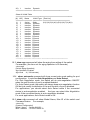
10.2 show 1qvlan command will show current 802.1Q VLAN status and
settings. (Note: 8/16 ports model supports 20 VLAN, and 24+2G model
supports 32 VLAN only)
Its syntax is . . .
>show 1qvlan
[802.1Q VLAN Configuration]
==========================================
802.1Q VLAN Function : Enabled
GVRP Protocol
: Disabled
PVID of Management port: 1
==========================================
=========================================================
Port PVID Port PVID Port PVID Port PVID
=========================================================
1
1
2
1
3
1
4
1
5
1
6
1
7
1
8
1
=========================================================
Show Static VLAN Table
=========================================================
[#) VID] Status
VLAN Type [Port List]
======== ======== ========== ===========================
1) 1
Active
Static
1(U),2(U),3(U),4(U),5(U),6(U),7(U),8(U)
2) 1
Inactive Dynamic
3) 1
Inactive Dynamic
4) 1
Inactive Dynamic
5) 1
Inactive Dynamic
6) 1
Inactive Dynamic
7) 1
Inactive Dynamic
8) 1
Inactive Dynamic
9) 1
Inactive Dynamic
10) 1
Inactive Dynamic
11) 1
Inactive Dynamic
12) 1
Inactive Dynamic
13) 1
Inactive Dynamic
14) 1
Inactive Dynamic
15) 1
Inactive Dynamic
16) 1
Inactive Dynamic
17) 1
Inactive Dynamic
18) 1
Inactive Dynamic
19) 1
Inactive Dynamic
32
20) 1
Inactive Dynamic
======== ======== ========== ==========================
Show All VLAN Table
=========================================================
[#) VID] Status
VLAN Type [Port List]
======== ======== ========== ===========================
1) 1
Active
Static
1(U),2(U),3(U),4(U),5(U),6(U),7(U),8(U)
2) 1
Inactive Dynamic
3) 1
Inactive Dynamic
4) 1
Inactive Dynamic
5) 1
Inactive Dynamic
6) 1
Inactive Dynamic
7) 1
Inactive Dynamic
8) 1
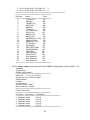
Inactive Dynamic
9) 1
Inactive Dynamic
10) 1
Inactive Dynamic
11) 1
Inactive Dynamic
12) 1
Inactive Dynamic
13) 1
Inactive Dynamic
14) 1
Inactive Dynamic
15) 1
Inactive Dynamic
16) 1
Inactive Dynamic
17) 1
Inactive Dynamic
18) 1
Inactive Dynamic
19) 1
Inactive Dynamic
20) 1
Inactive Dynamic
======== ======== ========== ===========================
10.3 show age command will show the aging time setting of the switch.
For example, (the time unit for aging operation is 55 seconds)
>show age
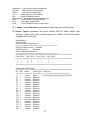
[Switch Aging Operation]
Age Operation: Enabled
Age Level : 6 ( 330 seconds )
10.4 show automode command will show current auto mode setting for port
configuration. It could be Auto Negotiation and Auto Detect.
For Auto Negotiation mode, the switch will do auto-negotiation ON/OFF
when the auto function of port is enabled/disabled.
For Auto Detect mode, the switch will always keep auto-negotiation function
ON but just modify its attribution if the auto function of port is disabled.
For applications, you should select Auto Detect mode if the connected
device is auto-negotiation enabled. And you can select Auto Negotiation
mode if the connected device is auto-negotiation disabled.
For most applications, Auto Detect mode is OK.
10.5 show cfg command will show Model Name, Mac ID of the switch and
Firmware version. For example,
>show cfg
[System Configuration]
Model Name : Switch 0800i-EL
MAC Address : 00:C0:F6:64:99:79
33
Firmware Version: 0.00.14
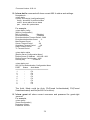
10.6 show dot1x command will show current 802.1x status and settings.
Its syntax is . . .
>show dot1x
Syntax: show dot1x [config|radius|port]
config : show 802.1x protocol status
radius : show radius server status
port : show ALL ports status
For example,
>show dot1x config
[802.1x Configuration]
802.1x Protocol
: Disabled
Re-authentication
: Disabled
Re-authentication Timeout Period : 3600
Re-authentication Max Count
:2
Max Request Count
:2
Server Timeout Period
: 30
Supplicant Timeout Period
: 30
Quiet Timeout Period
: 60
Tx Timeout Period
: 30
>show dot1x radius
[Redius Server Configuration Menu]
Redius Server IP Address : 192.168.1.222
Redius Server Port Number : 1812
Security Key
: 12345678
>show dot1x port
802.1X Port Authentication Configuration Menu
PORT
Status
Auth.Mode
=================================
1
FA
2
FA
3
FA
4
FA
5
FA
6
FA
7
FA
8
FA
The Auth. Mode could be Auto, FA(Forced Authenticated), FU(Forced
Unauthenticated) and No(No 802.1x function).
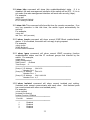
10.7 show guest will show current username and password for guest-right
account.
For example,
>show guest
[Guest configuration]
Username: guest
Password: 123456
34
10.8 show http command will show http enable/disable/ssl state. If it is
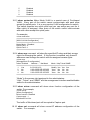
disabled, the web management interface of the switch will be OFF. If it is in
ssl mode, the web management interface will work with security (https).
For example,
>show http
[HTTP Protocol Setting]
HTTP Setting: Enabled
10.9 show idle This command will show idle time for console connection. If no
any key operation in this idle time, the switch logout automatically for
security.
For example,
>show idle
Idle Time : 600 (seconds)
10.10 show icmpb command will show current ICMP Block enable/disable
status. If it is enabled, the switch will not reply to ping request.
For example,
>show icmpb
[ICMP Blocking]
Current Status: Disabled
10.11 show igmp command will show current IGMP snooping function
enable/disable status and the IP multicast groups that learned by the
switch. For example,
>show igmp
[IGMP Configuration]
IGMP Switch : Enabled
Total Groups : 3
========================================================
[Group 1] IP Address : 224.0.0.9
Member Port : 1
[Group 2] IP Address : 224.0.0.2
Member Port : 1
[Group 3] IP Address : 224.2.188.136
Member Port : 4,5
========================================================
10.12 show isolated command will show current isolated port setting.
(Isolated ports cannot communicate with each other. And isolated ports
can communicate with other non-isolated ports.)
For example,
>show isolated
[Isolated Port Setting]
Isolated Function: Disabled
===================================
Port NO.
Isolated
===================================
1
Disabled
2
Disabled
3
Disabled
4
Disabled
35
5
Disabled
6
Disabled
7
Disabled
8
Disabled
===================================
10.13 show metrovlan Metro Mode VLAN is a special case of Port-based
VLAN. Every port of the switch cannot communicate with each other
except the uplink ports. It is a very popular VLAN configuration for switch.
The switch supports two uplink ports and you can assign any port for it.
After uplink is assigned, other ports of the switch cannot communicate
with each other except the uplink ports.
For example,
>show metrovlan
===========================
[802.1Q VLAN Configuration]
===========================
Metro Mode : Disabled
Uplink Port 1: 8
Uplink Port 2: 1
===========================
10.14 show mgr command will show the specified IP setup and their access
rights for managing the switch. If this function is enabled, only these IP
addresses can manage the switch with the assigned access rights.
>show mgr
[Management IP configuration]
Index Enabled
Address / Net Mask
Mode Http Telnet SNMP
===========================================================
1
Yes
0.0.0.0/0.0.0.0
Modify Yes Yes Yes
2
No
0.0.0.0/255.255.255.255
View No No No
3
No
0.0.0.0/255.255.255.255
View No No No
4
No
0.0.0.0/255.255.255.255
View No No No
===========================================================
“Mode” is the access right assigned to the administrators.
“Http”, “Telnet”, and “SNMP” are the management interface enable/disable
status for the administrators.
10.15 show mirror command will show mirror function configuration of the
switch. For example,
>show mirror
[Mirror Configuration]
Mirror function: Disabled
Capture port : 1
Monitored Port List:
The traffic of Monitored port will be copied to Capture port.
10.16 show net command will show current IP address configuration of the
switch. For example,
36
>show net
[eth0] Network Configuration:
DHCP
: DISABLE
IP Address: 192.168.1.12
Netmask : 255.255.255.0
Gateway : 192.168.1.2
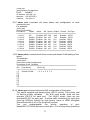
10.17 show port command will show status and configuration of each
connection port.
For example,
>show port
[Port Configuration]
Port Name
Status Admin AN Speed Duplex Flowctrl PortType
============================================================
1 Port 1
UP
Enabled OFF 100
Half
Enabled 100TX
2 Port 2
DOWN Enabled ON 100
Full
Enabled 100TX
3 Port 3
DOWN Enabled ON 100
Full
Enabled 100TX
4 Port 4
DOWN Enabled ON 100
Full
Enabled 100TX
5 Port 5
DOWN Enabled ON 100
Full
Enabled 100TX
6 Port 6
DOWN Enabled ON 100
Full
Enabled 100TX
7 Port 7
DOWN Enabled ON 100
Full
Enabled 100TX
8 Port 8
DOWN Enabled ON 100
Full
Enabled 100TX
============================================================
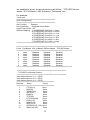
10.18 show pvlan command will show current port-based VLAN setting of the
switch.
For example,
>show pvlan
[Port-based VLAN Configuration]
Port-based VLAN : Disabled
============================================================
[ID] [Vlan Name]
[Port List]
==== =============== =======================================
[ 1]
Default PVLAN
1 2 3 4 5 6 7 8
[ 2]
[ 3]
[ 4]
[ 5]
[ 6]
[ 7]
[ 8]
============================================================
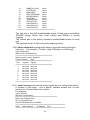
10.19 show qos command will show QoS configuration of the switch.
This switch supports port-based priority, 802.1P priority, ToS priority, and
L4 Service priority operation.
For 8/16 ports model, there are four
priorities (P0~P3) for each port. For 24+2G model, there are two
priorities(P0~P1) for each port. And the traffic scheduling for each port
could be SP(Strict Priority) for high priority queue or WRR (Weighted
Round Robin with 4:3:2:1) for the priority queues.
You
can
enable/disable
the
priority
operation
of
portbased/802.1P/ToS/L4-Service on each port. If all of the priority operations
37
are enabled for a port, the priority decision will follow – “TCP/UDP Servicebased > IP ToS-based > 802.1p-based > Port-based” rule.
For example,
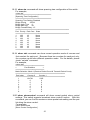
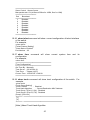
>show qos
=======================================
[QoS Configuration]
=======================================
Qos Function
: Disabled
Qos Scheduling : Weighted Round Robin
Smart Flow Control : Off
Diff/Serv Mapping : 1) CODEPOINT 6'b001010 => None
2) CODEPOINT 6'b010010 => None
3) CODEPOINT 6'b011010 => Low
4) CODEPOINT 6'b100010 => Low
5) CODEPOINT 6'b101110 => Mid
6) CODEPOINT 6'b110000 => Mid
7) CODEPOINT 6'b111000 => High
=======================================
========================================================
Port# Port Based 802.1p Based DiffServ Based TCP/UDP Based
========================================================
1
None
Disabled
Disabled
Disabled
2
None
Disabled
Disabled
Disabled
3
None
Disabled
Disabled
Disabled
4
None
Disabled
Disabled
Disabled
5
None
Disabled
Disabled
Disabled
6
None
Disabled
Disabled
Disabled
7
None
Disabled
Disabled
Disabled
8
None
Disabled
Disabled
Disabled
========================================================
==================================================
* TCP/UDP Port Number Setting
*
==================================================
User defined Service 1: 0 ~ 65535
User defined Service 2: 0 ~ 65535
User defined Service 3: 0 ~ 65535
======================================
Service#
Name
Priority
======================================
1
FTP(20,21)
None
2
SSH(22)
None
3
TELNET(23)
None
4
SMTP(25)
None
5
DNS(53)
None
6
TFTP(69)
None
7
HTTP(80,8080)
None
8
POP3(110)
None
9
NEWS(119)
None
10
SNTP(123)
None
11
NETBIOS(137~139) None
12
IMAP(143,220)
None
38
13
SNMP(161,162)
None
14
HTTPS(443)
None
15
MSN(1863)
None
16
XRD_RDP(3389)
None
17
QQ(4000,8000)
None
18
ICQ(5190)
None
19
YAHOO(5050)
None
20
DHCP(67,68)
None
21
User Defined 1
None
22
User Defined 2
None
23
User Defined 3
None
======================================
The first part is the QoS enable/disable status, Priority queue scheduling
SP/WRR setting, Smart Flow Contrl setting, and DiffServ to priority
mapping.
The second part is the priority operations enable/disable status on each
port.
The third part is the L4 Services priority mapping setting.
10.20 show ratecontrol command will show current rate control setting for
each port. For example, (Throttle - High:512K/step, Low:32K/step)
>show ratecontrol
[Rate Control Configuration]
=====================================
Rate Control Function: Disabled
Current Throttle : High
=====================================
Port
Ingress Egress
=====================================
1
No Limit No Limit
2
No Limit No Limit
3
No Limit No Limit
4
No Limit No Limit
5
No Limit No Limit
6
No Limit No Limit
7
No Limit No Limit
8
No Limit No Limit
=====================================
10.21 show security command will show current security setting of the switch.
It consists of two parts - one is Mac/IP Address access limit on port,
another is L4 Service filter-out by switch.
For example ...
>show security
[Security Configuration]
==========================================
MAC Limit Enabled Ports :
IP Limit Enabled Ports :
Filter-Out Enabled Ports: Disabled
==================================================
Index
MAC Address
IP Address Port
==================================================
39
1 00-11-22-33-44-55 192.168.1.10
3
2 00-11-22-33-44-66 192.168.1.22
4
==================================================
====================================
Service#
Name
Filter
====================================
1
FTP(20,21)
Off
2
SSH(22)
Off
3
TELNET(23)
Off
4
SMTP(25)
Off
5
DNS(53)
Off
6
TFTP(69)
Off
7
HTTP(80,8080)
Off
8
POP3(110)
Off
9
NEWS(119)
Off
10
SNTP(123)
Off
11
NETBIOS(137~139) Off
12
IMAP(143,220)
Off
13
SNMP(161,162)
Off
14
HTTPS(443)
Off
15
MSN(1863)
Off
16
XRD_RDP(3389)
Off
17
QQ(4000,8000)
Off
18
ICQ(5190)
Off
19
YAHOO(5050)
Off
20
DHCP(67,68)
Off
21
User Defined 1
Off
22
User Defined 2
Off
23
User Defined 3
Off
====================================
10.22 show snmp command will show SNMP configuration of the switch. For
example,
>show snmp
[SNMP Configuration]
===================================
Object ID : 1.3.6.1.4.1.655.50.1
System up Time: 5438 (seconds)
System Name :
Location
:
Contact name :
Get Community : public
Set Community : private
===================================
[Trap Community]
===================================
ID Status Community IP Address
=============================================
1 Disabled public
0.0.0.0
2 Disabled public
0.0.0.0
3 Disabled public
0.0.0.0
4 Disabled public
0.0.0.0
5 Disabled public
0.0.0.0
=============================================
40
10.23 show sta command will show spanning tree configuration of the switch.
For example,
>show sta
====================================
[Spanning Tree Configuration]
====================================
Spanning Tree Setting: Disabled
Bridge Priority
: 32768
Bridge Hello Time : 2
Bridge Max Age
: 20
Bridge Forward Delay : 15
======================================================
Port Priority Path Cost State
======================================================
1
128
19
None
2
128
19
None
3
128
19
None
4
128
19
None
5
128
19
None
6
128
19
None
7
128
19
None
8
128
19
None
======================================================
10.24 show stat command can show current operation mode of couners and
their content for each port. Because there two counters for each port only,
the counters could have different operation mode. For the details, please
check “set stat” command.
For example,
>show stat
=============================
=
Port Statistics
=
=============================
Mode Selection: Mode 1 (Receive Packet Count & Transmit Packet Count)
==================================================
Port Index
Counter 0
Counter 1
==================================================
1
191791
2325
2
0
0
3
0
0
4
0
0
5
0
0
6
0
0
7
0
0
8
0
0
10.25 show stormcontrol command will show current packet storm control
settings. This switch supports broadcast storm control function. With this
command, you can find the maximum storm packet rate setting and the port
list doing the storm control.
For example,
>show stormcontrol
[Storm Control Configuration]
41
=============================
Storm Control : None of ports.
Max packet rate: 63 (at interval 500us for 100M, 5ms fro 10M)
=====================
Port
Broadcast
=====================
1
Disabled
2
Disabled
3
Disabled
4
Disabled
5
Disabled
6
Disabled
7
Disabled
8
Disabled
=====================
10.26 show telnet command will show current configuration of telnet interface
of the switch.
For example,
>show telnet
[Telnet Protocol Setting]
Telnet Status: Enabled
Port Number : 23
10.27 show time
configuration.
For example,
command will show current system time and its
>show time
====================================
[Time Configuration]
====================================
Get Time By : Manually
Time Server : 192.43.244.18
Time Zone : Taiwan(+8)(57)
Current Time : 1970/01/01-11:48:08
====================================
10.28 show trunk command will show trunk configuration of the switch. For
example,
>show trunk
[Trunk Group Setting]
Trunk Function
: Disabled
Trunk Hash Algorithm
: Source/Destination MAC Address.
Trunk Group 1 (Port 1,2,3,4): Disabled
Trunk Group 2 (Port 5,6,7,8): Disabled
[Group] [Port List]
======= =======================================
[1]
[2]
======= =======================================
[Note:] About Trunk Hash Algorithm
42
It could be Port ID, Source Mac Address, Destination Mac Address, and
Source/Destination Mac Address. Because a trunk consists of several
connection cables between switches, this algorithm will decide the traffic
distribution between these cables. And it is done by hash algorithm with the
keys - Port ID, Source Mac Address, Destination Mac Address, or
Source/Destination Mac Address. SA+DA is used for most cases.
11. Upgrade command
This switch supports firmware or configuration upgrade with TFTP protocol. This
command is used to upgrade firmware or configuration to the switch.
Its syntax is . . .
>upgrade
Syntax: upgrade [firmware | config] ip filename
ip is the IP address of TFTP server.
filename is the upgrade file name in the TFTP server.
For example, “upgrade config 192.168.1.80 abcd” command will load file “abcd”
from TFTP server 192.168.1.80 as its configuration setting.
12. Whoami command
This command can show current login user name. It could be username for
administrator or guest.
For example,
>whoami
Current USER: admin
43
6.3 Management with Http Connection
Users can manage the switch with Http Web Browser connection. Before http
connection, IP address configuration of the switch should be done first.
Please follow the instruction in Section 6.2 to complete the console connection
and use “show net” command to check IP address of the switch first. If users
want to change the IP address of the switch, use “set net ip xxx.xxx.xxx.xxx
netmask xxx.xxx.xxx.xxx gateway xxx.xxx.xxx.xxx” command to modify the IP
address of the switch. The default IP configuration is 192.168.1.5 and mask
255.255.255.0.
After IP address configuration done and the switch is connected to network, users
can start Http connection by entering IP address of the switch to the web address
line in Web Browser.
A login screen will be prompted for user name and
password. The default user name and password is "admin" / ”123456”. Then the
management homepage will appear.
Left part of the homepage is a function list. Users can select one of them for
status monitoring or switch configuration.
Upper part of the homepage is the link status of the switch. Three different
colors are used to show different status of ports – Link Up, Link Down and Port
Disable.
Middle part of homepage is the main operation area for each function. For
some functions, there are sub-functions listed at top of this part.
The details about management with http connection will be shown in the following
sub-sections.
44
1. System Configuration
“System Configuration” is the homepage of the switch. And there are five subfunctions listed at top of this page.
1). System Info.
This function list the system information about the switch. You can find the
firmware version, Mac address, connection port number, maximum VLAN group
number, and maximum IGMP group number here.
You can configure aging operation of the switch – enable/disable and the
aging time for the switch.
2). Networking
This function is used to setup the IP configuration of the switch.
45
You can enable DHCP client function to get IP configuration from DHCP server
automatically.
Or, disable DHCP client function and set IP configuration
manually.
3). Time Setting
There two ways to get the system time.
a). Get time from Time Server
This switch support NTP protocol to get time from Internet time server. For such
application, you have to select “Get Time by Time Server”, input the IP of Time
Server, and select the Time Zone of your location. Then click [Apply]
If time is got from Time Server, it will be shown at “Current Time”.
For such application, you have get the IP of Time Server from your network
administrator first.
b). Set time manually
This switch can count time internal. You can select “Get Time by Manually”, and
input current time manually. Then click [Apply].
4). Telnetd Configuration
46
With this function, you can enable/disable telnet function of the switch.
change its service port for security request.
And
5). SNMP Config
Users can configure SNMP function here.
Setup the System Name, Location, and Contact information of the switch.
And configure GET/SET/Trap Community Name and the IP address for trap
operation. Then users can manage this switch with these settings from SNMP
management program.
47
2. Admin. Configuration
This function is used to configure administrator’s username/password and
security settings.
ICMP Blocking : This option is used to deny any ICMP request from network to
prevent any attacking.
If it is enabled, the switch will not reply any ICMP
request – including “ping” request.
Administrator Configuration : This is for network administrator to change
his/her username and password. (Default is admin/123456.)
Guest Configuration : This is used to setup the username/password of guestright user who can just view the setting of the switch.
Management IP Configuration:
This is used to setup the IP addresses that can manage this switch. They have
different access rights set in “Mode”. And the remote management interfaces
(Http, Telnet, SNMP) could be enable/disable for different administrators. This is
for security of the switch.
48
3. Rapid Spanning Tree
Spanning Protocol can prevent traffic looping in network. It can be configured for
switch unit (bridge) and port unit. If spanning tree function is enabled, any link
down to link up will have several seconds delay for the port going to forwarding
state.
1). Bridge Setting
These are the parameters for Spanning Tree operation on the switch.
Enable/Disable : enable/disable spanning tree operation
Bridge Priority (0~65535) : Bridge priority is for selecting the root device, root
port, and designated port. The device with the highest priority (lowest value)
becomes the STA root device. If all devices have the same priority, the device
with the lowest MAC address will then become the root device.
Hello Time (0~65535) : the period to send the spanning tree maintenance packet
if the switch is the root of the spanning tree. Default is 2 seconds.
Forward Delay (4~30): the maximum waiting time before changing states (i.e.,
listening to learning to forwarding). This delay is required because every device
must receive information about topology changes before it starts to forward
frames. In addition, each port needs time to listen for conflicting information that
would make it return to a blocking state; otherwise, temporary data loops might
result.
Maximum Age (6~40) : the spanning tree aging time if no spanning tree
maintenance packet is received. It will cause the spanning tree to re-create.
Default is 20 seconds.
49
2). Port Setting
Bridge Port Number is the Ethernet port that will be configured.
Port Priority (0~255) : If the path cost for all ports on a switch are the same, the
port with the highest priority (lowest value) will be forwarded when looping
happens. If more than one port have the same highest priority, the port with
lowest port number will be forwarded.
Port State : It is current spanning tree operation state of the port.
Port Enable : enable/disable spanning tree function on the port.
Port Path Cost (1~65535) : It is used to determine the best path between devices
if looping happens. Lower values will be forwarded and should be assigned to
ports with fast connections. Higher values will be blocked and should be assigned
to ports with slow connections. The suggestion values are 100(50~600) for 10M,
19(10~60) for 100M and 4(3~10) for 1000M connections.
Port Designated Root : This will show the root bridge ID of this segment and its
bridge priority.
Port Designated Cost : This will show the path cost between the root port and
the designated port of the root bridge.
Port Designated Bridge : This will show the switch’s bridge ID and its bridge
priority setting.
Designated Port : This will show the port number and its port priority.
50
4. Port Configuration
This function is used to configure port settings of the switch. You can enable
/disable a port, set it to fixed 10M or 100M, ... and so on.
Auto Mode : User can select the auto function of connection port here.
For “Auto Negotiation” mode, the switch will do port auto-negotiation function
ON/OFF when the auto function of port (in Port Configuration setting) is
enabled/disabled.
For “Auto Detect” mode, the switch will always keep port auto-negotiation function
ON but just modify its attribution if auto function of port (in Port Configuration
setting) is disabled.
For applications, you should select “Auto Detect” mode if the connected device is
auto-negotiation enabled. (For example, customer’s PC is auto-negotiation
enable and you want to set his network connection to work at 10Mbps.)
And you can select “Auto Negotiation” mode if the connected device is autonegotiation disabled (it is called forced mode, sometimes). Some of old TX-FX
Converters needs to work in this mode because FX supports 100/Full forced
mode only.
For most applications, “Auto Detect” mode is OK.
Port Setting : It is for modifying the setting of port. Follow the steps to do it.
1.
Select the port that you want to modify in “Port Number” first.
51
2.
3.
4.
5.
6.
7.
Fill the name of the port.
Select Enable/Disable state in “Admin”. If Disable is selected, this port will be
disabled for any network access.
Select the Enable/Disable state of Auto function of port. The auto mode
could be auto-negotiation or auto-detect operation
Select the operation speed and duplex mode of the port if Auto is disabled in
“Speed” and “Duplex”.
Select the Enable/Disable state of Flow Control function of port.
Click [Apply] after any modification.
Current Configuration : It is current status of ports.
Name: The name of the port.
Link: It shows the link status of each port.
Admin: It shows current port enable/disable status.
Auto: It shows current Auto enable/disable status of ports.
Speed: It shows the operation speed when auto is disabled.
Duplex: It shows the operation duplex mode when auto is disabled.
Flow Control: It shows current Flow Control function status of ports.
Note: If 100FX port, only 100Mbps/Full Duplex setting is allowed (Auto disable).
52
5. Security Function
This page is used to setup the security functions of the switch - they are Mac/IP
Access Limit, L4 Service Filter-out, and 802.1x authentication functions.
1). Mac/IP Security
This switch supports Mac/IP binding function on port for security request.
Follow the steps to complete the setting.
a. Add static entries to the learning table in [Add Static Entry] ...
1). Select Port
2). Select Mac or IP address, or both
3). Enter the Mac/IP address
4). Click [Apply]
5). Repeat Step 1)~4) to add more entries.
You can see new entries adding in [Static Entry List].
b. Enable Mac Limit / IP Limit on port ...
1). Mark “MAC Limit Enabled” / “IP Limit Enabled” for security ports.
2). You can mark one of them or both. That depends on your application. If
both Mac and IP Limit are marked, user must match both Mac and IP
addresses setting for network access.
3). If the limit function is not enabled, the switch will not start the security
function on ports.
Notes:24+2G model do not support IP Security function.
53
2). Layer4 Security
This switch can filter-out lots of popular network services.
function is done by blocking their default service ports.
And this filter-out
Follow the steps to do it.
a. At [Service Filter], mark those services that will be filter-out.
[Apply].
b. Enable the L4 Security function and click [Apply].
Then click
Note: There three User-Define services in the table. You can check the settings
of those User-Define services at “QoS Configuration”. They are defined in QoS
settings.
54
3). 802.1x Protocol
The 802.1x function can limit the port access for authentication users only. It
needs a RADIUS server for the authentication process and the switch acts as an
authenticator.
[Authentication Configuration]
The function here is for 802.1x function configuration.
1. 802.1x Authentication Status: [Enable/Disable/Transparent]
Enable: enable 802.1x function in authentication mode
Disable: disable 802.1x function
Transparent: only forwarding 802.1x packets
2. Re-authentication (enable/disable), Timeout Period and Max Count:
The re-authentication function will re-authenticate users after the timeout
period. The Max Count is the maximum re-try count between the switch and
users before authentication fail.
3. Max Request Count and Server Timeout Period:
The Server Timeout Period is the timeout period for the request between the
switch and RADIUS server.
The Max Request Count is the maximum re-try count between the switch and
RADIUS server before authentication fail.
4. Supplicant Timeout Period:
This is the timeout value between the switch and users (called “supplicant” in
802.1x) after first identification. The valid value is 0~65535.
5. Quiet Timeout Period:
This is the quiet time value between the switch and the user before next
authentication process when authentication fails.
6. Tx Timeout Period:
This is the timeout value for the identification request from the switch to
users. The request will be re-tried until the Re-authentication Max Count is
met. After that, authentication fail message will be sent. The valid value is
0~65535.
55
[Radius Server Configuration]
This function is for configuration between switch and RADIUS server. You can
assign the IP address of Radius Server, the protocol port number, and the
security key.
[Port Authentication Configuration]
The Port Authentication Configuration is used to select the authentication mode
for each port of the switch.
1. Auto: This is the normal 802.1x operation mode. The authentication status
(authenticated or unauthenticated) depends on the authentication result of port.
2. Force-Authorized: This mode will force the port always being authentication
successful in 802.1x process and the real authentication result will be ignored.
3. Force-Unauthorized: This mode will force the port always being authentication
fail in 802.1x process and the real authentication result will be ignored.
4. None: This mode will disable 802.1x operation on this port.
And you can see current 802.1x status on each port.
56
6. VirtualLAN Configuration
This switch supports 802.1Q VLAN, Port-based VLAN, and Metro Mode VLAN.
Isolated Ports function is also supported for Private VLAN application.
*Note: 8/16 ports models support 20 VLAN, and 24+2G model support 32 VLAN
only.
1). General Setting
VLAN Function : You can select the VLAN operation mode - 802.1Q VLAN, Portbased VLAN, or Metro Mode VLAN. (Metro Mode VLAN is a special case of Portbased VLAN. Every port cannot communicate with each other, except uplink
ports.
GVRP Protocol : This command is used to enable/disable the GVRP function for
802.1Q VLAN. If this function is enabled, this switch will learn the 802.1Q VLAN
from another 802.1Q network devices if it receives their packets. The learned
remote 802.1Q VLAN will be shown in the dynamic 802.1Q VLAN table.
Management Port VID : This command is used to setup the VLAN ID for the
remote management interface of the switch. Only users in the selected VLAN can
manage the switch by Http, Telnet and SNMP. For example, setting it to “5” will
allow the users in the VLAN with VLAN ID 5 to manage the switch remotely.
57
2). PVID Setting
PVID is used to set Port VLAN ID. When untagged packet is received, PVID of
the port will be used as the its VLAN ID. PVID is also used as the VLAN ID for
tag adding when untagged packet is translated to tagged packet.
3). 802.1Q Static VLAN
You can create 802.1Q Static VLAN here.
58
Create an 802.1Q VLAN:
1. Input the VLAN ID and VLAN Name in “Create New Static VLAN”. Click
[Create] to create the VLAN. The valid VLAN ID is 1 ~ 4094.
2. Select the VLAN in “Show Static VLAN Table”. The new VLAN is empty by
default. You can select the ports for the VLAN and tagged/untagged for
them. After that, click [Apply] to complete the VLAN configuration.
Modify an 802.1Q VLAN:
1. Select the VLAN in “Show Static VLAN Table”.
2. Modify its setting and click [Apply] to activate the new setting.
Delete an 802.1Q VLAN:
1. Select the VLAN in “Show Static VLAN Table”.
2. Click [Delete] to delete the 802.1Q VLAN.
About Tagged/Untagged
The tagged port will always send out packets with tag. If untagged packet is
received, tag will be added with the PVID setting of ingress port before forwarded
to tagged port. The 802.1Q VLAN information will be carried in the tag.
The untagged port will always send out packets without tag. If tagged packet is
received, tag will be removed from the packet before forwarded to untagged port.
4). 802.1Q Dynamic VLAN
This table will show the activity of 802.1Q VLAN.
802.1Q VLAN will be shown in the table.
Follow the steps to show the 802.1Q VLAN.
1. Select a VLAN in “Show VLAN Table”.
59
Both static and dynamic
2.
The 802.1Q VLAN activity status will be shown for the selected VLAN.
If GVRP protocol is enabled, this table will also show the learned remote 802.1Q
VLAN.
5). Port-based VLAN
This web page is for you to configure port-based VLAN.
[VLAN Create/Modify]
You can create/modify a Port-based VLAN with the following steps.
a. Select the VLAN ID number.
b. Enter the Name for the VLAN.
c. Select the ports for the VLAN. (You can click [Select All] to select all ports or
click [Remove All] to remove all ports from the VLAN.)
d. Click [Apply] to activate it.
You can see current Port-based VLAN settings in the table.
60
6). Metro Mode VLAN
Metro Mode VLAN is a special case of Port-based VLAN. Every port of the switch
cannot communicate with each other except the uplink ports. It is a very popular
VLAN configuration for switch.
The switch supports two uplink ports and you can assign any port for it. After
uplink is assigned, other ports of the switch cannot communicate with each other
except the uplink ports.
7). Isolated Ports
The Isolated Ports function can isolate the traffic between these isolated ports.
For example, Port 1,2,3 are marked as isolated ports.
So the traffic between
Port 1,2,3 will be blocked, even they are in the same VLAN. But they still can
communicate with other non-isolated ports in the same VLAN. This function is
for security application of network like Private VLAN.
Select the ports that will be isolated from each other and click [Apply].
61
7. Trunk
This switch supports two trunk connections and they are null by default. If users
want to use trunk function, follow the steps to configure it.
1.
2.
3.
4.
Select Enable in “Trunk Function” and click [Apply] to enable the function.
Enable Trunk Group 1 or Trunk Group 2 (Trunk Group 1 allows Port 1~4,
Trunk Group 2 allows Port 5~8).
If Trunk 1 or Trunk 2 is selected, you can select the ports for them. And click
[Apply] to activate it.
Connect Ethernet cables on those trunk ports.
If you want to disable trunk function, remove those trunk cables first.
disable it and click [Apply] button.
Then
About Trunk Hash Algorithm . . .
It could be Port ID, Source Mac Address, Destination Mac Address, and
Source/Destination Mac Address. Because a trunk consists of several connection
cables between switches, this algorithm will decide the traffic distribution between
these cables. And it is done by hash algorithm with the keys - Port ID, Source
Mac Address, Destination Mac Address, or Source/Destination Mac Address.
SA+DA is used for most cases.
About redundant application . . .
The trunk connection supports redundant function. If any trunk cable is broken,
the traffic going through that cable will be transferred to another trunk cable in the
trunk connection automatically.
62
8.
Mirror
Mirror function can copy the packets of monitored port to capture port for traffic
monitor on switch.
Follow the steps to configure Mirror function.
1. Select Enable in “Mirroring” and click [Apply] to enable the function.
2. Select the capture port. (The monitored traffic will be copied to this port.)
3. Select the monitored port
4. Click [Apply] button.
If you want to disable Mirror function, select Disable and click [Apply].
63
9. QoS Configuration
QoS (Quality of Service) is used to apply priority to network traffic forwarded by
the switch. Because more and more applications are serviced through network,
QoS function becomes more important.
This switch can apply priority by ingress port, 802.1P priority, IP ToS priority, and
L4 Services. Those priorities could be enable/disable on each port.
1). General Setting
QoS Function : This command can enable/disable QoS function of the switch.
QoS Scheduling : This command can set the traffic scheduling method between
priority queues. It could be SP(strict-priority) or WRR(weigh-round-robin). If SP,
the higher priority will always get bandwidth service before lower priority. If WRR,
the bandwidth is shared between priorities with 4:3:2:1 ratio.
Smart Flow Control : this function can enable/disable the Smart Flow Control
function. Flow Control can prevent packet loss, but it also cause high priority
packets cannot enter switch. It may need to disable flow control for QoS request.
This Smart Flow Control function can pause flow control function 1.5 seconds
temporary when it receive high priority packet. Then recover.
DiffServ to Priority Mapping : set the priority mapping of the seven DiffServ
values .. 001010(10)/ 010010(18)/ 011010(26)/ 100010(34)/ 101110(46)/
110000(48)/ 111000(56). And other DiffServ values get “None” priority.
64
2). Port Setting
This function is used to enable/disable those priority operations on each port.
Select a port at “Port Number” first.
Then enable/disable those priority
operations. Then click [Apply].
If more than one priorities are enabled and happen at the same time, the priority
decision will be made with the following order ...
TCP/UDP Service-based > DiffServ-based > 802.1p-based > Port-based
65
3). Service Setting
You can define the priority of those popular network applications here. And the
priority settings will be followed on those ports that enable “TCP/UDP Service
Based” in QoS-Port Setting.
Three user-defined services are allowed for the switch. And you can define them
in the following table.
66
10. Rate Control
This switch supports rate control of ingress/egress traffic on each port. And can
limit the bandwidth served on each port by this function.
There are two step sizes for the rate control function - 512Kbps/step for low
resolution, 32Kbps/step for high resolution. Before setting rate limit value, you
have to select the resolution first.
Follow the steps to setup this function.
a. Enable rate control function first. Then click [Apply].
b. Select the step size of rate resolution - low (512K/step), high (32K/step).
Then click [Apply]
c. Select a port.
d. Set its Ingress Rate Control value and Egress Rate Control value. Then click
[Apply].
e. You can see the rate control setting of each port in the table.
67
11. Storm Control
This switch supports broadcast storm control by limiting the packet rate at fixed
interval (500u second for 100M connection, 5m second for 10M connection).
The broadcast storm control function can be enabled by port.
Follow the steps to complete the setting.
a. Select Broadcast Control applied to “All” ports, “None” port, or “By Port”. If
“By Port” is selected, you need to enable broadcast control port by port.
b. Set the max packet rate allowed for broadcast.
c. If Broadcast Control is done by port, you can select a port and enable its
broadcast control function. Then click [Apply]
68
12. IGMP Snooping
If IGMP Snooping function is enabled, this switch can learn the IP multicast group
and serve for the multicast traffic request.
The IGMP function is for IP multicast operation in network. This switch can do
IGMP Snooping function to get the IP multicast group information from IGMP
active device. The learned IP multicast member group will be shown in the IGMP
web page. This switch will forward IP multicast traffic to these member ports that
it learned in the group information.
The IGMP snooping function can be enabled/disabled in this page
69
13. Statistics
This switch supports two statistic counters for each port. And the counters could
work with different modes. They could be ...
a. Receive Packet Count & Transmit Packet Count
b. Transmit Packet Count & Collision Count
c. Receive Packet Count & Drop Packet Count
d. Receive Packet Count & CRC error Packet Count
You can select the working mode of the counters at “Mode Selection”.
But
please note that, the counters will always be reset to “0” whenever their working
mode is changed.
The counters will be refreshed periodically. You can change the time interval at
“Refresh Time”.
70
14. Tools
Four functions are supported as the system maintenance tools.
a. System Reset
This function will cause the switch to reboot itself.
b. System Restore Factory Default Setting
This function will restore the switch configuration to factory default setting.
c. System Backup/Restore
[Backup Setting to binary file] will backup the configuration of the switch to the
web management PC in binary format.
[Backup Setting to text file] will backup the configuration of the switch to the web
management PC in text format for offline editing.
[Restore Setting] will get the configuration backup file from the web management
PC and restore it to the switch.
d. Firmware Upgrade
This function will upgrade the system operation software from the web
management PC.
71
6.4 About Telnet Interface
If you want to use Telnet to manage the switch from remote site, you have to set
the IP/Mask/Gateway address to the switch first from console. Then use "telnet
<IP>" command in DOS. Its operation interface is the same as console interface.
6.5 About SNMP Interface
If you want to use NMS to manage the switch from remote site, you have to set
the IP/Mask/Gateway address to the switch and configure the SNMP setting of
the switch from console first. Then you can use SNMP management program to
manage this switch.
This switch supports SNMP agent function and MIB II(Interface), Bridge MIB,
Etherlike MIB and Private MIB. The default GET community name is “public” and
SET community name is “private”.
This switch supports up to five trap receivers with different trap community
names.
72
7. Software Update and Backup
This switch supports software update and configuration backup/update/restore
functions. It could be done in three ways.
1. From console when booting: by Xmodem protocol and doing by terminal
program. This function can be used for run-time code and boot code updating.
(Boot code works only at boot time - before the main program starts.)
Press Ctrl-C when the switch is booting, the following message will be shown.
Boot Menu
===========================
0: Start the Run-time code
1: Upgrade Run-time code
2: Upgrade Boot Code
=> Select:
a. Start Run-time code : This option will continue the booting process.
b. Upgrade Run-time code : This option will try to update run-time code (main
code) from terminal program with Xmodem protocol. If this option is selected,
the following message will be shown.
“Waiting to receive file by Xmodem ....”
Then user can select “Send File” function of terminal program and select
Xmodem protocol and the update file, then start the file upgrade.
c. Upgrade Boot Code : This option will try to update boot code from terminal
program with Xmodem protocol. User can select “Send File” function of
terminal program and select Xmodem protocol and the update file, then start
the file upgrade.
2. From console/Telnet when running: Doing by TFTP protocol and it will need
a TFTP server in network. Please refer to the description of “Upgrade” function
in console operation in Section 6.2.
3. From web browser: Doing by http protocol and by web browser. Please refer
to the description of “Tools” function in Section 6.3.
73
A. Product Specifications
[ 8*UTP Ports Model ]
Access Method
Ethernet , CSMA/CD
Standards Conformance IEEE 802.3 10BASE-T, IEEE 802.3u 100BASE-TX
Communication Rate
10/100Mbps, Full / Half duplex (auto-negotiation)
MDI/MDIX
Auto-detect for each port
Media Supported
10BASE-T - 100 Ohm Category 3,4,5 twisted-pair
100BASE-TX - 100 Ohm Category 5 twisted-pair
Indicator Panel
LEDs for each unit : Power,
each port : Link/Act, 100M, FDX
Number of Ports
8* RJ45 TX ports
Dimensions
250 x 117 x 37 mm
Certification
CE Mark, FCC Class A
Temperature
Standard Operating: 0 to 50℃
Humidity
10% to 90% (Non-condensing)
Bridging Function
Switching Method
Address Table
Filtering/Forwarding Rate
Flow Control
Filtering, forwarding and learning
Store-and-forward
4K entries
Line speed
802.3x for full duplex, backpressure for half duplex
VLAN
Isolated Ports
QoS
802.1Q VLAN, Port-based VLAN, Metro VLAN
Yes
4 transmit priorities per ports, for port-based/802.1P
tagged-based/DiffServ/L4 Service priority operation
Spanning Tree
Support IEEE 802.1w RSTP protocol
Trunking
2 groups max.
Mirror Port
Yes
SNMP
Ver 1, Ver 2c, Supports MIB II(Interface), Bridge
MIB, Etherlike MIB, Private MIB
Static Mac/IP ID Access Limit Static Mac/IP address access limit on port
802.1x
Yes, support Authentication and Transparent modes
Applications Filtering
Yes, based on L4 Service Ports
Rate Control
Yes, 32Kbps~100Mbps, for ingress/egress traffic
Storm Control
Broadcast Storm Control with packet rate limit
IGMP
Yes, IGMP snooping function
Admin Manage Limit
Yes, by IP/Subnet/Interface limit
Out-band Management
Console
In-band Management
Telnet, http, SNMP
Software Update/Backup by TFTP protocol, Xmodem, for firmware/
configuration
74
[ 16+1FX Ports Model ]
Access Method
Ethernet , CSMA/CD
Standards Conformance IEEE 802.3 10BASE-T, IEEE 802.3u 100BASE
Communication Rate
10/100Mbps, Full / Half duplex (auto-negotiation)
MDI/MDIX
Auto-detect for each port
Media Supported
10BASE-T - 100 Ohm Category 3,4,5 twisted-pair
100BASE-TX - 100 Ohm Category 5 twisted-pair
Indicator Panel
LEDs for each unit : Power,
each port : Link/Act(/Speed), FDX
Number of Ports
16* RJ45 TX ports, 1* 100FX module slot (Port 16)
Dimensions
430W x 105D x 44H mm
Certification
CE Mark, FCC Class A
Temperature
Standard Operating: 0 to 50℃
Humidity
10% to 90% (Non-condensing)
Bridging Function
Switching Method
Address Table
Filtering/Forwarding Rate
Flow Control
Filtering, forwarding and learning
Store-and-forward
4K entries
Line speed
802.3x for full duplex, backpressure for half duplex
VLAN
Isolated Ports
QoS
802.1Q VLAN, Port-based VLAN, Metro VLAN
Yes
4 transmit priorities per ports, for port-based/802.1P
tagged-based/DiffServ/L4 Service priority operation
Spanning Tree
Support IEEE 802.1w RSTP protocol
Trunking
2 groups max.
Mirror Port
Yes
SNMP
Ver 1, Ver 2c, Supports MIB II(Interface), Bridge
MIB, Etherlike MIB, Private MIB
Static Mac/IP ID Access Limit Static Mac/IP address access limit on port
802.1x
Yes, support Authentication and Transparent modes
Applications Filtering
Yes, based on L4 Service Ports
Rate Control
Yes, 32Kbps~100Mbps, for ingress/egress traffic
Storm Control
Broadcast Storm Control with packet rate limit
IGMP
Yes, IGMP snooping function
Admin Manage Limit
Yes, by IP/Subnet/Interface limit
Out-band Management
Console
In-band Management
Telnet, http, SNMP
Software Update/Backup by TFTP protocol, Xmodem, for firmware/
configuration
75
[ 24+2G Ports Model ]
Access Method
Standards Conformance
Indicator Panel
Number of Ports
Dimensions
Certification
Input Power
Temperature
Humidity
Ethernet, CSMA/CD
IEEE 802.3 10BASE-T, IEEE 802.3u 100BASE
IEEE 802.3z, IEEE 802.3ab (1000Base)
10/100/1000Mbps,
Full / Half duplex (auto-negotiation)
LEDs - each unit : Power/ each port : Link/Act
24* 10/100M TX ports, 2* gigabit RJ45/SFP ports
430W x 105D x 44H mm
CE Mark, FCC Class A
Full range: 100 to 240V, 50 to 60 Hz
Standard Operating: 0 to 50℃
10% to 90% (Non-condensing)
Bridging Function
Switching Method
Address Table
Filtering/Forwarding Rate
Flow Control
Filtering, forwarding and learning
Store-and-forward
4K entries
Line speed
802.3x for full duplex, backpressure for half duplex
Communication Rate
VLAN
Isolated Ports
QoS
802.1Q VLAN, Port-based VLAN, Metro VLAN
Yes
2 transmit priorities per ports, for port-based/802.1P
tagged-based/DiffServ/L4 Service priority operation
Spanning Tree
Support IEEE 802.1w RSTP protocol
Trunking
3 groups max.
Mirror Port
Yes
SNMP
Ver 1, Ver 2c, Supports MIB II(Interface), Bridge
MIB, Etherlike MIB, Private MIB
Static Mac
Static Mac address access limit on port
802.1x
Yes, support Authentication and Transparent modes
Applications Filtering
Yes, based on L4 Service Ports
Rate Control
Yes, 32Kbps~100Mbps, for ingress/egress traffic
Storm Control
Broadcast Storm Control with packet rate limit
IGMP
Yes, IGMP snooping function
Admin Manage Limit
Yes, by IP/Subnet/Interface limit
Out-band Management
Console
In-band Management
Telnet, http, SNMP
Software Update/Backup by TFTP protocol, Xmodem, for firmware/
configuration
76
B. Compliances
EMI Certification
FCC Class A Certification (USA)
Warning: This equipment generates, uses, and can radiate radio frequency
energy and, if not installed and used in accordance with the instruction manual,
may cause interference to radio communications. It has been tested and found to
comply with the limits for a Class A digital device pursuant to Subpart B of Part 15
of FCC Rules, which are designed to provide reasonable protection against such
interference when operated in a commercial environment. Operation of this
equipment in a residential area is likely to cause interference, in which case the
user, at his own expense, will be required to take whatever measures are required
to correct the interference.
CE Mark Declaration of Conformance for EMI and Safety (EEC)
This is to certify that this product complies with ISO/IEC Guide 22 and EN45014.
It conforms to the following specifications:
EMC: EN55022(1988)/CISPR-22(1985) class A
EN60555-2(1995)
class A
EN60555-3
IEC1000-4-2(1995)
4kV CD, 8kV AD
IEC1000-4-3(1995)
3V/m
IEC1000-4-4(1995)
1kV - (power line), 0.5kV - (signal line)
This product complies with the requirements of the Low Voltage Directive
73/23/EEC and the EMC Directive 89/336/EEC.
Warning! Do not plug a phone jack connector in the RJ-45 port. This may
damage this device.
77
C. Warranty
We warrant to the original owner that the product delivered in this package will be
free from defects in material and workmanship for a period of warranty time from
the date of purchase from us or the authorized reseller. The warranty does not
cover the product if it is damaged in the process of being installed. We
recommend that you have the company from whom you purchased this product
install it.
78