1
i
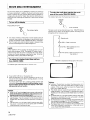
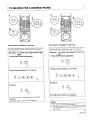
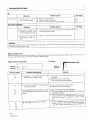
TO SEARCH FOR A DESIRED FRAME
................................
This function is available on LDs only.
This function is available on LDs only.
With a CAV (standard play) disc, the desired image can be searched
by specifying the frame number (refer to page 7 for definitions).
With a CLV (extended play) disc, a desired image can be searched
by specifying the time number (refer to page 7 for definitions).
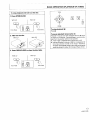
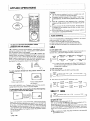
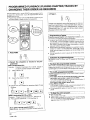
(Example)
To search the image at frame No.
1234:
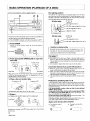
1. Press CHP/TM during playback.
(Example)
To search the image at 12 min, 34
sec.:
1. Press CHP/TM during playback.
CHP/TM
D%
CHP/TM
2. Press numeric buttons 1, 2, 3 and 4.
2. Press numeric buttons 1, 2, 3 and 4.
3. Press =.-.
3. Press _.
PLAY
PLAY
Still image of the specified
• Press I_ again to restart
time is displayed.
normal p_ayback.
The specified frame is searched and a still image is
displayed.
• Press • again to restart normal playback.
•
•
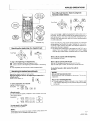
With a disc which does not contain time information
in seconds, specify
the time in minutes
(2 digits),
If the time number
or frame
number
specified
is greater
NOTES :
than
the
last number
on the disc,
the player
pauses
at the
1
end of the disc,
<VRB1148>