1
(Continued)
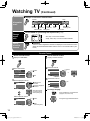
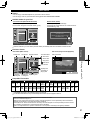
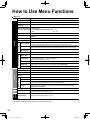
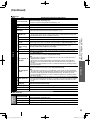
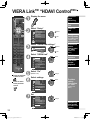
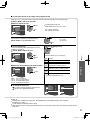
Menu list
Menu
Item
Channel surf mode
Language
Clock
ANT/Cable setup
Input labels
Power on link
Power off link
Energy saving
mode
Unselected
device energy
save
Default speakers
No signal for 10
minutes
No activity for 3
hours
Advanced
setup
Auto power on
Image viewer
auto play
First time setup
About
Reset to defaults
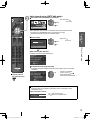
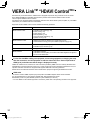
Adjusts the clock. (p. 14)
Sets channels. (p. 13)
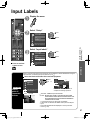
Selects the terminal and label of the external equipment. (p. 41)
Controls the equipment connected to HDMI terminals (Off/On) (p. 32)
“Power off link”, “Power on link”, “Energy saving mode”, “Unselected device energy save”
and “Default speakers” cannot be selected if “Off” is set.
Sets “Power on link” of the HDMI connected equipment (No/Yes) (p. 32)
•
Sets “Power off link” of the HDMI connected equipment (No/Yes) (p. 32)
Sets “Energy saving mode” of the HDMI connected equipment. (Quick start/Save) (p. 32)
Sets “Unselected device energy save” of the HDMI connected equipment. (p. 32)
(No (stay on)/Yes (with prompt)/Yes (no prompt))
Selects the default speakers (TV/Theater) (p. 32)
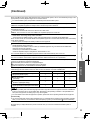
Reduces screen brightness to lower power consumption. Eye-friendly for viewing in a dark
room. (Standard/Saving)
To conserve energy, the TV automatically turns off when NO SIGNAL and NO OPERATION
continue for more than 10 minutes. (Stay on/Power TV off)
Note
Not in use when “Auto power on”, “On/Off Timer” or “Lock” is set, or while “SD mode” or
“Digital Channel” is selected.
“No signal for 10 minutes was activated” will be displayed for about 10 seconds when
the TV is turned on for the first time after the power was turned off by “No signal for 10
minutes”.
The on-screen display will flash 3, 2 and 1 to indicate the last three (3) remaining minutes
prior to the shut-off.
To conserve energy, the TV automatically turns off when no operation of remote and side
panel key continues for more than 3 hours. (Stay on/Power TV off)
Note
Not in use when “Auto power on” or “On/Off Timer” is set, or while “PC input” is selected.
“No activity for 3 hours was activated” will be displayed for about 10 seconds when the TV
is turned on for the first time after the power was turned off by “No activity for 3 hours”.
The on-screen display will flash 3, 2 and 1 to indicate the last three (3) remaining minutes
prior to the shut-off.
Turns TV On automatically when the cable box or a connected device is turned On (No/Yes)
TV AC cord must be plugged into this device. TV comes on every time the power is restored.
The “Sleep” timer, “On / Off timer”, and “First time setup” will not function if “Auto power on” is set.
(p. 42)
Set “Thumbnail” or “Slideshow” to play back SD cards automatically.
(Slideshow/Thumbnail/Set later/Off)
•
•
•
••
•
Advanced
ECO/energy saving
Setup
Power save
•
How to Use Menu Functions
(picture, sound quality, etc.)
VIERA Link settings
VIERA Link
Adjustments/Configurations (alternatives)
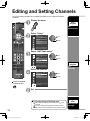
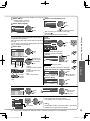
Sets the mode to select the channel with the Channel up/down button.
(All/Favorite/Digital only/Analog only)
Favorite: Only channels registered as FAVORITE. (p. 16)
Selects the screen menu language.
•
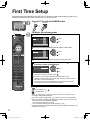
Restart first time setup from “Language” setting. (p. 12)
Displays TV version and software license.
Performing Reset will clear all items set with Setup, such as channel settings.
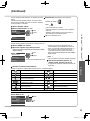
Sub menu list
Menu
Item
Setup
SUB MENU
Channel surf mode
Set favorite
Edit CH caption
Signal meter
Adjustments/Configurations (alternatives)
Sets the mode to select the channel with Channel up/down button.
(All/Favorite/Digital only/Analog only)
Sets favorite channels. (p. 16)
Changes the station identifier. (p. 39)
Checks the signal strength if interference or freezing occurs on a digital image.
29
tc_L22_x2_eng_0378-1.indb 29
2010/02/12 16:35:07