1
www.safetybasement.com
b. on/off
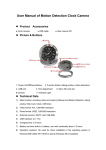
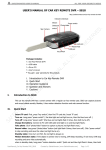
Hold down for a few seconds Power key (K1) to boot up the camera (both the green and
red light will flash). After the initialization the red light will turn off, a steady green light will
remain to enter the default camera allowing you to take pictures, mobile detection standby
mode.
To turn unit off, hold down for a few seconds the Power key (K1) to save the file and
shutdown (Lamps off three times while flashing).
c. mode change
The clock provides quick access to the mode functions:
d. video mode:
When the unit is turned off, insert the TF card (Figure 2), Hold down the power (K1) key for a
few seconds, the green and red light will flash for a few seconds then red light will turn off and
green steady light will remain. At this time the camera at the default camera mode, ready for
photo mode, motion detection mode state;
To enter VIDEO mode briefly press the Power key (K1). The green light will flash for about six
times then turn off. You are now in video camera.
briefly press " K2 "button to view the current working state. The green light will flash six times
then out;
short press" K1 "key, a prolonged green light, to save the file and stop the camera and return
to camera mode, camera mode, motion detection mode standby.
As a precautionary measure files will be saved every 30 minutes; then it will proceed to the
next section of the video recording.
e. photo mode
Insert TF card (Figure 2), turn on unit, after system initialization the unit will get into ready
mode;
short press K2 key to take photographs , green light flashes once and store a photograph
and return to the default camera mode. Repeat as needed to take photos.
f. Motion Detection
The unit has an outstanding home security functions: motion detection function, when
there movement in the view of the camera the unit will immediately begin to record,
recording every step of the moving object. Once the object leaves the cameras angle of
view the unit will automatically turn off to save disk space. This mode makes sure there is
no empty recording and wasted disk space.
To set unit in motion detection mode, first Insert TF card (Figure 2) and turn on the unit.
Once unit is initialized hold down for a few seconds the "K2" button. Both lights will flash
for a few seconds [about six flashes] then will turn off., at this time the camera will be
ready for the Motion Detection function.
Short press "K2" button to view the current working status, dual-lamp flashes six times
then out;
1-877-345-2336
Page 3