1
1
2
3
Table of Contents
Introduction......................................................................................................................................................................6
Types of Diesel Engine Fire Pump Controllers ..........................................................................................................6
Methods of starting/stopping ......................................................................................................................................6
Installation .......................................................................................................................................................................8
Location ......................................................................................................................................................................8
Mounting ....................................................................................................................................................................8
Wiring and Connections .............................................................................................................................................9
Water Connections.....................................................................................................................................................9
Electrical Wiring .........................................................................................................................................................9
Electrical Connections................................................................................................................................................9
Sizing..........................................................................................................................................................................9
Incoming Power Connections ....................................................................................................................................9
Circuit protection ........................................................................................................................................................9
Terminal Strips Descriptions ....................................................................................................................................10
Quick Start-Up Guide ...............................................................................................................................................11
Main Features ...............................................................................................................................................................20
The ViZiTouch ..........................................................................................................................................................20
Alarm bell .................................................................................................................................................................21
First Setup ................................................................................................................................................................21
Home .............................................................................................................................................................................22
Home ........................................................................................................................................................................22
Gauges Page ...........................................................................................................................................................25
Screen Saver ...........................................................................................................................................................25
Alarms ...........................................................................................................................................................................26
Alarms ......................................................................................................................................................................26
Configuration .................................................................................................................................................................30
Config .......................................................................................................................................................................30
NumPad Page ..........................................................................................................................................................31
Date and Time Page ................................................................................................................................................31
User Login Page / KeyPad Page .............................................................................................................................32
Advanced Configuration Page .................................................................................................................................33
Details of the Advanced Configuration Page ...........................................................................................................34
4
Timers Page .............................................................................................................................................................34
Inputs/Outputs Expansion board 1-2-3-4 .................................................................................................................35
Update Program Page .............................................................................................................................................36
Factory Settings .......................................................................................................................................................37
Reset to Factory Settings Page ...............................................................................................................................40
Service Page ............................................................................................................................................................41
New Pump Curve .....................................................................................................................................................42
Automatic Pump Curve Mode Disabled ...................................................................................................................43
The Sensors Pages..................................................................................................................................................44
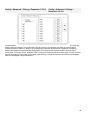
Details of the Debug Page .......................................................................................................................................48
Calibration ................................................................................................................................................................48
IO Debug ..................................................................................................................................................................48
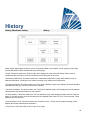
History ...........................................................................................................................................................................50
History ......................................................................................................................................................................50
Details of the History Page.......................................................................................................................................51
Events Page .............................................................................................................................................................51
Download to USB Device .........................................................................................................................................51
The Statistics ............................................................................................................................................................53
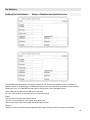
First/Last Service Statistics ......................................................................................................................................53
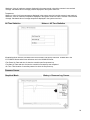
All Time Statistics .....................................................................................................................................................54
Pressure Curves ......................................................................................................................................................54
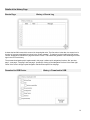
Graphical Mode ........................................................................................................................................................54
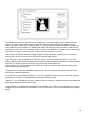
Textual Mode ...........................................................................................................................................................55
Power Curves ...........................................................................................................................................................56
Graphical Mode ........................................................................................................................................................56
Textual Mode ...........................................................................................................................................................57
Pump Curves ...........................................................................................................................................................58
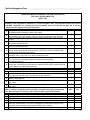
Technical Documents....................................................................................................................................................59
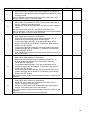
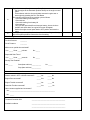
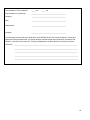
Pre-field Acceptance Test ........................................................................................................................................60
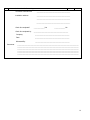
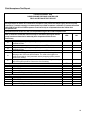
Field Acceptance Test Report ..................................................................................................................................62
5
Introduction
Diesel engine fire pump controllers are designed to automatically start a diesel engine driven fire pump upon
detection of a pressure drop in the fire protection system. A diesel engine fire pump controller provides automatic &
manual starting and stopping. An automatic start is controlled by a pressure transducer or by remote automatic
devices as deluge valve. A manual start is controlled by remote manual button or by controller pushbutton. The
automatic shutdown option provides a 30-minutes automatic stop after automatic start once all starting causes have
returned to normal. The diesel engine fire pump controller includes two battery chargers to maintain the engine
batteries continuously charged.
Types of Diesel Engine Fire Pump Controllers
FIRE PUMP CATALOGUE NUMBER
Model Prefix
Battery Voltage
Incoming Voltage
MODEL NO. EXAMPLE : GPD-12-120
GPD
12 : 12V
24 : 24V
120: 110/120V 50/60Hz
220: 208/240V 50/60Hz
Methods of starting/stopping
The controllers are available as combination automatic / non-automatic with provision for manual or automatic
shutdown (automatic shutdown only possible after automatic start)
METHODS OF STARTING
AUTOMATIC START
The controller will start automatically on low pressure detection by the pressure sensor when pressure drops below
the cut-in threshold. The controller must be in automatic mode.
MANUAL START
The engine can be started by pressing the CRANK 1 or and/or CRANK 2 push button, regardless of the system
pressure, when the Main Selector switch is in the HAND position. The Fuel Solenoid Valve will open as soon as a
CRANK button is pressed and will remain in this state.
REMOTE MANUAL START
The engine can be started from a remote location by momentarily closing a contact of a manual push button.
REMOTE AUTOMATIC START, DELUGE VALVE START
The engine can be started from a remote location by momentarily opening a contact connected to an automatic
device. The controller must be in automatic mode.
SEQUENTIAL START
In case of multiple pump application, it may be necessary to delay the starting of each motor in case of water
pressure drop to prevent simultaneous starting of all motors.
6
FLOW START, HIGH ZONE START
The controller can be started by opening/closing a contact on the FLOW/ZONE START/STOP input.
WEEKLY START
The engine can be started (and stopped) automatically at the preprogrammed time.
TEST START
The motor can be started automatically for a preprogrammed time by pressing the run test button.
METHODS OF STOPPING
MANUAL STOP
Manual stop is done by pressing the STOP push button. Note that pressing the stop push button will stop the
engine only if all starting causes have disappeared.
AUTOMATIC STOP
The automatic stop is possible only after an automatic start and this function must be activated. When this function
is enabled, the motor is automatically stopped 30 minutes after the restoration of the pressure (above the cut-out
threshold) given that no other run cause is present.
FLOW STOP, HIGH ZONE STOP
If the controller has been started by the FLOW/ZONE START/STOP input and that the signal has returned to
normal, the motor will be stopped given that no other run cause is present.
EMERGENCY STOP
The emergency stop is always possible in any running condition and is done by positioning the main selector switch
to the OFF position.
7
Installation
This diesel controller is UL listed, FM certified and CSA approved. The controller is built in accordance with the
latest edition of the National Fire Protection Association standard for the Installation of Centrifugal Fire Pumps,
NFPA No.20 (Centrifugal Fire Pumps 2010 Edition). The controller is intended to be installed in accordance to
NFPA 20-2010 and
in the USA
In Canada
Others *
National Electrical Code NFPA 70
Canadian Electrical Code, Part 1
Local Electrical Codes *
* Only American and Canadian applicable codes have been considered during the design of the controllers and the
selection of components.
Location
The controller shall be located as close as practical to the engine/motor it controls and shall be within sight of the
engine/motor. The controller shall be located or protected that it will not be damaged by water escaping from pump
or pump connections. Current carrying parts of controller shall be not less than 12 in. (305 mm) above the floor
level.
Working clearances around controller shall comply with NFPA 70, National Electrical Code, Article 110 or C22.1,
Canadian Electrical Code, Article 26.302 or other local codes.
The controller is suitable for use in locations subject to a moderate degree of moisture, such as a damp basement.
The pump room ambient temperature shall be between 41°F (5°C) and 104°F (40°C).
The standard controller enclosure is rated NEMA 2. It is the installer’s responsibility to insure that either the
standard enclosure meets the ambient conditions or that an enclosure with an appropriate rating has been
provided. Controllers must be installed inside a building and they are not designed for outside environment. The
paint color may change if controller is exposed to ultraviolet rays for a long period of time.
Mounting
The fire pump controller shall be mounted in a substantial manner on a single incombustible supporting structure.
Wall mounted controller shall be attached to the structure or wall using all four (4) mounting ears provided on the
controller with hardware designed to support the weight of the controller at a height not less than 12 in. (305 mm)
above floor level. Floor mounted controller shall be attached to the floor using all holes provided on the mounting
feet with hardware designed to support the weight of the controller. The mounting feet provide the necessary 12 in.
(305 mm) clearance for current carrying parts.
A concrete slab is recommended to avoid water accumulation at the controller’s feet.
8
Wiring and Connections
Water Connections
The controller must be connected to the pipe system according to NFPA20-2010 and also to a drain pipe. The
water connections are on the left side of the controller. The connection to the system pressure is a Male ½ NPT.
The connection to the drain is a tapered connection for plastic tubing.
Electrical Wiring
The electrical wiring between the power source and the diesel engine fire pump controller shall meet the NFPA 20–
2010, Chapter 12.5.2.5 and 12.6.4, NFPA 70 National Electrical Code Article 695 or C22.1 Canadian Electrical
Code, Section 32-200 or other local codes.
Electrical Connections
A licensed electrician must supervise the electrical connections. The dimension drawings show the area suitable for
incoming power and motor connections. No other location shall be used. Only watertight hub fittings shall be used
when entering the cabinet to preserve the NEMA rating of the cabinet. The installer is responsible for adequate
protection of the fire pump controller components against metallic debris or drilling chips. Failure to do so may
cause injuries to personnel, damage the controller and subsequently void warranty
Sizing
Wiring between controller and engine (terminals 1,2,3,4,5,9,10,12,301,302,304,304,312) must be stranded
#14AWG as minimum.
For battery wiring (terminals 6, 8 and 11), stranded #12 AWG (or 10 AWG with a fork terminal) wire must be used
when distance between controller and batteries is less than 25’/7.6m. For distance between 26’/7.9m to 50’/15.2m,
two stranded #12 AWG (or 10 AWG with fork terminal) wires must be used in parallel.
For distance over 50’/15.2m, two stranded #12 AWG (or 10 AWG with fork terminal) wires must be used in parallel,
an ancillary stranded #14AWG must be connected directly to the battery to sense the battery voltage – contact
factory in this particular case.
Power supply wiring must be stranded #14 AWG as minimum.
Incoming power supply terminals are sized for #16 to #6 AWG wire.
Incoming Power Connections
Diesel engine driven fire pump controller shall be powered by a dedicated source protected by a fuse or circuit
breaker. Verify the label on the cabinet to select the correct protection. Always follow this procedure when
connecting or disconnecting the controller: Connect both batteries before connecting the AC power. Disconnect the
AC power before disconnecting the batteries. Disconnecting the batteries while the AC is connected may result in
severe damage to the controller electronic boards.
Circuit protection
CB1 protects battery charger 1 transformer and CB2 protects battery charger 2 transformer. CB3 protects control
circuit from battery 1 and CB4 protects control circuit from battery 2.Again, please always follow this procedure
when connecting or disconnecting the controller: Connect both batteries before connecting the AC power.
Disconnect the AC power before disconnecting the batteries.
9
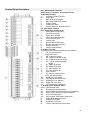
Terminal Strips Descriptions
A-H : Alarm Output Terminals
(SPDT Relay, 11:Common, 12:Normally Closed,
14:Normally Opened):
A
Controller Trouble (Fail safe)
B-C
Engine Run
D
Main SS in AUTO position
E
Main SS in HAND/OFF position
F
Engine Trouble
G
Pump Room Alarm
H
Factory Reserved - Optional Output 1
I-R : Field Inputs Terminal
(Dry Contact Only: Voltage Free):
I
Water Reservoir Low (NO)
J
Low Fuel Level (NO)
K
High Fuel Level (NO)
L
Flow / Zone Start-Stop (NO)
M
Fuel Tank Leak (NO)
N
Lockout (NO)
O
Remote Manual Start (NO)
P
Remote Automatic Start (NC)
Q
Deluge Valve (NC)
R
Factory Reserved (NO)
S : Engine Terminals :
The terminals are numbered according to the standard:
1
FS : fuel solenoid valve
(energized to start)
2
ER : engine run contact
3
OS : engine overspeed contact
4
OP : engine oil pressure contact
5
WT : engine coolant thermostat
contact
6
B1 : battery #1 positive
8
B2 : battery #2 positive
9
C1 : start contactor #1
10
C2 : start contactor #2
11
GND : Ground
12
ST : stop fuel solenoid valve
(ETS - energized to stop)
301
ECMS Elec. Ctrl. Switch
302
FIM Fuel Injection Malfunction
303
ECMW Elec. Ctrl. Warning
304
ECMF Elec. Ctrl. Fault
312
LET Low Engine Temperature
T : Analog inputs / Solenoid Valve:
SOL V. Test Solenoid Valve
AI1
Discharge Pressure transducer
AI2
Optional additional Discharge Pressure transducer
AI3
Water Level or Suction Pressure transducer
AI4
Fuel Level analog input
AI5
Flow or Spare Temperature analog input
U
Engine RPM Magnetic Pickup
V
CANBUS to IO cards
W
CANBUS to ViZiTouch
X
Factory reserved power connections
10
Quick Start-Up Guide
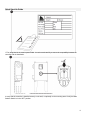
1-The rating label is the most important label. It must be read carefully to ensure the compatibility between the
controller and the installation.
2-Verify that the controller is installed securely on the wall, or optionally on the mounting stand. Verify the Main
Selector Switch is in the “OFF” position.
11
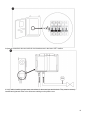
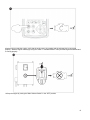
3-Open the controller’s door and verify all circuit breakers are in the lower “OFF” position.
4-Verify and/or install the proper water connections for the water input and the drain. They must be securely
installed and tightened. Refer to the silkscreen markings on the plastic cover.
12
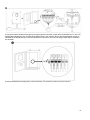
5-Connect all cables between the engine control panel and the controller engine terminal (Identified as “S” on the IO
board diagram displayed in the Terminal Strips Descriptions in the manual). Secure with the appropriate torque as
indicated on the torque label and verify all connections. Connect the AC main line and ground to the AC terminal in
the controller.
6-Activate all breakers by setting them to the ON position. The controller will boot up for the first time.
13
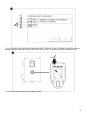
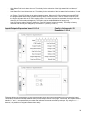
7- The “First Setup” page replaces the Homepage until the “First Setup” is done. Verify that the controller reads the
batteries voltage and current. Verify the “AC” is “OK” and not “FAIL”. Verify that the pressure reading is correct.
8-Turn the Main Selector Switch in the “HAND” position.
14
9-Before trying to start the engine, verify that the engine setup is complete and the exhaust pipe is connected
properly. Start the engine manually by using the “Crank 1” membrane button. Verify that the engine has started and
is running properly.
10-Stop the engine by turning the “Main Selector Switch” in the “OFF” position.
15
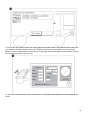
11-Click on the “Go to Setup” button. The “Config” page is now visible. Click on the “padlock” button to log in with
your password. If needed, read the “User Login / KeyPad” section for more information on how to enter your
password. Once a valid password is confirmed, the “Config” page will be visible again with the “padlock” showing
that it isopen the actual user security level.
12- Select the controller pressure units, cut-in and cut-out. Verify that all other parameters on the setup page are
correct.
16
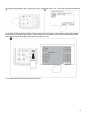
13-Once the configuration is done, click on the “Home” membrane button. The “First Setup” page will be displayed.
13-14- When satisfied with the controller settings, press the “Home” button on the membrane, then acknowledge
the changes by pressing the done button. If the done button is unavailable, ensure that a sufficient authorization
code has been entered and that at least all three voltages are valid.
15- Proceed with the download step to save the report.
17
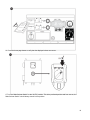
16- Press the home page button to verify that the displayed values are correct.
17-Turn the “Main Selector Switch” to the “AUTO” position. This is the preferred position and from now on, the
“Main Selector Switch” should always remain in that position.
18
18- The first Setup is now completed. The controller is fully installed and configured.
19
Main Features
The ViZiTouch
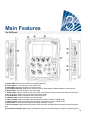
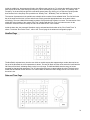
A: Power LED: Indicates if the ViZiTouch is properly powered.
B: Touch Screen: 4.2 inches color touch screen LCD.
C: Alarm LED: Indicates if an alarm is currently active.
D: Front USB Connector: USB Device connector used for file download, software updates, service reports.
E: Home button: Used to navigate to the Home page.
F: Alarm button: Used to navigate to the Alarm page. It also allows the user to silence the alarm bell, hence the
small “no speaker” symbol in the upper right corner of the button.
G: Config button: Used to navigate to the Configuration page.
H: History button: Used to navigate to the History page.
I: Crank 1 button: Used to manually crank the starter from battery 1 while in “HAND” mode.
J: Crank 2 button: Used to manually crank the starter from battery 2 while in “HAND” mode.
K: Stop button: Used to stop the engine if all starting conditions are gone.
L: Run Test button: Used to start the manual run test. Be aware that water will flow through the drain during the
test.
M: Contextual navigation pad: Used to facilitate the navigation on specific pages. A small icon representing the
20
contextual navigation pad will appear at the bottom right corner of a page if the pad is active. By clicking on the
small pad icon, a menu explaining the specific functions of the arrows will appear. For example, it is possible to
switch between the graphical or the table mode on the logs page, as well as navigate through the tables or the help
pages.
N: Help button : The help button is context sensitive It will always show the specific help page linked to the actual
ViZiTouch page that was selected when the button was pressed.
O: RS-485 connector
P: CAN bus connector to IO cards
Q: USB 2.0 connector
R: Ethernet connector
S: K-Type Thermocouple connector
T: Alarm Bell connector
Alarm bell
The alarm bell is activated under default condition and under optional or user defined conditions.
Any of these conditions will energize the alarm bell but may be silenced, except in some cases, by pressing on the
“Alarms / silence” membrane button. When silenced, the alarm bell restarts ringing if a new default occurs or if the
alarm conditions remain unchanged after 24 hours. The alarm bell automatically stops ringing if alarm conditions
are not present anymore.
Note: other external conditions may trigger optional conditions depending of the factory settings. Verify drawings
affixed inside the cabinet.
Default Conditions :
- Engine Overspeed
- Engine Low Oil Pressure
- Engine High Coolant Temperature
- Engine Fail to Start
- Battery Failure 1-2
- System Overpressure
- Engine Fuel Injection Malfunction
- DC Failure
- IO Cards Communication Loss
- CAN System Failure
- File System Failure
-
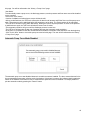
First Setup
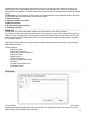
The first Setup must be done prior to using the controller. Completing the First Setup is the only way to access the
homepage and enable the automatic mode of the controller. The complete procedure can be found in the “Quick
Start-Up Guide” that is available with the controller.
21
Home
Home (Membrane button)
Home
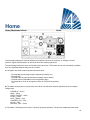
The home page displays all controller statuses and important values of the controller. All voltages, currents,
pressure, engine state and status, as well as all timers and cranking sequences.
The entire background will become red if an alarm becomes active. This feature will help the user identify a problem
even at a significant distance away from the controller.
A: Navigation bar which contains general information about:
- The language (the language may be changed by pressing on it)
- The page title
- The alarm banner (warning and alarm messages may be shown)
- The date and time (adjustable in the Configuration page)
- The temperature. It can be changed to Celsius or Fahrenheit by pressing
on it.
B: The battery charger state. It may become one of three colors and also explicitly describes the current battery
charger state.
POWER UP – Green
BULK – Green
OVER_CHARGE – Green
FLOAT – Green
LOST_TRACK – Grey
CHARGER_FAIL – Red
NO_AC – Red
BATTERY_FAIL – Green
C: The battery. The battery will be red if it is in failure and green otherwise. The first line of data shows the actual
22
voltage of the battery in volts and the second line shows the actual current in amperage.
D: The engine start contactor. It will be either open or close. When closed, the color of the contactor will be green,
showing that the contactor is active.
E: The starter gear. It represents the actual step of the cranking sequence. The counter inside indicates the step
timer, ranging from 15 to 0 seconds. As there are two cranking modes, “waiting for crank” and “cranking”, the gear
will alternate between yellow and green, allowing the user to know exactly the state of the cranking sequence.
Between the two contactors, a timer is visible. It indicates the current step inside the cranking sequence. It will stay
on a step during the 15 seconds of wait and on the 15 seconds of cranking and then will count on until the sixth
step, which is the end of the cranking sequence.
F: The diesel engine. It will be grey if the engine is stopped, green if an “Engine Run” signal is detected and red if a
“Fail to start” occurred, after 6 unsuccessful cranking attempts. Pressing on the engine will redirect the user to the
“Last Service Statistics” page, which monitors all relevant statistics concerning the controller since the last service.
Inside the engine two major alarms are represented; the “low oil pressure” alarm and the “engine high temperature”
alarm. These alarms will stop the engine only if it is running in test mode. When active, the appropriate alarm
symbol will light up, clearly indicating that the engine has a problem.
G: Three alternating square images representing three theoretical speeds to help understand the actual speed of
the engine. The grey gauge shows the needle at zero RPM when the engine is stopped, the green gauge shows
the set engine speed when it is running and the orange gauge shows the needle in the danger zone, representing
the overspeed alarm. Please note that you need to set the HOA selector switch at the “OFF” position in order to
reset the overspeed alarm. If the RPM meter option is enabled, a digital RPM counter will appear above these
images, to allow a precise reading of the actual RPM of the engine.
H: The “Fuel solenoid valve” that controls the flow of fuel in the engine. When the fuel solenoid is activated, the
valve will be horizontal, green and the yellow representation of the fuel will flow through the entire pipe. When the
“Stop Solenoid valve” is activated, the valve will rotate vertically, become red and the yellow representation of the
fuel will stop at the valve, indicating that the fuel does not flow through anymore.
I: Representation of the motor starting or stopping cause. A green capsule will indicate the reason why the motor is
running. Possible choices are:
LOCAL – This start cause is triggered if the engine is locally started directly from its own control panel and
the option is enabled.
MANUAL – It receives a manual crank request from one or both of the manual crank membrane buttons
while the selector switch is the “HAND” position.
REMOTE MANUAL: Manual engine starting activated by a remote start contact.
DELUGE: Automatic engine starting activated by a deluge valve.
AUTO: Automatic engine starting activated by pressure drop.
REMOTE AUTO: Automatic motor starting activated by remote equipment
FLOW: Automatic motor starting activated by a signal in the FLOW/ZONE START/STOP input.
HIGH ZONE: Automatic motor starting activated by a signal in the FLOW/ZONE START/STOP input.
WEEK TEST: Automatic motor starting activated by a scheduled test.
MANUAL TEST: Automatic motor starting activated by the run test pushbutton.
AC FAIL – AC Fail will count the time following an AC Failure and at the end of a predetermined timer, will
start the engine with an AC FAIL request.
23
A red capsule will indicate the reason why the motor is not running despite
the fact that a request is being made. Possible choices are:
DC FAIL – This start cause happens when the controller receives a request to start, but has no DC Power,
thus preventing its ability to effectively start the engine.
OVERSPEED– This start cause happens when the controller receives a request to start, but the engines
sends an “Overspeed” signal, thus preventing its ability to effectively start the engine.
FAILSTART – This start cause happens when the controller receives a request to start, but a “Fail To Start”
alarm is active after a cranking sequence failure, thus preventing its ability to effectively start the engine.
LOW ZONE: A not running lower zone controller prevents the motor from running. This functionality is
optional.
LOCKED: An interlock signal is preventing the motor from running.
J: The discharge pressure gauge. It allows for a precise reading of the actual system pressure. The red box on the
upper left corner of the gauge indicates the value of the Cut-In set point and the green box on the upper right corner
represents the Cut-Out set point. These values will also be represented by a red and green line on the gage,
allowing a quick comparison between the actual pressure and the set points. At the bottom of the gauge, a digital
indicator shows the actual discharge pressure represented also by the needle of the gauge. Just right of the digital
pressure indicator, the actual pressure unit is shown. Finally, the maximum allowable pressure is also indicated on
the gauge and will scale the gauge accordingly. The discharge pressure gauge is also a button linking to the
“Gauge” page, where all active gauges are displayed.
The dashboard
K: The HOA Selector switch. The three positions indicate the actual position of the HOA, “HAND” for manual mode,
“OFF” and “AUTO” for automatic mode. The controller should always be left in the “AUTO” position.
L: Operations timers including the sequential start timer, the run period shutdown timer, the manual test timer, the
weekly test timer and the AC Fail timer.
M: An “AC” pilot light. It represents the condition of the AC power source. The light will be green if AC power is
available and will become red if an AC failure is present. If the AC fail start option is active, the AC fail start timer
will appear right next of the AC pilot lamp.
N: Displays three statuses that describe the primary configuration of the controller: Pressure actuated or Nonpressure Actuated, Automatic Controller or Non-automatic, Manual or Automatic Shutdown.
O: The alarm/warning notification.
Warning indicator: Exclamation mark in a yellow round icon. If no alarm is in ACTIVE condition on the controller and
at least one warning is ACTIVE or OCCURRED, the warning indicator will be present.
24
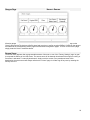
Gauges Page
Home > Gauges
All active gauges are gathered here (ex: pressure, flow and tachometer). The discharge pressure gauge on the
“Home” page must be clicked to access this page and more than 1 sensor must be installed. Clicking on the gauges
will redirect to the corresponding sensor page in the advanced configuration pages. To return to the “Home” page,
simply press the “Home” membrane button.
Screen Saver
The screen saver appears after a programmable amount of time set on one of the “Factory Settings” page. Its goal
is to expand the lifetime of the LCD screen. The screen saver will be instantly deactivated if the engine is running or
if an alarm is activated. To manually deactivate it, simply touch the screen or any membrane button. After
deactivation, the screen saver will always redirect to the “Home” page. It will also log off any user by resetting the
security level to 0.
25
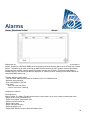
Alarms
Alarms (Membrane button)
Alarms
Displays the list of currently active and occurred alarms. An alarm is called ACTIVE when its triggering condition is
present. An alarm is called OCCURRED when its triggering condition has been active, but is no longer true. Alarms
with an "*" symbol must be reset by turning the Main Selector switch to the "OFF" position. Alarms representing
serious concerns are RED. Alarms representing simple warnings are YELLOW. To silence the bell press the
ALARM button or it will silence itself after the expiration of a factory set timer. Pressing on the RESET button will
reset OCCURRED alarms only.
The table displays system events:
- Date and Time: Date and time stamp of the alarm in the YYYY.MM.DD format
- Message: Alarm message
- State: OCCURRED or ACTIVE
- Color Code:
- Red: The event is an alarm
- Yellow: The event is a warning
Complete list of alarms :
Common Alarms:
Engine Trouble: The Engine Trouble common alarm is active when one or more of these conditions are active :
- Engine High Coolant Temperature (5)
- Engine Low Coolant Temperature (312)
- Engine Low Oil Pressure (4)
- Engine Fail to Start
- Engine Fail when Running
- Engine Overspeed* (3)
- Engine ECM Selector Switch in Alternate Position (301)
26
- Engine ECM Warning (303)
- Engine ECM Fault (304)
- Engine Fuel Injection Malfunction (302)
- Battery Failure 1-2
- DC Failure
- Over Pressure
Pump Room Trouble: A common alarm activated when the following events occur:
- Fuel Tank Leak
- Low Fuel Level
- High Fuel Level
- AC Failure
- Low Pump Room Temperature
- Low Suction Pressure
- Water Reservoir Low
- Water Reservoir Empty
CTRL Trouble: Important: this relay is normally energized when controller is in normal condition. The relay is
de-energized when controller trouble is detected (fail safe). The controller trouble common alarm is active when one
or more of these conditions are active :
- Charger Failure 1-2
- DC failure
- Default Solenoid Valve
- Cut-In not reached during test
- Pressure Line Failure
-
AC Failure: Monitors the AC power and activates on a failure.
-
Battery 1-2 Fail: Monitors the status of battery 1 and activates on a failure. This occurs when the battery is
disconnected, is the wrong type or unable to be recharged.
-
Charger 1-2 Fail: Monitors the state of battery charger 1 and activates on a failure. This occurs when the
battery charger has a defect, is not properly powered, or is unable to provide the needed current.
-
DC Failure: Activates if both batteries are in failure and will prevent the engine from starting.
-
Service Required: Activates when service is due for the controller. This occurs when the date set in the
service page has passed, or if no service has ever been done.
-
Weak Battery 1-2: Activates if the battery voltage falls below the weak battery set point in the factory
settings page.
-
Loss of Continuity 1-2: Activates if the engine start contactors are disconnected from the controller.
-
Low Pump Room Temp: Activates if the optional programmable input “Low Pump Room Temp” is activated
by an external signal.
-
Low Spare Temperature: Activates if the analog readout of the spare temperature input is enabled and is
lower than the low spare temperature set point in the “Spare temperature” sensor page.
-
WT CI Not Reached: Activates if the Cut-In is not reached during a manual run test or a weekly test timer.
At the end of the 255s timer, if the Cut-In is not reached, the test may still be successful at starting the
engine if the pressure has dropped by at least 5 PSI.
-
WT Check WT Solenoid: Activates if the pressure does not drop a minimum of 5 PSI during the manual run
test or the weekly test. Indicates a failure with the Test Solenoid Valve.
-
PT fault detected: If an optional dual pressure sensor is installed, it will be activated if the two pressure
27
transducers show different readings. Further investigation is advised to determine what caused the different
readings. Note that the controller will always choose the lowest pressure reading to determine the actual
system pressure.
-
Overpressure: Activates if the analog readout of the discharge pressure goes higher than the overpressure
set point in the discharge pressure sensor page.
-
Underpressure: Activates if the analog readout of the discharge pressure goes lower than the “Under
Pressure” set point in the discharge pressure sensor page.
-
Low Suction Pressure: Activates if the analog readout of the suction pressure is enabled and goes lower
than the low suction pressure set point in the suction pressure sensor page.
-
Force start on flow: Activates if an external contact triggers flow switch input or if the analog readout of the
flow is enabled and goes higher than the flow force start on flow set point in the flow sensor page.
-
Pressure Line Fail: Activates if the pressure is higher than the pressure line failure (“Burst Pressure” ) set
point in the “Factory Settings” page.
-
Water Res. Low: Activates if the “Water Reservoir Low” contact input is triggered or if the analog readout of
the water reservoir is enabled and is lower than the water reservoir low set point in the “Water Level”
sensor page.
-
Water Res. Empty: Activates if an external contact triggers the optional “Water Reservoir Empty” input.
-
Main Relief Valve Open: Activates if an external contact triggers the optional “Main Relief Valve Open”
input.
Fuel Tank Leak: Activates if the “Fuel Tank Leak” contact input is triggered,
-
Low Fuel Level: Activates if the “Low Fuel Level” contact input is triggered or if the analog readout of the
fuel level is enabled and goes lower than the low fuel level set point in the “Fuel Level” sensor page.
-
High Fuel Level: Activates if the “High Fuel Level” contact input is triggered or if the analog readout of the
fuel level is enabled and goes higher than the high fuel level set point in the “Fuel Level” sensor page.
-
Engine Fail When Running: Activates if the “Engine Run” signal is lost while the engine is running. The
engine will try to start the cranking sequence once again if the starting causes are not back to normal.
-
Engine Fail to Start: Activates if the engine fail to start after the complete 6 attempts crank sequence. The
engine will turn red.
-
Engine ECM: Activates if the specific “ECM” input is triggered on the engine connector strip.
-
Engine ECM Warning: Activates if the specific “ECM” input is triggered on the engine connector strip.
-
Engine ECM Fault: Activates if the specific “ECM” input is triggered on the engine connector strip.
-
Engine FIM: Activates if the specific “FIM” input is triggered on the engine connector strip.
-
Engine High Temperature: Activates if the specific “High Temp” input is triggered on the engine connector
strip and the engine is running. This alarm will stop the engine only if triggered during a manual run test or
a weekly test.
-
Engine Low Temperature: Activates if the specific “Low Temp” input (312) is triggered on the engine
connector strip.
Engine Low Oil Pressure: Activates if the specific “Low Oil Pressure” input is triggered on the engine
connector strip and the engine is running. This alarm will stop the engine only if triggered during a manual
run test or a weekly test.
-
28
-
Engine Overspeed*: Activates if the specific “Overspeed” input is triggered on the engine connector strip
and the engine is running. This alarm will immediately stop the engine and cannot be reset by using the
reset button on the alarm page. The alarm must be reset on the engine itself and the controller must be
turned off and on to complete the reset procedure for this alarm.
-
Io_expX-inX alarm: Activates if the specific expansion programmable input on the specific expansion board
is activated and triggered.
-
Charger1-2 Comm. Loss.: Activates if the communication with the specific battery charger is lost.
-
Battery1-2 Overvoltage: Activates if the voltage of the specific battery is higher than the specified
overvoltage set point.
-
High Water Level: Activates if the optional “High Water Level” contact input is triggered or if the analog
readout of the water level is enabled and goes higher than the “High Water Level” set point in the
“Water_Level” sensor page.
-
Low ambient temperature: Activates when the ambient temperature is below the factory set value (5
Celsius).
High ambient temperature: Activates when the ambient temperature is above
the factory set value (40 Celsius).
-
IO Diesel Communication Error: Activates if no communication with the diesel IO board could be
established for 15 seconds. This alarm is critical and triggers the bell. If this alarm persists for more than 1
minute the controller will reboot to try and fix the problem.
-
IO Expansion Communication Error: Activates if no communication with the Expansion IO board could be
established for 15 seconds.
-
Communication System Failure: Activates when the communication task has stopped responding. This
alarm condition is critical and will be followed by a controller reboot to try and fix the problem.
-
File System Failure: Activates when a file system error is detected. This alarm condition is critical and will
be followed by a controller reboot to try and fix the problem.
-
Pump on demand: Activates when the pressure is below the cut-in set-point on an automatic pressure
actuated controller.
29
Configuration
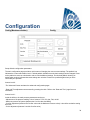
Config (Membrane button)
Config
Setup all basic configuration parameters.
The main configuration page provides a quick means of changing the most common settings. The padlock icon
indicates the current authorization level. A locked padlock indicates that only basic settings can be changed. Press
on the padlock to enter an authorization code to unlock additional settings. An unlocked padlock showing an
authorization number indicates that some settings are unlocked. Press on the padlock again when you have
concluded your operation.
Access Level 0:
-The “Advanced” button activates the advanced configuration pages.
- Date and Time adjustment are accessed by pressing the clock. Refer to the “Date and Time” page for more
information.
Access Level 1:
Inside the left box, the main pressure parameters can be set.
- Adjustment of the pressure reading “Unit of measure”: PSI, kPa, bar, FoH, mH20
- Maximum pressure of system (between the Cut-Out value and 9999)
- Cut-Out adjustment (between the Cut-Out value and the Maximum Pressure value). It should be set before setting
the Cut-In
- Cut-In adjustment (between 0 and the Cut-Out value)
30
Inside the middle box, the parameters linked to the different tests can be set. To activate the weekly test, press the
white square at the left of the weekly test frequency. When activated, the square turns green. The “Weekly Test
Frequency” is the text field just right of the activation square button. By clicking on it, a selection Pad will provide
three choices for the frequency of the periodic test: “Weekly Test”, “Bi-Weekly Test” and “Monthly Test”.
The next set of parameters is the periodic test schedule which consists of three editable fields. The first field is the
day of the week and the time, in hours and minutes. Simply press the appropriate button to set these values
accordingly. The next editable field located just below is the periodic test duration in minutes. The last section of the
middle box is the duration of the manual “Run Test”, labelled with the “Run Test” icon button as seen on the
membrane. Press the button to modify the value of the manual "Run Test" duration.
Inside the lower box, the Automatic Shutdown may be activated and the duration of the “Run Period Timer” is
shown. To edit the “Run Period Timer”, refer to the “Timers” page in the advanced configuration pages.
NumPad Page
The NumPad is activated every time the user clicks on a white square box representing a number that can be set.
On top of the NumPad, the current parameter is shown. The text will flash red if the value entered is invalid and the
OK button will be black, indicating that the value is out of range. The MIN and MAX show the range of values
accepted for that particular parameter. The “X” button allows the user to cancel editing the value. The back arrow
erases the last entered number and the “CA” button clears the whole text field. Simply click the “OK” button once
the value is set.
Date and Time Page
31
The Date and Time can be configured by selecting the current month and year by pressing the arrow buttons on
each side of the “Month-Year” display and selecting the day of the month by selecting the actual day. The time is
set by pressing the two square boxes under the clock; the left sets the hours and the right sets the minutes. Press
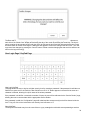
the Save button to commit the changes. A dialog box will appear to confirm the change “Date and Time”. The user
may cancel the changes by pressing the “Cancel” button. Please note that changing the date and time will have an
effect on the logs chronology.
User Login Page / KeyPad Page
User Login KeyPad:
This page allows the user to log into a higher security level by entering a password. If the password is valid the text
field will turn green and if it is invalid, the text field will turn red. A “X” button appears in the text field as soon as a
character is entered, allowing for a quick erase of the written password.
If the password is invalid for a consecutive number of times, the user will be redirected to the “Service Dealer” page,
allowing the user to communicate with the appropriate Service Dealer.
If the password is valid, the “Configuration” page will reload and the access security level will be shown inside the
lock. To log off, click on the lock and the user security level will return to “0”
Other KeyPads:
The KeyPad is activated every time the user clicks on a grey rectangle box with white text representing a text that
32
can be set. The “X” button allows the user to cancel editing the value. The back arrow erases the last entered
character and the “CA” button clears the whole text field. Simply click the “OK” button once the value is set. This
type of text field is mostly used to generate a digital text indication for a custom alarm input.
Advanced Configuration Page
Config > Advanced
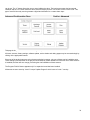
This page is the portal to all the advanced configuration parameters of the ViZiTouch.
All timers, sensors, factory settings, software update, service dealer and debug pages may be accessed simply by
clicking on the appropriate buttons.
Since two of the analog inputs are using the same physical connector, only one of these can be installed at once.
These analog inputs are shown in the grey box surrounded by a black dotted line. Each time one of these sensors
is installed, the other will turn orange, preventing the dual installation of these sensors.
The Program Field I/O button appears only if an expansion board has been installed.
All buttons are set to security “Level 0” except “Update Program” which is set at “Level 1” security.
33
Details of the Advanced Configuration Page
Timers Page
Config > Advanced > Timers 1-2
Most common timers for fire pump control can be configured here. Note that any timer set to 0 will remove the delay
in the decision process.
Access level 1:
- Engine starting and stopping:
The main timers settings are the “Sequential Start Timer” (seconds), which allows a delayed response on an
automatic start request, the “Run Period Timer” (minutes), which in case of an automatic shutdown controller sets
the time before the controller will stop the engine when all conditions are back to normal and the “Fail when running
Timer” (seconds), which allows a delayed response to a “Fail When Running” condition. Note that this condition,
when active, will recreate a starting sequence to allow the engine to go back to the running state.
-
Overpressure timer on: Time delay for the activation of the overpressure alarm, if used,
Underpressure timer on: Time delay for the activation of underpressure alarm, if used.
Low Suction Pressure alarm timer on: Time delay for the activation of the low suction pressure alarm, if
used.
34
-
-
High Water/Fuel Level alarm timer on: Time delay for the activation of the high water/fuel level alarm, if
used.
Low Water/Fuel Level Alarm timer on: Time delay for the activation of the low water/fuel level alarm, if used.
AC Failure: The AC Fail Start is an optional starting cause. When an AC Failure alarm becomes ACTIVE,
the programmable Start Delay will start counting. At the end of the timer, if the AC Failure is still ACTIVE,
the engine will start with an AC FAIL starting cause. If no other requests are activated, the engine will stop
when the AC Failure alarm disappears. The option can be enabled/disabled in factory only.
Low Oil Pressure alarm: Delays to buffer the “Low Oil Pressure” alarm (seconds). This delay is factory
reserved and can only be changed by Tornatech Inc. (security “Level 9”).
Inputs/Outputs Expansion board 1-2-3-4
Config > Advanced > IO
Expansion 1-2-3-4
This page allows the configuration of both programmable inputs and outputs available on an IO Expansion board.
Two buttons located far left swap between the input and output section of the page. Just beside, two square buttons
labelled “+” and “-“ are separated by a number that indicates the actual selected input/output. By using the “+ / -“
buttons, it is possible to navigate between them easily.
35
Output:
The configuration is performed by pressing on the square box located beside one of the signal needed. The box will
swap between BLANK (none), a NO (normally open) and a NC (normally close) symbol, allowing the desired
configuration to be obtained. On top of all outputs signals available, it is possible to link in the same way the
expansion board inputs to the selected output in any combination. The final state of the output signal is a logical
“OR” combination of all selected signal.
Input:
The input page has three elements: the “Digital Text Indication” field, the “Alarm Bell Icon” and the “Alarm Icon”.
Each one can be enabled or disabled. The first step is to click on the square button beside the text field to activate
the management of the input signal. Then, clicking on the text field will bring up the KeyPad, making it easy to write
a custom digital text indication. A maximum of 20 characters is allowed. Refer to the KeyPad help page for more
information. If the “Alarm Bell Icon” is enabled, the input signal will trigger the Alarm Bell. If the “Alarm Icon” is
enabled, the input signal will be treated as an alarm, if not, as a warning. As on the output page, the “+ / -“ buttons
allows for an easy navigation between all available inputs of the expansion board.
Update Program Page
This procedure is highly important and must be attempted with care. Please make sure to contact the factory prior
to using the Update Software function.
To ensure the program update is successful:
-Make sure the USB Device is plugged in at all times during the procedure.
-Do not power off the ViZiTouch while updating the software.
-Make sure the procedure is complete before removing the USB device. The ViZiTouch will reboot automatically.
All active logs, data and configuration will not be affected by software updates. Usual operation of the controller will
resume as soon as the software update is completed.
36
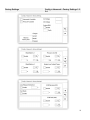
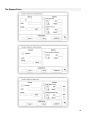
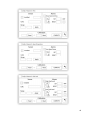
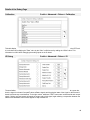
Factory Settings
Config > Advanced > Factory Settings 1-23-4
37
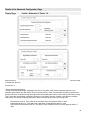
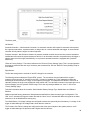
The factory settings are always pre-configured at the factory and set the main parameters of the controller.
Left Section:
Automatic Controller – Non-Automatic Controller: An automatic controller will respond to automatic start requests,
like a pressure transducer, a pressure switch, a deluge valve or a remote automatic start trigger. A non-automatic
controller will only start the engine on manual requests.
Pressure Actuated – Non-Pressure Actuated: A pressure actuated controller has at least one pressure transducer
installed and will monitor the system pressure at all time. In an automatic controller, the pressure drop will trigger a
starting sequence of the engine automatically. A non-pressure actuated controller is equipped with a pressure
switch only.
“Reset to Factory Settings”: This button redirects to the “Reset to Factory Settings” page. This is a major operation
that must be used with care and only if the factory was contacted first. See the “Reset to Factory Settings” help for
more details.
Right Section:
The first two settings set the nominal AC and DC voltage for the controller.
The following section enables the “Engine RPM” counter. The connection must be made with the engine’s
magnetic pickup using the "U" terminal on the GPD - IO board. If enabled, the “Teeth” parameter must be set
according to the exact number of “teeth” on the magnetic pickup gear. This parameter will allow the ViZiTouch to
calculate precisely the engine actual RPM with a fast refresh rate. The value will be shown in the upper-right corner
of the homepage, over the symbolic “RPM” image. This is the only setting available to a “Level 1” user on the
“Factory Settings” page.
Technical information about the controller: Serial Number, Battery Charger Type, Model Name and Software
Revision.
Additional optional factory parameters: Most parameters defined here share the same type of configuration. The
“Bell” icon, if activated, will trigger the alarm bell and the “alarm” icon, if activated will define this signal as an alarm,
otherwise, it will be identified as a warning only.
The “Weak Battery 1-2 Voltage” settings are configured to take action upon analysis of the battery 1-2 voltage. It will
trigger an alarm/warning if the voltage read is lower than the value set.
The “Pressure Line Failure” settings are configured to take action upon analysis of the system pressure. It will
trigger an alarm/warning if the pressure read is higher than the value set.
38
The “Engine Low Coolant Temperature (312)” settings are configured to take action when the “312” terminal is used
for electronic diesel engines that uses this signal. It will trigger an alarm/warning at the end of the programmable
timer if enabled.
Additional optional factory parameters
The optional “Local Request Detection” can be Enabled/Disabled here, as the programmable delay used to trigger
the detection. The delay sets the time before the ViZiTouch detects a “LOCAL” request. The “Local” request is
defined by an active “Engine Run” input on the engine terminal strip “U” while no request was detected. In other
words the engine was started locally on the engine control panel itself, without any request made by the ViZiTouch.
The “Test Mode” can be enabled only by Tornatech Inc. and is a way to shorten the cranking sequence timers to
accelerate testing during the manufacturer validation test. It should always be disabled during normal controller
operations.
ECM Warning (303): Settings are configured to take action when the “303” terminal is used for electronic diesel
engines that use this signal. It will trigger an alarm/warning at the end of the programmable timer if enabled.
ECM Fault (304): Settings are configured to take action when the “304” terminal is used for electronic diesel
engines that use this signal. It will trigger an alarm/warning at the end of the programmable timer if enabled.
Higher Zone Enable Delay: Delay, in seconds, after which a motor run signal is sent to a higher zone controller.
This option is only used for controllers in series.
Lower zone Request Maintain: Delay, in seconds, for which a run demand to a lower zone controller is maintained
after all run causes has return to normal. This option is only used for controllers in series.
LCD Backlight Dim Timer: The inactivity time it takes for the ViZiTouch screen to start fading out. This is done to
preserve the durability of the screen’s backlight. It is factory programmed to 5 minutes.
LCD Backlight Turn Off Timer: The inactivity time it takes for the ViZiTouch screen to turn off completely. It is
factory programmed to 5 minutes.
The inactivity timer starts if no “user actions” are detected on the screen or the membrane, the engine is not running
and no alarms are “ACTIVE”. As soon as one of those conditions is met, the inactivity timer will reset.
Low Ambient Temperature: Set-point for the low ambient temperature alarm.
High Ambient Temperature: Set-point for the high ambient temperature alarm.
Calibrate touch screen: This button can be used to recalibrate the touch screen of the ViZiTouch in case of a nonaccurate response.
39
Reset to Factory Settings Page
This page will reset the ViZiTouch to the original factory configuration, thus clearing all subsequent configurations
performed during the life of the controller.
This procedure should only be used as a last attempt to bring back the controller to a usable state.
User “Level 2”:
The “RESET” button will be activated (will become blue) only if no square buttons from the left column are activated
and the “Last Saved Settings” from the right column is not activated as well. A “Level 2” user can only reset the
“Factory Settings” and/or the “Additional Settings” from the right column.
The “Factory Settings” reset will restore the controller to its original factory configuration and service state. This
means that the first service will be undone, automatic mode settings, as well as the controller’s “Homepage” will be
deactivated until “First Service” is completed again. Please refer to the “Quick Start-Up” guide for more information
on how to perform the “First Start-Up” and how to complete the “Field Acceptance Test Report”.
Please note that all logs, pump curves and statistics will not be reset.
The “Additional Settings” reset will update the controller with an additional configuration sent by the manufacturer. It
does not perform a true “Factory Reset”. Its purpose is to allow an update of configuration variables that can only be
updated by Tornatech Inc.
All other square buttons on this page are “Level 9” security and can only be used by certified Tornatech
representatives, unless otherwise specified. The first square in the upper left corner performs the “Select all”
function for these parameters.
40
Service Page
Config > Advanced > Service
The upper left section hosts the Tornatech Inc. business card by default. This image can be changed by the service
dealer to incorporate a customized image. The image must have been created by Tornatech Inc., sent to the
service dealer and copied on a USB Device. The “Level 1” user can update the image by pressing the Tornatech
logo when the USB Device containing the business card is inserted into the USB port. Please contact factory for
more details.
The box situated just right of the business card is related to the “Pump Curve”. The ViZiTouch allows for the
recording of up to 10 different pump curves. The date and time of the last pump curve recorded is displayed here.
The “NEW” button allows the user to record a new pump curve. Clicking this button will redirect the user to the “New
Pump Curve” page. See the “New Pump Curve” help section for more details on how to record a new pump curve.
The user can see both the date of the last service done and the date of the next service at the bottom of the screen.
Access level 1:
- Change the period before the next service is required by pressing the white box between the “Last Done” date and
the “Next On” date. The “Next On” date will be adjusted automatically depending on the period selected and the
date of the last service.
When the required service is done, the user must click on the “Service Done” button to commit and end the service.
41
New Pump Curve
Service > New Pump Curve
The Service Dealer “New Pump Curve” Procedure
This page allows the user to create a pump curve. At the bottom of the screen, there are 3 buttons:
- Reset: Clears the data of the pump curve in progress.
- Auto: Uses needed types of transducers to create the pump curve (Discharge pressure, Suction pressure and
Flow sensor need to be installed.)
- Save: Saves the pump curve and update the pump curve chronological order as displayed in the “History > Pump
Curves” page.
The first line of the legend displays the system units for every column. The second row of the legend describes the
parameters represented and the third line of the legend displays the actual value of these parameters for quick
reference. The scroll bar on the right of the table allows the user to move downward in the table, up to the 10th
point. The new pump curve data will become invalid if the Flow of Pressure units are changed during the input
procedure or if no Flow or Pressure data is entered. In that case, click on the reset button. The Save button must be
used in order to record the pump curve into the ViZiTouch memory.
- Pdis: Discharge Pressure
- Psuc: Suction Pressure
- Pnet: The Net Pressure is calculated by subtracting the Suction Pressure from the Discharge Pressure. In Manual
Mode, it must be entered manually.
- Flow: Flow
- Volt: Voltage of the pump
- Current: Current of the pump
“Manual Mode”
To manually create a pump curve, data must first be entered on the first row and then on subsequent rows. There
are a total of 10 rows available, but there is no minimum required to get a curve. Of course, more rows improve
precision.
In each column the user must input every following value for maximum information, readability and future reference.
It is possible to create a quick pump curve, but it is not recommended since future references might be less
accurate. In that case, only fill the Pnet and the Flow values. The first row of data must set the “Flow” to 0 and the
last row of data must have a Pnet of 0. These values will ensure the pump curve is fully represented on the graph,
for all pressure and all flows.
When the required number of points are entered, just click on the “Save” button to record the pump curve and exit
42
this page. You will be redirected to the “History > Pump Curve” page.
“Auto Mode”
To automatically create a pump curve, the discharge pressure, suction pressure and flow meter must all be installed
on the controller.
-Click on the “Auto” button
-A series of validation will take place to ensure all data is valid.
-After a pre-defined timer, the ViZiTouch will acquire all data from all sensors and fill the first row of the pump curve
table. The pressure must be stabilized before the samples are to be taken. The Pnet pressure will be calculated.
-The ViZiTouch will then ring the Alarm Bell shortly, alerting the user to drop the pressure. As soon as the pressure
is stabilized once again, the ViZiTouch will take the second row of values.
-This automatic procedure will go on until the discharge pressure is near zero.
-The ViZiTouch will then take the last row of samples and stop the Automatic mode acquisition.
-At any point, it is possible to reset the recorded values and start the automatic mode sequence from the beginning.
- Click on the “Save” button to record the pump curve and exit this page. The user will be redirected to the “History
> Pump Curve” page.
Automatic Pump Curve Mode Disabled
The automatic pump curve was disabled because it needs three sensors installed. The three sensors buttons link to
the corresponding sensor page, allowing a quick navigation. If the button is orange, this indicates that this particular
sensor is not installed. If the button is blue, it means that this particular sensor is installed. It is always possible to
quit the automatic mode by pressing the "Cancel" button.
43
The Sensors Pages
44
45
In the ViZiTouch, all sensors refer to analog input connectors on the I/O board. They all have similar settings and
configuration.
The “Installed” selection (”Level 2” security): Install or uninstall this sensor from the ViZiTouch configuration.
Discharge Pressure: To set the pressure system unit, go the “Config” page. All pressure transducers share the
same unit.
The “Source” button (4 choices): (“Level 2” security)
- None: No pressure transducer or pressure switch is installed
- PT1 (factory standard): Only the AI1-PT1 terminal on the “T” terminal strip is enabled.
- PT2: Only the AI2-PT2 terminal on the “T” terminal strip is enabled.
- AUTO (factory installed option): AI1-PT1 and AI2-PT2 are installed and arranged for a redundancy system. The
ViZiTouch will always consider the lowest of the two pressure values as the reference. Additional alarms, like “PT
fault detected” become enabled. This alarm is triggered when the two transducers provides values that are different
by more than a pre-set delta value. The ViZiTouch will never make a decision as to which transducer is faulty; it will
only reveal that there is a problem with one of them. The service dealer should test both transducers to find out
which one is faulty.
Suction Pressure: To set the pressure system unit, go the “Config” page. All pressure transducers share the same
unit.
The “suction pressure” sensor shares the same analog input (AI4-W-S) as the water level sensor. Only one of them
can be installed at all time. Prior to installing one of them, the other one must be uninstalled by visiting its own
sensor page.
Flow: The “Flow” sensor shares the same analog input (AI3-Q-T) as the spare temperature sensor. Only one of
them can be installed at all time. Prior to installing one of them, the other one must be uninstalled by visiting its own
sensor page.
The “Unit” button is located just right of the “Installed” selection. Click on it to select the appropriate “Flow” Unit, the
factory pre-set unit is the GPM.
Flow Start:
- Enable/Disable the “Flow Start” condition by pressing the square button. If this alarm is enabled, it will also start
the engine by means of a “FLOW” request.
- Alarm Bell Icon: Activates the bell when a “Flow Start” occurs.
- Alarm Icon: If selected, the “Flow Start” event will be an alarm. If unselected, it will be a warning.
- Value: Flow value at which the “Flow Start” event will change state.
- Timer On: Timer used to buffer the activation of the “Flow Start” signal by the ViZiTouch.
Water Level: The “Water Level” sensor shares the same analog input (AI4-W-S) as the suction pressure sensor.
Only one of them can be installed at all time. Prior to installing one of them, the other one must be uninstalled by
visiting its own sensor page. The “Water Level” sensor has no unit, since it is monitoring the “Water Level” as a
percentage.
Spare Temperature: The “Spare Temperature” sensor shares the same analog input (AI3-Q-T) as the Flow sensor.
Only one of them can be installed at all time. Prior to installing one of them, the other one must be uninstalled by
visiting its own sensor page. The “Unit” button is located just right of the “Installed” selection. Click on it to select the
appropriate “Spare Temperature” Unit, the factory pre-set unit is the Celsius.
Fuel Level (GPD Model Only): The “Fuel Level” sensor has no unit, since it is monitoring the “Fuel Level” as a
percentage.
The Calibration method is the same for all sensors.
CALIBRATION:
The Calibration button: (“Level 2” security for the choice of calibration, but “Level 1” security for the calibration
procedure itself.) There are 4 ways to calibrate every sensor:
46
- 0-10V: Theoretical calibration with 0-10V sensor. Simply enter a value in the system pressure unit for 0V and
another value for 10V. Click on the “Apply” button to confirm the calibration. The resulting measured pressure is
shown in the lower right corner of the “Sensor” box. Make sure the dipswitch package right below the “T” terminals
is set to “0-10V” for that particular sensor (refer to the drawing). The switches are labelled and are each linked to
one analog input, in this case “1 or 2”. *Important Note: A set of jumpers is also associated with each analog input.
MAKE SURE THE CONTROLLER IS COMPLETELY POWERED OFF BEFORE MOVING A JUMPER. THIS
INCLUDES REMOVING THE AC AND DC POWER. The jumper can be placed on “5Vdc”, “12Vdc” and “Vaux” and
represents the powered DC value of the sensor. The factory pre-set position is “5Vdc”. If an installed sensor has a
power value of “5Vdc”, then the “0-10V” theoretical calibration must be calculated accordingly. Please contact
manufacturer for more information.
- 4-20mA: Theoretical calibration with 4-20mA sensor. Simply enter a value in the system pressure unit for 4mA and
another value for 20mA. The procedure explained above also applies in this case.
-Field Calibration: This is the factory pre-set method and the only one that is an actual calibration. Selecting this
calibration method will generate the Calibration box situated in the lowest part of the sensor page. It is very
important that the same care is used when selecting the appropriate dipswitch setting and jumper position. Please
refer to the “0-10V” section above.
1.Two actual points (low and high) are required
2. Set the lowest point (usually 0).
3. Press the left read button
4. Press the left rectangle text field and enter the value read on the external calibrated gauge.
5. Set a high point (usually the highest possible value will create the best calibration).
6. Press the right read button
7. Press the right rectangle text field and enter the value read on the external calibrated gauge.
8. Press the calculate button to finish the calibration. If the settings are incorrect, the calculate button will remain red
and if correct, the button will turn blue. The resulting measured value is shown in the lower right corner of the
“Sensor” box.
- On/Off: Use the input with a dry contact sensor, for example a float switch. The only parameter to set for this
method is the NO/NC buttons, effectively selecting between a normally open and a normally close switch. Click on
the “Apply” button to confirm the calibration.
The Alarms Section: (“Level 1” security)
The “DRY” button can enable or disable the “Dry Contact Input” on the IO board. There are two modes when
enabled, either “Normally open, NO” or “Normally close, NC”. Each mode is represented by the standard NO/NC
symbols.
- Enable/Disable the corresponding alarm/warning condition by pressing the square button
- Alarm Bell Icon: Activates the bell when the condition occurs.
- Alarm Icon: If selected, the occurring condition will be an alarm. If unselected, it will be a simple warning.
-RESET: Value at which the condition will go from the “ACTIVE” state to the “OCCURRED” state.
-SET: Value at which the system will activate the corresponding condition.
47
Details of the Debug Page
Calibration
Config > Advanced > Debug > Calibration
This table displays all calibration parameters. The “Scaled” value is the final calculated value used in the ViZiTouch.
It is calculated by multiplying the “Raw” value by the “Gain” coefficient and by adding the “Offset” value. This
information is useful when debugging the analog inputs on the IO board.
IO Debug
Config > Advanced > Debug > IO
The small white circle beside each signal is a representation of its state. If the white circle is filled with a green dot,
then the signal is activated. Comparing these software signals and the physical state of the signal on the electronic
board is the best way to troubleshoot. In the right column, additional “TEST” buttons are located beside each output
signal. Clicking on these buttons will toggle the output state of this signal, again allowing a comparison between the
software and hardware state of these signals to help troubleshoot.
48
Config > Advanced > Debug > Expansion 1-2-3-4
Config > Advanced > Debug >
Expansion 1-2-3-4
The small white circle beside each signal is a representation of its state. If the white circle is filled with a green dot,
then the signal is activated. The first element in the left column is the indication of whether or not the optional
Expansion board is installed. In the box, the corresponding Expansion board number is displayed. Comparing
between these software signals and the physical state of the signal on the electronic board is the best way to
troubleshoot. In the right column, additional “TEST” buttons are located beside each output signal. Clicking on these
buttons will toggle the output state of this signal, again allowing a comparison between the software and hardware
state of these signals to help troubleshoot.
49
History
History (Membrane button)
History
Select specific pages within the history section. Everything related to the statistics, events, pressure, power logs
and the download to USB is available within the History page.
-Events: This button leads to the “Events” page, which displays the most recent 500 events. Each event log
contains the date and time of occurrence as well as a brief description of the event.
-Download to USB Device: This button leads to the “Download to USB Device” page, which allows the user to
download information, including the user manual, drawings, logs, statistics and configuration.
-First Service Statistics: This button leads to the “First Service Statistics” page, which displays all relevant statistics
calculated since the very first service done on the controller.
-Last Service Statistics: This button leads to the “Last Service Statistics” page, which displays all relevant statistics
calculated since the last service done on the controller.
-All Time Statistics: This button leads to the “All Time Statistics” page, which displays the date and time of the first
power up, the date and time when the first start-up was completed and the total “On Time” of the controller. These
statistics can never be reset.
-Pressure/Power Curves: This button leads to the “Pressure Curves” / “Power Curves” page accordingly, which
displays all relevant pressure/power information.
-Pump Curves: This button leads to the “Pump Curves” page.
50
Details of the History Page
Events Page
History > Events Log
It shows the last 500 events which occurred in chronological order. The first column is the date, the second one is
the time of occurrence and the third column is the “Event message”. To obtain a log that is older than 500 events,
visit the “Download to USB Device” page and select “Events”. This method will generate a file containing all events
logs in the ViZiTouch history.
The contextual navigation pad is implemented in this page. It allows quick navigations functions, like “previous
page”, “next page”, “first page” and “last page”. As always, clicking on the Navigation Pad Icon in the lower right
corner of the screen will pop-up the Navigation Pad functions specific for this page.
Download to USB Device
History > Download to USB
51
To download information from the ViZiTouch to a USB Device a user with at least a “level 1” password must be
logged in. The first square beside the title is a “Select All” button. Pressing it will select all categories except
“Archive copied files”, which serves a separate purpose. The entire right side is filled with different progress bars,
to help monitor the current transfer. The "Download to USB” button will execute the command. If a USB Device is
not present or if there is an error, a message saying “Could not mount USB drive” will appear and any further action
is cancelled. To try again, remove the device, re-insert and press the button once more.
-Archived logs: All logs files that were archived using the “Archive copied files” square button. The purpose of
archiving files is to free up memory on the ViZiTouch by archiving older log files.
-Logs: All logs are currently available in the ViZiTouch memory. A “Comma Separated Values” or “.csv” file is
created every day and is named accordingly. Most software in modern computers will be able to read and interpret
these files. The log files contain the event logs, the pressure logs and the power logs.
-Documentation: All “.pdf” files available in the ViZiTouch, usually the complete user manual, the quick startup
guide, the drawings and schematics.
-Configuration: All configuration parameters contained in a “.txt” file, including but not limited to nominal values,
serial number, calibration parameters.
-Pump Curves: A “Comma Separated Values” or “.csv” file is created for every pump curve created and is named
accordingly. Every column is clearly identified with a title describing the values.
-Statistics: A “.csv” file including every kind of statistics, minimum, maximum, average for pressure and temperature
and all engine statistics, as well as factory data.
Program Backup: A compressed and encrypted file, only readable by the ViZiTouch. This allows the user to copy a
complete ViZiTouch to another one. IMPORTANT: The ViZiTouch is not in service while downloading the program
backup.
52
The Statistics
First/Last Service Statistics
History > Statistics since first/last service
The following descriptions apply to two pages reachable by the “First Service Statistics” and the “Last Service
Statistics” button on the History page. All statistics shown here are calculated since the first/last service was done.
All dates are in the YYYY.MM.DD format and all time references are in the HH:MM:SS format.
-Since: Date and time when the first/last service was done.
-On Time: Total duration of controller powered on during that period.
Engine:
-Last run: Date and time of the engine’s last run.
-Run time: Total running time of the engine during that period.
-Start count: Number of times the engine started during that period.
Pressure:
-Minimum: Value of minimum pressure displayed in the system actual unit and the moment it was reached.
53
-Maximum: Value of maximum pressure displayed in the system actual unit and the moment it was reached.
-Average: Calculated value of average pressure displayed in the system actual unit.
Temperature:
-Minimum: Value of minimum temperature displayed in the system actual unit and the moment it was reached.
-Maximum: Value of maximum temperature displayed in the system actual unit and the moment it was reached.
-Average: Calculated value of average temperature displayed in the system actual unit.
All Time Statistics
History > All Time Statistics
All statistics shown here are calculated since the controller’s first start-up was done. All dates are in the
YYYY.MM.DD format and all time references are in the HH:MM:SS format.
-First Power Up: Date and time of when the controller was first powered up.
-First Start Up: Date and time of when the controller’s first start-up was completed.
-On Time: Total duration of controller powered on since the first power-up.
Pressure Curves
Graphical Mode
History > Pressure Log Curves
54
The vertical axis represents the pressure in the actual unit selected. Its scale is dynamic and will resize depending
on the highest recorded value. The horizontal axis represents time and period. The left part of the horizontal axis
shows the beginning of the current scope and the right part shows the end of the scope. Located just right of the
axis, the total scope time is shown. The contextual navigation pad can be used in this page. It allows quick
navigations functions, like “Zoom in”, “Zoom out”, “Rewind”, “Forward” and “Textual Mode”. As always, clicking on
the Navigation Pad Icon in the lower right corner of the screen will pop-up the Navigation Pad functions specific for
this page. By pressing the right or left buttons on the navigation pad, the time will shift back or forth by the quarter of
the current zoom setting, allowing a quick user-friendly navigation.
The grey vertical bar with a blue arrow, located far right of the screen, is the legend. Clicking on it will display an
accurate description of the different curves (Discharge pressure, Suction pressure when available, Cut-In and CutOut) each with their respective colors.
Between the “0” pressure value and the horizontal axis, a short series of narrow horizontal zones are displayed.
They are described in the “Indicators” section of the legend. These zones indicate when the engine was running
and when a jockey pump was running by colorizing small sections of the horizontal zone whenever the condition is
occurring.
As indicated earlier, the “Textual Mode” is available by pressing the “Select” button on the navigation pad. This will
represents the pressure logs in a table form, allowing for a more precise reading (see “Textual Mode” right below).
Textual Mode
History > Pressure Log Text
The “Pressure Log text” shows a table with 10 rows. The total number of rows available is 500 and the logs are
sorted in chronological order. To see more logs, please download all logs on a USB Device.
Description of the columns :
-Date: Date when the log was recorded
-Time: Time when the log was recorded
-Unit: Actual pressure unit when the log was recorded
-Suc.: Suction pressure value
-Dis.: Discharge pressure value
-C.I.: Cut-In value when the log was recorded
-C.O.: Cut-Out value when the log was recorded
-ER: The cell will become green if the engine was running for that specific pressure log.
-JP: The cell will become green if the jockey pump was running for that specific pressure log.
55
The contextual navigation pad is implemented in this page. It allows for quick navigation functions, like “Page Up”,
“Page Down”, “First Page”, “Last Page” and “Graphical Mode”. As always, clicking on the Navigation Pad Icon in the
lower right corner of the screen will pop-up the Navigation Pad functions specific for this page. By pressing these
buttons, the displayed rows will shift, allowing a quick user-friendly navigation.
Power Curves
Graphical Mode
History > Power Log Curves
The power curve graphical mode contains two vertical axis. The first two curves, as seen on the legend, are the
voltage of the two batteries. They are linked to the first axis on the left of the graph in Volt. The two last curves, as
seen on the legend, are the current of the two batteries. They are linked to the second axis on the right of the graph
in Ampere. The vertical axis scales are dynamic and will resize depending on the highest recorded value. The
horizontal axis represents time and period. The left part of the horizontal axis shows the beginning of the current
scope and the right part shows the end of the scope. Located just right of the axis, the total scope time is shown.
The contextual navigation pad is implemented in this page. It allows for quick navigation functions, like “Zoom in”,
“Zoom out”, “Rewind”, “Forward” and “Textual Mode”. As always, clicking on the Navigation Pad Icon in the lower
right corner of the screen will activate the Navigation Pad with functions specific for the page. By pressing the right
or left buttons on the navigation pad, the time will shift back or forth by a quarter of the current zoom setting,
allowing a for quick user-friendly navigation.
The grey vertical bar with a blue arrow, located at the far of the screen is the legend. Clicking on it will display an
accurate description of the different curves (Vbatt1, Vbatt2, Ibatt1, Ibatt2) with their respective colors.
Between the “0” voltage value and the horizontal axis, horizontal zones are displayed. They are described in the
“Indicators” section of the legend. This zone indicates when the engine was running by shading small sections of
the horizontal zone whenever the condition is occurring.
As indicated earlier, the “Textual Mode” is available by pressing the “Select” button on the navigation pad. This will
represent the power logs in a table form, allowing for a more precise reading (see “Textual Mode” right below).
56
Textual Mode
History > Power Log Text
The “Power Log text” shows a table with 10 rows. The total number of rows available is 500 and the logs are sorted
in chronological order. To see more logs, please download all logs on a USB Device.
Description of the columns :
-Date: Date when the log was recorded
-Time: Time when the log was recorded
-Vbatt1: Actual voltage of battery charger 1
-Vbatt2: Actual voltage of battery charger 2
-Ibatt1: Actual current of battery charger 1
-Ibatt2: Actual current of battery charger 2
-ER: The cell will become green if the engine was running for that specific power log.
The contextual navigation pad is implemented in this page. It allows for quick navigations functions, like “Page Up”,
“Page Down”, “First Page”, “Last Page” and “Graphical Mode”. As always, clicking on the Navigation Pad Icon in the
lower right corner of the screen will pop-up the Navigation Pad functions specific for this page. By pressing these
buttons, the displayed rows will shift, allowing a for quick user-friendly navigation.
57
Pump Curves
History > Pump Curves
The vertical axis represents the pressure in the actual unit selected. Its scale is dynamic and will resize depending
on the highest recorded value. The horizontal axis represents the flow in the actual unit selected. Its scale is
dynamic and will resize depending on the highest recorded value. The contextual navigation pad is implemented in
this page. It allows quick navigations functions, like “Previous” and “Next”. As always, clicking on the Navigation
Pad Icon in the lower right corner of the screen will activate the Navigation Pad with functions specific to that page.
By pressing the right or left buttons on the navigation pad, the pump curve displayed will change, allowing a quick
user-friendly navigation.
The navigation is also represented in the elements of the upper right corner of the graph. The white square
indicates the date and time when the pump curve was recorded. The two arrow buttons will select the next or the
previous pump curve and the “Delete” button will delete the currently selected pump curve, if the user is at least
logged in as “Level 1”.
58
Technical Documents
59
Pre-field Acceptance Test
TORNATECH MODEL GPD DIESEL FIRE PUMP CONTROLLER
PRE- FIELD ACCEPTANCE TEST
CHECK LIST
Note: This document should be an official indication of whether or not the installation and general
condition if the equipment is adequate for a field acceptance test. This document should also aid the
individual responsible for executing the field acceptance test in his decision to carry out or not the
controller field acceptance test of the equipment.
Installation Check List:
YES
NO
Verify that the nameplate of the Fire Pump Controller corresponds with the AC voltage
1
available and the DC starting voltage of the engine.
Visual inspection for any damage to the exterior of the Fire Pump Controller. Make sure
2
the enclosure, alarm bell, selector switch, membrane and display are not damaged.
Verify that the Fire Pump Controller has been installed within sight of the pump and
3
engine.
Verify that the Fire Pump Controller has been installed not less than 12 inches from the
4
floor of the mechanical room.
Verify that all electrical connections to the Fire Pump Controller are done using liquid
5
tight conduit and connectors.
With the Fire Pump Controller door open, visually inspect for any drill chips, dirt or
foreign objects in the bottom of the enclosure, loose wires, broken components and
6
general proper electrician workmanship.
Verify that the correct AC voltage is supplied to the controller by taking a voltage
7
reading at the L1 & N (120V) or L1 & L2 (220-240) terminals.
Verify that the terminal connections between the Fire Pump Controller and the engine
(1 to 11 and 12 for Caterpillar engines) are properly done (optionally
8
301,302,303,304,312).
Verify that wiring to terminals #6, #8 (batteries) and #11 (ground) are of the appropriate
gauge size. (#10 AWG up to 25ft linear feet distance and #6 AWG for greater than 25ft
9
linear distance. See label inside controller).
10 Verify proper grounding of the Fire Pump Controller.
Initial Power-Up Check List:
YES
NO
Verify selector switch is in the “OFF” position
1
With the Fire Pump Controller door open, turn to “ON” circuit breakers CB3 and CB4
2
(DC) then CB1 and CB2 (AC). This sequence is very important.
Close Fire Pump Controller door. Verify on the ViZiTouch Homepage that the correct
3
battery voltage appears.
Place the selector switch in the “HAND” position. Verify that no alarms are displayed on
4
the screen.
Place the selector switch in the “AUTO” position. Verify that no alarms are displayed on
5
the screen.
Manual and Automatic Start Check List:
Note: A manual or automatic start must only be executed if the engine and the pump
YES
NO
have been cleared to be started by their respective official service technicians.
Place selector switch in the “Hand” position.
1
Verify starting of engine by pressing “Battery # 1 Manual Crank” membrane button.
2
Stop engine by placing the selector switch to the “OFF” position.
3
Verify starting of engine by pressing “Battery # 2 Manual Crank” membrane button.
4
Stop engine by placing the selector switch to the “OFF” position.
5
Set Cut-Out and Cut-In settings by following the quick start up guide or referring to the
ViZiTouch documentation. You need to be logged in to modify these settings. Verify
6
automatic start by dropping system pressure below Cut-In setting.
Stop engine by pressing “Stop” pushbutton. Note: Engine will only stop if the system
7
60
pressure is above the Cut-Out setting.
Tornatech Controller S/N:
_________________________________________
Installation address:
_________________________________________
_________________________________________
_________________________________________
Comments:
Check list completed?
_____________Yes
_____________ No
Check list completed by:
__________________________________________
Company:
__________________________________________
Date:
__________________________________________
Witnessed By:
__________________________________________
___________________________________________________________________________
___________________________________________________________________________
___________________________________________________________________________
___________________________________________________________________________
___________________________________________________________________________
___________________________________________________________________________
61
Field Acceptance Test Report
TORNATECH MODEL GPD
DIESEL ENGINE FIRE PUMP CONTROLLER
FIELD ACCEPTANCE TEST REPORT
Note: This document is the Tornatech official Field Acceptance Test report which follows the latest NFPA
20 requirements of article 14.2.6 Controller Acceptance Test pertinent to diesel engine driven fire pump
controllers. Tornatech strongly recommends that a pre-field acceptance verification (Tornatech document
GPD-PREFAT-001-E Pre-Field Acceptance Test Check List) be completed before this official field
acceptance test.
Complete this first section if it was not completed during the Pre-Field Acceptance test
Manual and Automatic Start Check List:
Note: A manual or automatic start must only be executed if the engine and the
YES
NO
pump have been cleared to be started by their respective official service
technicians.
Place selector switch in the “Hand” position.
1
Verify starting of engine by pressing “Battery # 1 Manual Crank”
2
membrane button.
Stop engine by placing the selector switch to the “OFF” position.
3
Verify starting of engine by pressing “Battery # 2 Manual Crank”
4
membrane button.
Stop engine by placing the selector switch to the “OFF” position.
5
Set Cut-Out and Cut-In settings by following the quick start-up guide or
referring to the ViZiTouch documentation. You need to be logged in to
6
modify these settings. Verify automatic start by dropping system pressure
below Cut-In setting.
Stop engine by pressing “Stop” membrane button. Note: Engine will only
7
stop if the system pressure is above the Cut-Out setting.
Battery # 1
YES
NO
3 manual starts
1
3 automatic starts
2
1 RUN TEST start
3
1 remote/deluge valve start
4
Start and Run engine at full speed after 1 crank cycle
5
Battery # 2
YES
NO
3 manual starts
1
3 automatic starts
2
1 RUN TEST start
3
1 remote/deluge valve start
4
Start and Run engine at full speed after 1 crank cycle
5
62
Visual/Audible Alarm Verification
Battery failure:
- At the terminal strip, disconnect wire #6 for battery #1 or wire #8 for
Battery #2. Audible and visual alarm will appear for battery failure and
1
controller trouble
Note: it is important to return the wires back to their original place and
reset the alarms in order to continue the tests.
Charger failure:
- Switch either circuit breaker #1 (CB1) or circuit breaker #2 (CB2) to
the OFF position to test either charger.
- Audible and visual alarm will appear for charger failure and controller
2
trouble
Warning: Do not switch both CB1 and CB2 off at the same time.
Note: it is important to return the circuit breaker back to its original position
and reset the alarms in order to continue the tests.
Engine high coolant temperature:
- Start engine either manually or automatically.
- Engine run LED on, place a jumper between terminals 5 & 11or
simulate high coolant signal coming from the engine.
- If engine was started manually, visual and audible alarm will be
present but engine will not shutdown. To shutdown, place selector
3
switch to the OFF position
- If engine was started automatically, visual and audible alarm will be
present and engine will not shutdown. To shutdown, place selector
switch to the OFF position
- Note: Please remove jumpers and reset alarm in order to continue to
the next simulation.
Engine low oil pressure:
- Start engine either manually or automatically.
- Engine run LED on, place a jumper between terminals 4 & 11 or
simulate engine low oil pressure from the engine. Alarm will
annunciate after 8 seconds
- If engine was started manually, visual and audible alarm will be
4
present but engine will not shutdown. To shutdown, place selector
switch to the OFF position
- If engine was started automatically, visual and audible alarm will be
present and engine will not shutdown. To shutdown, place selector
switch to the OFF position
Note: Please remove jumpers and reset alarm in order to continue to next
simulation.
Engine Overspeed:
- Start engine either manually or automatically.
- Engine run light on, place a jumper between terminals 6 & 3 or
simulate overspeed from the engine.
5
- Audible and visual alarm will be present and engine will shutdown
whether it was started manually or automatically
Note: Please remove jumpers and reset alarm in order to continue to next
simulation.
Note: Speed switch must be reset on the engine itself
YES
NO
63
Engine fail to start: (all engines except Caterpillar)
- Set the engine to the Automatic position directly on the engine control
panel
- Place selector switch to Auto and initiate automatic engine start or
start engine by pressing the Run Test Button
The controller will go through its cranking cycle as follows:
- 15 second cranking from battery #1
6
- 15 second rest
- 15 second cranking from battery #2
- 15 second rest
- This cycle will repeat itself three times per battery, hence six times.
- Audible and visual alarm for engine fail to start will appear.
- Switch the engine control panel back to OFF position and reset the
alarm
Stop engine by pressing “Stop” membrane button. Note: Engine will only
7
stop if the system pressure is above the Cut-Out setting.
Field Settings:
Cut-Out Pressure:
________
Cut-In Pressure:
________
Minimum run period timer activated?
Yes: _____ Set at _____minutes.
No: _____
Sequential Start Timer?
Yes: _____ Set at _____seconds.
No: _____
Weekly Test Enabled?
Yes: _____
Start (date and time) ___________
No: _____
Stop (date and time) ___________
Alarm Contacts Connections:
Selector switch in OFF or HAND connected?
_____Yes
_____ No
Engine Run connected?
_____Yes
_____ No
Engine Trouble connected?
_____Yes
_____ No
Controller Trouble connected?
_____Yes
_____ No
Other contacts supplied and connected?
Yes: _______________________________________________________
No: _____
Tornatech Controller S/N:
_________________________________________
Installation address:
_________________________________________
_________________________________________
64
Field Acceptance Test completed?
_____Yes
_____ No
Field Acceptance completed by:
__________________________________________
Company:
__________________________________________
Date:
__________________________________________
Witnessed By:
__________________________________________
Company:
__________________________________________
The undersigned witness has been made aware of the NFPA20 article 14.4 Periodic Inspection, Testing and
Maintenance which stipulates that “Fire pumps shall be inspected tested and maintained in accordance with
NFPA25 – Standard for the Inspection, Testing and Maintenance of Water Based Fire Protection Systems”
Comments:
_____________________________________________________________________________
_____________________________________________________________________________
_____________________________________________________________________________
_____________________________________________________________________________
_____________________________________________________________________________
65
66