1
TECHNICAL SPECIFICATIONS
Width: 13HP | Depth: 30mm
Current draw: +75mA, -35mA @ 12V
USING THE CLAP
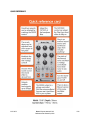
DRIVE CONTROL
The Clap can be clean when this control is turned low, but when dialed up, the
sound will be overdriven and harsh. While this control does tend to affect the
volume, don’t think of it as a volume control!
CUTOFF CONTROL
The resonant bandpass filter’s CUTOFF can be varied with this control.
WHY IS THERE NO CV OF CUTOFF?
We thought of adding CUTOFF CV, but, there were so many other things
we wanted to do so it didn’t fit into the design. There is a reason why a
VCF is its own module – they take up a lot of circuit space!
FILTER SWITCH
The bandpass filter (which the CUTOFF knob controls) can be bypassed with this
switch.
TRIG INPUT
Apply a gate or trigger signal to control the MCP from. This input has a 1V trigger
threshold and activates the clap when that threshold is met. Almost any signal can
be used as a trigger as long as it goes all the way back down to 0V and up again
with each repetition.
ACC INPUT
This is the ACCENT input. Applying a 0-5V signal here will vary the ACCENT amount from least (0V) to most (5V).
ACCENT varies the volume of the Clap.
When nothing is plugged into the ACC INPUT, the ACCENT defaults to either minimum or maximum ACCENT based
on the jumper setting on the back of the module. To change whether the input is pulled UP (MAXIMUM) or DOWN
(MINIMUM) by default, turn off the power to your modular and remove the module from your case so you can move
the jumper on the back of the PCB to the desired setting.
EXT INPUT
Plug in a sound source from elsewhere in your modular system to override the internal LFSR noise generator. This
opens up an entirely new realm of sonic possibilities. Try things like other noise sources, VCOs, anything really!
EXT CONTROL
This controls the volume of the sound source you are using. NOTE that if nothing is plugged into the EXT input, the EXT
knob controls the volume of the INTERNAL sound generator!
SUSTAIN CONTROL
This control directly affects the volume shape of the clap sound by affecting the bias of the VCAs controlling the shape
of the clap. Turning it all the way up will make the clap stay on indefinitely, while turning it all the way down will make it
not sound at all. While not technically a sustain control, it seemed the best name for this parameter, as it affects the
way the hand clap envelopes turn the VCA on and off.
8.31.2014
Mutant Clap user manual v1.03
hexinverter.net electronics, 2014
PG2