1
QuickRemote
QuickRemoteturnsyourdeviceintoaUniversalRemoteforyourhomeTV,set-topbox
andaudiosystem,andmore.
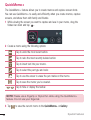
1 SlidetheStatusbardownwardand
tap >taptheQuickRemote
optiontoactivateit> > .
OR
Tap > >Apps tab> >
tap .
NOTE: If QuickRemote is disabled, you can enable it by opening the
Notifications panel and tapping
>
.
2 Selectthetypeandbrandofthe
device,thenfollowtheon-screen
instructionstoconfigurethedevice.
3 Onceyouhavecompletedtheinitial
setup,youcaneasilyaccessthe
QuickRemotefromtheNotification
panel.OpentheNotificationpaneland
usetheQuickRemotefunctions.
NOTE: QuickRemote operates the same way as an ordinary remote control
infrared (IR) signals. Be careful not to cover the infrared sensor at the top of
the device when you use the QuickRemote function. This function may not be
supported depending on the model, the manufacturer or service company.
30
Special Features