1
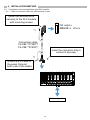
[Wiring Precautions] CAUTION Be sure to ground the FG terminal to the protective ground conductor dedicated to the programmable controller with a ground resistance of 100 Ω or less. Failure to do so may result in an electric shock or malfunction. Use applicable solderless terminals and tighten them within the specified torque range. If any spade solderless terminal is used, it may be disconnected when the terminal screw comes loose, resulting in failure. Check the rated voltage and terminal layout, and then wire the product correctly. Connecting a power supply with a different voltage rating or incorrect wiring may cause a fire or failure. Do not install the control lines or communication cables together with the main circuit lines or power cables. Keep a distance of 100mm (3.94 inches) or more between them. Failure to do so may result in malfunction due to noise. Place the cables in a duct or clamp them; if not, dangling cables may swing or be inadvertently pulled,, resulting in damage to the product or cables, or a malfunction due to poor connection. Tighten the terminal screws within the specified torque range. Undertightening can cause a short circuit, fire, or malfunction. Overtightening can damage screws and/or the product, causing the product to drop, short circuit, or malfunction. Tighten the connector screws within the specified torque range. Undertightening can cause a short circuit, fire, or malfunction. Overtightening can damage screws and/or the product, causing the product to drop, short circuit, or malfunction. Connect the connector to the product securely. Failure to do so may cause a malfunction. When disconnecting a cable from the product, do not pull the cable itself. For a cable with connector, hold the connector and pull it out. For a cable connected to a terminal block, loosen the terminal block screws before removing the cable. Failure to do so may result in a malfunction or damage to the product or cable. Before connecting the cables, check the type of interface to be connected. Connecting the cables to a wrong interface or erroneous wiring may cause the product or external devices to fail. Prevent foreign matter such as dust or wire chips from entering the product. Such foreign matter can cause a fire, failure, or malfunction. The product must be installed inside the control panel. Connect the main power supply to the product inside the control panel through a relay terminal block. Only qualified service personnel with knowledge of protection against electric shock should replace and wire the product. Keep a distance of 100mm (3.94 inches) or more between a thermocouple and the main circuit line or AC control lines. Also, keep the thermocouple away from a circuit that includes harmonics, such as a high-voltage circuit and a load circuit of an inverter. Do not place the product near a device that generates magnetic noise. When connecting the product to the programmable controller, check that the product configuration is correct. The modules may be failure or malfunction if the configuration is incorrect. 4