1
6 COMMUNICATION WITH EXTERNAL DEVICE - SERIAL
COMMUNICATION FUNCTION
MELSOFT
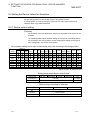
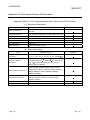
6.1 Operation Procedures for Serial Communication Function
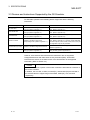
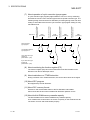
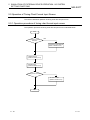
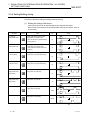
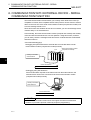
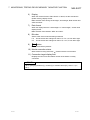
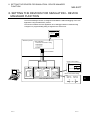
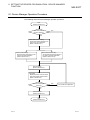
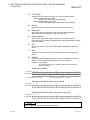
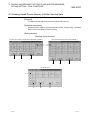
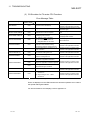
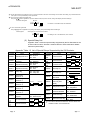
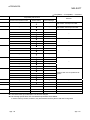
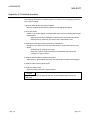
The following are the operation procedures for the serial communication function.
<GX Simulator side>
<External device side>
Start
(Refer to Section 6.2)
Start
Make communication settings such
as the COM port, communication
speed and data length.
(Refer to Section 6.3)
With the exception of the
COM port, make all the
settings equal.
Make communication settings
such as the communication
speed and data length.
Click the Open button to open
the COM port.
(Refer to Section 6.3)
Open the COM port to
be used.
Open the COM port to be used.
Receive a frame.
Send a frame from the
external device to
GX Simulator.
(After that, a response
command is sent to the
external device.)
Send a frame.
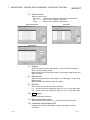
Check the communication status
data and perform debugging.
(Refer to Section 6.3 and 6.7)
Check the response command
data and perform debugging.
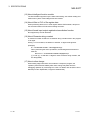
6
NO
Has debugging ended?
Has debugging ended?
YES
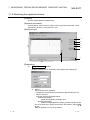
Click the Close button to close
the COM port.
(Refer to Section 6.3)
End
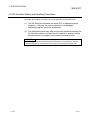
(Refer to Section 6.2)
6-2
NO
YES
Close the COM port being
used.
Close the COM port.
End
6-2