1
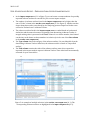
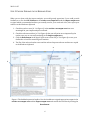
2013-10-25 STEP 3. INVESTIGATE OUTPUT – SIMILAR TRACKER CASES In the tracker case output area (cf. 1 in Figure 4) you can browse the 20 most similar tracker cases in the knowledge base. The IA column contains an ‘X’ if a previous impact analysis report is available. The Links column displays the number of links to impacted software artifacts identified in the previous impact analysis reports attached to the tracker case. The Sim. column shows a measure of the textual similarity between the text you entered in the input area and the text contained in the tracker case. Note that the number is a relative measure, and that limited conclusions can be drawn based on an individual measure. If you select a tracker case in the tracker case output area (or multiple tracker cases by pressing SHIFT or CTRL), the impacted software artifacts pointed out from the attached impact analysis reports are highlighted in the impact output area (see 2 in Figure 4). The description of the selected tracker case, as well as its attached impact analysis report if available, is presented in the Tracker Case Details area. 1 2 3 Figure 4. Tracker case #35529 is selected in the tracker case output area (cf. 1), the software artifacts previously pointed out as impacted (the three requirements SR-DGN-015, SR-DGN-038, and PR-INT-008) are highlighted in the impact output area (cf. 2). 4