1
System Monitoring
and Troubleshooting
6--20
System Monitoring and Troubleshooting
Error Codes
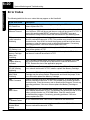
The following table lists the error codes that may appear on the Handheld.
DL405 Error Code
Description
E001
CPU Fatal Error
You may possibly clear the error by power cycling the CPU. If the error
returns replace the CPU.
E003
Software Time-out
If the program scan time exceeds the time allotted to the watchdog timer, this
error will occur. SP51 will be on and the error code will be stored in V7755. To
correct this problem add RSTWT instructions in FOR NEXT loops and
subroutines or using AUX 55 extend the time allotted to the watchdog timer.
E004
Invalid Instruction
(DL440 only)
The application program has changed for some reason. SP44 will be on and
the error code will be stored in V7755. This problem may possibly be due to
electrical noise. Use AUX21 to check the program syntax and correct where
necessary or clear the memory and re-download the program. Correct any
grounding problems. If the error returns replace the CPU.
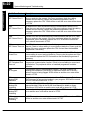
E041
CPU Battery Low
The CPU battery is low and should be replaced. SP43 will be on and the error
code will be stored in V7757.
E043
Memory Cartridge
Battery low
(DL440 only)
The Memory Cartridge battery is low and should be replaced. SP43 will be on
and the error code will be stored in V7757.
E099
Program Memory
Exceeded
If the compiled program length exceeds the amount of available CPU RAM
this error will occur. SP52 will be on and the error code will be stored in
V7755. Reduce the size of the application program.
E101
CPU MC Missing
(DL440 only)
The CPU Memory Cartridge has failed or is missing. SP44 will be on and the
error code will be stored in V7755. Install or replace the Memory Cartridge.
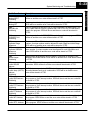
E104
Write Failed
(DL440 only)
A write to the CPU Memory Cartridge was not successful. The Memory
Cartridge may be write protected. Disassemble and check the jumper. If the
error still occurs replace the Memory Cartridge.
E151
Invalid Command
A parity error has occurred in the application program. SP44 will be on and
the error code will be stored in V7755. This problem may possibly be due to
electrical noise. Clear the memory and re-download the program. Correct any
grounding problems. If the error returns replace the Memory Cartridge or
CPU.
E155
RAM Failure
A checksum error has occurred in the system RAM. SP44 will be on and the
error code will be stored in V7755. This problem may possibly be due to a low
battery, electrical noise or a CPU RAM failure. Clear the memory and
re-download the program. Correct any grounding problems. If the error
returns replace the CPU.
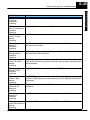
E2**
I/O Module Failure
An I/O module has failed. Run AUX42 to determine the actual error.
E201
Terminal Block
Missing
A terminal block is loose or missing from an I/O module. SP45 will be on and
the error code will be stored in V7756.