1
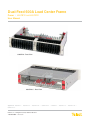
Dual-Feed 600A Load Center Frame
Power :: 600CB10 and 600CB12
User Manual
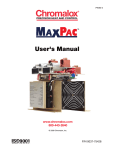
600CB10 - Front View
600CB10-C - Rear View
Applies to : 600CB10 :: 600CB10-C :: 600CB10-VL :: 600CB10-CL :: 600CB12 :: 600CB12-C :: 600CB12-VL ::
600CB12-CL
© Telect, Inc., All Rights Reserved, 136429-1 A0 07.14
1.509.926.6000 :: telect.com
Dual-Feed 600A Load Center Frame
Power :: Models 600CB10 and 600CB12
Table of Contents
1.1 Overview ................................................................................................................................1
1.2 Installation Guidelines.............................................................................................................2
1.3 Specifications..........................................................................................................................2
1.4 Installation Instructions........................................................................................................... 4
1.5 Parts & Accessories...............................................................................................................13
1.6 Interconnections ................................................................................................................... 15
1.7 Drawings ............................................................................................................................... 16
List of Figures
Figure 1 - 600CB10, 19" 10/10 Position Load Center Frame .....................................................1
Figure 2 - Installing Load Straps .................................................................................................5
Figure 3 - Alarm Board Location (bottom view of Side A) ........................................................... 5
Figure 4 - Alarm Board Jumper Settings .................................................................................... 6
Figure 5 - Alarm Wiring ...............................................................................................................6
Figure 6 - Rack Mounting ............................................................................................................7
Figure 7 - Ground Lug Connection ............................................................................................. 8
Figure 8 - Input Lugs ...................................................................................................................9
Figure 9 - LED Panel .................................................................................................................. 9
Figure 10 - Output Lug Connections ...........................................................................................10
Figure 11 - Installing Circuit Breakers ......................................................................................... 11
Figure 12 - Installing Fuse Holders and Fuses ............................................................................11
List of Tables
Table 1 - Circuit breakers, fuses, fuse holders and load strap kits ............................................. 13
Table 2 - Input power lugs .......................................................................................................... 14
Table 3 - Ground and circuit breaker output lugs ........................................................................ 14
© Telect, Inc., All Rights Reserved, 136429-1 A0 07.14
1.509.926.6000 :: telect.com
ii
Dual-Feed 600A Load Center Frame
Power :: Models 600CB10 and 600CB12
1.1 Overview
Telect’s dual-feed 600A per feed load center frames
provide high-capacity, -48V and ±24V power protection
for secondary power distribution and data and
communications equipment. Telect’s load center
frames are also ideal for primary distribution in small
central offices and at remote sites.
Models 600CB10 and 600CB12 are open-frame
chassis providing excellent heat dissipation and
overhead access to the load center’s BATT and RTN
terminals, vertical inputs.
Models 600CB10 and 600CB12 are white, 2RU, and fit
racks with either EIA or WECO spacing.
• Model 600CB10 contains 10 interrupter positions
on each side and fits a 19-in. rack (an adapter
kit can be purchased separately to mount the
600CB10 in a 23" rack).
• Model 600CB12 has 12 interrupter positions on
each side and fits a 23-in. rack.
Figure 1 - 600CB10, 19" 10/10 Position
Load Center Frame
Both accommodate AIRPAX®-style LEL or Carling CA1 circuit breakers or fuses (TPC/TPW and TPS/TLS) in
single- through quad-pole configurations. Each circuit breaker or fuse pole position accommodates a bullet-style,
plug-in circuit breaker or fuse holder up to 100A. With double-pole circuit breakers or TPW fuses, the maximum
output load can be up to 200A. With the triple-pole circuit breakers the maximum load is 250A and with quad-pole
circuit breakers the maximum load is 400A.
Sides A and B are electrically isolated except for the alarm card, which contains power, fuse and bay status relays
with dry, Form-C contacts. The contacts are connected to wire-wrap pins to switch on external power to visual/
audio external alarms. The alarm card also controls the three dual-color LEDs on the front panel.
All input, output, and alarm terminals are within the open-frame chassis. All BATT and RTN inputs, outputs, and
ground accommodate dual-hole lugs. Input and output terminals are studs and the ground terminals are bolt
connections at the sides of the load center near the rear corners. Only one ground connection is required.
Fuses, fuse holders, and circuit breakers are sold separately. Also sold separately are single-, double-, triple-,
and quad-pole straps for the output of the breakers or fuses. These copper straps bridge the output of the fuse
holders or circuit breakers to the output studs. See telect.com to order breakers, fuses, fuse holders, and load
straps.
The 600CB10-C and 600CB12-C provide horizonal inputs and a cover. The 600CB10-CL and 600CB12-CL also
provide horizontal inputs, a cover and single-pole load straps pre-installed into the panel.
The 600CB10-VL and 600CB12-VL provide vertical inputs as well as single-pole load straps pre-installed into the
panel.
© Telect, Inc., All Rights Reserved, 136429-1 A0 07.14
1.509.926.6000 :: telect.com
1
Dual-Feed 600A Load Center Frame
Power :: Models 600CB10 and 600CB12
1.2 Installation Guidelines
Elevated Operating Ambient - If installed in a closed or multi-unit rack assembly, the operating ambient
temperature of the rack environment may be greater than the room ambient. Therefore, consideration should be
given to installing the equipment in an environment compatible with the maximum ambient temperature (Tma)
specified by the manufacturer.
Reduced Air Flow - Installation of the equipment in a rack should be such that the amount of air flow required for
safe operation of the equipment is not compromised.
Mechanical Loading - Mounting of the equipment in the rack should be such that a hazardous condition is not
achieved due to uneven mechanical loading.
Circuit Overloading - Consideration should be given to the connection of the equipment to the supply circuit
and the effect that overloading of the circuits might have on overcurrent protection and supply wiring. Appropriate
consideration of equipment nameplate ratings should be used when addressing this concern.
Reliable Earthing - Reliable earthing of rack-mounted equipment should be maintained. Particular attention
should be given to supply connections other than direct connections to the branch circuit (e.g. use of power strips).
Disconnect Device - A readily available disconnect device shall be incorporated in the building installation wiring.
1.3 Specifications
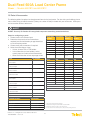
Inputs:
Voltage range (nominal voltage)
Specifications:
±21.6V to ±30V (nominal ±24 VDC)
-40V to -60V (nominal -48 VDC)
Max. input load rating
600A per side at max. operating ambient of 49°C (120°F)
Short circuit withstand rating
5000A
Nominal power loss at full load
Less than 75W per side @ 28,800W full load per side (600A x 48V)
Percentage of full power dissipation at nominal voltage
Less than 1%
Max. input interrupt device
750A
Input terminal studs (with nuts, flat washers, and spring washers) for
Two pairs of 3/8 - 16 studs on 1-in. centers per terminal [max. lug
dual-hole compression lugs
width of 1.94-in. (49.2 mm)] per pair. Torque nut (using 9/16-in. or 15
mm wrench) to 150-in./lb. (~17 N•m), max.
Input wire size
#1 AWG to 750 MCM
Grounding:
Specifications:
Earth GND terminal bolts (with washers) for dual-hole compression
Two pair of 1/4 - 20 threaded holes on 5/8-in. centers. Torque bolts
lug
(using 7/16-in. or 12 mm wrench) to 50-in./lb. (5.5 N•m), max.
Ground wire size
#2 AWG (min.) for any input interrupt device 400A or more
© Telect, Inc., All Rights Reserved, 136429-1 A0 07.14
1.509.926.6000 :: telect.com
2
Dual-Feed 600A Load Center Frame
Power :: Models 600CB10 and 600CB12
Outputs:
Specifications:
Max. output circuit breaker or fuse holder
Single-pole: 100A; Double-pole: 175A
Max. output load - continuous
Single-pole: 80A; Double-pole: 140A
Minimum short circuit interrupt rating
5000A
Max. total output load
550A per side
Output terminal studs (with KEPS nuts and washers) for dual-hole
1/4 - 20 studs on 5/8-in. centers [max. lug width of 0.625-in (15.8
compression lugs
mm) for a BATT terminal and 0.70 (17.7 mm) for a RTN terminal].
Torque bolts (using 7/16-in. or 12 mm wrench) to a 50-in./lb. (5.5
N•m), max.
Output wire size
• #10 AWG (min.) for a 25A single-pole interrupter to #2 AWG (min.)
for a 100A single-pole interrupter
• #2 AWG (min.) for double-pole interrupters from 100 to 175A
• 2/0 AWG (min.) for triple-pole interrupters
• 4/0 AWG (min.) for quad-pole interrupters
• AIRPAX®-style LEL or Carling-style CA1**
Circuit breakers*
Fuses and fuse holders
• TFD fuse holders for single-pole TLS or TPS fuses
• TPC DC-BBE-3 fuse holders for single-pole TPC fuses
• TPW fuse holders for double-pole TPC fuses
Alarms:
Specifications:
Alarm relay contacts
2A @ 30 VDC; 0.6A @ 60 VDC
Max. alarm card power rating
@24V: 103 mA (2.47W); @48V: 128 mA (6.14W)
Alarm wire size
#24 AWG, typical (#26 to #20 AWG)
Alarm terminals
Wire wrap
Dimensions:
Specifications:
600CB10 width (all models)
19-in. (483 mm)
600CB12 width (all models)
23-in. (584 mm)
Height
3.5-in. (88 mm)
Depth
12-in. (305 mm)
Dimensions:
Specifications:
Weight, without packaging and accessories
600CB10: 18 lbs. (8.2 kg); 600CB12: 22 lbs. (10 kg)
600CB10-xL: 21 lbs. (9.5 kg); 600CB12-xL: 25 lbs. (11.3 kg)
Weight, shipping
600CB12: 25 lbs. (11 kg); 600CB12: 30 lbs. (14 kg)
600CB12-xL: 28 lbs. (12.7 kg); 600CB12-xL: 33 lbs. (15 kg)
Environment:
Specifications:
Operating temperature
-10°C (14°F) to 55°C (131°F)
Humidity
90% and non-condensing
Compliance:
Specifications:
UL Recognized, NEBS Level 3
* Telect suggests you avoid using different types of circuit breakers or fuses in the same load center. Alarm contacts may vary
among interrupter manufacturers and may incapacitate the alarm system.
** Circuit breakers for this load center are designed and manufactured by Airpax Corporation and Carling Industries to meet
Telect’s specifications. Order circuit breakers only from Telect.
© Telect, Inc., All Rights Reserved, 136429-1 A0 07.14
1.509.926.6000 :: telect.com
3
Dual-Feed 600A Load Center Frame
Power :: Models 600CB10 and 600CB12
!
ALERT
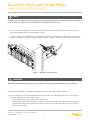
ALERT! Only qualified technicians may install and maintain this product. Verify all connections meet
requirements specified in local electric codes or operating company guidelines before supplying power.
Protect this equipment with a fuse or breaker sufficient to interrupt power levels specified.
Install this product in locations accessible only to qualified personnel. The panel weighs more than 35
lbs. (~16 kg); two persons may be required for handling and installing the Load Center Frame.
1.4 Installation Instructions
Please read these instructions carefully before beginning installation. If assistance is required, call Technical
Support at 888-821-4856, or 509-921-6161, or e-mail [email protected].
•
Telect is not liable for shipping damage. If damaged, notify the carrier and call Telect’s Customer Service
Department at 800-551-4567, or 509-926-6000 for further recourse.
•
Telect recommends that you install load straps before installing the load center on the rack. Also, install load
straps now for future add-on loads.
•
Inspect equipment after unpacking and compare it to the packing list. Immediately report any shipping
damage, defects, or missing parts to Telect at 800-551-4567. Keep all documentation that comes with your
shipment.
1. Assign interrupter positions and install load straps for those positions before installing the load center in a rack
as follows:
a. Choose interrupter positions for breakers or fuses.
You may mix interrupter ratings and single- and multi-pole interrupters in the same load center. Telect
recommends not mixing fuses with circuit breakers.
•
•
•
Avoid mixing non-mid-trip and mid-trip breakers.
Avoid mixing TLS/TPS with TPC fuses. (TLS and TPS fuses are compatible but made by different
manufacturers.)
Do not use multiple, single-pole breakers or fuses with multi-pole load straps.
b. Record interrupter position(s) and amperage of each intended interrupter.
• To mitigate heat build up caused by heavy loads >100A, plan a space on one side those interrupters.
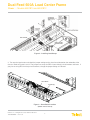
c. Remove bottom screw holding circuit breaker cover to selected interrupter positions. Refer to Figure 2.
• Retain screw and cover if you intend to use circuit breakers.
• Retain screw but discard cover if you intend to use fuses.
• Remove corresponding screw in plastic load-strap support.
• Slip receptacle(s) of load strap into plastic load strap receptacle holder and fasten with screw removed
in the previous step.
© Telect, Inc., All Rights Reserved, 136429-1 A0 07.14
1.509.926.6000 :: telect.com
4
Dual-Feed 600A Load Center Frame
Power :: Models 600CB10 and 600CB12
Figure 2 - Installing Load Straps
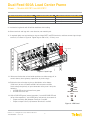
2. Turn over the load center and check the jumper settings on the alarm board located on the underside of the
chassis. Refer to Figures 3 and 4. The jumpers are set up for REC-4 (non-mid-trip) circuit breakers and fuses. If
you plan on using RLS-4 mid-trip circuit breakers, change the jumper setting as indicated.
Alarm Board
Jumpers (6)
Figure 3 - Alarm Board Location
(bottom view of side A)
© Telect, Inc., All Rights Reserved, 136429-1 A0 07.14
1.509.926.6000 :: telect.com
5
Dual-Feed 600A Load Center Frame
Power :: Models 600CB10 and 600CB12
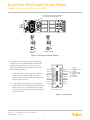
From the factory, jumpers are set for REC-4
(non-mid-trip) circuit breakers and fuses.
REC-4 CBs
& Fuses
RLS-4 Mid-Trip CBs
Figure 4 - Alarm Board Jumper Settings
3. If you intend to install alarm wiring for load center
and/or bay alarms, consider doing so now before
installing the load center in the rack. The alarm
terminal is located near the top center of the load
center. Refer to Figure 5.
LEGEND
B PWR NO
MINOR ACT
CB-F C
NC = NORMALLY CLOSED
MJR/MNR REF C = COMMON
NO = NORMALLY OPEN
MAJOR ACT
CB = CIRCUIT BREAKER
F
= FUSE
MINOR NO
ACT = ACTIVATE
MINOR C
REF = REFERENCE
CB-F NC
MINOR NC
A PWR NO
MAJOR NO
A PWR C
MAJOR C
A PWR NC
MAJOR NC
B PWR C
a. If you intend the alarm wires to exit at the back
of the rack, don’t forget to feed alarm wiring
from the back to the front of the rack before wire
wrapping the alarm pins.
B PWR NC
CB-F NO
b. It is possible to use a short, manual wire-wrap
tool to install alarm wiring after securing the load
center to the rack. If you intend to use a power
or larger manual wire-wrap tool, you must install
alarm wiring now.
FRONT OF LOAD CENTER
Figure 5 - Alarm Wiring
© Telect, Inc., All Rights Reserved, 136429-1 A0 07.14
1.509.926.6000 :: telect.com
6
Dual-Feed 600A Load Center Frame
Power :: Models 600CB10 and 600CB12
4. Locate an unused rack position and mount the load center using at least two sets of fasteners per side, as
shown in Figure 6.
Mount the panel as high as possible on the rack, leaving at least 1RU of access space above the load center.
Tighten screws to 35-in./lb. (4.29 N•m).
Telect recommends using a seismic rack for best rigidity.
Figure 6 - Rack Mounting
!
WARNING
WARNING! Failure to properly ground this equipment can create hazardous conditions to installation
personnel and to the equipment.
© Telect, Inc., All Rights Reserved, 136429-1 A0 07.14
1.509.926.6000 :: telect.com
7
Dual-Feed 600A Load Center Frame
Power :: Models 600CB10 and 600CB12
!
ALERT
ALERT! Only use components and crimping tools approved by agencies or certifying bodies recognized
in your country or region such as Underwriter’s Laboratories (UL), TUV, etc.
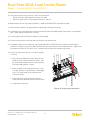
5. Use an approved crimping tool to attach approved, dual-hole compression lug onto suitable grounding wire.
(Size of ground depends on input interruption device.)
6. If required, lightly coat anti-oxidant on lug and grounding surface on side of panel. Connect the lug using 1/4 20 bolts, flat washers, and split washer provided, as shown in Figure 7. Tighten the bolt to 50-in./lb. (5.5 N•m).
Figure 7 - Ground Lug Connection
!
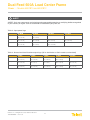
WARNING
WARNING! Before connecting input power cables, make sure input power to the panel is turned off.
7. Make sure input power is off before connecting this panel’s input cables to PDU or battery.
8. For input wiring, crimp dual-hole compression lugs onto #1 AWG to 750 MCM copper wires. The choice of
input wiring depends on the following criteria:
• Input interrupt device rating affects size of input wiring.
• Ambient operating temperature affects the type of input wire insulation. Use the table on the following
page to choose the correct temperature-rated input wires. For further information, consult the National
Electrical Code (NEC).
© Telect, Inc., All Rights Reserved, 136429-1 A0 07.14
1.509.926.6000 :: telect.com
8
Dual-Feed 600A Load Center Frame
Power :: Models 600CB10 and 600CB12
Ambient Operating Temperature Range
Max. Current Rating Per Side
Min. Cable Insulation Temperature Rating
-5° to 49°C (23° to 120°F)
600A
75°C (167°F)
49° to 55°C (120° to 131°F)
550A
75°C (167°F)
49° to 55°C (120° to 131°F)
600A
90°C (194°F)
9. Insulate the lug barrels with UL94 V-0 rated heat shrink tubing.
10. Clean terminals and lugs with a non-abrasive, non-mettalic pad.
11. If required, lightly coat anti-oxidant on lugs and input BATT and RTN terminals, and then connect lugs to input
terminals, as shown in Figure 8. Tighten lugs to 150-in./lb. (~17 N•m), max.
Side A Input RTN
Side A Input BATT
Figure 8 - Input Lugs
12. Make sure the breaker or fuse holder positions are either empty, off, or
contain dummy fuses (phoney, inoperative, all-plastic slugs).
13. Enable the fuse or breaker at primary distribution unit or battery
(750A max.) to turn on Feed A to Side A of load center and then
check voltage and polarity at input connectors of the panel. Verify the
following:
• A PWR LED on front of panel turns green.
• B PWR LED turns red.
14. With A PWR LED green (normal operation) - but with B PWR LED red
(off or failure operation) - test A PWR relay and contact alarm terminal:
• Expect continuity (0Ω) between Terminals C and NC.
• Expect an open circuit (∞Ω) between Terminals C and NO.
BAY
ALM
A PWR/
ALM
B PWR/
ALM
100A MAX PER POLE
A
INPUT
BUS
600A
+-24
- 48
V- - -
B
Figure 9 - LED Panel
© Telect, Inc., All Rights Reserved, 136429-1 A0 07.14
1.509.926.6000 :: telect.com
9
Dual-Feed 600A Load Center Frame
Power :: Models 600CB10 and 600CB12
15. Also, test fuse alarm relay contacts at CB-F alarm terminals.
• Expect continuity (0Ω) between Terminals C and NC.
• Expect an open circuit (∞Ω) between Terminals C and NO.
16. Repeat Steps 13 and 14 to power up Side B. A PWR and B PWR LEDs must both be green.
17. Make sure input power is off again before installing output wiring to this device.
18. For output wiring, crimp dual-hole lugs onto one end of #10 to #2/0 AWG copper output wires, as required by
NEC. (Work with one output wire at a time.)
19. Insulate lug barrels with UL94 V-0 rated heat shrink tubing.
20. Clean the panel terminal and lugs with non-abrasive, non-metallic pad.
21. If required, lightly coat anti-oxidant on lugs and output BATT and RTN terminals, and then connect lugs to
terminals, as shown in Figure 10. (NEC specifies only one lug and load at each output terminal.) Tighten nuts
to no more than 50-in./lb. (5.6 N•m), max., and then connect other end of output wire to load.
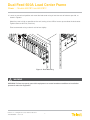
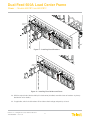
22. Install circuit breakers or fuses, as shown in Figures
11 and 12.
a. Use screws provided with circuit breaker or fuse
holder to attach cover to breaker or holder. (Use
the cover removed previously for circuit breakers.
The fuse holder requires a cover.)
b. Insert a breaker in the load center frame. ("Line"
is on top. Breaker is "upside down" so ON toggle
is up.) Or, insert holder in load center frame
("Load" is on top).
c. Fasten the cover to the load center using the
screw previously removed with the cover in Step 1.
d. If applicable, install fuse.
Figure 10 - Output Lug Connections
© Telect, Inc., All Rights Reserved, 136429-1 A0 07.14
1.509.926.6000 :: telect.com
10
Dual-Feed 600A Load Center Frame
Power :: Models 600CB10 and 600CB12
S ing le -P ole
B re ak e r
D ou b le -P o le
B re a ke r
Figure 11 - Installing Circuit Breakers
TPC Fuse
Holder
TPC Fuse
Figure 12 - Installing Fuse Holders and Fuses
23. With the output loads (devices fed by this load center) disabled, re-enable fuses or breakers at primary
distribution unit or battery.
24. If applicable, switch circuit breakers ON and then check voltage and polarity at loads.
© Telect, Inc., All Rights Reserved, 136429-1 A0 07.14
1.509.926.6000 :: telect.com
11
Dual-Feed 600A Load Center Frame
Power :: Models 600CB10 and 600CB12
25. If possible, either replace one of the functioning fuses with a blown fuse or switch OFF breaker.
• For a load center with fuses or non-mid-trip circuit breakers, the applicable ALM LED will turn red.
• For a load center with mid-trip breakers, the applicable ALM LED will remain green.
26. Check the CB-F alarm terminals. For a load center with fuses or non-mid-trip circuit breakers, expect the
following:
• An open circuit (∞Ω) between Terminals C and NC
• Continuity (0Ω) between Terminals C and NO.
27. For a load center with mid-trip breakers, expect the following:
• Continuity (0Ω) between Terminals C and NC
• An open circuit (∞Ω) between Terminals C and NO.
28. Re-install operable fuses or switch ON breakers before proceeding.
29. Record circuit assignments in accordance with operating company procedures and guidelines.
30. Lastly, enable equipment loads one at a time to verify proper operation of loads.
© Telect, Inc., All Rights Reserved, 136429-1 A0 07.14
1.509.926.6000 :: telect.com
12
Dual-Feed 600A Load Center Frame
Power :: Models 600CB10 and 600CB12
1.5 Parts & Accessories
The following tables list optional and replacement items for the load center. For wire sizing and labeling, please
refer to Wire Sizing & Label Convention (Telect part number 117995) included with your load center. Order parts
and accessories online at telect.com.
!
ALERT
ALERT! Use only UL-listed or UL-recognized component secondary protection devices.
Steps for configuring a panel:
1. Choose vertical or horizontal input
2. Determine the quantity of load connections
required (one load connection per populated fuse
or circuit breaker position
3. Choose multi-pole connections if required
4. Select circuit breakers or fuses
• If fuses, choose TPC or TFD holders
• If circuit breakers (or fuse holders), select
quantity equal to number of load connections
• Select circuit breaker or fuse amperage values
Panel
Part Number
600A Dual-feed 10/10 load center frame,
600CB10
hoirzontal inputs
600CB10-VL
vertical, loaded
600A Dual-feed 10/10 load center frame,
600CB10-CL
horizontal, loaded
600A Dual-feed 12/12 load center frame,
600CB12
vertical inputs
600A Dual-feed 12/12 load center frame,
600CB12-C
horizontal inputs
600A Dual-feed 12/12 load center frame,
Multi-pole
Breakers
Part
Number
30A
116671
125A (2-pole)
134634
40A
116672
150A (2-pole)
134635
50A
116673
175A (2-pole)
135921
60A
118160
200A (3-pole)
134636
70A
118161
225A (3-pole)
134637
80A
118162
250A (3-pole)
134638
90A
118163
400A (4-pole)
143962
118159
600CB08-RPK
Fuses
TPC
TPS
TLS
25A
125441
130476
N/A
30A
125442
130478
N/A
40A
125443
130482
N/A
50A
125444
130484
N/A
60A
125445
130486
N/A
70A
N/A
130488
N/A
75A
125446
N/A
N/A
80A
N/A
N/A
140640
90A
1254477
N/A
140641
100A
125448
N/A
140642
125A
125449
N/A
140644
TPC fuse holder
600CB12-VL
3
129347
TFD fuse holder (for TPS/TLS fuses)3
vertical, loaded
600A Dual-feed 12/12 load center frame,
Adapter
2
(1" C-C)
600CB10-C
600A Dual-feed 10/10 load center frame,
Part Number
100A
vertical inputs
600A Dual-feed 10/10 load center frame,
Single-pole
Breakers
Fuse holder cover
600CB12-CL
4
129816
600CBXX-CFK
horizontal, loaded
Adapter kit to mount 600CB10 in a 23" rack
02117-02+746
Adapter kit for double-pole input1
600CB1X-2FA
Load Connections
Part Number
Single-pole
600CB1X-1PK
Double-pole
600CB1X-2PK
1 Two kits are required for dual feed inputs.
Triple-pole
600CB1X-3PK
2 Required when using the 600CB1X-3PK or 600CB1X-4PK.
Four-pole
600CB1X-4PK
3 Holder kits contain fuse holder, cover, and fasteners.
© Telect, Inc., All Rights Reserved, 136429-1 A0 07.14
1.509.926.6000 :: telect.com
4 Load connection kits contain receptacle, strap assembly, and lug fasteners.
13
Dual-Feed 600A Load Center Frame
Power :: Models 600CB10 and 600CB12
!
ALERT
ALERT! Only use components and crimping tools approved by agencies or certifying bodies recognized
in your country or region such as Underwriter’s Laboratories (UL), TUV, etc.
Table 2 - Input power lugs
400 MCM
500 MCM
750 MCM
777.7 MCM
T&B
54216
(Die code 76)
54218
(Die code 87)
--
--
Burndy
YA322TC38
(Die code 19)
YA342TC38
(Die code 20)
YA392NT38
(Die code 24)
YA44L-2NT38-FX
(Die code L115)
Panduit
LCD400-38D-6
(Die code 76)
LCD500-38D-6
(Die code 87)
LCDN750-38D-6
(Die code 106)
--
Table 3 - Ground and circuit breaker output lugs (1/4-in. dual-holes on 5/8-in. centers, uninsulated)
#8 AWG
#6 AWG
#4 AWG
#2 AWG
#2/0 AWG
T&B
542040410
(Die code 21)
54205
(Die code 24)
54206
(Die code 29)
54207
(Die code 33)
--
Burndy
YA8CL-2TC14
(Die code 49)
YA6CL-2L
(Die code 7)
YA4C-2L
(Die code 8)
YA2CL-2TC14
(Die code 10)
YA26L2NT14
(Die code 13)
Panduit
LCD8-14A-L
(Die code 21)
LCD6-14A-L
(Die code 24)
LCD4-14A-L
(Die code 29)
LCD2-14A-Q
(Die code 33)
LCDN2/0-14A-X
(Die code 45)
© Telect, Inc., All Rights Reserved, 136429-1 A0 07.14
1.509.926.6000 :: telect.com
14
Dual-Feed 600A Load Center Frame
Power :: Models 600CB10 and 600CB12
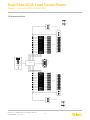
1.6 Interconnections
C GND
C GND
INPUT A 600A MAX
RETURN A
1
2
3
4
5
OUTPUT A
6
7
8
9
10
BAY
ALM
A PWR/
ALM
B PWR/
ALM
ALARM PCB
100A MAX PER POLE
A
INPUT
BUS
600A
+-24
- 48
V- - -
B
B PWR NO
MINOR ACT
B PWR C
MJR/MNR REF
B PWR NC
MAJOR ACT
CB-F NO
MINOR NO
CB-F C
MINOR C
CB-F NC
MINOR NC
A PWR NO
MAJOR NO
A PWR C
MAJOR C
A PWR NC
MAJOR NC
1
2
3
4
5
OUTPUT B
6
7
8
9
10
RETURN B
INPUT B 600A MAX
C GND
C GND
© Telect, Inc., All Rights Reserved, 136429-1 A0 07.14
1.509.926.6000 :: telect.com
15
Dual-Feed 600A Load Center Frame
Power :: Models 600CB10 and 600CB12
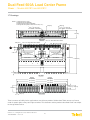
1.7 Drawings
NOTES 1. Dimensions are in in. [mm].
2. Breakers/Fuses sold separately.
3. Breaker/Fuse line straps sold separately.
4. Max lug width for input BATT and RTN is ~50 mm (~2 in.)
3
1.00 [25.4]
1.00 [25.4]
x 1 14 in. Stud, Nut,
Lock Washer, & Flat Washer
3
1
8-16 x 1 4 in. Stud, Nut,
Lock Washer, & Flat Washer
8-16
3.47 [88.1]
REAR VIEW
(ROTATED)
0.625 [15.9]
0.625 [15.9]
¼-20 x ¾ in.
¼-20 x 1 in. Stud, KEPS Nut, & Washer
¼-20 x ¾ in. Stud, KEPS Nut, & Washer
0.69 [17.5], Max. Lug Width
RTN A BUS
RTN B BUS
RTN A Input Terminal
(See Note 4.)
BATT A Input Terminal
RTN B Input Terminal
(See Note 4.)
BATT B Input Terminal
12.00 [304.8]
BATT B BUS
BATT A BUS
12.61 [320.3]
0.73 [18.5]
TOP VIEW
600CB10
600CB12
19.00 [482.6]
23.00 [584.2]
18.31 [465.1]
22.31 [566.7]
21.00 [533.4]
17.00 [431.8]
9
10
11
12
9
A PWR/
ALM
3.00 [76.2]
10
11
12
1.25 [31.8] 1.75 [44.5]
BAY
ALM
B PWR/
ALM
100A MAX PER POLE
A
0.50 [12.7]
INPUT
BUS
600A
+-24
- 48
V- - -
B
FRONT VIEW
Telect assumes no liability for the application or use of these products. Neither does Telect convey any license
under its patent rights or the patent rights of others. This document and the products described herein are subject
to change without notice.
© Telect, Inc., All Rights Reserved, 136429-1 A0 07.14
1.509.926.6000 :: telect.com
16
Dual-Feed 600A Load Center Frame
Power :: Models 600CB10 and 600CB12
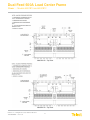
600CB12-CL - Top View
600CB12-VL - Top View
© Telect, Inc., All Rights Reserved, 136429-1 A0 07.14
1.509.926.6000 :: telect.com
17
Dual-Feed 600A Load Center Frame
Power :: Models 600CB10 and 600CB12
This page intentionally left blank.
© Telect, Inc., All Rights Reserved, 136429-1 A0 07.14
1.509.926.6000 :: telect.com
18