1
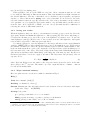
type [2] and [3] before hitting enter.
Stars typically looked at by the WET are very blue. Most comparison stars are red, and
so are extincted differently at different air masses. This often manifests as a slight curvature in
the divided lightcurve. The size of this affect can be calculated, but it is quicker, and just as
effective, to remove this trend by fitting a low order polynomial. To fit a trend to the data,
select the channel of interest, type [F], and select the order of the polynomial to fit (1 for linear,
2 for quadratic etc.) by typing the appropriate number. A polynomial will be fit and removed
from the data. As a rough rule of thumb, a second order polynomial should be sufficient for
removing the effects of differential extinction.
3.4.3
Saving your results
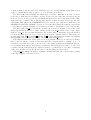
When the lightcurve has been edited to your satisfaction, it’s time to save your work. Select the
appropriate channel and write the lightcurve to disk by typing [W]. The cursor will change to
a vertical bar, allowing you to select the region of the lightcurve you want to save. To save the
entire lightcurve, just type [E]. If you try to save separate sections of the lightcurve, subsequent
sections will be appended to what was previously saved.
A common request is to save the lightcurves of the target and first reference star (Channels
1 and 2). [SHIFT]+[W] provides a handy shortcut to save both channels at once. Wqed saves a
file with the extension .lc?, where the question mark is replaced with the channel number. The
header from the input file is copied to the output file. Some keywords are added, including two for
the barycentric date of the data 6 . The keyword Bjed is the Barycentric Julian Ephemeris Date
(also known as just Barycentric Julian Date) of the midpoint of the first exposure. BjedCorr, is
the linear barycentric correction to apply to the times. The barycentric date (in days) of the i th
exposure, Ti , is
ti
× BjedCorr
(1)
Ti = Bjed +
86400
where Bjed and BjedCorr are the values of the respective header keywords, and t i is the time
(in seconds) of the ith exposure. The main body of the output file has two columns — time in
seconds and normalised flux.
3.4.4
Wqed command summary
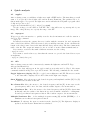
Here is a quick reference for the more utilized commands in Wqed.
Help [?]
Undo last command. [Ctrl]-[U]
Dividing one channel by others [/]
Smooth Gaussian smooths data with a kernel of std deviation of nn seconds, where nn is input
by the user. Usage: nn [ENTER]
Garbage bad points
g to garbage points inside a box of one channel
Shift-g specify an x-range of points to garbage for all channels.
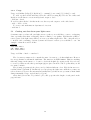
Ctrl-g garbage points outside of a box in one channel
6
Despite the best of intentions, mistakes can be made calculating Barycentric corrections, whether it is incorrect
coordinates, or a forgotten leapsecond. By putting Bjed in the header, but not changing the times for each data
point, we make it easier to correct a Bjed when necessary.
7