1
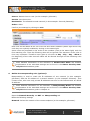
Comment (optional): Enter a description or additional information on the user.
Save your settings by clicking on Save.
More detailed information on the configuration of a User Account and detailed
explanations of the individual settings can be found in the Astaro Security Gateway V8 administration guide.
2.
Configure the IPSec remote access:
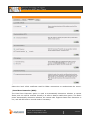
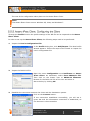
Open the Remote Access >> IPSec page.
On the Connections tab, click New IPSec remote access rule.
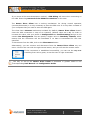
The Add IPSec remote access rule dialog box opens.
More detailed information on the configuration of a IPSec Remote Access and detailed explanations of the individual settings can be found in the Astaro Security
Gateway V8 administration guide.
Name: Enter a descriptive name for this connection.
Interface: Select the network interface to use for IPSec access.
Local networks: Select the local networks that should be reachable to the client.
© 2011 Astaro GmbH & Co. KG.
Subject to change without notice.
4 of 15