1
Note:
If you wish the IPSec-connected users to be allowed to access the Internet, you need to
select Any in the Local networks dialog box. Additionally, you need to define appropriate Masquerading or NAT rules.
Policy: Select an already defined policy (in this example: AES-256). Now you can use
the IPSec >> Policies tab to define your own policies.
Creating of own IPSec Policies is described in in the administration guide in
Chapter xx.
Authentication type: IPSec remote access supports authentication based on CA DN
Match, Preshared Keys and X.509 Certificate. The settings in this section depend on
the authentication type:
| CA DN Match
The authentication is based on the Distinguished Name (DN).
Authority: Select the Certificate Authority VPN Signing CA for the VPN users.
DN mask: In order to use a Distinguished Name as an ID, you will need information
from the X.509 index. Possible indications are Country (C), State (ST), Local (L), Organization
(O), Unit (OU), Common Name (CN) and E-Mail Address (E).
IP Pool: The default settings assign addresses from the private IP space 10.242.4.x/24.
This network is called the VPN Pool (IPSec). If you wish to use a different network, simply
change the definition of the VPN Pool (IPSec) on the Definitions >> Networks page.
| Preshared Keys
Preshared Key: Enter the shared secret. This shared secret is a secure phrase or password that is used to encrypt the traffic using the encryption algorithm for IPSec.
Confirm: Confirm the shared secret.
Security Note:
Use a secure password! Your name spelled backwards is, for example, not a secure
password – while something like xfT35!4z would be. Ensure that this password does
not fall into the hands of unauthorized third parties. With this password, an attacker
can build a connection to the internal network. We recommend changing this password at regular intervals.
| X.509 Certificate
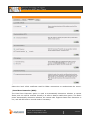
If you choose X.509 CA certificate, the following dialog box will be displayed.
© 2011 Astaro GmbH & Co. KG.
Subject to change without notice.
5 of 15