1
 | 15
5
Automatic Manual Flexion Table
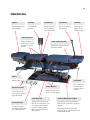
Control Box
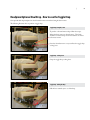
The Automatic & Manual Flex table has a digital control box that is used to operate the tables Automatic flexion features.
There are two modes of operation. Timed flexion where the flexion action will run for a period of time, or manual operation
where the chiropractor controls the length of the operation. The control box also has a dial for selecting the flexion speed of
the table.
Flexion Speed Dial
On / Off Switch
Use to adjust the flexion
speed.
Starts and stops the table
flexion motion
Timer or Manual Toggle
Use to select either timed
operation or manual operation mode.
Mode (sec, min, hrs)
Use to set your timed flexion
to be in second, minutes or
hours.
Flexion Duration Display
The duration is read first by
looking at the select units and
then the time. Show here
is a selection duration of 3
minutes and 19 seconds.
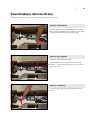
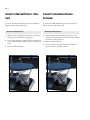
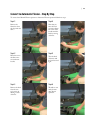
Timed Operation - Automatic Flexion:
Set Timed Flexion Duration
Use to increase or decrease
the timed duration of the
flexion operation.
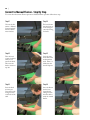
Manual Operation - Automatic Flexion
1. Switch the ‘Timer or Manual’ toggle to ‘Timer’
1. Switch the ‘Timer or Manual’ toggle to ‘Manual’
2. Switch the ‘On & Off Switch’ to ‘On’
2. Adjust the flexion speed of the table by turning the
‘Speed Dial’ .
3. Select ‘Mode’ to the desired units of time, either seconds, minutes or hours. Most common usage would be
minutes.
4. Set the amount of time using the ‘Increase & Decrease’
buttons. Remember that the time displayed on the digital display is in the units specified by the lights beside the
mode button (seconds, minutes or hours).
5. Adjust the flexion speed of the table by turning the
‘Speed Dial’ .
6. Push the Start button to begin flexion, and the Stop button to end the Flexion.
3. Switch the ‘On & Off Switch’ to ‘On’ and the Flexion
action will begin.
4. To stop the Flexion action switch the ‘On & Off Switch’
to ‘Off ’