1
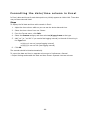
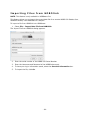
Importing Data (HOBOware Pro only) ......................................................... 84 Importing Text Files ................................................................................... 84 Import Text Files Requirements .................................................................... 86 Formatting the date/time column in Excel ...................................................... 89 Importing Files from HOBOlink ..................................................................... 90 Exporting Data ............................................................................................ 91 Exporting Points as Excel Text ...................................................................... 91 Exporting Data in BoxCar Format.................................................................. 92 Copying Points Data into another Application.................................................. 93 Exporting Details ........................................................................................ 94 Copying a Series to another Plot ................................................................... 95 21 CFR Part 11 Compliance .........................................................................96 Working in Secure Mode .............................................................................. 96 Security Mode Issues .................................................................................. 98 Viewing Logger Status ................................................................................ 99 Checking Device Status ............................................................................... 99 The Status Window................................................................................... 100 Device Details .......................................................................................... 102 Current Readings ..................................................................................... 104 The HOBO U30 Station (HOBOware Pro Only) ........................................... 105 Working with the HOBO U30 Station (HOBOware Pro Only) ............................ 105 Controlling the Relay on the HOBO U30 Station (HOBOware Pro Only) ............. 107 HOBO Shuttles (HOBOware Pro Only) ....................................................... 108 Working with a Shuttle (HOBOware Pro Only) ............................................... 108 Shuttle Management Dialog ....................................................................... 109 Offload Files from a Shuttle ....................................................................... 112 Deleting Files from a Shuttle ...................................................................... 114 FlexSmart Modules/Analog Sensor Ports (HOBOware Pro Only) ............... 115 Configuring an Analog Module/Port ............................................................. 115 The Configure Channel Dialog .................................................................... 117 Setting Scaling Parameters ........................................................................ 119 Configuring Excitation Power ...................................................................... 121 Load Configuration Dialog.......................................................................... 123 Resetting a Module to the Default Configuration............................................ 124 -5-