1
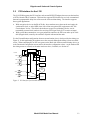
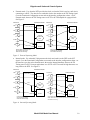
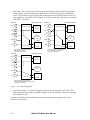
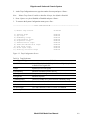
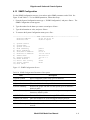
Use the Internal configuration when the network equipment is set for Internal Timing (see Figure 3).
In this application, the modems act as the network timing source. When connecting KG or KIV
encryptors on the Black side, go to the Functional Configuration screen and set the interface
configuration parameters: set the operating mode to Internal, then set the Internal Rate, then set the
delay time; for details, see Section 4.7.
FIFO
J1, DB-25
RXD
RX Data
RX Clock
SCR
Delay Line
SCT
Internal
Clock
SCTE
TX Clock
TXD
TX Data
Figure 3. P53 Interface for Internal Clock
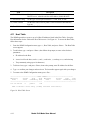
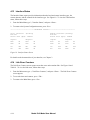
Use the External configuration when the network equipment is set for Network or Internal Timing
(see Figure 4). In this application, the modems act as an extension of the Red side cable in a true tail
circuit. When connecting KG or KIV encryptors on the Red side to a DTE device, go to the
Functional Configuration screen and set the interface configuration parameters: set the operating
mode for the modem at the Red end to External and the modem at the DTE end to Slave; for details,
see Section 4.7.
FIFO
J1, DB-25
RXD
RX Data
RX Clock
SCR
Delay Line
SCT
Internal
Clock
SCTE
TX Clock
TXD
TX Data
Figure 4. P53 Interface for External Function
3-4
Model 2340 Model User Manual