1
HOW TO FLY
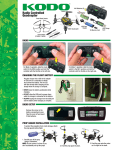
BASIC FLIGHT
FLIPS
The LEDs will flash when the battery voltage is low. Land the KODO as
soon as possible. Recharge the battery before storing the quadcopter.
Push down on the right stick and release it to start the flip. Hold
the right stick in any direction and release it when the flips are
completed. The radio will beep until the right stick released.
CORRECTING DRIFT
FORWARD TRIM
It is normal for the KODO to drift slightly. However if it drifts in any direction consistently press
the trim button opposite the movement as many times a needed to eliminate the drift.
FORWARD TRIM
BACKWARD TRIM
LEFT TRIM
LEFT TRIM
RIGHT TRIM
RIGHT TRIM
BACKWARD TRIM
CAMERA OPERATION
BLADE REPLACEMENT
NOTE: Rotor blades must be installed as shown.
FRONT
White Blades,
Blue LEDs
Press the photo button to capture a photo.
Press the video button to start a video.
The video button must be pressed again to stop and save the video on the card.
The photo button will not operate while the camera is recording a video.
REAR
Black Blades,
Red LEDs
A
B
B
A
TROUBLESHOOTING
PROBLEM: The quadcopter will not respond to the radio.
SOLUTION: (1) Charge or change the battery on the quadcopter (2) Turn off
the radio and disconnect the battery for the KODO. Re-link the
quadcopter and radio.
PROBLEM: Gyro not working properly.
SOLUTION: (1) Battery voltage low. (2) Re-link. (3) Land on to the ground for 3
seconds and take off again.
PROBLEM: Red radio LED light flashing after linking.
SOLUTION: Replace with new AAA batteries.
PROBLEM: Will not take off.
SOLUTION: Rotor blades incorrectly installed. See Rotor Blade Replacement
section.
PROBLEM: Unable to flip.
SOLUTION: Battery voltage too low.
PROBLEM: Quadcopter is shaking.
SOLUTION: Check the canopy, chassis, motors and rotor blades for damage.
dromida.com
DIDE0005 v1.0 © 2014 DROMIDA, A HOBBICO COMPANY