1
Cracking Passwords Version 1.1
24 of 45
file:///D:/password10.html
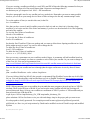
such you will have to change options as RaginRob found out. The following is a slightly modified version
from his tutorial.
I recently started playing around with Hydra and tried to hack my router. After searching the forum and
googling around a while I noticed that there are only some howto's for routers that have http-auth
authentication. That is, when you go to 192.168.2.1 e.g. and before showing anything you have to enter login
and password in a popup. My router (T-Com Sinus 154 DSL Basic 3) and many others I've dealt with so far
work differently. When I want to login to my router, I have to go to 192.168.2.1, a web interface with a
password field shows up, and I have to enter the password which is then checked by /cgi-bin/login.exe via
http-post.
It was quite tricky to find out how to use this authentication with hydra, so I guess there are some of you that
can benefit from this. I'll describe how I did it, so you can adapt the method and use it with your own router.
First of all I examined the login page of the web interface. Be sure to look at the frame source and not the
frameset. You should see the form and the action, here's what I saw:
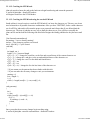
The form is defined as:
<form name="tF" method="post" action="/cgi-bin/login.exe" onSubmit="evaltF();">
Somewhere in the form there will be the field that takes the password:
<input type="password" name="pws" class="stylepwd" size="12" maxlength="12">
This is probably the most important data you need. You need to write down the field name ("pws" in my
case). The size attribute comes in very handy too because it tells us that the password's max length is 12
characters.
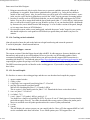
After that I tried to get familiar with Hydra's options. I figured out that you need the following options:
hydra -l "" -P passwords.txt -t 1 -f -v -V 192.168.2.1 http-post-form /cgi-bin
/login.exe:pws=^PASS^:loginpserr.htm
-l Sets the login name. In the end I don't need a login name but hydra gets kind of pissed when you don't pass
something, so I gave an empty string.
-P The wordlist to use for the password
-t 1 task only, not really necessary, I just wanted to make sure Hydra doesn't choke on too many requests -f
Hydra shall stop when a working password is found
-v be verbose. and even more. I skipped that in the final version but it's ok for debugging
192.168.1.1 is victim's ip
http-post-form the method to use
/cgi-bin/login.exe:pws=^PASS^:loginpserr.htm
This is the most important part. Here we tell Hydra what to pass the passwords to. The argument consists of
three parts separated by ":".
The first part is the script that takes the POST data, we found that in the frame source above.
The second part is the field name of the password field with an added =^PASS^. ^PASS^ is the variable that
hydra substitutes with the passwords in the wordlist.
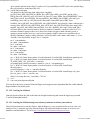
The third part is the "incorrect" condition. Hydra has to find out somehow if the current password that was
send to the router is correct or not. You have to find a string that is actually IN A NEGATIVE RESPONSE
from the router. As we don't have the password yet we can't know what the router will send if the password is
correct, therefore we have to check if it is NOT, which we can find out easily. To find out what the router
sends back to hydra I used Wireshark.
2/15/2010 3:48 PM