1
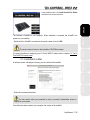
5.2. The DJ Control MP3 e2 control panel You can access the control panel to configure your DJ Control MP3 e2. corner of your screen) by clicking the icon. 5.2.2. Accessing the control panel on Mac - Access the control panel by double-clicking the icon on your desktop. 5.2.3. Control panel features Main tab: MIDI Channel for controls: Lets you select the MIDI channel on which MIDI commands are sent to control your DJing software, apart from Virtual DJ which includes native support for DJ Control MP3 e2. DEUTSCH • FRANÇAIS - Access the DJ Control MP3 e2 control panel via the Windows taskbar (in the lower right-hand ENGLISH 5.2.1. Accessing the control panel in Windows Sensitivity: Lets you adjust the sensitivity of the jog wheels according to how you are using them (scratching, setting up a track, etc.). • About tab: ESPAÑOL This tab contains all of the information regarding the driver version currently installed. Please refer to this information if you need to contact Hercules technical support. ITALIANO Enabling/Disabling: Lets you select whether to enable or disable the jog wheels. NEDERLANDS Jog wheels settings User Manual – 13/32