1
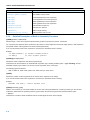
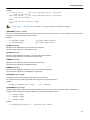
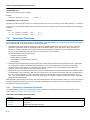
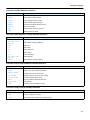
TSK51x/TSK52x Embedded Tools
Reference
TR0105 May 02, 2008
Software, hardware, documentation and related materials:
Copyright E 2008 Altium Limited. All Rights Reserved.
The material provided with this notice is subject to various forms of national and international intellectual property protection, including but not
limited to copyright protection. You have been granted a non−exclusive license to use such material for the purposes stated in the end−user
license agreement governing its use. In no event shall you reverse engineer, decompile, duplicate, distribute, create derivative works from or in
any way exploit the material licensed to you except as expressly permitted by the governing agreement. Failure to abide by such restrictions may
result in severe civil and criminal penalties, including but not limited to fines and imprisonment. Provided, however, that you are permitted to
make one archival copy of said materials for back up purposes only, which archival copy may be accessed and used only in the event that the
original copy of the materials is inoperable. Altium, Altium Designer, Board Insight, DXP, Innovation Station, LiveDesign, NanoBoard, NanoTalk,
OpenBus, P−CAD, SimCode, Situs, TASKING, and Topological Autorouting and their respective logos are trademarks or registered trademarks
of Altium Limited or its subsidiaries. All other registered or unregistered trademarks referenced herein are the property of their respective owners
and no trademark rights to the same are claimed. v8.0 31/3/08
Table of Contents
Table of Contents
C Language
1.1
1.2
1.3
1.3.1
1.3.2
1.3.3
1.4
1.4.1
1.5
1.6
1.7
1.8
1.8.1
1.8.2
1.9
1.10
1.11
1.11.1
1.11.2
1.11.3
1.11.4
1.11.5
1.11.6
1.11.6.1
1.11.6.2
1.11.6.3
1.11.7
1.12
1.13
1.13.1
1−1
Introduction . . . . . . . . . . . . . . . . . . . . . . . . . . . . . . . . . . . . . . . . . . . . . . . . . . . . . . . . . . . . . . . . . . . . . .
Data Types . . . . . . . . . . . . . . . . . . . . . . . . . . . . . . . . . . . . . . . . . . . . . . . . . . . . . . . . . . . . . . . . . . . . . .
Memory Qualifiers . . . . . . . . . . . . . . . . . . . . . . . . . . . . . . . . . . . . . . . . . . . . . . . . . . . . . . . . . . . . . . . .
Memory Type Qualifiers . . . . . . . . . . . . . . . . . . . . . . . . . . . . . . . . . . . . . . . . . . . . . . . . . . . . . . . . . . .
Accessing Hardware from C: __sfr, __bsfr . . . . . . . . . . . . . . . . . . . . . . . . . . . . . . . . . . . . . . . . . . .
Placing an Object at an Absolute Address: __at() . . . . . . . . . . . . . . . . . . . . . . . . . . . . . . . . . . . . .
Memory Models for the TSK51x/TSK52x . . . . . . . . . . . . . . . . . . . . . . . . . . . . . . . . . . . . . . . . . . . . .
Compiling for the Small, Auxiliary, Large or Reentrant Memory Model . . . . . . . . . . . . . . . . . . . .
Using Assembly in the C Source: __asm() . . . . . . . . . . . . . . . . . . . . . . . . . . . . . . . . . . . . . . . . . . .
Pragmas to Control the Compiler . . . . . . . . . . . . . . . . . . . . . . . . . . . . . . . . . . . . . . . . . . . . . . . . . . .
Predefined Preprocessor Macros . . . . . . . . . . . . . . . . . . . . . . . . . . . . . . . . . . . . . . . . . . . . . . . . . . .
Variables . . . . . . . . . . . . . . . . . . . . . . . . . . . . . . . . . . . . . . . . . . . . . . . . . . . . . . . . . . . . . . . . . . . . . . . .
Automatic Variables . . . . . . . . . . . . . . . . . . . . . . . . . . . . . . . . . . . . . . . . . . . . . . . . . . . . . . . . . . . . . . .
Initialized Variables . . . . . . . . . . . . . . . . . . . . . . . . . . . . . . . . . . . . . . . . . . . . . . . . . . . . . . . . . . . . . . .
Strings . . . . . . . . . . . . . . . . . . . . . . . . . . . . . . . . . . . . . . . . . . . . . . . . . . . . . . . . . . . . . . . . . . . . . . . . . .
Switch Statement . . . . . . . . . . . . . . . . . . . . . . . . . . . . . . . . . . . . . . . . . . . . . . . . . . . . . . . . . . . . . . . . .
Functions . . . . . . . . . . . . . . . . . . . . . . . . . . . . . . . . . . . . . . . . . . . . . . . . . . . . . . . . . . . . . . . . . . . . . . . .
Reentrant Functions . . . . . . . . . . . . . . . . . . . . . . . . . . . . . . . . . . . . . . . . . . . . . . . . . . . . . . . . . . . . . .
Parameter Passing . . . . . . . . . . . . . . . . . . . . . . . . . . . . . . . . . . . . . . . . . . . . . . . . . . . . . . . . . . . . . . .
Function Return Types . . . . . . . . . . . . . . . . . . . . . . . . . . . . . . . . . . . . . . . . . . . . . . . . . . . . . . . . . . . .
Inlining Functions: inline / __noinline . . . . . . . . . . . . . . . . . . . . . . . . . . . . . . . . . . . . . . . . . . . . . . . .
Intrinsic Functions . . . . . . . . . . . . . . . . . . . . . . . . . . . . . . . . . . . . . . . . . . . . . . . . . . . . . . . . . . . . . . . .
Interrupt Functions . . . . . . . . . . . . . . . . . . . . . . . . . . . . . . . . . . . . . . . . . . . . . . . . . . . . . . . . . . . . . . . .
Defining an Interrupt Service Routine: __interrupt() . . . . . . . . . . . . . . . . . . . . . . . . . . . . . . . . . . . .
Interrupt Frame: __frame() . . . . . . . . . . . . . . . . . . . . . . . . . . . . . . . . . . . . . . . . . . . . . . . . . . . . . . . . .
Register Bank Switching: __registerbank() . . . . . . . . . . . . . . . . . . . . . . . . . . . . . . . . . . . . . . . . . . .
Register Bank Independent Code Generation . . . . . . . . . . . . . . . . . . . . . . . . . . . . . . . . . . . . . . . . .
Section Naming . . . . . . . . . . . . . . . . . . . . . . . . . . . . . . . . . . . . . . . . . . . . . . . . . . . . . . . . . . . . . . . . . .
Libraries . . . . . . . . . . . . . . . . . . . . . . . . . . . . . . . . . . . . . . . . . . . . . . . . . . . . . . . . . . . . . . . . . . . . . . . . .
Printf and Scanf Routines . . . . . . . . . . . . . . . . . . . . . . . . . . . . . . . . . . . . . . . . . . . . . . . . . . . . . . . . . .
Libraries
2.1
2.2
2.2.1
2.2.2
2.2.3
2.2.4
2.2.5
2.2.6
2.2.7
2.2.8
2.2.9
2.2.10
2.2.11
2.2.12
2.2.13
2.2.14
2.2.15
2.2.16
2.2.17
2.2.18
2.2.19
2.2.20
1−1
1−2
1−3
1−3
1−4
1−6
1−6
1−7
1−7
1−11
1−15
1−16
1−16
1−16
1−16
1−18
1−19
1−19
1−19
1−20
1−20
1−21
1−23
1−24
1−25
1−25
1−26
1−26
1−27
1−27
2−1
Introduction . . . . . . . . . . . . . . . . . . . . . . . . . . . . . . . . . . . . . . . . . . . . . . . . . . . . . . . . . . . . . . . . . . . . . .
Library Functions . . . . . . . . . . . . . . . . . . . . . . . . . . . . . . . . . . . . . . . . . . . . . . . . . . . . . . . . . . . . . . . . .
assert.h . . . . . . . . . . . . . . . . . . . . . . . . . . . . . . . . . . . . . . . . . . . . . . . . . . . . . . . . . . . . . . . . . . . . . . . . .
complex.h . . . . . . . . . . . . . . . . . . . . . . . . . . . . . . . . . . . . . . . . . . . . . . . . . . . . . . . . . . . . . . . . . . . . . . .
ctype.h and wctype.h . . . . . . . . . . . . . . . . . . . . . . . . . . . . . . . . . . . . . . . . . . . . . . . . . . . . . . . . . . . . . .
errno.h . . . . . . . . . . . . . . . . . . . . . . . . . . . . . . . . . . . . . . . . . . . . . . . . . . . . . . . . . . . . . . . . . . . . . . . . . .
fcntl.h . . . . . . . . . . . . . . . . . . . . . . . . . . . . . . . . . . . . . . . . . . . . . . . . . . . . . . . . . . . . . . . . . . . . . . . . . . .
fenv.h . . . . . . . . . . . . . . . . . . . . . . . . . . . . . . . . . . . . . . . . . . . . . . . . . . . . . . . . . . . . . . . . . . . . . . . . . . .
float.h . . . . . . . . . . . . . . . . . . . . . . . . . . . . . . . . . . . . . . . . . . . . . . . . . . . . . . . . . . . . . . . . . . . . . . . . . . .
fss.h . . . . . . . . . . . . . . . . . . . . . . . . . . . . . . . . . . . . . . . . . . . . . . . . . . . . . . . . . . . . . . . . . . . . . . . . . . . .
inttypes.h and stdint.h . . . . . . . . . . . . . . . . . . . . . . . . . . . . . . . . . . . . . . . . . . . . . . . . . . . . . . . . . . . . .
io.h . . . . . . . . . . . . . . . . . . . . . . . . . . . . . . . . . . . . . . . . . . . . . . . . . . . . . . . . . . . . . . . . . . . . . . . . . . . . .
iso646.h . . . . . . . . . . . . . . . . . . . . . . . . . . . . . . . . . . . . . . . . . . . . . . . . . . . . . . . . . . . . . . . . . . . . . . . . .
limits.h . . . . . . . . . . . . . . . . . . . . . . . . . . . . . . . . . . . . . . . . . . . . . . . . . . . . . . . . . . . . . . . . . . . . . . . . . .
locale.h . . . . . . . . . . . . . . . . . . . . . . . . . . . . . . . . . . . . . . . . . . . . . . . . . . . . . . . . . . . . . . . . . . . . . . . . .
malloc.h . . . . . . . . . . . . . . . . . . . . . . . . . . . . . . . . . . . . . . . . . . . . . . . . . . . . . . . . . . . . . . . . . . . . . . . . .
math.h and tgmath.h . . . . . . . . . . . . . . . . . . . . . . . . . . . . . . . . . . . . . . . . . . . . . . . . . . . . . . . . . . . . . .
setjmp.h . . . . . . . . . . . . . . . . . . . . . . . . . . . . . . . . . . . . . . . . . . . . . . . . . . . . . . . . . . . . . . . . . . . . . . . . .
signal.h . . . . . . . . . . . . . . . . . . . . . . . . . . . . . . . . . . . . . . . . . . . . . . . . . . . . . . . . . . . . . . . . . . . . . . . . .
stdarg.h . . . . . . . . . . . . . . . . . . . . . . . . . . . . . . . . . . . . . . . . . . . . . . . . . . . . . . . . . . . . . . . . . . . . . . . . .
stdbool.h . . . . . . . . . . . . . . . . . . . . . . . . . . . . . . . . . . . . . . . . . . . . . . . . . . . . . . . . . . . . . . . . . . . . . . . .
stddef.h . . . . . . . . . . . . . . . . . . . . . . . . . . . . . . . . . . . . . . . . . . . . . . . . . . . . . . . . . . . . . . . . . . . . . . . . .
2−1
2−2
2−2
2−2
2−2
2−3
2−3
2−4
2−4
2−4
2−5
2−5
2−5
2−6
2−6
2−6
2−6
2−10
2−10
2−10
2−10
2−11
iii
TSK51x/TSK52x Embedded Tools Reference
2.2.21
2.2.22
2.2.23
2.2.24
2.2.25
2.2.26
2.2.27
2.2.28
stdint.h . . . . . . . . . . . . . . . . . . . . . . . . . . . . . . . . . . . . . . . . . . . . . . . . . . . . . . . . . . . . . . . . . . . . . . . . . .
stdio.h and wchar.h . . . . . . . . . . . . . . . . . . . . . . . . . . . . . . . . . . . . . . . . . . . . . . . . . . . . . . . . . . . . . . .
stdlib.h and wchar.h . . . . . . . . . . . . . . . . . . . . . . . . . . . . . . . . . . . . . . . . . . . . . . . . . . . . . . . . . . . . . . .
string.h and wchar.h . . . . . . . . . . . . . . . . . . . . . . . . . . . . . . . . . . . . . . . . . . . . . . . . . . . . . . . . . . . . . .
time.h and wchar.h . . . . . . . . . . . . . . . . . . . . . . . . . . . . . . . . . . . . . . . . . . . . . . . . . . . . . . . . . . . . . . . .
unistd.h . . . . . . . . . . . . . . . . . . . . . . . . . . . . . . . . . . . . . . . . . . . . . . . . . . . . . . . . . . . . . . . . . . . . . . . . .
wchar.h . . . . . . . . . . . . . . . . . . . . . . . . . . . . . . . . . . . . . . . . . . . . . . . . . . . . . . . . . . . . . . . . . . . . . . . . .
wctype.h . . . . . . . . . . . . . . . . . . . . . . . . . . . . . . . . . . . . . . . . . . . . . . . . . . . . . . . . . . . . . . . . . . . . . . . .
Assembly Language
3.1
3.2
3.3
3.4
3.5
3.6
3.6.1
3.6.2
3.6.3
3.7
3.7.1
3.7.2
3.8
3.8.1
3.8.2
3.9
3.9.1
3.9.2
3.9.3
3.9.4
3.9.5
3.10
Assembly Syntax . . . . . . . . . . . . . . . . . . . . . . . . . . . . . . . . . . . . . . . . . . . . . . . . . . . . . . . . . . . . . . . . .
Assembler Significant Characters . . . . . . . . . . . . . . . . . . . . . . . . . . . . . . . . . . . . . . . . . . . . . . . . . . .
Operands of an Assembly Instruction . . . . . . . . . . . . . . . . . . . . . . . . . . . . . . . . . . . . . . . . . . . . . . . .
Symbol Names . . . . . . . . . . . . . . . . . . . . . . . . . . . . . . . . . . . . . . . . . . . . . . . . . . . . . . . . . . . . . . . . . . .
Registers . . . . . . . . . . . . . . . . . . . . . . . . . . . . . . . . . . . . . . . . . . . . . . . . . . . . . . . . . . . . . . . . . . . . . . . .
Assembly Expressions . . . . . . . . . . . . . . . . . . . . . . . . . . . . . . . . . . . . . . . . . . . . . . . . . . . . . . . . . . . .
Numeric Constants . . . . . . . . . . . . . . . . . . . . . . . . . . . . . . . . . . . . . . . . . . . . . . . . . . . . . . . . . . . . . . .
Strings . . . . . . . . . . . . . . . . . . . . . . . . . . . . . . . . . . . . . . . . . . . . . . . . . . . . . . . . . . . . . . . . . . . . . . . . . .
Expression Operators . . . . . . . . . . . . . . . . . . . . . . . . . . . . . . . . . . . . . . . . . . . . . . . . . . . . . . . . . . . . .
Built−in Assembly Functions . . . . . . . . . . . . . . . . . . . . . . . . . . . . . . . . . . . . . . . . . . . . . . . . . . . . . . .
Overview of Built−in Assembly Functions . . . . . . . . . . . . . . . . . . . . . . . . . . . . . . . . . . . . . . . . . . . .
Detailed Description of Built−in Assembly Functions . . . . . . . . . . . . . . . . . . . . . . . . . . . . . . . . . . .
Assembler Directives . . . . . . . . . . . . . . . . . . . . . . . . . . . . . . . . . . . . . . . . . . . . . . . . . . . . . . . . . . . . . .
Overview of Assembler Directives . . . . . . . . . . . . . . . . . . . . . . . . . . . . . . . . . . . . . . . . . . . . . . . . . . .
Detailed Description of Assembler Directives . . . . . . . . . . . . . . . . . . . . . . . . . . . . . . . . . . . . . . . . .
Macro Operations . . . . . . . . . . . . . . . . . . . . . . . . . . . . . . . . . . . . . . . . . . . . . . . . . . . . . . . . . . . . . . . .
Defining a Macro . . . . . . . . . . . . . . . . . . . . . . . . . . . . . . . . . . . . . . . . . . . . . . . . . . . . . . . . . . . . . . . . .
Calling a Macro . . . . . . . . . . . . . . . . . . . . . . . . . . . . . . . . . . . . . . . . . . . . . . . . . . . . . . . . . . . . . . . . . .
Using Operators for Macro Arguments . . . . . . . . . . . . . . . . . . . . . . . . . . . . . . . . . . . . . . . . . . . . . . .
Using the .FOR and .REPEAT Directives as Macros . . . . . . . . . . . . . . . . . . . . . . . . . . . . . . . . . . .
Conditional Assembly . . . . . . . . . . . . . . . . . . . . . . . . . . . . . . . . . . . . . . . . . . . . . . . . . . . . . . . . . . . . .
Generic Instructions . . . . . . . . . . . . . . . . . . . . . . . . . . . . . . . . . . . . . . . . . . . . . . . . . . . . . . . . . . . . . . .
Tool Options
4.1
4.2
4.3
4.4
4.5
4.6
iv
3−1
3−2
3−2
3−2
3−3
3−3
3−4
3−4
3−4
3−5
3−5
3−6
3−8
3−8
3−10
3−45
3−45
3−45
3−46
3−48
3−49
3−50
4−1
Assembler List File Format . . . . . . . . . . . . . . . . . . . . . . . . . . . . . . . . . . . . . . . . . . . . . . . . . . . . . . . . .
Linker Map File Format . . . . . . . . . . . . . . . . . . . . . . . . . . . . . . . . . . . . . . . . . . . . . . . . . . . . . . . . . . . .
Object File Formats
6.1
6.1.1
6.1.2
6.1.3
6.1.3.1
6.1.3.2
6.1.3.3
6.1.3.4
6.1.3.5
6.1.3.6
3−1
C Compiler Options . . . . . . . . . . . . . . . . . . . . . . . . . . . . . . . . . . . . . . . . . . . . . . . . . . . . . . . . . . . . . . .
4−1
Assembler Options . . . . . . . . . . . . . . . . . . . . . . . . . . . . . . . . . . . . . . . . . . . . . . . . . . . . . . . . . . . . . . . 4−55
Linker Options . . . . . . . . . . . . . . . . . . . . . . . . . . . . . . . . . . . . . . . . . . . . . . . . . . . . . . . . . . . . . . . . . . . 4−81
Control Program Options . . . . . . . . . . . . . . . . . . . . . . . . . . . . . . . . . . . . . . . . . . . . . . . . . . . . . . . . . . 4−115
Make Utility Options . . . . . . . . . . . . . . . . . . . . . . . . . . . . . . . . . . . . . . . . . . . . . . . . . . . . . . . . . . . . . . . 4−151
Librarian Options . . . . . . . . . . . . . . . . . . . . . . . . . . . . . . . . . . . . . . . . . . . . . . . . . . . . . . . . . . . . . . . . . 4−177
List File Formats
5.1
5.2
2−11
2−11
2−17
2−19
2−20
2−22
2−23
2−24
IEEE−695 Format . . . . . . . . . . . . . . . . . . . . . . . . . . . . . . . . . . . . . . . . . . . . . . . . . . . . . . . . . . . . . . . .
Command Language Concept . . . . . . . . . . . . . . . . . . . . . . . . . . . . . . . . . . . . . . . . . . . . . . . . . . . . . .
Notational Conventions . . . . . . . . . . . . . . . . . . . . . . . . . . . . . . . . . . . . . . . . . . . . . . . . . . . . . . . . . . . .
Expressions . . . . . . . . . . . . . . . . . . . . . . . . . . . . . . . . . . . . . . . . . . . . . . . . . . . . . . . . . . . . . . . . . . . . .
Functions without Operands . . . . . . . . . . . . . . . . . . . . . . . . . . . . . . . . . . . . . . . . . . . . . . . . . . . . . . . .
Monadic Functions . . . . . . . . . . . . . . . . . . . . . . . . . . . . . . . . . . . . . . . . . . . . . . . . . . . . . . . . . . . . . . . .
Dyadic Functions and Operators . . . . . . . . . . . . . . . . . . . . . . . . . . . . . . . . . . . . . . . . . . . . . . . . . . . .
MUFOM Variables . . . . . . . . . . . . . . . . . . . . . . . . . . . . . . . . . . . . . . . . . . . . . . . . . . . . . . . . . . . . . . . .
@INS and @EXT Operator . . . . . . . . . . . . . . . . . . . . . . . . . . . . . . . . . . . . . . . . . . . . . . . . . . . . . . . .
Conditional Expressions . . . . . . . . . . . . . . . . . . . . . . . . . . . . . . . . . . . . . . . . . . . . . . . . . . . . . . . . . . .
5−1
5−1
5−3
6−1
6−1
6−1
6−2
6−2
6−3
6−3
6−4
6−4
6−4
6−4
Table of Contents
6.1.4
6.1.4.1
6.1.4.2
6.1.4.3
6.1.4.4
6.1.4.5
6.1.4.6
6.1.4.7
6.1.5
6.2
6.3
MUFOM Commands . . . . . . . . . . . . . . . . . . . . . . . . . . . . . . . . . . . . . . . . . . . . . . . . . . . . . . . . . . . . . .
Module Level Commands . . . . . . . . . . . . . . . . . . . . . . . . . . . . . . . . . . . . . . . . . . . . . . . . . . . . . . . . . .
Comment and Checksum Command . . . . . . . . . . . . . . . . . . . . . . . . . . . . . . . . . . . . . . . . . . . . . . . .
Sections . . . . . . . . . . . . . . . . . . . . . . . . . . . . . . . . . . . . . . . . . . . . . . . . . . . . . . . . . . . . . . . . . . . . . . . . .
Symbolic Name Declaration and Type Definition . . . . . . . . . . . . . . . . . . . . . . . . . . . . . . . . . . . . . .
Value Assignment . . . . . . . . . . . . . . . . . . . . . . . . . . . . . . . . . . . . . . . . . . . . . . . . . . . . . . . . . . . . . . . .
Loading Commands . . . . . . . . . . . . . . . . . . . . . . . . . . . . . . . . . . . . . . . . . . . . . . . . . . . . . . . . . . . . . . .
Linkage Commands . . . . . . . . . . . . . . . . . . . . . . . . . . . . . . . . . . . . . . . . . . . . . . . . . . . . . . . . . . . . . . .
MUFOM Functions . . . . . . . . . . . . . . . . . . . . . . . . . . . . . . . . . . . . . . . . . . . . . . . . . . . . . . . . . . . . . . . .
Motorola S−Record Format . . . . . . . . . . . . . . . . . . . . . . . . . . . . . . . . . . . . . . . . . . . . . . . . . . . . . . . .
Intel Hex Record Format . . . . . . . . . . . . . . . . . . . . . . . . . . . . . . . . . . . . . . . . . . . . . . . . . . . . . . . . . . .
Linker Script Language
7.1
7.2
7.3
7.3.1
7.3.2
7.3.3
7.3.4
7.3.5
7.3.6
7.3.7
7.3.8
7.3.9
7.3.10
7.3.11
7.4
7.5
7.5.1
7.5.2
7.5.3
7.5.4
7.6
7.6.1
7.6.2
7.6.3
7.7
7.7.1
7.7.2
7.7.3
7.8
7.8.1
7.9
7.9.1
7.9.2
7.9.3
7.9.4
7.9.5
Introduction . . . . . . . . . . . . . . . . . . . . . . . . . . . . . . . . . . . . . . . . . . . . . . . . . . . . . . . . . . . . . . . . . . . . . .
Structure of a Linker Script File . . . . . . . . . . . . . . . . . . . . . . . . . . . . . . . . . . . . . . . . . . . . . . . . . . . . .
Syntax of the Linker Script Language . . . . . . . . . . . . . . . . . . . . . . . . . . . . . . . . . . . . . . . . . . . . . . . .
Preprocessing . . . . . . . . . . . . . . . . . . . . . . . . . . . . . . . . . . . . . . . . . . . . . . . . . . . . . . . . . . . . . . . . . . . .
Lexical Syntax . . . . . . . . . . . . . . . . . . . . . . . . . . . . . . . . . . . . . . . . . . . . . . . . . . . . . . . . . . . . . . . . . . .
Identifiers . . . . . . . . . . . . . . . . . . . . . . . . . . . . . . . . . . . . . . . . . . . . . . . . . . . . . . . . . . . . . . . . . . . . . . . .
Expressions . . . . . . . . . . . . . . . . . . . . . . . . . . . . . . . . . . . . . . . . . . . . . . . . . . . . . . . . . . . . . . . . . . . . .
Built−in Functions . . . . . . . . . . . . . . . . . . . . . . . . . . . . . . . . . . . . . . . . . . . . . . . . . . . . . . . . . . . . . . . . .
LSL Definitions in the Linker Script File . . . . . . . . . . . . . . . . . . . . . . . . . . . . . . . . . . . . . . . . . . . . . .
Memory and Bus Definitions . . . . . . . . . . . . . . . . . . . . . . . . . . . . . . . . . . . . . . . . . . . . . . . . . . . . . . .
Architecture Definition . . . . . . . . . . . . . . . . . . . . . . . . . . . . . . . . . . . . . . . . . . . . . . . . . . . . . . . . . . . . .
Derivative Definition . . . . . . . . . . . . . . . . . . . . . . . . . . . . . . . . . . . . . . . . . . . . . . . . . . . . . . . . . . . . . . .
Processor Definition and Board Specification . . . . . . . . . . . . . . . . . . . . . . . . . . . . . . . . . . . . . . . . .
Section Layout Definition and Section Setup . . . . . . . . . . . . . . . . . . . . . . . . . . . . . . . . . . . . . . . . . .
Expression Evaluation . . . . . . . . . . . . . . . . . . . . . . . . . . . . . . . . . . . . . . . . . . . . . . . . . . . . . . . . . . . . .
Semantics of the Architecture Definition . . . . . . . . . . . . . . . . . . . . . . . . . . . . . . . . . . . . . . . . . . . . . .
Defining an Architecture . . . . . . . . . . . . . . . . . . . . . . . . . . . . . . . . . . . . . . . . . . . . . . . . . . . . . . . . . . .
Defining Internal Buses . . . . . . . . . . . . . . . . . . . . . . . . . . . . . . . . . . . . . . . . . . . . . . . . . . . . . . . . . . . .
Defining Address Spaces . . . . . . . . . . . . . . . . . . . . . . . . . . . . . . . . . . . . . . . . . . . . . . . . . . . . . . . . . .
Mappings . . . . . . . . . . . . . . . . . . . . . . . . . . . . . . . . . . . . . . . . . . . . . . . . . . . . . . . . . . . . . . . . . . . . . . . .
Semantics of the Derivative Definition . . . . . . . . . . . . . . . . . . . . . . . . . . . . . . . . . . . . . . . . . . . . . . .
Defining a Derivative . . . . . . . . . . . . . . . . . . . . . . . . . . . . . . . . . . . . . . . . . . . . . . . . . . . . . . . . . . . . . .
Instantiating Core Architectures . . . . . . . . . . . . . . . . . . . . . . . . . . . . . . . . . . . . . . . . . . . . . . . . . . . . .
Defining Internal Memory and Buses . . . . . . . . . . . . . . . . . . . . . . . . . . . . . . . . . . . . . . . . . . . . . . . .
Semantics of the Board Specification . . . . . . . . . . . . . . . . . . . . . . . . . . . . . . . . . . . . . . . . . . . . . . . .
Defining a Processor . . . . . . . . . . . . . . . . . . . . . . . . . . . . . . . . . . . . . . . . . . . . . . . . . . . . . . . . . . . . . .
Instantiating Derivatives . . . . . . . . . . . . . . . . . . . . . . . . . . . . . . . . . . . . . . . . . . . . . . . . . . . . . . . . . . .
Defining External Memory and Buses . . . . . . . . . . . . . . . . . . . . . . . . . . . . . . . . . . . . . . . . . . . . . . . .
Semantics of the Section Setup Definition . . . . . . . . . . . . . . . . . . . . . . . . . . . . . . . . . . . . . . . . . . . .
Setting up a Section . . . . . . . . . . . . . . . . . . . . . . . . . . . . . . . . . . . . . . . . . . . . . . . . . . . . . . . . . . . . . . .
Semantics of the Section Layout Definition . . . . . . . . . . . . . . . . . . . . . . . . . . . . . . . . . . . . . . . . . . .
Defining a Section Layout . . . . . . . . . . . . . . . . . . . . . . . . . . . . . . . . . . . . . . . . . . . . . . . . . . . . . . . . . .
Creating and Locating Groups of Sections . . . . . . . . . . . . . . . . . . . . . . . . . . . . . . . . . . . . . . . . . . .
Creating or Modifying Special Sections . . . . . . . . . . . . . . . . . . . . . . . . . . . . . . . . . . . . . . . . . . . . . .
Creating Symbols . . . . . . . . . . . . . . . . . . . . . . . . . . . . . . . . . . . . . . . . . . . . . . . . . . . . . . . . . . . . . . . . .
Conditional Group Statements . . . . . . . . . . . . . . . . . . . . . . . . . . . . . . . . . . . . . . . . . . . . . . . . . . . . . .
MISRA−C Rules
8.1
8.2
MISRA−C:1998 . . . . . . . . . . . . . . . . . . . . . . . . . . . . . . . . . . . . . . . . . . . . . . . . . . . . . . . . . . . . . . . . . .
MISRA−C:2004 . . . . . . . . . . . . . . . . . . . . . . . . . . . . . . . . . . . . . . . . . . . . . . . . . . . . . . . . . . . . . . . . . .
6−5
6−5
6−5
6−6
6−7
6−8
6−8
6−9
6−10
6−13
6−16
7−1
7−1
7−1
7−3
7−3
7−3
7−4
7−4
7−5
7−6
7−6
7−7
7−9
7−10
7−10
7−13
7−14
7−15
7−15
7−15
7−18
7−20
7−20
7−20
7−21
7−22
7−22
7−22
7−23
7−24
7−24
7−25
7−25
7−26
7−30
7−32
7−33
8−1
8−1
8−5
Index
v
TSK51x/TSK52x Embedded Tools Reference
vi
Manual Purpose and Structure
Manual Purpose and Structure
Windows Users
The documentation explains and describes how to use the TASKING TSK51x/TSK52x toolset to program a TSK51x/TSK52x
processor.
You can use the tools either with the graphical Altium Designer or from the command line in a command prompt window.
Structure
The toolset documentation consists of a user’s manual (Using the TSK51x/TSK52x Embedded Tools), which includes a Getting
Started section, and a separate reference manual (this manual).
Start by reading the Getting Started in Chapter 1 of the user’s manual.
The other chapters in the user’s manual explain how to use the compiler, assembler, linker and the various utilities.
Once you are familiar with these tools, you can use this reference manual to lookup specific options and details to make full use
of the TASKING toolset.
The reference manual describes the C language implementation and the assembly language.
vii
TSK51x/TSK52x Embedded Tools Reference
Short Table of Contents
Chapter 1: C Language
The TASKING C compilers are fully compatible with ISO−C. This chapter describes the specific target features of the C
language, including language extensions that are not standard in ISO−C. For example, pragmas are a way to control the
compiler from within the C source. The following language extensions are described:
•
•
•
•
•
•
Data types
Keywords
Function qualifiers
Intrinsic functions
Pragmas
Predefined macros
Chapter 2: Libraries
Contains overviews of all library functions you can use in your C source. First libraries are listed per header file that contains the
prototypes.These tables also show the level of implementation per function. Second, all library functions are listed and
discussed into detail.
Chapter 3: Assembly Language
Describes the specific features of the assembly language as well as ’directives’, which are pseudo instructions that are
interpreted by the assembler.
Chapter 4: Tool Options
Contains a description of all tool options:
•
•
•
•
•
•
C compiler options
Assembler options
Linker options
Control program options
Make utility options
Librarian options
Chapter 5: List File Formats
Contains a description of the following list file formats:
• Assembler List File Format
• Linker Map File Format
Chapter 6: Object File Formats
Contains a description of the following object file formats:
• IEEE−695 Object Format
• Motorola S−Record Format
• Intel Hex Record Format
Chapter 7: Linker Script Language
Contains a description of the linker script language (LSL).
Chapter 8: MISRA−C Rules
Contains a description the supported and unsupported MISRA−C code checking rules.
viii
Manual Purpose and Structure
Conventions Used in this Manual
Notation for syntax
The following notation is used to describe the syntax of command line input:
bold
Type this part of the syntax literally.
italics
Substitute the italic word by an instance. For example:
filename
Type the name of a file in place of the word filename.
{}
Encloses a list from which you must choose an item.
[]
Encloses items that are optional. For example
c51 [ −? ]
Both c51 and c51 −? are valid commands.
|
Separates items in a list. Read it as OR.
...
You can repeat the preceding item zero or more times.
Example
c51 [option]... filename
You can read this line as follows: enter the command c51 with or without an option, follow this by zero or more options and
specify a filename. The following input lines are all valid:
c51 test.c
c51 −g test.c
c51 −g −s test.c
Not valid is:
c51 −g
According to the syntax description, you have to specify a filename.
Icons
The following illustrations are used in this manual:
Note: notes give you extra information.
Warning: read the information carefully. It prevents you from making serious mistakes or from loosing information.
This illustration indicates actions you can perform with the mouse. Such as Altium Designer menu entries and dialogs.
Command line: type your input on the command line.
Reference: follow this reference to find related topics.
ix
TSK51x/TSK52x Embedded Tools Reference
Related Publications
C Standards
• ISO/IEC 9899:1999(E), Programming languages − C [ISO/IEC]
More information on the standards can be found at http://www.ansi.org
• DSP−C, An Extension to ISO/IEC 9899:1999(E),
Programming languages − C [TASKING, TK0071−14]
MISRA−C
• Guidelines for the Use of the C Language in Vehicle Based Software [MIRA limited, 1998]
See also http://www.misra.org.uk
• MISRA−C:2004: Guidelines for the use of the C Language in critical systems [MIRA limited, 2004]
See also http://www.misra−c.com
TASKING Tools
• Using the TSK51x/TSK52x Embedded Tools
[Altium, GU0107]
• TSK51x MCU Core Reference
[Altium, CR0115]
• TSK52x MCU Core Reference
[Altium, CR0116]
x
1 C Language
Summary
1.1
This chapter describes the target specific features of the C language, including
language extensions that are not standard in ISO−C. For example, pragmas are a
way to control the compiler from within the C source.
Introduction
The TASKING C compiler fully supports the ISO C standard but adds possibilities to program the special functions of the
TSK51x/TSK52x.
In addition to the standard C language, the compiler supports the following:
•
•
•
•
•
•
•
•
•
extra data type __bit
intrinsic (built−in) functions that result in target specific assembly instructions
pragmas to control the compiler from within the C source
predefined macros
the possibility to use assembly instructions in the C source
keywords to specify memory types for data and functions
attribute to specify absolute addresses
keywords for inlining functions and programming interrupt routines
libraries
All non−standard keywords have two leading underscores (__).
In this chapter the target specific characteristics of the C language are described, including the above mentioned extensions.
1−1
TSK51x/TSK52x Embedded Tools Reference
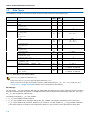
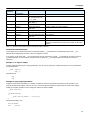
1.2
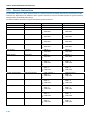
Data Types
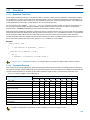
The TASKING C compiler for the TSK51x/TSK52x architecture (c51) supports the following data types:
Size
(bit)
Align
(bit)
Limits
__bit
1
1
0 or 1
Boolean
_Bool
1
8
0 or 1
Character
char
8
8
−27 .. 27−1
8
8
0 .. 28−1
16
8
−215 .. 215−1
1
8
16
1
8
8
0 or 1
−27 .. 27−1
−215 .. 215−1
16
8
0 .. 216−1
32
8
−231 .. 231−1
32
8
0 .. 232−1
32
8
−231 .. 231−1
32
8
0 .. 232−1
pointer to __sfr, __bsfr, __data, __bdata, __idata,
__pdata or __bit
8
8
0 .. 28−1
pointer to function, __xdata or __rom
16
8
0 .. 216−1
float
32
8
−3.402E+38 .. −1.175E−38
1.175E−38 .. 3.402E+38
32
8
−3.402E+38 .. −1.175E−38
1.175E−38 .. 3.402E+38
Type
C Type
Bit
signed char
unsigned char
Integral
short
signed short
int
signed int
enum
unsigned short
unsigned int
long
signed long
unsigned long
long long
signed long long
unsigned long long
Pointer
Floating−Point
double
long double
Table 1−1: Data Types for the TSK51x/TSK52x
The long long types are treated as long.
The double and long double types are always treated as float.
When you use the enum type, the compiler will use the smallest sufficient type (__bit, char, int), unless you use C
compiler option −−integer−enumeration (always use 16−bit integers for enumeration).
Bit data type
You can use the __bit type to define scalars in the bit−addressable area and for the return type of functions. A struct containing
bit−fields cannot be used for this purpose, for example because the struct is aligned at a byte boundary. Unlike the _Bool type
the __bit type is aligned on a bit boundary.
The following rules apply to __bit type variables:
• A __bit type variable is always unsigned.
• A __bit type variable can be exchanged with all other type−variables. The compiler generates the correct conversion.
A __bit type variable is like a boolean. Therefore, if you convert an int type variable to a __bit type variable, it becomes
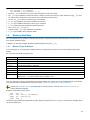
1 (true) if the integer is not equal to 0, and 0 (false) if the integer is 0. The next two C source lines have the same effect:
1−2
C Language
bit_variable = int_variable;
bit_variable = int_variable ? 1 : 0;
• Pointer to __bit is allowed, but you cannot take the address of a bit on the stack.
• The __bit type is allowed as a structure member. However, a bit structure can only contain members of type __bit, and
you cannot push a bit structure on the stack or return a bit structure via a function.
•
•
•
•
•
•
•
A union of a __bit structure and another type is not allowed.
A __bit type variable is allowed as a parameter of a function.
A __bit type variable is allowed as a return type of a function.
A __bit typed expression is allowed as switch expression.
The sizeof of a __bit type is 1.
A global or static __bit type variable can be initialized.
A __bit type variable can be declared volatile.
1.3
Memory Qualifiers
You can use static memory qualifiers to allocate static objects in a particular part of the addressing space of the processor or to
use a specific addressing mode.
In addition, you can place variables at absolute addresses with the keyword __at().
1.3.1
Memory Type Qualifiers
In the C language you can specify that a variable must lie in a specific part of memory. You can do this with a memory type
qualifier.
You can specify the following memory types:
Qualifier
Description
__data
Direct addressable on−chip RAM
__sfr
Defines a special function register. Special optimizations are performed on this type of variables.
__bsfr
Bit−addressable special function register
__idata
Indirect addressable on−chip RAM
__bdata
Bit−addressable on−chip RAM
__xdata
External RAM
__pdata
One 256 bytes page within external RAM
__rom
Data defined with this qualifier is placed in ROM. This section is excluded from automatic initialization by the
startup code. __rom always implies the type qualifier const.
Table 1−2: Memory Type Qualifiers for the TSK51x/TSK52x
If you do not specify a memory type qualifier for the TSK51x/TSK52x, the memory type for the variable depends on the default
of the selected TSK51x/TSK52x memory model (see section 1.4, Memory Models for the TSK51x/TSK52x).
See also the assembler directive .SECTION (Start or continue section), in section 3.8.2, Assembler Directives, in
Chapter Assembly Language.
Examples using explicit memory types:
__data
__rom
__xdata
__idata
char
char
int
long
c;
text[] = "No smoking";
array[10][4];
l;
The memory type qualifiers are treated like any other data type specifier (such as unsigned). This means the examples above
can also be declared as:
1−3
TSK51x/TSK52x Embedded Tools Reference
char
char
int
long
__data
__rom
__xdata
__idata
c;
text[] = "No smoking";
array[10][4];
l;
Pointers with memory type qualifiers
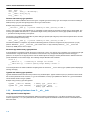
Pointers for the TSK51x/TSK52x can have two types: a ’logical’ type and a memory type. For example, a function is residing in
ROM (memory type), but the logical type is the return type of this function.
Example using memory types with pointers:
__rom char *__data p;
/* pointer residing in data, pointing to ROM */
means p has memory type data (allocated in on−chip RAM), but has logical type ’character in target memory space ROM’. The
memory type qualifier used left to the ’*’, specifies the target memory of the pointer, the memory type qualifier used right to the
’*’, specifies the storage memory of the pointer.
The memory type qualifiers are treated like any other data type specifier (like unsigned). This means the pointer above can also
be declared (exactly the same) using:
char __rom *__data p;
/* pointer residing in data, pointing to ROM */
The TSK51x/TSK52x C compiler is very efficient in allocating pointers, because it recognizes far (2 byte) and near (1 byte)
pointers. Pointers to __data, __idata and __pdata have a size of 1 byte, whereas pointers to __rom, __xdata and
functions (in ROM) have a size of 2 bytes.
Structure tags with memory type qualifiers
A tag declaration is intended to specify the layout of a structure or union. If a memory type is specified, it is considered to be part
of the declarator. A tag name itself, nor its members can be bound to any storage area, although members having type "...
pointer to" do require one. A tag may then be used to declare objects of that type, and may allocate them in different memories
(if that declaration is in the same scope). The following example illustrates this constraint.
struct S {
__xdata int i;
/* referring to storage: not correct
*/
__idata char *p; /* used to specify target memory: correct */
};
In the example above the TSK51x/TSK52x compiler ignores the erroneous __xdata memory type qualifier (without displaying a
warning message).
Typedef with memory type qualifiers
Typedef declarations follow the same scope rules as any declared object. Typedef names may be (re−)declared in inner blocks
but not at the parameter level. However, in typedef declarations, memory type qualifiers are allowed. A typedef declaration
should at least contain one type qualifier.
Example using memory types with typedefs:
typedef __idata int IDATINT;
typedef int __data *DATAPTR;
1.3.2
/* memory type __idata: OK */
/* logical type __data,
memory type ’default’
*/
Accessing Hardware from C: __sfr, __bsfr
Using Special Function Registers
It is easy to access Special Function Registers (SFRs) that relate to peripherals from C. The SFRs are defined in a special
function register file (*.sfr) as symbol names for use with the compiler. An SFR file contains the names of the SFRs and the
bits in the SFRs.
1−4
C Language
Example use in C:
P0 = 0x88;
P1_3 = 1;
if (P1_4 ==
{
P1_3 = 0;
}
IE1 = 1;
// use port name
// use of bit name
1)
// use of bit name
The compiler generates (TSK51A):
mov
setb
gjnb
clr
_2:
setb
128,#136
144.3
144.4,_2
144.3
136.3
You can find a list of defined SFRs and defined bits by inspecting the SFR file for a specific core. The files are named
regcore.sfr, for example regtks51a.sfr in the Altium Designer 6\System\ Tasking\c51\include directory.
Defining Special Function Registers
With the __sfr memory type qualifier you can define a symbol as an SFR. The compiler may assume that special SFR
operations can be performed on such symbols. The TSK51x/TSK52x compiler can decide to use bit instructions for those
special function registers that are bit accessible, in this case use __bsfr instead of __sfr. For example, if bits are defined in
the SFR definition, these bits can be accessed using bit instructions.
For the TSK51x/TSK52x only the SFRs at addresses 0x80, 0x88, 0x90, 0x98, 0xa0, 0xa8, 0xb0, 0xb8, 0xc0, 0xc8, 0xd0, 0xd8,
0xe0, 0xe8, 0xf0 and 0xf8 are bit addressable.
A typical definition of a special function register looks as follows:
typedef struct
_Bool __b0:1;
_Bool __b1:1;
_Bool __b2:1;
_Bool __b3:1;
_Bool __b4:1;
_Bool __b5:1;
_Bool __b6:1;
_Bool __b7:1;
} __bitstruct_t;
#define P0 (*(__bsfr unsigned char *)0x80)
#define P0_0 ((*(__bsfr __bitstruct_t *)0x80).__b0)
#define P0_1 ((*(__bsfr __bitstruct_t *)0x80).__b1)
#define SP (*(__sfr unsigned char *)0x81)
#define TCON (*(__bsfr unsigned char *)0x88)
#define IT0 ((*(__bsfr __bitstruct_t *)0x88).__b0)
#define IE0 ((*(__bsfr __bitstruct_t *)0x88).__b1)
Example of access to the SFR:
P0 = 0x56;
P0_0 = IE0;
Because the special function registers are dealing with I/O, it is incorrect to optimize away the access to them. Therefore, the
compiler deals with the special function registers as if they were declared with the volatile qualifier.
Non−initialized global SFR variables are not cleared at startup. For example:
__sfr int i;
// global SFR not cleared
1−5
TSK51x/TSK52x Embedded Tools Reference
It is not allowed to initialize global SFR variables. SFR variables are not initialized at startup. For example:
__sfr int j=10;
// not allowed to initialize global SFR
See also C compiler option −−cpu (Use SFR definitions for CPU) in section C Compiler Options in Chapter Tool Options.
1.3.3
Placing an Object at an Absolute Address: __at()
Just like you can declare a variable in a specific part of memory (using memory type qualifiers), you can also place an object at
an absolute address in memory. This may be useful to interface with other programs using fixed memory schemes, or to access
special function registers.
With the attribute __at() you can specify an absolute address.
Examples
unsigned char Display[80*24] __at( 0x2000 );
The array Display is placed at address 0x2000. In the generated assembly, an absolute section is created. On this position
space is reserved for the variable Display.
int i __at(0x1000) = 1;
The variable i is placed at address 0x1000 and is initialized at 1.
void f(void) __at( 0xf0ff + 1 ) { }
The function f is placed at address 0xf100.
Restrictions
Take note of the following restrictions if you place a variable at an absolute address:
• The argument of the __at() attribute must be a constant address expression.
• You can place only global variables at absolute addresses. Parameters of functions, or automatic variables within functions
cannot be placed at absolute addresses.
• A variable that is declared extern, is not allocated by the compiler in the current module. Hence it is not possible to use the
keyword __at() on an external variable. Use __at() at the definition of the variable.
• You cannot place structure members at an absolute address.
• Absolute variables cannot overlap each other. If you declare two absolute variables at the same address, the assembler and
/ or linker issues an error. The compiler does not check this.
1.4
Memory Models for the TSK51x/TSK52x
The TASKING C compiler for the TSK51x/TSK52x architecture (c51) supports the following memory models:
Memory Model
Description
Max RAM size
Default
memory type
small
direct addressable internal RAM
128 bytes
__data
auxiliary page
one page of external RAM
256 bytes
__pdata
large
external RAM
64 kB
__xdata
Table 1−3: Memory models and default memory types
The small memory model is the default memory model. Per memory model you can choose to use reentrancy which enables
you to call functions recursively.
Each memory model has a default memory type. You can overrule the default memory type with one of the memory type
qualifiers (see section 1.3.1, Memory Type Qualifiers. This allows you to exceed the default maximum RAM size.
1−6
C Language
1.4.1
Compiling for the Small, Auxiliary, Large or Reentrant Memory Model
By default the TSK51x/TSK52x compiler uses the small memory model. In the small memory model all data objects with the
default memory type and the stack (used for function parameter passing) must fit in the internal RAM. Objects with an explicit
memory type qualifier can exceed this limitation (for example an object qualified as __xdata or __pdata). Note that the stack
length depends upon the nesting depth of the various functions. Accessing data in internal RAM is considerably faster than
accessing data in external RAM. Therefore, it is useful to place often used variables in internal data memory and less often
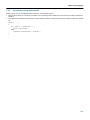
referenced data elements in external data memory.
When the compiler uses the large memory model to access data, the produced code is larger and in some cases slower than
the code for a similar operation in one of the other memory models.
The auxiliary page memory model is especially interesting for derivatives with 256 bytes of ’external’ RAM on chip. All data
objects with the default memory type must fit in one 256 bytes page.
Optionally you can choose to enable reentrancy. If you select reentrancy, a (less efficient) virtual dynamic stack is used which
allows you to call functions recursively. With reentrancy, you can call functions at any time, even from interrupt functions.
To select the memory model to compile for:
1. From the Project menu, select Project Options...
The Project Options dialog appears.
2. Make sure you have selected the TASKING TSK51x/TSK52x processor class.
3. Expand the C Compiler entry and select Memory Model.
4. Select the Aux, Large or Small memory model.
5. Optionally enable the Allow reentrant functions check box.
Using predefined macro __MODEL__ to write conditional code
With the predfined macro __MODEL__ you can write conditional C code in one source for different memory models. Depending
on the memory model for which you compile, the macro __MODEL__ expands to:
’a’ (auxiliary memory model)
’l’ (large memory model)
’s’ (small memory model)
Example
#if __MODEL__ == ’s’
/* this part is only for the small memory model */
...
#endif
1.5
Using Assembly in the C Source: __asm()
With the __asm keyword you can use assembly instructions in the C source and pass C variables as operands to the assembly
code. Be aware that C modules that contain assembly are not portable and harder to compile in other environments.
Furthermore, assembly blocks are not interpreted by the compiler: they are regarded as a black box. So, it is your responsibility
to make sure that the assembly block is syntactically correct.
General syntax of the __asm keyword
__asm( "instruction_template"
[ : output_param_list
[ : input_param_list
[ : register_save_list]]] );
1−7
TSK51x/TSK52x Embedded Tools Reference
instruction_template
%parm_nr[.regnum]
Assembly instructions that may contain parameters from the input list or
output list in the form: %parm_nr
Parameter number in the range 0 .. 9. With the optional .regnum you can
access an individual register from a register pair. For example, with the
word register R12, .0 selects register R1.
output_param_list
[[ "=[&]constraint_char"(C_expression)],...]
input_param_list
[[ "constraint_char"(C_expression)],...]
&
Says that an output operand is written to before the inputs are read, so
this output must not be the same register as any input.
constraint _char
Constraint character: the type of register to be used for the
C_expression.
C_expression
Any C expression. For output parameters it must be an lvalue, that is,
something that is legal to have on the left side of an assignment.
register_save_list
register_name:q
[["register_name"],...]
Name of the register you want to reserve.
Typical example: adding two C variables using assembly
__data char a, b;
__data int result;
void add2( void )
{
__asm( "MOV A, %1\n\t"
"ADD A, %2\n\t"
"MOV %0, A": "=m"(result): "r"(a), "r"(b) );
}
%0 corresponds with the first C variable, %1 with the second and so on.
Generated assembly code:
mov
R0,_b
mov
R1,_a
MOV A, R0
ADD A, R1
MOV _result, A
Specifying registers for C variables
With a constraint character you specify the register type for a parameter. In the example above, the r is used to force the use of
registers (Rn) for the parameters a and b.
You can reserve the registers that are already used in the assembly instructions, either in the parameter lists or in the reserved
register list (register_save_list, also called "clobber list"). The compiler takes account of these lists, so no unnecessary register
saving and restoring instructions are placed around the inline assembly instructions.
1−8
C Language
Constraint
character
Type
Operand
Remark
a
accumulator
A
b
bit
ACC.[0..7], B.[0..7], C,
AC, F0, RS1, RS0, OV,
F1, P, _bitvar
bit registers/variables
d
direct register
PSW, SP, B, ACC, DPH,
DPL, AR[0..7]
direct address of registers
i
immediate value
#data, #data16
m
memory
direct, label, addr11,
addr16, rel
p
data page pointer
DPTR
r
register
R[0..7]
R
registers
R01, R12, R23, R34, R45, word registers
R56, R67
s
register indirect
@R0, @R1
register indirect addressing
number
other operand
same as %number
Input constraint only. The number must refer to an output
parameter. Indicates that %number and number are the same
register.
memory variable or function address
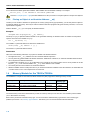
Table 1−4: Available input/output operand constraints TSK51x/TSK52x
Loops and conditional jumps
The compiler does not detect loops that are coded with multiple __asm statements or (conditional) jumps across __asm
statements and will generate incorrect code for the registers involved.
If you want to create a loop with __asm, the whole loop must be contained in a single __asm statement. The same counts for
(conditional) jumps. As a rule of thumb, all references to a label in an __asm statement must be contained in the same
statement.
Example 1: no input or output
A simple example without input or output parameters. You can use any instruction or label. Note that you can use standard C
escape sequences.
__asm( "nop\n\t"
"nop" );
Generated code:
nop
nop
Example 2: using output parameters
Assign the result of inline assembly to a variable. A register is chosen for the parameter because of the constraint r; the
compiler decides which register is best to use. The %0 in the instruction template is replaced with the name of this register.
Finally, the compiler generates code to assign the result to the output variable.
__data char out;
void main(void)
{
__asm( "mov %0,#0xff" : "=r"(out));
}
Generated assembly code:
mov R0,#0xff
mov
_out,R0
1−9
TSK51x/TSK52x Embedded Tools Reference
Example 3: using input and output parameters
Add two C variables and assign the result to a third C variable. Registers are used for the input parameters (constraint r, %1 for
a and %2 for b in the instruction template) and memory is used for the output parameter (constraint m, %0 for result in the
instruction template). The compiler generates code to move the input expressions into the input registers and to assign the
result to the output variable.
__data char a, b;
__data int result;
void add( void )
{
__asm( "MR A, %1\n\t"
"ADD A, %2\n\t"
"MR %0, a": "=m"(result): "r"(a), "r"(b) );
}
void main(void)
{
a = 3;
b = 4;
add2( );
}
Generated assembly code:
_add2:
mov
R0,_b
mov
R1,_a
MOV A, R0
ADD A, R1
MOV _result, A
_main:
mov
_a,#3
movx _b,#4
gjmp _add2
Example 4: reserve registers
Sometimes an instruction knocks out certain specific registers. The most common example of this is a function call, where the
called function is allowed to do whatever it likes with some registers. If this is the case, you can list specific registers that get
clobbered by an operation after the inputs.
Same as Example 3, but now register R0 is a reserved register. You can do this by adding a reserved register list (: "R0"). As
you can see in the generated assembly code, register R0 is not used (the first register used is R1).
__data char a, b;
__data int result;
void add2( void )
{
__asm( "MOV A, %1\n\t"
"ADD A, %2\n\t"
"MOV %0, A": "=m"(result): "r"(a), "r"(b) : "R0" );
}
1−10
C Language
Generated assembly code:
_add2:
mov
R1,_b
mov
R2,_a
MOV A, R1
ADD A, R2
MOV _result, A
Example 5: input and output are the same
If the input and output must be the same you can use a number constraint. The following example adds two values. Input
variable a has to go in the same place as the output variable a, so %2 and %0 are the same thing. That is why the constraint of
the argument 2 is "0", which means it has to be the same as argument 0. Note also that the .0 and .1 select a kid register from
a register pair. Register A is reserved.
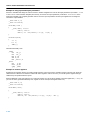
int _ADDI( int a, int b )
{
__asm("MOV A, %1.1\n\t"
"ADD A, %0.1\n\t"
"MOV %0.1, A\n\t"
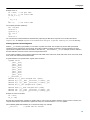
"MOV A, %1.0\n\t"
"ADDC A, %0.0\n\t"
"MOV %0.0, A" : "=R"(a) : "R"(b), "0"(a)
return a;
}
: "A" );
void main(void)
{
int ovar;
ovar = _ADDI(2,3);
}
Generated assembly:
__ADDI:
MOV
ADD
MOV
MOV
ADDC
MOV
ret
A, R5
A, R7
R7, A
A, R4
A, R6
R6, A
_main:
mov
mov
mov
mov
gcall
ret
1.6
R6,#0
R7,#2
R4,#0
R5,#3
__ADDI
Pragmas to Control the Compiler
Pragmas are keywords in the C source that control the behavior of the compiler. Pragmas overrule compiler options.
For example, you can set a compiler option to specify which optimizations the compiler should perform. With the #pragma
optimize flags you can set an optimization level for a specific part of the C source. This overrules the general optimization
level that is set in the C compiler Optimization page in the Project Options dialog (command line option −−optimize (−O)).
The general syntax for pragmas is:
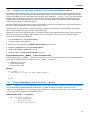
#pragma pragma−spec [ON | OFF | DEFAULT | RESTORE]
1−11
TSK51x/TSK52x Embedded Tools Reference
or:
_Pragma( "pragma−spec [ON | OFF | DEFAULT | RESTORE]" )
Pragmas marked with (*) accept the following special arguments:
default
set the pragma to the initial value
restore
restore the previous value of the pragma
Pragmas marked with (+) are boolean flags, and accept the following arguments:
on
switch the flag on (same as without argument)
off
switch the flag off
The compiler recognizes the following pragmas, other pragmas are ignored.
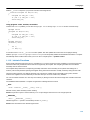
alias symbol=defined_symbol
Define symbol as an alias for definined_symbol. It corresponds to an equate directive (.equ) at assembly level. The symbol
should not be defined elsewhere, and defined_symbol should be defined with static storage duration (not extern or
automatic).
See assembler directive .EQU in section 3.8.2, Assembler Directives, in Chapter Assembly Language.
clear
noclear
By default, uninitialized global or static variables are cleared to zero on startup. With pragma noclear, this step is skipped.
Pragma clear resumes normal behavior.
See C compiler option −−noclear in section 4.1, C Compiler Options, in Chapter Tool Options.
compactmaxmatch value
Control the maximum size of a match.
See C compiler option −−compact−max−size in section 4.1, C Compiler Options, in Chapter Tool Options.
extend size
Specify the maximum amount of internal RAM to be used for ’automatic variables’ to be made ’register variables’.
See section 1.8.1, Automatic Variables in Chapter C Language.
See C compiler option −−extend (−x) in section 4.1, C Compiler Options, in Chapter Tool Options.
extension isuffix (*) (+)
Enables a language extension to specify imaginary floating−point constants. With this extension, you can use an "i" suffix on
a floating−point constant, to make the type _Imaginary.
extern symbol
Force an external reference (.extern assembler directive), even when the symbol is not used in the module.
See assember directive .EXTERN in section 3.8.2, Assembler Directives, in Chapter Assembly Language.
inline
noinline
smartinline
Instead of the qualifier inline, you can also use pragma inline and pragma noinline to inline a function body:
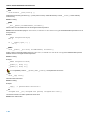
int
1−12
w,x,y,z;
C Language
#pragma inline
int add( int a, int b )
{
int i=4;
return( a + b );
}
#pragma noinline
void main( void )
{
w = add( 1, 2 );
z = add( x, y );
}
If a function has an inline or __noinline function qualifier, then this qualifier will overrule the current pragma setting.
See section 1.11.4, Inlining Functions: inline / __noinline.
By default, small fuctions that are not too often called (from different locations), are inlined. This reduces execution speed at
the cost of code size (C compiler option −Oi). With the pragma noinline / pragma smartinline you can temporarily
disable this optimization.
With the C compiler options −−inline−max−incr and −−inline−max−size you have more control over the automatic function
inlining process of the compiler.
See for more information the C compiler options −−inline−max−incr and −−inline−max−size in section 4.1, C Compiler
Options in Chapter Tool Options.
macro
nomacro (*) (+)
Turns macro expansion on or off. By default, macro expansion is enabled.
maxcalldepth value
Control the maximum call depth. By default, the maximum is infinite (−1).
See C compiler option −−max−call−depth in section 4.1, C Compiler Options, in Chapter Tool Options.
message "message" ...
Print the message string(s) on standard output.
optimize flags (*)
endoptimize
You can overrule the compiler option −O for the code between the pragmas optimize and endoptimize. The pragma
works the same as compiler option −O.
See section 2.6, Compiler Optimizations in Chapter Using the Compiler in the user’s manual.
See C compiler option −−optimize (−O) in section 4.1, C Compiler Options, in Chapter Tool Options.
page
nopage
Align or do not align code sections on a 256 page boundary.
ramstring
Allocate strings in ROM and RAM. The strings are copied to RAM at startup.
romstring
Same as compiler option −−source (−S). Allocate strings in ROM only.
1−13
TSK51x/TSK52x Embedded Tools Reference
See C compiler option −−source (−S) in section 4.1, C Compiler Options, in Chapter Tool Options.
section [type]={name |−f|−m|−fm} (*)
endsection
Rename sections of the specified type or restore default section naming.
See section 1.12, Section Naming.
See C compiler option −−rename−sections in section 4.1, C Compiler Options in Chapter Tool Options.
See assembler directive .SECTION (Start or continue section), in section 3.8.2, Assembler Directives, in Chapter
Assembly Language.
source (*) (+)
nosource
With these pragmas you can choose which C source lines must be listed as comments in assembly output.
See also C compiler option −−source (−s)
linear_switch
jump_switch
binary_switch
smart_switch
With these pragmas you can overrule the compiler chosen switch method:
linear_switch
Force jump chain code. A jump chain is comparable with an if/else−if/else−if/else construction.
jump_switch
Force jump table code. A jump table is a table filled with jump instructions for each possible
switch value. The switch argument is used as an index to jump within this table.
binary_switch
Force binary lookup table code. A binary search table is a table filled with a value to compare
the switch argument with and a target address to jump to.
smart_switch
Let the compiler decide the switch method used
See Section 1.10, Switch Statement.
tradeoff level (*)
Specify tradeoff between speed (0) and size (4).
See also C compiler option −−tradeoff (−t)
vector_offset offset (*)
Specify base address for interrupt vectors.
See C compiler option −−vector−offset in section 4.1, C Compiler Options in Chapter Tool Options.
novector
Do not generate interrupt vectors and reference to interrupt handler in run−time library.
See C compiler option −−novector in section 4.1, C Compiler Options in Chapter Tool Options.
1−14
C Language
warning [number,...] (*)
With this pragma you can disable warning messages. If you do not specify a warning number, all warnings will be suppressed.
See also C compiler option −−no−warnings (−w)
weak symbol
Mark a symbol as "weak" (.weak assembler directive). The symbol must have external linkage, which means a global or
external object or function. A static symbol cannot be declared weak.
A weak external reference is resolved by the linker when a global (or weak) definition is found in one of the object files.
However, a weak reference will not cause the extraction of a module from a library to resolve the reference. When a weak
external reference cannot be resolved, the null pointer is substituted.
A weak definition can be overruled by a normal global definition. The linker will not complain about the duplicate definition,
and ignore the weak definition.
See assembler directive .WEAK in Section 3.8.2, Assembler Directives, in Chapter Assembly Language.
1.7
Predefined Preprocessor Macros
In addition to the predefined macros required by the ISO C standard, such as __DATE__ and __FILE__, the TASKING C
compiler supports the predefined macros as defined in the table below. The macros are useful to create conditional C code.
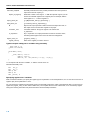
Macro
Description
__BIG_ENDIAN__
Expands to 1, indicating the processor accesses data in big−endian.
__BUILD__
Identifies the build number of the compiler, composed of decimal digits for the build number, three
digits for the major branch number and three digits for the minor branch number. For example, if
you use build 1.22.1 of the compiler, __BUILD__ expands to 1022001. If there is no branch
number, the branch digits expand to zero. For example, build 127 results in 127000000.
__C51__
Expands to 1 for the TSK51x/TSK52x toolset, otherwise unrecognized as macro.
__CPU__
Expands to the CPU core name (option −−cpu=cpu ).
__MODEL__
Identifies the memory model for which the current module is compiled. For example, if you
compile for the small memory model, the macro expands to s.
__REVISION__
Identifies the revision number of the compiler. For example, if you use version 1.0r2 of the
compiler, __REVISION__ expands to 2.
__SINGLE_FP__
Expands to 1 for single precision floating−point.
__TASKING__
Identifies the compiler as a TASKING compiler. Expands to 1 if a TASKING compiler is used.
__VERSION__
Identifies the version number of the compiler. For example, if you use version 1.0r2 of the
compiler, __VERSION__ expands to 1000 (dot and revision number are omitted, minor version
number in 3 digits).
Table 1−5: Predefined preprocessor macros
Example
#ifdef __C51__
/* this part is only compiled for the TSK51x/TSK52x target */
...
#endif
1−15
TSK51x/TSK52x Embedded Tools Reference
1.8
Variables
1.8.1
Automatic Variables
In non−reentrant functions recursion is not possible. In non−reentrant functions automatic variables are not allocated on a stack,
but in a static area. In a reentrant function automatic variables are treated the conventional way: passed via the stack. The
automatics in the static area are still overlayable with automatics of other functions. Automatics are subject to the memory model
selected. In a static function this means static allocation in one of the RAM memory spaces. In a reentrant function this means
dynamic allocation on the stack.
Although automatic variables are allocated in a static area with non−reentrant functions, they are not the same as local variables
(within a function) which are declared to be static by means of the C keyword static. The difference is that it is not guaranteed
that an automatic variable still has the same value as the previous time the function returned, because it may have been
overlaid with another automatic variable of another module. Whereas the values of variables declared with the keyword static
are the same as the previous time the function returned. static variables are new overlaid.
To generate code which is as fast as possible, the TSK51x/TSK52x compiler tries to place some automatic variables which are
used the most into registers and internal RAM (extended virtual registers). You can change the maximum amount of internal
RAM that may be used for such local variables with the compiler option −xsize or with the pragma extend size. The default size
is 4 bytes. Note that these bytes can be allocated for each function. These bytes are overlaid by the linker.
The static versions of the TSK51x/TSK52x C library have been built with −x0.
C compiler option −x in section 4.1, C Compiler Options in Chapter Tool Options.
1.8.2
Initialized Variables
Non automatic initialized variables use the same amount of space in both ROM and RAM (for all possible RAM memory
spaces). This is because the initializers are stored in ROM and copied to RAM at start−up. This is completely transparent to the
user. The only exception is an initialized variable residing in ROM, by means of the __rom memory type qualifier.
The following examples are for the TSK51x/TSK52x compiler in the large memory model.
int
i = 100;
__rom int
char
j = 3;
*p = "TEXT";
__rom char[] = "HELP";
__data char c = ’a’;
/* 2
2
/* 2
/* 7
7
2
5
/* 5
/* 1
1
bytes in ROM and
bytes in XDATA
bytes in ROM
bytes in ROM and
bytes in XDATA:
bytes for p,
bytes for "TEXT"
bytes in ROM
byte in ROM and
byte in DATA
*/
*/
*/
*/
*/
Section 1.3.1, Memory Type Qualifiers.
1.9
Strings
In this context the word ’strings’ means the separate occurrence of a string in a C program. So, array variables initialized with
strings are just initialized character arrays, which can be allocated in any memory type, and are not considered as ’strings’.
The TSK51x/TSK52x compiler places strings in both ROM and RAM. Where strings in RAM are placed depends on the
specified memory model. If you use the TSK51x/TSK52x compiler option −S (−−romstrings) or #pragma romstring, the
compiler places all strings in ROM only. This is useful for single chip applications when you want to allocate strings in ROM only.
Example without −S option:
__rom char hello[] = "Hello\n"; /* initialized array in ROM only */
char *world = "world\n";
/* initialized pointer
to string in XDATA */
1−16
C Language
Example with compiler option −S:
__rom char hello[] = "Hello\n"; /* initialized array in ROM only */
__rom char *world = "world\n"; /* initialized pointer
to string in ROM */
Example with #pragma romstring:
#pragma romstring
__rom char hello[] = "Hello\n"; /* initialized array in ROM only */
__rom char *world = "world\n"; /* initialized pointer
to string in ROM */
#pragma ramstring
Strings in library routines
Library routines containing pointer arguments always expect the target memory of these pointers to be the default RAM of the
memory model used to make this library. For example:
int printf( const char *format, ... );
In large memory model, this means printf() expects the address of the format string (the first argument) to have memory
type __xdata. Therefore, the C startup code of the large memory model copies all strings from ROM to XDATA. So, the
statement:
printf( "Hello world\n" );
is executed correctly, because the TSK51x/TSK52x compiler passes the address of the allocated XDATA area (filled at C startup
time) to printf().
With the −S option specified, the string is put in ROM only and the standard printf/scanf like library routines will fail. You will need
to create your own __rom qualified versions. All library sources are delivered. For example, you can use the source of
printf() (in module _printf.c) to create a __rom_printf(). The prototype could be:
int __rom_printf( __rom char *format, ... );
Modifying string literals
The TSK51x/TSK52x accepts that string literals are modifiable when strings are in both ROM and RAM. You can do this with
pointers, or even with a construct like:
"st ing"[2] = ’r’;
Of course, when you use the −S option this statement is not allowed.
1−17
TSK51x/TSK52x Embedded Tools Reference
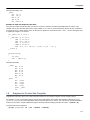
1.10
Switch Statement
The TASKING C compiler supports three ways of code generation for a switch statement: a jump chain (linear switch), a jump
table or a binary search table.
A jump chain is comparable with an if/else−if/else−if/else construction. A jump table is a table filled with jump instructions for
each possible switch value. The switch argument is used as an index to jump within this table. A binary search table is a table
filled with a value to compare the switch argument with and a target address to jump to.
#pragma smart_switch is the default of the compiler. The compiler tries to use the switch method which uses the least
space in ROM (table size in ROMDATA plus code to do the indexing).
For a switch with a long type argument, only binary search table code is used.
For an int type argument, a jump table switch is only possible when all case values are in the same 256 value range (the high
byte value of all programmed cases are the same).
Especially for large switch statements, the jump table approach executes faster than the binary search table approach. Also the
jump table has a predictable behavior in execution speed: independent of the switch argument, every case is reached in the
same execution time.
With a small number of cases, the jump chain method can be faster in execution and shorter in size.
You can overrule the compiler chosen switch method by using a pragma:
#pragma linear_switch
force jump chain code
#pragma jump_switch
force jump table code
#pragma binary_switch
force binary search table code
#pragma smart_switch
let the compiler decide the switch method used
Using a pragma cannot overrule the restrictions as described earlier.
The switch pragmas must be placed before the function body containing the switch statement. Nested switch statements use
the same switch method, unless the nested switch is implemented in a separate function which is preceded by a different
switch pragma.
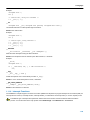
Example
/* place pragma before function body */
#pragma jump_switch
void test(unsigned char val)
{ /* function containing the switch */
switch (val)
{
/* use jump table */
}
}
1−18
C Language
1.11
Functions
1.11.1 Reentrant Functions
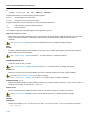
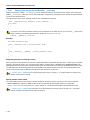
For the TSK51x/TSK52x functions in C can either be static or reentrant. In static functions parameters and automatic variables
are not allocated on a stack, but in a static area. Reentrant functions use a less efficient virtual dynamic stack which allows you
to call functions recursively. With reentrancy, you can call functions at any time, even from interrupt functions. The compiler can
overlay parameters and automatics of static functions, but not of reentrant functions.
You can use the function qualifiers __static or __reentrant to specify a function as static or reentrant, respectively. If you
do not specify a function qualifier, the TSK51x/TSK52x compiler assumes that those functions are static. If you specify the
compiler option −−reentrant the default for functions without a function qualifier is reentrant.
Although automatic variables are allocated in a static area with non−reentrant functions, they are not the same as local variables
(within a function) which are declared to be static by means of the C keyword static. The difference is that it is not guaranteed
that an automatic variable still has the same value as the previous time the function returned, because it may have been
overlaid with another automatic variable of another module. Whereas the values of variables declared with the keyword static
are the same as the previous time the function returned. static variables are never overlaid.
Example
void f_static( void )
{
/* this function is by default __static */
}
__reentrant int f_reentrant ( void )
{
int i;
/* variable i is placed on a virtual stack */
}
C compiler option −−reentrant in section 4.1, C Compiler Options in Chapter Tool Options of the reference manual.
1.11.2 Parameter Passing
A lot of execution time of an application is spent transferring parameters between functions. The fastest parameter transport is
via registers. Therefore, function parameters are first passed via registers. If no more registers are available for a parameter, the
compiler pushes parameters on the stack (for the TSK51x/TSK52x compiler a static or reentrant stack depending on the
__reentrant function qualifier). See the table below.
Parameter Type
Parameter Number
1
2
3
4
5
6
7
8
__bit / _Bool
B.0
B.1
B.2
B.3
B.4
B.5
B.6
B.7
char
R7
R5
R3
R6
R4
R2
8−bit struct
R7
R5
R3
R6
R4
R2
8−bit pointer (to data, bdata, idata,
pdata, sfr, bsfr, bit)
R7
R5
R3
R6
R4
R2
short / int
R67
R45
R23
16−bit struct
R67
R45
R23
16−bit pointer (to xdata, rom, code)
R67
R45
R23
long
R4567
float
R4567
32−bit struct
R4567
Table 1−6: Register usage for parameter passing
If a register corresponding to a parameter number is already in use the next register is used.
1−19
TSK51x/TSK52x Embedded Tools Reference
Example with three arguments
func1( int a, int b, int *c )
• a (first parameter) is passed in registers R67.
• b (second parameter) is passed in registers R45.
• c (third parameter) is passed in registers R23.
Example with two long/float arguments
func2( long d, long e )
• d (first parameter) is passed in registers R4567.
• e (second parameter) cannot be passed through registers anymore, and is passed via the stack.
Example with one long/float and one other argument
func3( float f, char g )
• f (first parameter) is passed in registers R4567.
• g (second parameter) is passed in register R3.
1.11.3 Function Return Types
The C compiler uses registers to store C function return values, depending on the function return types.
Return type
Register
Description
__bit / _Bool
C
carry
char
A
accumulator
short / int
R67
R6 high byte, R7 low byte
long
R4567
R45 high word, R67 low word
float
−
floating−point stack
8−bit pointer
A
accumulator
16−bit pointer
R67
R6 high byte, R7 low byte
R67
R6 high byte, R7 low byte
structure return
pointer16−bit
buffer
Table 1−7: Register usage for function return types
1.11.4 Inlining Functions: inline / __noinline
With the C compiler option −−optimize=+inline, the C compiler automatically inlines small functions in order to reduce
execution time (smart inlining). The compiler inserts the function body at the place the function is called. The C compiler decides
which functions will be inlined. You can overrule this behavior with the two keywords inline (ISO−C) and __noinline.
With the inline keyword you force the compiler to inline the specified function, regardless of the optimization strategy of the
compiler itself:
inline unsigned int abs(int val)
{
unsigned int abs_val = val;
if (val < 0) abs_val = −val;
return abs_val;
}
If a function with the keyword inline is not called at all, the compiler does not generate code for it.
You must define inline functions in the same source module as in which you call the function, because the compiler only inlines a
function in the module that contains the function definition. When you need to call the inline function from several source
modules, you must include the definition of the inline function in each module (for example using a header file).
1−20
C Language
With the __noinline keyword, you prevent a function from being inlined:
__noinline unsigned int abs(int val)
{
unsigned int abs_val = val;
if (val < 0) abs_val = −val;
return abs_val;
}
Using pragmas: inline, noinline, smartinline
Instead of the inline qualifier, you can also use #pragma inline and #pragma noinline to inline a function body:
#pragma inline
unsigned int abs(int val)
{
unsigned int abs_val = val;
if (val < 0) abs_val = −val;
return abs_val;
}
#pragma noinline
void main( void )
{
int i;
i = abs(−1);
}
If a function has an inline/__noinline function qualifier, then this qualifier will overrule the current pragma setting.
With the #pragma noinline / #pragma smartinline you can temporarily disable the default behavior that the C compiler
automatically inlines small functions when you turn on the C compiler option −−optimize=+inline.
1.11.5 Intrinsic Functions
Some specific assembly instructions have no equivalence in C. Intrinsic functions give the possibility to use these instructions.
Intrinsic functions are predefined functions that are recognized by the compiler. The compiler generates the most efficient
assembly code for these functions.
The compiler always inlines the corresponding assembly instructions in the assembly source (rather than calling it as a
function). This avoids parameter passing and register saving instructions which are normally necessary during function calls.
Intrinsic functions produce very efficient assembly code. Though it is possible to inline assembly code by hand, intrinsic
functions use registers even more efficiently. At the same time your C source remains very readable.
You can use intrinsic functions in C as if they were ordinary C (library) functions. All intrinsics begin with a double underscore
character.
The TASKING TSK51x/TSK52x C compiler recognizes the following intrinsic functions:
__alloc
void * volatile __alloc( __size_t size );
Allocate memory. Same as library function malloc().
Returns: a pointer to space in external memory of size bytes length. NULL if there is not enough space left.
__dotdotdot__
char * __dotdotdot__( void );
Variable argument ’...’ operator. Used in library function va_start().
Returns: the stack offset to the variable argument list.
1−21
TSK51x/TSK52x Embedded Tools Reference
__free
void volatile __free( void *p );
Deallocates the memory pointed to by p. p must point to memory earlier allocated by a call to __alloc(). Same as library
function free().
Returns: nothing.
__getbit
__bit __getbit( bitaddressable, bitoffset );
Get the value of a bit. bitoffset must be an integral constant expression.
Returns: the bit at bitoffset (range 0−7 for a char, 0−15 for an int or 0−31 for a long) of the bitaddressable operand for use in
bit expressions.
Example:
__bdata unsigned char byte;
int i;
if ( __getbit( byte, 3 ) )
i = 1;
__putbit
void __putbit( __bit value, bitaddressable, bitoffset );
Assign a value to the bit at bitoffset (range 0−7 for a char, 0−15 for an int or 0−31 for a long) of the bitaddressable operand.
bitoffset must be an integral constant expression.
Returns: nothing.
Example:
__bdata unsigned int word;
__putbit( 1, word, 11 );
__putbit( 0, word, 10 );
For compatibiltity reasons, __getbit() and __putbit() are implemented as macros.
__nop
void __nop( void );
Generate NOP instructions.
Returns: nothing.
Example:
__nop();
/* generate NOP instruction */
__rol
unsigned char __rol( unsigned char operand, unsigned char count );
Use the RL instruction to rotate operand left count times.
Returns: the rotated value.
1−22
C Language
Example:
unsigned char c;
int i;
/* rotate left, using int variable */
c = __rol( c, i );
__ror
unsigned char __ror( unsigned char operand, unsigned char count );
Use the RR instruction to rotate operand right count times.
Returns: the rotated value.
Example:
unsigned char c;
int i;
/* rotate right, using constant */
c = __ror( c, 2 );
c = __ror( c, 3 );
c = __ror( c, 7 );
__testclear
__bit volatile __testclear( __bit *semaphore );
Read and clear semaphore using the JBC instruction.
Returns: 0 if semaphore was not cleared by the JBC instruction, 1 otherwise.
Example:
__bit b;
unsigned char c;
if ( __testclear( &b ) ) /* JBC instruction */
c=1;
__vsp__
__bit __vsp__( void );
Virtual stack pointer used. Used in library function va_arg().
Returns: 1 if the virtual stack pointer is used, 0 otherwise.
__get_return_address
__codeptr __get_return_address( void );
Returns: return address of a function.
1.11.6 Interrupt Functions
The TASKING C compiler supports a number of function qualifiers and keywords to program interrupt service routines (ISR). An
interrupt service routine (or: interrupt function, interrupt handler, ) is called when an interrupt event (or: service request) occurs.
The different type of interrupts are explained in detail in the Core Processor reference manuals delivered with the
product. You can find them in the Help system under FPGA Design » Core References » Processors.
1−23
TSK51x/TSK52x Embedded Tools Reference
1.11.6.1
Defining an Interrupt Service Routine: __interrupt()
With the function type qualifier __interrupt() you can declare a function as an interrupt service routine. The function type
qualifier __interrupt() takes one or more vector addresses as argument(s). All supplied vector addresses will be initialized
to point to the interrupt function.
Interrupt functions cannot return anything and must have a void argument type list:
void __interrupt(vector_address[, vector_address]...)
isr( void )
{
...
}
If you want to use interrupt numbers instead of vector addresses for the TSK51A core, you can use the __INTNO macro
which is defined in the delivered special function register file (regtsk51a.sfr) as:
#define __INTNO(nr) ((8*nr)+3)
Example
#include <regtsk51a.sfr>
void __interrupt( 0x23 ) serial_receive( void )
{
...
}
void __interrupt( __INTNO(4) ) serial_transmit( void )
{
...
}
Suppress generation of interrupt vectors
When you define an interupt service routine, the compiler generates the appropriate interrupt vector, consisting of an instruction
jumping to the interrupt function. You can suppress this with the compiler option −−novector or the #pragma novector. The
difference between a normal function and an interrupt function is that an interrupt function ends with a RETI instruction instead
of a RET instruction, and that all registers that might possibly be corrupted during the execution of the interrupt function are
saved on function entry (this is called the interrupt frame) and restored on function exit.
C compiler option −−novector (Do not generate interrupt vectors) in section 4.1, C Compiler Options in Chapter Tool
Options of the reference manual.
Specify another vector offset
For certain ROM monitors it is necessary to specify an offset for all interrupt vectors. For this you can use the command
−−vector−offset=value. Suppose a ROM monitor has the interrupt table at offset 0x4000. When you compile with
−−vector−offset=0x4000 interrupt vector 1 (vector address 11) is being located at address 0x400B instead of 0xB.
C compiler option −−vector−offset (Specify a 16−bit offset address for interrupt vectors) in section 4.1, C Compiler
Options in Chapter Tool Options of the reference manual.
1−24
C Language
1.11.6.2
Interrupt Frame: __frame()
With the function type qualifier __frame() can specify which registers and SFRs must be saved for a particular interrupt
function. Only the specified registers will be pushed and popped from the stack. If you do not specify the function qualifier
__frame(), the C compiler determines which registers must be pushed and popped. The syntax is:
void __interrupt(vector_address[, vector_address]...)
__frame(reg[, reg]...) isr( void )
{
...
}
where, reg can be any register defined as an SFR. The compiler generates a warning if some registers are missing which are
normally required to be pushed and popped in an interrupt function prolog and epilog to avoid run−time problems.
Refer to the special function register files (.sfr) in the ...\target\include directory for an overview of all defined
special function registers. See also section 1.3.2, Accessing Hardware from C: __sfr).
Example
__interrupt( 0x10 ) __frame(A,R0,R1) void alarm( void )
{
...
}
When you do not want the interrupt frame (saving/restoring registers) to be generated you can use the compiler option
−−noframe. In that case you will have to specify your own interrupt frame. For this you can use the inline capabilities of the
compiler.
C compiler option −−noframe (Do not generate frame for interrupt handler) in section 4.1, C Compiler Options in Chapter
Tool Options of the reference manual.
Normally when an interrupt function is called, all registers in the default register bank that are (or could be) used in the interrupt
function are saved on the stack so the registers are available for the interrupt routine. After returning from the interrupt routine,
the original values are restored from the stack again.
1.11.6.3
Register Bank Switching: __registerbank()
For the TSK51x/TSK52x it is possible to assign a new register bank to an interrupt function, which can be used on the processor
to minimize the interrupt latency because registers do not need to be pushed on stack. You can switch register banks with the
__registerbank() function qualifier.
void __interrupt(vector_address[, vector_address]...)
__registerbank(bank) isr( void )
{
...
}
When you specify the __registerbank() qualifier the registers R0−R7 are implicitly saved when the register bank is being
switched (by using the predefined symbolic register addresses AR0−AR7).
The default register bank used is bank 0. You can change this default with the compiler option −b (−−bank−number).
Example
#define __INTNO(nr) ((8*nr)+3)
__interrupt(__INTNO(1)) __registerbank(2) void timer(void);
The TSK51x/TSK52x compiler places a long−jump instruction on the vector address 11 of interrupt number 1, to the timer()
routine, which switches the register bank to bank 2 and saves some more registers. When timer() is completed, the extra
registers are popped, the bank is switched back to the original value and a RETI instruction is executed.
1−25
TSK51x/TSK52x Embedded Tools Reference
You can call another C function from the interrupt C function. However, this function must be compiled with the same
__registerbank(bank−nr) qualifier, because the compiler generates code which uses the addresses of the registers
R0−R7. Therefore, the __registerbank() qualifier is also possible with normal C functions (and their prototype declarations).
Example
Suppose timer(), from the previous example, is calling get_number(). The function prototype (and definition) of
get_number() should contain the correct __registerbank().
__registerbank( 2 ) int get_number( void );
The compiler checks if a function calls another function using another register bank, which is an error.
C compiler option −b (Specify default register bank number) in section 4.1, C Compiler Options, in Chapter Tool Options.
1.11.7 Register Bank Independent Code Generation
You can use compiler option −−noregaddr or keyword __noregaddr to switch to register bank independent code generation.
In order to generate very efficient code the compiler uses absolute register addresses in its code generation. For example a
register to register ’move’. Since there is no ’MOV register, register’ instruction, the compiler will generate a ’MOV register,
direct’ with the absolute address of the source register as the second operand.
The absolute address of a register depends on the register bank, but sometimes this dependency is undesired. For example
when a function is called from both the main thread and an interrupt thread. If both threads use different register banks, they
cannot call a function that uses absolute register addresses. To overcome this, you can instruct the compiler to generate a
register bank independent function that can be called from both threads.
Example
__noregaddr int func( int x )
{
/* this function can be called from any function
independent of its register bank */
return x+1;
}
__registerbank(1) void f1( void )
{
func( 1 );
}
__registerbank(0) void main( void )
{
func( 0 );
}
1.12
Section Naming
The compiler generates several types of sections depending on the attributes of a section. The compiler uses the following
section naming convention:
[name][.attribute]...
The name is by default the section type (for example, code or data). Section attributes, such as "clear" and "init", can also be
part of the section name. The section types and attributes are target dependent. See the assembler directive .SECTION for a
complete list of section types and attributes.
Example
The following C code:
__data int i;
results in the following section declaration with name data:
.section data, data, clear
1−26
C Language
When you compile with −Rdata=mysection this results in:
.section mysection, data, clear
The following table lists the relation between C type qualifiers, assembly section types and the resulting memory spaces.
Qualifier
Section Type /
Space
Address Range
__data
data
0 − 0x7f
__sfr
sfr
0x80 − 0xff
__idata
idata
0 − 0xff
__bit
bit
0 − 0x7f
__xdata
xdata
0 − 0xffff
__pdata
pdata
0 − 0xff
__rom
code
0 − 0xffff
__bdata
bdata
0x20 − 0x2f
__bsfr
bsfr
0x80, 0x88, 0x90, 0x98, 0xa0, 0xa8,
0xb0, 0xb8, 0xc0, 0xc8, 0xd0, 0xd8,
0xe0, 0xe8, 0xf0, 0xf8
Table 1−8: C type qualifiers and section type relation for the TSK51x/TSK52x
See also the assembler directive .SECTION (Start or continue section), in section 3.8.2, Assembler Directives, in
Chapter Assembly Language of the reference manual.
See also C compiler option −−rename−sections in section 4.1, C Compiler Options in Chapter Tool Options.
1.13
Libraries
The TASKING compilers come with standard C libraries (ISO/IEC 9899:1999) and header files with the appropriate prototypes
for the library functions. All standard C libraries are available in object format and in C or assembly source code.
A number of standard operations within C are too complex to generate inline code for (too much code). These operations are
implemented as run−time library functions to save code.
See section 2.2, Library Functions, in Chapter Libraries, for an extensive description of all standard C library functions.
1.13.1 Printf and Scanf Routines
The C library functions printf(), fprintf(), vfprintf(), vsprintf(), ... call one single function, _doprint(), that
deals with the format string and arguments. The same applies to all scanf type functions, which call the function _doscan(),
and also for the wprintf and wscanf type functions which call _dowprint() and _dowscan() respectively. The C library
contains three versions of these routines: int, long and long long versions. If you use floating−point the formatter function
for floating−point _doflt() or _dowflt() is called. Depending on the formatting arguments you use, the correct routine is
used from the library. Of course the larger the version of the routine the larger your produced code will be.
Note that when you call any of the printf/scanf routines indirect, the arguments are not known and always the long long
version with floating−point support is used from the library.
Example
#include <stdio.h>
long L;
void main(void)
{
printf( "This is a long: %ld\n", L );
}
The linker extracts the long version without floating−point support from the library.
1−27
TSK51x/TSK52x Embedded Tools Reference
See also the description of #pragma weak in section 1.6, Pragmas to Control the Compiler in the user’s manual.
1−28
2 Libraries
This chapter lists all library functions that you can call in your C source.
Summary
2.1
Introduction
This chapter contains an overview of all library functions that you can call in your C source. This includes all functions of the
standard C library (ISO C99) and some functions of the floating−point library.
A number of standard operations within C are too complex to generate inline code for (too much code). These operations are
implemented as run−time library functions to save code.
Section 2.2, Library Functions, gives an overview of all library functions you can use, grouped per header file. A number of
functions declared in wchar.h are parallel to functions in other header files. These are discussed together.
Each library is available in six variants: for the large (l), medium (m) and small memory (s) model and all three with all functions
default reentrant (r) or static (s). The following libraries are available. Altium Designer automatically selects the appropriate
libraries depending on the specified options.
Libraries
Description
c51as.lib
c51ls.lib
c51ss.lib
Single precision C library, static functions
(some functions also need the floating−point library)
c51ar.lib
c51lr.lib
c51sr.lib
Single precision C library, reentrant functions
(some functions also need the floating−point library)
fp51as.lib
fp51ls.lib
fp51ss.lib
Floating−point library (non trapping)
fp51ar.lib
fp51lr.lib
fp51sr.lib
Floating−point library with reentrancy (non trapping)
fp51ast.lib
fp51lst.lib
fp51sst.lib
Floating−point library (trapping)
fp51art.lib
fp51lrt.lib
fp51srt.lib
Floating−point library with reentrancy (trapping)
rt51.lib
Run−time library
Table 2−1: Overview of libraries
All libraries are compiled for the auxiliary page (a), large (l) and small (s) memory model.
2−1
TSK51x/TSK52x Embedded Tools Reference
2.2
Library Functions
The following sections list all library functions, grouped per header file in which they are declared. Some functions are not
completely implemented because their implementation depends on the context where your application will run. These functions
are for example all I/O related functions. Where possible, these functions are implemented using file system simulation (FSS).
This system can be used by the debugger to simulate an I/O environment which enables you to debug your application.
A number of wide−character functions are available as C source code, but have not been compiled with the C library. To use
complete wide−character functionality, you must recompile the libraries with the macro WCHAR_SUPPORT_ENABLED and
keep this macro also defined when compiling your own sources. (See C compiler option −−define (−D) in section 4.1, C
Compiler Options, in Chapter 4, Tool options.)
2.2.1
assert.h
Prints a diagnostic message if NDEBUG is not defined.
assert(expr)
(Implemented as macro)
2.2.2
complex.h
The TSK51x/TSK52x does not support complex numbers.
2.2.3
ctype.h and wctype.h
The header file ctype.h declares the following functions which take a character c as an integer type argument. The header file
wctype.h declares parallel wide−character functions which take a character c of the wchar_t type as argument.
ctype.h
wctype.h
Description
isalnum
iswalnum
Returns a non−zero value when c is an alphabetic character or a number ([A−Z][a−z][0−9]).
isalpha
iswalpha
Returns a non−zero value when c is an alphabetic character ([A−Z][a−z]).
isblank
iswblank
Returns a non−zero value when c is a blank character (tab, space...)
iscntrl
iswcntrl
Returns a non−zero value when c is a control character.
isdigit
iswditit
Returns a non−zero value when c is a numeric character ([0−9]).
isgraph
iswgraph
Returns a non−zero value when c is printable, but not a space.
islower
iswlower
Returns a non−zero value when c is a lowercase character ([a−z]).
isprint
iswprint
Returns a non−zero value when c is printable, including spaces.
ispunct
iswpunct
Returns a non−zero value when c is a punctuation character
(such as ’.’, ’,’, ’!’).
isspace
iswspace
Returns a non−zero value when c is a space type character (space, tab, vertical tab,
formfeed, linefeed, carriage return).
isupper
iswupper
Returns a non−zero value when c is an uppercase character ([A−Z]).
isxdigit
iswxdigit
Returns a non−zero value when c is a hexadecimal digit ([0−9][A−F][a−f]).
tolower
towlower
Returns c converted to a lowercase character if it is an uppercase character, otherwise c is
returned.
toupper
towupper
Returns c converted to an uppercase character if it is a lowercase character, otherwise c is
returned.
_tolower
−
Converts c to a lowercase character, does not check if c really is an uppercase character.
Implemented as macro. This macro function is not defined in ISO C99.
_toupper
−
Converts c to an uppercase character, does not check if c really is a lowercase character.
Implemented as macro. This macro function is not defined in ISO C99.
isascii
Returns a non−zero value when c is in the range of 0 and 127.
This function is not defined in ISO C99.
toascii
Converts c to an ASCII value (strip highest bit).
This function is not defined in ISO C99.
2−2
Libraries
2.2.4
errno.h
External variable that holds implementation defined error codes.
int errno
The following error codes are defined as macros in errno.h:
EPERM
ENOENT
EINTR
EIO
EBADF
EAGAIN
ENOMEM
EACCES
EFAULT
EEXIST
ENOTDIR
EISDIR
EINVAL
ENFILE
EMFILE
ETXTBSY
ENOSPC
ESPIPE
EROFS
EPIPE
ELOOP
ENAMETOOLONG
1
2
3
4
5
6
7
8
9
10
11
12
13
14
15
16
17
18
19
20
21
22
Not owner
No such file or directory
Interrupted system call
I/O error
Bad file number
No more processes
Not enough core
Permission denied
Bad address
File exists
Not a directory
Is a directory
Invalid argument
File table overflow
Too many open files
Text file busy
No space left on device
Illegal seek
Read−only file system
Broken pipe
Too many levels of symbolic links
File name too long
Floating−point errors
EDOM
ERANGE
23
24
Argument too large
Result too large
Errors returned by prinff/scanf
ERR_FORMAT
ERR_NOFLOAT
ERR_NOLONG
ERR_NOPOINT
25
26
27
28
Illegal format string for printf/scanf
Floating−point not supported
Long not supported
Pointers not supported
Encoding error stored in errno by functions like fgetwc, getwc, mbrtowc, etc ...
EILSEQ
29
Invalid or incomplete multibyte or wide character
Errors set by RTOS
EILSEQ
ENODEV
2.2.5
30
31
Operation canceled
No such device
fcntl.h
The file fcntl.h contains the function open(), which calls the low level function _open(), and definitions of flags used by the
low level function _open(). This header file is not defined in ISO C99.
open
Opens a file for reading or writing. Calls _open.
(FSS implementation)
2−3
TSK51x/TSK52x Embedded Tools Reference
2.2.6
fenv.h
Contains mechanisms to control the floating−point environment. The functions in this header file are not implemented.
fegetenv
Stores the current floating−point environment. (Not implemented)
feholdexept
Saves the current floating−point environment and installs an environment that ignores all floating−point
exceptions. (Not implemented)
fesetenv
Restores a previously saved (fegetenv or feholdexcept) floating−point environment. (Not implemented)
feupdateenv
Saves the currently raised floating−point exceptions, restores a previousely saved floating−point environ
ment and finally raises the saved exceptions. (Not implemented)
feclearexcept
Clears the current exception status flags corresponding to the flags specified in the argument. (Not im
plemented)
fegetexceptflag
Stores the current setting of the floating−point status flags. (Not implemented)
feraiseexcept
Raises the exceptions represented in the argument. As a result, other exceptions may be raised as well.
(Not implemented)
fesetexceptflag
Sets the current floating−point status flags. (Not implemented)
fetestexcept
Returns the bitwise−OR of the exception macros corresponding to the exception flags which are current
ly set and are specified in the argument. (Not implemented)
For each supported exception, a macro is defined. The following exceptions are defined:
FE_DIVBYZERO
FE_OVERFLOW
FE_INEXACT
FE_UNDERFLOW
FE_INVALID
FE_ALL_EXCEPT
fegetround
Returns the current rounding direction, represented as one of the values of the rounding direction mac
ros. (Not implemented)
fesetround
Sets the current rounding directions. (Not implemented)
Currently no rounding mode macros are implemented.
2.2.7
float.h
The header file float.h defines the characteristics of the real floating−point types float, double and long double.
Float.h used to contain prototypes for the functions copysign(f), isinf(f), isfinite(f), isnan(f) and scalb(f).
These functions have accordingly to the ISO C99 standard been moved to the header file math.h. See also section
2.2.15, math.h and tgmath.h.
2.2.8
fss.h
The header file fss.h contains definitions for the debugger’s file system simulation (FSS). This header file is not defined in ISO
C99.
fss.h
Description
_fss_break(void)
Buffer and breakpoint functions for the debugger.
_fss_init(fd,is_close)
Opens file descriptors 0 (stdin), 1 (stdout) and 2 (stderr) and associates them with terminal
window FSS 0 of the debugger.
2−4
Libraries
2.2.9
inttypes.h and stdint.h
The header files stdint.h and inttypes.h provide additional declarations for integer types and have various characteristics.
The stdint.h header file contains basic definitions of integer types of certain sizes, and corresponding sets of macros. This
header file clearly refers to the corresponding sections in the ISO C99 standard.
The inttypes.h header file includes stdint.h and adds portable formatting and conversion functions. Below the conversion
functions from inttypes.h are listed.
intmax_t imaxabs(intmax_t j);
Returns the absolute value of j
imaxdiv_t imaxdiv(intmax_t numer,
intmax_t denom);
Computes numer/denom and numer % denom. The result is stored in the quot
and rem components of the imaxdiv_t structure type.
intmax_t strtoimax(const char *
restrict nptr, char ** restrict
endptr, int base);
Convert string to maximum sized integer. (Compare strtol)
uintmax_t strtoumax(const char *
restrict nptr, char ** restrict
endptr, int base);
Convert string to maximum sized unsigned integer. (Compare strtoul)
intmax_t wcstoimax(const wchar_t
* restrict nptr, wchar_t ** re
strict endptr, int base);
Convert wide string to maximum sized integer. (Compare wctol)
uintmax_t wcstoumax(const wchar_t
* restrict nptr, wchar_t ** re
strict endptr, int base);
Convert wide string to maximem sized unsigned integer. (Compare wctoul)
2.2.10 io.h
The header file io.h contains definitions and prototypes for low level I/O functions. This header file is not defined in
ISO/IEC9899.
_close(fd)
Used by the functions close and fclose.
(FSS implementation)
_lseek(fd,offset,whence)
Used by all file positioning functions: fgetpos, fseek, fsetpos, ftell, rewind. (FSS imple
mentation)
_open(fd,flags)
Used by the functions fopen and freopen.
(FSS implementation)
_read(fd,*buff,cnt)
Reads a sequence of characters from a file.
(FSS implementation)
_unlink(*name)
Used by the function remove.
(FSS implementation)
_write(fd,*buffer,cnt)
Writes a sequence of characters to a file.
(FSS implementation)
2.2.11 iso646.h
The header file iso646.h adds tokens that can be used instead of regular operator tokens.
#define
#define
#define
#define
#define
#define
#define
#define
#define
#define
#define
and
and_eq
bitand
bitor
compl
not
not_eq
or
or_eq
xor
xor_eq
&&
&=
&
|
~
!
!=
||
|=
^
^=
2−5
TSK51x/TSK52x Embedded Tools Reference
2.2.12 limits.h
Contains the sizes of integral types, defined as macros.
2.2.13 locale.h
To keep C code reasonable portable accross different languages and cultures, a number of facilities are provided in the header
file local.h.
char *setlocale( int category, const char *locale )
The function above changes locale−specific features of the run−time library as specified by the category to change and the
name of the locale.
The following categories are defined and can be used as input for this function:
LC_ALL
LC_COLLATE
LC_CTYPE
0
1
2
LC_NUMERIC
LC_TIME
LC_MONETARY
3
4
5
struct lconv *localeconv( void )
Returns a pointer to type stuct lconv with values appropriate for the formatting of numeric quantities according to the
rules of the current locale. The struct lconv in this header file is conforming the ISO standard.
2.2.14 malloc.h
The header file malloc.h contains prototypes for memory allocation functions. This include file is not defined in ISO C99, it is
included for backwards compatibility with ISO C90. For ISO C99, the memory allocation functions are part of stdlib.h. See
section 2.2.23, stdlib.h and wchar.h.
malloc(size)
Allocates space for an object with size size. The allocated space is not initialized. Returns a point
er to the allocated space.
calloc(nobj,size)
Allocates space for n objects with size size. The allocated space is initialized with zeros. Returns
a pointer to the allocated space.
free(*ptr)
Deallocates the memory space pointed to by ptr which should be a pointer earlier returned by the
malloc or calloc function.
realloc(*ptr,size)
Deallocates the old object pointed to by ptr and returns a pointer to a niew object with size size.
The new object cannot have a size larger than the previous object.
2.2.15 math.h and tgmath.h
The header file math.h contains the prototypes for many mathematical functions. Before ISO C99, all functions were computed
using the double type (the float was automatically converted to double, prior to calculation). In this ISO C99 version, parallel sets
of functions are defined for double, float and long double. They are respectively named function, functionf, functionl. All long
type functions, though declared in math.h, are implemented as the double type variant which nearly always meets the
requirement in embedded applications.
The header file tgmath.h contains parallel type generic math macros whose expansion depends on the used type. tgmath.h
includes math.h and the effect of expansion is that the correct math.h functions are called. The type generic macro, if
available, is listed in the second column of the tables below.
Trigonometric and hyperbolic functions
math.h
tgmath.h
Description
sin
sinf
sinl
sin
Returns the sine of x.
cos
cosf
cosl
cos
Returns the cosine of x.
tan
tanf
tanl
tan
Returns the tangent of x.
asin
asinf
asinl
asin
Returns the arc sine sin−1(x) of x.
acos
acosf
acosl
acos
Returns the arc cosine cos−1(x) of x.
atan
atanf
atanl
atan
Returns the arc tangent tan−1(x) of x.
2−6
Libraries
math.h
tgmath.h
Description
atan2
atan2f atan2l
atan2
Returns the result of: tan−1(y/x).
sinh
sinhf
sinhl
sinh
Returns the hyperbolic sine of x.
cosh
coshf
coshl
cosh
Returns the hyperbolic cosine of x.
tanh
tanhf
tanhl
tanh
Returns the hyperbolic tangent of x.
asinh
asinhf asinhl
asinh
Returns the arc hyperbolic sinus of x.
acosh
acoshf acoshl
acosh
Returns the non−negative arc hyperbolic cosinus of x.
atanh
atanhf atanhl
atanh
Returns the arc hyperbolic tangent of x.
Exponential and logarithmic functions
All of these functions are new in ISO C99, except for exp, log and log10.
math.h
tgmath.h
Description
exp
expf
expl
exp
Returns the result of the exponential function ex.
exp2
exp2f
exp2l
exp2
Returns the result of the exponential function 2x.
(Not implemented)
expm1
expm1f expm1l
expm1
Returns the result of the exponential function ex−1
(Not implemented)
log
logf
log
Returns the natural logarithm ln(x), x>0.
log10
log10f log10l
log10
Returns the base−10 logarithm of x, x>0.
log1p
log1pf log1pl
log1p
Returns the base−e logarithm of (1+x). x <> −1.
(Not implemented)
log2
log2f
log2l
log2
Returns the base−2 logarithm of x. x>0.
(Not implemented)
ilogb ilogbf
ilogbl
ilogb
Returns the signed exponent of x as an integer. x>0.
(Not implemented)
logb
logbl
logb
Returns the exponent of x as a signed integer in value in floating−point notation. x
> 0.
(Not implemented)
logbf
logl
frexp, ldexp, modf, scalbn, scalbln
math.h
tgmath.h
Description
frexp
frexpl
frexpf
frexp
Splits a float x into fraction f and exponent n, so that:
f = 0.0 or 0.5 ≤ | f | ≤ 1.0 and f*2 n = x. Returns f, stores n.
ldexp
ldexpl
ldexpf
ldexp
Inverse of frexp. Returns the result of x*2n.
(x and n are both arguments).
modf
modfl
modff
−
Splits a float x into fraction f and integer n, so that:
| f | < 1.0 and f+n=x. Returns f, stores n.
scalbn scalbnl scalbnf
scalbn
Computes the result of x*FLT_RADIXn. efficiently, not normally by computing
FLT_RADIXn explicitly.
scalbln scalblnl scalblnf
scalbln
Same as scalbn but with argument n as long int.
2−7
TSK51x/TSK52x Embedded Tools Reference
Rounding functions
math.h
tgmath.h
Description
ceil
ceilf
ceill
ceil
Returns the smallest integer not less than x, as a double.
floor
floorf
floorl
floor
Returns the largest integer not greater than x, as a double.
rint
rintl
rintf
rint
Returns the rounded integer value as an int according to the current rounding
direction. See fenv.h. (Not implemented)
lrint
lrintf
lrintl
lrint
Returns the rounded integer value as a long int according to the current
rounding direction. See fenv.h. (Not implemented)
llrint lrintf
lrintl
llrint
Returns the rounded integer value as a long long int according to the
current rounding direction. See fenv.h. (Not implemented)
nearbyint
Returns the rounded integer value as a floating−point according to the current
rounding direction. See fenv.h. (Not implemented)
nearbyint
nearbyintf
nearbyintl
round
Returns the nearest integer value of x as int. (Not implemented)
lround lroundl lroundf
lround
Returns the nearest integer value of x as long int. (Not implemented)
llround llroundl llroundf
llround
Returns the nearest integer value of x as long long int. (Not implemented)
trunc
trunc
Returns the truncated integer value x. (Not implemented)
tgmath.h
Description
fmod
Returns the remainder r of x−ny. n is chosen as trunc(x/y). r has the same
sign as x.
remainder
Returns the remainder r of x−ny. n is chosen as trunc(x/y). r may not have
the same sign as x. (Not implemented)
remquo
Same as remainder. In addition, the argument *quo is given a specific value
(see ISO). (Not implemented)
round
roundl
truncl
roundf
truncf
Remainder after devision
math.h
fmod
fmodl
remainder
fmodf
remainderl
remainderf
remquo remquol remquof
Power and absolute−value functions
math.h
tgmath.h
Description
cbrt
cbrtl
cbrtf
cbrt
Returns the real cube root of x (=x1/3).
(Not implemented)
fabs
fabsl
fabsf
fabs
Returns the absolute value of x (|x|). (abs, labs, llabs, div, ldiv, lldiv
are defined in stdlib.h)
fma
fmal
fmaf
fma
Floating−point multiply add. Returns x*y+z.
(Not implemented)
hypot
hypotl
hypotf
hypot
Returns the square root of x2+y2.
pow
powl
powf
power
Returns x raised to the power y (xy).
sqrt
sqrtl
sqrtf
sqrt
Returns the non−negative square root of x. x0.
Manipulation functions: copysign, nan, nextafter, nexttoward
math.h
copysign
nan
nanl
copysignl
copysignf
nanf
tgmath.h
Description
copysign
Returns the value of x with the sign of y.
−
Returns a quiet NaN, if available, with content indcated through tagp. (Not
implemented)
nextafter
nextafterl
nextafterf
nextafter
Returns the next representable value in the specified format after x in the
direction of y. Returns y is x=y. (Not implemented)
nexttoward
nexttowardl
nexttowardf
nexttoward
Same as nextafter, except that the second argument in all three variants is
of type long double. Returns y if x=y. (Not implemented)
2−8
Libraries
Positive difference, maximum, minimum
math.h
tgmath.h
Description
fdim
fdiml
fdimf
fdim
Returns the positive difference between: |x−y|.
(Not implemented)
fmax
fmaxl
fmaxf
fmax
Returns the maximum value of their arguments.
(Not implemented)
fmin
fminl
fminf
fmin
Returns the minimum value of their arguments.
(Not implemented)
Error and gamma (Not implemented)
math.h
tgmath.h
Description
erf
erfl
erff
erf
Computes the error function of x.
(Not implemented)
erfc
erfcl
erfcf
erc
Computes the complementary error function of x.
(Not implemented)
lgamma lgammal lgammaf
lgamma
Computes the *loge|Γ(x)|
(Not implemented)
tgamma tgammal tgammaf
tgamma
Computes Γ(x)
(Not implemented)
Comparison macros
The next are implemented as macros. For any ordered pair of numeric values exactly one of the relationships − less, greater,
and equal − is true. These macros are type generic and therefor do not have a parallel function in tgmath.h. All arguments
must be expressions of real−floating type.
math.h
tgmath.h
Description
isgreater
−
Returns the value of (x) > (y)
isgreaterequal
−
Returns the value of (x) >= (y)
isless
−
Returns the value of (x) < (y)
islessequal
−
Returns the value of (x) <= (y)
islessgreater
−
Returns the value of (x) < (y) || (x) > (y)
isunordered
−
Returns 1 if its arguments are unordered, 0 otherwise.
Classification macros
The next are implemented as macros. These macros are type generic and therefor do not have a parallel function in tgmath.h.
All arguments must be expressions of real−floating type.
math.h
tgmath.h
Description
fpclassify
−
Returns the class of its argument:
FP_INFINITE, FP_NAN, FP_NORMAL, FP_SUBNORMAL or FP_ZERO
isfinite
−
Returns a nonzero value if and only if its argument has a finite value
isinf
−
Returns a nonzero value if and only if its argument has an infinit value
isnan
−
Returns a nonzero value if and only if its argument has NaN value.
isnormal
−
Returns a nonzero value if an only if its argument has a normal value.
signbit
−
Returns a nonzero value if and only if its argument value is negative.
2−9
TSK51x/TSK52x Embedded Tools Reference
2.2.16 setjmp.h
The setjmp and longjmp in this header file implement a primitive form of nonlocal jumps, which may be used to handle
exceptional situations. This facility is traditionally considered more portable than signal.h.
int setjmp(jmp_buf env)
Records its caller’s environment in env and returns 0.
void longjmp(jmp_buf env,
int status)
Restores the environment previously saved with a call to setjmp().
2.2.17 signal.h
Signals are possible asynchronous events that may require special processing. Each signal is named by a number. The
following signals are defined:
SIGINT
SIGILL
SIGFPE
SIGSEGV
SIGTERM
SIGABRT
1
2
3
4
5
6
Receipt of an interactive attention signal
Detection of an invalid function message
An errouneous arithmetic operation (for example, zero devide, overflow)
An invalid access to storage
A termination request sent to the program
Abnormal terminiation, such as is initiated by the abort function.
The next function sends the signal sig to the program:
int raise(int sig)
The next function determines how subsequent signals will be handled:
signalfunction *signal (int, signalfunction *);
The first argument specifies the signal, the second argument points to the signal−handler function or has one of the following
values:
SIG_DFL
SIG_IGN
Default behaviour is used
The signal is ignored
The function returns the previous value of signalfunction for the specific signal, or SIG_ERR if an error occurs.
2.2.18 stdarg.h
The facilities in this header file gives you a portable way to access variable arguments lists, such as needed for as fprintf
and vfprintf. va_copy is new in ISO C99. This header file contains the following macros:
va_arg(ap,type)
Returns the value of the next argument in the variable argument list. It’s return type has the type
of the given argument type. A next call to this macro will return the value of the next argument.
va_copy(va_list dest,
va_list src)
This macro duplicates the current state of src in dest, creating a second pointer into the
argument list. After this call, va_arg() may be used on src and dest independently.
va_end(va_list ap)
This macro must be called after the arguments have been processed. It should be called before
the function using the macro ’va_start’ is terminated (ANSI specification).
va_start( va_list ap,
lastarg );
This macro initializes ap. After this call, each call to va_arg() will return the value of the next
argument. In our implementation, va_list cannot contain any bit type variables. Also the
given argument lastarg must be the last non−bit type argument in the list.
2.2.19 stdbool.h
This header file contains the following macro definitions. These names for boolean type and values are consistent with C++. You
are allowed to #undefine or redefine the macros below.
#define
#define
#define
#define
2−10
bool
true
false
__bool_true_false_are_defined
_Bool
1
0
1
Libraries
2.2.20 stddef.h
This header file defines the types for common use:
ptrdiff_t
signed integer type of the result of subtracting two pointers.
size_t
unsigned integral type of the result of the sizeof operator.
wchar_t
integer type to represent character codes in large character sets.
Besides these types, the following macros are defined:
NULL
expands to the null pointer constant
offsetof(_type,_member)
expands to an integer constant expression with type size_t that is the offset in bytes of
_member within structure type _type.
2.2.21 stdint.h
See section 2.2.9, inttypes.h and stdint.h
2.2.22 stdio.h and wchar.h
Types
The header file stdio.h contains functions for performing input and output. A number of functions also have a parallel wide
character function or macro, defined in wchar.h. The header file wchar.h also includes stdio.h.
In the C language, many I/O facilities are based on the concept of streams. The stdio.h header file defines the data type
FILE which holds the information about a stream. An FILE object is created with the function fopen. The pointer to this object
is used as an argument in many of the in this header file. The FILE object can contain the following information:
•
•
•
•
the current position within the stream
pointers to any associated buffers
indications of for read/write errors
end of file indication
The header file also defines type fpos_t as an unsigned long.
2−11
TSK51x/TSK52x Embedded Tools Reference
Macros
stdio.h / wchar.h
Description
NULL
expands to the null pointer constant
BUFSIZ
Size of the buffer used by the setbuf/setvbuf function: 512
EOF
End of file indicator. Expands to −1.
WEOF
End of file indicator. Expands to UINT_MAX (defined in limits.h)
NOTE: WEOF need not to be a negative number as long as its value does not correspond to a member
of the wide character set. (Defined in wchar.h).
FOPEN_MAX
Number of files that can be opened simultaneously: 4
NOTE: According to ISO C99 this value must be at least 8.
FILENAME_MAX
Maximum length of a filename: 100
_IOFBF
_IOLBF
_IONBF
Expand to an integer expression, suitable for use as argument to the setvbuf function.
L_tmpnam
Size of the string used to hold temporary file names: 8 (tmpxxxxx)
TMP_MAX
Maximum number of unique temporary filenames that can be generated: 0x8000
SEEK_CUR
SEEK_END
SEEK_SET
Expand to an integer expression, suitable for use as the third argument to the fseek function.
stderr
stdin
stdout
Expressions of type "pointer to FILE" that point to the FILE objects associated with standard error, input
and output streams.
File access
stdio.h
Description
fopen(name,mode)
Opens a file for a given mode. Available modes are:
"r"
read; open text file for reading
"w"
write; create text file for writing; if the file already exists its contents is discarded
"a"
append; open existing text file or create new text file for writing at end of file
"r+"
open text file for update; reading and writing
"w+"
create text file for update; previous contents if any is discarded
"a+"
append; open or create text file for update, writes at end of file
fclose(name)
Flushes the data stream and closes the specified file that was previously opened with
fopen.
fflush(name)
If stream is an output stream, any buffered but unwritten date is written. Else, the effect is
undefined.
freopen(name,mode,stream)
Similar to fopen, but rather then generating a new value of type FILE *, the existing value
is associated with a new stream.
setbuf(stream,buffer)
If buffer is NULL, buffering is turned off for the stream.
Otherwise, setbuf is equivalent to:
(void) setvbuf(stream,buf,_IOFBF, BUFSIZ).
setvbuf(stream,buffer,
mode,size)
Controls buffering for the stream; this function must be called before reading or writing.
Mode can have the following values:
_IOFBF causes full buffering
_IOLBF causes line buffering of text files
_IONBF causes no buffering
If buffer is not NULL, it will be used as a buffer; otherwise a buffer will be allocated. size
determines the buffer size.
2−12
Libraries
Character input/output
The format string of printf related functions can contain plain text mixed with conversion specifiers. Each conversion
specifier should be preceded by a ’%’ character. The conversion specifier should be build in order:
−
Flags (in any order):
−
specifies left adjustment of the converted argument.
+
a number is always preceded with a sign character.
+ has higher precedence than space.
space
a negative number is preceded with a sign, positive numbers with a space.
0
specifies padding to the field width with zeros (only for numbers).
#
specifies an alternate output form. For o, the first digit will be zero. For x or X, "0x" and "0X" will be prefixed to the
number. For e, E, f, g, G, the output always contains a decimal point, trailing zeros are not removed.
−
A number specifying a minimum field width. The converted argument is printed in a field with at least the length specified
here. If the converted argument has fewer characters than specified, it will be padded at the left side (or at the right when the
flag ’−’ was specified) with spaces. Padding to numeric fields will be done with zeros when the flag ’0’ is also specified (only
when padding left). Instead of a numeric value, also ’*’ may be specified, the value is then taken from the next argument,
which is assumed to be of type int.
−
A period. This separates the minimum field width from the precision.
−
A number specifying the maximum length of a string to be printed. Or the number of digits printed after the decimal point
(only for floating−point conversions). Or the minimum number of digits to be printed for an integer conversion. Instead of a
numeric value, also ’*’ may be specified, the value is then taken from the next argument, which is assumed to be of type
int.
−
A length modifier ’h’, ’hh’, ’l’, ’ll’, ’L’, ’j’, ’z’ or ’t’. ’h’ indicates that the argument is to be treated as a short or unsigned
short. ’hh’ indicates that the argument is to be treated as a char or unsigned char. ’l’ should be used if the argument is
a long integer, ’ll’ for a long long. ’L’ indicates that the argument is a long double. ’j’ indicates a pointer to intmax_t
or uintmax_t, ’z’ indicates a pointer to size_t and ’t’ indicates a pointer to ptrdiff_t.
Flags, length specifier, period, precision and length modifier are optional, the conversion character is not. The conversion
character must be one of the following, if a character following ’%’ is not in the list, the behavior is undefined.
Character
Printed as
d, i
int, signed decimal
o
int, unsigned octal
x, X
int, unsigned hexadecimal in lowercase or uppercase respectively
u
int, unsigned decimal
c
int, single character (converted to unsigned char)
s
char *, the characters from the string are printed until a NULL character is found. When the given precision is
met before, printing will also stop
f
double
e, E
double
g, G
double
a, A
double
n
int *, the number of characters written so far is written into the argument. This should be a pointer to an inte
ger in default memory. No value is printed.
p
pointer (hexadecimal 24−bit value)
%
No argument is converted, a ’%’ is printed.
Table 2−2: Printf conversion characters
All arguments to the scanf related functions should be pointers to variables (in default memory) of the type which is specified in
the format string.
The format string can contain :
2−13
TSK51x/TSK52x Embedded Tools Reference
−
Blanks or tabs, which are skipped.
−
Normal characters (not ’%’), which should be matched exactly in the input stream.
−
Conversion specifications, starting with a ’%’ character.
Conversion specifications should be built as follows (in order) :
−
A ’*’, meaning that no assignment is done for this field.
−
A number specifying the maximum field width.
−
The conversion characters d, i, n, o, u and x may be preceded by ’h’ if the argument is a pointer to short rather than int,
or by ’hh’ if the argument is a pointer to char, or by ’l’ (letter ell) if the argument is a pointer to long, or by ’ll’ for a pointer to
long long, ’j’ for a pointer to intmax_t or uintmax_t, ’z’ for a pointer to size_t or ’t’ for a pointer to ptrdiff_t. The
conversion characters e, f, and g may be preceded by ’l’ if the argument is a pointer to double rather than float, and by
’L’ for a pointer to a long double.
−
A conversion specifier. ’*’, maximum field width and length modifier are optional, the conversion character is not. The
conversion character must be one of the following, if a character following ’%’ is not in the list, the behavior is undefined.
Length specifier and length modifier are optional, the conversion character is not. The conversion character must be one of the
following, if a character following ’%’ is not in the list, the behavior is undefined.
Character
Scanned as
d
int, signed decimal.
i
int, the integer may be given octal (i.e. a leading 0 is entered) or hexadecimal (leading "0x" or "0X"), or just
decimal.
o
int, unsigned octal.
u
int, unsigned decimal.
x
int, unsigned hexadecimal in lowercase or uppercase.
c
single character (converted to unsigned char).
s
char *, a string of non white space characters. The argument should point to an array of characters, large
enough to hold the string and a terminating NULL character.
f
float
e, E
float
g, G
float
a, A
float
n
int *, the number of characters written so far is written into the argument. No scanning is done.
p
pointer; hexadecimal 24−bit value which must be entered without 0x− prefix.
[...]
Matches a string of input characters from the set between the brackets. A NULL character is added to termi
nate the string. Specifying []...] includes the ’]’ character in the set of scanning characters.
[^...]
Matches a string of input characters not in the set between the brackets. A NULL character is added to termi
nate the string. Specifying [^]...] includes the ’]’ character in the set.
%
Literal ’%’, no assignment is done.
Table 2−3: Scanf conversion characters
2−14
Libraries
stdio.h
wchar.h
Description
fscanf(stream,
format,...)
fwscanf(stream,
format,...)
Performs a formatted read from the given stream. Returns the number of
items converted succesfully. (FSS implementation)
scanf(format,...)
wscanf(format,...)
Performs a formatted read from the stdin stream. Returns the number
of items converted succesfully. (FSS implementation)
sscanf(*s,
format,...)
swscanf(*s,
format,...)
Performs a formatted read from the string s. Returns the number of items
converted succesfully.
vfscanf(stream,
format,arg)
vfwscanf(stream,
Same as fscanf/fwscanf, but extra arguments are given as variable
format,arg) argument list arg.
(See section 2.2.18, stdarg.h)
vscanf(format,arg)
vwscanf(format,arg) Same as scanf/wscanf, but extra arguments are given as variable ar
gument list arg.
(See section 2.2.18, stdarg.h)
vsscanf(s,format,
arg)
vswscanf(s,format,
arg)
Same as scanf/wscanf, but extra arguments are given as variable ar
gument list arg.
(See section 2.2.18, stdarg.h)
fprintf(stream,
format,...)
fwprintf(stream,
format,...)
Performs a formatted write to the given stream. Returns EOF/WEOF on
error.
(FSS implementation)
printf(format,...)
wprintf(format,...) Performs a formatted write to the stream stdout. Returns EOF/WEOF
on error.
(FSS implementation)
sprintf(*s,
format,...)
−
Performs a formatted write to string s. Returns EOF/WEOF on error.
snprintf(*s,n
format,...)
swprintf(*s,n
format,...)
Same as sprintf, but n specifies the maximum number of characters
(including the terminating null character) to be written.
vfprintf(stream,
vfwprintf(stream,
format,arg)
format,arg)
Same as fprintf/fwprintf, but extra arguments are given as variable
argument list arg. (See section 2.2.18, stdarg.h)
(FSS implementation)
vprintf(format,
arg)
Same as printf/wprintf, but extra arguments are given as variable
argument list arg. (See section 2.2.18, stdarg.h)
(FSS implementation)
vwprintf(format,
arg)
vsprintf(*s,
vswprintf(*s,
Same as sprintf/swprintf, but extra arguments are given as variable
format,arg)
format,arg) argument list arg. (See section 2.2.18, stdarg.h)
(FSS implementation)
2−15
TSK51x/TSK52x Embedded Tools Reference
Character input/output
stdio.h
wchar.h
Description
fgetc(stream)
fgetwc(stream)
Reads one character from stream. Returns the read character, or EOF/
WEOF on error.
(FSS implementation)
getc(stream)
getwc(stream)
Same as fgetc/fgetwc except that is implemented as a macro. (FSS
implementation)
NOTE: Currently #defined as getchar()/getwchar() because FILE
I/O is not supported. Returns the read character, or EOF/WEOF on error.
getchar(stdin)
getwchar(stdin)
Reads one character from the stdin stream. Returns the character read
or EOF/WEOF on error. Implemented as macro.
(FSS implementation)
fgets(*s,n,
stream)
fgetws(*s,n,
stream)
Reads at most the next n−1 characters from the stream into array s until
a newline is found. Returns s or NULL or EOF/WEOF on error.
(FSS implementation)
gets(*s,n,stdin)
−
Reads at most the next n−1 characters from the stdin stream into array
s. A newline is ignored. Returns s or NULL or EOF/WEOF on error.
(FSS implementation)
ungetc(c,stream)
ungetwc(c,stream)
Pushes character c back onto the input stream. Returns EOF/WEOF on
error.
fputc(c,stream)
fputwc(c,stream)
Put character c onto the given stream.
Returns EOF/WEOF on error.
(FSS implementation)
putc(c,stream)
putwc(c,stream)
Same as fpuc/fputwc except that is implemented as a macro. (FSS
implementation)
putchar(c,stdout)
putwchar(c,stdout)
Put character c onto the stdout stream.
Returns EOF/WEOF on error.
Implemented as macro. (FSS implementation)
fputs(*s,stream)
fputws(*s,stream)
Writes string s to the given stream.
Returns EOF/WEOF on error.
puts(*s)
−
Writes string s to the stdout stream.
Returns EOF/WEOF on error.
(FSS implementation)
Direct input/output
stdio.h
Description
fread(ptr,size,nobj,stream)
Reads nobj members of size bytes from the given stream into the array pointed to by
ptr. Returns the number of elements succesfully read.
(FSS implementation)
fwrite((ptr,size,nobj,stream)
Writes nobj members of size bytes from to the array pointed to by ptr to the given
stream. Returns the number of elements succesfully written.
(FSS implementation)
Random access
stdio.h
Description
fseek(stream,offset,
origin)
Sets the position indicator for stream. (FSS implementation)
When repositioning a binary file, the new position origin is given by the following macros:
SEEK_SET 0
SEEK_CUR 1
SEEK_END 2
2−16
offset characters from the beginning of the file
offset characters from the current position in the file
offset characters from the end of the file
Libraries
ftell(stream)
Returns the current file position for stream, or −1L on error.
(FSS implementation)
rewind(stream)
Sets the file position indicator for the stream to the beginning of the file. This function is
equivalent to:
(void) fseek( stream, 0L, SEEK_SET );
clearerr( stream );
(FSS implementation)
fgetpos(stream,pos)
Stores the current value of the file position indicator for stream in the object pointed to by
pos.
(FSS implementation)
fsetpos(stream,pos)
Positions stream at the position recorded by fgetpos in *pos.
(FSS implementation)
Operations on files
stdio.h
Description
remove(file)
Removes the named file, so that a subsequent attempt to open it fails. Returns a non−zero
value if not succesful.
rename(old,new)
Changes the name of the file from old name to new name. Returns a non−zero value if not
succesful.
tmpfile()
Creates a temporary file of the mode "wb+" that will be automatically removed when
closed or when the program terminates normally. Returns a file pointer.
tmpnam(buffer)
Creates new file names that do not conflict with other file names currently in use. The new
file name is stored in a buffer which must have room for L_tmpnam characters. Returns a
pointer to the temporary name. The file names are created in the current directory and all
start with "tmp". At most TMP_MAX unique file names can be generated.
Error handling
stdio.h
Description
clearerr(stream)
Clears the end of file and error indicators for stream.
ferror(stream)
Returns a non−zero value if the error indicator for stream is set.
feof(stream)
Returns a non−zero value if the end of file indicator for stream is set.
perror(*s)
Prints s and the error message belonging to the integer errno.
(See section 2.2.4, errno.h)
2.2.23 stdlib.h and wchar.h
The header file stdlib.h contains general utility functions which fall into the following categories (Some have parallel
wide−character, declared in wchar.h)
•
•
•
•
•
•
•
Numeric conversions
Random number generation
Memory management
Envirnoment communication
Searching and sorting
Integer arithmetic
Multibyte/wide character and string conversions.
Macros
EXIT_SUCCES 0
EXIT_FAILURE 1
Predefined exit codes that can be used in the exit function.
RAND_MAX 32767
Highest number that can be returned by the rand/srand function.
MB_CUR_MAX
Maximum number of bytes in a multibyte character for the extended character set specified by the
current locale (category LC_CTYPE, see section 2.2.13, locale.h).
1
2−17
TSK51x/TSK52x Embedded Tools Reference
Numeric conversions
The following functions convert the intial portion of a string *s to a double, int, long int and long long int value
respectively.
double
int
long
long long
atof(*s)
atoi(*s)
atol(*s)
atoll(*s)
The following functions convert the initial portion of the string *s to a float, double and long double value respectively. *endp will
point to the first character not used by the conversion.
stdlib.h
wchar.h
float
strtof(*s,**endp)
double
strtod(*s,**endp)
long double strtold(*s,**endp)
float
wcstof(*s,**endp)
double
wcstod(*s,**endp)
long double wcstold(*s,**endp)
The following functions convert the initial portion of the string *s to a long, long long, unsigned long and unsigned
long long respectively. Base specifies the radix. *endp will point to the first character not used by the conversion.
stdlib.h
long
long long
unsigned long
unsigned long
wchar.h
strtol(*s,**endp,base)
strtoll(*s,**endp,base)
strtoul(*s,**endp,base)
long
strtoull(*s,**endp,base)
long
long long
unsigned long
unsigned long
wcstol(*s,**endp,base)
wcstoll(*s,**endp,base)
wcstoul(*s,**endp,base)
long
wcstoull(*s,**endp,base)
Random number generation
rand
Returns a pseudo random integer in the range 0 to RAND_MAX.
srand(seed)
Same as rand but uses seed for a new sequence of pseudo random numbers.
Memory management
malloc(size)
Allocates space for an object with size size. The allocated space is not initialized. Returns a
pointer to the allocated space.
calloc(nobj,size)
Allocates space for n objects with size size. The allocated space is initialized with zeros. Returns
a pointer to the allocated space.
free(*ptr)
Deallocates the memory space pointed to by ptr which should be a pointer earlier returned by the
malloc or calloc function.
realloc(*ptr,size)
Deallocates the old object pointed to by ptr and returns a pointer to a niew object with size size.
The new object cannot have a size larger than the previous object.
Environment communication
abort()
Causes abnormal program termination. If the signal SIGABRTis caught, the signal handler may
take over control. (See section 2.2.17, signal.h).
atexit(*func)
Func points to a function that is called (without arguments) when the program normally
terminates.
exit(status)
Causes normal program termination. Acts as if main() returns with status as the return value.
Status can also be specified with the predefined macros EXIT_SUCCES or EXIT_FAILURE.
_Exit(status)
Same as exit, but no registered by the atexit function or signal handlers registerd by the
signal function are called.
getenv(*s)
Searches an environment list for a string s. Returns a pointer to the contents of s.
NOTE: this function is not implemented because there is no OS.
system(*s)
Passes the string s to the environment for execution.
NOTE: this function is not implemented because there is no OS.
2−18
Libraries
Searching and sorting
bsearch(*key,*base,
n,size,*cmp)
This function searches in an array of n members, for the object pointed to by key. The initial base
of the array is given by base. The size of each member is specified by size. The given array must
be sorted in ascending order, according to the results of the function pointed to by cmp. Returns a
pointer to the matching member in the array, or NULL when not found.
qsort(*base,n,
This function sorts an array of n members using the quick sort algorithm. The initial base of the
array is given by base. The size of each member is specified by size. The array is sorted in as
cending order, according to the results of the function pointed to by cmp.
size,*cmp)
Integer arithmetic
int
abs(j)
long
labs(j)
long long llabs(j)
Compute the absolute value of an int, long int, and long long int j resepectively.
div_t
ldiv_t
lldiv_t
Compute x/y and x%y in a single operation. X and y have respectively type int, long int and
long long int. The result is stored in the members quot and rem of struct div_t,
ldiv_t and lldiv_t which have the same types.
div(x,y)
ldiv(x,y)
lldiv(x,y)
Multibyte/wide character and string conversions
mblen(*s,n)
Determines the number of bytes in the multi−byte character pointed to by s. At most n characters
will be examined. (See also mbrlen in section 2.2.27, wchar.h)
mbtowc(*pwc,*s,n)
Converts the multi−byte character in s to a wide−character code and stores it in pwc. At most n
characters will be examined.
wctomb(*s,wc)
Converts the wide−character wc into a multi−byte representation and stores it in the string pointed
to by s. At most MB_CUR_MAX characters are stored.
mbstowcs(*pwcs,*s,n)
Converts a sequence of multi−byte characters in the string pointed to by s into a sequence of
wide characters and stores at most n wide characters into the array pointed to by pwcs. (See also
mbsrtowcs in section 2.2.27, wchar.h)
wcstombs(*s,*pwcs,n)
Converts a sequence of wide characters in the array pointed to by pwcs into multi−byte charac
ters and stores at most n multi−byte characters into the string pointed to by s. (See also
wcsrtowmb in section 2.2.27, wchar.h)
2.2.24 string.h and wchar.h
This header file provides numerous functions for manipulating strings. By convention, strings in C are arrays of characters with a
terminating null character. Most functions therefore take arguments of type *char. However, many functions have also parallel
wide−character functions which take arguments of type *wchar_t. These functions are declared in wchar.h.
Copying and concatenation functions
stdio.h
wchar.h
Description
memcpy(*s1,*s2,n)
wmemcpy(*s1,*s2,n)
Copies n characters from *s2 into *s1 and returns *s1. If *s1 and *s2
overlap the result is undefined.
memmove(*s1,*s2,n)
wmemmove(*s1,*s2,n) Same as memcpy, but overlapping strings are handled correctly. Returns
*s1.
strcpy(*s1,*s2)
wcscpy(*s1,*s2)
Copies *s2 into *s1 and returns *s1. If *s1 and *s2 overlap the result is
undefined.
strncpy(*s1,*s2,n)
wcsncpy(*s1,*s2,n)
Copies not more than n characters from *s2 into *s1 and returns *s1. If
*s1 and *s2 overlap the result is undefined.
strcat(*s1,*s2)
wcscat(*s1,*s2)
Appends a copy of *s2 to *s1 and returns *s1. If *s1 and *s2 overlap the
result is undefined.
strncat(*s1,*s2,n)
wcsncat(*s1,*s2,n)
Appends not more than n characters from *s2 to *s1 and returns *s1. If
*s1 and *s2 overlap the result is undefined.
2−19
TSK51x/TSK52x Embedded Tools Reference
Comparison functions
stdio.h
wchar.h
Description
memcmp(*s1,*s2,n)
wmemcmp(*s1,*s2,n)
Compares the first n characters of *s1 to the first n characters of *s2.
Returns < 0 if *s1 < *s2, 0 if *s1 = = *s2, or > 0 if *s1 > *s2.
strcmp(*s1,*s2)
wcscmp(*s1,*s2)
Compares string *s1 to string *s2. Returns < 0 if *s1 < *s2, 0 if *s1 = =
*s2, or > 0 if *s1 > *s2.
strncmp(*s1,*s2,n)
wcsncmp(*s1,*s2,n)
Compares the first n characters of *s1 to the first n characters of *s2.
Returns < 0 if *s1 < *s2, 0 if *s1 = = *s2, or > 0 if *s1 > *s2.
strcoll(*s1,*s2)
wcscoll(*s1,*s2)
Performs a local−specific comparison between string *s1 and string *s2
according to the LC_COLLATE category of the current locale. Returns <
0 if *s1 < *s2, 0 if *s1 = = *s2, or > 0 if *s1 > *s2. (See section 2.2.13,
locale.h)
strxfrm(*s1,*s2,n)
wcsxfrm(*s1,*s2,n)
Transforms (a local) string *s2 so that a comparison between
transformed strings with strcmp gives the same result as a comparison
between non−transformed strings with strcoll. Returns the
transformed string *s1.
stdio.h
wchar.h
Description
memchr(*s,c,n)
wmemchr(*s,c,n)
Checks the first n characters of *s on the occurence of character c.
Returns a pointer to the found character.
strchr(*s,c)
wcschr(*s,c)
Returns a pointer to the first occurence of character c in string *s or the
null pointer if not found.
strrchr(*s,c)
wcsrchr(*s,c)
Returns a pointer to the last occurence of character c in string *s or the
null pointer if not found.
strspn(*s,*set)
wcsspn(*s,*set)
Searches *s for a sequence of characters specified in *set. Returns the
length of the first sequence found.
strcspn(*s,*set)
wcscspn(*s,*set)
Searches *s for a sequence of characters not specified in *set. Returns
the length of the first sequence found.
strpbrk(*s,*set)
wcspbrk(*s,*set)
Same as strspn/wcsspn but returns a pointer to the first character in *s
that also is specified in *set.
strstr(*s,*sub)
wcsstr(*s,*sub)
Searches for a substring *sub in *s. Returns a pointer to the first
occurence of *sub in *s.
strtok(*s,*delim)
wcstok(*s,*delim)
A sequence of calls to this function breaks the string *s into a sequence
of tokens delimited by a character specified in *delim. The token found in
*s is terminated with a null character. The function returns a pointer to the
first position in *s of the token.
Search functions
Miscellaneous functions
stdio.h
wchar.h
Description
memset(*s,c,n)
wmemset(*s,c,n)
Fills the first n bytes of *s with character c and returns *s.
strerror(errno)
−
Typically, the values for errno come from int errno. This function re
turns a pointer to the associated error message. (See also section 2.2.4,
errno.h)
strlen(*s)
wcslen(*s)
Returns the length of string *s.
2.2.25 time.h and wchar.h
The header file time.h provides facilities to retrieve and use the (calendar) date and time, and the process time. Time can be
represented as an integer value, or can be broken−down in components. Two arithmetic data types are defined which are
capable of holding the integer representation of times:
clock_t
time_t
2−20
unsigned long long
unsigned long
Libraries
The type struct tm below is defined according to ISO/IEC9899 with one exception: this implementation does not support leap
seconds. The struct tm type is defines as follows:
struct tm
{
int
tm_sec;
int
tm_min;
int
tm_hour;
int
tm_mday;
int
tm_mon;
int
tm_year;
int
tm_wday;
int
tm_yday;
int
tm_isdst;
};
/*
/*
/*
/*
/*
/*
/*
/*
/*
seconds after the minute − [0, 59]
minutes after the hour − [0, 59]
hours since midnight − [0, 23]
day of the month − [1, 31]
months since January − [0, 11]
year since 1900
days since Sunday − [0, 6]
days since January 1 − [0, 365]
Daylight Saving Time flag
*/
*/
*/
*/
*/
*/
*/
*/
*/
Time manipulation
Returns the application’s best approximation to the processor time used by the program since it was
started. This low−level routine is not implemented because it strongly depends on the hardware. To
determine the time in seconds, the result of clock should be divided by the value defined as
clock
CLOCKS_PER_SEC
12000000
difftime(t1,t0)
Returns the difference t1−t0 in seconds.
mktime(tm *tp)
Converts the broken−down time in the structure pointed to by tp, to a value of type time_t. The
return value has the same encoding as the return value of the time function.
time(*timer)
Returns the current calendar time. This value is also assigned to *timer.
Time conversion
asctime(tm *tp)
Converts the broken−down time in the structure pointed to by tp into a string in the form Mon Jan
21 16:15:14 2004\n\0. Returns a pointer to this string.
ctime(*timer)
Converts the calender time pointed to by timer to local time in the form of a string. This is equivalent
to: asctime(localtime(timer))
gmtime(*timer)
Converts the calender time pointed to by timer to the broken−down time, expressed as UTC.
Returns a pointer to the broken−down time.
localtime(*timer)
Converts the calendar time pointed to by timer to the broken−down time, expressed as local time.
Returns a pointer to the broken−down time.
Formatted time
The next function has a parallel function defined in wchar.h:
stdio.h
wchar.h
strftime(*s,smax,*fmt,tm *tp)
wstrftime(*s,smax,*fmt,tm *tp)
Formats date and time information from struct tm *tp into *s according to the specified format *fmt. No more than smax
characters are placed into *s. The formatting of strftime is locale−specific using the LC_TIME category (see section 2.2.13,
locale.h). You can use the next conversion specifiers:
%a
%A
%b
%B
%c
%C
%d
abbreviated weekday name
full weekday name
abbreviated month name
full month name
local date and time representation (same as %a %b %e %T %Y)
last two of the year
day of the month (01−31)
2−21
TSK51x/TSK52x Embedded Tools Reference
%D
%e
%F
%g
%G
%h
%H
%I
%j
%m
%M
%n
%p
%r
%R
%S
%t
%T
%u
%U
%V
%w
%W
%x
%X
%y
%Y
%z
%Z
%%
same as %m/%d/%y
day of the month (1−31), with single digits preceded by a space
ISO 8601 date format: %Y−%m−%d
last two digits of the week based year (00−99)
week based year (0000˘9999)
same as %b
hour, 24−hour clock (00−23)
hour, 12−hour clock (01−12)
day of the year (001−366)
month (01−12)
minute (00−59)
replaced by the newline character
local equivalent of AM or PM
locale’s 12−hour clock time; same as %I:%M:%S %p
same as %H:%M
second (00−59)
replaced by horizontal tab character
ISO 8601 time format: %H:%M:%S
ISO 8601 weekday number (1−7), Monday as first day of the week
week number of the year, Sunday as first day of the week (00−53)
ISO 8601 week number (01−53) in the week−based year
weekday (0−6, Sunday is 0)
week number of the year (00−53), week 1 has the first Monday
local date representation
local time representation
year without century (00−99)
year with century
ISO 8601 offset of time zone from UTC, or nothing
time zone name, if any
%
2.2.26 unistd.h
The file unistd.h contains standard UNIX I/O functions. These functions are all implemented using the debugger’s file system
simulation. Except for lstat and fstat which are not implemented. This header file is not defined in ISO C99.
access(*name,mode)
Use the file system simulation of the debugger to check the permissions of a file on the host. mode
specifies the type of access and is a bit pattern constructed by a logical OR of the following values:
R_OK
W_OK
X_OK
F_OK
Checks read permission.
Checks write permission.
Checks execute (search) permission.
Checks to see if the file exists.
(FSS implementation)
chdir(*path)
Use the file system simulation feature of the debugger to change the current directory on the host
to the directory indicated by path.
(FSS implementation)
close(fd)
File close function. The given file descriptor should be properly closed. This function calls
_close().
(FSS implementation)
getcwd(*buf,size)
Use the file system simulation feature of the debugger to retrieve the current directory on the host.
Returns the directory name.
(FSS implementation)
lseek(fd,offset,
whence)
Moves read−write file offset. Calls _lseek().
(FSS implementation)
read(fd,*buff,cnt)
Reads a sequence of characters from a file. This function calls _read(). (FSS implementation)
stat(*name,*buff)
Use the file system simulation feature of the debugger to stat() a file on the host platform.
(FSS implementation)
2−22
Libraries
lstat(*name,*buff)
This function is identical to stat(), except in the case of a symbolic link, where the link itself is
’stat’−ed, not the file that it refers to.
(Not implemented)
fstat(fd,*buff)
This function is identical to stat(), except that it uses a file descriptor instead of a name. (Not
implemented)
unlink(*name)
Removes the named file, so that a subsequent attempt to open it fails. Calls _unlink().
(FSS implementation)
write(fd,*buff,cnt)
Write a sequence of characters to a file. Calls _write().
(FSS implementation)
2.2.27 wchar.h
Many in wchar.h represent the wide−character variant of other so these are discussed together. (See sections 2.2.22, stdio.h
and wchar.h, 2.2.23, stdlib.h and wchar.h, 2.2.24, string.h and wchar.h and 2.2.25, time.h and wchar.h).
The remaining are described below. They perform conversions between multi−byte characters and wide characters. In these, ps
points to struct mbstate_t which holds the conversion state information necessary to convert between sequences of multibyte
characters and wide characters:
typedef struct
{
wchar_t
unsigned short
unsigned short
wc_value;
n_bytes;
encoding;
/* wide character value solved so far */
/* number of bytes of solved multibyte */
/* encoding rule for wide character <=>
multibyte conversion */
} mbstate_t;
When multibyte characters larger than 1 byte are used, this struct will be used to store the conversion information when not all
the bytes of a particular multibyte character have been read from the source. In this implementation, multi−byte characters are 1
byte long (MB_CUR_MAX and MB_LEN_MAX are defined as 1) and this will never occur.
mbsinit(*ps)
Determines whether the object pointed to by ps, is an initial conversion state. Returns
a non−zero value if so.
mbsrtowcs(*pwcs,**src,n,*ps)
Restartable version of mbstowcs. See section 2.2.23, stdlib.h and wchar.h. The initial
conversion state is specified by ps. The input sequence of multibyte charactersis
specified indirectly by src.
wcsrtombs(*s,**src,n,*ps)
Restartable version of wcstombs. See section 2.2.23, stdlib.h and wchar.h. The initial
conversion state is specified by ps. The input wide string is specified indirectly by src.
mbrtowc(*pwc,*s,n,*ps)
Converts a multibyte character *s to a wide character *pwc according to conversion state
ps. See also mbtowc in section 2.2.23, stdlib.h and wchar.h.
wcrtomb(*s,wc,*ps)
Converts a wide character wc to a multi−byte character according to conversion state
ps and stores the multi−byte character in *s.
btowc(c)
Returns the wide character corresponding to character c. Returns WEOF on error.
wctob(c)
Returns the multi−byte character corresponding to the wide character c. The returned
multi−byte character is represented as one byte. Returns EOF on error.
mbrlen(*s,n,*ps)
Inspects up to n bytes from the string *s to see if those characters represent valid
multibyte characters, relative to the conversion state held in *ps.
2−23
TSK51x/TSK52x Embedded Tools Reference
2.2.28 wctype.h
Most in wctype.h represent the wide−character variant of declared in ctype.h and are discussed in section 2.2.3, ctype.h and
wctype.h. In addition, this header file provides extensible, locale specific, wide character classification.
wctype(*property)
Constructs a value of type wctype_t that describes a class of wide characters identified by the
string *property. If property identifies a valid class of wide characters according to the LC_TYPE
category (see section 2.2.13, locale.h) of the current locale, a non−zero value is returned that can
be used as an argument in the iswctype function.
iswctype(wc,desc)
Tests whether the wide character wc is a member of the class represented by wctype_t desc.
Returns a non−zero value if tested true.
Function
Equivalent to locale specific test
iswalnum(wc)
iswctype(wc,wctype("alnum"))
iswalpha(wc)
iswctype(wc,wctype("alpha"))
iswcntrl(wc)
iswctype(wc,wctype("cntrl"))
iswdigit(wc)
iswctype(wc,wctype("digit"))
iswgraph(wc)
iswctype(wc,wctype("graph"))
iswlower(wc)
iswctype(wc,wctype("lower"))
iswprint(wc)
iswctype(wc,wctype("print"))
iswpunct(wc)
iswctype(wc,wctype("punct"))
iswspace(wc)
iswctype(wc,wctype("space"))
iswupper(wc)
iswctype(wc,wctype("upper"))
iswxditig(wc)
iswctype(wc,wctype("xdigit"))
wctrans(*property)
Constructs a value of type wctype_t that describes a mapping between wide characters identi
fied by the string *property. If property identifies a valid mapping of wide characters according to
the LC_TYPE category (see section 2.2.13, locale.h) of the current locale, a non−zero value is
returned that can be used as an argument in the towctrans function.
towctrans(wc,desc)
Transforms wide character wc into another wide−character, described by desc.
Function
Equivalent to locale specific transformation
towlower(wc)
towctrans(wc,wctrans("tolower")
towupper(wc)
towctrans(wc,wctrans("toupper")
2−24
3 Assembly Language
This chapter describes the most important aspects of the TASKING assembly
language and contains a detailed description of all built−in assembly functions and
assembler directives. For a complete overview of the architecture you are using and
a description of the assembly instruction set, refer to the target’s Core Reference
Manual.
Summary
3.1
Assembly Syntax
An assembly program consists of zero or more statements. A statement may optionally be followed by a comment. Any source
statement can be extended to more lines by including the line continuation character (\) as the last character on the line. The
length of a source statement (first line and continuation lines) is only limited by the amount of available memory.
Mnemonics and directives are case insensitive. Labels, symbols, directive arguments, and literal strings are case sensitive.
The syntax of an assembly statement is:
[label[:]] [instruction | directive | macro_call] [;comment]
label
A label is a special symbol which is assigned the value and type of the current program location counter. A label
can consist of letters, digits and underscore characters (_). The first character cannot be a digit. A label which is
prefixed by whitespace (spaces or tabs) has to be followed by a colon (:). The size of an identifier is only limited
by the amount of available memory.
Examples:
LAB1:
LAB1
instruction
;
;
;
;
This label is followed by a colon and
can be prefixed by whitespace
This label has to start at the beginning
of a line
An instruction consists of a mnemonic and zero, one or more operands. It must not start in the first column.
Operands are described in section 3.3, Operands of an Assembly Instruction. The instructions are described in
the target’s Core Reference Manual.
The instruction can also be a so−called ’generic instruction’. Generic instructions are pseudo instructions (no
instructions from the instruction set). Depending on the situation in which a generic instruction is used, the
assembler replaces the generic instruction with appropriate real assembly instruction(s). For a complete list, see
section 3.10, Generic Instructions.
directive
With directives you can control the assembler from within the assembly source. Except for preprocessing
directives, these must not start in the first column. Directives are described in section 3.8, Assembler Directives.
macro_call
A call to a previously defined macro. It must not start in the first column. See section 3.9 Macro Operations.
comment
Comment, preceded by a ; (semicolon).
You can use empty lines or lines with only comments.
3−1
TSK51x/TSK52x Embedded Tools Reference
3.2
Assembler Significant Characters
You can use all ASCII characters in the assembly source both in strings and in comments. Also the extended characters from
the ISO 8859−1 (Latin−1) set are allowed.
Some characters have a special meaning to the assembler. Special characters associated with expression evaluation are
described in section 3.6.3, Expression Operators. Other special assembler characters are:
Character
Description
;
Start of a comment
\
Line continuation character or
Macro operator: argument concatenation
?
Macro operator: return decimal value of a symbol
%
Macro operator: return hex value of a symbol
^
Macro operator: override local label
"
Macro string delimiter or
Quoted string .DEFINE expansion character
’
String constants delimiter
@
Start of a built−in assembly function
$
Location counter substitution
[ ]
Substring delimiter
#
Immediate addressing (TSK51x/TSK52x)
Note that macro operators have a higher precedence than expression operators.
3.3
Operands of an Assembly Instruction
In an instruction, the mnemonic is followed by zero, one or more operands. An operand has one of the following types:
Operand
Description
symbol
A symbolic name as described in section 3.4, Symbol Names. Symbols can also occur in expressions.
register
Any valid register as listed in section 3.5, Registers.
expression
Any valid expression as described in section 3.6, Assembly Expressions.
address
A combination of expression, register and symbol.
3.4
Symbol Names
User−defined symbols
A user−defined symbol can consist of letters, digits and underscore characters (_). The first character cannot be a digit. The size
of an identifier is only limited by the amount of available memory. The case of these characters is significant. You can define a
symbol by means of a label declaration or an equate or set directive.
Labels
Symbols used for memory locations are referred to as labels.
Reserved symbols
Symbol names and other identifiers beginning with a period (.) are reserved for the system (for example for directives or section
names). Instructions and names of core processor registers are also reserved. The case of these built−in symbols is
insignificant.
3−2
Assembly Language
Examples
Valid symbol names:
loop_1
ENTRY
a_B_c
_aBC
Invalid symbol names:
1_loop
(starts with a number)
.DEFINE
(reserved directive name)
R0
(reserved register name)
3.5
Registers
The following register names, either upper or lower case, should not be used for user−defined symbol names in an assembly
language source file:
TSK51x/TSK52x registers
A
C
DPTR
R0
R1
R2
R3
R4
R5
R6
R7
The following special function registers should also not be used as symbol names in an assembly language source file. However
it is allowed to redefine them.
TSK51x/TSK52x special function registers
AR0
AR1
AR2
AR3
AR4
AR5
ACC
B
DPH
DPL
PSW
SP
AC
CY
F0
F1
P
OV
3.6
AR6
AR7
RS0
RS1
Assembly Expressions
An expression is a combination of symbols, constants, operators, and parentheses which represent a value that is used as an
operand of an assembler instruction (or directive).
Expressions may contain user−defined labels (and their associated integer values), and any combination of integers or ASCII
literal strings.
Expressions follow the conventional rules of algebra and boolean arithmetic.
Expressions that can be evaluated at assembly time are called absolute expressions. Expressions where the result is unknown
until all sections have been combined and located, are called relocatable or relative expressions.
When any operand of an expression is relocatable, the entire expression is relocatable. Relocatable expressions are emitted in
the object file and evaluated by the linker.
The assembler evaluates expressions with 64−bit precision in two’s complement.
The syntax of an expression can be any of the following:
−
numeric contant
−
string
−
symbol
−
expression binary_operator expression
−
unary_operator expression
−
( expression )
−
function call
All types of expressions are explained in separate sections.
3−3
TSK51x/TSK52x Embedded Tools Reference
3.6.1
Numeric Constants
Numeric constants can be used in expressions. If there is no prefix, by default the assembler assumes the number is a decimal
number.
Base
Description
Example
Binary
A 0b prefix followed by binary digits (0,1). Or use a b suffix
0b1101
11001010b
Hexadecimal
A 0x prefix followed by a hexadecimal digits (0−9, A−F, a−f). Or use a h suffix
0x12FF
0x45
0fa10h
Decimal,
integer
Decimal digits (0−9).
12
1245
Table 3−1: Numeric constants
3.6.2
Strings
ASCII characters, enclosed in single (’) or double (″) quotes constitue an ASCII string. Strings between double quotes allow
symbol substitution by a .DEFINE directive, whereas strings between single quotes are always literal strings. Both types of
strings can contain escape characters.
Strings constants in expressions are evaluated to a number (each character is replaced by its ASCII value). Strings in
expressions can have a size of up to 4 characters or less depending on the operand of an instruction or directive; any
subsequent characters in the string are ignored. In this case the assembler issues a warning. An exception to this rule is when a
string is used in a .DB, .DH, .DW or .DL assembler directive; in that case all characters result in a constant value of the
specified size. Null strings have a value of 0.
Square brackets ([ ]) delimit a substring operation in the form:
[string,offset,length]
offset is the start position within string. length is the length of the desired substring. Both values may not exceed the size of
string.
Examples
’ABCD’
; (0x41424344)
’’’79’
; to enclose a quote double it
"A\"BC"
; or to enclose a quote escape it
’AB’+1
; (0x4143) string used in expression
’’
; null string
[’TASKING’,0,4]
; results in the substring ’TASK’
3.6.3
Expression Operators
The next table shows the assembler operators. They are ordered according to their precedence. Operators of the same
precedence are evaluated left to right. Parenthetical expressions have the highest priority (innermost first).
Valid operands include numeric constants, literal ASCII strings and symbols.
Type
Unary
3−4
Oper
ator
Name
Description
()
parenthesis
Expressions enclosed by parenthesis are evaluated first.
+
plus
Returns the value of its operand.
−
minus
Returns the negative of its operand.
~
complement
Returns complement, integer only
!
logical negate
Returns 1 if the operands’ value is 0; otherwise 0. For example, if buf is 0 then
!buf is 1.
Assembly Language
Type
Oper
ator
Arithmetic
Shift
Relational
Bitwise
Logical
Name
Description
*
multiplication
Yields the product of two operands.
/
division
Yields the quotient of the division of the first operand by the second.
With integers, the divide operation produces a truncated integer.
%
modulo
Integer only: yields the remainder from a division of the first operand by the
second.
+
addition
Yields the sum of its operands.
−
subtraction
Yields the difference of its operands.
<<
shift left
Integer only: shifts the left operand to the left (zero−filled) by the number of bits
specified by the right operand.
>>
shift right
Integer only: shifts the left operand to the right (sign bit extended) by the number
of bits specified by the right operand.
<
less than
<=
less or equal
>
greater than
an integer 1 if the indicated condition is TRUE.
>=
greater or equal
an integer 0 if the indicated condition is FALSE.
==
equal
!=
not equal
&
AND
Integer only: yields bitwise AND
|
OR
Integer only: yields bitwise OR
^
exclusive OR
Integer only: yields bitwise exlusive OR
logical AND
Returns an integer 1 if both operands are non−zero; otherwise, it returns an
integer 0.
||
logical OR
Returns an integer 1 if either of the operands is non−zero; otherwise, it returns an
integer 1
.
Dot
Singles out a bit number using the syntax: byte.bitpos
&&
Dot
Returns:
Table 3−2: Assembly expression operators
3.7
Built−in Assembly Functions
The TASKING assemblers have several built−in functions to support data conversion, string comparison, and math
computations. You can use functions as terms in any expression.
Syntax of an assembly function
@function_name([argument[,argument]...])
Functions start with ’@’ character and have zero or more arguments, and are always followed by opening and closing
parentheses. White space (a blank or tab) is not allowed between the function name and the opening parenthesis and between
the (comma−separated) arguments.
3.7.1
Overview of Built−in Assembly Functions
The following table provides an overview of all built−in assembly functions. Next all functions are described into more detail. expr
can be any assembly expression resulting in an integer value. Expressions are explained in section 3.6, Assembly Expressions.
Overview of assembly functions
Function
Description
@ARG(’symbol’|expr)
Test whether macro argument is present
@CAST(type,expr)
Cast result of expr to type
@CNT()
Return number of macro arguments
3−5
TSK51x/TSK52x Embedded Tools Reference
Function
Description
@CPU(string)
Test if current CPU matches string
@DEFINED(’symbol’|symbol)
Test whether symbol exists
@LSB(expr)
Least significant byte of the expression
@LSW(expr)
Least significant word of the expression
@MSB(expr)
Most significant byte of the expression
@MSW(expr)
Most significant word of the expression
@STRCAT(str1,str2)
Concatenate str1 and str2
@STRCMP(str1,str2)
Compare str1 with str2
@STRLEN(str)
Return length of string
@STRPOS(str1,str2[,start])
Return position of str1 in str2
3.7.2
Detailed Description of Built−in Assembly Functions
@ARG(’symbol’ | expression)
Returns integer 1 if the macro argument represented by symbol or expression is present, 0 otherwise.
You can specify the argument with a symbol name (the name of a macro argument enclosed in single quotes) or with expression
(the ordinal number of the argument in the macro formal argument list).
If you use this function when macro expansion is not active, the assembler issues a warning.
Example:
.IF @ARG(’TWIDDLE’) ;is argument twiddle present?
.IF @ARG(1)
;is first argument present?
@CAST(type,expression)
Returns the result of expression, but with the specified type.
This function can be useful when you assemble with expression type−checking enabled (option −−type−checking), and the
assembler reports a type conflict. You can then cast the expression to the correct type.
The following types are allowed:
data, sfr, idata, bit, bdata, xdata, pdata, code, sfrbit, bsfr, byte, word, dword
@CNT()
Returns the number of macro arguments of the current macro expansion as an integer.
If you use this function when macro expansion is not active, the assembler issues a warning.
Example:
ARGCOUNT .SET @CNT() ; reserve argument count
@CPU(’processor_type’)
With the @CPU function you can check whether the source code is being assembled for a certain processor type. The function
evaluates to TRUE when the specified processor_type matches the processor type that was specified with the option
−−cpu=cpu.
This function is useful to create conditional code for several targets as shown in the example.
3−6
Assembly Language
Example:
.IF @CPU(’tsk51a’)
; true if you specified option −−cpu=tsk51a
... ; code for the TSK51A
.ELIF @CPU(’tsk52a’) ; true if you specified option −−cpu=tsk52a
... ; code for the TSK52A
.ELSE
... ; code for other processor types
.ENDIF
C compiler option −−cpu (Select CPU) in section 4.1, C Compiler Options, of Chapter Tool Options.
@DEFINED(’symbol’ | symbol)
Returns 1 if symbol has been defined, 0 otherwise. If symbol is quoted, it is looked up as a .DEFINE symbol; if it is not quoted, it
is looked up as an ordinary symbol, macro or label.
Example:
.IF @DEFINED(’ANGLE’)
.IF @DEFINED(ANGLE)
;is symbol ANGLE defined?
;does label ANGLE exist?
@LSB(expression)
Returns the least significant byte of the result of the expression.
The result of the expression is calculated as 16 bits.
@LSW(expression)
Returns the least significant word (bits 0..15) of the result of the expression.
The result of the expression is calculated as a long (32 bits).
@MSB(expression)
Returns the most significant byte of the result of the expression.
The result of the expression is calculated as16 bits.
@MSW(expression)
Returns the most significant word (bits 16..31) of the result of the expression.
The result of the expression is calculated as a long (32 bits).
@STRCAT(string1,string2)
Concatenates string1 and string2 and returns them as a single string.
You must enclose string1 and string2 either with single quotes or with double quotes.
Example:
.DEFINE ID "@STRCAT(’TAS’,’KING’)"
; ID = ’TASKING’
@STRCMP(string1,string2)
Compares string1 with string2 by comparing the characters in the string. The function returns the difference between the
characters at the first position where they disagree, or zero when the strings are equal:
<0
if string1 < string2
0
if string1 == string2
>0
if string1 > string2
Example:
.IF (@STRCMP(STR,’MAIN’))==0
; does STR equal ’MAIN’?
3−7
TSK51x/TSK52x Embedded Tools Reference
@STRLEN(string)
Returns the length of string as an integer.
Example:
SLEN SET @STRLEN(’string’)
; SLEN = 6
@STRPOS(string1,string2[,start])
Returns the position of string2 in string1 as an integer. If string2 does not occur in string1, the last string postition + 1 is returned.
With start you can specify the starting position of the search. If you do not specify start, the search is started from the beginning
of string1.
Example:
ID .set @STRPOS(’TASKING’,’ASK’)
ID .set @STRPOS(’TASKING’,’BUG’)
3.8
; ID = 1
; ID = 7
Assembler Directives
An assembler directive is simply a message to the assembler. Assembler directives are not translated into machine instructions,
but can produce data. There are three types of assembler directives.
• Assembler directives that tell the assembler how to go about translating instructions into machine code. This is the most
typical form of assembly directives. Typically they tell the assembler where to put a program in memory, what space to
allocate for variables, and allow you to initialize memory with data. When the assembly source is assembled, a location
counter in the assembler keeps track of where the code and data is to go in memory.
The following directives fall under this group:
−
Assembly control directives
−
Symbol definition directives
−
Data definition / Storage allocation directives
−
HLL directives
• Directives that are interpreted by the macro preprocessor. These directives tell the macro preprocessor how to manipulate
your assembly code before it is actually being assembled. You can use these directives to write macros and to write
conditional source code. Parts of the code that do not match the condition, will not be assembled at all. Unlike other
directives, preprocesssor directives can start in the first column.
• Some directives act as assembler options and most of them indeed do have an equivalent assembler (command line) option.
The advantage of using a directive is that with such a directive you can overrule the assembler option for a particular part of
the code. A typical example is to tell the assembler with an option to generate a list file while with the directives .NOLIST
and .LIST you overrule this option for a part of the code that you do not want to appear in the list file. Directives of this kind
sometimes are called controls.
Each assembler directive has its own syntax. Some assembler directives can be preceded with a label. If you do not precede an
assembler directive with a label, you must use white space instead (spaces or tabs). You can use assembler directives in the
assembly code as pseudo instructions.
3.8.1
Overview of Assembler Directives
The following tables provide an overview of all assembler directives. For a detailed description of these directives, refer to
section 3.8.2, Detailed Description of Assembler Directives.
Overview of assembly control directives
Directive
Description
.END
Indicates the end of an assembly module
.INCLUDE
Include file
.MESSAGE
Programmer generated message
3−8
Assembly Language
Overview of symbol definition directives
Directive
Description
.EQU
Set permanent value to a symbol
.EXTERN
Import global section symbol
.GLOBAL
Declare global section symbol
.LABEL
Define a label of specified type
.RESUME
Resume a previously defined section
.SECTION
Start a new section
.SET
Set temporary value to a symbol
.WEAK
Mark a symbol as ’weak’
Overview of data definition / storage allocation directives
Directive
Description
.ALIGN
Align location counter
.BS/.BSBIT/.BSB/
.BSW/.BSL
Define block storage (initialized)
.DBIT
Define bit
.DB
Define byte
.DH
Define half word
.DW
Define word
.DL
Define long word
.DS/.DSBIT/.DSB/
.DSW/.DSL
Define storage
.OFFSET
Move location counter forwards
Overview of macro and conditional assembly directives
Directive
Description
.DEFINE
Define substitution string
.BREAK
Break out of current macro expansion
.REPEAT/.ENDREP
Repeat sequence of source lines
.FOR/.ENDFOR
Repeat sequence of source lines n times
.IF/.ELIF/.ELSE
Conditional assembly directive
.ENDIF
End of conditional assembly directive
.MACRO/.ENDM
Define macro
.UNDEF
Undefine .DEFINE symbol or macro
Overview of listing control assembly directives
Directive
Description
.LIST/.NOLIST
Print / do not print source lines to list file
.PAGE
Set top of page/size of page
.TITLE
Set program title in header of assembly list file
3−9
TSK51x/TSK52x Embedded Tools Reference
Overview of HLL directives
Directive
Description
.CALLS
Pass call tree information
.SYMB
Generate symbolic debug information
TSK51x/TSK52x specific directive
Directive
Description
.REGISTERBANK
Use register bank
3.8.2
Detailed Description of Assembler Directives
.ALIGN
Syntax
.ALIGN expression
Description
With the .ALIGN directive you tell the assembler to align the location counter.
When the assembler encounters the .ALIGN directive, it moves the location counter forwards to an address that is aligned as
specified by expression and places the next instruction or directive on that address. The alignment is in minimal addressable
units (MAUs). The assembler fills the ’gap’ with NOP instructions. If the location counter is already aligned on the specified
alignment, it remains unchanged. The location of absolute sections will not be changed.
The expression must be a power of two: 2, 4, 8, 16, ... If you specify another value, the assembler changes the alignment to the
next higher power of two and issues a warning.
In bit−type sections expression is in number of bits.
Examples
.SECTION code,
.ALIGN 16
;
instruction ;
;
code
the assembler aligns
this instruction at 16 MAUs and
fills the ’gap’ with NOP instructions.
.SECTION code,
.ALIGN 12
;
instruction ;
;
code
WRONG: not a power of two, the
assembler aligns this instruction at
16 MAUs and issues a warning.
3−10
Assembly Language
.BREAK
Syntax
.BREAK
Description
The .BREAK directive causes immediate termination of a macro expansion, a .FOR loop exansion or a .REPEAT loop
expansion. In case of nested loops or macros, the .BREAK directive returns to the previous level of expansion.
The .BREAK directive is, for example, useful in combination with the .IF directive to terminate expansion when error conditions
are detected.
Example
.FOR MYVAR IN 10 TO 20
...
;
...
; assembly source lines
...
;
.IF MYVAR > 15
.BREAK
.ENDIF
.ENDREP
3−11
TSK51x/TSK52x Embedded Tools Reference
.BS/.BSBIT/.BSB/.BSH/.BSW/.BSL
Syntax
[label] .BS expression1[,expression2]
[label] .BSBIT expression1[,expression2]
[label] .BSB expression1[,expression2]
[label] .BSH expression1[,expression2]
[label] .BSW expression1[,expression2]
[label] .BSL expression1[,expression2]
Description
With the .BS directive (Block Storage) the assembler reserves a block of memory. The reserved block of memory is initialized to
the value of expression2, or zero if omitted.
With expression1 you specify the number of minimum addressable units (MAUs) you want to reserve, and how much the
location counter will advance. The expression must be an integer greater than zero and cannot contain any forward references
to address labels (labels that have not yet been defined).
In a bit−type section, the MAU size is 1, the .BS directive initializes a number of bits equal to the result of the expression.
With expression2 you can specify a value to initialize the block with. Only the least significant MAU of expression2 is used. If
you omit expression2, the default is zero.
If you specify label, it gets the value of the location counter at the start of the directive processing.
Initialization of a block of memory only happens in sections with section attribute init or romdata. In other sections, the
assembler issues a warning and only reserves space, just as with .DS.
The .BSBIT, .BSB, .BSH, .BSW and .BSL directives are variants of the .BS directive:
.BSBIT
The expression1 argument specifies the number of bits to reserve. You can only use this directive in sections of
type bit.
.BSB
The expression1 argument specifies the number of bytes to reserve. In a bit−type section, the .BSB directive still
initializes 8 bits.
.BSH
Same as the .BSB directive.
.BSW
The expression1 argument specifies the number of words to reserve (one word is 16 bits). In a bit−type section,
the .BSW directive still initializes 16 bits.
.BSL
The expression1 argument specifies the number of longs to reserve (one long is 32 bits). In a bit−type section, the
.BSL directive still initializes 32 bits.
Example
The .BSB directive is for example useful to define and initialize an array that is only partially filled:
.section data, data, init
.DB 84,101,115,116 ; initialize 4 bytes
.BSB 96,0xFF
; reserve another 96 bytes, initialized with 0xFF
Related information
.DS
3−12
(Define Storage)
Assembly Language
.CALLS
Syntax
.CALLS ’caller’, ’callee’
Description
With this directive you indicate that a function caller calls another function callee.
Normally .CALLS directives are automatically generated by the compiler. Use the .CALLS directive in hand coded assembly
when the assembly code calls a C function. If you manually add .CALLS directives, make sure they connect to the compiler
generated .CALLS directives: the name of the caller must also be named as a callee in another directive.
The linker uses the .CALLS information to build a call graph. The call graph then is used to create a static stack overlay.
Example
.SECTION _func, data, overlay(’stack_data’)
.SECTION _main, data, overlay(’stack_data’)
.CALLS ’_main’,’_nfunc’
Indicates that the function _main calls the function _nfunc
3−13
TSK51x/TSK52x Embedded Tools Reference
.DB
Syntax
[label] .DB argument[,argument]...
Description
With the .DB directive (Define Byte) the assembler allocates and initializes one byte of memory for each argument.
An argument can be:
• a single or multiple character string constant
• an integer expression
• NULL (indicated by two adjacent commas: ,,)
If you specify label, it gets the value of the location counter at the start of the directive processing.
Multiple arguments are stored in successive address locations. If an argument is NULL, its corresponding address location is
flled with zeros.
Integer arguments are stored as is, but must be byte values (within the range 0−255); floating−point numbers are not allowed. If
the evaluated expression is out of the range [−256, +255] the assembler issues an error. For negative values within that range,
the assembler adds 256 to the specified value (for example, −254 is stored as 2).
In case of single and multiple character strings, each character is stored in consecutive bytes whose lower seven bits represent
the ASCII value of the character. The standard C escape sequences are allowed:
.DB ’R’
.DB ’AB’,,’D’
; = 0x52
; = 0x41420043 (second argument is empty)
When you use the .DB directive in a bit−type section, each argument initializes 8 bits, and the location counter of the
current section is incremented with 8 bits.
Example
TABLE:
CHARS:
.DB 14,253,0x62,’ABCD’
.DB ’A’,’B’,,’C’,’D’
Related information
.BS (Block Storage)
.DS (Define Storage)
.DBIT (Define Bit)
.DH (Define Half Word)
.DW (Define Word)
.DL (Define Long)
3−14
Assembly Language
.DBIT
Syntax
[label] .DBIT argument[,argument]...
Description
With the .DBIT directive (Define Bit) you allocate and initialize memory in bit units for each argument.
You can use the .DBIT directive only within sections of the type bit.
An argument is 0 or 1.
If you specify label, it gets the value of the location counter at the start of the directive processing.
Example
NBITS:
.DBIT 1,0,1,1
; allocate and initialize four bits
Related information
.BS (Block Storage)
.DS (Define Storage)
.DB (Define Byte)
.DH (Define Half Word)
.DW (Define Word)
.DL (Define Long)
.SECTION (Start a new section)
3−15
TSK51x/TSK52x Embedded Tools Reference
.DEFINE
Syntax
.DEFINE symbol string
Description
With the .DEFINE directive you define a substitution string that you can use on all following source lines. The assembler
searches all succeeding lines for an occurrence of symbol, and replaces it with string. If the symbol occurs in a double quoted
string it is also replaced. Strings between single quotes are not expanded.
This directive is useful for providing better documentation in the source program. A symbol can consist of letters, digits and
underscore characters (_), and the first character cannot be a digit.
The assembler issues a warning if you redefine an existing symbol.
Example
Suppose you defined the symbol LEN with the substitution string "32":
.DEFINE LEN "32"
Then you can use the symbol LEN for example as follows:
.DS LEN
.MESSAGE I "The length is: LEN"
The assembler preprocessor replaces LEN with 32" and assembles the following lines:
.DS 32
.MESSAGE I "The length is: 32"
Related information
.UNDEF (Undefine a .DEFINE symbol or macro)
.MACRO/.ENDM (Define a macro)
3−16
Assembly Language
.DH
Syntax
[label] .DH argument[,argument]...
Description
With the .DH directive (Define Half Word) you allocate and initialize a half word of memory for each argument.
A half word is 8 bits (byte), so the .DH directive is the same as the .DB directive.
An argument is:
• a single or multiple character string constant
• an expression
• NULL (indicated by two adjacent commas: ,,)
If you specify label, it gets the value of the location counter at the start of the directive processing.
Multiple arguments are stored in successive half word address locations. If an argument is NULL, its corresponding address
location is filled with zeros.
Integer arguments are stored as is, but must be byte values (within the range 0−255); floating−point numbers are not allowed. If
the evaluated expression is out of the range [−256, +255] the assembler issues an error. For negative values within that range,
the assembler adds 256 to the specified value (for example, −254 is stored as 2).
In case of single and multiple character strings, each character is stored in consecutive bytes whose lower seven bits represent
the ASCII value of the character. The standard C escape sequences are allowed:
.DH ’AB’,,’D’ => 0x41
0x42
0x00 (second argument is empty)
0x44
When you use the .DH directive in a bit−type section, each argument initializes 8 bits, and the location counter of the
current section is incremented with the same number of bits.
Example
TABLE:
CHARS:
.DH 14,253,0x62,’ABCD’
.DH ’A’,’B’,,’C’,’D’
Related information
.BS (Block Storage)
.DS (Define Storage)
.DBIT (Define Bit)
.DB (Define Byte)
.DW (Define Word)
.DL (Define Long)
3−17
TSK51x/TSK52x Embedded Tools Reference
.DL
Syntax
[label] .DL argument[,argument]...
Description
With the .DL directive (Define Long) you allocate and initialize four bytes of memory for each argument.
An argument is:
• a single or multiple character string constant
• an expression
• NULL (indicated by two adjacent commas: ,,)
If you specify label, it gets the value of the location counter at the start of the directive processing.
Multiple arguments are stored in sets of four bytes. If an argument is NULL, its corresponding address locations are flled with
zeros.
Long arguments are stored as is. Floating−point values are not allowed.
If the evaluated argument is too large to be represented in a long, the assembler issues an error and truncates the value.
In case of character strings, each character is stored in the least significant byte of a long whose lower seven bits represent the
ASCII value of the character:
.DL ’AB’,,’D’ => 0x00000041
0x00000042
0x00000000 (second argument is empty)
0x00000044
When you use the .DL directive in a bit−type section, each argument initializes 32 bits, and the location counter of the
current section is incremented with the same number of bits.
Example
TABLE:
CHARS:
.DL 14,253,0x62,’ABCD’
.DL ’A’,’B’,,’C’,’D’
Related information
.BS (Block Storage)
.DS (Define Storage)
.DBIT (Define Bit)
.DB (Define Byte)
.DH (Define Half Word)
.DW (Define Word)
3−18
Assembly Language
.DS/.DSBIT/.DSB/.DSH/.DSW/.DSL
Syntax
[label] .DS expression
[label] .DSBIT expression
[label] .DSB expression
[label] .DSH expression
[label] .DSW expression
[label] .DSL expression
Description
With the .DS directive (Define Storage) the assembler reserves a block of memory. The reserved block of memory is not
initialized to any value.
With the expression you specify the number of minimum addressable units (MAUs) that you want to reserve. The expression
must evaluate to an integer larger than zero and cannot contain references to symbols that are not yet defined in the assembly
source.
In a bit−type section, the MAU size is 1, the .DS directive reserves a number of bits equal to the result of the expression.
If you specify label, it gets the value of the location counter at the start of the directive processing.
You cannot use the .DS directive in sections with attribute init. If you need to reserve initialized space in an init section,
use the .BS directive instead.
The .DSBIT, .DSB, .DSH, .DSW and .DSL directives are variants of the .DS directive:
.DSBIT
The expression argument specifies the number of bits to reserve.
.DSB
The expression argument specifies the number of bytes to reserve. In a bit−type section, the .DSB directive still
reserves 8 bits.
.DSH
Same as the .DSB directive.
.DSW
The expression argument specifies the number of words to reserve (one word is 16 bits). In a bit−type section, the
.DSW directive still reserves16 bits.
.DSL
The expression argument specifies the number of longs to reserve (one long is 32 bits). In a bit−type section, the
.DSL directive still reserves 32 bits.
Example
RES:
.DS 5+3
; allocate 8 bytes
Related information
.BS (Block Storage)
.DBIT (Define Bit)
.DB (Define Byte)
.DH (Define Half Word)
.DW (Define Word)
.DL (Define Long)
3−19
TSK51x/TSK52x Embedded Tools Reference
.DW
Syntax
[label] .DW argument[,argument]...
Description
With the .DW directive (Define Word) you allocate and initialize one word of memory for each argument.
One word is 16 bits.
An argument is:
• a single or multiple character string constant
• an expression
• NULL (indicated by two adjacent commas: ,,)
If you specify label, it gets the value of the location counter at the start of the directive processing.
Multiple arguments are stored in sets of two bytes. If an argument is NULL, its corresponding address locations are flled with
zeros.
Word arguments are stored as is. Floating−point values are not allowed. If the evaluated argument is too large to be represented
in a word, the assembler issues a warning and truncates the value.
In case of character strings, each character is stored in the least significant byte of a word which represents the ASCII value of
the character:
.DW ’AB’,,’D’ => 0x0041
0x0042
0x0000 (second argument is empty)
0x0044
When you use the .DW directive in a bit−type section, each argument initializes 16 bits, and the location counter of the
current section is incremented with the same number of bits.
Example
TABLE:
CHARS:
.DW 14,253,0x62,’ABCD’
.DW ’A’,’B’,,’C’,’D’
Related information
.BS (Block Storage)
.DS (Define Storage)
.DBIT (Define Bit)
.DB (Define Byte)
.DH (Define Half Word)
.DL (Define Long)
3−20
Assembly Language
.END
Syntax
.END
Description
With the .END directive you tell the assembler that the end of the module is reached. If the assembler finds assembly source
lines beyond the .END directive, it ignores those lines and issues a warning.
Example
.section code, code
; source lines
.END
; End of assembly module
3−21
TSK51x/TSK52x Embedded Tools Reference
.EQU
Syntax
symbol .EQU expression
Description
With the .EQU directive you assign the value of expression to symbol permanently. Once defined, you cannot redefine the
symbol. With the .GLOBAL directive you can define the symbol global.
The expression can either be absolute or relocatable and cannot contain forward references. Normally, the defined symbol gets
the same type as the result of the expression. However, when the resulting expression has type none" the symbol gets no type
when the .EQU is used outside a section and it gets the type of the section when it is defined inside a section.
Example
MYSYMBOL1 .EQU
0x4000 ; gets no type
.SECTION code, code
_START:
.SECTION data, data
MYSYMBOL2 .EQU 0x4100 ; gets type data
MYSYMBOL3 .EQU _START
;
;
;
;
gets type of the expression:
because _START is defined in
a section with type CODE, the
symbol gets type CODE.
.END
You cannot redefine the used symbols.
Related information
.SET (Set temporary value to a symbol)
3−22
Assembly Language
.EXTERN
Syntax
.EXTERN symbol [:type] [,symbol [:type]]...
Description
With the .EXTERN directive you define an external symbol. It means that the symbol is referenced in the current module while it
is defined outside the current module.
You must define the symbols either outside any module or declare it as globally accessible within another module with the
.GLOBAL directive.
The type of the global symbol which is referenced with the .EXTERN directive is determined from its definition. The assembler
then uses the type information of the .EXTERN directive to check the symbol’s use: if the symbol does not fit the instruction’s
operand, the assembler issues a warning.
If you do not specify type, the assembler does not check the use of the specified symbol.
Each target has a specific set of types as described in the .SECTION (Start a new section) directive.
If you do not use the .EXTERN directive and the symbol is not defined within the current module, the assembler issues a
warning and inserts the .EXTERN directive.
Example
.EXTERN
AA,CC,DD
; defined elsewhere
.EXTERN
AA:DATA
; assembler checks for type
Related information
.GLOBAL (Declare global section symbol)
3−23
TSK51x/TSK52x Embedded Tools Reference
.FOR/.ENDFOR
Syntax
[label] .FOR var IN expression[,expression]...
....
.ENDFOR
or:
[label] .FOR var IN start TO end [STEP step]
....
.ENDFOR
Description
With the .FOR/.ENDFOR directive you can repeat a sequence of assembly source lines with an iterator. As shown by the
syntax, you can use the .FOR/.ENDFOR in two ways.
1. In the first mehod, the loop is repeated as many times as the number of arguments following IN. If you use the symbol var in
the assembly lines between .FOR and .ENDFOR, for each repetition the symbol var is substituted by a subsequent
expression from the argument list. If the argument is a null, then the loop is repeated with each occurrence of the symbol var
removed.
2. In the second method, the loop is repeated using the symbol var as a counter. The counter passes all integer values from
start to end with a step. If you do not specify step, the counter is increased by one for every repetition.
If you specify label, it gets the value of the location counter at the start of the directive processing.
Example
In the following example the loop is repeated 4 times (there are four arguments). With the .DB directive you allocate and
initialize a byte of memory for each repetition of the loop (a word for the .DW directive). Effectively, the preprocessor duplicates
the .DB and .DW directives four times in the assembly source.
.FOR VAR1 IN 1,2+3,4,12
.DB VAR1
.DW (VAR1*VAR1)
.ENDFOR
In the following example the loop is repeated 16 times. With the .DL directive you allocate and initialize four bytes of memory for
each repetition of the loop. Effectively, the preprocessor duplicates the .DL directive16 times in the assembled file, and
substitutes VAR2 with the subsequent numbers.
.FOR VAR2 IN 1 to 0x10
.DL (VAR1*VAR1)
.ENDFOR
Related information
.REPEAT/.ENDREP (Repeat sequence of source lines)
3−24
Assembly Language
.GLOBAL
Syntax
.GLOBAL symbol[,symbol]...
Description
All symbols or labels defined in the current section or module are local to the module by default. You can change this default
behavior with assembler option −ig.
With the .GLOBAL directive you declare one of more symbols as global. It means that the specified symbols are defined within
the current section or module, and that those definitions should be accessible by all modules.
The type of the global defined symbol is determined by its definition.
To access a symbol, defined with .GLOBAL, from another module, use the .EXTERN directive.
Only program labels and symbols defined with .EQU can be made global.
Example
LOOPA .EQU 1
.GLOBAL
LOOPA
; definition of symbol LOOPA
; LOOPA will be globally
; accessible by other modules
Related information
.EXTERN (Import global section symbol)
3−25
TSK51x/TSK52x Embedded Tools Reference
.IF/.ELIF/.ELSE/.ENDIF
Syntax
.IF expression
.
.
[.ELIF expression]
.
.
[.ELSE]
.
.
.ENDIF
(the .ELIF directive is optional)
(the .ELSE directive is optional)
Description
With the .IF/.ENDIF directives you can create a part of conditional assembly code. The assembler assembles only the code
that matches a specified condition.
The expression must evaluate to an integer and cannot contain forward references. If expression evaluates to zero, the
IF−condition is considered FALSE, any non−zero result of expression is considered as TRUE.
You can nest .IF directives to any level. The .ELSE and .ELIF directive always refer to the nearest previous .IF directive.
Example
Suppose you have an assemble source file with specific code for a test version, for a demo version and for the final version.
Within the assembly source you define this code conditionally as follows:
.IF
TEST
... ; code for the test version
.ELIF DEMO
... ; code for the demo version
.ELSE
... ; code for the final version
.ENDIF
Before assembling the file you can set the values of the symbols TEST and DEMO in the assembly source before the .IF
directive is reached. For example, to assemble the demo version:
TEST .SET 0
DEMO .SET 1
You can also define the symbols in Altium Designer as preprocessor macros in dialog Project » Project Options » Assembler
» Preprocessing (assembler option −−define).
Related information
Assembler option −−define (Define preprocessor macro) in Section 4.2, Assembler Options, of Chapter Tool Options.
3−26
Assembly Language
.INCLUDE
Syntax
.INCLUDE "filename" | <filename>
Description
With the .INCLUDE directive you include another file at the exact location where the .INCLUDE occurs. This happens before
the resulting file is assembled. The .INCLUDE directive works similarly to the #include statement in C. The source from the
include file is assembled as if it followed the point of the .INCLUDE directive. When the end of the included file is reached,
assembly of the original file continues.
The string specifies the filename of the file to be included. The filename must be compatible with the operating system
(forward/backward slashes) and can contain a directory specification. If you omit a filename extension, the assembler assumes
the extension .asm.
If an absolute pathname is specified, the assembler searches for that file. If a relative path is specified or just a filename, the
order in which the assembler searches for include files is:
1. The current directory if you use the "filename" construction.
The current directory is not searched if you use the <filename> syntax.
2. The path that is specified with the assembler option −−include−directory (−I).
3. The path that is specified in the environment variable AStargetINC when the product was installed.
4. The default directory ...\ctarget\include.
Example
Suppose that your assembly source file test.src contains the following line:
.INCLUDE "c:\myincludes\myinc.inc"
The assembler issues an error if it cannot find the file at the specified location.
.INCLUDE "myinc.inc"
The assembler searches the file myinc.inc according to the rules described above.
Related information
Assembler option −−include−directory (Add directory to include file search path) in Section 4.2, Assembler Options, of
Chapter Tool Options.
3−27
TSK51x/TSK52x Embedded Tools Reference
.LABEL
Syntax
label .LABEL type
Description
With the .LABEL directive you define a label of a specified type.
Use this directive if the label that you define, must have another type than it receives by default. By default, a label inherits its
type from the type of the section in which you define the label.
Example
In the next example, the first label receives the type of the section. The second label is defined with the .LABEL directive and
receives the type data.
mylabel1
mylabel2
3−28
.SECTION code, code
.EQU 2
.LABEL data
Assembly Language
.LIST/.NOLIST
Syntax
.NOLIST
.
. ; assembly source lines
.
.LIST
Description
If you generate a list file (see assembler option −−list−file), you can use the .LIST and .NOLIST directives to specify which
source lines the assembler must write to the list file.
The assembler prints all source lines to the list file, untill it encounters a .NOLIST directive. The assembler does not print the
.NOLIST directive and subsequent source lines. When the assembler encounters the .LIST directive, it resumes printing to the
list file, starting with the .LIST directive itself.
It is possible to nest the .LIST/.NOLIST directives.
Example
Suppose you assemble the following assembly code with the assembler option −−list−file:
.SECTION code, code
... ; source line 1
.NOLIST
... ; source line 2
.LIST
... ; source line 3
.END
The assembler generates a list file with the following lines:
.SECTION code, code
... ; source line 1
.LIST
... ; source line 3
.END
Related information
Assembler option −−list−file (Generate list file) in Section 4.2, Assembler Options, of Chapter Tool Options.
3−29
TSK51x/TSK52x Embedded Tools Reference
.MACRO/.ENDM
Syntax
macro_name .MACRO [argument[,argument]...]
...
macro_definition_statements
...
.ENDM
Description
With the .MACRO directive you define a macro. Macros provide a shorthand method for handling a repeated pattern of code or
group of instructions. You can define the pattern as a macro, and then call the macro at the points in the program where the
pattern would repeat.
The definition of a macro consists of three parts:
• Header, which assigns a name to the macro and defines the arguments.
• Body, which contains the code or instructions to be inserted when the macro is called.
• Terminator, which indicates the end of the macro definition (.ENDM directive).
The arguments are symbolic names that the macro processor replaces with the literal arguments when the macro is expanded
(called). Each formal argument must follow the same rules as symbol names: the name can consist of letters, digits and
underscore characters (_). The first character cannot be a digit. Argument names cannot start with a percent sign (%).
Macro definitions can be nested but the nested macro will not be defined until the primary macro is expanded.
You can use the following operators in macro definition statements:
Operator
Name
Description
\
Macro argument
concatenation
Concatenates a macro argument with adjacent alphanumeric characters.
?
Return decimal
value of symbol
Substitutes the ?symbol sequence with a character string that represents the decimal value
of the symbol.
%
Return hex
value of symbol
Substitutes the %symbol sequence with a character string that represents the hexadecimal
value of the symbol.
"
Macro string
delimiter
Allows the use of macro arguments as literal strings.
^
Macro local label
override
Prevents name mangling on labels in macros.
Example
The macro definition:
macro_a .MACRO arg1,arg2
.db arg1
.dw (arg1*arg2)
.ENDM
The macro call:
.section macro_data,data,init
macro_a 2,3
The macro expands as follows:
.db 2
.dw (2*3)
3−30
;header
;body
;terminator
Assembly Language
Related information
.DEFINE (Define a substitution string)
Section 3.9, Macro Operations.
3−31
TSK51x/TSK52x Embedded Tools Reference
.MESSAGE
Syntax
.MESSAGE type [{str|exp|symbol}[,{str|exp|symbol}]...]
Description
With the .MESSAGE directive you tell the assembler to print a message to stdout during the assembling process.
With type you can specify the following types of messages:
I
Information message. Error and warning counts are not affected and the assembler continues the assembling process.
W Warning message. Increments the warning count and the assembler continues the assembling process.
E Error message. Increments the error count and the assembler continues the assembling process.
F Fatal error message. The assembler immediately aborts the assembling process and generates no object file or list file.
The .MESSAGE directive is for example useful in combination with conditional assembly to indicate which part is assembled.
Example
.MESSAGE I ’Generating tables’
ID .EQU 4
.MESSAGE E ’The value of ID is ’,ID
.DEFINE LONG "SHORT"
.MESSAGE I ’This is a LONG string’
.MESSAGE I "This is a LONG string"
Within single quotes, the defined symbol LONG is not expanded. Within double quotes the symbol LONG is expanded so the
actual message is printed as:
This is a LONG string
This is a SHORT string
3−32
Assembly Language
.OFFSET
Syntax
.OFFSET expression
Description
With the .OFFSET directive you tell the assembler to give the location counter a new offset relative to the start of the section.
When the assembler encounters the .OFFSET directive, it moves the location counter forwards to the specified address, relative
to the start of the section, and places the next instruction on that address. If you specify an address equal to or lower than the
current position of the location counter, the assembler issues an error.
Example
.SECTION code, code
nop
nop
nop
.OFFSET 0x20
; the assembler places
nop
; this instruction at address 0x20
; relative to the start of the section.
.SECTION code, code
nop
nop
nop
.OFFSET 0x02
; WRONG: the current position of the
nop
; location counter is 0x03.
3−33
TSK51x/TSK52x Embedded Tools Reference
.PAGE
Syntax
.PAGE [width,length,blanktop,blankbtm,blankleft]
Description
If you generate a list file (see assembler option −−list−file), you can use the .PAGE directive to format the generated list file.
width
Number of characters on a line (1−255). Default is 132.
length
Number of lines per page (10−255). Default is 66.
blanktop
Number of blank lines at the top of the page. Default = 0.
Specify a value so that blanktop + blankbtm ≤ length − 10.
blankbtm
Number of blank lines at the bottom of the page. Default = 0.
Specify a value so that blanktop + blankbtm ≤ length − 10.
blankleft
Number of blank columns at the left of the page. Default = 0. Specify a value smaller than width.
If you use the .PAGE directive without arguments, it causes a ’formfeed’: the next source line is printed on the next page in the
list file.
You can omit an argument by using two adjacent commas. If the remaining arguments after an argument are all empty, you can
omit them.
A label is not allowed with this directive.
Example
.PAGE
; formfeed, the next source line is printed
; on the next page in the list file.
.PAGE 96
; set pagewidth to 96. Note that you can
; omit the last four arguments
.PAGE ,,5
; insert five blank lines at the top. Note
; that you can omit the last two arguments.
Related information
.TITLE (Set program title in header of assembler list file)
Assembler option −−list−file (Generate list file) in Section 4.2, Assembler Options, of Chapter Tool Options.
3−34
Assembly Language
.REGISTERBANK
Syntax
.REGISTERBANK expression
Description
This directive notifies the assembler of the register bank that is used by the subsequent code.
The expression is the number (0, 1, 2 or 3) which refers to one of four register banks. With the .REGISTERBANK directive you
can predefine symbolic register addresses (AR0 through AR7) instead of their absolute addresses. In addition, this directive
causes the assembler to generate an external bank(nr). The run−time library will contain modules resolving this external and
reserving the required data space.
If you equate a symbol (for example with the .EQU directive) to an ARi symbol, the user−defined symbol will not change its value
as a result of the subsequent .REGISTERBANK directive.
Example
.REGISTERBANK 3
PUSH AR2 ;Push register 2 of bank 3
.REGISTERBANK 1
PUSH AR2 ;Push register 2 of bank 1
3−35
TSK51x/TSK52x Embedded Tools Reference
.REPEAT/.ENDREP
Syntax
[label] .REPEAT expression
....
.ENDREP
Description
With the .REPEAT/.ENDREP directive you can repeat a sequence of assembly source lines. With expression you specify the
number of times the loop is repeated.
If you specify label, it gets the value of the location counter at the start of the directive processing.
Example
In this example the loop is repeated 3 times. Effectively, the preprocessor repeats the source lines (.DB 10) three times, then
the assembler assembles the result:
.REPEAT 3
.DB 10 ; assembly source lines
.ENDREP
Related information
.FOR/.ENDFOR (Repeat sequence of source lines n times)
3−36
Assembly Language
.RESUME
Syntax
.RESUME name [, type[, attribute]...]
Description
With the .SECTION directive you always start a new section. With the .RESUME directive you can reactivate a previously
defined section. See the .SECTION directive for a list of available section types and attributes. If you omit the type and attribute,
the previously defined section with the same name is reactivated (ignoring the type and attribute(s)). If you specify a type and
attribute you reactivate the section with that same type and attribute.
You cannot resume sections that have the group or overlay attribute. In this case the assembler issues a warning.
Example
.SECTION code, code
...
.SECTION data, data
...
.SECTION code, code
...
.SECTION data, data, init
...
.RESUME code
...
.RESUME data, data
...
.RESUME data, data, init
; First code section
; First data section
; Second code section
; Second data section
; Resume in the second code section
; Resume in the first data section
; Resume in the second data section
Related information
.SECTION (Start a new section)
3−37
TSK51x/TSK52x Embedded Tools Reference
.SECTION
Syntax
.SECTION name, type[, attribute]...
Description
With the .SECTION directive you define a new section. Each time you use the .SECTION directive, a new section is created. It
is possible to create multiple sections with exactly the same name.
To resume a previously defined section, use the .RESUME directive.
If you define a section, you must always specify the section name and type. Names starting with a dot ’.’ are reserved for the
system. Optionally, you can specify one or more attributes.
You can specify the following section types:
Section Type
Description
data
Direct addressable data (on−chip)
sfr
Special Function Registers, part of DATA
idata
Indirect addressable space (on−chip)
bit
Bit data space
xdata
External address space
pdata
Paged data, mapped in one 256 bytes page
code
Code address space
sfrbit
SFR bits (part of SFR space)
bdata
Bit−addressable data (on−chip RAM)
bsfr
Bit−addressable SFR space
Table 3−3: TSK51x/TSK52x section types
Sections of a specified type are located by the linker in a memory space that has the same name as the section type. The space
names are defined in a so−called ’linker script file’ (files with the extension .lsl) delivered with the product in the directory
\Program Files\Altium Designer\System\Tasking \include.lsl.
You can specify the following section attributes:
Attribute
Description
Allowed on
at(address)
Locate the section at the specified address
all
clear
Clear the DATA section at program startup
all except:
code, sfr, sfrbit,
bsfr
noclear
Do not clear the DATA section at program startup (default)
all
init
Copies the data from the section from ROM to RAM at program setup.
all except:
code, sfr, sfrbit,
bsfr
noinit
Do not initialize section (default)
all
inpage
Indicates that the section must fit within a 256 byte page.
xdata, pdata
inblock
Indicates that the section must fit within a 2K page.
code
max
When sections with the same name occur in different object modules, with the MAX
attribute, the linker generates a section of which the size is the maximum of the sizes
in the individual object modules.
all except:
code
romdata
Indicates that the section contains data to be placed in ROM
code, xdata,
pdata
3−38
Assembly Language
Attribute
Description
Allowed on
overlay(’overlay’)
Generated by the C compiler to create overlaid sections in the static model
(TSK51x/TSK52x only)
all except:
sfr, sfrbit, bsfr
group(’group’)
Used to group sections, for example for placing in the same page.
all except:
sfr, sfrbit, bsfr
Table 3−4: TSK51x/TSK52x section attributes
Example
.SECTION data, data, init
; Declare section of type ’data’ and
; initialize it by copying
; its data from ROM
.SECTION data, data, clear
; Declare a data section,
; cleared at program startup
.SECTION data, data, init
; Declare a second data init section
.RESUME (Resume a previously defined section)
3−39
TSK51x/TSK52x Embedded Tools Reference
.SET
Syntax
symbol
.SET expression
.SET symbol expression
Description
With the .SET directive you assign the value of expression to symbol temporarily. If a symbol was defined with the .SET
directive, you can redefine that symbol in another part of the assembly source, using the .SET directive again. Symbols that you
define with the .SET directive are always local: you cannot define the symbol global with the .GLOBAL directive.
The .SET directive is useful in establishing temporary or reusable counters within macros. expression must be absolute and
cannot include a symbol that is not yet defined (no forward references are allowed).
Normally, the defined symbol gets the same type as the result of the expression. However, when the resulting expression has
type "none", the symbol gets no type.
Example
COUNT
.SET
0
; Initialize count. Later on you can
; assign other values to the symbol
Related information
.EQU (Set a permanent value to a symbol)
3−40
Assembly Language
.SYMB (read−only)
Syntax
.SYMB string [, abs_expr] [, abs_expr]
Description
With the .SYMB directive high−level language symbolic debug information is passed via the assembler (and linker) to the
debugger.
The .SYMB is not meant for ’hand coded’ assembly files but is generated internally by the C compiler.
3−41
TSK51x/TSK52x Embedded Tools Reference
.TITLE
Syntax
.TITLE [title]
Description
If you generate a list file (see assembler option −−list−file), you can use the .TITLE directive to specify the program title which
is printed at the top of each page in the assembler list file.
If you use the .TITLE directive without the argument, the title becomes empty. This is also the default. The specified title is valid
until the assembler encouters a new .TITLE directive.
Example
.TITLE "The best program"
In the header of each page in the assembler list file, the title of the progam is printed. In this case: The best program
Related information
.PAGE (Format the assembler list file)
Assembler option −−list−file (Generate list file) in Section 4.2, Assembler Options, of Chapter Tool Options.
3−42
Assembly Language
.UNDEF
Syntax
.UNDEF symbol
Description
With the .UNDEF directive you can undefine a substitution string that was previously defined with the .DEFINE directive. The
substitution string associated with symbol is released, and symbol will no longer represent a valid .DEFINE substitution.
The assembler issues a warning if you redefine an existing symbol.
Example
.UNDEF LEN
Undefines the LEN substitution string that was previously defined with the .DEFINE directive.
Related information
.DEFINE (Define substitution string)
3−43
TSK51x/TSK52x Embedded Tools Reference
.WEAK
Syntax
.WEAK symbol[,symbol]...
Description
With the .WEAK directive you mark one or more symbols as ’weak’. The symbol can be defined in the same module with the
.GLOBAL directive or the .EXTERN directive. If the symbol does not already exist, it will be created.
A ’weak’ external reference is resolved by the linker when a global (or weak) definition is found in one of the object files.
However, a weak reference will not cause the extraction of a module from a library to resolve the reference.
You can overrule a weak definition with a .GLOBAL definition in another module. The linker will not complain about the duplicate
definition, and ignore the weak definition.
Only program labels and symbols defined with .EQU can be made weak.
Example
LOOPA .EQU 1
.GLOBAL
LOOPA
.WEAK LOOPA
;
;
;
;
definition of symbol LOOPA
LOOPA will be globally
accessible by other modules
mark symbol LOOPA as weak
Related information
.EXTERN (Import global section symbol)
.GLOBAL (Declare global section symbol)
3−44
Assembly Language
3.9
Macro Operations
Macros provide a shorthand method for inserting a repeated pattern of code or group of instructions. You can define the pattern
as a macro, and then call the macro at the points in the program where the pattern would repeat.
Some patterns contain variable entries which change for each repetition of the pattern. Others are subject to conditional
assembly.
When a macro is called, the assembler executes the macro and replaces the call by the resulting in−line source statements.
’In−line’ means that all replacements act as if they are on the same line as the macro call. The generated statements may
contain substitutable arguments. The statements produced by a macro can be any processor instruction, almost any assembler
directive, or any previously−defined macro. Source statements resulting from a macro call are subject to the same conditions
and restrictions as any other statements.
Macros can be nested. The assembler processes nested macros when the outer macro is expanded.
3.9.1
Defining a Macro
The first step in using a macro is to define it.
The definition of a macro consists of three parts:
• Header, which assigns a name to the macro and defines the arguments.
• Body, which contains the code or instructions to be inserted when the macro is called.
• Terminator, which indicates the end of the macro definition (.ENDM directive).
A macro definition takes the following form:
macro_name .MACRO [arg[,arg]...] [; comment]
.
source statements
.
.ENDM
If the macro name is the same as an existing assembler directive or mnemonic opcode, the assembler replaces the directive or
mnemonic opcode with the macro and issues a warning.
The arguments are symbolic names that the macro preprocessor replaces with the literal arguments when the macro is
expanded (called). Each argument must follow the same rules as global symbol names. Argument names cannot start with a
percent sign (%).
Example
Consider the following macro definition:
RESERV
.MACRO val
.DS val
.ENDM
; reserve space
After the following macro call:
.section code, code
RESERV 8
The macro expands to:
.DS 8
3.9.2
Calling a Macro
To invoke a macro, construct a source statement with the following format:
[label] macro_name [arg[,arg...]]
[; comment]
where:
label
An optional label that corresponds to the value of the location counter at the start of the macro expansion.
3−45
TSK51x/TSK52x Embedded Tools Reference
macro_name The name of the macro. This may not start in the first column.
arg
One or more optional, substitutable arguments. Multiple arguments must be separated by commas.
comment
An optional comment.
The following applies to macro arguments:
• Each argument must correspond one−to−one with the formal arguments of the macro definition. If the macro call does not
contain the same number of arguments as the macro definition, the assembler issues a warning.
• If an argument has an embedded comma or space, you must surround the argument by single quotes (’).
• You can declare a macro call argument as null in three ways:
−
enter delimiting commas in succession with no intervening spaces
macroname ARG1,,ARG3 ; the second argument is a null argument
−
terminate the argument list with a comma, the arguments that normally would follow, are now considered null
macroname ARG1,
−
; the second and all following arguments are null
declare the argument as a null string
• No character is substituted in the generated statements that reference a null argument.
3.9.3
Using Operators for Macro Arguments
The assembler recognizes certain text operators within macro definitions which allow text substitution of arguments during
macro expansion. You can use these operators for text concatenation, numeric conversion, and string handling.
Operator
Name
Description
\
Macro argument
concatenation
Concatenates a macro argument with adjacent alphanumeric characters.
?
Return decimal
value of symbol
Substitutes the ?symbol sequence with a character string that represents the decimal value
of the symbol.
%
Return hex
value of symbol
Substitutes the %symbol sequence with a character string that represents the hexadecimal
value of the symbol.
"
Macro string
delimiter
Allows the use of macro arguments as literal strings.
^
Macro local label
override
Prevents name mangling on labels in macros.
Example: Argument Concatenation Operator − \
Consider the following macro definition:
SWAP_REG .MACRO REG1,REG2
XCH A, R\REG1
XCH A, R\REG2
XCH A, R\REG1
.ENDM
; swap registers
The macro is called as follows:
SWAP_REG
0,1
The macro expands as follows:
XCH
XCH
XCH
A, R0
A, R1
A, R0
The macro preprocessor substitutes the character ’0’ for the argument REG1, and the character ’1’ for the argument REG2. The
concatenation operator (\) indicates to the macro preprocessor that the substitution characters for the arguments are to be
concatenated with the character ’R’.
3−46
Assembly Language
Without the ’\’ operator the macro would expand as:
XCH
XCH
XCH
A, RREG1
A, RREG2
A, RREG1
which results in an assembler error (invalid operand).
Example: Decimal Value Operator − ?
Instead of substituting the formal arguments with the actual macro call arguments, you can also use the value of the macro call
arguments.
Consider the following source code that calls the macro SWAP_SYM after the argument AREG has been set to 0 and BREG has
been set to 1.
AREG .SET
BREG .SET
SWAP_SYM
0
1
AREG,BREG
If you want to replace the arguments with the value of AREG and BREG rather than with the literal strings ’AREG’ and ’BREG’,
you can use the ? operator and modify the macro as follows:
SWAP_SYM
XCH
XCH
XCH
.ENDM
.MACRO REG1,REG2
A,R\?REG1
A,R\?REG2
A,R\?REG1
;swap REG1,REG2
The macro first expands as follows:
XCH
XCH
XCH
A, R\0
A, R\1
A, R\2
Because of the concatenation operator ’\’ the strings are concatenated:
XCH
XCH
XCH
A, R0
A, R1
A, R2
Example: Hex Value Operator − %
The percent sign (%) is similar to the standard decimal value operator (?) except that it returns the hexadecimal value of a
symbol.
Consider the following macro definition:
GEN_LAB
.MACRO
LAB\%VAL STMT
.ENDM
LAB,VAL,STMT
The macro is called after NUM has been set to 10:
NUM .SET
GEN_LAB
10
HEX,NUM,NOP
The macro expands as follows:
HEXA NOP
The %VAL argument is replaced by the character ’A’ which represents the hexadecimal value 10 of the argument VAL.
Example: Argument String Operator − "
To generate a literal string, enclosed by single quotes (’), you must use the argument string operator (") in the macro definition.
Consider the following macro definition:
3−47
TSK51x/TSK52x Embedded Tools Reference
STR_MAC
.DB
.ENDM
.MACRO STRING
"STRING"
The macro is called as follows:
STR_MAC
ABCD
The macro expands as follows:
.DB
’ABCD’
Within double quotes .DEFINE directive definitions can be expanded. Take care when using constructions with quotes and
double quotes to avoid inappropriate expansions. Since .DEFINE expansion occurs before macro substitution, any .DEFINE
symbols are replaced first within a macro argument string:
.DEFINE LONG ’short’
STR_MAC
.MACRO STRING
.MESSAGE I ’This is a LONG STRING’
.MESSAGE I "This is a LONG STRING"
.ENDM
If the macro is called as follows:
STR_MAC
sentence
it expands as:
.MESSAGE I ’This is a LONG STRING’
.MESSAGE I ’This is a short sentence’
Macro Local Label Override Operator − ^
If you use labels in macros, the assembler normally generates another unique name for the labels (such as
LOCAL__M_L000001).
The macro ^−operator prevents name mangling on macro local labels.
Consider the following macro definition:
INIT .MACRO
LOCAL: mov
.ENDM
addr
A,^addr
The macro is called as follows:
LOCAL:
INIT LOCAL
The macro expands as:
LOCAL__M_L000001: mov
A,LOCAL
If you would not have used the ^ operator, the macro preprocessor would choose another name for LOCAL because the label
already exists. The macro would expand like:
LOCAL__M_L000001: mov
3.9.4
A,LOCAL__M_L000001
Using the .FOR and .REPEAT Directives as Macros
The .FOR and .REPEAT directives are specialized macro forms to repeat a block of source statements. You can think of them
as a simultaneous definition and call of an unnamed macro. The source statements between the .FOR and .ENDFOR directives
and .REPEAT and .ENDREP directives follow the same rules as macro definitions.
For a detailed description of these directives, see section 3.8, Assembler Directives.
3−48
Assembly Language
3.9.5
Conditional Assembly
With the conditional assembly directives you can instruct the macro preprocessor to use a part of the code that matches a
certain condition.
You can specify assembly conditions with arguments in the case of macros, or through definition of symbols via the .DEFINE,
.SET, and .EQU directives.
The built−in functions of the assembler provide a versatile means of testing many conditions of the assembly environment.
You can use conditional directives also within a macro definition to check at expansion time if arguments fall within a range of
allowable values. In this way macros become self−checking and can generate error messages to any desired level of detail.
The conditional assembly directive .IF/.ENDIF has the following form:
.IF expression
.
.
[.ELIF expression]
;(the .ELIF directive is optional)
.
.
[.ELSE]
;(the .ELSE directive is optional)
.
.
.ENDIF
A section of a program that is to be conditionally assembled must be bounded by an .IF−.ENDIF directive pair. If the optional
.ELSE and/or .ELIF directives are not present, then the source statements following the .IF directive and up to the next
.ENDIF directive will be included as part of the source file being assembled only if the expression had a non−zero result.
If the expression has a value of zero, the source file will be assembled as if those statements between the .IF and the .ENDIF
directives were never encountered.
If the .ELSE directive is present and expression has a nonzero result, then the statements between the .IF and .ELSE
directives will be assembled, and the statement between the .ELSE and .ENDIF directives will be skipped. Alternatively, if
expression has a value of zero, then the statements between the .IF and .ELSE directives will be skipped, and the statements
between the .ELSE and .ENDIF directives will be assembled.
3−49
TSK51x/TSK52x Embedded Tools Reference
3.10
Generic Instructions
The assembler supports so−called ’generic instructions’. Generic instructions are pseudo instructions (no instructions from the
instruction set). Depending on the situation in which a generic instruction is used, the assembler replaces the generic instruction
with appropriate real assembly instruction(s).
The TSK51x/TSK52x assembler recognizes the following generic instructions:
Instruction
Replacement 1
Replacement 2
GCALL label
ACALL label
LCALL label
GJMP label
SJMP label
AJMP label
GJC label
JC label
JNC label
JC ~1
AJMP label
JZ label
JNZ ~1
AJMP label
JNZ label
JZ ~1
AJMP label
JB bit,label
JZ ~1
LJMP label
~1:
JNB bit,~1
AJMP label
~1:
GJNB bit,label
JNZ ~1
LJMP label
~1:
~1:
GJB bit,label
JC ~1
LJMP label
~1:
~1:
GJNZ label
JNC ~1
LJMP label
~1:
~1:
GJZ label
LJMP label
JNC ~1
AJMP label
~1:
GJNC label
Replacement 3
JNB bit,label
JNB bit,~1
LJMP label
~1:
JB bit,~1
AJMP label
JNB bit,~1
LJMP label
~1:
~1:
GJBC bit,label
JBC bit,label
JBC bit,~1
SJMP ~2
~1: AJMP label
~2:
JBC bit,~1
SJMP ~2
~1: LJMP label
~2:
GCJNE A,direct,label
CJNE A,direct,label
CJNE A,direct,~1
SJMP ~2
~1: AJMP label
~2:
CJNE A,direct,~1
SJMP ~2
~1: LJMP label
~2:
GCJNE A,#imm8,label
CJNE A,#imm8,label
CJNE A,#imm8,~1
SJMP ~2
~1: AJMP label
~2:
CJNE A,#imm8,~1
SJMP ~2
~1: LJMP label
~2:
GCJNE Rn,#imm8,label
CJNE Rn,#imm8,label
CJNE Rn,#imm8,~1
SJMP ~2
~1: AJMP label
~2:
CJNE Rn,#imm8,~1
SJMP ~2
~1: LJMP label
~2:
GCJNE @Ri,#imm8,label
CJNE @Ri,#imm8,label
CJNE @Ri,#imm8,~1
SJMP ~2
~1: AJMP label
~2:
CJNE @Ri,#imm8,~1
SJMP ~2
~1: LJMP label
~2:
GDJNZ direct,label
DJNZ direct,label
DJNZ direct,~1
SJMP ~2
~1: AJMP label
~2:
DJNZ direct,~1
SJMP ~2
~1: LJMP label
~2:
GDJNZ Rn,label
DJNZ Rn,label
DJNZ Rn,~1
SJMP ~2
~1: AJMP label
~2:
DJNZ Rn,~1
SJMP ~2
~1: LJMP label
~2:
3−50
4 Tool Options
Summary
4.1
This chapter provides a detailed description of the options for the compiler,
assembler, linker, control program, make program and the librarian.
C Compiler Options
Altium Designer uses a makefile to build your entire project. This means that in Altium Designer you cannot run the compiler
separately. If you compile a single C source file from within Altium Designer, the file is also assembled. However, you can set
options specific for the compiler.
Options in Altium Designer versus options on the command line
Most command line options have an equivalent option in Altium Designer but some options are only available on the command
line (for example in a Windows Command Prompt). If there is no equivalent option in Altium Designer, you can specify a
command line option in Altium Designer as follows:
1. From the Project menu, select Project Options...
The Project Options dialog box appears.
2. Expand the C Compiler entry and select Miscellaneous.
3. Enter one or more command line options in the Additional C compiler options field.
Invocation syntax on the command line (Windows Command Prompt)
To call the compiler from the command line, use the following syntax:
c51 [ [option]... [file]... ]...
The input file must be a C source file (.c or .ic).
4−1
TSK51x/TSK52x Embedded Tools Reference
Short and long option names
Options can have both short and long names. Short option names always begin with a single minus (−) character, long option
names always begin with double minus (−−) characters. You can abbreviate long option names as long as the name is unique.
You can mix short and long option names on the command line.
Options can have flags or sub−options. To switch a flag ’on’, use a lowercase letter or a +longflag. To switch a flag off, use an
uppercase letter or a −longflag. Separate longflags with commas. The following two invocations are equivalent:
c51 −Oac test.c
c51 −−optimize=+coalesce,+cse test.c
When you do not specify an option, a default value may become active.
4−2
Tool Options − C Compiler
C Compiler: −−bank−number (−b)
Menu entry
1. From the Project menu, select Project Options...
The Project Options dialog box appears.
2. Expand the C Compiler entry and select Miscellaneous.
3. Add the option −−bank−number=number to the Additional C compiler options field.
Command line syntax
−−bank−number=number
−bnumber
Description
Select the default register bank number for all functions of the module. You can specify register bank 0, 1, 2 or 3. Notice that no
code is generated to switch to this register bank.
The default register bank is 0.
Related information
See section 1.11.6.3, Register Bank Switching: __registerbank(), in chapter C Language.
4−3
TSK51x/TSK52x Embedded Tools Reference
C Compiler: −−bypass
Menu entry
1. From the Project menu, select Project Options...
The Project Options dialog box appears.
2. Expand the C Compiler entry and select Miscellaneous.
3. Add the option −−bypass=value to the Additional C compiler options field.
Command line syntax
−−bypass=value
You can specify the following values:
0
1
No bypasses (default)
Bypass chip erratum for Dallas DS80C390
Description
With −−bypass=1 you can bypass the erratum regarding the DIV AB instruction for the Dallas DS80C390. The DIV AB
instruction can return erroneous results if the A register is accessed immediately preceding the DIV AB instruction. With this
option you tell the compiler to insert a NOP instruction between the MOV and DIV instruction.
Related information
Dallas reference: Dallas DS80C390 erratum #6, revision B3 01/19/00
4−4
Tool Options − C Compiler
C Compiler: −−check
Menu entry
1. From the Project menu, select Project Options...
The Project Options dialog box appears.
2. Expand the C Compiler entry and select Miscellaneous.
3. Add the option −−check to the Additional C compiler options field.
Command line syntax
−−check
Description
With this option you can check the source code for syntax errors, without generating code. This saves time in developing your
application because the code will not actually be compiled.
The compiler reports any warnings and/or errors.
Related information
Assembler option −−check (Check syntax)
4−5
TSK51x/TSK52x Embedded Tools Reference
C Compiler: −−cpu (−C)
Menu entry
1. From the Project menu, select Project Options...
The Project Options dialog box appears.
2. Expand the Processor entry and select Processor Definition.
3. Select a processor from the Select processor box.
Command line syntax
−cpu=[tsk51a|tsk52a|tsk52b]
−−C[tsk51a|tsk52a|tsk52b]
Description
With this option you define the CPU core for which you create your application. The TSK51x/TSK52x target has more than one
processor type and therefore you need to specify for which processor type the compiler should compile.
The effect of this option is that the compiler includes the appropriate special function register file: regcpu.sfr. You choose one
of the following CPU’s: TSK51A, TSK52A or TSK52B.
Example
To compile the file test.c for the TSK51x/TSK52x processor and use the SFR file for the TSK51A processor type, enter the
following on the command line:
c51 −−cpu=tsk51a test.c
The compiler includes the SFR file regtsk51a.sfr and compiles for the chosen processor type.
When you call the compiler from the command line, make sure you specify the same core type to the assembler to avoid
conflicts!
Related information
−
4−6
Tool Options − C Compiler
C Compiler: −−compact−max−size
Menu entry
1. From the Project menu, select Project Options...
The Project Options dialog box appears.
2. Expand the C Compiler entry and select Miscellaneous.
3. Add the option −−compact−max−size to the Additional C compiler options field.
Command line syntax
−−compact−max−size=value
(Default: 200)
Description
This option is related to the compiler optimization −−optimize=+compact (Code compaction or reverse inlining). Code
compaction is the opposite of inlining functions: large sequences of code that occur more than once, are transformed into a
function. This reduces code size (possibly at the cost of execution speed).
However, in the process of finding sequences of matching instructions, compile time and compiler memory usage increase
quadratically with the number of instructions considered for code compaction. With this option you tell the compiler to limit the
number of matching instructions it considers for code compaction.
Example
To limit the maximum number of instructions in functions that the compiler generates during code compaction:
c51 −−optimize=+compact −−compact−max−size=100 test.c
Related information
C compiler option −−optimize=+compact (Optimization: code compaction)
C compiler option −−max−call−depth (Maximum call depth for code compaction)
4−7
TSK51x/TSK52x Embedded Tools Reference
C Compiler: −−debug−info (−g)
Menu entry
1. From the Project menu, select Project Options...
The Project Options dialog box appears.
2. Expand the C Compiler entry and select Debug Information.
3. Enable the option Generate symbolic debug information.
4. Enable or disable the suboptions.
Command line syntax
−−debug−info[=suboption]
−g[d|a]
You can set the following suboptions (when you specify −g without suboption, the default is −gd):
default
all
(d)
(a)
Generate default debug information.
Generate all debug information.
Description
With this option you tell the compiler to add directives to the output file for including symbolic information. This facilitates high
level debugging but increases the size of the resulting assembler file (and thus the size of the object file). For the final
application, compile your C files without debug information.
When you specify a high optimization level, debug comfort may decrease. Therefore, the compiler issues a warning if the
chosen optimizations expect to affect ease of debugging.
default debug information
This provides all debug information you need to debug your application. It meets the debugging requirements in most cases
without resulting in over−sized assembler/object files.
all debug information
With this information extra debug information is generated. In extra−ordinary cases you may use this debug information (for
instance, if you use your own debugger which makes use of this information). With this suboption, the resulting
assembler/object file increases significantly.
Related information
−
4−8
Tool Options − C Compiler
C Compiler: −−define (−D)
Menu entry
1. From the Project menu, select Project Options...
The Project Options dialog box appears.
2. Expand the C Compiler entry and select Preprocessing.
3. Select User macro and click on the down arrow in the right pane to expand macro input.
4. Click on an empty Macro field and enter a macro name. (Then click an empty cell to confirm)
5. Optionally, click in the Value field and enter a definition. (Then click an empty cell to confirm)
Command line syntax
−−define=macro_name[=macro_definition]
−Dmacro_name[=macro_definition]
Description
With this option you can define a macro and specify it to the preprocessor. If you only specify a macro name (no macro
definition), the macro expands as ’1’. You can specify as many macros as you like.
On the command line, you can use the option −−define (−D) multiple times. If the command line exceeds the length limit of the
operating system, you can define the macros in an option file which you then must specify to the compiler with the option
−−option−file=file (−f).
Defining macros with this option (instead of in the C source) is, for example, useful to compile conditional C source as shown in
the example below.
Example
Consider the following C program with conditional code to compile a demo program and a real program:
void main( void )
{
#if DEMO == 1
demo_func();
#else
real_func();
#endif
}
/* compile for the demo program */
/* compile for the real program */
You can now use a macro definition to set the DEMO flag:
Macro
Value
DEMO
1 (or empty)
On the command line, use the option as follows:
c51 −−define=DEMO test.c
c51 −−define=DEMO=1 test.c
Note that both invocations have the same effect.
The next example shows how to specify a macro with arguments. Macro definitions follow exactly the same rules as the
#define statement in the C language.
Macro
Value
MAX(A,B)
((A) > (B) ? (A) : (B))
On the command line, use the option −D as follows:
c51 −D"MAX(A,B)=((A) > (B) ? (A) : (B))" test.c
4−9
TSK51x/TSK52x Embedded Tools Reference
Note that the macro name and definition are placed between double quotes because otherwise the spaces would indicate a new
option.
Related information
C compiler option −−undefine (Undefine preprocessor macro)
C compiler option −−option−file (Read options from file)
4−10
Tool Options − C Compiler
C Compiler: −−diag
Menu entry
1. From the View menu, select Workspace » Panels » System Messages.
The Message pannel appears.
2. In the Message panel, right−click on the message you want more information on.
A popup menu appears.
3. Select More Info.
A Message Info box appears with additional information.
Command line syntax
−−diag=[format:]{all|nr,...}
Description
With this option you can ask for an extended description of error messages in the format you choose. The output is directed to
stdout (normally your screen) and in the format you specify. You can specify the following formats: html, rtf or text (default).
To create a file with the descriptions, you must redirect the output.
With the suboption all, the descriptions of all error messages are given. If you want the description of one or more selected error
messages, you can specify the error message numbers, separated by commas.
With this option the compiler does not compile any files.
Example
To display an explanation of message number 282, enter:
c51 −−diag=282
This results in the following message and explanation:
E282: unterminated comment
Make sure that every comment starting with /* has a matching */. Nested comments are not
possible.
To write an explanation of all errors and warnings in HTML format to file cerrors.html, use redirection and enter:
c51 −−diag=html:all > cerrors.html
Related information
−
4−11
TSK51x/TSK52x Embedded Tools Reference
C Compiler: −−error−file
Menu entry
Command line only.
Command line syntax
−−error−file[=file]
Description
With this option the compiler redirects error messages to a file.
If you do not specify a filename, the error file will be named after the input file with extension .err.
Example
To write errors to errors.err instead of stderr, enter:
c51 −−error−file=errors.err test.c
Related information
−
4−12
Tool Options − C Compiler
C Compiler: −−extend (−x)
Menu entry
1. From the Project menu, select Project Options...
The Project Options dialog box appears.
2. Expand the C Compiler entry and select Miscellaneous.
3. Add the option −x to the Additional C compiler options field.
Command line syntax
−−extend=size
−xsize
Description
By default the compiler uses a maximum of four bytes of internal RAM for automatic registers. With this option you can change
the number of bytes the compiler uses as a maximum.
Related information
Section 1.8.1, Automatic Variables, in the chapter C Language.
4−13
TSK51x/TSK52x Embedded Tools Reference
C Compiler: −−help (−?)
Menu entry
Command line only.
Command line syntax
−−help[=item,...]
−?
You can specify the following arguments:
intrinsics
options
pragmas
typedefs
(i)
(o)
(p)
(t)
Show the list of intrinsic functions
Show extended option descriptions
Show the list of supported pragmas
Show the list of predefined typedefs
Description
Displays an overview of all command line options. With an argument you can specify which extended information is shown.
Example
The following invocations all display a list of the available command line options:
c51 −?
c51 −−help
c51
The following invocation displays a list of the available pragmas:
c51 −−help=pragmas
4−14
Tool Options − C Compiler
C Compiler: −−include−directory (−I)
Menu entry
1. From the Project menu, select Project Options...
The Project Options dialog box appears.
2. Select Build Options.
3. Add a pathname in the Include files path field.
If you enter multiple paths, separate them with a semicolon (;).
Command line syntax
−−include−directory=path,...
−Ipath,...
Description
With this option you can specify the path where your include files are located. A relative path will be relative to the current
directory.
The order in which the compiler searches for include files is:
1. The pathname in the C source file and the directory of the C source
(only for #include files that are enclosed in "").
2. The path that is specified with this option.
3. The path that is specified in the environment variable C51INC when the product was installed.
4. The default include directory relative to the installation directory
(unless you specified option −−nostdinc).
Example
Suppose that the C source file test.c contains the following lines:
#include <stdio.h>
#include "myinc.h"
You can specify the include directory myinclude to the C compiler:
c51 −−include−directory=myinclude test.c
First the compiler looks for the file stdio.h in the directory myinclude relative to the current directory. If it was not found, the
compiler searches in the environment variable and then in the default include directory.
The compiler now looks for the file myinc.h, in the directory where test.c is located. If the file is not there the compiler
searches in the directory myinclude. If it was still not found, the compiler searches in the environment variable and then in the
default include directory.
Related information
C compiler option −−include−file (Include file at the start of a compilation)
C compiler option −−nostdinc (Skip standard include files directory)
4−15
TSK51x/TSK52x Embedded Tools Reference
C Compiler: −−include−file (−H)
Menu entry
1. From the Project menu, select Project Options...
The Project Options dialog box appears.
2. Expand the C Compiler entry and select Preprocessing.
3. Enter the name of the file in the Include this file before source field or click ... and select a file.
Command line syntax
−−include−file=file,...
−Hfile,...
Description
With this option (set at project level) you include one extra file at the beginning of each C source file in your project. On a
document level (Project » Document Options), you can overrule this option with another file or no file at all.
The specified include file is included before all other includes. This is the same as specifying #include "file" at the very
beginning of (each of) your C source files.
Example
c51 −−include−file=stdio.h test1.c test2.c
The file stdio.h is included at the beginning of both test1.c and test2.c.
Related information
C compiler option −−include−directory (Add directory to include file search path)
Section 2.4, How the Compiler Searches Include Files, in chapter Using the Compiler of the user’s manual.
4−16
Tool Options − C Compiler
C Compiler: −−inline
Menu entry
1. From the Project menu, select Project Options...
The Project Options dialog box appears.
2. Expand the C Compiler entry and select Miscellaneous.
3. Add the option −−inline to the Additional C compiler options field.
Command line syntax
−−inline
Description
With this option you instruct the compiler to inline calls to functions without the __noinline function qualifier whenever
possible. This option has the same effect as a #pragma inline at the start of the source file.
This option can be useful to increase the possibilities for code compaction
(compiler option −−optimize=+compact).
Related information
C compiler option −−optimize=+compact (Code compaction)
4−17
TSK51x/TSK52x Embedded Tools Reference
C Compiler: −−inline−max−incr / −−inline−max−size
Menu entry
1. From the Project menu, select Project Options...
The Project Options dialog box appears.
2. Expand the C Compiler entry and select Optimization.
3. Set the option Maximum code size increasse caused by to a value (default: 25)
4. Set the option Maximum size for functions to always inline to a value (default: 10)
Command line syntax
−−inline−max−incr=percentage
−−inline−max−size=threshold
(Default: 25)
(Default: 10)
Description
With these options you can control the function inlining optimization process of the compiler. These options have only effect
when you have enabled the inlining optimization (option −Oi).
Regardless of the optimization process, the compiler always inlines all functions that have the function qualifier inline.
With the option −−inline−max−size you can specify the maximum size of functions that the compiler inlines as part of the
optimization process. The compiler always inlines all functions that are smaller than the specified threshold. The threshold is
measured in compiler internal units and the compiler uses this measure to decide which functions are small enough to inline.
The default threshold is 10.
After the compiler has inlined all functions that have the function qualifier inline and all functions that are smaller than the
specified threshold, the compiler looks whether it can inline more functions without increasing the code size too much. With the
option −−inline−max−incr you can specify how much the code size is allowed to increase. Default, this is 25% which means
that the compiler continues inlining functions until the resulting code size is 25% larger than the original size.
Example
c51 −−inline−max−incr=40 −−inline−max−size=15 test.c
The compiler first inlines all functions with the function qualifier inline and all functions that are smaller than the specified
threshold of 15. If the code size has still not increased with 40%, the compiler decides which other functions it can inline.
Related information
C compiler option −−optimize (Specify optimization level)
Section 1.11.4, Inlining Functions, in chapter C Language.
4−18
Tool Options − C Compiler
C Compiler: −−integer−enumeration
Menu entry
1. From the Project menu, select Project Options...
The Project Options dialog box appears.
2. Expand the C Compiler entry and select Language.
3. Enable the option Treat enumerated types always as integer.
Command line syntax
−−integer−enumeration
Description
Normally the compiler treats enumerated types as the smallest data type possible (char or even as __bit instead of int).
This reduces code size. With this option the compiler always treats enum−types as int as defined in the ISO C99 standard.
Related information
−
4−19
TSK51x/TSK52x Embedded Tools Reference
C Compiler: −−iso (−c)
Menu entry
1. From the Project menu, select Project Options...
The Project Options dialog box appears.
2. Expand the C Compiler entry and select Language.
3. Select the ISO C standard C90 or C99.
Command line syntax
−−iso={90|99}
−c{90|99}
Description
With this option you select the ISO C standard. The compiler checks the C source against this standard and may generate
warnings or errors if you use C language that is not defined in the standard.
C90 is also referred to as the "ANSI C standard". C99 refers to the newer ISO/IEC 9899:1999 (E) standard. C99 is the default.
c51 −−iso=90 test.c
Related information
C compiler option −−language (Language extensions)
4−20
Tool Options − C Compiler
C Compiler: −−keep−output−files (−k)
Menu entry
Altium Designer always removes the .src file when errors occur during compilation.
Command line syntax
−−keep−output−files
−k
Description
If an error occurs during compilation, the resulting .src file may be incomplete or incorrect. With this option you keep the
generated output file (.src) when an error occurs.
By default the compiler removes the generated output file (.src) when an error occurs. This is useful when you use the make
utility. If the erroneous files are not removed, the make utility may process corrupt files on a subsequent invocation.
Use this option when you still want to inspect the generated assembly source. Even if it is incomplete or incorrect.
Related information
−
4−21
TSK51x/TSK52x Embedded Tools Reference
C Compiler: −−language (−A)
Menu entry
1. From the Project menu, select Project Options...
The Project Options dialog box appears.
2. Expand the C Compiler entry and select Language.
3. Enable or disable the following options:
• Allow C++ style comments in C source code (only available when ISO C 90 is selected)
• Relax const check for string literals
Command line syntax
−−language=[flags]
−A[flags]
You can set the following flags:
+/−gcc
+/−comments
+/−strings
(g/G)
(p/P)
(x/X)
Enable a number of gcc extensions
Allow C++ style comments in C source code
Relaxed const check for string literals
The option −−language (−A) is the equivalent of −AGPX which disables all language extensions.
The default is −Agpx.
Description
With this option you control the language extensions the compiler accepts. Default the C compiler allows all language
extensions.
With Allow C++ style comments in C source code (−Ap) you tell the compiler to allow C++ style comments (//) in ISO C90
mode (option −c90). In ISO C99 mode this style of comments is always accepted.
With Relax const check for string literals (−Ax) you tell the compiler not to check for assignments of a constant string to a
non−constant string pointer. With this option the following example produces no warning:
char *p;
void main( void ) { p = "hello"; }
With option −−language=+gcc (−Ag, command line only) you tell the compiler to enable the following gcc languages
extensions:
•
•
•
•
•
•
•
•
•
•
•
•
•
•
•
•
The identifier __FUNCTION__ expands to the current function name
Alternative syntax for variadic macros
Alternative syntax for designated initializers
Allow zero sized arrays
Allow empty struct/union
Allow empty initializer list
Allow initialization of static objects by compound literals
The middle operand of a ? : operator may be omitted
Allow a compound statement inside braces as expression
Allow arithmetic on void pointers and function pointers
Allow a range of values after a single case label
Additional preprocessor directive #warning
Allow comma operator, conditional operator and cast as lvalue
An inline function without "static" or "extern" will be global
An "extern inline" function will not be compiled on its own
An __attribute__ directly following a struct/union definition relates to that tag instead of to the objects in the declaration.
For an exact description of these gcc extensions, please refer to the gcc info pages (info gcc).
4−22
Tool Options − C Compiler
Example
c51 −AGPx −c90 test.c
c51 −−language=−gcc,−comments,+strings −−iso=90 test.c
C compiler option −−iso (ISO C standard)
4−23
TSK51x/TSK52x Embedded Tools Reference
C Compiler: −−max−call−depth
Menu entry
1. From the Project menu, select Project Options...
The Project Options dialog box appears.
2. Expand the C Compiler entry and select Miscellaneous.
3. Add the option −−max−call−depth to the Additional C compiler options field.
Command line syntax
−−max−call−depth=value (Default: −1)
Description
This option is related to the compiler optimization −−optimize=+compact (Code compaction or reverse inlining). Code
compaction is the opposite of inlining functions: large sequences of code that occur more than once, are transformed into a
function. This reduces code size (possibly at the cost of execution speed).
During code compaction the compiler generates nested calls. This may cause the program to run out of its stack. To prevent
stack overflow caused by too deeply nested function calls, you can use this option to limit the call depth. This option can have
the following values:
−1
Poses no limit to the call depth (default)
0
The compiler will not generate any function calls. (Effectively the same as if you turned of code compaction with option
−−optimize=−compact)
>0
Code sequences are only reversed if this will not lead to code at a call depth larger than specified with value. Function
calls will be placed at a call depth no larger than value−1. (Note that if you specified a value of 1, the option
−−optimize=+compact may remain without effect when code sequences for reversing contain function calls.)
This option does not influence the call depth of user written functions.
If you use this option with various C modules, the call depth is valid for each individual module. The call depth after
linking may differ, depending on the nature of the modules.
Related information
C compiler option −−optimize=+compact (Optimization: code compaction)
C compiler option −−compact−max−size (Maximum size of a match for code compaction)
4−24
Tool Options − C Compiler
C Compiler: −−mdptr (−m)
Menu entry
1. From the Project menu, select Project Options...
The Project Options dialog box appears.
2. Expand the C Compiler entry and select Miscellaneous.
3. Add the option −−mdptr to the Additional C compiler options field.
Command line syntax
−−mdptr={Amtel|Dallas|Infineon|Philips}
−m{a|d|i|p}
Description
The standard TSK51x/TSK52x architecture provides just one 16−bit pointer for indirect addressing of external memory (DPTR).
At this moment however, there are several architectures supporting more than just one data pointer. You can use the following
suboptions to use multiple data pointers:
a
Amtel AT8x53/AT89S53/AT89S4D12/AT89S8252 supports two 16−bit data pointers
d Dallas 80C320/520/530 and AMD 80C521 supports eight 16−bit data pointers
i
Infineon Technologies C500/C800 family supports two 16−bit data pointers
p Philips 51 family supports eight 16−bit data pointers
By default this option is not set and just one data pointer is supported.
Related information
−
4−25
TSK51x/TSK52x Embedded Tools Reference
C Compiler: −−misrac
Menu entry
1. From the Project menu, select Project Options...
The Project Options dialog box appears.
2. Expand the C Compiler entry and select MISRA−C.
3. Select a MISRA−C Standard.
If you select Custom MISRA−C configuration:
4. In the left pane, expand the MISRA−C entry and select MISRA−C Rules.
5. Enable or disable the individual rules.
Command line syntax
−−misrac={all|number[−number],... }
Description
With this option you specify to the compiler which MISRA−C rules must be checked. With the option −−misrac=all the compiler
checks for all supported MISRA−C rules.
Example
c51 −−misrac=9−13 test.c
The compiler generates an error for each MISRA−C rule 9, 10, 11, 12 or 13 violation in file test.c.
Related information
C compiler option −−misrac−advisory−warnings
C compiler option −−misrac−required−warnings
Linker option −−misrac−report
4−26
Tool Options − C Compiler
C Compiler: −−misrac−advisory−warnings / −−misrac−required−warnings
Menu entry
1. From the Project menu, select Project Options...
The Project Options dialog box appears.
2. Expand the C Compiler entry and select MISRA−C.
3. Enable one or both options Turn advisory rule violation into warning and Turn required rule violation into warning.
Command line syntax
−−misrac−advisory−warnings
−−misrac−required−warnings
Description
Normally, if an advisory rule or required rule is violated, the compiler generates an error. As a consequence, no output file is
generated. With this option, the compiler generates a warning instead of an error.
Related information
C compiler option −−misrac
Linker option −−misrac−report
4−27
TSK51x/TSK52x Embedded Tools Reference
C Compiler: −−misrac−version
Menu entry
1. From the Project menu, select Project Options...
The Project Options dialog appears.
2. Expand the C Compiler entry and select MISRA−C.
3. Select the MISRA−C standard: MISRA−C:1998 or MISRA−C:2004.
Command line syntax
−−misrac−version={1998|2004}
Description
MISRA−C rules exist in two versions: MISRA−C:1998 and MISRA−C:2004. By default, the C source is checked against the
MISRA−C:2004 rules. With this option you can specify to check against the MISRA−C:1998 rules.
Related information
See Chapter 8, MISRA−C Rules, for a list of all supported MISRA−C rules.
C compiler option −−misrac
4−28
Tool Options − C Compiler
C Compiler: −−model (−M)
Menu entry
1. From the Project menu, select Project Options...
The Project Options dialog box appears.
2. Expand the C Compiler entry and select Memory Model.
3. Select the Small, Aux or Large memory model.
4. Optionally enable the Allow reentrant functions check box.
Command line syntax
−−model={aux|large|small}
−M{a|l|s}
Description
By default the TSK51x/TSK52x compiler uses the small memory model. When the compiler uses the small memory model to
access data, all data objects and the stack (used for function parameter passing) must fit in the internal RAM. Note that the
stack length depends upon the nesting depth of the various functions. Accessing data in internal RAM is considerably faster
than accessing data in external RAM.
In the large memory model the produced code is larger and in some cases slower than the code for a similar operation in one of
the other memory models.
The auxiliary page memory model is especially interesting for derivatives with 256 bytes of ’external’ RAM on chip. All data must
fit in one 256 bytes page.
Related information
Optionally you can choose to enable reentrancy with C compiler option −−reentrant.
Section 1.4, Memory Models, in chapter C Language.
4−29
TSK51x/TSK52x Embedded Tools Reference
C Compiler: −−noclear
Menu entry
1. From the Project menu, select Project Options...
The Project Options dialog box appears.
2. Expand the C Compiler entry and select Miscellaneous.
3. Add the option −−noclear to the Additional C compiler options field.
Command line syntax
−−noclear
Description
Normally variables are cleared at program startup. With this option you tell the compiler to generate code to prevent
non−initialized global variables from being cleared at program startup.
Related information
−
4−30
Tool Options − C Compiler
C Compiler: −−noframe
Menu entry
1. From the Project menu, select Project Options...
The Project Options dialog box appears.
2. Expand the C Compiler entry and select Code Generation.
3. Disable the option Generate frame for interrupt handler.
Command line syntax
−−noframe
Description
With this option you can specify whether the compiler should generate an interrupt frame (saving/restoring registers) for
interrupt handlers or not.
Related information
C compiler option −−vector−offset (Reset/interrupt vector offset)
C compiler option −−novector (Generate code for interrupt vector)
Section 1.11.6, Interrupt Functions, in chapter C Language.
4−31
TSK51x/TSK52x Embedded Tools Reference
C Compiler: −−noregaddr
Menu entry
1. From the Project menu, select Project Options...
The Project Options dialog box appears.
2. Expand the C Compiler entry and select Code Generation.
3. Disable the option Allow absolute register addresses (AR0−AR7) in generated code.
Command line syntax
−−noregaddr
Description
With this option you tell the compiler to generate register bank independent code. This creates the possibility to generate
functions that can be called from any function, independent of its register bank.
Related information
Section 1.11.7, Register Bank Independent Code Generation, in chapter C Language.
4−32
Tool Options − C Compiler
C Compiler: −−nostdinc
Menu entry
1. From the Project menu, select Project Options...
The Project Options dialog box appears.
2. Expand the C Compiler entry and select Miscellaneous.
3. Add the option −−nostdinc to the Additional C compiler options field.
Command line syntax
−−nostdinc
Description
With this option you tell the compiler not to look in the default include directory relative to the installation directory, when
searching for include files. This way the compiler only searches in the include file search paths you specified.
Related information
C compiler option −−include−directory (Add directory to include file search path)
4−33
TSK51x/TSK52x Embedded Tools Reference
C Compiler: −−novector
Menu entry
1. From the Project menu, select Project Options...
The Project Options dialog box appears.
2. Expand the C Compiler entry and select Code Generation.
3. Disable the option Generate code for interrupt vector.
Command line syntax
−−novector
Description
With this option you tell the compiler not to generate code for interrupt vectors and references to the interrupt handler in the
run−time library. Use this option if you do not use interrupts in your application, or if you want to write your own interrupt vectors.
Related information
C compiler option −−vector−offset (Specify a base address for interrupt vectors)
C compiler option −−noframe (Do not generate frame for interrupt handler)
Section 1.11.6, Interrupt Functions, in chapter C Language.
4−34
Tool Options − C Compiler
C Compiler: −−no−warnings (−w)
Menu entry
1. From the Project menu, select Project Options...
The Project Options dialog box appears.
2. Expand the C Compiler entry and select Diagnostics.
3. In the Warnings field, select one of the following options:
• Report all warnings
• Suppress all warnings
• Suppress specific warningsn
If you select Suppress specific warnings:
4. Enter the numbers, separated by commas, of the warnings you want to suppress.
Command line syntax
−−no−warnings[=number,...]
−w[number,...]
Description
With this option you can suppress all warning messages or specific warning messages.
On the command line this option works as follows:
• If you do not specify this option, all warnings are reported.
• If you specify this option but without numbers, all warnings are suppressed.
• If you specify this option with a number, only the specified warning is suppressed.
You can specify the option −−no−warnings=number multiple times.
Example
To suppress warnings 135 and 136, enter 135,136 in the Specific warnings to suppress field, or enter the following on the
command line:
c51 test.c −−no−warnings=135,136
Related information
C compiler option −−warnings−as−errors (Treat warnings as errors)
4−35
TSK51x/TSK52x Embedded Tools Reference
C Compiler: −−optimize (−O)
Menu entry
1. From the Project menu, select Project Options...
The Project Options dialog box appears.
2. Expand the C Compiler entry and select Optimization.
3. Select an optimization level in the Optimization level box.
4. If you select Custom Optimization, enable or disable the optimizations you want.
5. In addition, in the Size/speed trade−off field, select a level between fully optimize for size or fully optimize for speed.
Command line syntax
−−optimize[=flags]
−O[flags]
Use the following options for predefined sets of flags:
−−optimize=0
(−O0)
No optimization
Alias for: −OABCEFGILOPRSY
−−optimize=1
(−O1)
Few optimizations
Alias for: −OabcefgILOPRSy
−−optimize=2
(−O2)
Medium optimization (default)
Alias for: −OabcefgIloprsy
−−optimize=3
(−O3)
Full optimization
Alias for: −Oabcefgiloprsy
You can enable the following individual optimizations:
+/−coalesce
+/−ipro
+/−cse
+/−expression
+/−flow
+/−glo
+/−inline
+/−loop
+/−forward
+/−propagate
+/−compact
+/−subscript
+/−peephole
(a/A)
(b/B)
(c/C)
(e/E)
(f/F)
(g/G)
(i/I)
(l/L)
(o/O)
(p/P)
(r/R)
(s/S)
(y/Y)
Coalescer (remove unnecessary moves)
Interprocedural Register Optimization
Common subexpression elimination (CSE)
Expression simplification
Control flow simplification (optimization and code reordering)
Generic assembly code optimizations
Function inlining
Loop transformations
Forward store
Constant propagation
Code compaction (reverse inlining)
Subscript strength reduction
Peephole optimizations
For an extensive description of these optimizations, please refer to section 2.6, Compiler Optimizations in chapter Using the
Compiler of the user’s manual.
Description
The TASKING C compilers offer four optimization levels and a custom level, at each level a specific set of optimizations is
enabled.
• No optimization (−O0): No optimizations are performed. The compiler tries to achieve a 1−to−1 resemblance between
source code and produced code. Expressions are evaluated in the order written in the source code, associative and
commutative properties are not used.
• Few optimizations (−O1): Enables optimizations that do not affect the debug−ability of the source code. Use this level when
you encounter problems during debugging your source code with optimization level 2.
• Medium optimization (−O2): Enables more optimizations to reduce code size and/or execution time. This is the default
optimization level.
4−36
Tool Options − C Compiler
• Full optimization (−O3): This is the highest optimization level. Use this level to decrease execution time to meet your
real−time requirements.
• Custom optimization (−Ox/X): you can enable/disable specific optimizations.
With these options you can control the level of optimization. The default optimization level is Medium optimization (option −O2
or −O or −OabcefgIloprsy).
You can overrule these settings in your C source file with the pragma pair #pragma optimize flag and #pragma
endoptimize.
In addition to the command line option −−optimize (−O), you can specify the option −−tradeoff (−t). With this option you
specify whether the used optimizations should optimize for more speed (regardless of code size) or for smaller code size
(regardless of speed).
Example
The following invocations are equivalent and result all in the default optimization set:
c51 test.c
c51 −O2 test.c
c51 −−optimize=2 test.c
c51 −O test.c
c51 −−optimize test.c
c51 −OabcefgIloprsy test.c
c51 −−optimize=+coalesce,+ipro,+cse,+expression,+flow,+glo,
−inline,+loop,+forward,+propagate,+compact,+subscript,+peephole
test.c
Related information
Section 2.6, Compiler Optimizations, in chapter Using the Compiler of the user’s manual.
C compiler option −−tradeoff (−t) (Trade off between speed (−t0) and size (−t4))
4−37
TSK51x/TSK52x Embedded Tools Reference
C Compiler: −−option−file (−f)
Menu entry
1. From the Project menu, select Project Options...
The Project Options dialog box appears.
2. Expand the C Compiler entry and select Miscellaneous.
3. Add the option −−option−file to the Additional C compiler options field.
Be aware that the options in the option file are added to the C compiler options you have set in the other dialogs. Only in
extraordinary cases you may want to use them in combination. Altium Designer automatically saves the options with your
project.
Command line syntax
−−option−file=file,...
−f file,...
Description
This option is primarily intended for command line use. Instead of typing all options on the command line, you can create an
option file which contains all options and flags you want to specify. With this option you specify the option file to the compiler.
Use an option file when the command line would exceed the limits of the operating system, or just to store options and save
typing.
You can specify the option −−option−file multiple times.
Format of an option file
• Multiple arguments on one line in the option file are allowed.
• To include whitespace in an argument, surround the argument with single or double quotes.
• If you want to use single quotes as part of the argument, surround the argument by double quotes and vise versa:
"This has a single quote ’ embedded"
’This has a double quote " embedded’
’This has a double quote " and a single quote ’"’ embedded"
• When a text line reaches its length limit, use a \ to continue the line. Whitespace between quotes is preserved.
"This is a continuation \
line"
−> "This is a continuation line"
• It is possible to nest command line files up to 25 levels.
Example
Suppose the file myoptions contains the following lines:
−g
−DDEMO=1
test.c
Specify the option file to the C compiler:
c51 −−option−file=myoptions
This is equivalent to the following command line:
c51 −g −DDEMO=1 test.c
Related information
−
4−38
Tool Options − C Compiler
C Compiler: −−output (−o)
Menu entry
Altium Designer names the output file always after the C source file.
Command line syntax
−−output=file
−o file
Description
With this option you can specify another filename for the output file of the compiler. Without this option the basename of the C
source file is used with extension .src.
Example
To create the file output.src instead of test.src, enter:
c51 −−output=output.src test.c
Related information
−
4−39
TSK51x/TSK52x Embedded Tools Reference
C Compiler: −−preprocess (−E)
Menu entry
1. From the Project menu, select Project Options...
The Project Options dialog box appears.
2. Expand the C Compiler entry and select Preprocessing.
3. Enable the option Store the C Compiler preprocess output (<file>.pre).
Command line syntax
−−preprocess[=flags]
−E[flags]
You can set the following flags (when you specify −E without flags, the default is −ECMP):
+/−comments
+/−make
+/−noline
(c/C)
(m/M)
(p/P)
Keep comments from the C source in the preprocessed output
Generate dependency lines that can be used for the makefile
Strip #line source position info (lines starting with #line)
The compiler sends the preprocessed file to stdout. To capture the information in a file, specify an output file with the option
−−output.
Description
When compiling, each file is preprocessed first. With this option you can store the result of preprocessed C files. Altium
Designer stores the preprocessed file in a file called name.pre (where name is the name of the C source file being compiled). C
comments are not preserved (similar to −ECMP)
Related information
4−40
Tool Options − C Compiler
C Compiler: −−rename−sections (−R)
Menu entry
1. From the Project menu, select Project Options...
The Project Options dialog box appears.
2. Expand the C Compiler entry and select Miscellaneous.
3. Add the option −−rename−sections to the Additional C compiler options field.
Command line syntax
−−rename−sections=[type]={name|−f|−m|−fm}
−R[type]={name|−f|−m|−fm}
Description
In case a module must be loaded at a fixed address, or a data section needs a special place in memory, you can use this option
to generate different section names. You can then use this unique section name in the linker script file for locating.
With the section type you select which sections are renamed. With name you specify a new name for these sections. The
following name values have special meaning:
With the suboption −f, the compiler uses the function name (only for code).
With the suboption −m, the compiler uses the name of the current module.
With the suboption −fm (or −mf), the compiler uses the name of the current module for data sections and the function name for
code sections.
If you do not specify a section type, all sections are renamed.
It is not possible to rename overlay sections.
Instead of the option −R you can use the pragma pair #pragma section / endsection in the source:
#pragma section type=name
/* rename section */
....
#pragma endsection
/* restore default naming convention */
See the assembler directive .SECTION for a list of section types and attributes.
Example
The following C code:
__data int i;
results after compilation in the following section declaration with name data and type data:
.section data, data, clear
To change the name of all sections with type data, enter:
c51 −−rename−sections=data=NEW test.c
This results in:
.section NEW, data, clear
To use the name of the current module name (test) for all data sections:
c51 −−rename−sections=data=−m test.c
Example
To change all sections named .data into .data.NEW:
4−41
TSK51x/TSK52x Embedded Tools Reference
Related information
Section 1.12, Section Naming, in chapter C Language.
Assembler directive .SECTION
4−42
Tool Options − C Compiler
C Compiler: −−reentrant
Menu entry
1. From the Project menu, select Project Options...
The Project Options dialog box appears.
2. Expand the C Compiler entry and select Memory Model.
3. Enable the Allow reentrant functions check box.
Command line syntax
−−reentrant
Description
If you select reentrancy, a (less efficient) virtual dynamic stack is used which allows you to call functions recursively. With
reentrancy, you can call functions at any time, even from interrupt functions.
Related information
C compiler option −−model (Memory model)
Section 1.4, Memory Models, in chapter C Language.
Section 1.11.1, Reentrant Functions, in chapter C Language.
4−43
TSK51x/TSK52x Embedded Tools Reference
C Compiler: −−romstrings (−S)
Menu entry
1. From the Project menu, select Project Options...
The Project Options dialog box appears.
2. Expand the C Compiler entry and select Code Generation.
3. Enable the option Put strings in ROM only.
Command line syntax
−−romstrings
−S
Description
By default, constant strings are copied from ROM to RAM at program startup. With this option you tell the compiler to keep
constant strings in ROM. If you use this option, you can access these strings only with the __rom keyword.
With this option enabled, strings are not copied to RAM at startup to save RAM memory. Strings in ROM cannot be modified and
access is slower than access to strings in RAM.
Related information
−
4−44
Tool Options − C Compiler
C Compiler: −−signed−bitfields
Menu entry
1. From the Project menu, select Project Options...
The Project Options dialog box appears.
2. Expand the C Compiler entry and select Language.
3. Enable the option Treat ’int’ bit−fields as signed.
Command line syntax
−−signed−bitfields
Description
For bit−fields it depends on the implementation whether a plain int is treated as signed int or unsigned int. By
default an int bit−field is treated as unsigned int. This offers the best performance. With this option you tell the compiler
to treat int bit−fields as signed int. In this case, you can still add the keyword unsigned to treat a particular int
bit−field as unsigned.
Related information
−
4−45
TSK51x/TSK52x Embedded Tools Reference
C Compiler: −−source (−s)
Menu entry
1. From the Project menu, select Project Options...
The Project Options dialog box appears.
2. Expand the C Compiler entry and select Miscellaneous.
3. Enable the option Merge C source code with assembly in output file (.src).
Command line syntax
−−source
−s
Description
With this option you tell the compiler to merge C source code with generated assembly code in the output file. The C source
lines are included as comments.
Related information
−
4−46
Tool Options − C Compiler
C Compiler: −−static
Menu entry
1. From the Project menu, select Project Options...
The Project Options dialog box appears.
2. Expand the C Compiler entry and select Miscellaneous.
3. Add the option −−static to the Additional C compiler options field.
Command line syntax
−−static
Description
With this option, the compiler treats external definitions at file scope (except for main) as if they were declared static. As a
result, unused functions will be eliminated, and the alias checking algorithm assumes that objects with static storage cannot be
referenced from functions outside the current module.
On the command line this option only makes sense when you specify all modules of an application on the command line.
Example
c51 −−static module1.c module2.c module3.c ...
Related information
−
4−47
TSK51x/TSK52x Embedded Tools Reference
C Compiler: −−stdout (−n)
Menu entry
Command line only.
Command line syntax
−−stdout
−n
Description
With this option you tell the compiler to send the output to stdout (usually your screen). No files are created. This option is for
example useful to quickly inspect the output or to redirect the output to other tools.
Related information
−
4−48
Tool Options − C Compiler
C Compiler: −−tradeoff (−t)
Menu entry
1. From the Project menu, select Project Options...
The Project Options dialog box appears.
2. Expand the C Compiler entry and select Optimization.
3. In the Size/speed trade−off field, select a level between fully optimize for size or fully optimize for speed.
Command line syntax
−−tradeoff={0|1|2|3|4}
−t{0|1|2|3|4}
Description
If the compiler uses certain optimizations (option −−optimize), you can use this option to specify whether the used optimizations
should optimize for more speed (regardless of code size) or for smaller code size (regardless of speed).
By default the compiler optimizes for more speed (−−tradeoff=0).
If you have not used the option −−optimize, the compiler uses the default optimization. In this case it is still useful to
specify a trade−off level.
Related information
C compiler option −−optimize (Specify optimization level)
4−49
TSK51x/TSK52x Embedded Tools Reference
C Compiler: −−uchar (−u)
Menu entry
1. From the Project menu, select Project Options...
The Project Options dialog box appears.
2. Expand the C Compiler entry and select Language.
3. Enable the option Treat ’char’ variables as unsigned.
Command line syntax
−−uchar
−u
Description
By default char is the same as specifying signed char. With this option char is the same as unsigned char.
Related information
−
4−50
Tool Options − C Compiler
C Compiler: −−undefine (−U)
Menu entry
1. From the Project menu, select Project Options...
The Project Options dialog box appears.
2. Expand the C Compiler entry and select Miscellaneous.
3. Add the option −−undefine to the Additional C compiler options field.
Command line syntax
−−undefine=macro_name
−Umacro_name
Description
With this option you can undefine an earlier defined macro as with #undef.
This option is for example useful to undefine predefined macros.
However, the following predefined ISO C standard macros cannot be undefined:
__FILE__
__LINE__
__TIME__
__DATE__
__STDC__
current source filename
current source line number (int type)
hh:mm:ss
mmm dd yyyy
level of ANSI standard
Example
To undefine the predefined macro __TASKING__:
c51 −−undefine=__TASKING__ test.c
Related information
C compiler option −−define (Define preprocessor macro)
4−51
TSK51x/TSK52x Embedded Tools Reference
C Compiler: −−vector−offset
Menu entry
1. From the Project menu, select Project Options...
The Project Options dialog box appears.
2. Expand the C Compiler entry and select Code Generation.
3. Enable the option Generate code for interrupt vector.
4. In the Reset/interrupt vector offset field, enter an offset address in the range 0x0000−0xFFFF.
Command line syntax
−−vector−offset=address
Description
With this option you can specify a 16−bit offset address for the interrupt vector table. The default offset address is 0x0000.
This option is for example useful to place the vector table in RAM.
Example
Type 0x4000 as the base address of the interrupt vector table in the Reset/interrupt vector offset field, or enter the following
on the command line:
c51 −−vector−offset=0x4000 test.c
Suppose your C source contains the following interrupt function:
__interrupt(0x0013) void isr( void )
The compiler adds the offset address to the vector address in the C source so the actual vector address becomes 0x4013.
Related information
C compiler option −−novector (Do not generate interrupt vectors)
C compiler option −−noframe (Do not generate frame for interrupt handler)
Section 1.11.6, Interrupt Functions, in chapter C Language.
4−52
Tool Options − C Compiler
C Compiler: −−version (−V)
Menu entry
Command line only.
Command line syntax
−−version
−V
Description
Displays version information of the compiler. The compiler ignores all other options or input files.
Related information
−
4−53
TSK51x/TSK52x Embedded Tools Reference
C Compiler: −−warnings−as−errors
Menu entry
1. From the Project menu, select Project Options...
The Project Options dialog box appears.
2. Expand the C Compiler entry and select Diagnostics.
3. Enable the option Treat warnings as errors.
Command line syntax
−−warnings−as−errors
Description
If the compiler encounters an error, it stops compiling. When you use this option without arguments, you tell the compiler to treat
all warnings as errors. This means that the exit status of the compiler will be non−zero after one or more compiler warnings. As
a consequence, the compiler now also stops after encountering a warning.
Related information
C compiler option −−no−warnings (Suppress some or all warnings)
4−54
Tool Options − Assembler
4.2
Assembler Options
Altium Designer uses a makefile to build your entire project. This means that in Altium Designer you cannot run the assembler
separately. If you want assembly results, you must compile a single C source file from within Altium Designer, the file is then
also assembled. However, you can set options specific for the assembler.
Options in Altium Designer versus options on the command line
Most command line options have an equivalent option in Altium Designer but some options are only available on the command
line (for example in a Windows Command Prompt). If there is no equivalent option in Altium Designer, you can specify a
command line option in Altium Designer as follows:
1. From the Project menu, select Project Options...
The Project Options dialog box appears.
2. Expand the Assembler entry and select Miscellaneous.
3. Enter one or more command line options in the Additional assembler options field.
Invocation syntax on the command line (Windows Command Prompt)
To call the assembler from the command line, use the following syntax:
as51 [ [option]... [file]... ]...
The input file must be an assembly source file (.asm or .src).
Short and long option names
Options can have both short and long names. Short option names always begin with a single minus (−) character, long option
names always begin with double minus (−−) characters. You can abbreviate long option names as long as the name is unique.
You can mix short and long option names on the command line.
Options can have flags or sub−options. To switch a flag ’on’, use a lowercase letter or a +longflag. To switch a flag off, use an
uppercase letter or a −longflag. Separate longflags with commas. The following two invocations are equivalent:
as51 −Ogs test.src
as51 −−optimize=+generics,+instr−size test.src
When you do not specify an option, a default value may become active.
4−55
TSK51x/TSK52x Embedded Tools Reference
Assembler: −−case−insensitive (−c)
Menu entry
1. From the Project menu, select Project Options...
The Project Options dialog box appears.
2. Expand the Assembler entry and select Miscellaneous.
3. Disable the option Assemble case sensitive.
Command line syntax
−−case−insensitive
−c
Description
With this option you tell the assembler not to distinguish between upper and lower case characters. By default the assembler
considers upper and lower case characters as different characters.
Disabling the option Assemble case sensitive in Altium Designer is the same as specifying the option
−−case−insensitive on the command line.
Assembly source files that are generated by the compiler must always be assembled case sensitive. When you are writing your
own assembly code, you may want to specify the case insensitive mode.
Example
When assembling case insensitive, the label LabelName is the same label as labelname.
Related information
−
4−56
Tool Options − Assembler
Assembler: −−check
Menu entry
1. From the Project menu, select Project Options...
The Project Options dialog box appears.
2. Expand the Assembler entry and select Miscellaneous.
3. Add the option −−check to the Additional assembler options field.
Command line syntax
−−check
Description
With this option you can check the source code for syntax errors, without generating code. This saves time in developing your
application.
The assembler reports any warnings and/or errors.
Related information
C compiler option −−check (Check syntax)
4−57
TSK51x/TSK52x Embedded Tools Reference
Assembler: −−cpu (−C)
Menu entry
1. From the Project menu, select Project Options...
The Project Options dialog box appears.
2. Expand the Processor entry and select Processor Definition.
3. Select a processor from the Select processor box.
Command line syntax
−−cpu=cpu
−Ccpu
Description
With this option you define the CPU core for which you create your application. The TSK51x/TSK52x target has more than one
processor type and therefore you need to specify for which processor type the assembler should assemble.
The effect of this option is that the assembler includes the appropriate special function register file: regcpu.sfr. You choose
one of the following CPU’s: TSK51A, TSK52A or TSK52B.
Assembly code can check the value of the option by means of the built−in function @CPU().
Example
To assemble the file test.src for the TSK51x/TSK52x processor and use the SFR file for the TSK51A processor type, enter
the following on command line:
as51 −−cpu=tsk51a test.src
The assembler includes the SFR file regtsk51a.sfr and assembles for the chosen processor type.
When you call the assembler from the command line, make sure you specify the same core type to the compiler to avoid
conflicts!
Related information
Assembly function @CPU()
4−58
Tool Options − Assembler
Assembler: −−debug−info (−g)
Menu entry
1. From the Project menu, select Project Options...
The Project Options dialog box appears.
2. Expand the Assembler entry and select Debug Information.
3. Select which debug information to include: Automatic HLL or assembly level debug information, Custom debug
information or No debug information.
If you select Custom debug information:
4. Select which Custom debug information to include: Assembler source line information, Pass HLL debug information, or
None.
5. Enable or disable the option Assembler local symbols information.
Command line syntax
−−debug−info[=flag]
−g[flag]
You can set the following flags:
+/−asm
+/−hll
+/−local
+/−smart
(a/A)
(h/H)
(l/L)
(s/S)
Assembly source line information
Pass high level language debug information (HLL)
Assembler local symbols debug information
Smart debug information
Description
With this option you tell the assembler which kind of debug information to emit in the object file.
If you do not use this option, the default is −−debug−info=+hll. If you specify −−debug−info without any flags, the default is
−−debug−info=+smart.
You cannot specify −−debug−info=+asm,+hll. Either the assembler generates assembly source line information, or it passes
HLL debug information.
When you specify −−debug−info=+smart, the assembler selects which flags to use. If high level language information is
available in the source file, the assembler passes this information (same as −−debug−info=−asm,+hll,−local). If not, the
assembler generates assembly source line information (same as −−debug−info=+asm,−hll,+local).
With −−debug−info=AHLS the assembler does not generate any debug information.
Related information
−
4−59
TSK51x/TSK52x Embedded Tools Reference
Assembler: −−define (−D)
Menu entry
1. From the Project menu, select Project Options...
The Project Options dialog box appears.
2. Expand the Assembler entry and select Preprocessing.
3. Click on User macro, click on the down arrow in the right pane to expand macro input.
4. Click on an empty Macro field and enter a macro name. (Then click outside the cell to confirm)
5. Optionally, click in the Value field and enter a definition. (Then click outside the cell to confirm)
Command line syntax
−−define=macro_name[=macro_definition]
−Dmacro_name[=macro_definition]
Description
With this option you can define a macro and specify it to the assembler preprocessor. If you only specify a macro name (no
macro definition), the macro expands as ’1’.
You can specify as many macros as you like. On the command line you can use the option −−define (−D) multiple times. If the
command line exceeds the limit of the operating system, you can define the macros in an option file which you then must specify
to the assembler with the option −−option−file=file (−f).
Defining macros with this option (instead of in the assembly source) is, for example, useful in combination with conditional
assembly as shown in the example below.
This option has the same effect as defining symbols via the .DEFINE, .SET, and .EQU directives. (similar to #define in
the C language). With the .MACRO directive you can define more complex macros.
Example
Consider the following assembly program with conditional code to assemble a demo program and a real program:
.IF DEMO == 1
...
; instructions for demo application
.ELSE
...
; instructions for the real application
.ENDIF
You can now use a macro definition to set the DEMO flag:
Macro
Value
DEMO
1 (or empty)
as51 −−define=DEMO test.src
as51 −−define=DEMO=1 test.src
Note that both invocations have the same effect.
Related information
Assembler option −−option−file (Read options from file)
4−60
Tool Options − Assembler
Assembler: −−diag
Menu entry
1. From the View menu, select Workspace Panels » System » Messages.
The Messages panel appears.
2. In the Messages panel, right−click on the message you want more information on.
A popup menu appears.
3. Select More Info.
A Message Info box appears with additional information.
Command line syntax
−−diag=[format:]{all|nr,...}
Description
With this option you can ask for an extended description of error messages in the format you choose. The output is directed to
stdout (normally your screen) and in the format you specify. You can specify the following formats: html, rtf or text (default).
To create a file with the descriptions, you must redirect the output.
With the suboption all, the descriptions of all error messages are given. If you want the description of one or more selected error
messages, you can specify the error message numbers, separated by commas.
With this option the assembler does not assemble any files.
Example
To display an explanation of message number 241, enter:
as51 −−diag=241
This results in the following message and explanation:
W241: additional input files will be ignored
The assembler supports only a single input file. All other input files are ignored.
To write an explanation of all errors and warnings in HTML format to file aserrors.html, use redirection and enter:
as51 −−diag=html:all > aserrors.html
Related information
−
4−61
TSK51x/TSK52x Embedded Tools Reference
Assembler: −−emit−locals
Menu entry
Command line only.
Command line syntax
−−emit−locals
Description
With this option the assembler also emits local symbols to the object file. Normally, only global symbols are emitted. Having local
symbols in the object file can be useful for debugging.
Related information
−
4−62
Tool Options − Assembler
Assembler: −−error−file
Menu entry
Command line only.
Command line syntax
−−error−file[=file]
Description
With this option the assembler redirects error messages to a file.
If you do not specify a filename, the error file will be named after the input file with extension .ers.
Example
To write errors to errors.err instead of stderr, enter:
as51 −−error−file=errors.err test.src
Related information
−
4−63
TSK51x/TSK52x Embedded Tools Reference
Assembler: −−help (−?)
Menu entry
Command line only.
Command line syntax
−−help[=options]
−?
Description
Displays an overview of all command line options. When you specify the argument options you can list detailed option
descriptions.
Example
The following invocations all display a list of the available command line options:
as51 −?
as51 −−help
as51
To see a detailed description of the available options, enter:
as51 −−help=options
4−64
Tool Options − Assembler
Assembler: −−include−directory (−I)
Menu entry
1. From the Project menu, select Project Options...
The Project Options dialog box appears.
2. Select Build Options.
3. Add a pathname in the Include Files Path field.
If you enter multiple paths, separate them with a semicolon (;).
Command line syntax
−−include−directory=path,...
−Ipath,...
Description
With this option you can specify the path where your include files are located. A relative path will be relative to the current
directory.
The order in which the assembler searches for include files is:
1. The pathname in the assembly file and the directory of the assembly source.
2. The path that is specified with this option.
3. The path that is specified in the environment variable AS51INC when the product was installed.
4. The default include directory relative to the installation directory.
Example
Suppose that your assembly source file test.src contains the following line:
.INCLUDE ’myinc.inc’
You can call the assembler as follows:
as51 −−include−directory=c:\proj\include test.src
First the assembler looks in the directory where test.src is located for the file myinc.inc. If it does not find the file, it looks in
the directory c:\proj\include for the file myinc.inc (this option). If the file is still not found, the assembler searches in the
environment variable and then in the default include directory.
Related information
Assembler option −−include−file (−H) (Include file before source)
4−65
TSK51x/TSK52x Embedded Tools Reference
Assembler: −−include−file (−H)
Menu entry
1. From the Project menu, select Project Options...
The Project Options dialog box appears.
2. Expand the Assembler entry and select Preprocessing.
3. Enter the name of the file in the Include this file before source field or click ... and select a file.
Command line syntax
−−include−file=file,...
−Hfile,...
Description
With this option (set at project level) you include one extra file at the beginning of the assembly source file. The specified include
file is included before all other includes. This is the same as specifying .INCLUDE ’file’ at the beginning of your assembly
source.
Example
as51 −−include−file=myinc.inc test1.src
The file myinc.inc is included at the beginning of test1.src before it is assembled.
Related information
Assembler option −−include−directory (Include files path)
Section 3.4, How the Assembler Searches Include Files, in chapter Using the Assembler of the user’s manual.
4−66
Tool Options − Assembler
Assembler: −−keep−output−files (−k)
Menu entry
Altium Designer always removes the object file when errors occur during assembling.
Command line syntax
−−keep−output−files
−k
Description
If an error occurs during assembling, the resulting object file (.obj) may be incomplete or incorrect. With this option you keep
the generated object file when an error occurs.
By default the assembler removes the generated object file when an error occurs. This is useful when you use the make utility. If
the erroneous files are not removed, the make utility may process corrupt files on a subsequent invocation.
Use this option when you still want to use the generated object. For example when you know that a particular error does not
result in a corrupt object file.
Related information
−
4−67
TSK51x/TSK52x Embedded Tools Reference
Assembler: −−list−file (−l)
Menu entry
1. From the Project menu, select Project Options...
The Project Options dialog box appears.
2. Expand the Assembler entry and select List File.
3. Enable Generate list file.
4. In the List file format section, enable or disable the types of information to be included.
Command line syntax
−−list−file[=file]
−l[file]
Description
With this option you tell the assembler to generate a list file. A list file shows the generated object code and the relative
addresses. Note that the assembler generates a relocatable object file with relative addresses.
With the optional file you can specify an alternative name for the list file. By default, the name of the list file is the basename of
the source file with the extension .lst.
Related information
On the command line you can use the option −−list−format (−L) to specify which types of information should be included
in the list file.
4−68
Tool Options − Assembler
Assembler: −−list−format (−L)
Menu entry
1. From the Project menu, select Project Options...
The Project Options dialog box appears.
2. Expand the Assembler entry and select List File.
3. Enable Generate list file.
4. In the List file format section, enable or disable the types of information to be included.
Command line syntax
−−list−format=flags
−Lflags
You can set the following flags:
0
1
Same as −LDEGILMNPQRSVWXY (all options disabled)
Same as −Ldegilmnpqrsvwxy (all options enabled)
+/−section
+/−symbol
+/−generic−expansion
+/−generic
+/−line
+/−macro
+/−empty−line
+/−conditional
+/−equate
+/−relocations
+/−hll
+/−equate−values
+/−wrap−lines
+/−macro−expansion
+/−cycle−count
(d/D)
(e/E)
(g/G)
(i/I)
(l/L)
(m/M)
(n/N)
(p/P)
(q/Q)
(r/R)
(s/S)
(v/V)
(w/W)
(x/X)
(y/Y)
Section directives (.SECTION)
Symbol definition directives
Generic instruction expansion
Generic instructions
C preprocessor #line directives
Macro/dup definitions (e.g. .MACRO)
Empty source lines (newline)
Conditional assembly (.IF, .ELSE, .ENDIF)
Assembler .EQU and .SET directives
Relocation characters (’r’)
HLL symbolic debug information (.SYMB)
Assembler .EQU and .SET values
Wrapped source lines
Macro expansions
Cycle counts
Default: −LDEGilMnPqrsVWXy
Description
With this option you specify which information you want to include in the list file.
On the command line you must use this option in combination with the option −−list−file (−l).
Related information
Assembler option −−list−file (Generate list file)
Assembler option −−section−info=+list (Display section information in list file)
4−69
TSK51x/TSK52x Embedded Tools Reference
Assembler: −−no−warnings (−w)
Menu entry
1. From the Project menu, select Project Options...
The Project Options dialog box appears.
2. Expand the Assembler entry and select Diagnostics.
3. Enable one of the options:
• Report all warnings
• Suppress all warnings
• Suppress specific warnings
If you select Suppress specific warnings:
4. Enter the numbers, separated by commas, of the warnings you want to suppress.
Command line syntax
−−no−warnings[=number,...]
−w[number,...]
Description
With this option you can suppresses all warning messages or specific warning messages.
• If you do not specify this option, all warnings are reported.
• If you specify this option but without numbers, all warnings are suppressed.
• If you specify this option with a number, only the specified warning is suppressed.
You can specify the option −−no−warnings=number multiple times.
Example
To suppress warnings 135 and 136, enter 135, 136 in the Specific warnings to suppress field, or enter the following on the
command line:
as51 test.src −−no−warnings=135,136
Related information
Assembler option −−warnings−as−errors (Treat warnings as errors)
4−70
Tool Options − Assembler
Assembler: −−optimize (−O)
Menu entry
1. From the Project menu, select Project Options...
The Project Options dialog box appears.
2. Expand the Assembler entry and select Optimization.
3. Enable or disable the optimization options:
• Generic instructions
• Jump chains
• Instruction size
Command line syntax
−Oflags
−−optimize=flags
You can set the following flags:
+/−generics
+/−jumpchains
+/−instr−size
(g/G)
(j/J)
(s/S)
Allow generic instructions
Jump chains
Optimize instruction size
Default: −−optimize=gJs
Description
Allow generic instructions
If you use generic instructions in your assembly source, the assembler can optimize them by replacing it with the fastest or
shortest possible variant of that instruction. By default this option is enabled. If you turn off this optimization, the assembler
generates an error on generic instructions. Be aware that the compiler also generates generic instructions!
Jump chains
With this optimization, the assembler replaces chained jumps by a single jump instruction. For example, a jump from a to b
immediately followed by a jump from b to c, is replaced by a jump from a to c.
Optimize instruction size
With this optimization the assembler tries to find the shortest possible operand encoding for instructions.
Related information
Section 3.5, Assembler Optimizations in chapter Using the Assembler of the user’s manual.
4−71
TSK51x/TSK52x Embedded Tools Reference
Assembler: −−option−file (−f)
Menu entry
1. From the Project menu, select Project Options...
The Project Options dialog box appears.
2. Expand the Assembler entry and select Miscellaneous.
3. Add the option −−option−file to the Additional assembler options field.
Be aware that the options in the option file are added to the assembler options you have set in the other dialogs. Only in
extraordinary cases you may want to use them in combination.
Command line syntax
−−option−file=file,...
−f file,...
Description
This option is primarily intended for command line use. Instead of typing all options on the command line, you can create an
option file which contains all options and flags you want to specify. With this option you specify the option file to the assembler.
Use an option file when the command line would exceed the limits of the operating system, or just to store options and save
typing.
Option files can also be generated on the fly, for example by the make utility. You can specify the option −−option−file multiple
times.
Format of an option file
• Multiple arguments on one line in the option file are allowed.
• To include whitespace in an argument, surround the argument with single or double quotes.
• If you want to use single quotes as part of the argument, surround the argument by double quotes and vise versa:
"This has a single quote ’ embedded"
’This has a double quote " embedded’
’This has a double quote " and a single quote ’"’ embedded"
• When a text line reaches its length limit, use a ’to continue the line. Whitespace between quotes is preserved.
"This is a continuation \
line"
−> "This is a continuation line"
• It is possible to nest command line files up to 25 levels.
Example
Suppose the file myoptions contains the following lines:
−gaL
test.src
Specify the option file to the assembler:
as51 −−option−file=myoptions
This is equivalent to the following command line:
as51 −gaL test.src
Related information
−
4−72
Tool Options − Assembler
Assembler: −−output (−o)
Menu entry
Altium Designer names the output file always after the source file.
Command line syntax
−−output=file
−o file
Description
With this option you can specify another filename for the output file of the assembler. Without this option, the basename of the
assembly source file is used with extension .obj.
Example
To create the file relobj.obj instead of asm.obj, enter:
as51 −−output=relobj.obj asm.src
Related information
−
4−73
TSK51x/TSK52x Embedded Tools Reference
Assembler: −−preprocessor−type (−m)
Menu entry
1. From the Project menu, select Project Options...
The Project Options dialog box appears.
2. Expand the Assembler entry and select Miscellaneous.
3. Add the option −−preprocessor−type to the Additional assembler options field.
Command line syntax
−−preprocessor−type={none|tasking}
−m{n|t}
Default: −mt
Description
With this option you select the preprocessor that the assembler will use. By default, the assembler uses the TASKING
preprocessor.
When the assembly source file does not contain any preprocessor symbols, you can specify to the assembler not to use a
preprocessor.
Related information
−
4−74
Tool Options − Assembler
Assembler: −−rom−monitor−nops
Menu entry
Command line only.
Command line syntax
−−rom−monitor−nops
Description
With this option you generate 2 extra NOP instructions before any code label for TSK51x/TSK52x ROM monitor support. This is
to prevent errors when breakpoints are set just before a label.
Related information
−
4−75
TSK51x/TSK52x Embedded Tools Reference
Assembler: −−section−info (−t)
Menu entry
1. From the Project menu, select Project Options...
The Project Options dialog box appears.
2. Expand the Assembler entry and select List File.
3. Enable Generate list file.
4. Enable the option Display section information.
Command line syntax
−−section−info[=flags]
−t[flags]
You can set the following flags:
+/−console
+/−list
(c/C)
(l/L)
Display section information on stdout.
Write section information to the list file.
Description
With this option you tell the assembler to display section information. For each section its memory space, size, total cycle counts
and name is listed on stdout and/or in the list file.
The cycle count consists of two parts: the total accumulated count for the section and the total accumulated count for all
repeated instructions. In the case of nested loops it is possible that the total supersedes the section total.
Without arguments this option is the same as −−section−info=cl.
With −−section−info=l, the assembler writes the section information to the list file. You must specify this option in
combination with the option −−list−file (generate list file).
Example
as51 −−list−file −−section−info=+console,+list test.src
The assembler generates a list file and writes the section information to this file. The section information is also displayed on
stdout.
Related information
Assembler option −−list−file (generate list file)
4−76
Tool Options − Assembler
Assembler: −−symbol−scope (−i)
Menu entry
1. From the Project menu, select Project Options...
The Project Options dialog box appears.
2. Expand the Assembler entry and select Miscellaneous.
3. Select the default label mode: Local or Global.
Command line syntax
−−symbol−scope={global|local}
−i{g|l}
(Default: −il)
Description
With this option you tell the assembler how to treat symbols that you have not specified explicitly as global or local. By default
the assembler treats all symbols as local symbols unless you have defined them explicitly as global.
Related information
−
4−77
TSK51x/TSK52x Embedded Tools Reference
Assembler: −−version (−V)
Menu entry
Command line only.
Command line syntax
−−version
−V
Description
Displays version information of the assembler. The assembler ignores all other options or input files.
Related information
−
4−78
Tool Options − Assembler
Assembler: −−verbose (−v)
Menu entry
Command line only.
Command line syntax
−−verbose
−v
Description
With this option you put the assembler in verbose mode. The assembler prints the filenames and the assembly passes while it
processes the files so you can monitor the current status of the assembler.
Related information
−
4−79
TSK51x/TSK52x Embedded Tools Reference
Assembler: −−warnings−as−errors
Menu entry
1. From the Project menu, select Project Options...
The Project Options dialog box appears.
2. Expand the Assembler entry and select Diagnostics.
3. Enable the option Treat warnings as errors.
Command line syntax
−−warnings−as−errors
Description
If the assembler encounters an error, it stops assembling. When you use this option without arguments, you tell the assembler to
treat all warnings as errors. This means that the exit status of the assembler will be non−zero after one or more compiler
warnings. As a consequence, the assembler now also stops after encountering a warning.
Related information
Assembler option −−no−warnings (Suppress some or all warnings)
4−80
Tool Options − Linker
4.3
Linker Options
Altium Designer uses a makefile to build your entire project. This means that you cannot run the linker separately. However, you
can set options specific for the linker.
Options in Altium Designer versus options on the command line
Most command line options have an equivalent option in Altium Designer but some options are only available on the
command line (for example in a Windows Command Prompt). If there is no equivalent option in Altium Designer, you can
specify a command line option in Altium Designer as follows:
1. From the Project menu, select Project Options...
The Project Options dialog box appears.
2. Expand the Linker entry and select Miscellaneous.
3. Enter one or more command line options in the Additional Linker options field.
Invocation syntax on the command line (Windows Command Prompt)
The invocation syntax on the command line is:
lk51 [ [option]... [file]... ]...
When you are linking multiple files (either relocatable object files (.obj) or libraries (.lib), it is important to specify the files in
the right order.
Short and long option names
Options can have both short and long names. Short option names always begin with a single minus (−) character, long option
names always begin with double minus (−−) characters. You can abbreviate long option names as long as the name is unique.
You can mix short and long option names on the command line.
Options can have flags or sub−options. To switch a flag ’on’, use a lowercase letter or a +longflag. To switch a flag off, use an
uppercase letter or a −longflag. Separate longflags with commas. The following two invocations are equivalent:
lk51 −mfk test.obj
lk51 −−map−file−format=+files,+link test.obj
When you do not specify an option, a default value may become active.
4−81
TSK51x/TSK52x Embedded Tools Reference
Linker: −−case−insensitive
Menu entry
1. From the Project menu, select Project Options...
The Project Options dialog box appears.
2. Expand the Linker entry and select Miscellaneous.
3. Disable the option Link case sensitive.
Command line syntax
−−case−insensitive
Description
With this option you tell the linker not to distinguish between upper and lower case characters in symbols. By default the linker
considers upper and lower case characters as different characters.
Disabling the option Link case sensitive in Altium Designer is the same as specifying the option −−case−insensitive on
the command line.
Assembly source files that are generated by the compiler must always be assembled and thus linked case sensitive. When you
have written your own assembly code and specified to assemble it case insensitive, you must also link the .obj file case
insensitive.
Related information
−
4−82
Tool Options − Linker
Linker: −−chip−output (−c)
Menu entry
1. From the Project menu, select Project Options...
The Project Options dialog box appears.
2. Expand the Linker entry and select Output Format.
3. Enable the options Intel HEX records and/or Motorola S−records.
Command line syntax
−−chip−output=[basename]:format[:addr_size],...
−c[basename]:format[:addr_size],...
You can specify the following formats:
IHEX
SREC
Intel Hex
Motorola S−records
The addr_size specifies the size of the addresses in bytes (record length). For Intel Hex you can use the values 1, 2 or 4 bytes
(default). For Motorola−S you can specify: 2 (S1 records), 3 (S2 records) or 4 bytes (S3 records, default). In Altium Designer you
cannot specify the address size because Altium Designer always uses the default values.
Description
With this option you specify the Intel Hex or Motorola S−record output format for loading into a PROM−programmer. The linker
generates a file for each ROM memory defined in the LSL file, where sections are located:
memory memname
{ type=rom; }
The name of the file is the name of the Altium Designer project or, on the command line, the name of the memory device that
was emitted with extension .hex or .sre. Optionally, you can specify a basename which prepends the generated file name.
The linker always outputs a debugging file in IEEE−695 format and optionally an absolute object file in Intel Hex−format
and/or Motorola S−record format.
Example
To generate Intel Hex output files for each defined memory, enter the following on the command line:
lk51 −−chip−output=myfile:IHEX test1.obj
In this case, this generates the file myfile_memname.hex
Related information
Linker option −−output (Output file)
Section 6.2, Motorola S−Record Format,
Section 6.3, Intel Hex Record Format, in Chapter Object File Formats.
4−83
TSK51x/TSK52x Embedded Tools Reference
Linker: −−define (−D)
Menu entry
1. From the Project menu, select Project Options...
The Project Options dialog box appears.
2. Expand the Linker entry and select Miscellaneous.
3. Add the option −−define to the Additional linker options field.
Command line syntax
−−define=macro_name[=macro_definition]
−Dmacro_name[=macro_definition]
Description
With this option you can define a macro and specify it to the linker LSL file preprocessor. If you only specify a macro name (no
macro definition), the macro expands as ’1’.
You can specify as many macros as you like; just use the option −−define multiple times. If the command line exceeds the limit
of the operating system, you can define the macros in an option file which you then must specify to the linker with the option
−−option−file=file (−f).
The definition can be tested by the preprocessor with #if, #ifdef and #ifndef, for conditional locating.
Example
To define the stack size which is used in the linker script file 51.lsl, enter:
lk51 test.obj −otest.abs −d51.lsl −D__STACK=32
or using the long option names:
lk51 test.obj −otest.abs −lsl−file=51.lsl −−define=__STACK=32
Related information
Linker option −−option−file (Read options from file)
4−84
Tool Options − Linker
Linker: −−diag
Menu entry
1. From the View menu, select Workspace Panels » System » Messages.
The Messages panel appears.
2. In the Messages panel, right−click on the message you want more information on.
A popup menu appears.
3. Select More Info.
A Message Info box appears with additional information.
Command line syntax
−−diag=[format:]{all|nr,...]
Description
With this option you can ask for an extended description of error messages in the format you choose. The output is directed to
stdout (normally your screen) and in the format you specify. You can specify the following formats: html, rtf or text (default).
To create a file with the descriptions, you must redirect the output.
With the suboption all, the descriptions of all error messages are given. If you want the description of one or more selected error
messages, you can specify the error message numbers, separated by commas.
With this option the linker does not link/locate any files.
Example
To display an explanation of message number 106, enter:
lk51 −−diag=106
This results in the following message and explanation:
E106: unresolved external: <message>
The linker could not resolve all external symbols. This is an error when the incremental
linking option is disabled. The <message> indicates the symbol that is unresolved.
To write an explanation of all errors and warnings in HTML format to file lerrors.html, enter:
lk51 −−diag=html:all > lerrors.html
Related information
−
4−85
TSK51x/TSK52x Embedded Tools Reference
Linker: −−error−file
Menu entry
−
Command line syntax
−−error−file[=file]
Description
With this option the linker redirects error messages to a file.
If you do not specify a filename, the error file is lk51.elk.
Example
To write errors to errors.elk instead of stderr, enter:
lk51 −−error−file=errors.elk test.obj
Related information
−
4−86
Tool Options − Linker
Linker: −−error−limit
Menu entry
−
Command line syntax
−−error−limit=number
Description
With this option you tell the linker to only emit the specified maximum number of errors. When 0 (null) is specified, the linker
emits all errors. Without this option the maximum number of errors is 42.
Related information
−
4−87
TSK51x/TSK52x Embedded Tools Reference
Linker: −−extern (−e)
Menu entry
1. From the Project menu, select Project Options...
The Project Options dialog box appears.
2. Expand the Linker entry and select Miscellaneous.
3. Add the option −−extern to the Additional linker options field.
Command line syntax
−−extern=symbol
−e symbol
Description
With this option you force the linker to consider the given symbol as an undefined reference. The linker tries to resolve this
symbol, either the symbol is defined in an object file or the linker extracts the corresponding symbol definition from a library.
This option is, for example, useful if the startup code is part of a library. Because your own application does not refer to the
startup code, you can force the startup code to be extracted by specifying the symbol __start as an unresolved external.
Example
Consider the following invocation:
lk51 mylib.lib
Nothing is linked and no output file will be produced, because there are no unresolved symbols when the linker searches
through mylib.lib.
lk51 −−extern=__start mylib.lib
In this case the linker searches for the symbol __start in the library and (if found) extracts the object that contains __start,
the startup code. If this module contains new unresolved symbols, the linker looks again in mylib.lib. This process repeats
until no new unresolved symbols are found.
Related information
Section 4.4, Linking with Libraries, in chapter Using the Linker of the user’s manual.
4−88
Tool Options − Linker
Linker: −−first−library first
Menu entry
−
Command line syntax
−−first−library−first
Description
When the linker processes a library it searches for symbols that are referenced by the objects and libraries processed so far. If
the library contains a definition for an unresolved reference the linker extracts the object that contains the definition from the
library.
By default the linker processes object files and libraries in the order in which they appear on the command line. If you specify the
option −−first−library−first the linker always tries to take the symbol definition from the library that appears first on the
command line before scanning subsequent libraries.
This is for example useful when you are working with a newer version of a library that partially overlaps the older version.
Because they do not contain exactly the same functions, you have to link them both. However, when a function is present in
both libraries, you may want the linker to extract the most recent function.
Example
Consider the following example:
lk51 −−first−library−first a.lib test.obj b.lib
If the file test.obj calls a function which is both present in a.lib and b.lib, normally the function in b.lib would be
extracted. With this option the linker first tries to extract the symbol from the first library a.lib.
Note that routines in b.lib that call other routines that are present in both a.lib and b.lib are now also resolved from
a.lib.
Related information
Linker option −−no−rescan (Rescan libraries to solve unresolved externals)
4−89
TSK51x/TSK52x Embedded Tools Reference
Linker: −−help (−?)
Menu entry
−
Command line syntax
−−help[=options]
−?
Description
Displays an overview of all command line options. When you specify the argument options you can list detailed option
descriptions.
Example
The following invocations all display a list of the available command line options:
lk51 −?
lk51 −−help
lk51
To see a detailed description of the available options, enter:
lk51 −−help=options
4−90
Tool Options − Linker
Linker: −−include−directory (−I)
Menu entry
−
Command line syntax
−−include−directory=path,...
−Ipath,...
Description
With this option you can specify the path where your LSL include files are located. A relative path will be relative to the current
directory.
The order in which the linker searches for LSL include files is:
1. The pathname in the LSL file and the directory where the LSL file is located
(only for #include files that are enclosed in "")
2. The path that is specified with this option.
3. The default directory $(PRODDIR)\include.lsl.
Example
Suppose that your linker script file mylsl.lsl contains the following line:
#include "myinc.inc"
You can call the linker as follows:
lk51 −−include−directory=c:\proj\include −−lsl−file=mylsl.lsl test.obj
First the linker looks in the directory where mylsl.lsl is located for the file myinc.inc. If it does not find the file, it looks in the
directory c:\proj\include for the file myinc.inc (this option). Finally it looks in the directory $(PRODDIR)\include.lsl.
Related information
−
4−91
TSK51x/TSK52x Embedded Tools Reference
Linker: −−incremental (−r)
Menu entry
−
Command line syntax
−−incremental
−r
Description
Normally the linker links and locates the specified object files. With this option you tell the linker only to link the specified files.
The linker creates a linker output file .out. You then can link this file again with other object files until you have reached the final
linker output file that is ready for locating.
In the last pass, you call the linker without this option with the final linker output file .out. The linker will now locate the file.
Example
In this example, the files test1.obj, test2.obj and test3.obj are incrementally linked:
1. lk51 −−incremental test1.obj test2.obj −otest.out
test1.obj and test2.obj are linked
2. lk51 −−incremental test3.obj test.out
test3.obj and test.out are linked, task1.out is created
3. lk51 task1.out
task1.out is located
Related information
Section 4.5, Incremental Linking in chapter Using the Linker of the user’s manual.
4−92
Tool Options − Linker
Linker: −−keep−output−files (−k)
Menu entry
Altium Designer always removes the output files when errors occurred.
Command line syntax
−−keep−output−files
−k
Description
If an error occurs during linking, the resulting output file may be incomplete or incorrect. With this option you keep the generated
output files when an error occurs.
By default the linker removes the generated output file when an error occurs. This is useful when you use the make utility. If the
erroneous files are not removed, the make utility may process corrupt files on a subsequent invocation.
Use this option when you still want to use the generated file. For example when you know that a particular error does not result
in a corrupt object file, or when you want to inspect the output file, or send it to Altium support.
Related information
−
4−93
TSK51x/TSK52x Embedded Tools Reference
Linker: −−library (−l)
Menu entry
1. From the Project menu, select Project Options...
The Project Options dialog box appears.
2. Expand the Linker entry and select Libraries.
3. Enable the option Link default C libraries.
Command line syntax
−−library=name
−lname
Description
With this option you tell the linker to use system library name.lib, where name is a string. The linker first searches for
system libraries in any directories specified with −−library−directory, then in the directories specified with the environment
variable LIBC51, unless you used the option −−ignore−default−library−path.
Example
To search in the system library c51ls.lib (C library):
lk51 test.obj mylib.lib −−library=c51ls
The linker links the file test.obj and first looks in mylib.lib (in the current directory only), then in the system library
c51ls.lib to resolve unresolved symbols.
Related information
Linker option −−library−directory (Additional search path for system libraries)
Section 4.4, Linking with Libraries, in chapter Using the Linker of the user’s manual.
4−94
Tool Options − Linker
Linker: −−library−directory (−L) / −−ignore−default−library−path
Menu entry
1. From the Project menu, select Project Options...
The Project Options dialog box appears.
2. Open the Build Options page.
3. Add a pathname in the Library files path field.
If you enter multiple paths, separate them with a semicolon (;).
Command line syntax
−−library−directory=dir
−Ldir
−−ignore−default−library−path
−L
Description
With this option you can specify the path(s) where your system libraries, specified with the −−library option, are located. If you
want to specify multiple paths, use the option −−library−directory for each separate path.
The default path is $(PRODDIR)\c51\lib.
If you specify only −L (without a pathname) or the long option −−ignore−default−library−path, the linker will not search the
default path and also not in the paths specified in the environment variable LIBC51. So, the linker ignores steps 2 and 3 as
listed below.
The priority order in which the linker searches for system libraries specified with the −−library option is:
1. The path that is specified with the −−library−directory option.
2. The path that is specified in the environment variable LIBC51.
3. The default directory $(PRODDIR)\c51\lib (or a processor specific sub−directory).
Example
Suppose you call the linker as follows:
lk51 test.obj −−library−directory=c:\mylibs −−library=c51ls
First the linker looks in the directory c:\mylibs for library c51ls.lib (this option).
If it does not find the requested libraries, it looks in the directory that is set with the environment variable LIBC51.
Then the linker looks in the default directory $(PRODDIR)\c51\lib for libraries.
Related information
Linker option −−library (Link system library)
Section 4.4.1, How the linker searches libraries in chapter Using the Linker of the user’s manual.
4−95
TSK51x/TSK52x Embedded Tools Reference
Linker: −−link−only
Menu entry
−
Command line syntax
−−link−only
Description
With this option you suppress the locating phase. The linker stops after linking and informs you about unresolved references.
Related information
Control program option −cl (Stop after linking)
4−96
Tool Options − Linker
Linker: −−lsl−check
Menu entry
−
Command line syntax
−−lsl−check
Description
With this option the linker just checks the syntax of the LSL file(s) and exits. No linking or locating is performed. Use the option
−−lsl−file=file to specify the name of the Linker Script File you want to test.
Related information
Linker option −−lsl−file (Linker script file)
Linker option −−lsl−dump (Dump LSL info)
Section 4.8, Controlling the Linker with a Script, in chapter Using the Linker of the user’s manual.
4−97
TSK51x/TSK52x Embedded Tools Reference
Linker: −−lsl−dump
Menu entry
1. From the Project menu, select Project Options...
The Project Options dialog box appears.
2. Expand the Linker entry and select Miscellaneous.
3. Enable the option Dump processor and memory info from LSL file.
Command line syntax
−−lsl−dump[=file]
Description
With this option you tell the linker to dump the LSL part of the map file in a separate file, independent of the option −−map−file
(generate map file). If you do not specify a filename, the file lktarget.ldf is used.
Related information
Linker option −−map−file−format (Map file formatting)
4−98
Tool Options − Linker
Linker: −−lsl−file (−d)
Menu entry
1. From the Project menu, select Project Options...
The Project Options dialog box appears.
2. Expand the Linker entry and select Miscellaneous.
3. Enable the option Use project specific LSL file.
4. In the LSL file field, type a name or click ... and select an LSL file.
Command line syntax
−−lsl−file=file
−dfile
Description
A linker script file contains vital information about the core for the locating phase of the linker. A linker script file is coded in LSL
and contains the following types of information:
• the architecture definition describes the core’s hardware architecture.
• the memory definition describes the physical memory available in the system.
• the section layout definition describes how to locate sections in memory.
With this option you specify a linker script file to the linker. If you do not specify this option, the linker uses a default script file.
You can specify the existing file 51.lsl or the name of a manually written linker script file. You can use this option multiple
times. The linker processes the LSL files in the order in which they appear on the command line.
Related information
Linker option −−lsl−check (Check LSL file(s) and exit)
Section 4.8, Controlling the Linker with a Script, in chapter Using the Linker of the user’s manual.
4−99
TSK51x/TSK52x Embedded Tools Reference
Linker: −−map−file (−M)
Menu entry
1. From the Project menu, select Project Options...
The Project Options dialog box appears.
2. Expand the Linker entry and select Map File.
3. Enable the option Generate a memory map file (.map).
4. In the Map file format section, enable or disable the information you want to be included in the map file.
Command line syntax
−−map−file[=file]
−M[file]
Description
With this option you tell the linker to generate a linker map file. If you do not specify a filename and you specfied the −o option,
the linker uses the same basename as the output file with the extension .map. If you did not specify the −o option, the linker
uses the file task1.map. Altium Designer names the .map file after the project.
A linker map file is a text file that shows how the linker has mapped the sections and symbols from the various object files
(.obj) to the linked object file. A locate part shows the absolute position of each section. External symbols are listed per space
with their absolute address, both sorted on symbol and sorted on address.
Related information
With the option −−map−file−format (map file formatting) you can specify which parts you want to place in the map file.
Section 5.2, Linker Map File Format, in Chapter List File Formats.
4−100
Tool Options − Linker
Linker: −−map−file−format (−m)
Menu entry
1. From the Project menu, select Project Options...
The Project Options dialog box appears.
2. Expand the Linker entry and select Map File.
3. Enable the option Generate a map file (.map).
4. In the Map file format section, enable or disable the information you want to be included in the map file.
Command line syntax
−−map−file−format=flags
−mflags
You can specify the following formats:
0
1
2
Same as −mcfikLMNoQrSU (link information)
Same as −mCfiKlMNoQRSU (locate information)
Same as −mcfiklmNoQrSu (most information)
+/−callgraph
+/−files
+/−invocation
+/−link
+/−locate
+/−memory
+/−nonalloc
+/−overlay
+/−statics
+/−crossref
+/−lsl
+/−rules
(c/C)
(f/F)
(i/I)
(k/K)
(l/L)
(m/M)
(n/N)
(o/O)
(q/Q)
(r/R)
(s/S)
(u/U)
Call graph information
Processed files information
Invocation and tool information
Link result information
Locate result information
Memory usage information
Non alloc information
Overlay information
Module local symbols
Cross references information
Processor and memory information
Locate rules
Description
With this option you specify which information you want to include in the map file. Use this option in combination with the option
−−map−file (−M).
If you do not specify this option, the linker uses the default: −−map−file−format=2.
Related information
Linker option −−map−file (Generate map file)
4−101
TSK51x/TSK52x Embedded Tools Reference
Linker: −−misra−c−report
Menu entry
1. From the Project menu, select Project Options...
The Project Options dialog box appears.
2. Expand the C Compiler entry and select MISRA−C.
3. Select a MISRA−C configuration.
4. Enable the option Produce a MISRA−C report.
Command line syntax
−−misra−c−report[=file]
Description
With this option you tell the linker to create a MISRA−C Quality Assurance report. This report lists the various modules in the
project with the respective MISRA−C settings at the time of compilation. If you do not specify a filename, the file name.mcr is
used.
Related information
Compiler option −−misrac
4−102
Tool Options − Linker
Linker: −−non−romable
Menu entry
1. From the Project menu, select Project Options...
The Project Options dialog box appears.
2. Expand the Linker entry and select Miscellaneous.
3. Add the option −−non−romable to the Additional linker options field.
Command line syntax
−−non−romable
Description
With this option, the linker will locate all ROM sections in RAM. A copy table is generated and is located in RAM. When the
application is started, that data and BSS sections are re−initialized.
Related information
−
4−103
TSK51x/TSK52x Embedded Tools Reference
Linker: −−no−rescan
Menu entry
1. From the Project menu, select Project Options...
The Project Options dialog box appears.
2. Expand the Linker entry and select Libraries.
3. Disable the option Rescan libraries to solve unresolved externals.
Command line syntax
−−no−rescan
Description
When the linker processes a library it searches for symbol definitions that are referenced by the objects and libraries processed
so far. If the library contains a definition for an unresolved reference the linker extracts the object that contains the definition from
the library. The linker processes object files and libraries in the order in which they appear on the command line.
When all objects and libraries are processed the linker checks if there are unresolved symbols left. If so, the default behavior of
the linker is to rescan all libraries in the order given at the command line. The linker stops rescanning the libraries when all
symbols are resolved, or when the linker could not resolve any symbol(s) during the rescan of all libraries. Notice that resolving
one symbol may introduce new unresolved symbols.
With this option, you tell the linker to scan the object files and libraries only once. When the linker has not resolved all symbols
after the first scan, it reports which symbols are still unresolved. This option is useful if you are building your own libraries. The
libraries are most efficiently organized if the linker needs only one pass to resolve all symbols.
Related information
Linker option −−first−library−first (Scan libraries in given order)
4−104
Tool Options − Linker
Linker: −−no−rom−copy (−N)
Menu entry
1. From the Project menu, select Project Options...
The Project Options dialog box appears.
2. Expand the Linker entry and select Miscellaneous.
3. Add the option −−no−rom−copy to the Additional linker options field.
Command line syntax
−−no−rom−copy
−N
Description
With this option the linker will not generate a ROM copy for data sections. A copy table is generated and contains entries to
clear BSS section. However, no entries to copy data sections from ROM to RAM are placed in the copy table.
The data sections are initialized when the application is downloaded. The data sections are not re−initialized when the
application is restarted.
Related information
−
4−105
TSK51x/TSK52x Embedded Tools Reference
Linker: −−no−warnings (−w)
Menu entry
1. From the Project menu, select Project Options...
The Project Options dialog box appears.
2. Expand the Linker entry and select Diagnostics.
3. Set Error reporting to one of the following values:
• Report all warnings
• Suppress all warnings
• Suppress specific warnings.
If you select Suppress specific warnings:
4. Enter the numbers, separated by commas, of the warnings you want to suppress.
Command line syntax
−−no−warnings[=number,...]
−w[number,...]
Description
With this option you can suppresses all warning messages or specific warning messages.
• If you do not specify this option, all warnings are reported.
• If you specify this option but without numbers, all warnings are suppressed.
• If you specify this option with a number, only the specified warning is suppressed. You can specify the option
−−no−warnings=number multiple times.
Example
To suppress warnings 135 and 136, enter 135, 136 in the Specific warnings to suppress field, or enter the following on the
command line:
lk51 −−no−warnings=135,136 test.obj
Related information
Linker option −−warnings−as−errors (Treat warnings as errors)
4−106
Tool Options − Linker
Linker: −−optimize (−O)
Menu entry
1. From the Project menu, select Project Options...
The Project Options dialog box appears.
2. Expand the Linker entry and select Optimization.
3. Select an optimization level in the Optimization level box.
If you select Custom Optimization:
4. Enable the optimizations you want.
Command line syntax
−−optimize[=flags]
−O[flags]
Use the following options for predefined sets of flags:
−−optimize=0
(−O0)
No optimization
Alias for: −OCLTXY
−−optimize=1
(−O1)
Default optimization
Alias for: −OCLtxy
−−optimize=2
(−O2)
All optimizations
Alias for: −Ocltxy
You can set the following flags:
+/−delete−unreferenced−sections
+/−first−fit−decreasing
+/−copytable−compression
+/−delete−duplicate−code
+/−delete−duplicate−data
(c/C) Delete unreferenced sections from the output file
(l/L) Use a ’first fit decreasing’ algorithm to locate
unrestricted sections in memory.
(t/T) Emit smart restrictions to reduce copy table size
(x/X) Delete duplicate code sections from the output file
(y/Y) Delete duplicate constant data from the output file
Description
With this option you can control the level of optimization the linker performs. If you do not use this option, −−optimize=1 is the
default.
Related information
Section 4.7, Linker Optimizations, in chapter Using the Linker of the user’s manual.
4−107
TSK51x/TSK52x Embedded Tools Reference
Linker: −−option−file (−f)
Menu entry
1. From the Project menu, select Project Options...
The Project Options dialog box appears.
2. Expand the Linker entry and select Miscellaneous.
3. Add the option −−option−file to the Additional linker options field.
Be aware that the options in the option file are added to the linker options you have set in the other dialogs. Only in
extraordinary cases you may want to use them in combination. Altium Designer automatically saves the options with your
project.
Command line syntax
−−option−file=file
−f file
Description
This option is primarily intended for command line use. Instead of typing all options on the command line, you can create an
option file which contains all options and flags you want to specify. With this option you specify the option file to the linker.
Use an option file when the length of the command line would exceed the limits of the operating system, or just to store options
and save typing.
You can specify the option −−option−file multiple times.
Format of an option file
• Multiple arguments on one line in the option file are allowed.
• To include whitespace in an argument, surround the argument with single or double quotes.
• If you want to use single quotes as part of the argument, surround the argument by double quotes and vise versa:
"This has a single quote ’ embedded"
’This has a double quote " embedded’
’This has a double quote " and a single quote ’"’ embedded"
• When a text line reaches its length limit, use a \ to continue the line. Whitespace between quotes is preserved.
"This is a continuation \
line"
−> "This is a continuation line"
• It is possible to nest command line files up to 25 levels.
Example
Suppose the file myoptions contains the following lines:
−Mmymap
test.obj
−Lc:\mylibs
(generate a map file)
(input file)
(additional search path for system libraries)
Specify the option file to the linker:
lk51 −−option−file=myoptions
This is equivalent to the following command line:
lk51 −Mmymap test.obj −Lc:\mylibs
Related information
−
4−108
Tool Options − Linker
Linker: −−output (−o)
Menu entry
1. From the Project menu, select Project Options...
The Project Options dialog box appears.
2. Expand the Linker entry and select Output Format.
3. Enable one or more output formats
Command line syntax
−−output=[filename][:format[:addr_size]]...
−o[filename][:format[:addr_size]]...
You can specify the following formats:
IEEE
ELF
IHEX
SREC
IEEE−695
ELF/DWARF
Intel Hex
Motorola S−records
Description
By default, the linker generates an output file in IEEE−695 format, named after the first input file with extension .abs.
With this option you can specify an alternative filename, and an alternative output format. The default output format is the format
of the first input file.
You can use the −−output option multiple times. This is useful to generate multiple output formats. With the first occurrence of
the −−output option you specify the basename (the filename without extension), which is used for subsequent −−output
options with no filename specified. If you do not specify a filename, or you do not specify the −−output option at all, the linker
uses the default basename taskn.
IHEX and SREC formats
If you specify the Intel Hex format or the Motorola S−records format, you can use the argument addr_size to specify the size of
addresses in bytes (record length). For Intel Hex you can use the values: 1, 2, and 4 (default). For Motorola S−records you can
specify: 2 (S1 records), 3 (S2 records) or 4 bytes (S3 records, default).
The name of the output file will be filename with the extension .hex or .sre and contains the code and data allocated in the
default address space. If they exist, any other address spaces are also emitted whereas their output files are named
filename_spacename.hex (.sre).
Use option −−chip−output (−c) to create Intel Hex or Motorola S−record output files for each chip defined in the LSL file
(suitable for loading into a PROM−programmer).
Example
To create the output file myfile.hex of the default address space:
lk51 test.obj −−output=myfile.hex:IHEX
If they exist, any other address spaces are emitted as well and are named myfile_spacename.hex.
Related information
Linker option −−chip−output (Generate an output file for each chip)
4−109
TSK51x/TSK52x Embedded Tools Reference
Linker: −−strip−debug (−S)
Menu entry
1. From the Project menu, select Project Options...
The Project Options dialog box appears.
2. Expand the Linker entry and select Miscellaneous.
3. Disable the option Include symbolic debug information.
Command line syntax
−−strip−debug
−S
Description
With this option you specify not to include symbolic debug information in the resulting output file.
Related information
−
4−110
Tool Options − Linker
Linker: −−user−provided−initialization−code (−i)
Menu entry
1. From the Project menu, select Project Options...
The Project Options dialog box appears.
2. Expand the Linker entry and select Miscellaneous.
3. Add the option −−user−provided−initialization−code to the Additional linker options field.
Command line syntax
−−user−provided−initialization−code
−i
Description
It is possible to use your own initialization code, for example, to save ROM space. With this option you tell the linker not to
generate a copy table for initialize/clear sections. Use linker labels in your source code to access the positions of the sections
when located.
If the linker detects references to the TASKING initialization code, an error is emitted: it is either the TASKING initialization
routine or your own, not both.
Note that the options −−no−rom−copy and −−non−romable, may vary independently. The ’copytable−compression’
optimization (−−optimize=t) is automatically disabled when you enable this option.
Related information
−
4−111
TSK51x/TSK52x Embedded Tools Reference
Linker: −−verbose (−v) / −−extra−verbose (−vv)
Menu entry
1. From the Project menu, select Project Options...
The Project Options dialog box appears.
2. Expand the Linker entry and select Miscellaneous.
3. Add the option −−verbose or−−extra−verbose to the Additional linker options field.
Command line syntax
−−verbose / −−extra−verbose
−v / −vv
Description
With this option you put the linker in verbose mode. The linker prints the link phases while it processes the files. In the extra
verbose mode, the linker also prints the filenames and it shows which objects are extracted from libraries. With this option you
can monitor the current status of the linker.
Related information
−
4−112
Tool Options − Linker
Linker: −−version (−V)
Menu entry
−
Command line syntax
−−version
−V
Description
Display version information. The linker ignores all other options or input files.
Related information
−
4−113
TSK51x/TSK52x Embedded Tools Reference
Linker: −−warnings−as−errors
Menu entry
1. From the Project menu, select Project Options...
The Project Options dialog box appears.
2. Expand the Linker entry and select Diagnostics.
3. Enable the option Treat warnings as errors.
Command line syntax
−−warnings−as−errors
Description
When the linker detects an error or warning, it tries to continue the link process and reports other errors and warnings. When
you use this option without arguments, you tell the linker to treat all warnings as errors. This means that the exit status of the
linker will be non−zero after the detection of one or more linker warnings. As a consequence, the linker will not produce any
output files.
You can also limit this option to specific warnings by specifying a comma−separated list of warning numbers.
Related information
Linker option −−no−warnings (Suppress some or all warnings)
4−114
Tool Options − Control Program
4.4
Control Program Options
The control program is a tool to facilitate use of the toolset from the command line. Therefore you can only call the control
program from the command line. The invocation syntax is:
cc51 [option]... [file]...
Options
The control program processes command line options either by itself, or, when the option is unknown to the control program, it
looks whether it can pass the option to one of the other tools. However, for directly passing an option to the C compiler,
assembler or linker, it is recommended to use the control program options −−pass−c, −−pass−assembler, −−pass−linker.
Short and long option names
Options can have both short and long names. Short option names always begin with a single minus (−) character, long option
names always begin with double minus (−−) characters. You can abbreviate long option names as long as the name is unique.
You can mix short and long option names on the command line.
Options can have flags or sub−options. To switch a flag ’on’, use a lowercase letter or a +longflag. To switch a flag off, use an
uppercase letter or a −longflag. Separate longflags with commas. The following two invocations are equivalent:
cc51 −Wc−Oac test.c
cc51 −−pass−c=−−optimize=+coalescer,+cse test.c
When you do not specify an option, a default value may become active.
4−115
TSK51x/TSK52x Embedded Tools Reference
Control Program: −−address−size
Command line syntax
−−address−size=addr_size
Description
If you specify IHEX or SREC with the control option −−format, you can additionally specify the record length to be emitted in the
output files.
With this option you can specify the size of addresses in bytes (record length). For Intel Hex you can use the values: 1, 2, and 4
(default). For Motorola S−records you can specify: 2 (S1 records), 3 (S2 records) or 4 bytes (S3 records, default).
If you do not specify addr_size, the default address size is generated.
Example
To create the SREC file test.sre with S1 records, type:
cc51 −−format=SREC −−address−size=2 test.c
Related information
Control program option −−format (Set linker output format)
Linker option −−output (Specify an output object file)
4−116
Tool Options − Control Program
Control Program: −−check
Command line syntax
−−check
Description
With this option you can check the source code for syntax errors, without generating code. This saves time in developing your
application.
The compiler/assembler reports any warnings and/or errors.
Related information
C compiler option −−check (Check syntax)
Assembler option −−check (Check syntax)
4−117
TSK51x/TSK52x Embedded Tools Reference
Control Program: −−cpu (−C)
Command line syntax
−−cpu=cpu
−Ccpu
Description
With this option you define the CPU core for which you create your application. The TSK51x/TSK52x target has more than one
processor type and therefore you need to specify for which processor type you want to create your application.
The effect of this option is that the compiler includes the appropriate special function register file: regcpu.sfr. You choose one
of the following CPU’s: TSK51A, TSK52A or TSK52B.
Assembly code can check the value of the option by means of the built−in function @CPU().
Example
To build the file test.c for the TSK51x/TSK52x processor and use SFR file regtsk51a.sfr:
cc51 −−cpu=tsk51a test.c
Related information
C compiler option −−cpu (Select CPU core type)
Assembler option −−cpu (Select CPU core type)
4−118
Tool Options − Control Program
Control Program: −−create (−cl/−cm/−co/−cs)
Command line syntax
−−create[=stage]
−c[stage]
You can specify the following stages (if you omit the stage, the default is −−create=object):
relocatable
(l)
Stop after the files are linked to a linker object file (.out)
mil
(m)
Stop after C files are compiled to MIL (.mil)
object
(o)
Stop after the files are assembled to objects (.obj)
assembly
(s)
Stop after C files are compiled to assembly (.src)
Description
Normally the control program generates an absolute object file of the specified output format from the file you supplied as input.
With this option you tell the control program to stop after a certain number of phases.
Related information
Linker option −−link−only (Link only, no locating)
4−119
TSK51x/TSK52x Embedded Tools Reference
Control Program: −−debug−info (−g)
Command line syntax
−−debug−info
−g
Description
With this option you tell the control program to include debug information in the generated object file.
Related information
−
4−120
Tool Options − Control Program
Control Program: −−define (−D)
Command line syntax
−−define=macro_name[=macro_definition]
−Dmacro_name[=macro_definition]
Description
With this option you can define a macro and specify it to the preprocessor. If you only specify a macro name (no macro
definition), the macro expands as ’1’.
You can specify as many macros as you like. On the command line, use the option −−define multiple times. If the command line
exceeds the length limit of the operating system, you can define the macros in an option file which you then must specify to the
control program with the option −−option−file=file (−f).
Defining macros with this option (instead of in the C source) is, for example, useful to compile or assemble conditional source as
shown in the example below.
The control program passes the option −−define (−D) to the compiler and the assembler.
Example
Consider the following C program with conditional code to compile a demo program and a real program:
void main( void )
{
#if DEMO == 1
demo_func();
#else
real_func();
#endif
}
/* compile for the demo program */
/* compile for the real program */
You can now use a macro definition to set the DEMO flag. With the control program this looks as follows:
cc51 −−define=DEMO test.c
cc51 −−define=DEMO=1 test.c
Note that both invocations have the same effect.
The next example shows how to define a macro with arguments. Note that the macro name and definition are placed between
double quotes because otherwise the spaces would indicate a new option.
cc51 −D"MAX(A,B)=((A) > (B) ? (A) : (B))" test.c
Related information
Control Program option −−undefine (Undefine preprocessor macro)
Control Program option −−option−file (Read options from file)
4−121
TSK51x/TSK52x Embedded Tools Reference
Control Program: −−diag
Command line syntax
−−diag=[format:]{all|nr,...]
Description
With this option you can ask for an extended description of error messages in the format you choose. The output is directed to
stdout (normally your screen) and in the format you specify. You can specify the following formats: html, rtf or text (default).
To create a file with the descriptions, you must redirect the output.
With the suboption all, the descriptions of all error messages are given. If you want the description of one or more selected error
messages, you can specify the error message numbers, separated by commas.
With this option the control program does not process any files.
Example
To display an explanation of message number 103, enter:
cc51 −−diag=103
This results in message 103 with explanation.
To write an explanation of all errors and warnings in HTML format to file ccerrors.html, enter:
cc51 −−diag=html:all > ccerrors.html
Related information
−
4−122
Tool Options − Control Program
Control Program: −−dry−run (−n)
Command line syntax
−−dry−run
−n
Description
With this option you put the control program verbose mode. The control program prints the invocations of the tools it would use
to process the files without actually performing the steps.
Related information
Control Program option −−verbose (−v) (Verbose output)
4−123
TSK51x/TSK52x Embedded Tools Reference
Control Program: −−error−file
Command line syntax
−−error−file
Description
With this option the control program tells the compiler, assembler and linker to redirect error messages to a file.
The error file will be named after the input file with extension .err (for compiler) or .ers (for assembler). For the linker, the
error file is lk51.elk.
Example
To write errors to error files instead of stderr, enter:
cc51 −−error−file −t test.c
Related information
Control Program option −−warnings−as−errors (Treat warnings as errors)
4−124
Tool Options − Control Program
Control Program: −−format
Command line syntax
−−format=format
You can specify the following formats:
IEEE
ELF
IHEX
SREC
IEEE−695
ELF/DWARF
Intel Hex
Motorola S−records
Description
With this option you specify the output format for the resulting (absolute) object file. The default output format is IEEE−695,
which can directly be used by the debugger.
If you choose IHEX or SREC, you can additionally specify the address size of the chosen format (option −−address−size).
Example
To generate an Motorola S−record output file:
cc51 −−format=SREC test1.c test2.c −−output=test.sre
Related information
Control program option −−address−size (Set address size for linker IHEX/SREC files)
Linker option −−output (Specify an output object file)
Linker option −−chip−output (Generate hex file for each chip)
4−125
TSK51x/TSK52x Embedded Tools Reference
Control Program: −−fp−trap
Command line syntax
−−fp−trap
Description
By default the control program uses the non−trapping floating−point library (fp51ls.lib for the large model). With this option
you tell the control program to use the trapping floating−point library (fp51lst.lib).
If you use the trapping floating−point library, exceptional floating−point cases are intercepted and can be handled separately by
an application defined exception handler. Using this library decreases the execution speed of your application.
Related information
4−126
Tool Options − Control Program
Control Program: −−help (−?)
Command line syntax
−−help[=options]
−?
Description
Displays an overview of all command line options. When you specify the argument options you can list detailed option
descriptions.
Example
The following invocations all display a list of the available command line options:
cc51 −?
cc51 −−help
cc51
To see a detailed description of the available options, enter:
cc51 −−help=options
4−127
TSK51x/TSK52x Embedded Tools Reference
Control Program: −−include−directory (−I)
Command line syntax
−−include−directory=path,...
−Ipath,...
Description
With this option you can specify the path where your include files are located. A relative path will be relative to the current
directory.
Example
Suppose that the C source file test.c contains the following lines:
#include <stdio.h>
#include "myinc.h"
You can call the control program as follows:
cc51 −−include−directory=myinclude test.c
First the compiler looks for the file stdio.h in the directory myinclude relative to the current directory. If it was not found, the
compiler searches in the environment variable and then in the default include directory.
The compiler now looks for the file myinc.h, in the directory where test.c is located. If the file is not there the compiler
searches in the directory myinclude. If it was still not found, the compiler searches in the environment variable and then in the
default include directory.
Related information
C compiler option −−include−directory (Add directory to include file search path)
C compiler option −−include−file (Include file at the start of a compilation)
Section 2.4, How the Compiler Searches Include Files, in chapter Using the Compiler of the user’s manual.
4−128
Tool Options − Control Program
Control Program: −−iso
Command line syntax
−−iso={90|99}
Description
With this option you specify to the control program against which ISO standard it should check your C source. C90 is also
referred to as the "ANSI C standard". C99 refers to the newer ISO/IEC 9899:1999 (E) standard and is the default.
Independant of the chosen ISO standard, the control program always links libraries with C99 support.
Example
To compile the file test.c conform the ISO C90 standard:
cc51 −−iso=90 test.c
Related information
C compiler option −−iso (ISO C standard)
4−129
TSK51x/TSK52x Embedded Tools Reference
Control Program: −−keep−output−files (−k)
Command line syntax
−−keep−output−files
−k
Description
If an error occurs during the compilation, assembling or linking process, the resulting output file may be incomplete or incorrect.
With this option you keep the generated output files when an error occurs.
By default the control program removes generated output files when an error occurs. This is useful when you use the make
utility. If the erroneous files are not removed, the make utility may process corrupt files on a subsequent invocation.
Use this option when you still want to use the generated files. For example when you know that a particular error does not result
in a corrupt file, or when you want to inspect the output file, or send it to Altium support.
Related information
−
4−130
Tool Options − Control Program
Control Program: −−keep−temporary−files (−t)
Menu Entry
1. From the Project menu, select Project Options...
The Project Options dialog box appears.
2. Select Build Options.
3. Enable the option Keep temporary files that are generated during a compile.
Command line syntax
−−keep−temporary−files
−t
Description
By default, the control program removes intermediate files like the .src file (result of the compiler phase) and the .obj file
(result of the assembler phase).
With this option you tell the control program to keep temporary files it generates during the creation of the absolute object file.
Related information
−
4−131
TSK51x/TSK52x Embedded Tools Reference
Control Program: −−library (−l)
Command line syntax
−−library=name
−lname
Description
With this option you tell the linker via the control program to use system library name.lib, where name is a string. The
linker first searches for system libraries in any directories specified with −−library−directory, then in the directories specified
with the environment variable LIBC51, unless you used the option −−ignore−default−library−path.
Example
To search in the system library c51ls.lib (C library):
cc51 test.obj mylib.lib −−library=c51ls
The linker links the file test.obj and first looks in mylib.lib (in the current directory only), then in the system library
c51ls.lib to resolve unresolved symbols.
Related information
Linker option −−library−directory (Additional search path for system libraries)
Section 4.4, Linking with Libraries, in chapter Using the Linker of the user’s manual.
4−132
Tool Options − Control Program
Control Program:−−library−directory (−L) / −−ignore−default−library−path
Command line syntax
−−library−directory=dir
−Ldir
−−ignore−default−library−path
−L
Description
With this option you can specify the path(s) where your system libraries, specified with the −−library option, are located. If you
want to specify multiple paths, use the option −−library−directory for each separate path.
By default path this is $(PRODDIR)\c51\lib directory.
If you specify only −L (without a pathname) or the long option −−ignore−default−library−path, the linker will not search the
default path and also not in the paths specified in the environment variable LIBC51. So, the linker ignores steps 2 and 3 as
listed below.
The priority order in which the linker searches for system libraries specified with the −−library option is:
1. The path that is specified with the −−library−directory option.
2. The path that is specified in the environment variable LIBC51.
3. The default directory $(PRODDIR)\c51\lib (or a processor specific sub−directory).
Example
Suppose you call the control program as follows:
cc51 test.c −−library−directory=c:\mylibs −−library=c51ls
First the linker looks in the directory c:\mylibs for library c51ls.lib (this option).
If it does not find the requested libraries, it looks in the directory that is set with the environment variable LIBC51.
Then the linker looks in the default directory $(PRODDIR)\c51\lib for libraries.
Related information
Linker option −−library (Link system library)
4−133
TSK51x/TSK52x Embedded Tools Reference
Control Program: −−list−files
Command line syntax
−−list−files[=name]
Description
With this option you tell the assembler via the control programma to generate a list file for each specified input file. A list file
shows the generated object code and the relative addresses. Note that the assembler generates a relocatable object file with
relative addresses.
With name you can specify a name for the list file. This is only possible if you specify only one input file to the control
program. If you do not specify name, or you specify more than one input files, the control program names the generated list
file(s) after the specified input file(s) with extension .lst.
Example
This example generates the list files 1.lst and 2.lst for 1.c and 2.c. If in this example also a name had been specified, it
would be ignored because two input files are specified.
cc51 1.c 2.c −−list−files
Related information
Assembler option −−list−file (Generate list file)
Assembler option −−list−format (List file formatting options)
4−134
Tool Options − Control Program
Control Program: −−lsl−file (−d)
Command line syntax
−−lsl−file=file
−dfile
Description
A linker script file contains vital information about the core for the locating phase of the linker. A linker script file is coded in LSL
and contains the following types of information:
• the architecture and derivative definition describe the core’s hardware architecture and its internal memory.
• the board specification describes the physical memory available in the system.
• the section layout definition describes how to locate sections in memory.
With this option you specify a linker script file via the control program to the linker. If you do not specify this option, the linker
does not use a script file. You can specify the existing file 51.lsl or the name of a manually written linker script file. You can
use this option multiple times. The linker processes the LSL files in the order in which they appear on the command line.
Related information
Section 4.8, Controlling the Linker with a Script, in chapter Using the Linker of the user’s manual.
4−135
TSK51x/TSK52x Embedded Tools Reference
Control Program: −−model (−M)
Command line syntax
−−model={aux|large|small}
−M{a|l|s}
Description
By default the TSK51x/TSK52x compiler uses the small memory model. When the compiler uses the small memory model to
access data, all data objects and the stack (used for function parameter passing) must fit in the internal RAM. Note that the
stack length depends upon the nesting depth of the various functions. Accessing data in internal RAM is considerably faster
than accessing data in external RAM.
In the large memory model the produced code is larger and in some cases slower than the code for a similar operation in one of
the other memory models.
The auxiliary page memory model is especially interesting for derivatives with 256 bytes of ’external’ RAM on chip. All data must
fit in one 256 bytes page.
Related information
Optionally you can choose to enable reentrancy with control program option −−reentrant.
Section 1.4, Memory Models, in chapter C Language.
4−136
Tool Options − Control Program
Control Program: −−no−default−libraries
Command line syntax
−−no−default−libraries
Description
By default the control program specifies the standard C libraries (C99) and run−time library to the linker. With this option you tell
the control program not to specify the standard C libraries and run−time library to the linker.
In this case you must specify the libraries you want to link to the linker with the option −llibrary_name. The control program
recognizes the option −l as an option for the linker and passes it as such.
Example
cc51 −−no−default−libraries test.c
The control program does not specify any libraries to the linker. In normal cases this would result in unresoved externals.
To specify your own libraries (libmy.a) and avoid unresolved externals:
cc51 −−no−default−libraries −lmy test.c
Related information
Linker option −−library (−l) (Add library)
4−137
TSK51x/TSK52x Embedded Tools Reference
Control Program: −−no−map−file
Command line syntax
−−no−map−file
Description
By default the control program tells the linker to generate a linker map file.
A linker map file is a text file that shows how the linker has mapped the sections and symbols from the various object files
(.obj) to the linked object file. A locate part shows the absolute position of each section. External symbols are listed per space
with their absolute address, both sorted on symbol and sorted on address.
With this option you prevent the generation of a map file.
Related information
−
4−138
Tool Options − Control Program
Control Program: −−no−preprocessing−only
Command line syntax
−−no−preprocessing−only
Description
On the command line, the control program stops after preprocessing. If you also want to compile the C source you can specify
the option −−no−preprocessing−only. In this case the control program calls the compiler twice, once with option
−−preprocess and once for a regular compilation.
Related information
Control program option −−preprocess / −E
4−139
TSK51x/TSK52x Embedded Tools Reference
Control Program: −−no−warnings (−w)
Command line syntax
−−no−warnings[=number]
−w[number]
Description
With this option you can suppress all warning messages or specific C compiler warning messages:
• If you do not specify this option, all warnings are reported.
• If you specify this option but without numbers, all warnings are suppressed.
• If you specify this option with a number, only the specified C compiler warning is suppressed.
You can specify the option −−no−warnings=number multiple times.
Related information
−
4−140
Tool Options − Control Program
Control Program: −−option−file (−f)
Command line syntax
−−option−file=file
−f file
Description
Instead of typing all options on the command line, you can create an option file which contains all options and flags you want to
specify. With this option you specify the option file to the control program.
Use an option file when the command line would exceed the limits of the operating system, or just to store options and save
typing.
You can specify the option −−option−file multiple times.
Format of an option file
• Multiple arguments on one line in the option file are allowed.
• To include whitespace in an argument, surround the argument with single or double quotes.
• If you want to use single quotes as part of the argument, surround the argument by double quotes and vise versa:
"This has a single quote ’ embedded"
’This has a double quote " embedded’
’This has a double quote " and a single quote ’"’ embedded"
• When a text line reaches its length limit, use a ’to continue the line. Whitespace between quotes is preserved.
"This is a continuation \
line"
−> "This is a continuation line"
• It is possible to nest command line files up to 25 levels.
Example
Suppose the file myoptions contains the following lines:
−DDEMO=1
test.c
Specify the option file to the control program:
cc51 −−option−file=myoptions
This is equivalent to the following command line:
cc51 −DDEMO=1 test.c
Related information
−
4−141
TSK51x/TSK52x Embedded Tools Reference
Control Program: −−output (−o)
Command line syntax
−−output=file
−o file
Description
Default, the control program generates a file with the same basename as the first specified input file. With this option you specify
another name for the resulting absolute object file.
Example
cc51 test.c prog.c
The control program generates an IEEE−695 object file (default) with the name test.abs.
To generate the file result.abs:
cc51 −−output=result.abs test.c prog.c
Related information
−
4−142
Tool Options − Control Program
Control Program: −−pass (−W)
Command line syntax
−−pass−assembler=option
(−Waoption)
Pass option directly to the assembler
−−pass−c=option
(−Wcoption)
Pass option directly to the C compiler
−−pass−linker=option
(−Wloption)
Pass option directly to the linker
Description
With this option you tell the control program to call a tool with the specified option. The control program does not use or interpret
the option itself, but specifies it directly to the tool which it calls.
Related information
−
4−143
TSK51x/TSK52x Embedded Tools Reference
Control Program: −−preprocess (−E)
Command line syntax
−−preprocess[=flags]
−E[flags]
You can set the following flags (when you specify −E without flags, the default is −ECMP):
+/−comments
+/−make
+/−noline
(c/C)
(m/M)
(p/P)
Keep comments from the C source in the preprocessed output
Generate dependency lines that can be used for the makefile
Strip #line source position info (lines starting with #line)
Description
With this option you tell the control program to preprocess the C source.
The C compiler sends the preprocessed output to the file name.pre (where name is the name of the C source file being
compiled). Altium Designer also compiles the C source.
On the command line, the control program stops after preprocessing. If you also want to compile the C source you can specify
the option −−no−preprocessing−only. In this case the control program calls the compiler twice, once with option
−−preprocess and once for a regular compilation.
Example
cc51 −−preprocess=+comments,−make,−noline −−no−preprocessing−only test.c
The compiler preprocesses the file test.c and sends the output to the file test.pre. Comments are included but no
dependencies are generated and the line source position information is not stripped from the output file. Next, the control
program calls the compiler, assembler and linker to create the final object file test.abs.
Related information
Control program option −−no−preprocessing−only
4−144
Tool Options − Control Program
Control Program: −−reentrant
Command line syntax
−−reentrant
Description
If you select reentrancy, a (less efficient) virtual dynamic stack is used which allows you to call functions recursively. With
reentrancy, you can call functions at any time, even from interrupt functions.
Related information
Control Program option −−model (Memory model)
Section 1.4, Memory Models, in chapter C Language.
Section 1.11.1, Reentrant Functions, in chapter C Language.
4−145
TSK51x/TSK52x Embedded Tools Reference
Control Program: −−static
Command line syntax
−−static
Description
This option is directly passed to the compiler.
With this option, the compiler treats external definitions at file scope (except for main) as if they were declared static. As a
result, unused functions will be eliminated, and the alias checking algorithm assumes that objects with static storage cannot be
referenced from functions outside the current module.
This option only makes sense when you specify all modules of an application on the command line.
Example
cc51 −−static module1.c module2.c module3.c
Related information
−
4−146
Tool Options − Control Program
Control Program: −−undefine (−U)
Command line syntax
−−undefine=macro_name
−Umacro_name
Description
With this option you can undefine an earlier defined macro as with #undef.
This option is for example useful to undefine predefined macros. However, you cannot undefine predefined ISO C standard
macros.
The control program passes the option −−undefine (−U) to the compiler.
Example
To undefine the predefined macro __TASKING__:
cc51 −−undefine=__TASKING__ test.c
Related information
Control Pogram option −−define (Define preprocessor macro)
4−147
TSK51x/TSK52x Embedded Tools Reference
Control Program: −−verbose (−v)
Command line syntax
−−verbose
−v
Description
With this option you put the control program in verbose mode. With the option −v the control program performs it tasks while it
prints the steps it performs to stdout.
Related information
Control Program option −n (−−dry−run) (Verbose output and suppress execution)
4−148
Tool Options − Control Program
Control Program: −−version (−V)
Command line syntax
−−version
−V
Description
Display version information. The control program ignores all other options or input files.
Related information
−
4−149
TSK51x/TSK52x Embedded Tools Reference
Control Program: −−warnings−as−errors
Command line syntax
−−warnings−as−errors
Description
If one of the tools encounters an error, it stops processing the file(s). With this option you tell the tools to treat warnings as
errors. As a consequence, the tools now also stop after encountering a warning.
Related information
Control Program option −−no−warnings (Suppress all warnings)
4−150
Tool Options − Make Utility
4.5
Make Utility Options
When you build a project in Altium Designer, Altium Designer generates a makefile and uses the make utility tmk to build all
your files. However, you can also use the make utility directly from the command line to build your project.
The invocation syntax is:
tmk [option...] [target...] [macro=def]
This section describes all options for the make utility. The make utility is a command line tool so there are no equivalent options
in Altium Designer.
4−151
TSK51x/TSK52x Embedded Tools Reference
Defining Macros
Command line syntax
macro=definition
Description
With this argument you can define a macro and specify it to the make utility.
A macro definition remains in existence during the execution of the makefile, even when the makefile recursively calls the make
utility again. In the recursive call, the macro acts as an environment variable. This means that it is overruled by definitions in the
recursive call. Use the option −e to prevent this.
You can specify as many macros as you like. If the command line exceeds the limit of the operating system, you can define the
macros in an option file which you then must specify to the make utility with the option −m file.
Defining macros on the command line is, for example, useful in combination with conditional processing as shown in the
example below.
Example
Consider the following makefile with conditional rules to build a demo program and a real program:
ifdef DEMO
# the value of DEMO is of no importance
real.abs : demo.obj main.obj
lk51 demo.obj main.obj −d51.lsl −lc51ss −lfp51ss −lrt51
else
real.abs : real.obj main.obj
lk51 real.obj main.obj −d51.lsl −lc51ss −lfp51ss −lrt51
endif
You can now use a macro definition to set the DEMO flag:
tmk real.abs DEMO=1
In both cases the absolute object file real.abs is created but depending on the DEMO flag it is linked with demo.obj or with
real.obj.
Related information
Make utility option −e (Environment variables override macro definitions)
Make utility option −m (Name of invocation file)
4−152
Tool Options − Make Utility
Make Utility: −?
Command line syntax
−?
Description
Displays an overview of all command line options.
Example
The following invocation displays a list of the available command line options:
tmk −?
Related information
−
4−153
TSK51x/TSK52x Embedded Tools Reference
Make Utility: −a
Command line syntax
−a
Description
Normally the make utility rebuilds only those files that are out of date. With this option you tell the make utility to rebuild all files,
without checking whether they are out of date.
Example
tmk −a
Rebuilds all your files, regardless of whether they are out of date or not.
Related information
−
4−154
Tool Options − Make Utility
Make Utility: −c
Command line syntax
−c
Description
Altium Designer uses this option for the graphical version of the make utility when you create sub−projects. In this case the
make utility calls another instance of the make utility for the sub−project. With the option −c, the make utility runs as a child
process of the current make.
The option −c overrules the option −err.
Example
tmk −c
The make utility runs its commands as a child processes.
Related information
−
4−155
TSK51x/TSK52x Embedded Tools Reference
Make Utility: −D/−DD
Command line syntax
−D
−DD
Description
With the option −D the make utility prints every line of the makefile to standard output as it is read by tmk.
With the option −DD not only the lines of the makefile are printed but also the lines of the tmk.mk file (implicit rules).
Example
tmk −D
Each line of the makefile that is read by the make utility is printed to standard output (usually your screen).
Related information
−
4−156
Tool Options − Make Utility
Make Utility: −d/−dd
Command line syntax
−d
−dd
Description
With the option −d the make utility shows which files are out of date and thus need to be rebuild. The option −dd gives more
detail than the option −d.
Example
tmk −d
Shows which files are out of date and rebuilds them.
Related information
−
4−157
TSK51x/TSK52x Embedded Tools Reference
Make Utility: −e
Command line syntax
−e
Description
If you use macro definitions, they may overrule the settings of the environment variables.
With the option −e, the settings of the environment variables are used even if macros define otherwise.
Example
tmk −e
The make utility uses the settings of the environment variables regardless of macro definitions.
Related information
−
4−158
Tool Options − Make Utility
Make Utility: −err
Command line syntax
−err file
Description
With this option the make utility redirects error messages and verbose messages to a specified file.
With the option −s the make utility only displays error messages.
Example
tmk −err error.txt
The make utility writes messages to the file error.txt.
Related information
Make utility option −s (Do not print commands before execution)
4−159
TSK51x/TSK52x Embedded Tools Reference
Make Utility: −f
Command line syntax
−f my_makefile
Description
Default the make utility uses the file makefile to build your files.
With this option you tell the make utility to use the specified file instead of the file makefile. Multiple −f options act as if all the
makefiles were concatenated in a left−to−right order.
Example
tmk −f mymake
The make utility uses the file mymake to build your files.
Related information
−
4−160
Tool Options − Make Utility
Make Utility: −G
Command line syntax
−G path
Description
Normally you must call the make utility tmk from the directory where your makefile and other files are stored.
With the option −G you can call the make utility from within another directory. The path is the path to the directory where your
makefile and other files are stored and can be absolute or relative to your current directory.
Example
Suppose your makefile and other files are stored in the directory ..\myfiles. You can call the make utility, for example, as
follows:
tmk −G ..\myfiles
Related information
−
4−161
TSK51x/TSK52x Embedded Tools Reference
Make Utility: −i
Command line syntax
−i
Description
When an error occurs during the make process, the make utility exits with a certain exit code.
With the option −i, the make utility exits without an error code, even when errors occurred.
Example
tmk −i
The make utility exits without an error code, even when an error occurs.
Related information
−
4−162
Tool Options − Make Utility
Make Utility: −K
Command line syntax
−K
Description
With this option the make utility keeps temporary files it creates during the make process. The make utility stores temporary files
in the directory that you have specified with the environment variable TMPDIR or in the default ’temp’ directory of your system
when the TMPDIR environment variable is not specified.
Example
tmk −K
The make utility preserves all temporary files.
Related information
−
4−163
TSK51x/TSK52x Embedded Tools Reference
Make Utility: −k
Command line syntax
−k
Description
When during the make process the make utility encounters an error, it stops rebuilding your files.
With the option −k, the make utility only stops building the target that produced the error. All other targets defined in the makefile
are built.
Example
tmk −k
If the make utility encounters an error, it stops building the current target but proceeds with the other targets that are defined in
the makefile.
Related information
Make utility option −S (Undo the effect of −k)
4−164
Tool Options − Make Utility
Make Utility: −m
Command line syntax
−m file
Description
Instead of typing all options on the command line, you can create an option file which contains all options and flags you want to
specify. With this option you specify the option file to the make utility.
Use an option file when the command line would exceed the limits of the operating system, or just to store options and save
typing.
You can specify the option −m multiple times.
Format of an option file
• Multiple arguments on one line in the option file are allowed.
• To include whitespace in an argument, surround the argument with single or double quotes.
• If you want to use single quotes as part of the argument, surround the argument by double quotes and vise versa:
"This has a single quote ’ embedded"
’This has a double quote " embedded’
’This has a double quote " and a single quote ’"’ embedded"
• When a text line reaches its length limit, use a ’\’ to continue the line. Whitespace between quotes is preserved.
"This is a continuation \
line"
−> "This is a continuation line"
• It is possible to nest command line files up to 25 levels.
Example
Suppose the file myoptions contains the following lines:
−k
−err errors.txt
test.abs
Specify the option file to the make utility:
tmk −m myoptions
This is equivalent to the following command line:
tmk −k −err errors.txt test.abs
Related information
−
4−165
TSK51x/TSK52x Embedded Tools Reference
Make Utility: −n
Command line syntax
−n
Description
With this option you tell the make utility to perform a dry run. The make utility shows what it would do but does not actually
perform these tasks.
This option is for example useful to quickly inspect what would happen if you call the make utility.
Example
tmk −n
The make utility does not perform any tasks but displays what it would do if called without the option −n.
Related information
Make utility option −s (Do not print commands before execution)
4−166
Tool Options − Make Utility
Make Utility: −p
Command line syntax
−p
Description
Normally, if a command in a target rule in a makefile returns an error or when the target construction is interrupted, the make
utility removes that target file. With this option you tell the make utility to make all target files precious. This means that
dependency files are never removed.
Example
tmk −p
The make utility never removes target dependency files.
Related information
−
4−167
TSK51x/TSK52x Embedded Tools Reference
Make Utility: −q
Command line syntax
−q
Description
With this option the make utility does not perform any tasks but only returns an exit code. A zero status indicates that all target
files are up to date, a non−zero status indicates that some or all target files are out of date.
Example
tmk −q
The make utility only returns an exit code that indicates whether all target files are up to date or not. It does not rebuild any files.
Related information
−
4−168
Tool Options − Make Utility
Make Utility: −r
Command line syntax
−r
Description
When you call the make utility, it first reads the implicit rules from the file tmk.mk, then it reads the makefile with the rules to
build your files. (The file tmk.mk is located in the \etc directory of the toolset.)
With this option you tell the make utility not to read tmk.mk and to rely fully on the make rules in the makefile.
Example
tmk −r
The make utility does not read the implicit make rules in tmk.mk.
Related information
−
4−169
TSK51x/TSK52x Embedded Tools Reference
Make Utility: −S
Command line syntax
−S
Description
With this option you cancel the effect of the option −k. This is only necessary in a recursive make where the option −k might be
inherited from the top−level make via MAKEFLAGS or if you set the option −k in the environment variable MAKEFLAGS.
Example
tmk −S
The effect of the option −k is cancelled so the make utility stops with the make process after it encounters an error.
The option −k in this example may have been set with the environment variable MAKEFLAGS or in a recursive call to tmk in the
makefile.
Related information
Make utility option −k (On error, abandon the work for the current target only)
4−170
Tool Options − Make Utility
Make Utility: −s
Command line syntax
−s
Description
With this option you tell the make utility to perform its tasks without printing the commands it executes. Error messages are
normally printed.
Example
tmk −s
The make utility rebuilds your files but does not print the commands it executes during the make process.
Related information
Make utility option −n (Perform a dry run)
4−171
TSK51x/TSK52x Embedded Tools Reference
Make Utility: −t
Command line syntax
−t
Description
With this option you tell the make utility to touch the target files, bringing them up to date, rather than performing the rules to
rebuild them.
Example
tmk −t
The make utility updates out−of−date files by giving them a new date and time stamp. The files are not actually rebuild.
Related information
−
4−172
Tool Options − Make Utility
Make Utility: −time
Command line syntax
−time
Description
With this option you tell the make utility to display the current date and time on standard output.
Example
tmk −time
The make utility displays the current date and time and updates out−of−date files.
Related information
−
4−173
TSK51x/TSK52x Embedded Tools Reference
Make Utility: −V
Command line syntax
−V
Description
Display version information. The make utility ignores all other options or input files.
Example
tmk −V
The make utility displays the version information but does not perform any tasks.
Related information
−
4−174
Tool Options − Make Utility
Make Utility: −W
Command line syntax
−W target
Description
With this option the make utility considers the specified target file always as up to date and will not rebuild it.
Example
tmk −W test.abs
The make utility rebuilds out of date targets in the makefile except the file test.abs which is considered now as up to date.
Related information
−
4−175
TSK51x/TSK52x Embedded Tools Reference
Make Utility: −x
Command line syntax
−x
Description
With this option the make utility shows extended error messages. Extended error messages give more detailed information
about the exit status of the make utility after errors. Altium Designer uses this option for the graphical version of make.
Example
tmk −x
If errors occur, the make utility gives extended information.
Related information
−
4−176
Tool Options − Librarian
4.6
Librarian Options
The librarian tlb is a tool to build library files and it offers the possibility to replace, extract and remove modules from an existing
library.
You can only call the librarian from the command line. The invocation syntax is:
tlb key_option [sub_option...] library [object_file]
This section describes all options for the make utility. Suboptions can only be used in combination with certain key options.
Keyoptions and their suboptions are therefor described together. The miscellaneous options can always be used and are also
described separately.
The librarian is a command line tool so there are no equivalent options in Altium Designer.
Description
Option
Suboption
Main functions (key options)
Replace or add an object module
−r
−a −b −c −u −v
Extract an object module from the library
−x
−o −v
Delete object module from library
−d
−v
Move object module to another position
−m
−a −b −v
Print a table of contents of the library
−t
−s0 −s1
Print object module to standard output
−p
Suboptions
Append or move new modules after existing module name
−a name
Append or move new modules before existing module name
−b name
Create library without notification if library does not exist
−c
Preserve last−modified date from the library
−o
Print symbols in library modules
−s{0|1}
Replace only newer modules
−u
Verbose
−v
Miscellaneous
Display options
−?
Display version header
−V
Read options from file
−f file
Suppress warnings above level n
−wn
Table 4−1: Overview of librarian options and suboptions
4−177
TSK51x/TSK52x Embedded Tools Reference
Librarian: −?
Command line syntax
−?
Description
Displays an overview of all command line options.
Example
The following invocations display a list of the available command line options:
tlb −?
tlb
Related information
−
4−178
Tool Options − Librarian
Librarian: −d
Command line syntax
−d [−v]
Description
Delete the specified object modules from a library. With the suboption −v the librarian shows which files are removed.
−v
Verbose: the librarian shows which files are removed.
Example
tlb −d mylib.lib obj1.obj obj2.obj
The librarian deletes obj1.obj and obj2.obj from the library mylib.lib.
tlb −d −v mylib.lib obj1.obj obj2.obj
The librarian deletes obj1.obj and obj2.obj from the library mylib.lib and displays which files are removed.
Related information
−
4−179
TSK51x/TSK52x Embedded Tools Reference
Librarian: −f
Command line syntax
−f file
Description
Instead of typing all options on the command line, you can create an option file which contains all options and flags you want to
specify. With this option you specify the option file to the librarian tlb.
Use an option file when the command line would exceed the limits of the operating system, or just to store options and save
typing.
Option files can also be generated on the fly, for example by the make utility. You can specify the option −f multiple times.
Format of an option file
• Multiple arguments on one line in the option file are allowed.
• To include whitespace in an argument, surround the argument with single or double quotes.
• If you want to use single quotes as part of the argument, surround the argument by double quotes and vise versa:
"This has a single quote ’ embedded"
’This has a double quote " embedded’
’This has a double quote " and a single quote ’"’ embedded"
• When a text line reaches its length limit, use a ’to continue the line. Whitespace between quotes is preserved.
"This is a continuation \
line"
−> "This is a continuation line"
• It is possible to nest command line files up to 25 levels.
Example
Suppose the file myoptions contains the following lines:
−x mylib.lib obj1.obj
−w5
Specify the option file to the librarian:
tlb −f myoptions
This is equivalent to the following command line:
tlb −x mylib.lib obj1.obj −w5
4−180
Tool Options − Librarian
Librarian: −m
Command line syntax
−m [−a posname] [−b posname]
Description
Move the specified object modules to another position in the library.
The ordering of members in a library can make a difference in how programs are linked if a symbol is defined in more than one
member.
Default, the specified members are moved to the end of the archive. Use the suboptions −a or −b to move them to a specified
place instead.
−a posname
Move the specified object module(s) after the existing module posname.
−b posname
Move the specified object module(s) before the existing module posname.
Example
Suppose the library mylib.lib contains the following objects (see option −t):
obj1.obj
obj2.obj
obj3.obj
To move obj1.obj to the end of mylib.lib:
tlb −m mylib.lib obj1.obj
To move obj3.obj just before obj2.obj:
tlb −m −b obj3.obj mylib.lib obj2.obj
The library mylib.lib after these two invocations now looks like:
obj3.obj
obj2.obj
obj1.obj
Related information
Librarian option −t (Print library contents)
4−181
TSK51x/TSK52x Embedded Tools Reference
Librarian: −p
Command line syntax
−p
Description
Print the specified object module(s) in the library to standard output.
This option is only useful when you redirect or pipe the output to other files or tools that serve your own purposes. Normally you
do not need this option.
Example
tlb −p mylib.lib obj1.obj > file.obj
The librarian prints the file obj1.obj to standard output where it is redirected to the file file.obj. The effect of this example
is very similar to extracting a file from the library but in this case the ’extracted’ file gets another name.
Related information
−
4−182
Tool Options − Librarian
Librarian: −r
Command line syntax
−r [−a posname] [−b posname] [−c] [−u] [−v]
Description
You can use the option −r for several purposes:
• Adding new objects to the library
• Replacing objects in the library with the same object of a newer date
• Creating a new library
The option −r normally adds a new module to the library. However, if the library already contains a module with the specified
name, the existing module is replaced. If you specify a library that does not exist, the librarian creates a new library with the
specified name.
If you add a module to the library without specifying the suboption −a or −b, the specified module is added at the end of the
archive. Use the suboptions −a or −b to insert them to a specified place instead.
−a posname Add the specified object module(s) after the existing module posname.
−b posname Add the specified object module(s) before the existing module posname.
−c
Create a new library without checking whether it already exists. If the library already exists, it is overwritten.
−u
Insert the specified object module only if it is newer than the module in the library.
−v
Verbose: the librarian shows which files are removed.
The suboptions −a or −b have no effect when an object is added to the library.
Examples
Suppose the library mylib.lib contains the following objects (see option −t):
obj1.obj
To add obj2.obj to the end of mylib.lib:
tlb −r mylib.lib obj2.obj
To insert obj3.obj just before obj2.obj:
tlb −r −b obj2.obj mylib.lib obj3.obj
The library mylib.lib after these two invocations now looks like:
obj1.obj
obj3.obj
obj2.obj
Creating a new library
To create a new library file, add an object file and specify a library that does not yet exist:
tlb −r obj1.obj newlib.lib
The librarian creates the library newlib.lib and adds the object obj1.obj to it.
To create a new library file and overwrite an existing library, add an object file and specify an existing library with the supoption
−c:
tlb −r −c obj1.obj mylib.lib
4−183
TSK51x/TSK52x Embedded Tools Reference
The librarian overwrites the library mylib.lib and adds the object obj1.obj to it. The new library mylib.lib only contains
obj1.obj.
Related information
Librarian option −t (Print library contents)
4−184
Tool Options − Librarian
Librarian: −t
Command line syntax
−t [−s0|−s1]
Description
Print a table of contents of the library to standard out. With the suboption −s the librarian displays all symbols per object file.
−s0
Displays per object the library in which it resides, the name of the object itself and all symbols in the object.
−s1
Displays only the symbols of all object files in the library.
Example
tlb −t mylib.lib
The librarian prints a list of all object modules in the libary mylib.lib.
tlb −t −s0 mylib.lib
The librarian prints per object all symbols in the library. This looks like:
prolog.obj
symbols:
mylib.lib:prolog.obj:___Qabi_callee_save
mylib.lib:prolog.obj:___Qabi_callee_restore
div16.obj
symbols:
mylib.lib:div16.obj:___udiv16
mylib.lib:div16.obj:___div16
mylib.lib:div16.obj:___urem16
mylib.lib:div16.obj:___rem16
Related information
−
4−185
TSK51x/TSK52x Embedded Tools Reference
Librarian: −V
Command line syntax
−V
Description
Display version information. The librarian ignores all other options or input files.
Example
tlb −V
The librarian displays version information but does not perform any tasks.
Related information
−
4−186
Tool Options − Librarian
Librarian: −w
Command line syntax
−wlevel
Description
With this suboption you tell the librarian to suppress all warnings above the specified level. The level is a number between 0 − 9.
The level of a message is printed between parentheses after the warning number. If you do not use the −w option, the default
warning level is 8.
Example
To suppresses warnings above level 5:
tlb −x −w5 mylib.lib obj1.obj
Related information
−
4−187
TSK51x/TSK52x Embedded Tools Reference
Librarian: −x
Command line syntax
−x [−o] [−v]
Description
Extract an existing module from the library.
−o
Give the extracted object module the same date as the last−modified date that was recorded in the library.
Without this suboption it receives the last−modified date of the moment it is extracted.
−v
Verbose: the librarian shows which files are extracted.
Examples
To extract the file obj1.obj from the library mylib.lib:
tlb −x mylib.lib obj1.obj
If you do not specify an object module, all object modules are extracted:
tlb −x mylib.lib
Related information
−
4−188
5 List File Formats
This chapter describes the format of the assembler list file and the linker map file.
Summary
5.1
Assembler List File Format
The assembler list file is an additional output file of the assembler that contains information about the generated code.
The list file consists of a page header and a source listing.
Page header
The page header is repeated on every page:
TASKING target Assembler vx.yrz Build nnn SN 00000000
Title
ADDR CODE
CYCLES
Page 1
LINE SOURCE LINE
The first line contains version information.
The second line can contain a title which you can specify with the assembler directive .TITLE and always contains a page
number. With the assembler directives .LIST/.NOLIST and .PAGE, and with the assembler option −Lflag (−−list−format) you
can format the list file.
See Section 3.8.2, Assembler Directives in Chapter Assembly Language and Section 4.2, Assembler Options in Chapter
Tools Options.
The fourth line contains the headings of the columns for the source listing.
Source listing
The following is a sample part of a listing. An explanation of the different columns follows below.
ADDR CODE
CYCLES
0010 7Err
0012 7Frr
0014 12rrrr
2
2
6
0000
| RESERVED
0001
24
26
32
LINE SOURCE LINE
1
; Module start
.
.
32
mov
R6,#@msb(__2_ini)
33
mov
R7,#@lsb(__2_ini)
34
gcall
_printf
.
.
38
.ds
2
The meaning of the different columns is:
ADDR
This column contains the memory address. The address is a hexadecimal number that represents the
offset from the beginning of a relocatable section or the absolute address for an absolute section. The
address only appears on lines that generate object code.
5−1
TSK51x/TSK52x Embedded Tools Reference
CODE
This is the object code generated by the assembler for this source line, displayed in hexadecimal format.
The displayed code need not be the same as the generated code that is entered in the object module. The
code can also be relocatable code. In this case the letter ’r’ is printed for the relocatable code part in the
listing. For lines that allocate space, the code field contains the text "RESERVED". For lines that initialize a
buffer, the code field lists one value followed by the word "REPEATS".
CYCLES
The first number in this column is the number of instruction cycles needed to execute the instruction(s) as
generated in the CODE field. The second number is the accumulated cycle count of this section.
LINE
This column contains the line number. This is a decimal number indicating each input line, starting from 1
and incrementing with each source line.
SOURCE LINE
This column contains the source text. This is a copy of the source line from the assembly source file.
For the .SET and .EQU directives the ADDR and CODE columns do not apply. The symbol value is listed instead.
Related information
See section 3.6, Generating a List File, in Chapter Using the Assembler of the user’s manual for more information on
how to generate a list file and specify the amount of list file information.
5−2
List File Formats
5.2
Linker Map File Format
The linker map file is an additional output file of the linker that shows how the linker has mapped the sections and symbols from
the various object files (.obj) to output sections. The locate part shows the absolute position of each section. External symbols
are listed per space with their absolute address, both sorted on symbol and sorted on address.
With the linker option −−map−file−format (map file formatting) you can specify which parts of the map file you want to see.
Example (part of) linker map file
********************************************************** Processed Files Part
+−−−−−−−−−−−−−−−−−−−−−−−−−−−−−−−−−−−−−−−−−−−−−−−−−−−−−−−−−−−+
| File
| From archive | Symbol causing the extraction |
**********************************************************
|===========================================================|
| cstart.obj | c51ls.lib
| __start
|
| hello.obj |
|
|
| printf.obj | c51ls.lib
| __overlay__printf
|
+−−−−−−−−−−−−−−−−−−−−−−−−−−−−−−−−−−−−−−−−−−−−−−−−−−−−−−−−−−−+
*************************************************************** Link Part ****************************************************************
+−−−−−−−−−−−−−−−−−−−−−−−−−−−−−−−−−−−−−−−−−−−−−−−−−−−−−−−−−−−−−−−−−−−−−−−−−−−−−−−−−−−−+
| [in] File | [in] Section | [in] Size | [out] Offset | [out] Section | [out] Size |
|====================================================================================|
| hello.obj | code
| 0x00000028 | 0x00000000
| code
| 0x00000028 |
|−−−−−−−−−−−−−−−−−−−−−−−−−−−−−−−−−−−−−−−−−−−−−−−−−−−−−−−−−−−−−−−−−−−−−−−−−−−−−−−−−−−−|
| cstart.obj | code
| 0x00000003 | 0x00000000
| code
| 0x00000003 |
|−−−−−−−−−−−−−−−−−−−−−−−−−−−−−−−−−−−−−−−−−−−−−−−−−−−−−−−−−−−−−−−−−−−−−−−−−−−−−−−−−−−−|
| printf.obj | code
| 0x0000002d | 0x00000000
| code
| 0x0000002d |
+−−−−−−−−−−−−−−−−−−−−−−−−−−−−−−−−−−−−−−−−−−−−−−−−−−−−−−−−−−−−−−−−−−−−−−−−−−−−−−−−−−−−+
*******************************************************
Module Local Symbols Part
********************************************************
+ Scope ".\hello.obj"
+−−−−−−−−−−−−−−−−−−−−−−−−−−−−−−−−−−−−−−−−−−−−+
| Name
| Address
| Space
|
|============================================|
| __999001__1 | 0x00000008 | system:sw:data |
| __1_ini
| 0x00000000 | system:sw:xdata |
| __2_ini
| 0x00000010 |
|
| _2
| 0x00000522 | system:sw:code |
+−−−−−−−−−−−−−−−−−−−−−−−−−−−−−−−−−−−−−−−−−−−−+
**********************************************************
Cross Reference Part
**********************************************************
+−−−−−−−−−−−−−−−−−−−−−−−−−−−−−−−−−−−−−−−−−−−−−−−−−−−−−−−−−−−−−−−−−−−−−−−−−−−−−−−−−+
| Definition file | Definition section | Symbol
| Referenced in
|
|=================================================================================|
| cstart.obj
| _start
| __start
| hello.obj
|
| hello.obj
| code
| _main
| cstart.obj
|
+−−−−−−−−−−−−−−−−−−−−−−−−−−−−−−−−−−−−−−−−−−−−−−−−−−−−−−−−−−−−−−−−−−−−−−−−−−−−−−−−−+
* Undefined symbols
====================
+−−−−−−−−−−−−−−−−−−−−−−−−+
| Symbol | Referenced in |
|========================|
| __init | hello.obj
|
+−−−−−−−−−−−−−−−−−−−−−−−−+
5−3
TSK51x/TSK52x Embedded Tools Reference
************************************************************
Call Graph Part
*************************************************************
Overlay Part
**************************************************************
@__start
|
+−− @_main
|
+−− @_printloop
|
|
|
+−− @_printf *
|
+−− @_printf *
@_printf
|
+−− @__doprint
|
+−− @__emitchar *
|
+−− @__putstring *
|
+−−
|
|
|
@__putnumber
|
+−− @__emitchar *
|
|
|
|
|
+−− @__putstring *
|
+−− @_strlen *
|
|
+−− @__ltoa
|
+−− @__doflt
**************************************************************
* Overlay: stack_xdata
=======================
+−−−−−−−−−−−−−−−−−−−+
| size | 0x000000a1 |
+−−−−−−−−−−−−−−−−−−−+
+ Paths
+−−−−−−−−−−−−−−−−−−−−−−−−−−−−−−−−−−−−−−−−−−−−−−−−−−−−−−−−−−−−−−−−−−−−−−−−+
| [in] File
| [in] Section
| [in] Size | [out] Offset |
|========================================================================|
| cstart.obj
| stack_xdata@__start
| 0x00000000 | 0x0000001d
|
| hello.obj
| stack_xdata@_main
| 0x00000000 | 0x0000001d
|
| −
| stack_xdata@_printf *
| 0x00000008 | 0x0000001d
|
+−−−−−−−−−−−−−−−−−−−−−−−−−−−−−−−−−−−−−−−−−−−−−−−−−−−−−−−−−−−−−−−−−−−−−−−−+
**************************************************************
Locate Part
* Task entry address
=====================
+−−−−−−−−−−−−−−−−−−+
| symbol | __start |
+−−−−−−−−−−−−−−−−−−+
* Section translation
======================
+ Space system:sw:code
+−−−−−−−−−−−−−−−−−−−−−−−−−−−−−−−−−−−−−−−−−−−−−−−−−−−−−−−−−−−−−−−−−−−−−−+
| Chip
| Group | Section | Size (MAU) | Space addr | Chip addr |
|======================================================================|
| system:xrom |
| code
| 0x00000003 | 0x00000000 | 0x00000000 |
|
|
| _start | 0x00000019 | 0x00000003 | 0x00000003 |
|
|
| [xdata] | 0x00000004 | 0x0000001c | 0x0000001c |
+−−−−−−−−−−−−−−−−−−−−−−−−−−−−−−−−−−−−−−−−−−−−−−−−−−−−−−−−−−−−−−−−−−−−−−+
* Symbol translation (sorted on name)
======================================
+−−−−−−−−−−−−−−−−−−−−−−−−−−−−−−−−−−−−−−−−−−−−−+
| Name
| Address
| Space
|
|=============================================|
| __fss_buffer | 0x00000053 | system:sw:xdata |
| _errno
| 0x0000004c |
|
| _main
| 0x000001e1 | system:sw:code |
+−−−−−−−−−−−−−−−−−−−−−−−−−−−−−−−−−−−−−−−−−−−−−+
5−4
***************************************************************
List File Formats
* Symbol translation (sorted on address)
=========================================
+−−−−−−−−−−−−−−−−−−−−−−−−−−−−−−−−−−−−−−−−−−−−−+
| Address
| Name
| Space
|
|=============================================|
| 0x0000004c | _errno
| system:sw:xdata |
| 0x00000053 | __fss_buffer |
|
| 0x000001e1 | _main
| system:sw:code |
+−−−−−−−−−−−−−−−−−−−−−−−−−−−−−−−−−−−−−−−−−−−−−+
**************************************************************
Memory Part
***************************************************************
* Address range usage at space level
=====================================
+−−−−−−−−−−−−−−−−−−−−−−−−−−−−−−−−−−−−−−−−−−−−−−−−−−−−−−−−−−−−−−−−−−−−−−−−−−−−−−−−−+
| Name
| Total
| Used
% | Free
% | > free gap % |
|=================================================================================|
| system:sw:code | 0x00010000 | 0x00002008 13 | 0x0000dff8 87 | 0x0000dff8 87 |
| system:sw:data | 0x00000080 | 0x0000002b 34 | 0x00000055 66 | 0x00000055 66 |
| system:sw:idata | 0x00000100 | 0x0000002b 17 | 0x000000d5 83 | 0x000000d5 83 |
| system:sw:pdata | 0x00000100 | 0x00000100 100 | 0x00000000
0 | 0x00000000
0 |
| system:sw:xdata | 0x00010000 | 0x0000010a
1 | 0x0000fef6 99 | 0x0000fef6 99 |
+−−−−−−−−−−−−−−−−−−−−−−−−−−−−−−−−−−−−−−−−−−−−−−−−−−−−−−−−−−−−−−−−−−−−−−−−−−−−−−−−−+
* Address range usage at memory level
======================================
+−−−−−−−−−−−−−−−−−−−−−−−−−−−−−−−−−−−−−−−−−−−−−−−−−−−−−−−−−−−−−−−−−−−−−−−−−−−−−+
| Name
| Total
| Used
% | Free
% | > free gap % |
|=============================================================================|
| system:iram | 0x00000100 | 0x0000002b 17 | 0x000000d5 83 | 0x000000d5 83 |
| system:xram | 0x00010000 | 0x0000010a
1 | 0x0000fef6 99 | 0x0000fef6 99 |
| system:xrom | 0x00010000 | 0x00002008 13 | 0x0000dff8 87 | 0x0000dff8 87 |
+−−−−−−−−−−−−−−−−−−−−−−−−−−−−−−−−−−−−−−−−−−−−−−−−−−−−−−−−−−−−−−−−−−−−−−−−−−−−−+
********************************************************
Linker Script File Part
*********************************************************
************************************************************ Locate Rule Part ************************************************************
+−−−−−−−−−−−−−−−−−−−−−−−−−−−−−−−−−−−−−−−−−−−−−−−−−−−−−−−−−−−−−−−−−−−−−−−−−−−−−−−−−−−−−−−−−−−−−−−−−−+
| Address space
| Type
| Properties
| Sections
|
|==================================================================================================|
|
|
|
|
system:sw:code
system:sw:code
system:sw:xdata
system:sw:code
|
|
|
|
absolute
address range
clustered
clustered
| 0x00000000
| 0x00000000..0x000000ff
|
|
|
|
|
|
code
_start
xdata + xdata + xdata + xdata
[xdata] + [xdata] + [xdata] + [xdata]
|
|
|
|
| system:sw:idata | unrestricted |
| stack
|
| system:sw:code | unrestricted |
| _Exit
_fss_break
code
|
+−−−−−−−−−−−−−−−−−−−−−−−−−−−−−−−−−−−−−−−−−−−−−−−−−−−−−−−−−−−−−−−−−−−−−−−−−−−−−−−−−−−−−−−−−−−−−−−−−−+
The meaning of the different parts is:
Processed Files Part
This part of the map file shows all processed files. This also includes object files that are extracted from a library, with the
symbol that led to the extraction.
Link Part
This part of the map file shows per object file how the link phase has mapped the sections from the various object files (.obj) to
output sections.
[in] File
The name of an input object file.
[in] Section
A section name from the input object file.
[in] Size
The size of the input section.
[out] Offset
The offset relative to the start of the output section.
[out] Section
The resulting output section name.
[out] Size
The size of the output section.
5−5
TSK51x/TSK52x Embedded Tools Reference
Module Local Symbols Part
This part of the map file shows a table for each local scope within an object file. Each table has three columns, 1 the symbol
name, 2 the address of the symbol and 3 the space where the symbol resides in. The table is sorted on symbol name within
each space.
By default this part is not shown in the map file. You have to turn this part on manually with linker option
−−map−file−format=+statics (module local symbols).
Cross Reference Part
This part of the map file lists all symbols defined in the object modules and for each symbol the object modules that contain a
reference to the symbol are shown. Also, symbols that remain undefined are shown.
Call Graph Part
This part of the map file contains a schematic overview that shows how (library) functions call each other.
Overlay Part
This part of the map file shows how the static stack is organized. This part also shows the locate overlay information if you used
overlay groups in the linker script file.
Locate Part: Section translation
This part of the map file shows the absolute position of each section in the absolute object file. It is organized per address
space, memory chip and group and sorted on space address.
+ Space
The names of the address spaces as defined in the linker script file (*.lsl). The names are constructed
of the derivative name followed by a colon ’:’, the core name, another colon ’:’ and the space name.
Chip
The names of the memory chips as defined in the linker script file (*.lsl) in the memory definitions.
Group
Sections can be ordered in groups. These are the names of the groups as defined in the linker script file
(*.lsl) with the keyword group in the section_layout definition. The name that is displayed is the
name of the deepest nested group.
Section
The name of the section. Names within square brackets [ ] will be copied during initialization from ROM to
the corresponding section name in RAM.
Size (MAU)
The size of the section in minimum addressable units.
Space addr
The absolute address of the section in the address space.
Chip addr
The absolute offset of the section from the start of a memory chip.
Locate Part: Symbol translation
This part of the map file lists all external symbols per address space name, both sorted on address and sorted on symbol name.
Name
The name of the symbol.
Address
The absolute address of the symbol in the address space.
Space
The names of the address spaces as defined in the linker script file (*.lsl). The names are constructed
of the derivative name followed by a colon ’:’, the core name, another colon ’:’ and the space name.
Memory Part
This part of the map file shows the memory usage in totals and percentages for spaces and chips. The largest free block of
memory per space and per chip is also shown.
Linker Script File Part
This part of the map file shows the processor and memory information of the linker script file.
By default this part is not shown in the map file. You have to turn this part on manually with linker option
−−map−file−format=+lsl (processor and memory info). You can print this information to a separate file with linker option
−−lsl−dump.
5−6
List File Formats
Locate Rule Part
This part of the map file shows the rules the linker uses to locate sections.
Address space
The names of the address spaces as defined in the linker script file (*.lsl). The names are constructed
of the derivative name followed by a colon ’:’, the core name, another colon ’:’ and the space name.
Type
The rule type:
ordered/contiguous/clustered/unrestricted
Specifies how sections are grouped. By default, a group is ’unrestricted’ which means that the linker
has total freedom to place the sections of the group in the address space.
absolute
The section must be located at the address shown in the Properties column.
address range
The section must be located in the union of the address ranges shown in the Properties column;
end addresses are not included in the range.
address range size The sections must be located in some address range with size not larger than shown in the
Properties column; the second number in that field is the alignment requirement for the address
range.
After locating all sections, the largest remaining gap in the space is used completely for the stack
and/or heap.
ballooned
Properties
The contents depends on the Type column.
Sections
The sections to which the rule applies;
restrictions between sections are shown in this column:
<
ordered
|
contiguous
+
clustered
For contiguous sections, the linker uses the section order as shown here. Clustered sections can be
located in any relative order.
Related information
Section 4.10, Generating a Map File, in Chapter Using the Linker of the user’s manual.
Linker option −−map−file (Generate map file)
5−7
TSK51x/TSK52x Embedded Tools Reference
5−8
6 Object File Formats
Summary
6.1
This chapter describes the formats of several object files.
IEEE−695 Format
The IEEE−695 standard describes MUFOM: Microprocessor Universal Format for Object Modules. It defines a target
independent storage standard for object files. However, this standard does not describe how symbolic debug information should
be encoded according to that standard. Symbolic debug information can be a part of an object file. A debugger which reads an
object file uses the symbolic debug information to obtain knowledge about the relation between the executable code and the
origination high−level language source files. Since the IEEE−695 standard does not describe the representation of debug
information, working implementations of this standard show vendor specific and microprocessor specific solutions for this area.
TIOF, which stands for Target Independent Object Format, is specified as a MUFOM based standard including the
representation of symbolic debug information for high−level languages, without introducing the microprocessor dependent
solutions.
Since TIOF and IEEE−695 both use the MUFOM concept as their basis both formats are very similar to each other.
6.1.1
Command Language Concept
Most object formats are record oriented: there are one or more section headers at a fixed position in the file which describe how
many sections are present. A section header contains information like start address, file offset, etc. The contents of the section
is in some data part, which can only be processed after the header has been read. So the tool that reads such an object uses
implicit assumptions how to process such a file. Seeking through the file to get those records which are relevant is usual.
MUFOM ( IEEE−695 ) uses a different approach. It is designed as a command language which steers the linker and object
reader in the debugger.
An assembler or compiler may create an object module where most of the data contained in it is relocatable. The next phase in
the translation process is linking several object modules into one new object module. A relocatable object uses relocation
expressions at places where the absolute values are not yet known. An expression evaluator in the linker transforms the
relocation expressions into absolute values.
Finally the object is ready for loading into memory. Since an object file is transformed by several processes, MUFOM
implements an object file as a sequence of commands which steers this transformation process.
These commands are created, executed or copied by one of five processes which act on a MUFOM object file:
1. Creation process
Creation of the object file by an assembler or compiler. The assembler or compiler tells other MUFOM processes what to do,
by emitting commands generated from assembly source text or a high−level language.
2. Linkage process
Linking of several object modules into one module resolving external references by renaming X variables into I variables,
and by generating new commands (assigning of R variables).
3. Relocation process
Relocation, giving all sections an absolute address by assigning their L variable.
4. Expression evaluation process
Evaluation of loader expressions, generated in one of the three previously mentioned MUFOM processes.
5. Loader process
Loading the absolute memory image.
6−1
TSK51x/TSK52x Embedded Tools Reference
The last four processes are in fact command interpreters: the assembler writes an object file which is basically a large sequence
of instructions for the linker. For example, instead of writing the contents of a section as a sequence of bytes at a specific
position in the file, IEEE−695 defines a load command, LR, which instructs the linker to load a number of bytes. The LR
command specifies the number of MAUs (minimum addressable unit) that will be relocated, followed by the actual data. This
data can be a number of absolute bytes, or an expression which must be evaluated by the linker.
Transforming relocation expressions into new expressions or absolute data and combining sections is the actual linkage
process.
It is possible that one or more of the above MUFOM processes are combined in one tool. For instance, the linker is built from
process 2, 3 and 4 above.
6.1.2
Notational Conventions
The following conventions are used in this appendix:
|
select one of the items listed between ’|’
" "
literal characters are between " "
[ ]+
optional item repeats one time or more
[ ]?
optional item repeats zero times or one time
[ ]*
optional item repeats zero times or more
::=
can be read as "is defined as"
6.1.3
Expressions
An expression in an IEEE−695 file is a combination of variables, operators and absolute data.
The variable name always starts with a non−hexadecimal letter (G...Z), immediately followed by an optional hexadecimal
number. The first non−hexadecimal letter gives the class of the variable. Reading an object file you encounter the following
variables:
G−
Start address of a program. If not assigned this address defaults to the address of low−level symbol _start.
I−
An I variable represents a global symbol in an object module.
The I variable is assigned an expression which is to be made available to other modules for the purpose of
linkage edition. The name of an I variable is always composed of the letter ’I’, followed by a hexadecimal number.
An I variable is created only by an NI command.
L−
Start address of a section. This variable is only used for absolute sections. The ’L’ is followed by a section index,
which is an hexadecimal number. L variables are created by an assignment command, but the section index must
have been been defined by an ST command.
N−
Name of internal symbol. This variable is used to assign values of local symbols, or, to build complex types for
use by a high−level language debugger, or for inter−modular type checking during linkage. The N variable is
created with a NN command.
P−
Program pointer per section. This variable always contains the current address of the target memory location. The
P variable is followed by a section index, which is a hexadecimal number. The section index must have been
defined with an ST command (section type command). The variable is created after its first assignment.
R−
The R type variable is a relocation reference for a particular section. All references to addresses in this section
must be made relative to the R variable. Linking is accomplished by assigning a new value to R. The R variable
consists of the letter ’R’, followed by an section index, which is a hexadecimal number. The section index must
have been defined with an ST command. The default value of an (unassigned) R variable is 0.
S−
The S type variable is the section size (in MAUs) for a section. There is one S variable per section. The ’S’ is
followed by an section index. An S variable is created by its first assignment.
W−
Work variable. This type of variable can be used to assign values to, which can be used in following MUFOM
commands. They serve the purpose of maintaining values in a workspace without any additional meaning. A work
variable consists of the letter ’W’ followed by a hexadecimal number. W variables are created by their first
assignment.
6−2
Object File Formats
X−
An X type variable refers to an external reference. X−variables cannot have a value assigned to it. An X variable
consists of the letter ’X’ followed by a hexadecimal number.
The MUFOM language uses the following data types to form expressions:
digit
::= "0" | "1" | "2" | "3" | "4" | "5" | "6" | "7" | "8" | "9"
hex_letter
::= "A" | "B" | "C" | "D" | "E" | "F"
hex_digit
::= digit | hex_letter
hex_number ::= [ hex_digit ]+
nonhex_letter ::= "G" | "H" | "I" | "J" | "K" | "L" | "M" | "N" | "O" | "P" | "Q" | "R" | "S" | "T" | "U" | "V" |
"W" | "X" | "Y" | "Z"
letter
::= hex_letter | nonhex_letter
alpha_num
::= letter | digit
identifier
::= letter [ alpha_num ]*
character
::= ’value valid within chosen character set’
char_string_length ::= hex_digit hex_digit
char_string
::= char_string_length [ character ]*
The numeric value specified in ’char_string_length’ should be followed by an equal number of characters.
Expressions may be formed out of immediate numbers and MUFOM variables. The MUFOM processes 2 to 4, which form the
linker, contain expression evaluators which parse and calculate the values for the expressions. If a MUFOM process cannot
calculate the absolute value of an expression, because the values of the variable are not yet known, it copies the expression
(with modifications) into the output file.
Expression are coded in reverse Polish notation. (The operator follows the operands.)
expression ::=boolean_function | one_operand_function |
two_operand_function | three_operand_function |
four_operand_function | conditional_expr | hex_number |
MUFOM_variable
6.1.3.1
Functions without Operands
@F
:
false function
@T
:
true function
boolean_function ::= "@F" | "@T"
The false and true function produce a boolean result false or true which may be used in logical expressions. Both functions do
not have operands.
6.1.3.2
Monadic Functions
Monadic functions have one operand which precedes the function.
one_operand_function
operand
monop
::= operand "," monop
::= expression
::= "@ABS" | "@NEG" | "@NOT" | "@ISDEF"
@ABS:
returns the absolute value of an integer operand
@NEG:
returns the negative value of an integer operand
@NOT:
returns the negation of a boolean operand or the one’s complement value if the operand is an integer
@ISDEF:
returns the logical true value if all variable in an expression are defined, return false otherwise.
6−3
TSK51x/TSK52x Embedded Tools Reference
6.1.3.3
Dyadic Functions and Operators
Dyadic functions and operators have two operands which precede the operator or function.
two_operand_function ::= operand1 "," operand2 "," dyadop
operand1 ::= expression
operand2 ::= expression
dyadop
::= "@AND" | "@MAX" | "@MIN" | "@MOD" | "@OR" |"@XOR" | "+" | "−" | "/" | "*" |
"<" | ">" | "=" | "#"
@AND:
returns boolean true/false result of logical ’and’ operation on operands, when both operands are logical values.
When both operands are not logical values the bitwise and is performed.
@MAX:
compares both operands arithmetically and returns the largest value.
@MIN:
compares both operands arithmetically and returns the smallest value.
@MOD:
returns the modulo result of the division of operand1 by operand2. The result is undefined if either operand is
negative, or if operand2 is zero.
@OR:
returns boolean true/false result of logical ’or’ operation on operands, when both operands are logical values.
When both operands are no logical values the bitwise and is performed.
+, −, *, /:
These are the arithmetic operators for addition, subtraction, multiplication and division. The result is an integer.
For division the result is undefined if operand2 equals zero. The result of a division rounds toward zero.
<, >, =, #:
These are operators for the following logical relations: ’less than’, ’greater than’, ’equals’, ’is unequal’. The result is
true or false.
6.1.3.4
MUFOM Variables
The meaning of the MUFOM variable is explained in section 6.1.3. The following syntax rules apply for the MUFOM variables:
MUFOM_variable
::=
MUFOM_var | MUFOM_var_num | MUFOM_var_optnum
MUFOM_var
::=
"G"
MUFOM_var_num
::=
"I" | "N" | "W" | "X" | hex_number
MUFOM_var_optnum
::=
"L" | "P" | "R" | "S" | [ hex_number ]?
6.1.3.5
@INS and @EXT Operator
The @INS operator inserts a bit string.
four_operand_function
::=
operand1 "," operand2 "," operand3"," operand4 "," @INS
operand2 is inserted in operand1 starting at position operand3, and ending at position operand4.
The @EXT operator extracts a bit string.
three_operand_function
::=
operand1 "," operand2 "," operand3"," @EXT
A bit string is extracted from operand1 starting at position operand2 and ending at position operand3.
6.1.3.6
Conditional Expressions
conditional_expr ::=
err_expr | if_else_expr
err_expr
::=
value "," condition "," err_num "," "@ERR"
value
::=
expression
condition
::=
expression
err_num
::=
expression
if_else_expr
::=
condition "," "@IF" "," expression ","@ELSE" "," expression "," "@END"
6−4
Object File Formats
6.1.4
6.1.4.1
MUFOM Commands
Module Level Commands
At module level there are four commands: one command to start and one to end a module, one command to set the date and
time of creation of the module, and one command to specify address formats.
MB Command
The MB command is the first command in a module. It specifies the target machine configuration and an optional command with
the module name.
MB_command ::= "MB" machine_identifier [ "," module_name ]? "."
Example:
MB c51.
ME Command
The module end command is the last command in an object file. It defines the end of the object module.
ME_command ::= "ME."
DT Command
The DT command sets the date and time of creation of an object module.
DT_command ::= "DT" [ digit ]* "."
Example:
DT19930120120432.
The format of display of the date and time is "YYYYMMDDHHMMSS":
4 digits for the year, 2 digits for the month, 2 digits for the day, 2 digits for the hour, 2 digits for the minutes and 2 digits for the
seconds.
AD Command
The AD command specifies the address format of the target execution environment.
AD_command
::=
"AD" bits_per_MAU [ "," MAU_per_address [ "," order ]? ]?
MAU_per_address
::=
hex_number
bits_per_MAU
::=
hex_number
order
::=
"L" | "M"
MAU stands for minimum addressable unit. This is target processor dependant.
L means least significant byte at lowest address ( little endian )
M means most significant byte at lowest address ( big endian )
Example:
AD8,2,L.
Specifies a 2−byte addressable 8−bit processor running in little endian mode.
6.1.4.2
Comment and Checksum Command
The comment command offers the possibility to store information in an object module about the object module and the
translators that created it. The comment may be used to record the file name of the source file of the object module or the
version number of the translator that created it. Because the standard supports several layers each of which has its own revision
number an object module may contain several comment commands which specify which revision of the standard has been used
to create the module. The contents of a comment is not prescribed by the standard and thus it is implementation defined how a
MUFOM process handles a comment command.
CO_command
::= "CO" [comment_level]? "," comment_text "."
comment_level
::= hex_number
6−5
TSK51x/TSK52x Embedded Tools Reference
comment_text::= char_string
The comment levels 0 − 6 are reserved to pass information about the revision number of the layers in this standard.
The checksum command starts and checks the checksum calculation of an object module.
6.1.4.3
Sections
A section is the smallest unit of code or data that can be controlled separately. Each section has a unique number which is
introduced at the first section begin (SB) command. The contents of a section may follow its introduction. A section ends at the
next SB command with a number different from the current number. A section resumes at an SB command with a number that
has been introduced before.
SB Command
SB_command::= "SB" hex_number "."
The maximum number of sections in an object module is implementation defined.
ST Command
The ST command specifies the type of a section.
ST_command::= "ST" section_number [ "," section_type ]* [ "," section_name ]? "."
section_type ::= letter
section_name::= char_string
A section can be named or unnamed. If section_name is omitted a section is unnamed. A section can be relocatable or
absolute. If the section start address is an absolute number the section is called absolute. If the section start address is not yet
known, the section is called relocatable. In relocatable sections all addresses are specified relative to the relocation base of that
section. The relocation phase of the linker may map the relocation base of a section onto a fixed address.
During linkage edition the section name and the section attributes identify a section and thus the actions to be taken. If a section
is defined in several modules, the linkage editor must determine how to act on sections with the same name. This can be either
one of the following strategies:
• several sections are to be joined into a single one
• several sections are to be overlapped
• sections are not to coexist
A section type gives additional information to the linkage editor about the section, which may be used to layout a section in
memory. Section type information is encoded with letters, which may be combined in one ST command. Some combinations of
letters are invalid or may be meaningless.
letter
meaning
A
absolute
access
section has absolute address assigned to corresponding L−variable
R
read only
access
no write access to this section
W
writable
access
section may be read and written
X
executable
access
section contains executable code
Z
zero page
access
if target has zero page or short addressable page Z−section map into it
Ynum
addressing
mode
access
section must be located in addressing mode num
B
blank
access
section must be initialized to ’0’ (cleared)
F
not filled
access
section is not filled or cleared (scratch)
I
initialize
access
section must be initialized in rom
E
equal
overlap
if sections in two modules have different length an error must be raised
M
max
overlap
Use largest value as section size
U
unique
overlap
The section name must be unique
6−6
class
explanation
Object File Formats
letter
meaning
C
cumulative
overlap
class
Concatenate sections if they appear in several modules. The section alignment for
partial section must be preserved
explanation
O
overlay
overlap
sections with the name name@func must be combined to one section name,
according to the rules for func obtained from the call graph
S
separate
overlap
multiple sections can have the same name and they may relocated at unrelated
addresses
N
now
when
section is located before normal sections (without N or P)
P
postpone
when
section is located after normal sections (without N or P)
Table 6−1: Section types
SA Command
SA_command
::=
"SA" section_number "," [MAU_boundary ]?[ "," page_size ]? ".’
MAU_boundary ::=
expression
page_size
expression
::=
The MAU boundary value forces the relocator to align a section on the number of MAUs specified. If page_size is present the
relocator checks that the section does not exceed a page boundary limit when it is relocated.
6.1.4.4
Symbolic Name Declaration and Type Definition
NI Command
The NI command defines an internal symbol. An internal symbol is visible outside the module. Thus it may resolve an undefined
external in another module.
NI_command ::= "N" I_variable "," char_string "."
The NI_command must precede any reference to the I_variable in a module. There may not be more than one I_variable with
the same name or number.
NX Command
The NX command defines an external symbol which is undefined in the current module. The NX command must precede all
occurrences of the corresponding X variable.
NX_command ::= "N" X_variable "," char_string "."
The unresolved reference corresponding to an NX−command can be resolved by an internal symbol definition ( NI_command )
in another module.
NN Command
The NN command defines a local name which may be used for defining a name of a local symbol in a module or a name in a
type definition.
A name defined with an NN command is not visible outside the scope of the module. The NN command must precede all
occurrences of the corresponding N variable.
NN_command ::= "N" N_variable "," char_string "."
AT Command
The attribute command may be used to define debugging related information of a symbol, such as the symbol type number.
Level 2 of the standard does not prescribe the contents of the optional fields of the AT command. The language dependent layer
(level 3) describes how these fields can be used to pass high−level symbol information with the AT command.
AT_command
::=
"AT" variable "," type_table_entry [ "," lex_level [ "," hex_number ]* ]? "."
variable
::=
I_variable | N_variable | X_variable
type_table_entry ::=
hex_number
6−7
TSK51x/TSK52x Embedded Tools Reference
lex_level
::=
hex_number
The type_table entry is a type number introduced with a type command (TY). References to type numbers in the AT command
may precede the definition of the type in the TY command.
The meaning of the lex_level field is defined at layer 3 or higher. The same applies to the optional hex_number fields.
TY Command
The TY−command defines a new type table entry. The type number introduced by the type command can be seen as a
reference index to this type. The TY−command defines the relation between the newly introduced type and other types that are
defined in other places in the object module. It also establishes a relation between a new type index and symbols (N_variable).
TY_command
::= "TY" type_table_entry [ "," parameter ]+ "."
type_table_entry ::= hex_number
parameter
::= hex_number | N_variable | "T" type_table_entry
Level 2 does not define the semantics of the parameters. These are defined at level 3, the language layer. A linkage editor
which does not have knowledge of the semantics of the parameter in a type command can still perform type comparison: Two
types are considered to compare equal when the following conditions hold:
•
•
•
•
both types have an equal number of parameters.
the numeric values in the types are equal
N_variables in both types have the same name
the type entries referenced from both types compare equal
Variable N0 is supposed to compare equal to any other name.
Type table entry T0 is supposed to compare equal to any other type.
6.1.4.5
Value Assignment
AS Command
The assignment command assigns a value to a variable.
AS_command ::= "AS" MUFOM_variable "," expression "."
6.1.4.6
Loading Commands
The contents of a section is either absolute data (code) or relocatable data (code). Absolute data can be loaded with the LD
command. The address where loading takes place depends on the value of the P−variable belonging to the section. Data which
is contiguous in a LD command is supposed to be loaded contiguously in memory.
If data is not absolute it contains expressions which must be evaluated by the expression evaluator. The LR command allows a
relocation expression to be part of the loading command.
LD Command
LD_command ::= "LD" [ hex_digit ]+ "."
The constants loaded with the LD command are loaded with the most significant part first.
IR Command
A relocation base is an expression which can be associated with a relocation letter. This relocation letter can be used in
subsequent load relocate commands.
IR_command
::= "IR" relocation_letter "," relocation_base[ "," number_of_bits ]? "."
relocation_letter ::= nonhex_letter
relocation_base ::= expression
number_of_bits ::= expression
6−8
Object File Formats
Example:
IRV,X20,16.
ITM,R2,40,+,8.
The number_of_bits must be less than or equal to the number of bits per address, which is the product of the number of MAUs
per address and the number of bits per MAU, both of which are specified in the AD command. If the number_of_bits is not
specified it equals the number of bits per address.
LR Command
LR_command
::=
"LR" [ load_item ]+ "."
load_item
::=
relocation_letter offset "," | load_constant |
"(" expression [ "," number_of_MAUs ]? ")"
load_constant
::=
[ hex_digit ]+
number_of_MAUs
::=
expression
Examples:
LR002000400060.
LRT80,0020.
LR(R2,100,+,4).
The first example shows immediate constants which may be loaded as a part of an LR command.
The second example shows the use of the relocation base defined in the previous paragraph, followed by a constant.
The third example shows how the value of the expression R2 + 100 is used to load 4 MAUs.
The three commands in this example may be combined into one LR command:
LR002000400060T80,0020(R2,100,+,4).
RE Command
The replicate command defines the number of times a LR command must be replicated:
RE_command ::= "RE" expression "."
The LR command must immediately follow the RE command.
Example:
RE04.
LR(R2,200,+,4).
The commands above load 16 MAUs: 4 times the 4 MAU value of R2 + 200
6.1.4.7
Linkage Commands
RI Command
The retain internal symbol command indicates that the symbolic information of an NI command must be retained in the output
file.
RI_command
::= "R" I_variable [ "," level_number ]? "."
level_number
::= hex_number
WX Command
The weak external command flags a previously defined external (NX_command) as weak. This means that if the external
remains unresolved, the value of the expression in the WX command is assigned to the X variable.
WX_command
::= "W" X_variable [ "," default_value ]? "."
default_value
::= expression
6−9
TSK51x/TSK52x Embedded Tools Reference
LI Command
The LI command specifies a default library search list. The library names specified in the LI_command are searched for
unresolved references.
LI_command
::= "LI" char_string [ "," char_string ]* "."
LX Command
The LX command specifies a library to search for a named unresolved variable.
LX_command
::= "L" X_variable [ "," char_string ]+ "."
The paragraphs above showed the commands and operators as ASCII strings. In an object file they are binary encoded. The
following tables show the binary representation.
6.1.5
MUFOM Functions
The following table lists the first byte of MUFOM elements. Each value between 0 and 255 classifies the MUFOM language
element that follows, or it is a language element itself. E.g. numbers outside the range 0−127 are preceded by a length field:
0x82 specifies that a 2 byte integer follows. 0xE4 is the function code for the LR command.
Overview of first byte of MUFOM language elements
Value
Description
0x00 − 0x7F
Start of regular string, or one byte numbers ranging 0 − 127
0x80
Code for omitted optional number field
0x81 − 0x88
Numbers outside the range 0 − 127
0x89 − 0x8F
Unused
0x90 − 0xA0
User defined function codes
0xA0 − 0xBF
MUFOM function codes
0xC0
Unused
0xC1 − 0xDA
MUFOM letters
0xDB − 0xDF
Unused
0xE0 − 0xF9
MUFOM commands
0xFA − 0xFF
Unused
Table 6−2: Overview of first byte of MUFOM language elements
Binary encoding of MUFOM letters and function codes
Function code
Function
code
@F
0xA0
@T
@ABS
Identifiers
Letter
code
0xA1
A
0xC1
0xA2
B
0xC2
@NEG
0xA3
C
0xC3
@NOT
0xA4
D
0xC4
+
0xA5
E
0xC5
−
0xA6
F
0xC6
/
0xA7
G
0xC7
*
0xA8
H
0xC8
@MAX
0xA9
I
0xC9
6−10
Object File Formats
Function code
Identifiers
Function
code
Letter
code
@MIN
0xAA
J
0xCA
@MOD
0xAB
K
0xCB
<
0xAC
L
0xCC
>
0xAD
M
0xCD
=
0xAE
N
0xCE
!= <>
0xAF
O
0xCF
@AND
0xB0
P
0xD0
@OR
0xB1
Q
0xD1
@XOR
0xB2
R
0xD2
@EXT
0xB3
S
0xD3
@INS
0xB4
T
OxD4
@ERR
0xB5
U
0xD5
@IF
0xB6
V
0xD6
@ELSE
0xB7
W
0xD7
@END
0xB8
X
0xD8
@ISDEF
0xB9
Y
0xD9
Z
0xDA
Table 6−3: Binary encoding of MUFOM letters and function codes
MUFOM Command codes
Command
Code
Description
MB
0xE0
Module begin
ME
0xE1
Module end
AS
0xE2
Assign
IR
0xE3
Inititialize relocation base
LR
0xE4
Load with relocation
SB
0xE5
Section begin
ST
0xE6
Section type
SA
0xE7
Section alignment
NI
0xE8
Internal name
NX
0xE9
External name
CO
0xEA
Comment
DT
0xEB
Date and time
AD
0xEC
Address description
LD
0xED
Load
CS (with sum)
0xEE
Checksum followed by sum value
CS
0xEF
Checksum (reset sum to 0 )
NN
0xF0
Name
AT
0xF1
Attribute
TY
0xF2
Type
RI
0xF3
Retain internal symbol
6−11
TSK51x/TSK52x Embedded Tools Reference
Command
Code
Description
WX
0xF4
Weak external
LI
0xF5
Library search list
LX
0xF6
Library external
RE
0xF7
Replicate
SC
0xF8
Scope definition
LN
0xF9
Line number
0xFA
Undefined
0xFB
Undefined
0xFC
Undefined
0xFD
Undefined
0xFE
Undefined
0xFF
Undefined
Table 6−4: MUFOM Command codes
6−12
Object File Formats
6.2
Motorola S−Record Format
With the linker option −ofilename:SREC option the linker produces output in Motorola S−record format with three types of
S−records: S0, S3 and S7. With the options −ofilename:SREC:2 or −ofilename:SREC:3 option you can force other types of
S−records. They have the following layout:
S0 − record
’S’ ’0’ <length_byte> <2 bytes 0> <comment> <checksum_byte>
A linker generated S−record file starts with a S0 record with the following contents:
length_byte
comment
checksum
: $07
: lk51
: $BB
l k 5 1
S00700006C6B3531BB
The S0 record is a comment record and does not contain relevant information for program execution.
The length_byte represents the number of bytes in the record, not including the record type and length byte.
The checksum is calculated by first adding the binary representation of the bytes following the record type (starting with the
length_byte) to just before the checksum. Then the one’s complement is calculated of this sum. The least significant byte of the
result is the checksum. The sum of all bytes following the record type is 0FFH.
S1 − record
With the linker option −ofilename:SREC:2, the actual program code and data is supplied with S1 records, with the following
layout:
’S’ ’1’ <length_byte> <address> <code bytes> <checksum_byte>
This record is used for 2−byte addresses.
Example:
S1130250F03EF04DF0ACE8A408A2A013EDFCDB00E6
| |
|
|_ checksum
| |
|_ code
| |_ address
|_ length
The linker has an option that controls the length of the output buffer for generating S1 records. The default buffer length is 32
code bytes.
The checksum calculation of S1 records is identical to S0.
S2 − record
With the linker option −ofilename:SREC:3, the actual program code and data is supplied with S2 records, with the following
layout:
’S’ ’2’ <length_byte> <address> <code bytes> <checksum_byte>
This record is used for 3−byte addresses.
Example:
S213FF002000232222754E00754F04AF4FAE4E22BF
| |
|
|_ checksum
| |
|_ code
| |_ address
|_ length
The linker has an option that controls the length of the output buffer for generating S2 records. The default buffer length is 32
code bytes.
6−13
TSK51x/TSK52x Embedded Tools Reference
The checksum calculation of S2 records is identical to S0.
S3 − record
With the linker option −ofilename:SREC:4, which is the default, the actual program code and data is supplied with S3 records,
with the following layout:
’S’ ’3’ <length_byte> <address> <code bytes> <checksum_byte>
The linker generates 4−byte addresses by default.
Example:
S3070000FFFE6E6825
| |
|
|_ checksum
| |
|_ code
| |_ address
|_ length
The linker has an option that controls the length of the output buffer for generating S3 records.
The checksum calculation of S3 records is identical to S0.
S7 − record
With the linker option −ofilename:SREC:4, which is the default, at the end of an S−record file, the linker generates an S7 record,
which contains the program start address. S7 is the corresponding termination record for S3 records.
Layout:
’S’ ’7’ <length_byte> <address> <checksum_byte>
Example:
S70500000000FA
| |
|_checksum
| |_ address
|_ length
The checksum calculation of S7 records is identical to S0.
S8 − record
With the linker option −ofilename:SREC:3, at the end of an S−record file, the linker generates an S8 record, which contains the
program start address.
Layout:
’S’ ’8’ <length_byte> <address> <checksum_byte>
Example:
S804FF0003F9
| |
|_checksum
| |_ address
|_ length
The checksum calculation of S8 records is identical to S0.
S9 − record
With the linker option −ofilename:SREC:2, at the end of an S−record file, the linker generates an S9 record, which contains the
program start address. S9 is the corresponding termination record for S1 records.
Layout:
’S’ ’9’ <length_byte> <address> <checksum_byte>
6−14
Object File Formats
Example:
S9030210EA
| |
|_checksum
| |_ address
|_ length
The checksum calculation of S9 records is identical to S0.
6−15
TSK51x/TSK52x Embedded Tools Reference
6.3
Intel Hex Record Format
Intel Hex records describe the hexadecimal object file format for 8−bit, 16−bit and 32−bit microprocessors. The hexadecimal
object file is an ASCII representation of an absolute binary object file. There are six different types of records:
•
•
•
•
•
•
Data Record (8−, 16, or 32−bit formats)
End of File Record (8−, 16, or 32−bit formats)
Extended Segment Address Record (16, or 32−bit formats)
Start Segment Address Record (16, or 32−bit formats)
Extended Linear Address Record (32−bit format only)
Start Linear Address Record (32−bit format only)
By default the linker generates records in the 32−bit format (4−byte addresses).
General Record Format
ÁÁÁ
ÁÁÁÁ
ÁÁÁÁ
ÁÁÁÁ
ÁÁÁÁ
ÁÁÁÁÁ
ÁÁÁ
ÁÁÁÁ
ÁÁÁÁ
ÁÁÁÁ
ÁÁÁÁ
ÁÁÁÁÁ
ÁÁÁ
ÁÁÁÁ
ÁÁÁÁ
ÁÁÁÁ
ÁÁÁÁ
ÁÁÁÁÁ
ÁÁÁ
ÁÁÁÁ
ÁÁÁÁ
ÁÁÁÁ
ÁÁÁÁ
ÁÁÁÁÁ
In the output file, the record format is:
:
length
offset
type
content
checksum
Where:
:
is the record header.
length
is the record length which specifies the number of bytes of the content field. This value occupies one byte (two
hexadecimal digits). The linker outputs records of 255 bytes (32 hexadecimal digits) or less; that is, length is
never greater than FFH.
offset
is the starting load offset specifying an absolute address in memory where the data is to be located when loaded
by a tool. This field is two bytes long. This field is only used for Data Records. In other records this field is coded
as four ASCII zero characters (’0000’).
type
is the record type. This value occupies one byte (two hexadecimal digits). The record types are:
Byte Type
Record type
00
Data
01
End of File
02
Extended segment address (not used)
03
Start segment address (not used)
04
Extended linear address (32−bit)
05
Start linear address (32−bit)
content
is the information contained in the record. This depends on the record type.
checksum
is the record checksum. The linker computes the checksum by first adding the binary representation of the
previous bytes (from length to content). The linker then computes the result of sum modulo 256 and subtracts the
remainder from 256 (two’s complement). Therefore, the sum of all bytes following the header is zero.
Extended Linear Address Record
The Extended Linear Address Record specifies the two most significant bytes (bits 16−31) of the absolute address of the first
data byte in a subsequent Data Record:
ÁÁÁ
ÁÁÁ
ÁÁÁÁ
ÁÁÁÁ
ÁÁÁÁÁÁ
ÁÁÁÁÁ
ÁÁÁ
ÁÁÁ
ÁÁÁÁ
ÁÁÁÁ
ÁÁÁÁÁÁ
ÁÁÁÁÁ
ÁÁÁ
ÁÁÁ
ÁÁÁÁ
ÁÁÁÁ
ÁÁÁÁÁÁ
ÁÁÁÁÁ
:
6−16
02
0000
04
upper_address
checksum
Object File Formats
The 32−bit absolute address of a byte in a Data Record is calculated as:
( address + offset + index ) modulo 4G
where:
address
is the base address, where the two most significant bytes are the upper_address and the two least significant
bytes are zero.
offset
is the 16−bit offset from the Data Record.
index
is the index of the data byte within the Data Record (0 for the first byte).
Example:
:0200000400FFFB
| |
| |
|_ checksum
| |
| |_ upper_address
| |
|_ type
| |_ offset
|_ length
Data Record
The Data Record specifies the actual program code and data.
ÁÁÁ
ÁÁÁÁ
ÁÁÁÁ
ÁÁÁ
ÁÁÁÁÁ
ÁÁÁÁ
ÁÁÁ
ÁÁÁÁ
ÁÁÁÁ
ÁÁÁ
ÁÁÁÁÁ
ÁÁÁÁ
ÁÁÁ
ÁÁÁÁ
ÁÁÁÁ
ÁÁÁ
ÁÁÁÁÁ
ÁÁÁÁ
:
length
offset
00
data
checksum
The length byte specifies the number of data bytes. The linker has an option that controls the length of the output buffer for
generating Data records. The default buffer length is 32 bytes.
The offset is the 16−bit starting load offset. Together with the address specified in the Extended Address Record it specifies an
absolute address in memory where the data is to be located when loaded by a tool.
Example:
:0F00200000232222754E00754F04AF4FAE4E22C3
| |
| |
|_ checksum
| |
| |_ data
| |
|_ type
| |_ offset
|_ length
Start Linear Address Record
The Start Linear Address Record contains the 32−bit program execution start address.
ÁÁÁ
ÁÁÁ
ÁÁÁÁ
ÁÁÁÁ
ÁÁÁÁ
ÁÁÁÁÁ
ÁÁÁ
ÁÁÁ
ÁÁÁÁ
ÁÁÁÁ
ÁÁÁÁ
ÁÁÁÁÁ
ÁÁÁ
ÁÁÁ
ÁÁÁÁ
ÁÁÁÁ
ÁÁÁÁ
ÁÁÁÁÁ
Layout:
:
04
0000
05
address
checksum
Example:
:0400000500FF0003F5
| |
| |
|_ checksum
| |
| |_ address
| |
|_ type
| |_ offset
|_ length
6−17
TSK51x/TSK52x Embedded Tools Reference
End of File Record
The hexadecimal file always ends with the following end−of−file record:
:00000001FF
| |
| |_ checksum
| |
|_ type
| |_ offset
|_ length
6−18
7 Linker Script Language
Summary
7.1
This chapter describes the syntax of the linker script language (LSL)
Introduction
To make full use of the linker, you can write a script with information about the architecture of the target processor and locating
information. The language for the script is called the Linker Script Language (LSL). This chapter first describes the structure of
an LSL file. The next section contains a summary of the LSL syntax. Finally, in the remaining sections, the semantics of the
Linker Script Language is explained.
The TASKING linker is a target independent linker/locator that can simultaneously link and locate all programs for all cores
available on a target board. The target board may be of arbitrary complexity. A simple target board may contain one standard
processor with some external memory that executes one task. A complex target board may contain multiple standard
processors and DSPs combined with configurable IP−cores loaded in an FPGA. Each core may execute a different program,
and external memory may be shared by multiple cores.
LSL serves two purposes. First it enables you to specify the characteristics (that are of interest to the linker) of your specific
target board and of the cores installed on the board. Second it enables you to specify how sections should be located in
memory.
7.2
Structure of a Linker Script File
A script file consists of several definitions. The definitions can appear in any order.
The architecture definition (required)
In essence an architecture definition describes how the linker should convert logical addresses into physical addresses for a
given type of core. If the core supports multiple address spaces, then for each space the linker must know how to perform this
conversion. In this context a physical address is an offset on a given internal or external bus. Additionally the architecture
definition contains information about items such as the (hardware) stack and the vector table.
This specification is normally written by Altium. The architecture definition of the LSL file should not be changed by you unless
you also modify the core’s hardware architecture. If the LSL file describes a multi−core system an architecture definition must be
available for each different type of core.
See section 7.5, Semantics of the Architecture Definition for detailed descriptions of LSL in the architecture definition.
The derivative definition
The derivative definition describes the configuration of the internal (on−chip) bus and memory system. Basically it tells the linker
how to convert offsets on the buses specified in the architecture definition into offsets in internal memory. A derivative definition
must be present in an LSL file. Microcontrollers and DSPs often have internal memory and I/O sub−systems apart from one or
more cores. The design of such a chip is called a derivative.
When you design an FPGA together with a PCB, the components on the FPGA become part of the board design and there is no
need to distinguish between internal and external memory. For this reason you probably do not need to work with derivative
definitions at all. There are, however, two situations where derivative definitions are useful:
1. When you re−use an FPGA design for several board designs it may be practical to write a derivative definition for the FPGA
design and include it in the project LSL file.
2. When you want to use multiple cores of the same type, you must instantiate the cores in a derivative definition, since the
linker automatically instantiates only a single core for an unused architecture.
7−1
TSK51x/TSK52x Embedded Tools Reference
See section 7.6, Semantics of the Derivative Definition for a detailed description of LSL in the derivative definition.
The processor definition
The processor definition describes an instance of a derivative. Typically the processor definition instantiates one derivative only
(single−core processor). A processor that contains multiple cores having the same (homogeneous) or different (heterogeneous)
architecture can also be described by instantiating multiple derivatives of the same or different types in separate processor
definitions.
If for a derivative ’A’ no processor is defined in the LSL file, the linker automatically creates a processor named ’A’ of derivative
’A’. This is why for single−processor applications it is enough to specify the derivative in the LSL file.
See section 7.7, Semantics of the Board Specification for a detailed description of LSL in the processor definition.
The memory and bus definitions (optional)
Memory and bus definition are used within the context of a derivative definition to specify internal memory and on−chip buses. In
the context of a board specification the memory and bus definitions are used to define external (off−chip) memory and buses.
Given the above definitions the linker can convert a logical address into an offset into an on−chip or off−chip memory device.
See section 7.7.3, Defining External Memory and Buses, for more information on how to specify the external physical
memory layout. Internal memory for a processor should be defined in the derivative definition for that processor.
The board specification
The processor definition and memory and bus definitions together form a board specification. LSL provides language constructs
to easily describe single−core and heterogeneous or homogeneous multi−core systems. The board specification describes all
characteristics of your target board’s system buses, memory devices, I/O sub−systems, and cores that are of interest to the
linker. Based on the information provided in the board specification the linker can for each core:
• convert a logical address to an offset within a memory device
• locate sections in physical memory
• maintain an overall view of the used and free physical memory within the whole system while locating
The section layout definition (optional)
The optional section layout definition enables you to exactly control where input sections are located. Features are provided
such as: the ability to place sections at a given load−address or run−time address, to place sections in a given order, and to
overlay code and/or data sections.
Which object files (sections) constitute the task that will run on a given core is specified on the command line when you invoke
the linker. The linker will link and locate all sections of all tasks simultaneously. From the section layout definition the linker can
deduce where a given section may be located in memory, form the board specification the linker can deduce which physical
memory is (still) available while locating the section.
See section 7.9, Semantics of the Section Layout Definition, for more information on how to locate a section at a specific
place in memory.
Skeleton of a Linker Script File
The skeleton of a linker script file now looks as follows:
architecture architecture_name
{
architecture definition
}
derivative derivative_name
{
derivative definition
}
7−2
Linker Script Language
processor processor_name
{
processor definition
}
memory definitions and/or bus definitions
section_layout space_name
{
section placement statements
}
7.3
Syntax of the Linker Script Language
7.3.1
Preprocessing
When the linker loads an LSL file, the linker processes it with a C−style prepocessor. As such, it strips C and C++ comments.
You can use the standard ISO C preprocessor directives, such as #include, #define, #if/#else/#endif.
For example:
#include "arch.lsl"
Preprocess and include the file arch.lsl at this point in the LSL file.
7.3.2
Lexical Syntax
The following lexicon is used to describe the syntax of the Linker Script Language:
A ::= B
A ::= B C
A ::= B | C
<B>0|1
<B>>=0
<B>>=1
= A is defined as B
= A is defined as B and C; B is followed by C
= A is defined as B or C
= zero or one occurrence of B
= zero of more occurrences of B
= one of more occurrences of B
IDENTIFIER = a character sequence starting with ’a’−’z’, ’A’−’Z’ or ’_’.
Following characters may also be digits and dots ’.’
STRING
= sequence of characters not starting with \n, \r or \t
DQSTRING
= " STRING "
(double quoted string)
OCT_NUM
= octal number, starting with a zero (06, 045)
DEC_NUM
= decimal number, not starting with a zero (14, 1024)
HEX_NUM
= hexadecimal number, starting with ’0x’ (0x0023, 0xFF00)
OCT_NUM, DEC_NUM and HEX_NUM can be followed by a k (kilo), M (mega), or G (giga).
Characters in bold are characters that occur literally. Words in italics are higher order terms that are defined in the same or in
one of the other sections.
To write comments in LSL file, you can use the C style ’/*
*/’ or C++ style ’//’.
7−3
TSK51x/TSK52x Embedded Tools Reference
7.3.3
Identifiers
arch_name
bus_name
core_name
derivative_name
file_name
group_name
mem_name
proc_name
section_name
space_name
stack_name
symbol_name
7.3.4
::=
::=
::=
::=
::=
::=
::=
::=
::=
::=
::=
::=
IDENTIFIER
IDENTIFIER
IDENTIFIER
IDENTIFIER
DQSTRING
IDENTIFIER
IDENTIFIER
IDENTIFIER
DQSTRING
IDENTIFIER
section_name
DQSTRING
Expressions
The expressions and operators in this section work the same as in ISO C.
number
::= OCT_NUM
| DEC_NUM
| HEX_NUM
expr
::=
|
|
|
|
|
|
unary_op
::= !
| ~
| −
// logical NOT
// bitwise complement
// negative value
binary_op
::=
|
|
|
|
|
|
|
|
|
|
|
|
|
|
|
|
|
//
//
//
//
//
//
//
//
//
//
//
//
//
//
//
//
//
//
7−4
number
symbol_name
unary_op expr
expr binary_op expr
expr ? expr : expr
( expr )
function_call
^
*
/
%
+
−
>>
<<
==
!=
>
<
>=
<=
&
|
&&
||
exclusive OR
multiplication
division
modulus
addition
subtraction
right shift
left shift
equal to
not equal to
greater than
less than
greater than or equal to
less than or equal to
bitwise AND
bitwise OR
logical AND
logical OR
Linker Script Language
7.3.5
Built−in Functions
function_call
::=
|
|
|
|
|
absolute ( expr )
addressof ( addr_id )
exists ( section_name )
max ( expr , expr )
min ( expr , expr )
sizeof ( size_id )
addr_id
::= sect : section_name
| group : group_name
size_id
::= sect : section_name
| group : group_name
| mem : mem_name
• Every space, bus, memory, section or group your refer to, must be defined in the LSL file.
• The addressof() and sizeof() functions with the group or sect argument can only be used in the right hand side of an
assignment. The sizeof() function with the mem argument can be used anywhere in section layouts.
You can use the following built−in functions in expressions. All functions return a numerical value. This value is a 64−bit signed
integer.
absolute()
int absolute( expr )
Converts the value of expr to a positive integer.
absolute( "labelA"−"labelB" )
addressof()
int addressof( addr_id )
Returns the address of addr_id, which is a named section or group. To get the offset of the section with the name asect:
addressof( sect: "asect")
This function only works in assignments.
exists()
int exists( section_name )
The function returns 1 if the section section_name exists in one or more object file, 0 otherwise. If the section is not present in
input object files, but generated from LSL, the result of this function is undefined.
To check whether the section mysection exists in one of the object files that is specified to the linker:
exists( "mysection" )
max()
int max( expr, expr )
Returns the value of the expression that has the largest value. To get the highest value of two symbols:
max( "sym1" , "sym2")
7−5
TSK51x/TSK52x Embedded Tools Reference
min()
int min( expr, expr )
Returns the value of the expression hat has the smallest value. To get the lowest value of two symbols:
min( "sym1" , "sym2")
sizeof()
int sizeof( size_id )
Returns the size of the object (group, section or memory) the identifier refers to. To get the size of the section "asection":
sizeof( sect: "asection" )
The group and sect arguments only works in assignments. The mem argument can be used anywhere in section
layouts.
7.3.6
LSL Definitions in the Linker Script File
description
definition
::= <definition>>=1
::= architecture_definition
| derivative_definition
| board_spec
| section_definition
| section_setup
• At least one architecture_definition must be present in the LSL file.
7.3.7
Memory and Bus Definitions
mem_def
::= memory mem_name { <mem_descr ;>>=0 }
• A mem_def defines a memory with the mem_name as a unique name.
mem_descr
•
•
•
•
•
::=
|
|
|
|
type = <reserved>0|1 mem_type
mau = expr
size = expr
speed = number
mapping
A mem_def contains exactly one type statement.
A mem_def contains exactly one mau statement (non−zero size).
A mem_def contains exactly one size statement.
A mem_def contains zero or one speed statement (default value is 1).
A mem_def contains at least one mapping.
mem_type
::= rom
| ram
| nvram
// attrs = rx
// attrs = rw
// attrs = rwx
bus_def
::= bus bus_name { <bus_descr ;>>=0 }
• A bus_def statement defines a bus with the given bus_name as a unique name within a core architecture.
bus_descr
::= mau = expr
| width = expr
|
| mapping
//
//
//
//
bus width, nr
of data bits
legal destination
’bus’ only
• The mau and width statements appear exactly once in a bus_descr. The default value for width is the mau size.
• The bus width must be an integer times the bus MAU size.
7−6
Linker Script Language
• The MAU size must be non−zero.
• A bus can only have a mapping on a destination bus (through dest = bus: ).
mapping
::= map ( map_descr <, map_descr>>=0 )
map_descr
::=
|
|
|
|
|
•
•
•
•
•
A mapping requires at least the size and dest statements.
Each map_descr can occur only once.
You can define multiple mappings from a single source.
Overlap between source ranges or destination ranges is not allowed.
If the src_dbits or dest_dbits statement is not present, its value defaults to the width value if the source/destination is
a bus, and to the mau size otherwise.
destination
•
•
•
•
•
dest = destination
dest_dbits = range
dest_offset = expr
size = expr
src_dbits = range
src_offset = expr
::= space : space_name
| bus : <proc_name |
core_name :>0|1 bus_name
A space_name refers to a defined address space.
A proc_name refers to a defined processor.
A core_name refers to a defined core.
A bus_name refers to a defined bus.
The following mappings are allowed (source to destination)
−
space => space
−
space => bus
−
bus => bus
−
memory => bus
range
7.3.8
::= expr
..
expr
Architecture Definition
architecture_definition
::= architecture arch_name
<( parameter_list )>0|1
<extends arch_name
<( argument_list )>0|1 >0|1
{ arch_spec>=0 }
• An architecture_definition defines a core architecture with the given arch_name as a unique name.
• At least one space_def and at least one bus_def have to be present in an architecture_definition.
• An architecture_definition that uses the extends construct defines an architecture that inherits all elements of the
architecture defined by the second arch_name. The parent architecture must be defined in the LSL file as well.
parameter_list
::= parameter <, parameter>>=0
parameter
::= IDENTIFIER <= expr>0|1
argument_list
::= expr <, expr>>=0
arch_spec
::= bus_def
| space_def
| endianness_def
space_def
::= space space_name { <space_descr;>>=0 }
• A space_def defines an address space with the given space_name as a unique name within an architecture.
7−7
TSK51x/TSK52x Embedded Tools Reference
space_descr
::=
|
|
|
space_property ;
section_definition //no space ref
vector_table_statement
reserved_range
space_property
::=
|
|
|
|
|
|
|
|
|
|
id = number // as used in object
mau = expr
align = expr
page_size = expr <[ range ] <| [ range ]>>=0 >0|1
page
direction = direction
stack_def
heap_def
copy_table_def
start_address
mapping
•
•
•
•
A space_def contains exactly one id and one mau statement.
A space_def contains at most one align statement.
A space_def contains at most one page_size statement.
A space_def contains at least one mapping.
stack_def
::= stack stack_name ( stack_heap_descr
<, stack_heap_descr >>=0 )
• A stack_def defines a stack with the stack_name as a unique name.
heap_def
::= heap heap_name ( stack_heap_descr
<, stack_heap_descr >>=0 )
• A heap_def defines a heap with the heap_name as a unique name.
stack_heap_descr
::=
|
|
|
|
min_size = expr
grows = direction
align = expr
fixed
id = expr
• The min_size statement must be present.
• You can specify at most one align statement and one grows statement.
• Each stack definition has its own unique id, the number specified corresponds to the index in the .CALLS directive as
generated by the compiler. If the id is omitted, the id is 0 (zero).
direction
::= low_to_high
| high_to_low
• If you do not specify the grows statement, the stack and grow low−to−high.
copy_table_def
::= copytable <( copy_table_descr
<, copy_table_descr>>=0 )>0|1
• A space_def contains at most one copytable statement.
• If the architecture definition contains more than one address space, exactly one copy table must be defined in one of the
spaces. If the architecture definition contains only one address space, a copy table definition is optional (it will be generated
in the space).
copy_table_descr
::=
|
|
|
align = expr
copy_unit = expr
dest <space_name>0|1 = space_name
page
• The copy_unit is defined by the size in MAUs in which the startup code moves data.
• The dest statement is only required when the startup code initializes memory used by another processor that has no
access to ROM.
• A space_name refers to a defined address space.
7−8
Linker Script Language
start_addr
::= start_address ( start_addr_descr
<, start_addr_descr>>=0 )
start_addr_descr
::= run_addr = expr
| symbol = symbol_name
• A symbol_name refers to the section that contains the startup code.
vector_table_statement
::= vector_table section_name
( vecttab_spec <, vecttab_spec>>=0 )
{ <vector_def>>=0 }
vecttab_spec
::=
|
|
|
|
|
|
|
|
|
vector_def
::= vector ( vector_spec <, vector_spec>>=0 )
vector_spec
::= id = vector_id_spec
| fill = vector_value
vector_id_spec
::= number
| [ range ] <, [ range ]>>=0
vector_value
::= symbol_name
| [ number <, number>>=0 ]
| loop <[ expr ]>0|1
reserved_range
::= reserved expr .. expr ;
endianness_def
::= endianness { <endianness_type;>>=1 }
endianness_type
::= big
| little
7.3.9
vector_size = expr
size = expr
id_symbol_prefix = symbol_name
run_addr = addr_absolute
template = section_name
template_symbol = symbol_name
vector_prefix = section_name
fill = vector_value
no_inline
copy
Derivative Definition
derivative_definition
::= derivative derivative_name
<( parameter_list )>0|1
<extends derivative_name
<( argument_list )>0|1 >0|1
{ <derivative_spec>>=0 }
• A derivative_definition defines a derivative with the given derivative_name as a unique name.
derivative_spec
::=
|
|
|
|
core_def
bus_def
mem_def
section_definition // no processor name
section_setup
core_def
::= core core_name { <core_descr ;>>=0 }
• A core_def defines a core with the given core_name as a unique name.
• At least one core_def must be present in a derivative_definition.
7−9
TSK51x/TSK52x Embedded Tools Reference
core_descr
::= architecture = arch_name
<( argument_list )>0|1
| endianness = ( endianness_type
<, endianness_type>>=0 )
• An arch_name refers to a defined core architecture.
• Exactly one architecture statement must be present in a core_def.
7.3.10 Processor Definition and Board Specification
board_spec
::= proc_def
| bus_def
| mem_def
proc_def
::= processor proc_name
{ proc_descr ; }
proc_descr
::= derivative = derivative_name
<( argument_list )>0|1
• A proc_def defines a processor with the proc_name as a unique name.
• If you do not explicitly define a processor for a derivative in an LSL file, the linker defines a processor with the same name as
that derivative.
• A derivative_name refers to a defined derivative.
• A proc_def contains exactly one derivative statement.
7.3.11 Section Layout Definition and Section Setup
section_definition ::= section_layout <space_ref>0|1
<( locate_direction )>0|1
{ <section_statement>>=0 }
• A section definition inside a space definition does not have a space_ref.
• All global section definitions have a space_ref.
space_ref
•
•
•
•
•
::= <proc_name>0|1 : <core_name>0|1
: space_name
If more than one processor is present, the proc_name must be given for a global section layout.
If the section layout refers to a processor that has more than one core, the core_name must be given in the space_ref.
A proc_name refers to a defined processor.
A core_name refers to a defined core.
A space_name refers to a defined address space.
locate_direction
::= direction = direction
direction
::= low_to_high
| high_to_low
• A section layout contains at most one direction statement.
• If you do not specify the direction statement, the locate direction of the section layout is low−to−high.
section_statement
::= simple_section_statement ;
| aggregate_section_statement
simple_section_statement
::= assignment
| select_section_statement
| special_section_statement
assignment
::= symbol_name assign_op expr
assign_op
::= =
| :=
7−10
Linker Script Language
select_section_statement
::= select <ref_tree>0|1 <section_name>0|1
<section_selections>0|1
• Either a section_name or at least one section_selection must be defined.
section_selections
::= ( section_selection
<, section_selection>>=0 )
section_selection
::= attributes = < <+|−> attribute>>0
• +attribute means: select all sections that have this attribute.
• −attribute means: select all sections that do not have this attribute.
special_section_statement
::= heap stack_name <size_spec>0|1
| stack stack_name <size_spec>0|1
| copytable
| reserved section_name <reserved_specs>0|1
• Special sections cannot be selected in load−time groups.
size_spec
::= ( size = expr )
reserved_specs
::= ( reserved_spec <, reserved_spec>>=0 )
reserved_spec
::=
|
|
|
attributes
fill_spec
size = expr
alloc_allowed = absolute
• If a reserved section has attributes r, rw, x, rx or rwx, and no fill pattern is defined, the section is filled with zeros. If no
attributes are set, the section is created as a scratch section (attributes ws, no image).
fill_spec
::= fill = fill_values
fill_values
::= expr
| [ expr <, expr>>=0 ]
aggregate_section_statement
::= { <section_statement>>=0 }
| group_descr
| if_statement
| section_creation_statement
group_descr
::= group <group_name>0|1 <( group_specs )>0|1
section_statement
• No two groups for an address space can have the same group_name.
group_specs
::= group_spec <, group_spec >>=0
group_spec
::=
|
|
|
|
|
|
|
|
|
|
group_alignment
attributes
copy
nocopy
group_load_address
fill <= fill_values>0|1
group_page
group_run_address
group_type
allow_cross_references
priority = number
• The allow−cross−references property is only allowed for overlay groups.
• Sub groups inherit all properties from a parent group.
7−11
TSK51x/TSK52x Embedded Tools Reference
group_alignment
::= align = expr
attributes
::= attributes = <attribute>>=1
attribute
::=
|
|
|
|
|
r
w
x
i
s
b
//
//
//
//
//
//
readable sections
writable sections
executable code sections
initialized sections
scratch sections
blanked (cleared) sections
group_load_address
::= load_addr <= load_or_run_addr>0|1
group_page
::= page <= expr>0|1
| page_size = expr <[ range ] <| [ range ]>>=0 >0|1
group_run_address ::= run_addr <= load_or_run_addr>0|1
group_type
::=
|
|
|
clustered
contiguous
ordered
overlay
• For non−contiguous groups, you can only specify group_alignment and attributes.
• The overlay keyword also sets the contiguous property.
• The clustered property cannot be set together with contiguous or ordered on a single group.
load_or_run_addr
::= addr_absolute
| addr_range <| addr_range>>=0
addr_absolute
::= expr
| memory_reference [ expr ]
• An absolute address can only be set on ordered groups.
addr_range
::= [ expr .. expr ]
| memory_reference
| memory_reference [ expr .. expr ]
• The parent of a group with an addr_range or page restriction cannot be ordered, contiguous or clustered.
memory_reference
::= mem : <proc_name :>0|1 <core_name :>0|1 mem_name
• A proc_name refers to a defined processor.
• A core_name refers to a defined core.
• A mem_name refers to a defined memory.
if_statement
::= if ( expr ) section_statement
<else section_statement>0|1
section_creation_statement
::= section section_name ( section_specs )
{ <section_statement2>>=0 }
section_specs
::= section_spec <, section_spec >>=0
section_spec
::=
|
|
|
|
attributes
fill_spec
size = expr
blocksize = expr
overflow = section_name
section_statement2
::= select_section_statement ;
| group_descr2
| { <section_statement2>>=0 }
7−12
Linker Script Language
group_descr2
::= group <group_name>0|1
( group_specs2 )
section_statement2
group_specs2
::= group_spec2 <, group_spec2 >>=0
group_spec2
::= group_alignment
| attributes
| load_addr
section_setup
::= section_setup space_ref
{ <section_setup_item>>=0 }
section_setup_item
::=
|
|
|
7.4
vector_table_statement
reserved_range
stack_def ;
heap_def ;
Expression Evaluation
Only constant expressions are allowed, including sizes, but not addresses, of sections in object files.
All expressions are evaluated with 64−bit precision integer arithmetic. The result of an expression can be absolute or
relocatable. A symbol you assign is created as an absolute symbol.
7−13
TSK51x/TSK52x Embedded Tools Reference
7.5
Semantics of the Architecture Definition
Keywords in the architecture definition
architecture
extends
endianness
big little
bus
mau
width
map
space
id
mau
align
page_size
page
direction
low_to_high
stack
min_size
grows
low_to_high
align
fixed
id
heap
min_size
grows
low_to_high
align
fixed
id
copytable
align
copy_unit
dest
page
vector_table
vector_size
size
id_symbol_prefix
run_addr
template
template_symbol
vector_prefix
fill
no_inline
copy
vector
id
fill
loop
reserved
start_address
run_addr
symbol
map
7−14
high_to_low
high_to_low
high_to_low
Linker Script Language
map
dest
dest_dbits
dest_offset
size
src_dbits
src_offset
7.5.1
bus
space
Defining an Architecture
With the keyword architecture you define an architecture and assign a unique name to it. The name is used to refer to it at
other places in the LSL file:
architecture name
{
definitions
}
If you are defining multiple core architectures that show great resemblance, you can define the common features in a parent
core architecture and extend this with a child core architecture that contains specific features. The child inherits all features of
the parent. With the keyword extends you create a child core architecture:
architecture name_child_arch extends name_parent_arch
{
definitions
}
A core architecture can have any number of parameters. These are identifiers which get values assigned on instantiation or
extension of the architecture. You can use them in any expression within the core architecture. Parameters can have default
values, which are used when the core architecture is instantiated with less arguments than there are parameters defined for it.
When you extend a core architecture you can pass arguments to the parent architecture. Arguments are expressions that set
the value of the parameters of the sub−architecture.
architecture name_child_arch (parm1,parm2=1)
extends name_parent_arch (arguments)
{
definitions
}
7.5.2
Defining Internal Buses
With the bus keyword you define a bus (the combination of data and corresponding address bus). The bus name is used to
identify a bus and does not conflict with other identifiers. Bus descriptions in an architecture definition or derivative definition
define internal buses. Some internal buses are used to communicate with the components outside the core or processor. Such
buses on a processor have physical pins reserved for the number of bits specified with the width statements.
• The mau field specifies the MAU size (Minimum Addressable Unit) of the data bus. This field is required.
• The width field specifies the width (number of address lines) of the data bus. The default value is the MAU size.
• The map keyword specifies how this bus maps onto another bus (if so). Mappings are described in section 7.5.4, Mappings.
bus bus_name
{
mau = 8;
width = 8;
map ( map_description );
}
7.5.3
Defining Address Spaces
With the space keyword you define a logical address space. The space name is used to identify the address space and does
not conflict with other identifiers.
7−15
TSK51x/TSK52x Embedded Tools Reference
• The id field defines how the addressing space is identified in object files. In general, each address space has a unique ID.
The linker locates sections with a certain ID in the address space with the same ID. This field is required. In IEEE this ID is
specified explicitly for sections and symbols, ELF sections map by default to the address space with ID 1. Sections with one
of the special names defined in the ABI (Application Binary Interface) may map to different address spaces.
• The mau field specifies the MAU size (Minimum Addressable Unit) of the space. This field is required.
• The align value must be a power of two. The linker uses this value to compute the start addresses when sections are
concatenated. An align value of n means that objects in the address space have to be aligned on n MAUs.
• The page_size field sets the page alignment and page size in MAUs for the address space. It must be a power of 2. The
default value is 1. If one or more page ranges are supplied the supplied value only sets the page alignment. The ranges
specify the available space in each page, as offsets to the page start, which is aligned at the page alignment.
See also the page keyword in subsection Locating a group in section 7.9.2, Creating and Locating Groups of Sections.
• With the optional direction field you can specify how all sections in this space should be located. This can be either from
low_to_high addresses (this is the default) or from high_to_low addresses.
• The map keyword specifies how this address space maps onto an internal bus or onto another address space. Mappings are
described in section 7.5.4, Mappings.
Stacks and heaps
• The stack keyword defines a stack in the address space and assigns a name to it. The architecture definition must contain
at least one stack definition. Each stack of a core architecture must have a unique name. See also the stack keyword in
section 7.9.3, Creating or Modifying Special Sections.
The stack is described in terms of a minimum size (min_size) and the direction in which the stack grows (grows). This
can be either from low_to_high addresses (stack grows upwards, this is the default) or from high_to_low addresses
(stack grows downwards). The min_size is required.
By default, the linker tries to maximize the size of the stacks and heaps. After locating all sections, the largest remaining gap
in the space is used completely for the stacks and heaps. If you specify the keyword fixed, you can disable this so−called
’balloon behavior’. The size is also fixed if you used a stack or heap in the software layout definition in a restricted way. For
example when you override a stack with another size or select a stack in an ordered group with other sections.
The id keyword matches stack information generated by the compiler with a stack name specified in LSL. This value
assigned to this keyword is strongly related to the compiler’s output, so users are not supposed to change this configuration.
Optionally you can specify an alignment for the stack with the argument align. This alignment must be equal or larger than
the alignment that you specify for the address space itself.
• The heap keyword defines a heap in the address space and assigns a name to it. The definition of a heap is similar to the
definition of a stack. See also the heap keyword in section 7.9.3, Creating or Modifying Special Sections.
See section 7.9, Semantics of the Section Layout Definition, for information on creating and placing stack sections.
Copy tables
• The copytable keyword defines a copy table in the address space. The content of the copy table is created by the linker
and contains the start address and size of all sections that should be initialized by the startup code. You must define exactly
one copy table in one of the address spaces (for a core).
Optionally you can specify an alignment for the copy table with the argument align. This alignment must be equal or larger
than the alignment that you specify for the address space itself. If smaller, the alignment for the address space is used.
The copy_unit argument specifies the size in MAUs of information chunks that are copied. If you do not specify the copy
unit, the MAU size of the address space itself is used.
The dest argument specifies the destination address space that the code uses for the copy table. The linker uses this
information to generate the correct addresses in the copy table. The memory into where the sections must be copied at
run−time, must be accessible from this destination space.
Sections generated for the copy table may get a page restriction with the address space’s page size, by adding the page
argument.
7−16
Linker Script Language
Vector table
• The vector_table keyword defines a vector table with n vectors of size m (This is an internal LSL object similar to an LSL
group.) The run_addr argument specifies the location of the first vector (id=0). This can be a simple address or an offset in
memory (see the description of the run−time address in subsection Locating a group in section 7.9.2, Creating and Locating
Groups of Sections). A vector table defines symbols _lc_ub_foo and _lc_ue_foo pointing to start and end of the table.
vector_table "vtable" (vector_size=m, size=n, run_addr=x, ...)
See the following example of a vector table definition:
vector_table "vtable" (vector_size = 4, size = 256, run_addr=0,
template=".text.vector_template",
template_symbol="_lc_vector_target",
vector_prefix="_vector_",
id_symbol_prefix="foo",
no_inline,
/* default: empty, or */
fill="foo", /* or */
fill=[1,2,3,4], /* or */
fill=loop)
{
vector (id=0, fill="_START");
vector (id=12, fill=[0xab, 0x21, 0x32, 0x43]);
vector (id=[1..11], fill=[0]);
vector (id=[18..23], fill=loop);
}
The template argument defines the name of the section that holds the code to jump to a handler function from the vector
table. This template section does not get located and is removed when the locate phase is completed. This argument is
required.
The template_symbol argument is the symbol reference in the template section that must be replaced by the address of
the handler function. This symbol name should start with the linker prefix for the symbol to be ignored in the link phase. This
argument is required.
The vector_prefix argument defines the names of vector sections: the section for a vector with id vector_id is
$(vector_prefix)$(vector_id). Vectors defined in C or assembly source files that should be included in the vector table must
have the correct symbol name. The compiler uses the prefix that is defined in the default LSL file(s); if this attribute is
changed, the vectors declared in C source files are not included in the vector table. When a vector supplied in an object file
has exactly one relocation, the linker will assume it is a branch to a handler function, and can be removed when the handler
is inlined in the vector table. Otherwise, no inlining is done. This argument is required.
With the optional no_inline argument the vectors handlers are not inlined in the vector table.
With the optional copy argument a ROM copy of the vector table is made and the vector table is copied to RAM at startup.
With the optional id_symbol_prefix argument you can set an internal string representing a symbol name prefix that may
be found on symbols in vector handler code. When the linker detects such a symbol in a handler, the symbol is assigned the
vector number. If the symbol was already assigned a vector number, a warning is issued.
The fill argument sets the default contents of vectors. If nothing is specified for a vector, this setting is used. See below.
When no default is provided, empty vectors may be used to locate large vector handlers and other sections. Only one fill
argument is allowed.
The vector field defines the content of vector with the number specified by id. If a range is specified for id ([p..q,s..t]) all
vectors in the ranges (inclusive) are defined the same way.
With fill=symbol_name, the vector must jump to this symbol. If the section in which the symbol is defined fits in the vector
table (size may be >m), locate the section at the location of the vector. Otherwise, insert code to jump to the symbol’s value.
A template handler section name + symbol name for the target code must be supplied in the LSL file.
fill=[value(s)], fills the vector with the specified MAU values.
With fill=loop the vector jumps to itself. With the optional [offset] you can specify an offset from the vector table entry.
7−17
TSK51x/TSK52x Embedded Tools Reference
Reserved address ranges
• The reserved keyword specifies to reserve a part of an address space even if not all of the range is covered by memory.
See also the reserved keyword in section 7.9.3, Creating or Modifying Special Sections.
Start address
• The start_address keyword specifies the start address for the position where the C startup code is located. When a
processor is reset, it initializes its program counter to a certain start address, sometimes called the reset vector. In the
architecture definition, you must specify this start address in the correct address space in combination with the name of the
label in the application code which must be located here.
The run_addr argument specifies the start address (reset vector). If the core starts executing using an entry from a vector
table, and directly jumps to the start label, you should omit this argument.
The symbol argument specifies the name of the label in the application code that should be located at the specified start
address. The symbol argument is required. The linker will resolve the start symbol and use its value after locating for the
start address field in IEEE−695 files and Intel Hex files. If you also specified the run_addr argument, the start symbol
(label) must point to a section. The linker locates this section such that the start symbol ends up on the start address.
space space_name
{
id = 1;
mau = 8;
align = 8;
page_size = 1;
stack name (min_size = 1k, grows = low_to_high);
reserved start_address .. end_address;
start_address ( run_addr = 0x0000,
symbol = "start_label" )
map ( map_description );
}
7.5.4
Mappings
You can use a mapping when you define a space, bus or memory. With the map field you specify how addresses from the
source (space, bus or memory) are translated to addresses of a destination (space, bus). The following mappings are possible:
•
•
•
•
space => space
space => bus
bus => bus
memory => bus
With a mapping you specify a range of source addresses you want to map (specified by a source offset and a size), the
destination to which you want to map them (a bus or another address space), and the offset address in the destination.
• The dest argument specifies the destination. This can be a bus or another address space (only for a space to space
mapping). This argument is required.
• The src_offset argument specifies the offset of the source addresses. In combination with size, this specifies the range of
address that are mapped. By default the source offset is 0x0000.
• The size argument specifies the number of addresses that are mapped. This argument is required.
• The dest_offset argument specifies the position in the destination to which the specified range of addresses is mapped.
By default the destination offset is 0x0000.
If you are mapping a bus to another bus, the number of data lines of each bus may differ. In this case you have to specify a
range of source data lines you want to map (src_dbits = begin..end) and the range of destination data lines you want to
map them to (dest_dbits = first..last).
• The src_dbits argument specifies a range of data lines of the source bus. By default all data lines are mapped.
• The dest_dbits argument specifies a range of data lines of the destination bus. By default, all data lines from the source
bus are mapped on the data lines of the destination bus (starting with line 0).
7−18
Linker Script Language
From space to space
If you map an address space to another address space (nesting), you can do this by mapping the subspace to the containing
larger space. In this example a small space of 64k is mapped on a large space of 16M.
space small
{
id = 2;
mau = 4;
map (src_offset = 0, dest_offset = 0,
dest = space : large, size = 64k);
}
From space to bus
All spaces that are not mapped to another space must map to a bus in the architecture:
space large
{
id = 1;
mau = 4;
map (src_offset = 0, dest_offset = 0,
dest = bus:bus_name, size = 16M );
}
From bus to bus
The next example maps an external bus called e_bus to an internal bus called i_bus. This internal bus resides on a core
called mycore. The source bus has 16 data lines whereas the destination bus has only 8 data lines. Therefore, the keywords
src_dbits and dest_dbits specify which source data lines are mapped on which destination data lines.
architecture mycore
{
bus i_bus
{
mau = 4;
}
space i_space
{
map (dest=bus:i_bus, size=256);
}
}
bus e_bus
{
mau = 16;
width = 16;
map (dest = bus:mycore:i_bus, src_dbits = 0..7, dest_dbits = 0..7 )
}
It is not possible to map an internal bus to an external bus.
7−19
TSK51x/TSK52x Embedded Tools Reference
7.6
Semantics of the Derivative Definition
Keywords in the derivative definition
derivative
extends
core
architecture
bus
mau
width
map
memory
type
mau
size
speed
map
section_layout
section_setup
map
dest
dest_dbits
dest_offset
size
src_dbits
src_offset
7.6.1
reserved
bus
rom
ram
nvram
space
Defining a Derivative
With the keyword derivative you define a derivative and assign a unique name to it. The name is used to refer to it at other
places in the LSL file:
derivative name
{
definitions
}
If you are defining multiple derivatives that show great resemblance, you can define the common features in a parent derivative
and extend this with a child derivative that contains specific features. The child inherits all features of the parent (cores and
memories). With the keyword extends you create a child derivative:
derivative name_child_deriv extends name_parent_deriv
{
definitions
}
As with a core architecture, a derivative can have any number of parameters. These are identifiers which get values assigned
on instantiation or extension of the derivative. You can use them in any expression within the derivative definition.
derivative name_child_deriv (parm1,parm2=1)
extends name_parent_derivh (arguments)
{
definitions
}
7.6.2
Instantiating Core Architectures
With the keyword core you instantiate a core architecture in a derivative.
7−20
Linker Script Language
• With the keyword architecture you tell the linker that the given core has a certain architecture. The architecture name
refers to an existing architecture definition in the same LSL file.
For example, if you have two cores (called mycore_1 and mycore_2) that have the same architecture (called
mycorearch), you must instantiate both cores as follows:
core mycore_1
{
architecture = mycorearch;
}
core mycore_2
{
architecture = mycorearch;
}
If the architecture definition has parameters you must specify the arguments that correspond with the parameters. For
example mycorearch1 expects two parameters which are used in the architecture definition:
core mycore
{
architecture = mycorearch1 (1,2);
}
7.6.3
Defining Internal Memory and Buses
With the memory keyword you define physical memory that is present on the target board. The memory name is used to identify
the memory and does not conflict with other identifiers. It is common to define internal memory (on−chip) in the derivative
definition. External memory (off−chip memory) is usually defined in the board specification (See section 7.7.3, Defining External
Memory and Buses).
• The type field specifies a memory type:
−
rom:
read only memory − it can only be written at load−time
−
ram:
random access volatile writable memory − writing at run−time is possible
while writing at load−time has no use since the data is not retained after
a power−down
−
nvram:
non volatile ram − writing is possible both at load−time and run−time
The optional reserved qualifier before the memory type, tells the linker not to locate any section in the memory by default.
You can locate sections in such memories using an absolute address or range restriction (see subsection Locating a group
in section 7.9.2, Creating and Locating Groups of Sections).
• The mau field specifies the MAU size (Minimum Addressable Unit) of the memory. This field is required.
• The size field specifies the size in MAU of the memory. This field is required.
• The speed field specifies a symbolic speed for the memory (1..4): 1 is the fastest, 4 the slowest. The linker uses the relative
speed of the memories in such a way, that optimal speed is achieved. The default speed is 1.
• The map field specifies how this memory maps onto an (internal) bus. Mappings are described in section 7.5.4, Mappings.
memory mem_name
{
type = rom;
mau = 8;
size = 64k;
speed = 2;
map ( map_description );
}
With the bus keyword you define a bus in a derivative definition. Buses are described in section 7.5.2, Defining Internal Buses.
7−21
TSK51x/TSK52x Embedded Tools Reference
7.7
Semantics of the Board Specification
Keywords in the board specification
processor
derivative
bus
mau
width
map
memory
type
mau
size
speed
map
map
dest
dest_dbits
dest_offset
size
src_dbits
src_offset
7.7.1
reserved
bus
rom
ram
nvram
space
Defining a Processor
If you have a target board with multiple processors that have the same derivative, you need to instantiate each individual
processor in a processor definition. This information tells the linker which processor has which derivative and enables the linker
to distinguish between the present processors.
If you use processors that all have a unique derivative, you may omit the processor definitions. In this case the linker
assumes that for each derivative definition in the LSL file there is one processor. The linker uses the derivative name also
for the processor.
With the keyword processor you define a processor. You can freely choose the processor name. The name is used to refer to
it at other places in the LSL file:
processor proc_name
{
processor definition
}
7.7.2
Instantiating Derivatives
With the keyword derivative you tell the linker that the given processor has a certain derivative. The derivative name refers
to an existing derivative definition in the same LSL file.
For examples, if you have two processors on your target board (called myproc_1 and myproc_2) that have the same derivative
(called myderiv), you must instantiate both processors as follows:
processor myproc_1
{
derivative = myderiv;
}
processor myproc_2
{
derivative = myderiv;
}
7−22
Linker Script Language
If the derivative definition has parameters you must specify the arguments that correspond with the parameters. For example
myderiv1 expects two parameters which are used in the derivative definition:
processor myproc
{
derivative = myderiv1 (2,4);
}
7.7.3
Defining External Memory and Buses
It is common to define external memory (off−chip) and external buses at the global scope (outside any enclosing definition).
Internal memory (on−chip memory) is usually defined in the scope of a derivative definition.
With the keyword memory you define physical memory that is present on the target board. The memory name is used to identify
the memory and does not conflict with other identifiers. If you define memory parts in the LSL file, only the memory defined in
these parts is used for placing sections.
If no external memory is defined in the LSL file and if the linker option to allocate memory on demand is set then the linker will
assume that all virtual addresses are mapped on physical memory. You can override this behavior by specifying one or more
memory definitions.
memory mem_name
{
type = rom;
mau = 8;
size = 64k;
speed = 2;
map ( map_description );
}
For a description of the keywords, see section 7.6.3, Defining Internal Memory and Buses.
With the keyword bus you define a bus (the combination of data and corresponding address bus). The bus name is used to
identify a bus and does not conflict with other identifiers. Bus descriptions at the global scope (outside any definition) define
external buses. These are buses that are present on the target board.
bus bus_name
{
mau = 8;
width = 8;
map ( map_description );
}
For a description of the keywords, see section 7.5.2, Defining Internal Buses.
You can connect off−chip memory to any derivative: you need to map the off−chip memory to a bus and map that bus on the
internal bus of the derivative you want to connect it to.
7−23
TSK51x/TSK52x Embedded Tools Reference
7.8
Semantics of the Section Setup Definition
Keywords in the section setup definition
section_setup
stack
min_size
grows
low_to_high
align
fixed
id
heap
min_size
grows
low_to_high
align
fixed
id
vector_table
vector_size
size
id_symbol_prefix
run_addr
template
template_symbol
vector_prefix
fill
no_inline
copy
vector
id
fill
loop
reserved
7.8.1
high_to_low
high_to_low
Setting up a Section
With the keyword section_setup you can define stacks, heaps, vector tables, and/or reserved address ranges outside their
address space definition.
section_setup ::my_space
{
vector table statements
reserved address range
stack definition
heap definition
}
See the subsections Stacks and heaps, Vector table and Reserved address ranges in section 7.5.3, Defining Address
Spaces, for details on the keywords stack, heap, vector_table and reserved.
7−24
Linker Script Language
7.9
Semantics of the Section Layout Definition
Keywords in the section layout definition
section_layout
direction
low_to_high high_to_low
group
align
attributes
+ − r w x b i s
copy
nocopy
fill
ordered
contiguous
clustered
overlay
allow_cross_references
load_addr
mem
run_addr
mem
page
page_size
priority
select
stack
size
heap
size
reserved
size
attributes
r w x
fill
alloc_allowed absolute
copytable
section
size
blocksize
attributes
r w x
fill
overflow
if
else
7.9.1
Defining a Section Layout
With the keyword section_layout you define a section layout for exactly one address space. In the section layout you can
specify how input sections are placed in the address space, relative to each other, and what the absolute run and load
addresses of each section will be.
You can define one or more section definitions. Each section definition arranges the sections in one address space. You can
precede the address space name with a processor name and/or core name, separated by colons. You can omit the processor
name and/or the core name if only one processor is defined and/or only one core is present in the processor. A reference to a
space in the only core of the only processor in the system would look like "::my_space". A reference to a space of the only
core on a specific processor in the system could be "my_chip::my_space". The next example shows a section definition for
sections in the my_space address space of the processor called my_chip:
7−25
TSK51x/TSK52x Embedded Tools Reference
section_layout my_chip::my_space ( locate_direction )
{
section statements
}
With the optional keyword direction you specify whether the linker starts locating sections from low_to_high (default) or
from high_to_low. In the second case the linker starts locating sections at the highest addresses in the address space but
preserves the order of sections when necessary (one processor and core in this example).
section_layout ::my_space ( direction = high_to_low )
{
section statements
}
If you do not explicitly tell the linker how to locate a section, the linker decides on the basis of the section attributes in the
object file and the information in the architecture definition and memory parts where to locate the section.
7.9.2
Creating and Locating Groups of Sections
Sections are located per group. A group can contain one or more (sets of) input sections as well as other groups. Per group you
can assign a mutual order to the sets of sections and locate them into a specific memory part.
group ( group_specifications )
{
section_statements
}
With the section_statements you generally select sets of sections to form the group. This is described in subsection Selecting
sections for a group.
Instead of selecting sections, you can also modify special sections like stack and heap or create a reserved section. This is
described in section 7.9.3, Creating or Modifying Special Sections.
With the group_specifications you actually locate the sections in the group. This is described in subsection Locating a group.
Selecting sections for a group
With the select keyword you can select one or more sections for the group. You can select a section by name or by attributes.
If you select a section by name, you can use a wildcard pattern:
"*"
"?"
"\"
"[abc]"
"[a−z]"
matches with all section names
matches with a single character in the section name
takes the next character literally
matches with a single ’a’, ’b’ or ’c’ character
matches with any single character in the range ’a’ to ’z’
group ( ... )
{
select "mysection";
select "*";
}
The first select statement selects the section with the name "mysection". The second select statement selects all sections
that were not selected yet.
A section is selected by the first select statement that matches, in the union of all section layouts for the address space.
Global section layouts are processed in the order in which they appear in the LSL file. Internal core architecture section layouts
always take precedence over global section layouts.
• The attributes field selects all sections that carry (or do not carry) the given attribute. With +attribute you select sections
that have the specified attribute set. With −attribute you select sections that do not have the specified attribute set. You can
specify one or more of the following attributes:
−
r readable sections
−
w writable sections
7−26
Linker Script Language
−
x executable sections
−
i initialized sections
−
b sections that should be cleared at program startup
−
s scratch sections (not cleared and not initialized)
To select all read−only sections:
group ( ... )
{
select (attributes = +r−w);
}
Keep in mind that all section selections are restricted to the address space of the section layout in which this group
definition occurs.
• With the ref_tree field you can select a group of related sections. The relation between sections is often expressed by
means of references. By selecting just the ’root’ of tree, the complete tree is selected. This is for example useful to locate a
group of related sections in special memory (e.g. fast memory). The (referenced) sections must meet the following
conditions in order to be selected:
1. The sections are within the section layout’s address space
2. The sections match the specified attributes
3. The sections have no absolute restriction (as is the case for all wildcard selections)
For example, to select the code sections referenced from foo1:
group refgrp (ordered, contiguous, run_addr=mem:ext_c)
{
select ref_tree "foo1" (attributes=+x);
}
If section foo1 references foo2 and foo2 references foo3, then all these sections are selected by the selection shown
above.
Locating a group
group group_name ( group_specifications )
{
section_statements
}
With the group_specifications you actually define how the linker must locate the group. You can roughly define three things: 1)
assign properties to the group like alignment and read/write attributes, 2) define the mutual order in the address space for
sections in the group and 3) restrict the possible addresses for the sections in a group.
The linker creates labels that allow you to refer to the begin and end address of a group from within the application software.
Labels __lc_gb_group_name and __lc_ge_group_name mark the begin and end of the group respectively, where the begin
is the lowest address used within this group and the end is the highest address used. Notice that a group not necessarily
occupies all memory between begin and end address. The given label refers to where the section is located at run−time (versus
load−time).
1. Assign properties to the group like alignment and read/write attributes.
These properties are assigned to all sections in the group (and subgroups) and override the attributes of the input sections.
• The align field tells the linker to align all sections in the group and the group as a whole according to the align value. By
default the linker uses the largest alignment constraint of either the input sections or the alignment of the address space.
• The attributes field tells the linker to assign one or more attributes to all sections in the group. This overrules the
default attributes. By default the linker uses the attributes of the input sections. You can set the r, w or rw attributes and
you can switch between the b and s attributes.
• The copy field tells the linker to locate a read−only section in RAM and generate a ROM copy and a copy action in the
copy table. This property makes the sections in the group writable which causes the linker to generate ROM copies for
the sections.
7−27
TSK51x/TSK52x Embedded Tools Reference
• The effect of the nocopy field is the opposite of the copy field. It prevents the linker from generating ROM copies of the
selected sections.
2. Define the mutual order of the sections in the group.
By default, a group is unrestricted which means that the linker has total freedom to place the sections of the group in the
address space.
• The ordered keyword tells the linker to locate the sections in the same order in the address space as they appear in the
group (but not necessarily adjacent).
Suppose you have an ordered group that contains the sections ’A’, ’B’ and ’C’. By default the linker places the sections
in the address space like ’A’ − ’B’ − ’C’, where section ’A’ gets the lowest possible address. With
direction=high_to_low in the section_layout space properties, the linker places the sections in the address
space like ’C’ − ’B’ − ’A’, where section ’A’ gets the highest possible address.
• The contiguous keyword tells the linker to locate the sections in the group in a single address range. Within a
contiguous group the input sections are located in arbitrary order, however the group occupies one contigous range of
memory. Due to alignment of sections there can be ’alignment gaps’ between the sections.
When you define a group that is both ordered and contiguous, this is called a sequential group. In a sequential group
the linker places sections in the same order in the address space as they appear in the group and it occupies a
contiguous range of memory.
• The clustered keyword tells the linker to locate the sections in the group in a number of contiguous blocks. It tries to
keep the number of these blocks to a minimum. If enough memory is available, the group will be located as if it was
specified as contiguous. Otherwise, it gets split into two or more blocks.
If a contiguous or clustered group contains alignment gaps, the linker can locate sections that are not part of the group in
these gaps. To prevent this, you can use the fill keyword. If the group is located in RAM, the gaps are treated as
reserved (scratch) space. If the group is located in ROM, the alignment gaps are filled with zeros by default. You can
however change the fill pattern by specifying a bit pattern. The result of the expression, or list of expressions, is used as
values to write to memory, each in MAU.
• The overlay keyword tells the linker to overlay the sections in the group. The linker places all sections in the address
space using a contiguous range of addresses. (Thus an overlay group is automatically also a contiguous group.) To
overlay the sections, all sections in the overlay group share the same run−time address.
For each input section within the overlay the linker automatically defines two symbols. The symbol
__lc_cb_section_name is defined as the load−time start address of the section. The symbol
__lc_ce_section_name is defined as the load−time end address of the section. C (or assembly) code may be used to
copy the overlaid sections.
If sections in the overlay group contain references between groups, the linker reports an error. The keyword
allow_cross_references tells the linker to accept cross−references. Normally, it does not make sense to have
references between sections that are overlaid.
group ovl (overlay)
{
group a
{
select "my_ovl_p1";
select "my_ovl_p2";
}
group b
{
select "my_ovl_q1";
}
}
It may be possible that one of the sections in the overlay group already has been defined in another group where it
received a load−time address. In this case the linker does not overrule this load−time address and excludes the section
from the overlay group.
7−28
Linker Script Language
3. Restrict the possible addresses for the sections in a group.
The load−time address specifies where the group’s elements are loaded in memory at download time. The run−time address
specifies where sections are located at run−time, that is when the program is executing. If you do not explicitly restrict the
address in the LSL file, the linker assigns addresses to the sections based on the restrictions relative to other sections in the
LSL file and section alignments. The program is responsible for copying overlay sections at appropriate moment from its
load−time location to its run−time location (this is typically done by the startup code).
• The run_addr keyword defines the run−time address. If the run−time location of a group is set explicitly, the given order
between groups specify whether the run−time address propagates to the parent group or not. The location of the sections
a group can be restricted either to a single absolute address, or to a number of address ranges. With an expression you
can specify that the group should be located at the absolute address specified by the expression:
group (run_addr = 0xa00f0000)
You can use the ’[offset]’ variant to locate the group at the given absolute offset in memory:
group (run_addr = mem:A[0x1000])
A range can be an absolute space address range, written as [ expr .. expr ], a complete memory device, written
as mem:mem_name, or a memory address range,
mem:mem_name[expr .. expr]
group (run_addr = mem:my_dram)
You can use the ’|’ to specify an address range of more than one physical memory device:
group (run_addr = mem:A | mem:B)
• The load_addr keyword changes the meaning of the section selection in the group: the linker selects the load−time
ROM copy of the named section(s) instead of the regular sections. Just like run_addr you can specify an absolute
address or an address range.
The load_addr keyword itself (without an assignment) specifies that the group’s position in the LSL file defines its
load−time address.
group (load_addr)
select "mydata";
// select ROM copy of mydata: "[mydata]"
The load−time and run−time addresses of a group cannot be set at the same time. If the load−time property is set for a
group, the group (only) restricts the positioning at load−time of the group’s sections. It is not possible to set the address of a
group that has a not−unrestricted parent group.
The properties of the load−time and run−time start address are:
• At run−time, before using an element in an overlay group, the application copies the sections from their load location to
their run−time location, but only if these two addresses are different. For non−overlay sections this happens at program
start−up.
• The start addresses cannot be set to absolute values for unrestricted groups.
• For non−overlay groups that do not have an overlay parent, the load−time start address equals the run−time start
address.
• For any group, if the run−time start address is not set, the linker selects an appropriate address.
• If an ordered group or sequential group has an absolute address and contains sections that have separate page
restrictions (not defined in LSL), all those sections are located in a single page. In other cases, for example when an
unrestricted group has an address range assigned to it, the paged sections may be located in different pages.
For overlays, the linker reserves memory at the run−time start address as large as the largest element in the overlay group.
• The page keyword tells the linker to place the group in one page. Instead of specifying a run−time address, you can
specify a page and optional a page number. Page numbers start from zero. If you omit the page number, the linker
chooses a page.
The page keyword refers to pages in the address space as defined in the architecture definition.
• With the page_size keyword you can override the page alignment and size set on the address space. When you set the
page size to zero, the linker removes simple (auto generated) page restrictions from the selected sections. See also the
page_size keyword in section 7.5.3, Defining Address Spaces.
group (page, ... )
group (page = 3, ...)
7−29
TSK51x/TSK52x Embedded Tools Reference
• With the priority keyword you can change the order in which sections are located. This is useful when some sections
are considered important for good performance of the application and a small amount of fast memory is available. The
value is a number for which the default is 1, so higher priorities start at 2. Sections with a higher priority are located
before sections with a lower priority, unless their relative locate priority is already determined by other restrictions like
run_addr and page.
group (priority=2)
{
select "importantcode1";
select "importantcode2";
}
7.9.3
Creating or Modifying Special Sections
Instead of selecting sections, you can also create a reserved section or an output section or modify special sections like a stack
or a heap. Because you cannot define these sections in the input files, you must use the linker to create them.
Stack
• The keyword stack tells the linker to reserve memory for the stack. The name for the stack section refers to the stack as
defined in the architecture definition. If no name was specified in the architecture definition, the default name is stack.
With the keyword size you can specify the size for the stack. If the size is not specified, the linker uses the size given by
the min_size argument as defined for the stack in the architecture definition. Normally the linker automatically tries to
maximize the size, unless you specified the keyword fixed.
group ( ... )
{
stack "mystack" ( size = 2k );
}
The linker creates two labels to mark the begin and end of the stack, __lc_ub_stack_name for the begin of the stack and
__lc_ue_stack_name for the end of the stack. The linker allocates space for the stack when there is a reference to either
of the labels.
See also the stack keyword in section 7.5.3, Defining Address Spaces.
Heap
• The keyword heap tells the linker to reserve a dynamic memory range for the malloc() function. Optionally you can assign
a name to the heap section. With the keyword size you can change the size for the heap. If the size is not specified, the
linker uses the size given by the min_size argument as defined for the heap in the architecture definition. Normally the
linker automatically tries to maximize the size, unless you specified the keyword fixed.
group ( ... )
{
heap "myheap" ( size = 2k );
}
The linker creates two labels to mark the begin and end of the heap, __lc_ub_heap_name for the begin of the heap and
__lc_ue_heap_name for the end of the heap. The linker allocates space for the heap when a reference to either of the
section labels exists in one of the input object files.
Reserved section
• The keyword reserved tells the linker to create an area or section of a given size. The linker will not locate any other
sections in the memory occupied by a reserved section, with some exceptions. Optionally you can assign a name to a
reserved section. With the keyword size you can specify a size for a given reserved area or section.
group ( ... )
{
reserved "myreserved" ( size = 2k );
}
7−30
Linker Script Language
The optional fill field contains a bit pattern that the linker writes to all memory addresses that remain unoccupied during
the locate process. The result of the expression, or list of expressions, is used as values to write to memory, each in MAU.
The first MAU of the fill pattern is always the first MAU in the section.
By default, no sections can overlap with a reserved section. With alloc_allowed=absolute sections that are located at
an absolute address due to an absolute group restriction can overlap a reserved section.
With the attributes field you can set the access type of the reserved section. The linker locates the reserved section in its
space with the restrictions that follow from the used attributes, r, w or x or a valid combination of them. The allowed
attributes are shown in the following table. A value between < and > in the table means this value is set automatically by the
linker.
Properties set in LSL
Resulting section properties
attributes
filled
x
yes
r
yes
r
access
memory
content
<rom>
executable
r
<rom>
data
no
r
<rom>
scratch
rx
yes
r
<rom>
executable
rw
yes
rw
<ram>
data
rw
no
rw
<ram>
scratch
rwx
yes
rw
<ram>
executable
group ( ... )
{
reserved "myreserved" ( size = 2k,
attributes = rw, fill = 0xaa );
}
If you do not specify any attributes, the linker will reserve the given number of maus, no matter what type of memory lies
beneath. If you do not specify a fill pattern, no section is generated.
The linker creates two labels to mark the begin and end of the section, __lc_ub_name for the start, and __lc_ue_name
for the end of the reserved section.
Output sections
• The keyword section tells the linker to accumulate sections obtained from object files ("input sections") into an output
section of a fixed size in the locate phase. You can select the input sections with select statements. You can use groups
inside output sections, but you can only set the align, attributes and load_addr attributes.
The fill field contains a bit pattern that the linker writes to all unused space in the output section. When all input sections
have an image (code/data) you must specify a fill pattern. If you do not specify a fill pattern, all input sections must be
scratch sections. The fill pattern is aligned at the start of the output section.
As with a reserved section you can use the attributes field to set the access type of the output section.
group ( ... )
{
section "myoutput" ( size = 4k, attributes = rw, fill = 0xaa )
{
select "myinput1";
select "myinput2";
}
}
The available room for input sections is determined by the size, blocksize and overflow fields. With the keyword size
you specify the fixed size of the output section. Input sections are placed from output section start towards higher addresses
(offsets). When the end of the output section is reached and one or more input sections are not yet placed, an error is
emitted. If however, the overflow field is set to another output section, remaining sections are located as if they were
selected for the overflow output section.
7−31
TSK51x/TSK52x Embedded Tools Reference
group ( ... )
{
section "tsk1_data" (size=4k, attributes=rw, fill=0,
overflow = "overflow_data")
{
select ".data.tsk1.*"
}
section "tsk2_data" (size=4k, attributes=rw, fill=0,
overflow = "overflow_data")
{
select ".data.tsk2.*"
}
section "overflow_data" (size=4k, attributes=rx,
fill=0)
{
}
}
With the keyword blocksize , the size of the output section will adapt to the size of its content. For example:
group flash_area (run_addr = 0x10000)
{
section "flash_code" (blocksize=4k, attributes=rx,
fill=0)
{
select "*.flash";
}
}
If the content of the section is 1 mau, the size will be 4k, if the content is 11k, the section will be 12k, etc. If you use size in
combination with blocksize, the size value is used as default (minimal) size for this section. If it is omitted, the default
size will be of blocksize. It is not allowed to omit both size and blocksize from the section definition.
The linker creates two labels to mark the begin and end of the section, __lc_ub_name for the start, and __lc_ue_name
for the end of the output section.
Copy table
• The keyword copytable tells the linker to select a section that is used as copy table. The content of the copy table is
created by the linker. It contains the start address and length of all sections that should be initialized by the startup code.
The linker creates two labels to mark the begin and end of the section, __lc_ub_table for the start, and __lc_ue_table
for the end of the copy table. The linker generates a copy table when a reference to either of the section labels exists in one
of the input object files.
7.9.4
Creating Symbols
You can tell the linker to create symbols before locating by putting assignments in the section layout definition. Symbol names
are represented by double−quoted strings. Any string is allowed, but object files may not support all characters for symbol
names. You can use two different assignment operators. With the simple assignment operator ’=’, the symbol is created
unconditionally. With the ’:=’ operator, the symbol is only created if it already exists as an undefined reference in an object file.
The expression that represents the value to assign to the symbol may contain references to other symbols. If such a referred
symbol is a special section symbol, creation of the symbol in the left hand side of the assignment will cause creation of the
special section.
section_layout
{
"__lc_bs" := "__lc_ub_stack";
// when the symbol __lc_bs occurs as an undefined reference
// in an object file, the linker allocates space for the stack
}
7−32
Linker Script Language
7.9.5
Conditional Group Statements
Within a group, you can conditionally select sections or create special sections.
• With the if keyword you can specify a condition. The succeeding section statement is executed if the condition evaluates to
TRUE (1).
• The optional else keyword is followed by a section statement which is executed in case the if−condition evaluates to FALSE
(0).
group ( ... )
{
if ( exists ( "mysection" ) )
select "mysection";
else
reserved "myreserved" ( size=2k );
}
7−33
TSK51x/TSK52x Embedded Tools Reference
7−34
8 MISRA−C Rules
This chapter contains an overview of the supported and unsupported MISRA−C
rules.
Summary
8.1
MISRA−C:1998
This section lists all supported and unsupported MISRA−C:1998 rules.
See also section 2.7, C Code Checking: MISRA−C, in Chapter Using the Compiler of the User’s Manual.
A number of MISRA−C rules leave room for interpretation. Other rules can only be checked in a limited way. In such
cases the implementation decisions and possible restrictions for these rules are listed.
x means that the rule is not supported by the TASKING C compiler.
(R) is a required rule, (A) is an advisory rule.
x
x
x
1. (R)
The code shall conform to standard C, without language extensions
2. (A)
Other languages should only be used with an interface standard
3. (A)
Inline assembly is only allowed in dedicated C functions
4. (A)
Provision should be made for appropriate run−time checking
5. (R)
Only use characters and escape sequences defined by ISO C
6. (R)
Character values shall be restricted to a subset of ISO 106460−1
7. (R)
Trigraphs shall not be used
8. (R)
Multibyte characters and wide string literals shall not be used
9. (R)
Comments shall not be nested
10. (A)
Sections of code should not be "commented out"
In general, it is not possible to decide whether a piece of comment is C code that is commented out, or just
some pseudo code. Instead, the following heuristics are used to detect possible C code inside a comment:
− a line ends with ’;’, or
− a line starts with ’}’, possibly preceded by white space
x
11. (R)
Identifiers shall not rely on significance of more than 31 characters
12. (A)
The same identifier shall not be used in multiple name spaces
13. (A)
Specific−length typedefs should be used instead of the basic types
14. (R)
Use ’unsigned char’ or ’signed char’ instead of plain ’char’
15. (A)
Floating−point implementations should comply with a standard
16. (R)
The bit representation of floating−point numbers shall not be used
A violation is reported when a pointer to a floating−point type is converted to a pointer to an integer type.
17. (R)
18. (A)
"typedef" names shall not be reused
Numeric constants should be suffixed to indicate type
A violation is reported when the value of the constant is outside the range indicated by the suffixes, if any.
19. (R)
Octal constants (other than zero) shall not be used
20. (R)
All object and function identifiers shall be declared before use
21. (R)
Identifiers shall not hide identifiers in an outer scope
22. (A)
Declarations should be at function scope where possible
8−1
TSK51x/TSK52x Embedded Tools Reference
x
x
x
23. (A)
All declarations at file scope should be static where possible
24. (R)
Identifiers shall not have both internal and external linkage
25. (R)
Identifiers with external linkage shall have exactly one definition
26. (R)
Multiple declarations for objects or functions shall be compatible
27. (A)
External objects should not be declared in more than one file
28. (A)
The "register" storage class specifier should not be used
29. (R)
The use of a tag shall agree with its declaration
30. (R)
All automatics shall be initialized before being used
This rule is checked using worst−case assumptions. This means that violations are reported not only for
variables that are guaranteed to be uninitialized, but also for variables that are uninitialized on some
execution paths.
31. (R)
Braces shall be used in the initialization of arrays and structures
32. (R)
Only the first, or all enumeration constants may be initialized
33. (R)
The right hand operand of && or || shall not contain side effects
34. (R)
The operands of a logical && or || shall be primary expressions
35. (R)
Assignment operators shall not be used in Boolean expressions
36. (A)
Logical operators should not be confused with bitwise operators
37. (R)
Bitwise operations shall not be performed on signed integers
38. (R)
A shift count shall be between 0 and the operand width minus 1
This violation will only be checked when the shift count evaluates to a constant value at compile time.
x
39. (R)
The unary minus shall not be applied to an unsigned expression
40. (A)
"sizeof" should not be used on expressions with side effects
41. (A)
The implementation of integer division should be documented
42. (R)
The comma operator shall only be used in a "for" condition
43. (R)
Don’t use implicit conversions which may result in information loss
44. (A)
Redundant explicit casts should not be used
45. (R)
Type casting from any type to or from pointers shall not be used
46. (R)
The value of an expression shall be evaluation order independent
This rule is checked using worst−case assumptions. This means that a violation will be reported when a
possible alias may cause the result of an expression to be evaluation order dependent.
8−2
47. (A)
No dependence should be placed on operator precedence rules
48. (A)
Mixed arithmetic should use explicit casting
49. (A)
Tests of a (non−Boolean) value against 0 should be made explicit
50. (R)
F.P. variables shall not be tested for exact equality or inequality
51. (A)
Constant unsigned integer expressions should not wrap−around
52. (R)
There shall be no unreachable code
53. (R)
All non−null statements shall have a side−effect
54. (R)
A null statement shall only occur on a line by itself
55. (A)
Labels should not be used
56. (R)
The "goto" statement shall not be used
57. (R)
The "continue" statement shall not be used
58. (R)
The "break" statement shall not be used (except in a "switch")
59. (R)
An "if" or loop body shall always be enclosed in braces
60. (A)
All "if", "else if" constructs should contain a final "else"
61. (R)
Every non−empty "case" clause shall be terminated with a "break"
62. (R)
All "switch" statements should contain a final "default" case
MISRA−C Rules
63. (A)
A "switch" expression should not represent a Boolean case
64. (R)
Every "switch" shall have at least one "case"
65. (R)
Floating−point variables shall not be used as loop counters
66. (A)
A "for" should only contain expressions concerning loop control
A violation is reported when the loop initialization or loop update expression modifies an object that is not
referenced in the loop test.
67. (A)
Iterator variables should not be modified in a "for" loop
68. (R)
Functions shall always be declared at file scope
69. (R)
Functions with variable number of arguments shall not be used
70. (R)
Functions shall not call themselves, either directly or indirectly
A violation will be reported for direct or indirect recursive function calls in the source file being checked.
Recursion via functions in other source files, or recursion via function pointers is not detected.
71. (R)
Function prototypes shall be visible at the definition and call
72. (R)
The function prototype of the declaration shall match the definition
73. (R)
Identifiers shall be given for all prototype parameters or for none
74. (R)
Parameter identifiers shall be identical for declaration/definition
75. (R)
Every function shall have an explicit return type
76. (R)
Functions with no parameters shall have a "void" parameter list
77. (R)
An actual parameter type shall be compatible with the prototype
78. (R)
The number of actual parameters shall match the prototype
79. (R)
The values returned by "void" functions shall not be used
80. (R)
Void expressions shall not be passed as function parameters
81. (A)
"const" should be used for reference parameters not modified
82. (A)
A function should have a single point of exit
83. (R)
Every exit point shall have a "return" of the declared return type
84. (R)
For "void" functions, "return" shall not have an expression
85. (A)
Function calls with no parameters should have empty parentheses
86. (A)
If a function returns error information, it should be tested
A violation is reported when the return value of a function is ignored.
87. (R)
#include shall only be preceded by other directives or comments
88. (R)
Non−standard characters shall not occur in #include directives
89. (R)
#include shall be followed by either <filename> or "filename"
90. (R)
Plain macros shall only be used for constants/qualifiers/specifiers
91. (R)
Macros shall not be #define’d and #undef’d within a block
92. (A)
#undef should not be used
93. (A)
A function should be used in preference to a function−like macro
94. (R)
A function−like macro shall not be used without all arguments
95. (R)
Macro arguments shall not contain pre−preprocessing directives
A violation is reported when the first token of an actual macro argument is ’#’.
96. (R)
Macro definitions/parameters should be enclosed in parentheses
97. (A)
Don’t use undefined identifiers in pre−processing directives
98. (R)
A macro definition shall contain at most one # or ## operator
99. (R)
All uses of the #pragma directive shall be documented
This rule is really a documentation issue. The compiler will flag all #pragma directives as violations.
100. (R)
"defined" shall only be used in one of the two standard forms
101. (A)
Pointer arithmetic should not be used
8−3
TSK51x/TSK52x Embedded Tools Reference
102. (A)
No more than 2 levels of pointer indirection should be used
A violation is reported when a pointer with three or more levels of indirection is declared.
103. (R)
No relational operators between pointers to different objects
In general, checking whether two pointers point to the same object is impossible. The compiler will only
report a violation for a relational operation with incompatible pointer types.
104. (R)
Non−constant pointers to functions shall not be used
105. (R)
Functions assigned to the same pointer shall be of identical type
106. (R)
Automatic address may not be assigned to a longer lived object
107. (R)
The null pointer shall not be de−referenced
A violation is reported for every pointer dereference that is not guarded by a NULL pointer test.
108. (R)
All struct/union members shall be fully specified
109. (R)
Overlapping variable storage shall not be used
A violation is reported for every ’union’ declaration.
110. (R)
Unions shall not be used to access the sub−parts of larger types
A violation is reported for a ’union’ containing a ’struct’ member.
111. (R)
bit−fields shall have type "unsigned int" or "signed int"
112. (R)
bit−fields of type "signed int" shall be at least 2 bits long
113. (R)
All struct/union members shall be named
114. (R)
Reserved and standard library names shall not be redefined
115. (R)
Standard library function names shall not be reused
x
116. (R)
Production libraries shall comply with the MISRA−C restrictions
x
117. (R)
The validity of library function parameters shall be checked
118. (R)
Dynamic heap memory allocation shall not be used
119. (R)
The error indicator "errno" shall not be used
120. (R)
The macro "offsetof" shall not be used
121. (R)
<locale.h> and the "setlocale" function shall not be used
122. (R)
The "setjmp" and "longjmp" functions shall not be used
123. (R)
The signal handling facilities of <signal.h> shall not be used
124. (R)
The <stdio.h> library shall not be used in production code
125. (R)
The functions atof/atoi/atol shall not be used
126. (R)
The functions abort/exit/getenv/system shall not be used
127. (R)
The time handling functions of library <time.h> shall not be used
See also section 2.7, C Code Checking: MISRA−C, in Chapter Using the Compiler of the User’s manual.
8−4
MISRA−C Rules
8.2
MISRA−C:2004
This section lists all supported and unsupported MISRA−C:2004 rules.
See also section 2.7, C Code Checking: MISRA−C, in Chapter Using the Compiler of the User’s Manual.
A number of MISRA−C rules leave room for interpretation. Other rules can only be checked in a limited way. In such
cases the implementation decisions and possible restrictions for these rules are listed.
x means that the rule is not supported by the TASKING C compiler.
(R) is a required rule, (A) is an advisory rule.
Environment
1.1
(R)
All code shall conform to ISO 9899:1990 "Programming languages − C", amended and corrected by
ISO/IEC 9899/COR1:1995, ISO/IEC 9899/AMD1:1995, and ISO/IEC 9899/COR2:1996.
1.2
(R)
No reliance shall be placed on undefined or unspecified behavior.
x 1.3
(R)
Multiple compilers and/or languages shall only be used if there is a common defined interface standard
for object code to which the languages/compilers/assemblers conform.
x 1.4
(R)
The compiler/linker shall be checked to ensure that 31 character significance and case sensitivity are
supported for external identifiers.
x 1.5
(A)
Floating−point implementations should comply with a defined floating−point standard.
Language extensions
2.1
(R)
Assembly language shall be encapsulated and isolated.
2.2
(R)
Source code shall only use /* ... */ style comments.
2.3
(R)
The character sequence /* shall not be used within a comment.
2.4
(A)
Sections of code should not be "commented out".
In general, it is not possible to decide whether a piece of comment is C code that is commented out, or
just some pseudo code. Instead, the following heuristics are used to detect possible C code inside a
comment:
− a line ends with ’;’, or
− a line starts with ’}’, possibly preceded by white space
Documentation
x 3.1
(R)
All usage of implementation−defined behavior shall be documented.
x 3.2
(R)
The character set and the corresponding encoding shall be documented.
x 3.3
(A)
The implementation of integer division in the chosen compiler should be determined, documented and
taken into account.
3.4
(R)
All uses of the #pragma directive shall be documented and explained.
This rule is really a documentation issue. The compiler will flag all #pragma
directives as violations.
3.5
(R)
The implementation−defined behavior and packing of bit−fields shall be documented if being relied upon.
x 3.6
(R)
All libraries used in production code shall be written to comply with the provisions of this document, and
shall have been subject to appropriate validation.
Character sets
4.1
(R)
Only those escape sequences that are defined in the ISO C standard shall be used.
4.2
(R)
Trigraphs shall not be used.
8−5
TSK51x/TSK52x Embedded Tools Reference
Identifiers
5.1
(R)
Identifiers (internal and external) shall not rely on the significance of more than 31 characters.
5.2
(R)
Identifiers in an inner scope shall not use the same name as an identifier in an outer scope, and therefore
hide that identifier.
5.3
(R)
A typedef name shall be a unique identifier.
5.4
(R)
A tag name shall be a unique identifier.
x 5.5
(A)
No object or function identifier with static storage duration should be reused.
5.6
(A)
No identifier in one name space should have the same spelling as an identifier in another name space,
with the exception of structure and union member names.
x 5.7
(A)
No identifier name should be reused.
Types
x
6.1 (R)
The plain char type shall be used only for storage and use of character values.
6.2 (R)
signed and unsigned char type shall be used only for the storage and use of numeric values.
6.3 (A)
typedefs that indicate size and signedness should be used in place of the basic types.
6.4
(R)
bit−fields shall only be defined to be of type unsigned int or signed int.
6.5
(R)
bit−fields of type signed int shall be at least 2 bits long.
(R)
Octal constants (other than zero) and octal escape sequences shall not be used.
Constants
7.1
Declarations and definitions
8−6
8.1
(R)
Functions shall have prototype declarations and the prototype shall be visible at both the function
definition and call.
8.2
(R)
Whenever an object or function is declared or defined, its type shall be explicitly stated.
8.3
(R)
For each function parameter the type given in the declaration and definition shall be identical, and the
return types shall also be identical.
8.4
(R)
If objects or functions are declared more than once their types shall be compatible.
8.5
(R)
There shall be no definitions of objects or functions in a header file.
8.6
(R)
Functions shall be declared at file scope.
8.7
(R)
Objects shall be defined at block scope if they are only accessed from within a single function.
x 8.8
(R)
An external object or function shall be declared in one and only one file.
x 8.9
(R)
An identifier with external linkage shall have exactly one external definition.
x 8.10
(R)
All declarations and definitions of objects or functions at file scope shall have internal linkage unless
external linkage is required.
8.11
(R)
The static storage class specifier shall be used in definitions and declarations of objects and functions
that have internal linkage.
8.12
(R)
When an array is declared with external linkage, its size shall be stated explicitly or defined implicitly by
initialization.
MISRA−C Rules
Initialization
9.1
(R)
All automatic variables shall have been assigned a value before being used.
This rule is checked using worst−case assumptions. This means that violations are reported not only for
variables that are guaranteed to be uninitialized, but also for variables that are uninitialized on some
execution paths.
9.2
(R)
Braces shall be used to indicate and match the structure in the non−zero initialization of arrays and
structures.
9.3
(R)
In an enumerator list, the "=" construct shall not be used to explicitly initialize members other than the
first, unless all items are explicitly initialized.
Arithmetic type conversions
10.1
(R)
The value of an expression of integer type shall not be implicitly converted to a different underlying type if:
a) it is not a conversion to a wider integer type of the same signedness, or
b) the expression is complex, or
c) the expression is not constant and is a function argument, or
d) the expression is not constant and is a return expression.
10.2
(R)
The value of an expression of floating type shall not be implicitly converted to a different type if:
a) it is not a conversion to a wider floating type, or
b) the expression is complex, or
c) the expression is a function argument, or
d) the expression is a return expression.
10.3
(R)
The value of a complex expression of integer type may only be cast to a type that is narrower and of the
same signedness as the underlying type of the expression.
10.4
(R)
The value of a complex expression of floating type may only be cast to a narrower floating type.
10.5
(R)
If the bitwise operators ~ and << are applied to an operand of underlying type unsigned char or
unsigned short, the result shall be immediately cast to the underlying type of the operand.
10.6
(R)
A "U" suffix shall be applied to all constants of unsigned type.
Pointer type conversions
11.1
(R)
Conversions shall not be performed between a pointer to a function and any type other than an integral
type.
11.2
(R)
Conversions shall not be performed between a pointer to object and any type other than an integral type,
another pointer to object type or a pointer to void.
11.3
(A)
A cast should not be performed between a pointer type and an integral type.
11.4
(A)
A cast should not be performed between a pointer to object type and a different pointer to object type.
11.5
(R)
A cast shall not be performed that removes any const or volatile qualification from the type
addressed by a pointer.
12.1
(A)
Limited dependence should be placed on C’s operator precedence rules in expressions.
12.2
(R)
The value of an expression shall be the same under any order of evaluation that the standard permits.
Expressions
This rule is checked using worst−case assumptions. This means that a violation will be reported when a
possible alias may cause the result of an expression to be evaluation order dependent.
12.3
(R)
The sizeof operator shall not be used on expressions that contain side effects.
12.4
(R)
The right−hand operand of a logical && or || operator shall not contain side effects.
12.5
(R)
The operands of a logical && or || shall be primary−expressions.
12.6
(A)
The operands of logical operators (&&, || and !) should be effectively Boolean. Expressions that are
effectively Boolean should not be used as operands to operators other than (&&, || and !).
12.7
(R)
Bitwise operators shall not be applied to operands whose underlying type is signed.
8−7
TSK51x/TSK52x Embedded Tools Reference
12.8
(R)
The right−hand operand of a shift operator shall lie between zero and one less than the width in bits of
the underlying type of the left−hand operand.
This violation will only be checked when the shift count evaluates to a constant value at compile
time.
12.9
(R)
The unary minus operator shall not be applied to an expression whose underlying type is unsigned.
12.10
(R)
The comma operator shall not be used.
12.11
(A)
Evaluation of constant unsigned integer expressions should not lead to wrap−around.
12.12
(R)
The underlying bit representations of floating−point values shall not be used.
A violation is reported when a pointer to a floating−point type is converted to a pointer to an integer type.
12.13
(A)
The increment (++) and decrement (−−) operators should not be mixed with other operators in an
expression.
Control statement expressions
13.1
(R)
Assignment operators shall not be used in expressions that yield a Boolean value.
13.2
(A)
Tests of a value against zero should be made explicit, unless the operand is effectively Boolean.
13.3
(R)
Floating−point expressions shall not be tested for equality or inequality.
13.4
(R)
The controlling expression of a for statement shall not contain any objects of floating type.
13.5
(R)
The three expressions of a for statement shall be concerned only with loop control.
A violation is reported when the loop initialization or loop update expression modifies an object that is not
referenced in the loop test.
13.6
(R)
Numeric variables being used within a for loop for iteration counting shall not be modified in the body of
the loop.
13.7
(R)
Boolean operations whose results are invariant shall not be permitted.
14.1
(R)
There shall be no unreachable code.
14.2
(R)
All non−null statements shall either:
a) have at least one side effect however executed, or
b) cause control flow to change.
14.3
(R)
Before preprocessing, a null statement shall only occur on a line by itself; it may be followed by a
comment provided that the first character following the null statement is a white−space character.
14.4
(R)
The goto statement shall not be used.
14.5
(R)
The continue statement shall not be used.
14.6
(R)
For any iteration statement there shall be at most one break statement used for loop termination.
14.7
(R)
A function shall have a single point of exit at the end of the function.
14.8
(R)
The statement forming the body of a switch, while, do ... while or for statement be a compound
statement.
14.9
(R)
An if (expression) construct shall be followed by a compound statement. The else keyword shall
be followed by either a compound statement, or another if statement.
14.10
(R)
All if ... else if constructs shall be terminated with an else clause.
Control flow
Switch statements
8−8
15.1
(R)
A switch label shall only be used when the most closely−enclosing compound statement is the body of a
switch statement.
15.2
(R)
An unconditional break statement shall terminate every non−empty switch clause.
15.3
(R)
The final clause of a switch statement shall be the default clause.
15.4
(R)
A switch expression shall not represent a value that is effectively Boolean.
15.5
(R)
Every switch statement shall have at least one case clause.
MISRA−C Rules
Functions
16.1
(R)
16.2
(R)
Functions shall not be defined with variable numbers of arguments.
Functions shall not call themselves, either directly or indirectly.
A violation will be reported for direct or indirect recursive function calls in the source file being checked.
Recursion via functions in other source files, or recursion via function pointers is not detected.
16.3
(R)
Identifiers shall be given for all of the parameters in a function prototype declaration.
16.4
(R)
The identifiers used in the declaration and definition of a function shall be identical.
16.5
(R)
Functions with no parameters shall be declared with parameter type void.
16.6
(R)
The number of arguments passed to a function shall match the number of parameters.
16.7
(A)
A pointer parameter in a function prototype should be declared as pointer to const if the pointer is not
used to modify the addressed object.
16.8
(R)
All exit paths from a function with non−void return type shall have an explicit return statement with an
expression.
16.9
(R)
A function identifier shall only be used with either a preceding &, or with a parenthesized parameter list,
which may be empty.
16.10
(R)
If a function returns error information, then that error information shall be tested.
A violation is reported when the return value of a function is ignored.
Pointers and arrays
x 17.1
(R)
Pointer arithmetic shall only be applied to pointers that address an array or array element.
x 17.2
(R)
Pointer subtraction shall only be applied to pointers that address elements of the same array.
17.3
(R)
>, >=, <, <= shall not be applied to pointer types except where they point to the same array.
In general, checking whether two pointers point to the same object is impossible. The compiler will only
report a violation for a relational operation with incompatible pointer types.
17.4
(R)
17.5
(A)
Array indexing shall be the only allowed form of pointer arithmetic.
The declaration of objects should contain no more than 2 levels of pointer indirection.
A violation is reported when a pointer with three or more levels of indirection is declared.
17.6
(R)
The address of an object with automatic storage shall not be assigned to another object that may persist
after the first object has ceased to exist.
Structures and unions
18.1
(R)
All structure or union types shall be complete at the end of a translation unit.
18.2
(R)
An object shall not be assigned to an overlapping object.
x 18.3
(R)
An area of memory shall not be reused for unrelated purposes.
18.4
(R)
Unions shall not be used.
Preprocessing directives
19.1
(A)
#include statements in a file should only be preceded by other preprocessor directives or comments.
19.2
(A)
Non−standard characters should not occur in header file names in #include directives.
x 19.3
(R)
The #include directive shall be followed by either a <filename> or "filename" sequence.
19.4
(R)
C macros shall only expand to a braced initializer, a constant, a parenthesized expression, a type
qualifier, a storage class specifier, or a do−while−zero construct.
19.5
(R)
Macros shall not be #define’d or #undef’d within a block.
19.6
(R)
#undef shall not be used.
19.7
(A)
A function should be used in preference to a function−like macro.
19.8
(R)
A function−like macro shall not be invoked without all of its arguments.
8−9
TSK51x/TSK52x Embedded Tools Reference
19.9
(R)
Arguments to a function−like macro shall not contain tokens that look like preprocessing directives.
A violation is reported when the first token of an actual macro argument is ’#’.
19.10
(R)
In the definition of a function−like macro each instance of a parameter shall be enclosed in parentheses
unless it is used as the operand of # or ##.
19.11
(R)
All macro identifiers in preprocessor directives shall be defined before use, except in #ifdef and
#ifndef preprocessor directives and the defined() operator.
19.12
(R)
There shall be at most one occurrence of the # or ## preprocessor operators in a single macro definition.
19.13
(A)
The # and ## preprocessor operators should not be used.
19.14
(R)
The defined preprocessor operator shall only be used in one of the two standard forms.
19.15
(R)
Precautions shall be taken in order to prevent the contents of a header file being included twice.
19.16
(R)
Preprocessing directives shall be syntactically meaningful even when excluded by the preprocessor.
19.17
(R)
All #else, #elif and #endif preprocessor directives shall reside in the same file as the #if or
#ifdef directive to which they are related.
Standard libraries
20.1
(R)
Reserved identifiers, macros and functions in the standard library, shall not be defined, redefined or
undefined.
20.2
(R)
The names of standard library macros, objects and functions shall not be reused.
x 20.3
(R)
The validity of values passed to library functions shall be checked.
20.4
(R)
Dynamic heap memory allocation shall not be used.
20.5
(R)
The error indicator errno shall not be used.
20.6
(R)
The macro offsetof, in library <stddef.h>, shall not be used.
20.7
(R)
The setjmp macro and the longjmp function shall not be used.
20.8
(R)
The signal handling facilities of <signal.h> shall not be used.
20.9
(R)
The input/output library <stdio.h> shall not be used in production code.
20.10
(R)
The library functions atof, atoi and atol from library <stdlib.h> shall not be used.
20.11
(R)
The library functions abort, exit, getenv and system from library <stdlib.h> shall not be used.
20.12
(R)
The time handling functions of library <time.h> shall not be used.
Run−time failures
x 21.1
8−10
(R)
Minimization of run−time failures shall be ensured by the use of at least one of:
a) static analysis tools/techniques;
b) dynamic analysis tools/techniques;
c) explicit coding of checks to handle run−time faults.
Index
Index
Symbols
__asm, syntax, 1−7
__at(), 1−6
__BIG_ENDIAN__, 1−15
__bsfr, 1−5
__BUILD__, 1−15
__C51__, 1−15
__CPU__, 1−15
__interrupt(), 1−24
__MODEL__, 1−15
__noinline, 1−20
__noregaddr, 1−26
__reentrant, 1−19
__REVISION__, 1−15
__sfr, 1−4, 1−5
__SINGLE_FP__, 1−15
__static, 1−19
__TASKING__, 1−15
__VERSION__, 1−15
_close, 2−5
_Exit, 2−18
_fss_break, 2−4
_fss_init, 2−4
_IOFBF, 2−12
_IOLBF, 2−12
_IONBF, 2−12
_lseek, 2−5
_open, 2−5
_read, 2−5
_tolower, 2−2
_unlink, 2−5
_write, 2−5
A
abort, 2−18
abs, 2−19
Absolute Address, 1−6
access, 2−22
Accessing Hardware from C, 1−4
acos functions, 2−6
acosh functions, 2−7
Address spaces, 7−15
alias, 1−12
align, 3−10
Alignment gaps, 7−28
Architecture definition, 7−1, 7−14
arg, 3−6
asctime, 2−21
asin functions, 2−6
asinh functions, 2−7
Assembler directives
.align, 3−10
.break, 3−11
.bs, 3−12
.bsb, 3−12
.bsbit, 3−12
.bsh, 3−12
.bsl, 3−12
.bsw, 3−12
.calls, 3−13
.db, 3−14
.dbit, 3−15
.define, 3−16
.dh, 3−17
.dl, 3−18
.ds, 3−19
.dsb, 3−19
.dsbit, 3−19
.dsh, 3−19
.dsl, 3−19
.dsw, 3−19
.dw, 3−20
.end, 3−21
.equ, 3−22
.extern, 3−23
.for/.endfor, 3−24
.global, 3−25
.if/.elif/.else/.endif, 3−26
.include, 3−27
.label, 3−28
.list/.nolist, 3−29
.macro/.endm, 3−30
.message, 3−32
.offset, 3−33
.page, 3−34
.registerbank, 3−35
.repeat/.endrep, 3−36
.resume, 3−37
.section, 3−38
.set, 3−40
.symb, 3−41
.title, 3−42
.undef, 3−43
assembly control (overview), 3−8
conditional assembly (overview), 3−9
data definition (overview), 3−9
detailed description, 3−10
HLL (overview), 3−10
listing control (overview), 3−9
macros (overview), 3−9
overview, 3−8
storage allocation (overview), 3−9
symbol definitions (overview), 3−9
TSK51x/TSK52x (overview), 3−10
weak, 3−44
Assembler options, 4−55
−?, 4−64
−−case−insensitive, 4−56
−−check, 4−57
−−cpu, 4−58
−−debug−info, 4−59
−−define, 4−60
Index−1
TSK51x/TSK52x Embedded Tools Reference
−−diag, 4−61
−−emit−locals, 4−62
−−error−file, 4−63
−−help, 4−64
−−include−directory, 4−65
−−include−file, 4−66
−−list−file, 4−68
−−list−format, 4−69
−−no−warnings, 4−70
−−optimize, 4−71
−−option−file, 4−72
−−output, 4−73
−−preprocessor−type, 4−74
−−rom−monitor−nops, 4−75
−−section−info, 4−76
−−symbol−scope, 4−77
−−verbose, 4−79
−−version, 4−78
−−warnings−as−errors, 4−80
−C, 4−58
−c, 4−56
−D, 4−60
−f, 4−72
−g, 4−59
−H, 4−66
−I, 4−65
−i, 4−77
−k, 4−67
−k (−−keep−output−files), 4−67
−L, 4−69
−l, 4−68
−m, 4−74
−O, 4−71
−o, 4−73
−t, 4−76
−V, 4−78
−v, 4−79
−w, 4−70
debug information, 4−59, 4−62
diagnostics, 4−70, 4−80
list file, 4−68, 4−69, 4−76
optimization, 4−71
preprocessing, 4−60, 4−66, 4−74
Assembler significant characters, 3−2
Assembly, Programming in C, 1−7
Assembly expressions, 3−3
Assembly functions, 3−5
@arg, 3−6
@cast, 3−6
@cnt, 3−6
@cpu, 3−6
@defined, 3−7
@lsb, 3−7
@lsw, 3−7
@msb, 3−7
@msw, 3−7
@strcat, 3−7
@strcmp, 3−7
Index−2
@strlen, 3−8
@strpos, 3−8
detailed description, 3−6
overview, 3−5
Assembly syntax, 3−1
atan functions, 2−6
atan2 functions, 2−7
atanh functions, 2−7
atexit, 2−18
atof, 2−18
atoi, 2−18
atol, 2−18
atoll, 2−18
Automatic variables, 1−16
Auxiliary memory model, 1−7
B
Bank switching, 1−25, 4−3
Binary search table, 1−18
binary_switch, 1−14
Bit data type, 1−2
Board specification, 7−2, 7−22
break, 3−11
bs, 3−12
bsb, 3−12
bsbit, 3−12
bsearch, 2−19
bsh, 3−12
bsl, 3−12
bsw, 3−12
btowc, 2−23
BUFSIZ, 2−12
Build options, 4−95
include files path, 4−15, 4−33, 4−65, 4−91
Bus definition, 7−2
Buses, 7−15
C
C compiler options, 4−1
−?, 4−14
−−bank−number, 4−3
−−bypass, 4−4
−−check, 4−5
−−compact−max−size, 4−7
−−cpu, 4−6
−−debug−info, 4−8
−−define, 4−9
−−diag, 4−11
−−error file, 4−12
−−extend, 4−13
−−help, 4−14
−−include−directory, 4−15
−−include−file, 4−16
−−inline, 4−17
−−inline−max−incr, 4−18
−−inline−max−size, 4−18
−−integer−enumeration, 4−19
Index
−−iso, 4−20
−−keep−output−files, 4−21
−−language, 4−22
−−max−call−depth, 4−24
−−mdptr, 4−25
−−misrac, 4−26
−−misrac−advisory−warnings, 4−27
−−misrac−required−warnings, 4−27
−−model, 4−29
−−no−warnings, 4−35
−−noclear, 4−30
−−noframe, 4−31
−−noregaddr, 4−32
−−nostdinc, 4−33
−−novector, 4−34
−−optimize, 4−36
−−option−file, 4−38
−−output, 4−39
−−preprocess, 4−40
−−reentrant, 4−43
−−rename−sections, 4−41
−−romstrings, 4−44
−−signed−bitfields, 4−45
−−source, 4−46
−−static, 4−47
−−stdout, 4−48
−−tradeoff, 4−49
−−uchar, 4−50
−−undefine, 4−51
−−vector−offset, 4−52
−−version, 4−53
−−warnings−as−errors, 4−54
−A, 4−22
−b, 4−3
−C, 4−6
−c, 4−20
−D, 4−9
−E, 4−40
−f, 4−38
−g, 4−8
−H, 4−16
−I, 4−15
−k, 4−21
−M, 4−29
−m, 4−25
−n, 4−48
−O, 4−36
−o, 4−39
−R, 4−41
−S, 4−44
−s, 4−46
−t, 4−49
−U, 4−51
−u, 4−50
−V, 4−53
−w, 4−35
−x, 4−13
code generation, 4−31, 4−32, 4−34, 4−44, 4−52
debug information, 4−8
diagnostics, 4−35, 4−54
language, 4−19, 4−20, 4−22, 4−45, 4−50
memory model, 4−29, 4−43
MISRA−C, 4−26
optimization, 4−36, 4−49
preprocessing, 4−9, 4−16, 4−40, 4−51
C++ style comments, 4−22
Call graph, 3−13
calloc, 2−6, 2−18
calls, 3−13
cast, 3−6
cbrt functions, 2−8
ceil functions, 2−8
chdir, 2−22
Check source code, 4−5, 4−57, 4−117
clear / noclear, 1−12
clearerr, 2−17
clock, 2−21
clock_t, 2−20
CLOCKS_PER_SEC, 2−21
close, 2−22
cnt, 3−6
Code compaction, 4−17, 4−24
Command file, 4−165
Comment, 3−1
Comments, 7−3
compactmaxmatch, 1−12
compiler options, −−misrac−version, 4−28
Compiling, 1−7
Conditional assembly, 3−49
Conditional make rules, 4−152
Control program, passing options, 4−143
Control program options, 4−115
−?, 4−127
−−adress−size, 4−116
−−check, 4−117
−−cpu, 4−118
−−create, 4−119
−−debug−info, 4−120
−−define, 4−121
−−diag, 4−122
−−dry−run, 4−123
−−error file, 4−124
−−format, 4−125
−−fp−trap, 4−126
−−help, 4−127
−−ignore−default−library−path, 4−133
−−include−directory, 4−128
−−iso, 4−129
−−keep−output−files, 4−130
−−keep−temporary−files, 4−131
−−library, 4−132
−−library−directory, 4−133
−−lsl−file, 4−135
−−model, 4−136
−−no−default−libraries, 4−137
−−no−map−file, 4−138
Index−3
TSK51x/TSK52x Embedded Tools Reference
−−no−preprocessing−only, 4−139
−−no−warnings, 4−140
−−option file, 4−141
−−output, 4−142
−−pass, 4−143
−−preprocess, 4−144
−−reentrant, 4−145
−−static, 4−146
−−undefine, 4−147
−−verbose, 4−148
−−version, 4−149
−−warnings−as−errors, 4−150
−C, 4−118
−c, 4−119
−D, 4−121
−d, 4−135
−E, 4−144
−f, 4−141
−g, 4−120
−I, 4−128
−k, 4−130
−L, 4−133
−l, 4−132
−l (−−library), 4−134
−M, 4−136
−n, 4−123
−o, 4−142
−t, 4−131
−U, 4−147
−V, 4−149
−v, 4−148
−W, 4−143
−w, 4−140
preprocessing, 4−121
Copy table, 7−16, 7−32
copysign functions, 2−8
cos functions, 2−6
cosh functions, 2−7
cpu, 3−6
ctime, 2−21
D
Data types, 1−2
Bit, 1−2
db, 3−14
dbit, 3−15
Debug info, 4−120
Debug information, 4−62
define, 3−16
defined, 3−7
Defining a macro, 3−45
Derivative definition, 7−1, 7−20
dh, 3−17
difftime, 2−21
Directives, 3−1
div, 2−19
dl, 3−18
ds, 3−19
Index−4
dsb, 3−19
dsbit, 3−19
dsh, 3−19
dsl, 3−19
dsw, 3−19
dw, 3−20
dyadic functions, 6−4
E
end, 3−21
EOF, 2−12
equ, 3−22
erf functions, 2−9
erfc functions, 2−9
errno, 2−3
exit, 2−18
EXIT_FAILURE, 2−17
EXIT_SUCCES, 2−17
exp functions, 2−7
exp2 functions, 2−7
expm1 functions, 2−7
expression evaluator, 6−1
Expressions, 3−3
absolute, 3−3
relative, 3−3
relocatable, 3−3
extend, 1−12
extension isuffix, 1−12
extern, 1−12, 3−23
F
fabs functions, 2−8
fclose, 2−12
fdim functions, 2−9
FE_ALL_EXCEPT, 2−4
FE_DIVBYZERO, 2−4
FE_INEXACT, 2−4
FE_INVALID, 2−4
FE_OVERFLOW, 2−4
FE_UNDERFLOW, 2−4
feclearexcept, 2−4
fegetenv, 2−4
fegetexceptflag, 2−4
feholdexept, 2−4
feof, 2−17
feraiseexcept, 2−4
ferror, 2−17
fesetenv, 2−4
fesetexceptflag, 2−4
fetestexcept, 2−4
feupdateenv, 2−4
fflush, 2−12
fgetc, 2−16
fgetpos, 2−17
fgets, 2−16
fgetwc, 2−16
fgetws, 2−16
FILENAME_MAX, 2−12
Index
floor functions, 2−8
fma functions, 2−8
fmax functions, 2−9
fmin functions, 2−9
fmod functions, 2−8
fopen, 2−12
FOPEN_MAX, 2−12
for/endfor, 3−24
fpclassify, 2−9
fprintf, 2−15
fputc, 2−16
fputs, 2−16
fputwc, 2−16
fputws, 2−16
fread, 2−16
free, 2−6, 2−18
freopen, 2−12
frexp functions, 2−7
fscanf, 2−15
fseek, 2−16
fsetpos, 2−17
fstat, 2−23
ftell, 2−17
Function, syntax, 3−5
Function inlining, 1−20
Function qualifiers
__frame(), 1−25
__interrupt(), 1−24
__registerbank(), 1−25
fwprintf, 2−15
fwrite, 2−16
fwscanf, 2−15
G
Generic instructions, 3−1, 3−50
getc, 2−16
getchar, 2−16
getcwd, 2−22
getenv, 2−18
gets, 2−16
getwc, 2−16
getwchar, 2−16
global, 3−25
gmtime, 2−21
H
Header files, 2−2
alert.h, 2−2
complex.h, 2−2
ctype.h, 2−2
errno.h, 2−3
fcntl.h, 2−3
fenv.h, 2−4
float.h, 2−4
fss.h, 2−4
inttypes.h, 2−5
io.h, 2−5
iso646.h, 2−5
limits.h, 2−6
locale.h, 2−6
malloc.h, 2−6
math.h, 2−6
setjmp.h, 2−10
signal.h, 2−10
stdarg.h, 2−10
stdbool.h, 2−10
stddef.h, 2−11
stdint.h, 2−5
stdio.h, 2−11
stdlib.h, 2−17
string.h, 2−19
tgmath.h, 2−6
time.h, 2−20
unistd.h, 2−22
wchar.h, 2−11, 2−19, 2−20, 2−23
wctype.h, 2−2, 2−24
Heap, 7−16
hypot functions, 2−8
I
IEEE−695, 6−1
command language concept, 6−1
conditional expressions, 6−4
expressions, 6−2
notational conventions, 6−2
variables in object file, 6−2
if/elif/else/endif, 3−26
ilogb functions, 2−7
imaxabs, 2−5
imaxdiv, 2−5
include, 3−27
Include directory, 4−15, 4−33, 4−65, 4−91, 4−128
Include file, 4−16, 4−66
Initialized variables, 1−16
Inline assembly, __asm, 1−7
Inline functions, 1−20
inline/ noinline / smartinline, 1−12
Inlining, 4−17
Input specification, 3−1
Instructions, 3−1
generic, 3−1, 3−50
Intel hex, record type, 6−16
Intel Hex record format, 6−16
Interrupt, 4−31
Interrupt frame, 1−25
Interrupt functions, 1−23
__frame(), 1−25
__interrupt(), 1−24
Interrupt service routine, 1−23
__registerbank(), 1−25
bank switching, 1−25
defining, 1−24
Interrupt vector, 4−34, 4−52
Intrinsic functions, 1−21
isalnum, 2−2
isalpha, 2−2
Index−5
TSK51x/TSK52x Embedded Tools Reference
isblank, 2−2
iscntrl, 2−2
isdigit, 2−2
isfinite, 2−9
isgraph, 2−2
isgreater, 2−9
isgreaterequal, 2−9
isinf, 2−9
isless, 2−9
islessequal, 2−9
islessgreater, 2−9
islower, 2−2
isnan, 2−9
isnormal, 2−9
ISO C standard, selecting, 4−20, 4−129
isprint, 2−2
ispunct, 2−2
isspace, 2−2
isunordered, 2−9
isupper, 2−2
iswalnum, 2−2, 2−24
iswalpha, 2−2, 2−24
iswblank, 2−2
iswcntrl, 2−2, 2−24
iswctype, 2−24
iswdigit, 2−2, 2−24
iswgraph, 2−2, 2−24
iswlower, 2−2, 2−24
iswprint, 2−2, 2−24
iswpunct, 2−2, 2−24
iswspace, 2−2, 2−24
iswupper, 2−2, 2−24
iswxdigit, 2−2
iswxditig, 2−24
isxdigit, 2−2
J
Jump chain, 1−18
Jump table, 1−18
jump_switch, 1−14
L
L_tmpnam, 2−12
Label, 3−2
label, 3−28
Labels, 3−1
labs, 2−19
Large memory model, 1−7
ldexp functions, 2−7
ldiv, 2−19
lgamma functions, 2−9
Librarian options
−?, 4−178
−d, 4−179
−f, 4−180
−m, 4−181
−p, 4−182
−r, 4−183
Index−6
−t, 4−185
−V, 4−186
−w, 4−187
−x, 4−188
add module, 4−183
create library, 4−183
delete module, 4−179
extract module, 4−188
move module, 4−181
print list of objects, 4−185
print list of symbols, 4−185
print module, 4−182
replace module, 4−183
warning level, 4−187
Libraries, linking, 4−89, 4−104
Library, specifying, 4−94, 4−95, 4−132, 4−133, 4−134
linear_switch, 1−14
Linker macro, 4−84
Linker options, 4−81
−?, 4−90
−−case−insensitive, 4−82
−−chip−output, 4−83
−−define, 4−84
−−diag, 4−85
−−error−file, 4−86
−−error−limit, 4−87
−−extern, 4−88
−−extra−verbose, 4−112
−−first−library−first, 4−89
−−help, 4−90
−−ignore−default−library−path, 4−95
−−include−directory, 4−91
−−incremental, 4−92
−−keep−output−files, 4−93
−−library, 4−94
−−library−directory, 4−95
−−link−only, 4−96
−−lsl−check, 4−97
−−lsl−dump, 4−98
−−lsl−file, 4−99
−−map−file, 4−100
−−map−file−format, 4−101
−−misra−c−report, 4−102
−−no−rescan, 4−104
−−no−rom−copy, 4−105
−−no−warnings, 4−106
−−non−romable, 4−103
−−optimize, 4−107
−−option−file, 4−108
−−output, 4−109
−−strip−debug, 4−110
−−user−provided−initialization−code, 4−111
−−verbose, 4−112
−−version, 4−113
−−warnings−as−errors, 4−114
−c, 4−83
−D, 4−84
−d, 4−99
Index
−e, 4−88
−f, 4−108
−I, 4−91
−i, 4−111
−k, 4−93
−L, 4−95
−l, 4−94
−M, 4−100
−m, 4−101
−N, 4−105
−O, 4−107
−o, 4−109
−r, 4−92
−S, 4−110
−V, 4−113
−v, 4−112
−vv, 4−112
−w, 4−106
diagnostics, 4−106, 4−114
libraries, 4−94, 4−104
Map File, 4−100
miscellaneous, 4−82, 4−84, 4−88, 4−98, 4−99
optimization, 4−107
output format, 4−83
Linker script file, 4−97, 4−98
architecture definition, 7−1
board specification, 7−2
bus definition, 7−2
derivative definition, 7−1
memory definition, 7−2
preprocessing, 7−3
processor definition, 7−2
section layout definition, 7−2
specifying, 4−99, 4−135
structure, 7−1
List file, 4−68, 4−69
list/nolist, 3−29
llabs, 2−19
lldiv, 2−19
llrint functions, 2−8
llround functions, 2−8
Local label override operator, 3−48
localeconv, 2−6
localtime, 2−21
log functions, 2−7
log10 functions, 2−7
log1p functions, 2−7
log2 functions, 2−7
logb functions, 2−7
longjmp, 2−10
lrint functions, 2−8
lround functions, 2−8
lsb, 3−7
lseek, 2−22
LSL expression evaluation, 7−13
LSL functions
absolute(), 7−5
addressof(), 7−5
exists(), 7−5
max(), 7−5
min(), 7−6
sizeof(), 7−6
LSL keywords
align, 7−16, 7−27
alloc_allowed, 7−31
allow_cross_references, 7−28
architecture, 7−15, 7−20
attributes, 7−26, 7−27
blocksize, 7−32
bus, 7−15, 7−18, 7−23
clustered, 7−28
contiguous, 7−28
copy, 7−17, 7−27
copy_unit, 7−16
copytable, 7−16, 7−32
core, 7−20
derivative, 7−20, 7−22
dest, 7−16, 7−18
dest_dbits, 7−18
dest_offset, 7−18
direction, 7−26, 7−28
else, 7−33
extends, 7−15, 7−20
fill, 7−17, 7−28, 7−31
fixed, 7−16, 7−30
group, 7−26, 7−27
grows, 7−16
heap, 7−16, 7−30
high_to_low, 7−16, 7−26
id, 7−15, 7−16
id_symbol_prefix, 7−17
if, 7−33
load_addr, 7−29
low_to_high, 7−16, 7−26
map, 7−15, 7−16, 7−18, 7−21
mau, 7−15, 7−16, 7−21, 7−23
mem, 7−29
memory, 7−21, 7−23
min_size, 7−16, 7−30
no_inline, 7−17
nocopy, 7−28
nvram, 7−21
ordered, 7−28
overflow, 7−31
overlay, 7−28
page, 7−16, 7−29
page_size, 7−16, 7−29
priority, 7−30
processor, 7−22
ram, 7−21
ref_tree, 7−27
reserved, 7−18, 7−21, 7−30
rom, 7−21
run_addr, 7−17, 7−18, 7−29
section, 7−31
section_layout, 7−25
Index−7
TSK51x/TSK52x Embedded Tools Reference
section_setup, 7−24
select, 7−26
size, 7−17, 7−18, 7−21, 7−23, 7−30, 7−31
space, 7−15, 7−18
speed, 7−21, 7−23
src_dbits, 7−18
src_offset, 7−18
stack, 7−16, 7−30
start_address, 7−18
symbol, 7−18
template, 7−17
template_symbol, 7−17
type, 7−21, 7−23
vector, 7−17
vector_prefix, 7−17
vector_size, 7−17
vector_table, 7−17
width, 7−15
LSL syntax, 7−3
architecture definition, 7−7
board specification, 7−10
bus definition, 7−6
derivative definition, 7−9
memory definition, 7−6
processor definition, 7−10
section layout definition, 7−10
lstat, 2−23
lsw, 3−7
M
macro / nomacro, 1−13
Macro argument string, 3−47
Macro call, 3−1
Macro definition, 4−9, 4−60, 4−121
Macro operations, 3−45
macro/endm, 3−30
Macros, 3−45
.for directive, 3−48
.repeat directive, 3−48
argument concatenation, 3−46
argument operator, 3−46
argument string, 3−47
calling, 3−45
conditional assembly, 3−49
defining, 3−45
local label override, 3−48
make utility, 4−152
return decimal value operator, 3−47
return hex value operator, 3−47
Macros (preprocessor), 1−15
Make utility options
−?, 4−153
−a, 4−154
−c, 4−155
−D, 4−156
−d, 4−157
−DD, 4−156
−dd, 4−157
Index−8
−e, 4−158
−err, 4−159
−f, 4−160
−G, 4−161
−i, 4−162
−K, 4−163
−k, 4−164
−m, 4−165, 4−170
−n, 4−166
−p, 4−167
−q, 4−168
−r, 4−169
−s, 4−171
−t, 4−172
−time, 4−173
−V, 4−174
−W, 4−175
−x, 4−176
defining a macro, 4−152
malloc, 2−6, 2−18
Map file generation, 4−100
Mappings, 7−18
MAU, 6−2
maxcalldepth, 1−13
MB_CUR_MAX, 2−17, 2−23
MB_LEN_MAX, 2−23
mblen, 2−19
mbrlen, 2−23
mbrtowc, 2−23
mbsinit, 2−23
mbsrtowcs, 2−23
mbstate_t, 2−23
mbstowcs, 2−19
mbtowc, 2−19
memchr, 2−20
memcmp, 2−20
memcpy, 2−19
memmove, 2−19
Memory definition, 7−2
Memory model, 4−29, 4−136
Memory models, 1−6
Memory qualifiers, 1−3
Memory type qualifiers, 1−3
memset, 2−20
Merging source code, 4−46
message, 1−13, 3−32
MISRA−C, 4−26, 4−27
MISRA−C report, 4−102
supported rules 1998, 8−1
supported rules 2004, 8−5
version, 4−28
mktime, 2−21
modf functions, 2−7
monadic functions, 6−3
Motorola S−record format, 6−13
msb, 3−7
msw, 3−7
Index
MUFOM, 6−1
AD command, 6−5
AS command, 6−8
AT command, 6−7
checksum command, 6−5
command codes, 6−11
comment command, 6−5
data types, 6−3
DT command, 6−5
first byte of language elements, 6−10
function codes, 6−10
functions, 6−10
IR command, 6−8
LD command, 6−8
letters, 6−10
LI command, 6−10
loading commands, 6−8
LR command, 6−9
LX command, 6−10
MB command, 6−5
ME command, 6−5
module level commands, 6−5
NI command, 6−7
NN command, 6−7
NX command, 6−7
processes, 6−1
RE command, 6−9
RI command, 6−9
SA command, 6−7
SB command, 6−6
sections, 6−6
ST command, 6−6
TY command, 6−8
value assignment, 6−8
WX command, 6−9
Multiple data pointers, 4−25
N
nan functions, 2−8
nearbyint functions, 2−8
nextafter functions, 2−8
nexttoward functions, 2−8
Functions, 1−19
intrinsic, 1−21
parameter passing, 1−19
reentrant, 1−19
return types, 1−20
novector, 1−14
NULL, 2−11, 2−12
O
offset, 3−33
offsetof, 2−11
open, 2−3
Operands, 3−2
Optimization, 4−36, 4−71, 4−107
code compaction, 4−17, 4−24
inlining, 4−18
optimize for speed/size, 4−49
reverse inlining, 4−24
optimize / endoptimize, 1−13
Option file, 4−38, 4−108, 4−141, 4−165
Options, saving / restoring, 4−38, 4−108
P
page, 3−34
page / nopage, 1−13
Parameter passing, 1−19
Passing options, 4−143
Peripherals, 1−4
perror, 2−17
Pointers, 1−4
pow functions, 2−8
Pragmas, 1−11
Predefined preprocessor macros, 1−15
Preprocessing, 4−60, 4−139, 4−144, 7−3
storing output, 4−40
printf, 2−13, 2−15
conversion characters, 2−13
printf versions, 1−27
Processor definition, 7−2, 7−22
Processor options, processor definition, 4−6, 4−58
Processor type
assembling for, 4−58
compiling for, 4−6, 4−118
selecting, 4−6, 4−58, 4−118
ptrdiff_t, 2−11
putc, 2−16
putchar, 2−16
puts, 2−16
putwc, 2−16
putwchar, 2−16
Q
qsort, 2−19
R
raise, 2−10
ramstring, 1−13
rand, 2−18
RAND_MAX, 2−17
read, 2−22
realloc, 2−6, 2−18
Reentrancy, 1−6, 1−7, 1−19
Reentrant functions, 4−43
Register bank switching, 1−25
Register usage, 1−19, 1−20
registerbank, 3−35
remainder functions, 2−8
remove, 2−17
remquo functions, 2−8
rename, 2−17
Renaming sections, 4−41
repeat/endrep, 3−36
Reserved address ranges, 7−18
Reset vector, 7−18
Index−9
TSK51x/TSK52x Embedded Tools Reference
resume, 3−37
Return decimal value operator, 3−47
Return hex value operator, 3−47
Reverse inlining, 4−24
rewind, 2−17
rint functions, 2−8
romstring, 1−13
round functions, 2−8
S
scalbln functions, 2−7
scalbn functions, 2−7
scanf, 2−13, 2−15
conversion characters, 2−14
scanf versions, 1−27
Section, 3−38
section / endsection, 1−14
Section attributes, 3−38
Section information, 4−76
Section layout definition, 7−2, 7−25
Section names, 1−26
Section renaming, 4−41
Section setup definition, 7−24
Section types, 3−38
Sections, 1−26, 3−38
grouping, 7−26
SEEK_CUR, 2−12, 2−16
SEEK_END, 2−12, 2−16
SEEK_SET, 2−12, 2−16
Service request, 1−23
set, 3−40
setbuf, 2−12
setjmp, 2−10
setlocale, 2−6
setvbuf, 2−12
SFR, 1−4
SIGABRT, 2−10
SIGFPE, 2−10
SIGILL, 2−10
SIGINT, 2−10
signal, 2−10
signbit, 2−9
SIGSEGV, 2−10
SIGTERM, 2−10
sin functions, 2−6
sinh functions, 2−7
size_t, 2−11
Small memory model, 1−7
smart_switch, 1−14
smartinline, 1−13
snprintf, 2−15
source / nosource, 1−14
Special function register file, including, 4−6, 4−58
Special Function Registers, 1−4
Define, 1−5
sprintf, 2−15
sqrt functions, 2−8
srand, 2−18
Index−10
sscanf, 2−15
Stack, 7−16
Start address, 7−18
stat, 2−22
Statement, 3−1
stderr, 2−12
stdin, 2−12
stdout, 2−12
Storage types, 1−3
strcat, 2−19, 3−7
strchr, 2−20
strcmp, 2−20, 3−7
strcoll, 2−20
strcpy, 2−19
strcspn, 2−20
strerror, 2−20
strftime, 2−21
Strings
C, 1−16
substring, 3−4
strlen, 3−8
strncat, 2−19
strncmp, 2−20
strncpy, 2−19
strpbrk, 2−20
strpos, 3−8
strrchr, 2−20
strspn, 2−20
strstr, 2−20
strtod, 2−18
strtof, 2−18
strtoimax, 2−5
strtok, 2−20
strtol, 2−18
strtold, 2−18
strtoll, 2−18
strtoul, 2−18
strtoull, 2−18
strtoumax, 2−5
Structure tags, 1−4
strxfrm, 2−20
Substring, 3−4
Switch method, 1−14
switch statement, 1−18
swprintf, 2−15
swscanf, 2−15
symb, 3−41
Symbol names, 3−2
Syntax error checking, 4−5, 4−57, 4−117
Syntax of an expression, 3−3
system, 2−18
T
tan functions, 2−6
tanh functions, 2−7
tgamma functions, 2−9
time, 2−21
time_t, 2−20
Index
TIOF, 6−1
title, 3−42
tm (struct), 2−21
TMP_MAX, 2−12
tmpfile, 2−17
tmpnam, 2−17
tolower, 2−2
toupper, 2−2
towctrans, 2−24
towlower, 2−2, 2−24
towupper, 2−2, 2−24
tradeoff, 1−14
Transferring parameters between functions, 1−19
trunc functions, 2−8
Typedef, 1−4
U
undef, 3−43
ungetc, 2−16
ungetwc, 2−16
unlink, 2−23
Using assembly in C source, 1−7
V
va_arg, 2−10
va_copy, 2−10
va_end, 2−10
va_start, 2−10
Variables, 1−16
automatic, 1−16
initialized, 1−16
Vector table, 7−17
vector_offset, 1−14
Version information, 4−174, 4−186
vfprintf, 2−15
vfscanf, 2−15
vfwprintf, 2−15
vfwscanf, 2−15
vprintf, 2−15
vscanf, 2−15
vsprintf, 2−15
vsscanf, 2−15
vswprintf, 2−15
vswscanf, 2−15
vwprintf, 2−15
vwscanf, 2−15
Warnings
suppressing, 4−35, 4−70, 4−106, 4−140
treat as errors, 4−80
wchar_t, 2−11
wcrtomb, 2−23
wcscat, 2−19
wcschr, 2−20
wcscmp, 2−20
wcscoll, 2−20
wcscpy, 2−19
wcscspn, 2−20
wcsncat, 2−19
wcsncmp, 2−20
wcsncpy, 2−19
wcspbrk, 2−20
wcsrchr, 2−20
wcsrtombs, 2−23
wcsspn, 2−20
wcsstr, 2−20
wcstod, 2−18
wcstof, 2−18
wcstoimax, 2−5
wcstok, 2−20
wcstol, 2−18
wcstold, 2−18
wcstoll, 2−18
wcstombs, 2−19
wcstoul, 2−18
wcstoull, 2−18
wcstoumax, 2−5
wcsxfrm, 2−20
wctob, 2−23
wctomb, 2−19
wctrans, 2−24
wctype, 2−24
weak, 1−15, 3−44
WEOF, 2−12
wmemchr, 2−20
wmemcmp, 2−20
wmemcpy, 2−19
wmemmove, 2−19
wmemset, 2−20
wprintf, 2−15
write, 2−23
wscanf, 2−15
wstrftime, 2−21
W
warning, 1−15
Index−11
TSK51x/TSK52x Embedded Tools Reference
Index−12