1
BASIC SETUP cont.
PASSWORD
When you first startup your system, you are technically logged in as the ADMIN under Device ID000000. The
system employs two user authorities connected to a Device ID. The authorities are as follows:
• ADMIN - Administrator: Has full control of the system, and can change both administrator and user
passwords and enable/disable password checking
• USER - Normal user: Only has access to live viewing, search, playback, and other limited authorities.
NOTE: For security reasons, it is highly recommended to enable passwords on your system. If you enable passwords, you must
select a 6-digit USER password and a 6-digit ADMIN password.
If you ever forget the password you’ve inputted, use the override code below:
PASSWORD Override code 020818
ATTENTION: By default, passwords are disabled on the system. You do not need a password to log in or
access menus. You will not need a password to access your system using the browser-based remote
software.
Password
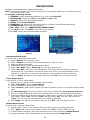
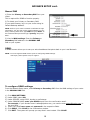
You can change the Device ID and password of the ADMIN and the USER from the Password menu.
To open the Password/security menu:
1)Right-click anywhere onscreen to open the Sub-Menu and select MAIN MENU.
2)Click BASIC. The Basic Setup Menu opens.
3)Click PASSWORD. The Password/Security menu opens.
To change your Device ID and Password:
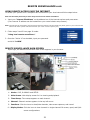
1)Click the field beside DEVICE ID and enter a 6-digit numerical Device ID using the Virtual
Keyboard (mouse only).
2)Under PASSWORD, select ENABLE.
3) Click the field beside USER PASSWORD to enter a 6-digit numerical password using the
Virtual Keyboard (mouse only). Re-enter the password in the corresponding field.
4) Click the field beside ADMIN PASSWORD to enter a 6-digit numerical password using
the Virtual Keyboard (mouse only). Re-enter the password in the corresponding field.
NOTE: The USER and ADMIN passwords MUST NOT be the same.
5)Click APPLY to save your changes. Click CLOSE in the confirmation window.
6)Click EXIT in each menu until all windows are closed.
Use your new password to log in to the system and access system menus.
NETWORK PW CLEAN: (PW = Password)
Select and click APPLY this will disable the IE browser password
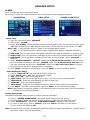
VIDEO/AUDIO
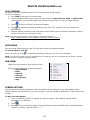
VGA Resolution: Select desired resolution for your external
display, 800x600 or 1024x768.
Camera System: Select from NTSC or PAL (NTSC for US only)
Loop Time: Single channel display rotation time.
Input any time desired up to 999 seconds.
Volume Setup: Select from 0-63 (This unit has a built-in
speaker)
Adjust Margin: Use to align screen (Top/Bottom/Left/Right) to
fit the LCD.
14