1
SM 840 E
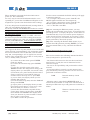
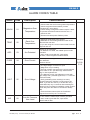
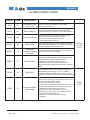
ALARM CODES TABLE
Alarm
Code
Description
H20
07
Low Water Flow
from head
LOCK
08
Open Interlock
Cause/Solution
If it isn’t used the related input must be grounded.
If used, contact grounded=OK, open=alarm
Check head water flow.
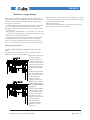
Check interlocks on magnetron head assembly
including waveguide. Check 25 pin D-Sub interlock
Check Connector # 3 for signs of arcing: in case
replace both socket & plug with new one.
Check arcing on the magnetron head,
in case replace the magnetron
LEAK
09
Current Leakage
RACK
10
Rack Error
11
Maximum
Reverse Power
Exceded
The reverse power threshold has been exceeded.
Check the threshold limit setting.
Power Down
a) The alarm “Power Down” is enabled and the line
voltage has been suddenly removed while the unit
was in MW-ON. Check main line for faults
b) Disable “Power Down” alarm: the only
disadvantage is the unit will not inform you of
unexpected main voltage removal when in MW-ON
state
MREV
POWD
RAM
COM
12
13
14
page 26 of 27
The unit has detected an output current 10% lower
than expected, usually due by a sudden drop of the
main line voltage: check the main line
Ram Error
Internal RAM memory data corrupted: check for
Ram Battery presence (it’s a “click on” battery
installed over the CPU Ram) or its charge (>2.8V).
Replace the battery. Switch OFF the unit and restart.
Communication
interrupted
The unit was running in “remote control mode” and
the communication failed. Check:
a) cable and connectors insertion
b) remove any “suspend or low power mode” from yr
PC (the OS may stops to drive the PC serial port)
c) disable any screen saver from the PC
d) do not move the FrontPanel window on yr
desktop: some early version of operating system
may stop driving the serial port.
e) Raise communication timeout setting in
FrontPanel.
Version
2.0.1 &
2.0.2
Version
2.02
File:SM840_r2 eng - June 2002 - Manuale per: SM 840E