1
::: Specifications
Capacity
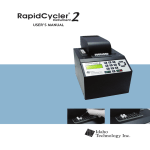
24 x 0.2 ml PCR tubes
Fuse Requirements:
Sample Volume:
25µL or 50µL
Display:
30 Cycle Run Time: 35 min.with 25 µL sample vol.
45 min. with 50 µL sample vol.
Dimensions:
20 cm x 15 cm x 23 cm
Warranty:
8A 250 V 3AG
128 x 64 pixel graphic display
8 line/ 22 character
backlit display
1 Year, parts and labor
30 day money back guarantee.
Blazing Speed
Air cycling provides unmatched ramping and cooling rates,making Indy two-to-three times faster than standard heat block thermocyclers.These quick cycle times are achieved using standard 0.2 ml PCR sample
tubes.
Compact Siz e
The 20 cm x 15 cm x 23 cm footprint is small enough for every researcher to have an Indy in their personal work space.
Uniform and Accurate
Temperature Control
The instrument’s cylindrical chamber provides sample-to-sample uniformity within +/- 0.5 ºC. The chamber is heated via a resistive heating element and cooled with ambient air.
Quick Reaction Optimization
The unparalleled speed of Indy Air Thermocycler allows quick optimization of reaction conditions and
yields more specific product.
Simple Pr ogramming
The 128 X 64 backlit screen and keypad allow quick and easy programming.Even the most complex protocols are simple to program as operators are guided through a series of user-friendly screens.
Oil F ree Operation
The chamber is designed to prevent sample condensation,thus eliminating the need for the addition of oil.