1
16-CH NVR Quick Start Guide
1. Install Hard Drive &DVD Writer
1.1 Install Hard Drive
Note: This series supports eight SATA HDDs. Please select the hard drive as per
the manufacturer‘s recommendation. Refer to ‘Appendix C Compatible Devices’.
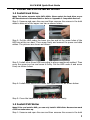
Step 1: Unscrew and open the case and then unscrew the screws in the both
sides to take out of the upper iron bar as shown below:
Step 2: Put the HDD under the lower iron bar and let the screw holes of the
HDD aim at the iron bars‟. Then screw firmly and connect the power and data
cables. The pictures are shown as follows:
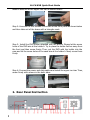
Step 3: Install other three HDD according to above-mentioned method. Then
cover the upper iron bar and screw it firmly. Put the HDD under it and screw
firmly as shown below:
Step 4: Install other three HDD under the upper iron bar as shown below:
Step 5: Cover the back cover of the device and screw firmly.
1.2 Install DVD Writer
Note: If the you install a DVD, you can only install 4 HDD disks. Because too much
room has been taken up.
Step 1: Unscrew and open the case and then unscrew the screws in the both
1