1
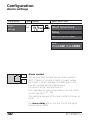
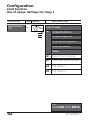
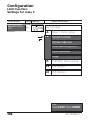
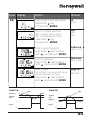
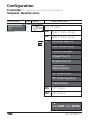
APT4000 Series
4-Wire Contacting
Conductivity Analyzers
User Manual
70-82-25-104
Revision 2 – 09/03
Copyright and Notices
© Copyright 2003 by Honeywell
Revision 2 – 09/03
Warranty/Remedy
Honeywell warrants goods of its manufacture as being free of defective
materials and faulty workmanship. Contact your local sales office for warranty information. If warranted goods are returned to Honeywell during
the period of coverage, Honeywell will repair or replace without charge
those items it finds defective. The foregoing is Buyers’ sole remedy and is
in lieu of all other warranties, expressed or implied, including those of merchantability and fitness for a particular
purpose. Specifications may change without notice.
The information we supply is believed to be accurate and reliable as of this
printing. However, we assume no responsibility for this use.
While we provide application assistance personally, through our literature
and the Honeywell web site, it is up to the customer to determine the
suitability of the product in the application.
About This Document
Abstract
This document provides information specific to the APT4000CC Analyzer.
Contacts
World Wide Web
The following lists Honeywell’s World
interest to our customers.
Honeywell Organization
Corporate
Industrial Measurement and Control
Wide Web sites that will be of
WWW Address (URL)
http://www.honeywell.com
http://www.honeywell.com/imc
Telephone
Contact us by telephone at the numbers listed below.
Phone Number
Organization
United States and Canada Honeywell
1-800-423-9883 Tech. Support
1-888-423-9883 Q&A Faxback
(TACFACS)
1-800-525-7439 Service
Address
Honeywell Industrial Measurement and Control, 1100 Virginia Drive,
Fort Washington, PA 19034
Contents
Safety information . . . . . . . . . . . . . . . . . . . . . . . . . .5
Intended use . . . . . . . . . . . . . . . . . . . . . . . . . . . . . . . . . . . . . . . .6
Trademarks . . . . . . . . . . . . . . . . . . . . . . . . . . . . . . . . . . . . . . . . .6
Overview of APT4000CC . . . . . . . . . . . . . . . . . . . . . .7
Assembly . . . . . . . . . . . . . . . . . . . . . . . . . . . . . . . . . .8
Package contents . . . . . . . . . . . . . . . . . . . . . . . . . . . . . . . . . . . .8
Mounting plan . . . . . . . . . . . . . . . . . . . . . . . . . . . . . . . . . . . . . .9
Pipe mounting, panel mounting . . . . . . . . . . . . . . . . . . . . . . . .10
Installation and connection . . . . . . . . . . . . . . . . . .12
Information on installation . . . . . . . . . . . . . . . . . . . . . . . . . . . .12
Terminal assignments . . . . . . . . . . . . . . . . . . . . . . . . . . . . . . . .12
Typical wiring . . . . . . . . . . . . . . . . . . . . . . . . . . . . . . . . . . . . . .15
Protective wiring of relay outputs . . . . . . . . . . . . . . . . . . . . . . .16
User interface and display . . . . . . . . . . . . . . . . . . .18
Operation: Keypad . . . . . . . . . . . . . . . . . . . . . . . . . . . . . . . . . .20
Safety features . . . . . . . . . . . . . . . . . . . . . . . . . . . .21
Sensocheck, Sensoface sensor monitoring . . . . . . . . . . . . . . . .21
GainCheck device self test . . . . . . . . . . . . . . . . . . . . . . . . . . . .21
Automatic device self-test . . . . . . . . . . . . . . . . . . . . . . . . . . . . .21
Hold mode . . . . . . . . . . . . . . . . . . . . . . . . . . . . . . . . . . . . . . .22
To activate the Hold mode from outside . . . . . . . . . . . . . . . . . .23
Configuration . . . . . . . . . . . . . . . . . . . . . . . . . . . . .24
Menu structure of configuration . . . . . . . . . . . . . . . . . . . . . . . .25
Overview of configuration steps . . . . . . . . . . . . . . . . . . . . . . . .26
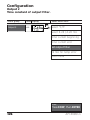
Output 1 . . . . . . . . . . . . . . . . . . . . . . . . . . . . . . . . . . . . . . . . .28
Output 2 . . . . . . . . . . . . . . . . . . . . . . . . . . . . . . . . . . . . . . . . .42
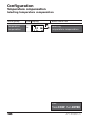
Temperature compensation . . . . . . . . . . . . . . . . . . . . . . . . . . . .48
Alarm settings . . . . . . . . . . . . . . . . . . . . . . . . . . . . . . . . . . . . .50
Limit function . . . . . . . . . . . . . . . . . . . . . . . . . . . . . . . . . . . . . .52
Controller . . . . . . . . . . . . . . . . . . . . . . . . . . . . . . . . . . . . . . . .56
Setting of relays for USP function . . . . . . . . . . . . . . . . . . . . . . .58
Controlling a rinsing probe or signaling parameter set 2 . . . . . .60
Selecting parameter set 1/2 . . . . . . . . . . . . . . . . . . . . . . . . . . .62
External switchover of parameter sets . . . . . . . . . . . . . . . . . . . .60
Default settings of parameter sets . . . . . . . . . . . . . . . . . . . . . .65
Parameter set, individual settings . . . . . . . . . . . . . . . . . . . . . . .66
3
Calibration . . . . . . . . . . . . . . . . . . . . . . . . . . . . . . . .68
Calibration by entry of cell constant . . . . . . . . . . . . . . . . . . . .70
Calibration with calibration solution . . . . . . . . . . . . . . . . . . . . .72
Product calibration . . . . . . . . . . . . . . . . . . . . . . . . . . . . . . . . . .74
Adjusting temp probe . . . . . . . . . . . . . . . . . . . . . . . . . . . . . . .76
Diagnostics functions . . . . . . . . . . . . . . . . . . . . . . .77
Display of output currents . . . . . . . . . . . . . . . . . . . . . . . . . . . . .77
Display of calibration data (Cal nfo) . . . . . . . . . . . . . . . . . . . . .77
Sensor monitor . . . . . . . . . . . . . . . . . . . . . . . . . . . . . . . . . . . . .77
Display of last error message . . . . . . . . . . . . . . . . . . . . . . . . . .77
Specify current at output 1 (current source 1) . . . . . . . . . . . . . .78
Specify current at output 2 (current source 2) . . . . . . . . . . . . . .78
Relay test (manual test of contacts) . . . . . . . . . . . . . . . . . . . . .78
Controller test (manual specification of controller output) . . . .79
Controller functions . . . . . . . . . . . . . . . . . . . . . . . .80
PID controller . . . . . . . . . . . . . . . . . . . . . . . . . . . . . . . . . . . . . .80
Pulse length / pulse frequency controller . . . . . . . . . . . . . . . . . .82
Error messages (error codes)
Operating states . . . . . . . . . .
Sensoface . . . . . . . . . . . . . . . .
USP function . . . . . . . . . . . . .
Appendix . . . . . . . . . . . . . . . .
.
.
.
.
.
.
.
.
.
.
.
.
.
.
.
.
.
.
.
.
.
.
.
.
.
.
.
.
.
.
.
.
.
.
.
.
.
.
.
.
.
.
.
.
.
.
.
.
.
.
.
.
.
.
.
.
.
.
.
.
.
.
.
.
.
.
.
.
.
.
.
.
.
.
.
.
.
.
.
.
.84
.86
.88
.90
.93
Product line and accessories . . . . . . . . . . . . . . . . . . . . . . . . . . .93
Specifications . . . . . . . . . . . . . . . . . . . . . . . . . . . . . . . . . . . . . .94
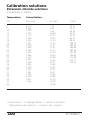
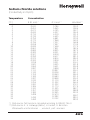
Calibration solutions . . . . . . . . . . . . . . . . . . . . . . . . . . . . . . . .100
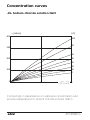
Concentration curves . . . . . . . . . . . . . . . . . . . . . . . . . . . . . . .102
Glossary . . . . . . . . . . . . . . . . . . . . . . . . . . . . . . . . .108
Index . . . . . . . . . . . . . . . . . . . . . . . . . . . . . . . . . . . .110
4
APT4000CC
Safety information
Be sure to read and observe the following instructions!
The analyzer has been designed in accordance with the state of
the art and complying with the applicable safety regulations.
When operating the analyzer, certain conditions may nevertheless lead to danger for the operator or damage to the analyzer.
Caution!
Commissioning may only be carried out by trained experts.
Whenever it is likely that protection has been impaired, the
analyzer shall be made inoperative and secured against unintended operation.
The protection is likely to be impaired if, for example:
• the analyzer shows visible damage
• the analyzer fails to perform the intended measurements
• after prolonged storage at temperatures above 70 °C
• after severe transport stresses
Before recommissioning the analyzer, a professional routine test
in accordance with EN 61010-1 must be performed. This test
should be carried out by the manufacturer.
Caution!
Before commissioning it must be proved that the analyzer may
be connected with other equipment.
5
Intended use
The APT4000CC is used for measurement of electrical conductivity and temperature in liquids.
Fields of application are: biotechnology, chemical industry,
environment, food processing, water/waste-water treatment,
and power utility measurements.
The rugged molded enclosure can be fixed into a control panel
or mounted on a wall or at a post. The protective hood provides
additional protection against direct weather exposure and
mechanical damage.
The APT4000CC has been designed for 2-electrode conductivity
sensors. It provides a second current output for temperature
measurement, a PID controller (making use of the relay contacts),
and a universal power supply for 24 ... 230 V AC/DC.
For CIP applications, you can switch between two parameter
sets.
Trademarks
The following names are registered trademarks. For practical reasons they are shown without trademark symbol in this manual.
Sensocheck®
Sensoface®
VariPower®
are registered trademarks of Knick GmbH & Co. KG, Germany.
6
APT4000CC
Overview of APT4000CC
cond I hi
1
cond U hi
2
cond U lo
3
cond I lo
4
SG
(Solution
Ground)
5
shield
C
NTC/RTD
D
NTC/RTD
E
2-el cond
input
Output 1
- output 1/2
11
+ output 2
12
relay 1
13
relay 1/2
R2
14
relay 2
Alarm
15
alarm
16
alarm
17
wash / PSet2
18
clean / PSet2
19
power
20
power
R1
clean
PSet2
hold
hold/
control
6
+ output 1
10
Output 2
Temp
input
9
Hold
input
Power
7
Control
control
8
input
7
Assembly
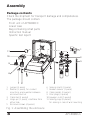
Package contents
Check the shipment for transport damage and completeness.
The package should contain:
• Front unit of APT4000CC
• Lower case
• Bag containing small parts
• Instruction manual
• Specific test report
1
11
10
2
3
9
8
7 6
1
2
3
4
5
5
Jumper (2 piece)
Washer (1 piece), for conduit
mounting: place washer between
enclosure and nut
Cable ties (3 pieces)
Hinge pin (1 piece), insertable from
either side
Enclosure screws (4 pieces)
4
6
7
8
9
10
11
Sealing inserts (1 piece)
Rubber reducer (1 piece)
Cable glands (3 pieces)
Filler plugs (3 pieces)
Hexagon nuts (5 pieces)
Sealing plugs (2 pieces),
for sealing in case of wall mounting
Fig. 1: Assembling the enclosure
8
APT4000CC
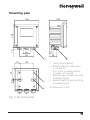
Mounting plan
105
144
15
144
27
42
84
21
43
1
80
2
1
2
72
32
6,2
3
3
4
4
Cable gland (3 pieces)
Breakthroughs for cable gland
or conduit 1/2”,
ø 21.5 mm (2 breakthroughs)
Conduits not included!
Breakthroughs for pipe mounting
(4 breakthroughs)
Breakthroughs for wall mounting
(2 breakthroughs)
All dimensions in mm.
Fig. 2: Mounting plan
9
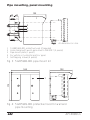
Pipe mounting, panel mounting
40
132
60
1
2
3
4
5
All dimensions in mm.
1
2
3
4
5
512005989-001 protective hood (if required)
Hose clamps with worm gear drive to DIN 3017 (2 pieces)
Pipe-mount plate (1 piece)
For vertical or horizontal posts or pipes
Self-tapping screws (4 pieces)
Fig. 3: 51205988-001 pipe-mount kit
165
132
1
173
1
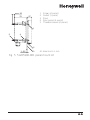
Fig. 4: 51205989-001 protective hood for wall and
pipe mounting
10
APT4000CC
max. 25
78
1
2
3
4
5
27
Screws (4 pieces)
Gasket (1 piece)
Panel
Span pieces (4 pieces)
Threaded sleeves (4 pieces)
1
5
4
2
1...22
3
All dimensions in mm.
Fig. 5: 51205990-001 panel-mount kit
11
Installation and connection
Information on installation
Caution!
• Installation may only be carried out by trained experts in accordance with this instruction manual and as per applicable local
and national codes.
• Be sure to observe the technical specifications and
input ratings.
• Be sure not to notch the conductor when stripping the
insulation.
• Before connecting the analyzer to the power supply, make sure
that its voltage lies within the range 20.5 ... 253 V AC/DC.
• All parameters must be set by a system administrator prior to
commissioning.
The terminals are suitable for single wires and flexible leads up to
2.5 mm2 (AWG 14).
Terminal assignments
Fig. 6: Terminal assignments APT4000CC
12
APT4000CC
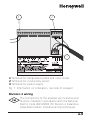
3
2
1
1 Terminals for temperature probe and outer shield
2 Terminals for conductivity sensor
3 Terminals for power supply
Fig. 7: Information on installation, rear side of analyzer
Division 2 wiring
The connections to the analyzer are incendive and
must be installed in accordance with the National
Electric Code (ANSI-NFPA 70) Division 2 hazardous
(classified) location incendive wiring techniques.
13
14
APT4000CC
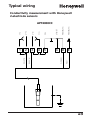
Typical wiring
Conductivity measurement with Honeywell
2-electrode sensors
I lo
SG
shield
RTD/NTC
RTD/NTC
4
5
C
D
E
RED
V lo
3
GREEN
V hi
2
BLACK
1
WHITE
I hi
APT4000CC
15
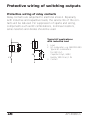
Protective wiring of switching outputs
Protective wiring of relay contacts
Relay contacts are subjected to electrical erosion. Especially
with inductive and capacitive loads, the service life of the contacts will be reduced. For suppression of sparks and arcing,
components such as RC combinations, nonlinear resistors,
series resistors and diodes should be used.
Typical AC applications
with inductive load
1
1
1
2
2
3
2
3
3
16
Load
RC combination, e.g. RIFA PMR 209
Typical RC combinations
for 230 V AC:
Capacitor 0.1µF / 630V,
Resistor 100 Ohms / 1 W
Contact
APT4000CC
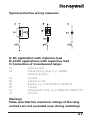
Typical protective wiring measures
A: DC application with inductive load
B: AC/DC applications with capacitive load
C: Connection of incandescent lamps
A1
A2
A3
B1
B2
B3
C1
C3
Inductive load
Free-wheeling diode, e.g. 1N4007
(Observe polarity)
Contact
Capacitive load
Resistor, e.g. 8 Ohms/1W at 24V/0.3A
Contact
Incandescent lamp, max 60W/230V, 30W/115V
Contact
Warning!
Make sure that the maximum ratings of the relay
contacts are not exceeded even during switching!
17
User interface and display
User interface
1
2
Display
Mode indicators (no keys), from left to right:
- Measuring mode
- Calibration mode
- Alarm
- Clean contact active
- Configuration mode
18
3
4
5
6
7
Keypad
Coding
Rating plate
Model designation
Alarm LED
APT4000CC
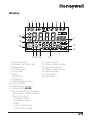
Display
1
2
3 4
5
6
7
8
9
10
20
11
19
12
18
13
17 16 15
1
2
3
4
5
6
7
8
9
10
11
12
13
Mode code entry
Parameter set 2 selected
Temperature
Current output
Limit values
Alarm
Sensocheck
Calibration
Interval/response time
Clean contact
Measurement symbols
Proceed with ENTER
Bar for identifying the device
status, above mode indicators
from left to right:
- Measuring mode
- Calibration mode
- Alarm
- Clean contact active
- Configuration mode
14
14
15
16
17
18
19
20
Lower display
Manual temp indicator
Hold mode active
Waiting time running
Electrode data
Main display
Sensoface
19
Operation: Keypad
Start, end calibration
Start, end configuration
Select digit position
(selected position flashes)
Edit digit
• Calibration:
Continue in program sequence
• Configuration: Confirm entries,
next configuration step
• Measuring mode: Display output current
Cal Info, display of cell constant
Error Info, display last error message
+
20
Start GainCheck device self-test
APT4000CC
Safety functions
Sensocheck, Sensoface sensor monitoring
Sensocheck continuously monitors the sensor and lines.
Sensocheck can be switched off (Configuration, Pg 50).
Sensoface provides information on the conductivity
sensor condition. Significant sensor polarization effects
or an excessive cable capacitance are indicated.
GainCheck device self-test
A display test is carried out, the software version is displayed
and the memory and measured value transfer are checked.
Start GainCheck device self-test:
+
Automatic device self-test
The automatic device self-test checks the memory and measured-value transfer. It runs automatically in the background at
fixed intervals.
21
Safety functions
Hold mode
Display:
The Hold mode is a safety state during configuration and calibration. Output current is frozen (LAST) or set to a fixed value
(FIX). Alarm and limit contacts are disabled.
If the calibration or configuration mode is exited, the
APT4000CC remains in the Hold mode for safety reasons. This
prevents undesirable reactions of the connected peripherals
due to incorrect configuration or calibration. The measured
value and “Hold” are displayed alternately. The APT4000CC
only returns to measuring mode after ENTER is pressed and a
waiting time of 20 sec has passed.
22
APT4000CC
To activate the Hold mode from outside
The Hold mode can be activated from outside by sending a
signal to the Hold input (e.g. from the process control system).
Power supply
12...24 V AC/DC
Hold
6
input
7
APT4000CC
Hold active
Process control system (PCS)
Hold inactive
10 ... 30 V AC/DC 0 ... 2 V AC/DC
23
Configuration
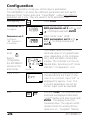
In the Configuration mode you set the device parameters.
The APT4000CC can store two different parameter sets and switch
between them. Sensor data and “Clean/PSet2” output are edited in
parameter set 1 only. They are valid for both parameter sets.
Configuring
Press CONF.
Parameter set 1
Configure:
Enter mode code “1200”:
Edit parameter set 1 with and
, confirm/proceed with ENTER.
Parameter set 2
Configure:
“88” appears in
the display.
Enter mode code “1288”:
Edit parameter set 2 with
and , confirm/proceed with
ENTER.
The output current is frozen
(at its last value or at a preset fixed
value, depending on the configuration), limit and alarm contacts are
inactive. The controller is in the configured state, Sensoface is off, mode
indicator “Configuration” is on.
Hold
During
configuration
the APT4000CC
remains in the
Hold mode.
Hold icon
Input errors
The configuration parameters are
checked during the input. In the
case of an incorrect input “Err” is
displayed for approx. 3 sec. The
incorrect parameters cannot be
stored. Input must be repeated.
End
End with CONF. The measured value
and Hold are displayed alternately,
“enter” flashes. End Hold mode with
ENTER . The display shows the
measured value. The output current
remains frozen for another 20 sec
(Hold icon on, “hourglass” flashes).
24
APT4000CC
Menu structure of configuration
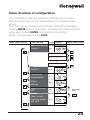
The configuration steps are assigned to different menu groups.
With the arrow keys you can jump between the individual menu
groups.
Each menu group contains menu items for setting the parameters.
Pressing ENTER opens a menu item. The values are edited using the
arrow keys. Pressing ENTER confirms/stores the settings.
Return to measurement: Press CONF.
Select menu group
Menu group
Code Display
Output 1
o1.
Select menu item
Menu item 1
Menu item 2
Menu item ...
Output 2
o2.
Temperature
compensation
tc.
Alarm
settings
AL.
Relay/Controller/
USP
rL.
Clean contact /
Signaling parameter set 2
Cn.
Previous menu
group:
25
Overview of configuration steps
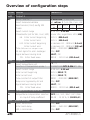
Code Menu
Selection
out1
Output 1
o1.
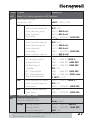
Sensor selection *
Select measured variable
Select solution (Conc) see Pg 102
Codes:
2-electrode / 4-electrode
µS, mS/cm, MΩ·cm, SAL, Conc, USP
NaCl
HCl NaOH H2SO4 HNO3
Select current range
Characteristic (not for SAL, Conc, USP)
0-20 mA / 4-20 mA
Linear LIN / Logarithmic LOG (LIN)
LIN: Enter current beginning
XXX.X (000.0 mS)
XXX.X (100.0 mS)
in decades: 0.1...1000 mS (0.1 mS)
in decades: 0.1...1000 mS (100 mS)
0000 ... 0120 SEC (0000 SEC)
ON / OFF
LAST / FIX
000.0 ... 021.0 mA (021.0 mA)
Enter current end
LOG: Enter current beginning
Enter current end
Time constant of output filter
22 mA signal for error messages
Signal behavior during Hold
FIX: Enter fixed value
out2
o2.
-01- -02- -03-
-04-
-05-
Output 2
Select temperature unit
Selection of temperature probe *
Select current range
Enter current beginning
Enter current end
Time constant of output filter
Temp error signaled by 22 mA
Signal behavior during Hold
FIX: Enter fixed value
°C / °F
Pt100/Pt1000/NTC 8.55k/NTC 30k
0-20 mA / 4-20 mA
XXX.X (000.0 °C)
XXX.X (100.0 °C)
0000 ... 0120 SEC (0000 SEC)
ON / OFF
LAST / FIX
000.0 ... 021.0 mA (021.0 mA)
tc
Temperature compensation
tc.
Temperature compensation selection
OFF / Lin / nLF / NaCl / HCl / NH3
Lin: Input of temp coefficient
00.00 ... 19.99 %/ K (02.00%/K)
ALrt
AL.
26
Alarm settings
Select Sensocheck
ON / OFF
Enter alarm delay
0000 ... 0600 SEC (0010 SEC)
LED in Hold mode
ON / OFF
APT4000CC
Code Menu
Selection
rLAY
Relay 1/2: Limits, controller, USP function
rL.
Select limit function /
Controller / USP
L1.
Select contact function
Select contact response
Enter switching point
Enter hysteresis
Enter delay
L2.
Select contact function
Select contact response
Enter switching point
Enter hysteresis
Enter delay
Enter controller setpoint
Ct.
Enter neutral zone
(P) Controller gain KP
(I) Reset time TR
(D) Rate time TD
Controller
PLC: Pulse length
PFC: Pulse frequency
Select Hold behavior
U1.
Enter reduced USP factor
Select contact response
Enter delay
U2.
Select contact response
Enter delay
Cln
Contact Clean / PSet2
Cn.
Select as Clean contact /
Signal for parameter set 2 *
rinse
Rinsing interval *
Rinse duration *
Contact response *
*
LiMIT / CtROL / USP
Lo / Hi
N/O / N/C
XXX.X (000.0 mS)
XXX.X (001.0 mS)
0000 ... 9999 SEC (0010 SEC)
Lo / Hi
N/O / N/C
XXX.X (100.0 mS)
XXX.X (001.0 mS)
0000 ... 9999 SEC (0010 SEC)
XXX.X (050.0 mS)
XXX.X (001.0 mS)
0010 ... 9999 % (0100 %)
0000 ... 9999 SEC (0000 SEC)
0000 ... 9999 SEC (0000 SEC)
PLC / PFC
0001 ... 0600 SEC (0010 SEC)
0001 ... 0180 /min (0060 /min)
Y LAST / Y Off
0010 ... 0100 % (0100 %)
N/O / NC
0000 ... 9999 SEC (0000 SEC)
N/O / N/C
0000 ... 9999 SEC (0000 SEC)
rinse / PSet2
000.0 ... 999.9 h (000.0 h)
0000 ... 1999 SEC (0060 SEC)
N/O / N/C
These parameters are only edited in parameter set 1.
They are valid for both parameter sets.
27
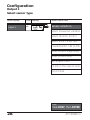
Configuration
Output 1
Select sensor type
Menu group
Code Display
Select menu item
Output 1
o1.
Sensor selection
Select measured variable
Select solution (Conc)
Select 0-20 / 4-20 mA
Characteristic: LIN / LOG
Enter current beginning
Enter current end
Set output filter
22 mA in the case of error
Hold mode
End:
Press CONF, then ENTER
28
APT4000CC
Code Display
Action
o1.
Select configuration
(Press CONF.)
After correct input a welcome
text (CONF) is displayed for
approx. 3 sec
After correct input a welcome
text (CONF) is displayed for
approx. 3 sec
Choices
For parameter set 1:
Enter mode code “1200”
(Select position using arrow
key and edit number using .
When the display reads “1200”,
press ENTER to confirm.)
For parameter set 2:
Enter mode code “1288”
(Select position using arrow
key and edit number using .
When the display reads “1288”,
press ENTER to confirm.)
The APT4000CC is in Hold
mode (Hold icon is on).
Select 2-electrode sensor
Proceed with ENTER
2-EL
(2-EL/4-EL)
Note: Characters represented in gray are flashing and can be edited.
*) This configuration is only edited in parameter set 1.
It is valid for both parameter sets.
29
Configuration
Output 1
Select measured variable
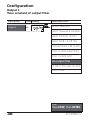
Menu group
Output 1
Code Display
o1.
Select menu item
Sensor selection
Select measured variable
Select solution (Conc)
Select 0-20 / 4-20 mA
Characteristic: LIN / LOG
Enter current beginning
Enter current end
Set output filter
22 mA in the case of error
Hold mode
End:
Press CONF, then ENTER
30
APT4000CC
Code Display
Action
Choices
o1.
Select measured variable:
000.0 mS
Select with arrow key
Proceed with ENTER
(0.000 µS
00.00 µS
(USP)
000.0 µS
0000 µS
0.000 mS
00.00 mS
000.0 mS
Conductivity:
• 0.000 ... 9.999
• 00.00 ... 99.99
• 000.0 ... 999.9
• 0.000 ... 9.999
• 00.00 ... 99.99
• 000.0 ... 999.9
• 0.000 ... 9.999
• 00.00 ... 99.99
µS/cm
µS/cm
µS/cm
mS/cm
mS/cm
mS/cm
S/m
S/m
Resistivity:
• 00.00 ... 99.99 MΩ·cm
0.000 S/m
00.00 S/m
00.00 MΩ
0.00 SAL
00.00 %
Salinity (SAL):
• 0.0 ... 45.0 ‰ (0 ... 35 °C)
USP)
Concentration (Conc):
• 0.00 ... 9.99 % by wt
USP – automatic range
• 00.00 ... 99.99 µS/cm
Note: Characters represented in gray are flashing and can be edited.
31
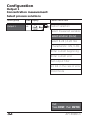
Configuration
Output 1
Concentration measurement:
Select process solutions
Menu group
Code Display
Select menu item
Output 1
o1.
Sensor selection
Select measured variable
Select solution (Conc)
Select 0-20 / 4-20 mA
Characteristic: LIN / LOG
Enter current beginning
Enter current end
Set output filter
22 mA in the case of error
Hold mode
End:
Press CONF, then ENTER
32
APT4000CC
Code Display
Action
Choices
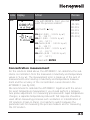
o1.
Only with 00.00 % Conc, you can -01-SOL
select the process solution:
(-01-SOL
-02-SOL
Select with
key
-03-SOL
-04-SOL
-01- NaCl (0.00 ... 9.99 % by wt)
-05-SOL)
(0 ... 120 °C)
-02- HCl (0.00 ... 9.99 % by wt)
(-20 ... 50 °C)
-03- NaOH (0.00 ... 9.99 % by wt)
(0 ... 100 °C)
-04- H2SO4 (0.00 ... 9.99 % by wt)
-17 ... 110 °C)
-05- HNO3 (0.00 ... 9.99 % by wt)
(-17 ... 50 °C)
Proceed with ENTER
Concentration measurement
For the solutions listed above, the APT4000CC can determine the substance concentration from the measured conductivity and temperature
values in % by wt. The measurement error is made up of the sum of
measurements errors during conductivity and temperature measurement and the accuracy of the concentration curves stored in the
APT4000CC (see Pg 102).
We recommend to calibrate the APT4000CC together with the sensor.
For exact temperature measurement, you should perform a temperature probe adjustment. For measuring processes with rapid temperature
changes, a separate temperature probe with fast response should be
used. When measuring processes such as dilution or intensification of
CIP solutions (Clean-In-Place), it is helpful to switch between the
parameter sets for measuring the process medium and for measuring
the CIP solution.
33
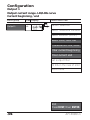
Configuration
Output 1
Output current range. LIN/LOG curve
Current beginning / end
Menu group
Code Display
Select menu item
Output 1
o1.
Sensor selection
Select measured variable
Select solution (Conc)
Select 0-20 / 4-20 mA
Characteristic: LIN / LOG
Enter current beginning
Enter current end
Set output filter
22 mA in the case of error
Hold mode
End:
Press CONF, then ENTER
34
APT4000CC
Code Display
Action
Choices
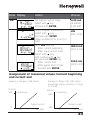
o1.
Set output current range
Select with
key
Proceed with ENTER
4-20 mA
(0-20mA/
4-20 mA)
Select output characteristic
Select with key
Proceed with ENTER
(Step omitted for % (Conc) or
SAL)
LIN
(LIN / LOG)
With LIN selected:
• Enter current beginning
Enter lower end of scale
Select with key,
edit number with
key,
proceed with ENTER key.
• Enter current end
Enter upper end of scale
Proceed with ENTER
000.0 mS
(XXX.X mS)
100.0 mS
(XXX.X mS)
Assignment of measured values: Current beginning
and current end
Example 1: Range 0...200 mS/cm
[mS/cm]
200
Conductivity
Example 2: Range 100...200 mS/cm
Advantage: Higher resolution in range
of interest
[mS/cm]
Conductivity
200
Output current
0
Output current
100
4
20 [mA]
4
20 [mA]
35
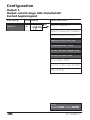
Configuration
Output 1
Output current range. LOG characteristic
Current beginning/end
Menu group
Code Display
Select menu item
Output 1
o1.
Sensor selection
Select measured variable
Select solution (Conc)
Select 0-20 / 4-20 mA
Characteristic: LOG
Enter current beginning
Enter current end
Set output filter
22 mA in the case of error
Hold mode
End:
Press CONF, then ENTER
36
APT4000CC
Code Display
Action
o1.
Choices
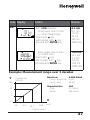
With LOG selected:
• Enter lower end of scale
(= current beginning)
Select with
key,
edit number with
key,
proceed with ENTER key.
0.1 mS
(0.1 mS
1.0 mS
10 mS
100 mS
1000 mS)
• Enter upper end of scale
(= current end)
Select with key,
edit number with
key,
proceed with ENTER key.
100 mS
(0.1 mS
1.0 mS
10 mS
100 mS
1000 mS)
Example: Measurement range over 3 decades
Y
100
Selection:
0-20/4-20mA
• Current beginning: 4 mA
• Current end:
20 mA
Conductivity
[mS/cm]
Characteristic:
• 4 mA
• 20 mA
10
LOG
0.1 mS/cm
100 mS/cm
1
X
0.1
4.0
9.3
14.7
20.0
[mA]
Output current
37
Configuration
Output 1
Time constant of output filter
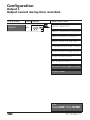
Menu group
Code Display
Output 1
o1.
Select menu item
Sensor selection
Select measured variable
Select solution (Conc)
Select 0-20 / 4-20 mA
Characteristic: LIN / LOG
Enter current beginning
Enter current end
Set output filter
22 mA in the case of error
Hold mode
End:
Press CONF, then ENTER
38
APT4000CC
Code Display
Action
Choices
o1.
Time constant of output filter
Default setting: 0 sec (inactive).
To specify a time constant:
Select with key,
edit number with
key,
proceed with ENTER key.
0000 SEC
(0000 ...
0120 SEC)
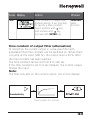
Time constant of output filter (attenuation)
To smoothen the current output, a low-pass filter with
adjustable filter time constant can be switched on. When there
is a jump at the input (100 %), the output level is 63 % after
the time constant has been reached.
The time constant can be set from 0 to 120 sec.
If the time constant is set to 0 sec, the current output follows
the input.
Note:
The filter only acts on the current output, not on the display, the
limit values, or the controller!
Conductivity
Time constant 0 to 120 sec
39
Configuration
Output 1
Output current during Error and Hold.
Menu group
Code Display
Select menu item
Output 1
o1.
Sensor selection
Select measured variable
Select solution (Conc)
Select 0-20 / 4-20 mA
Characteristic: LIN / LOG
Enter current beginning
Enter current end
Set output filter
22 mA in the case of error
Hold mode
End:
Press CONF, then ENTER
40
APT4000CC
Code Display
o1.
Action
Choices
22 mA signal for error message
Select with
arrow key.
Proceed with ENTER
OFF
(OFF / ON)
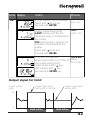
Output signal during Hold
LAST: During Hold the last
measured value is maintained at
the output
FIX: During Hold a value (to be
entered) is maintained at the
output
Select with arrow key.
Proceed with ENTER
LAST
(LAST / FIX)
Only with FIX selected:
Enter current which is to flow at
the output during Hold
Select position with key,
edit number with
key,
proceed with ENTER key.
021.0 mA
(000.0 ...
021.0 mA)
Output signal for Hold:
Output current
[mA]
Output signal Hold
Setting FIX = 21.0 mA
Output signal Hold
Setting LAST
21
4
Hold active
Hold active
41
Configuration
Output 2
Temperature unit and probe, output current.
Menu group
Code Display
Output 2
o2.
Select menu item
Select °C/°F
Select temp probe
Select 0-20 / 4-20 mA
Enter current beginning
Enter current end
Set output filter
22 mA for temp error
Hold mode
End:
Press CONF, then ENTER
42
APT4000CC
Code Display
Action
Choices
o2.
Specify temperature unit
Select with
arrow key
Proceed with ENTER
°C
(°C / °F)
Select temperature probe *
Select with
arrow key
Proceed with ENTER
8.55 NTC
(100 PT
1000 PT
30 k NTC)
Set output current range
Select with
arrow key
Proceed with ENTER
4 – 20 mA
Current beginning:
Enter lower end of scale.
Select with , edit number
with , proceed with ENTER.
000.0 °C
Current end:
Enter upper end of scale.
Select with , edit number
with , proceed with ENTER.
100.0 °C
(4 - 20 mA/
0 - 20 mA)
(XXX.X °C)
(XXX.X °C)
Process temperature: Current beginning and end
Example 1: Range 0 to 100 °C
[°C]
100
Process temperature
Example 2: Range 50 to 70 °C.
Advantage: Higher resolution in
range of interest
[°C]
70
Process temperature
Output current
Output current
0
50
4
20 [mA]
*) These parameters are only edited in parameter set 1.
They are valid for both parameter sets.
4
20
[mA]
43
Configuration
Output 2
Time constant of output filter.
Menu group
Output 2
Code Display
o2.
Select menu item
Select °C/°F
Select 0-20 / 4-20 mA
Enter current beginning
Enter current end
Set output filter
22 mA for temp error
Hold mode
End:
Press CONF, then ENTER
44
APT4000CC
Code Display
Action
Choices
o2.
Time constant of output filter
Default setting: 0 sec (inactive).
To specify a time constant:
Select position with key,
edit number with
key,
proceed with ENTER key.
0000 SEC
(0000 ...
0120 SEC)
Time constant of output filter (attenuation)
To smoothen the current output 2, a low-pass filter with
adjustable filter time constant can be switched on. When there
is a jump at the input (100 %), the output level is 63 % after
the time constant has been reached.
The time constant can be set from 0 to 120 sec.
If the time constant is set to 0 sec (default), the current output
follows the input.
Note:
The filter only acts on the current output, not on the display!
Conductivity
Time constant 0 to 120 sec
45
Configuration
Output 2
Temperature error. Output current during Hold.
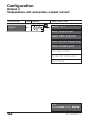
Menu group
Output 2
Code Display
o2.
Select menu item
Select °C/°F
Select 0-20 / 4-20 mA
Enter current beginning
Enter current end
Set output filter
22 mA for temp error
Hold mode
End:
Press CONF, then ENTER
46
APT4000CC
Code Display
Action
Choices
o2.
22 mA signal for error message
Select with
arrow key.
Proceed with ENTER
OFF
Output signal during Hold
LAST: During Hold the last
measured value is maintained at
the output
FIX: During Hold a value (to be
entered) is maintained at the
output
Select with
arrow key.
Proceed with ENTER
LAST
Only with FIX selected:
Enter current which is to flow at
the output during Hold
Select position with key,
edit number with
key,
proceed with ENTER key.
021.0 mA
(OFF / ON)
(LAST / FIX)
(000.0 ...
021.0 mA)
Output signal for Hold:
Output current
[mA]
Output signal Hold
Setting FIX = 21.0 mA
Output signal Hold
Setting LAST
21
4
Hold active
Hold active
47
Configuration
Temperature compensation
Selecting temperature compensation
Menu group
Temperature
compensation
Code Display
tc.
Select menu item
Selecting
temperature compensation
End:
Press CONF, then ENTER
48
APT4000CC
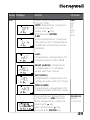
Code Display
tc.
Action
Select temp compensation
(not for USP)
OFF: Temperature compensation switched off
Select with
key.
Proceed with ENTER
LIN:
Linear temperature compensation with entry of temperature
coefficient and reference temperature
Choices
OFF
(OFF
LIN
nLF
nACL
HCL
nH3)
nLF:
Temperature compensation for
natural waters to EN 27888
NaCl (nACL): Temperature
compensation for ultrapure
water with NaCl traces
HCl (HCL):
Temperature compensation for
ultrapure water with HCl traces
NH3 (nH3):
Temperature compensation for
ultrapure water with NH3 traces
Only with linear temperature
compensation (LIN) selected:
Enter temperature coefficient.
Select with key,
edit number with
key,
proceed with ENTER key.
02.00%/K
(00.00 ...
19.99 %/K)
49
Configuration
Alarm settings
Menu group
Code Display
Alarm
settings
AL.
Select menu item
Select Sensocheck
Delay
LED in Hold mode
End:
Press CONF, then ENTER
Alarm
15
16
Alarm contact
The alarm contact is closed during normal operation
(N/C). It opens in the case of alarm or power outage.
As a result, a failure message is provided even in the
case of line breakage (fail-safe behavior).
For contact ratings, see Specifications.
Error messages can also be signaled by a 22 mA output
current (see Pg 41, 47, 84).
The operating behavior of the alarm contact is shown on
Pg 86.
The alarm delay acts on the LED, the 22 mA signal
and the alarm contact.
50
APT4000CC
Code Display
AL.
Action
Choices
Select Sensocheck
(Continuous monitoring of
sensor properties)
Select with
key.
Proceed with ENTER.
OFF
Alarm delay
Select with , edit number
with , proceed with ENTER.
0010 SEC
(0000 ...
0600 SEC)
LED in Hold mode
Select with
key.
Proceed with ENTER.
OFF
(ON / OFF)
(ON / OFF)
LED state:
Configuration
Alarm
Hold
ON
on
flashes
OFF
flashes
off
51
Configuration
Limit function
Use of relays. Settings for relay 1
Menu group
Code Display
Relay/Controller/
USP
rL.
Select menu item
Use of relays
L1. Contact function
Contact response
Enter switching point
Enter hysteresis
Delay
L2. Relay 2 menu group
Ct. Controller menu group
U1 USP: Relay 1
U2 USP: Relay 2
End:
Press CONF, then ENTER
52
APT4000CC
Code Display
rL.
L1.
Action
Use of relays:
• Limit function (LiMIT)
• Controller (CtROL)
• USP function
Select with key.
Proceed with ENTER.
Note: Selecting
• CtROL leads to
Controller menu Ct.
• USP leads to relay for USP
menu U1 U2
Choices
LiMIT
(LiMIT
CtROL
USP)
For function principle, see Pg 55. Lo
(Lo/Hi)
Select with key.
Proceed with ENTER.
Limit 1 contact response
N/O
N/O: normally open contact
N/C: normally closed contact
(N/O
N/C)
Select with key.
Proceed with ENTER.
Limit 1 switching point
Select with , edit number
with , proceed with ENTER.
000.0 mS
(XXX.X mS)
Limit 1 hysteresis
Select with , edit number
with , proceed with ENTER.
001.0 mS
(XXX.X mS)
Limit 1 delay
0010 SEC
The contact is activated with delay
(deactivated without delay)
(0000 ...
9999 SEC)
Select with , edit number
with , proceed with ENTER.
53
Configuration
Limit function
Settings for relay 2
Menu group
Code Display
Relay/Controller/
USP
rL.
Select menu item
Use of relays
L1. Relay 1 menu group
L2. Contact function
Contact response
Enter switching point
Enter hysteresis
Delay
Ct. Controller menu group
U1 USP: Relay 1
U2 USP: Relay 2
End:
Press CONF, then ENTER
54
APT4000CC
Code Display
L2.
Action
Choices
Select Limit 2 (see Fig. below).
Select with key.
Proceed with ENTER.
Hi
(HI/Lo)
Limit 2 contact response
N/O
(N/O
N/C)
N/O: normally open contact
N/C: normally closed contact
Select with key.
Proceed with ENTER.
Limit 2 switching point
Select with , edit number
with , proceed with ENTER.
100.0 mS
(XXX.X mS)
Limit 2 hysteresis
Select with , edit number
with , proceed with ENTER.
001.0 mS
(XXX.X mS)
Limit 2 delay
0010 SEC
(0000 ...
9999 SEC)
The contact is activated with delay
(deactivated without delay)
Select with , edit number
with , proceed with ENTER.
Limit Lo
Signal
Limit Hi
Signal
Hysteresis +
Switching
point
Switching
point
Hysteresis -
1
Contact
1
Contact
0
0
55
Configuration
Controller (for description see Pg 80 and the following)
Setpoint. Neutral zone.
Menu group
Code Display
Relay/Controller/
USP
rL.
Select menu item
Use of relays
L1. Relay 1 menu group
L2. Relay 2 menu group
Ct.
Controller setpoint
Enter neutral zone
(P) Controller gain
(I) Reset time TR
(D) Rate time TD
Pulse length /
Pulse frequency
PLC: Pulse length
PFC: Pulse frequency
Hold behavior
U1 USP: Relay 1
U2 USP: Relay 2
End:
Press CONF, then ENTER
56
APT4000CC
Code Display
Action
Choices
Ct.
Setpoint
Select with , edit number
with , proceed with ENTER.
050.0 mS
(XXX.X mS)
Neutral zone (dead band)
Select with , edit number
with , proceed with ENTER.
001.0 mS
(XXX.X mS)
Controller: Proportional action
Select with , edit number
with , proceed with ENTER.
0100 %
(0010 ...
9999 %)
Controller: Integral (reset time)
Select with , edit number
with , proceed with ENTER.
0000 SEC
(0000 ...
9999 SEC)
Controller: Derivative (rate time) 0000 SEC
(0000 ...
Select with , edit number with 9999 SEC)
, proceed with ENTER.
Pulse length /Pulse frequency
Select with key.
Proceed with ENTER.
PLC
(PLC / PFC)
PLC: Pulse length
Select with , edit number
with , proceed with ENTER.
0010 SEC
(0001 ...
0600 SEC)
PFC: Pulse frequency
Select with , edit number
with , proceed with ENTER.
0060 /min
(0001 ...
0180 /min)
Behavior during Hold
Select with key.
Proceed with ENTER.
Y LAST
(Y Off/
Y LAST)
57
Configuration
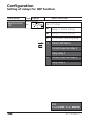
Setting of relays for USP function
Menu group
Code Display
Relay/Controller/
USP
rL.
Select menu item
Use of relays
L1. Relay 1 menu group
L2. Relay 2 menu group
Ct.
Controller menu group
U1
Enter USP factor
Contact response relay 1
Delay relay 1
U2
Contact response relay 2
Delay relay 2
End:
Press CONF, then ENTER
58
APT4000CC
Code Display
Action
U1
With USP function selected,
relays 1 and 2 are used for USP
function (see Pg 90)
USP must have been selected as
measured variable.
For function of relay 1,
see Pg 91.
Enter reduced USP factor
10 ... 100%
Select: Contact response relay 1
N/O: normally open contact
N/C: normally closed contact
Choices
0100 %
(0010 ...
0100 %)
N/O
(N/O
N/C)
Select with key.
Proceed with ENTER.
Enter delay.
Select with , edit number
with , proceed with ENTER.
U2
For function of relay 2, see Pg
91. Select contact response
N/O: normally open contact
N/C: normally closed contact
0000 SEC
(XXXX SEC)
N/O
(N/O
N/C)
Select with key.
Proceed with ENTER.
Enter delay.
Select with , edit number
with , proceed with ENTER.
000 SEC
(XXXX SEC)
59
Configuration
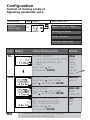
Control of rinsing probe or
Signaling parameter set 2
Menu group
Contact:
Clean / PSet2
Code Display
Cln
Select menu item
Select Clean / PSet2
Rinsing interval
Rinse duration
Contact response
Code Display
Cn.
rinse
Action (Rinsing probe)
Choices
Function selection *:
• Control of rinsing probe (rinse)
• Signaling parameter set 2
active
Select with key.
Proceed with ENTER.
rinse
Rinsing interval *
Select with , edit number
with , proceed with ENTER.
000.0 h
Rinse duration *
Select with , edit number
with , proceed with ENTER.
0060 SEC
(0000 ...
1999 SEC)
Select contact response *
N/O
(N/O
N/O: normally open contact
N/C: normally closed contact
Select with key.
Proceed with ENTER.
60
*) These parameters are only edited in parameter set 1.
They are valid for both parameter sets.
(rinse /
PSet2)
Choices
PSet2:
see next
page
(xxx.x h)
N/C)
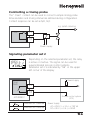
Controlling a rinsing probe
The “Clean” contact can be used to connect a simple rinsing probe.
Rinse duration and rinsing interval are defined during configuration.
Contact response can be set as N/O, N/C.
e.g. splash cleaning
17
Clean
18
Power supply
Signaling parameter set 2
Depending on the selected parameter set, the relay
is active or inactive. The signal can be used for
superordinated process control systems.
Parameter set 2 is indicated by “88” in the upper
left corner of the display.
Power supply
Clean
PSet2
17
18
APT4000CC
Parameter set 1 selected
Parameter set 2 selected
Process control system
(PCS)
Power supply:
AC< 250 V / < 3 A / < 750 VA
DC< 30 V / < 3 A / < 90 W
61
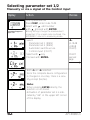
Selecting parameter set 1/2
Manually or via a signal at the Control input
Display
After correct input a welcome
text (CONF) is displayed for
approx. 3 sec
Action
Choices
Select parameter set
Press CONF, enter code 7654
Select with , edit number
with , proceed with ENTER.
Wrong settings change the measurement
properties! If an invalid code is entered, the
APT4000CC returns to measuring mode.
-1-
Select:
• Parameter set 1 (MAN)
• Parameter set 2 (MAN)
• Automatic switchover via
Control input (Ctr-XT)
Select with key.
Proceed with ENTER.
(-1- MAN
-2-MAN
Ctr-EXT)
Ctr-EXT:
see next
page
With -1- or -2- selected:
Since the complete device configuration
is changed in one step, there is a security prompt (No/Yes).
Note:
When pressing ENTER directly, the
selection is not stored.
Activation of parameter set 2 is indicated by “88” in the upper left corner
of the display.
62
APT4000CC
Display
Action
Choices
With Control input Ctr-EXT selected:
You can switch between the parameter sets by applying an external signal
to the Control input, see below.
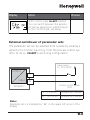
External switchover of parameter sets
The parameter set can be selected from outside by sending a
signal to the Control input (e.g. from the process control system). To do so, Ctr-EXT is set during configuration.
Power supply
12...24 V AC/DC
Control
7
input
8
Process control system
(PCS)
APT4000CC
0 ... 2 V AC/DC
Parameter set 1 selected
10 ... 30 V AC/DC
Parameter set 2 selected
Note:
Parameter set 2 is indicated by “88” in the upper left corner of the
display.
63
64
APT4000CC
Default settings of parameter sets
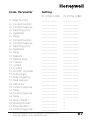
Two complete parameter sets are stored in the EEPROM.
As delivered, the two sets are identical but can be edited.
Note:
Fill in your configuration data on the following pages.
Code. Parameter
Default setting
Code. Parameter
Default setting
o1. Sensor selection *
o1. Process variable
o1. Conc solution
o1. 0/4-20 mA
o1. Characteristic
o1. Current start (LIN)
o1. Current end (LIN)
o1. Current start (LOG)
o1. Current end (LOG)
o1. Filter time
o1. 22mA signal
o1. Hold behavior
o1. FIX current
o2. Unit °C / °F
o2. Temp probe *
o2. 0/4...20mA
o2. Current start
o2. Current end
o2. Filter time
o2. 22mA signal
o2. Hold behavior
o2. FIX current
tc. Temp compensation
tc. Temp coefficient
AL. Sensocheck
AL. Alarm delay
AL. LED Hold
2-EL
000.0 mS
-014-20 mA
LIN
000.0 mS
100.0 mS
0.1 mS
100 mS
0 sec
OFF
LAST
021.0 mA
°C
Pt 100
4-20 mA
000.0 °C
100.0 °C
0 sec
OFF
LAST
021.0 mA
OFF
02.00%/K
OFF
0010 sec
OFF
L1. Contact function
L1. Contact response
L1. Switching point
L1. Hysteresis
L1. Delay
L2. Contact function
L2. Contact response
L2. Switching point
L2. Hysteresis
L2. Delay
Ct. Setpoint
Ct. Neutral zone
Ct. P action
Ct. I action
Ct. D action
Ct. PLC/PFC controller
Ct. Pulse length
Ct. Pulse frequency
Ct. Hold behavior
U1 USP factor
U1 Contact response
U1 Delay
U2 Contact response
U2 Delay
Cn. Rinse/ PSet2 *
Cn. Rinsing interval *
Cn. Rinse duration*
Cn. Contact type *
Lo
N/O
000.0 mS
001.0 mS
0010 sec
Hi
N/O
100.0 mS
001.0 mS
0010 sec
050.0 mS
001.0 mS
0100 %
0000 sec
0000 sec
PLC
0010 sec
0060 /min
LAST
100 %
N/O
0000 sec
N/O
0000 sec
rinse
000.0 h
0060 sec
N/O
*) These parameters are only edited in parameter set 1.
They are valid for both parameter sets.
65
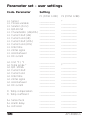
Parameter set – user settings
Code. Parameter
Setting
P1 (CONF 1200)
P2 (CONF 1288)
o1.
o1.
o1.
o1.
o1.
o1.
o1.
o1.
o1.
o1.
o1.
o1.
o1.
Sensor
Process variable
Solution (Conc)
0/4-20 mA
Characteristic (LIN/LOG)
Current start (LIN)
Current end (LIN)
Current start (LOG)
Current end (LOG)
Filter time
22mA signal
Hold behavior
FIX current
____________
____________
____________
____________
____________
____________
____________
____________
____________
____________
____________
____________
____________
*
____________
____________
____________
____________
____________
____________
____________
____________
____________
____________
____________
____________
o2.
o2.
o2.
o2.
o2.
o2.
o2.
o2.
o2.
Unit °C / °F
Temp probe *
0/4...20mA
Current start
Current end
Filter time
22mA signal
Hold behavior
FIX current
____________
____________
____________
____________
____________
____________
____________
____________
____________
____________
*
____________
____________
____________
____________
____________
____________
____________
tc. Temp compensation
tc. Temp coefficient
____________
____________
____________
____________
AL. Sensocheck
AL. Alarm delay
AL. LED Hold
____________
____________
____________
____________
____________
____________
66
APT4000CC
Code. Parameter
Setting
P1 (CONF 1200)
P2 (CONF 1288)
rL. Relay function
____________
____________
L1.
L1.
L1.
L1.
L1.
Contact function
Contact response
Switching point
Hysteresis
Delay
____________
____________
____________
____________
____________
____________
____________
____________
____________
____________
L2.
L2.
L2.
L2.
L2.
Contact function
Contact response
Switching point
Hysteresis
Delay
____________
____________
____________
____________
____________
____________
____________
____________
____________
____________
Ct.
Ct.
Ct.
Ct.
Ct.
Ct.
Ct.
Ct.
Ct.
Setpoint
Neutral zone
P action
I action
D action
PLC/PFC controller
Pulse length
Pulse frequency
Hold behavior
____________
____________
____________
____________
____________
____________
____________
____________
____________
____________
____________
____________
____________
____________
____________
____________
____________
____________
U1
U1
U1
U2
U2
USP factor
Contact response
Delay
Contact response
Delay
____________
____________
____________
____________
____________
____________
____________
____________
____________
____________
Cn
Cn
Cn
Cn
Rinse / PSet2 *
Rinsing interval *
Rinse duration *
Contact response *
____________
____________
____________
____________
*
*
*
*
*) These parameters are only edited in parameter set 1.
They are valid for both parameter sets.
67
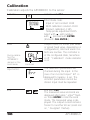
Calibration
Calibration adjusts the APT4000CC to the sensor.
Activate
Activate with CAL
Enter mode code:
• Input of cell constant 1100
• With calibration solution 0110
• Product calibration 1105
• Temp probe adjustment 1015
Select with , edit number
with , proceed with ENTER.
(End with CAL ENTER.)
Output current is frozen (last value
or preset fixed value, depending on
configuration), limit and alarm contacts are inactive. The controller is
in the configured state, Sensoface
is off, “Calibration” mode indicator
is on.
Hold
During calibration the
APT4000CC
remains in the
Hold mode.
Hold icon
Input errors
The calibration parameters are
checked during the input. In the
case of an incorrect input ”Err” is
displayed for approx. 3 sec. The
incorrect parameters cannot be
stored. Input must be repeated.
End
End with CAL.
The measured value and Hold are
displayed alternately, “enter” flashes. Press ENTER to end the Hold
mode. The measured value is displayed. The output current remains
frozen for another 20 sec (Hold icon
on, “hourglass” flashes).
68
APT4000CC
Information on calibration
Calibration adapts the meter to the conductivity sensor.
Calibration can be performed by:
• Input of cell constant (e.g. for ultrapure-water sensors)
• Determining the cell constant with a known
calibration solution
• Sampling (product calibration)
• Temperature probe adjustment
Note:
• All calibration procedures must be performed by trained
personnel.
• Incorrectly set parameters may go unnoticed, but change the
measuring properties.
69
Calibration by input of cell constant
Input of cell constant with simultaneous display of conductivity
and temperature
Display
Action
Remark
Press CAL key,
enter code 1100
Select with , edit number
with , proceed with ENTER.
The APT4000CC is
in the Hold mode.
If an invalid code is
entered, the
APT4000CC returns
to measuring mode.
Ready for calibration
Display (3 sec)
Enter the PRODUCT of the Cell
Constant and Cell Calibration
Factor found on the sensor.
i.e. Constant 0.01 x Factor 1.07.
Enter 0.0107.
The lower display
shows the conductivity value.
Select with , edit number
with , proceed with ENTER.
A change in the cell constant
also changes the conductivity
value.
(When there has
not been an entry
for 6 sec, the lower
display alternately
shows the conductivity and temperature value.)
Press ENTER to confirm cell
constant.
70
APT4000CC
Display
Action
Remark
The APT4000CC now displays
the conductivity and temperature.
The measured value is shown
in the main display alternately
with “Hold”. “enter” flashes.
End calibration with ENTER.
After end of calibration, the outputs
remain in Hold
mode for approx.
20 sec.
71
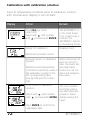
Calibration with calibration solution
Input of temperature-corrected value of calibration solution
with simultaneous display of cell constant
Display
Action
Remark
Press CAL key, enter
code 0110
Select with , edit number
with , proceed with ENTER.
The APT4000CC is
in the Hold mode.
If an invalid code is
entered, the
APT4000CC returns
to measuring mode.
Ready for calibration
Display (3 sec)
Dismount and clean sensor
Immerse sensor in calibration
solution.
When there has not
been an entry for
6sec, the lower disDetermine the temperatureplay alternately
corrected conductivity value of shows the cell conthe calibration solution from
stant and temperathe corresponding table
ture value.
(see Pg 100 and the following).
Enter value of calibration
solution.
The cell constant
and temperature
are alternately disSelect with , edit number
played in lower
with , proceed with ENTER. display during the
input.
Press ENTER to confirm the
calibration data.
72
APT4000CC
Display
Action
Remark
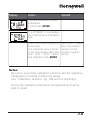
The determined cell constant
is displayed.
Confirm with ENTER.
The APT4000CC now displays
the conductivity and temperature.
Clean sensor and re-place it in
the process.
The measured value is shown
in the main display alternately
with “Hold”. “enter” flashes.
End calibration with ENTER.
After end of calibration, the outputs
remain in Hold
mode for approx.
20 sec.
Notes:
• Be sure to use known calibration solutions and the respective
temperature-corrected conductivity values.
(see “Calibration solutions” Pg. 100 and the following).
• During the calibration procedure the temperature must be
kept constant.
73
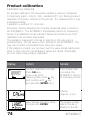
Product calibration
Calibration by sampling
For product calibration the measured variable is used as configured:
Conductivity (µS/cm, mS/cm, S/m), resistivity (MΩ·cm). During product
calibration the sensor remains in the process. The measurement is only
interrupted briefly.
Calibration is without TC correction.
Procedure: During sampling the currently measured value is stored in
the APT4000CC. The APT4000CC immediately returns to measuring
mode. The calibration mode indicator flashes and reminds you that
calibration has not been terminated.
The sample is measured in the lab or directly on the site using a
portable meter. The lab value is then entered in the APT4000CC. The
new cell constant is calculated from these two values.
If the sample is invalid, you can take over the value stored during sampling. In that case the old calibration values are stored. Afterwards,
you can start a new product calibration.
Display
Action
Remark
Product calibration 1st step:
Press CAL key,
enter code 1105.
(Select position with key,
edit number with
key,
proceed with ENTER key. )
If an invalid code
is entered, the
APT4000CC returns
to measuring mode.
Display
(approx. 3 sec)
Take sample and store value.
Proceed with ENTER
74
The sample is measured in the lab or
directly on the site.
APT4000CC
Display
Action
Remark
Measuring mode:
While the sample
value is determined,
the APT4000CC is
in measuring mode.
From the flashing CAL mode
indicator you see that sample
calibration has not been terminated.
Product calibration 2nd step:
When the sample value has
been determined, call up the
product calibration once
more (CAL, code 1105).
Display
(approx. 3 sec)
Enter lab value. The new cell
constant is calculated.
The new cell constant is displayed.
Confirm with ENTER.
New calibration:
Press CAL.
The measured value is shown
in the main display alternately
with “Hold”. “enter” flashes.
End with ENTER.
After end of calibration, the outputs remain in
Hold mode for
approx. 20 sec.
75
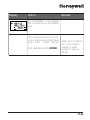
Temperature probe adjustment
Display
Action
Remark
Activate calibration
(Press CAL,
enter 1015)
Select position with key,
edit number with
key,
proceed with ENTER key.
Wrong settings
change the measurement properties!
If an invalid code
is entered, the
APT4000CC returns
to measuring mode.
APT4000CC is in the
Hold mode (Display
for approx. 3 sec)
Ready for calibration
Measure the temperature of
the process medium using an
external thermometer. Enter
measured temperature value:
Select with key,
edit number with
key,
proceed with ENTER key.
End adjustment with ENTER.
Hold will be deactivated after
20 sec.
Default:
Current value of
secondary display.
Measurement
Display
Remark
In the measuring mode the main display shows the
configured process variable (conductivity, resistivity,
salinity), the lower display shows the temperature.
During calibration you can return to measuring
mode by pressing the CAL key, during configuration
by pressing CONF (waiting time for measured-value
stabilization approx. 20 sec).
76
APT4000CC
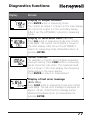
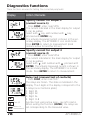
Diagnostics functions
Display
Remark
Display of output currents
Press ENTER while in measuring mode.
The current at output 1 is shown in the main display,
the current at output 2 in the secondary display.
After 5 sec the APT4000CC returns to measuring
mode.
Display of calibration data (Cal Info)
Press CAL while in measuring mode and confirm
code 0000. The current cell constant is shown in
the main display. After 20 sec the APT4000CC
returns to measuring mode (immediate return at
pressing ENTER).
Sensor monitor
for validation of sensor and complete measuredvalue processing. Press CONF while in measuring
mode and enter code 2222. The measured resistance is shown in the main display, the measuring
temperature in the lower display.
Press ENTER to return to measurement.
Display of last error message
(Error Info)
Press CONF while in measuring mode and confirm
code 0000. The last error message is displayed for
approx. 20 sec. After that the message will be
deleted (immediate return to measurement at
pressing ENTER).
77
Diagnostics functions
These functions are used for testing the connected peripherals.
Display
Action / Remarks
Specify current for output 1
(current source 1)
• Press CONF, enter code 5555
The current indicated in the main display for output
1 can be edited.
Select with key, edit number with
key,
proceed with ENTER key.
The actually measured current is shown in the secondary display. The APT4000CC is in Hold mode.
Press ENTER to return to measurement (Hold
remains active for another 20 sec).
Specify current for output 2
(current source 2)
• Press CONF, enter code 5556
The current indicated in the main display for output
2 can be edited.
Select with , edit number with , proceed with
ENTER. The actually measured current is shown in
the secondary display. The APT4000CC is in Hold
mode. Press ENTER to return to measurement.
Select a relay
Test 0/1
Return to
measurement
78
Relay test (manual test of contacts)
• Press CONF, enter code 5557
The relays are frozen. This state is indicated in the
display. The 4 digits in the display correspond to the
4 relays (as on terminal plate):
1. Digit: R1
2. Digit: R2
3. Digit: AL
4. Digit: CLN
Function test using arrow keys – see left column.
When exiting the function (ENTER), the relays are
set corresponding to the measured value.
APT4000CC
Display
Action / Remarks
Controller
characteristic
+100 %
Controller output
Controller test (manual specification of
controller output)
• Press CONF, enter code 5559
After function activation “Ctrl” is displayed for
approx. 3 sec. With controller turned off, “OFF” is
displayed in addition, then return to measuring
mode.
The function is used to start up control loops or
check the actuators.
For bumpless changeover to automatic operation
(exiting this function), configure an I-action component (reset time).
Setpoint
-100 %
The arrows indicate which relay
(valve) is active:
Specify value:
Select with , edit number with
ENTER.
, proceed with
The APT4000CC is in Hold mode.
Press ENTER to return to measurement (Hold
remains active for another 20 sec).
Relay 2 active
(Meas. value >
setpoint)
Controller output -100 to 0 %: Relay 2 active
Relay 1 active
(Meas. value <
setpoint)
Controller output 0 to +100 %: Relay 1 active
Momentary controller output (adjusted value has
not been stored yet)
79
Controller functions
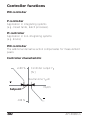
PID controller
P controller
Application in integrating systems
(e.g. closed tanks, batch processes).
PI controller
Application in non-integrating systems
(e.g. drains).
PID controller
The additional derivative action compensates for measurement
peaks.
Controller characteristic
+100 %
Controller output YP
[%]
Neutral zone YP=0
Setpoint
mS/cm
-100 %
80
APT4000CC
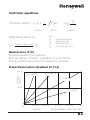
Controller equations
Controller output Y = YP +
1
TR
YPdt
P action
Proportional action YP
YP=
Setpoint - Meas. value
Meas. range
*KC
+ TD
I action
with:
YP
TR
TD
KC
dYP
dt
D action
Proportional action
Reset time [sec]
Rate time [sec]
Controller gain [%]
Neutral zone (Y=0)
Tolerated deviation from setpoint.
With the setting “1mS/cm” a deviation of ± 0.5 mS/cm
from the desired value does not activate the controller.
Proportional action (Gradient KC [%])
100 %
%
KC = 200
Controller
output Y
KC = 500
%
KC = 100
%
50 %
KC = 50
Xw
MR*0.2
Deviation
MR*0.4
MR*0.6
MR*0.8
%
MR
(Process variables: mS/cm, S/m, SAL)
81
Controller functions
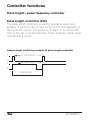
Pulse length / pulse frequency controller
Pulse length controller (PLC)
The pulse length controller is used to operate a valve as an
actuator. It switches the contact on for a time that depends on
the controller output. The period is constant. A minimum ON
time of 0.5 sec is maintained even if the controller output takes
corresponding values.
Output signal (switching contact) of pulse length controller
1
ON time (Y = 20 %)
0
1
ON time (Y = 80 %)
0
Pulse length
82
APT4000CC
Pulse frequency controller (PFC)
The pulse frequency controller is used to operate a frequencycontrolled actuator (metering pump). It varies the frequency
with which the contacts are switched on. The maximum pulse
frequency [pulses/min] can be defined. It depends on the actuator.
The Contact ON time is constant. It is automatically calculated
from the user-defined maximum pulse frequency.
Output signal (switching contact) of pulse frequency controller
1
ON time
0
Pulse frequency (Y = 80 %)
1
0
Pulse frequency (Y = 80 %)
83
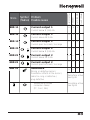
ERR 01 Measured Sensor
value
flashes
•
•
•
•
ERR 98 “Conf”
flashes
ERR 99 “FAIL”
flashes
ERR 03
x
x
x
x
x
x
x
x
x
x
x
x
x
x
x
x
x
x
Wrong cell constant
Measurement range violation
SAL > 45 ‰
Sensor connection or cable defective
ERR 02 Measured Unsuitable sensor
value
flashes
Out 1 (22mA)
Problem
Possible causes
Out 2 (22mA)
Display
Red LED
Errors
Alarm contact
Error messages (Error Codes)
Conductance range > 3500 mS
System error
Configuration or calibration data
defective. Completely reconfigure and
recalibrate the APT4000CC.
Memory error in device program
Factory settings
EEPROM or RAM defective
This error message only occurs in the
case of a complete defect. The
APT4000CC must be repaired and
recalibrated at the factory.
Temperature probe
Open or short circuit
Temperature range exceeded
84
APT4000CC
x
x
x
x
x
x
x
x
x
x
x
x
x
x
x
x
x
x
x
x
Out 2 (22mA)
Red LED
Current output 1
Out 1 (22mA)
ERR 11
Symbol Problem
(flashes) Possible causes
Alarm contact
Errors
Current below 0 (3.8) mA
ERR 12
Current output 1
Current above 20.5 mA
ERR 13
Current output 1
Current span too small / too large
ERR 21
Current output 2
Current below 0 (3.8) mA
ERR 22
Current output 2
Current above 20.5 mA
ERR 23
Current output 2
Current span too small / too large
ERR 33
Sensocheck:
Wrong or defective sensor /
Polarization effects at the sensor /
cable too long or defective /
plug defective
• Temperature outside
conversion tables
(TC, Conc, SAL)
x
Sensoface active
see Pg 89
Sensoface active
see Pg 89
85
Time out
Alarm contact
LED
Clean
contact
Rel.1/2
Limit value
Out 2
Out 1
Operating state
Rel.1/2
Controller
Operating states
Measurement
Cal Info
(CAL) 0000
20 s
Error Info
(CONF) 0000
20 s
Calibration
(CAL) 1100
Calibration
(CAL) 0110
Temp adjustment
(CAL) 1015
Product cal 1
(CAL) 1105
Product cal 2
(CAL) 1105
Conf par set 1
(CONF) 1200
20
min
Conf par set 2
(CONF) 1288
20
min
Parameter set 1/2
(CONF) 7654
20
min
86
APT4000CC
LED
Time out
Alarm contact
Clean
contact
Rel.1/2
Limit value
Rel.1/2
Controller
Out 1
Out 2
Operating state
Sensor monitor
(CONF) 2222
20
min
Current source 1
(CONF) 5555
20
min
Current source 2
(CONF) 5556
20
min
Relay test
(CONF) 5557
20
min
Manual controller
(CONF) 5559
20
min
Clean
function
Hold input
Explanation:
active
as configured (LAST/FIX or LAST/Off)
87
Sensoface
The little smiley in the display (Sensoface) provides information
about the sensor condition (defects, maintenance required,
cable capacitance too high).
It alerts to significant sensor polarization or excessive cable
capacitance e.g. caused by an unsuitable cable or a cable that
is too long. The permitted calibration ranges and the conditions for a friendly, neutral, or sad Sensoface are summarized in
the following chart. Additional icons refer to the error cause.
Sensocheck
Continuously monitors the sensor and its wiring.
Sensocheck can be switched off.
Critical values make the Sensoface “sad” and the
corresponding icon flashes:
The Sensocheck message is also output as error message Err
33. The alarm contact is active, the red LED is lighted, output
current 1 is set to 22 mA (when configured correspondingly).
Sensocheck can be switched off during configuration (then
Sensoface is also disabled). Exception: After a calibration a
Smiley is always displayed for confirmation.
Note
The worsening of a Sensoface criterion leads to the devaluation
of the Sensoface indicator (Smiley becomes “sad”). To reset the
Sensoface indicator, the defect must be remedied and the
APT4000CC be calibrated.
88
APT4000CC
Display
Problem
Status
Sensor defect
Wrong or defective sensor
Significant polarization of sensor
Excessive cable capacitance (also
see error message Err 33, Pg 84).
Temperature
error
Temperature outside range for
TC, conc, SAL
Note:
When very fast response times (t90) are required, e.g. when
detecting separation layers, Sensocheck should be switched off
(see “Specifications” Pg 94).
89
USP function
According to the “USP” directive (U.S. Pharmacopeia), Section 645
“Water Conductivity”, the conductivity of pharmaceutical waters can
be monitored online. To do so, the conductivity is measured without
temperature compensation and is compared with limit values (see
“Temperature/conductivity table as per USP” on Pg 91).
The water is usable if the conductivity is below the USP limit. For
higher conductivities, further test steps must be performed according
to the directive.
To increase safety the USP limit value can be reduced in the
APT4000CC.
To do so, a factor (%) is entered.
Configuration steps
• out1 menu group:
When USP function has been selected, the measurement range is
fixed to 00.00 ... 9.99 µS/cm. Temperature compensation is switched
off. Temperature is monitored (see Pg 31).
• In the rL. menu group select USP as limit function.
Relays 1 and 2 can now be used as USP limit contacts
(see Pg 52).
• Reduced limit contact U1 (Relay 1):
Enter USP factor (reduced limit, configurable in the range
10 % ... 100 %).
Set contact response for relay 1.
Set delay time (see Pg 59).
• Limit contact U2
Set contact response for relay 2.
Set delay time (see Pg 59).
90
APT4000CC
Temperature/conductivity table as per USP
Temp in °C
0
5
10
15
20
25
30
35
40
45
50
Conductivity in µS/cm
0.6
0.8
0.9
1.0
1.1
1.3
1.4
1.5
1.7
1.8
1.9
Temp in °C
55
60
65
70
75
80
85
90
95
100
Conductivity in µS/cm
2.1
2.2
2.4
2.5
2.7
2.7
2.7
2.7
2.9
3.1
Limits for USP function
Limit contact response U1 (Relay 1) and U2 (Relay 2)
Conductivity within limits of USP function
Cond>USP (Table)
Relay 1 active
Relay 2 active
Err 01
USP factor
10 %
100 %
Reduced
USP limit value
USP limit value
see table above
91
92
APT4000CC
Appendix
Product line and accessories
Devices
Contacting Conductivity Analyzer
Mounting accessories
Pipe-mount kit
Panel-mount kit
Protective hood
Order No.
APT4000CC-E00
51205988-001
51205990-001
51205989-001
93
Specifications
Conductivity input
Meas. range
Input for 2-electrode sensors
Conductivity
0.2 µS · c to 1000 mS · c
Ranges
Conductivity
*)
0.000 ... 9.999 µS/cm
00.00 ... 99.99 µS/cm
000.0 ... 999.9 µS/cm
0000 ... 9999 µS/cm
0.000 ... 9.999 mS/cm
00.00 ... 99.99 mS/cm
000.00 ... 999.9 mS/cm
0.000 ... 9.999 S/m
00.00 ... 99.99 S/m
Response time (T90)
Measurement error
1,2,3)
Resistivity
00.00 ... 99.99 MΩ · cm
Concentration
0.00 ... 9.99 % by wt
Salinity
0.0 ... 45 ‰ (0 ... 35 °C)
< 1 sec (Sensocheck off)
< 3 sec (Sensocheck on)
< 1 % meas. val. +0.4 µS · c
Concentration determination
Operating modes *)
-01- NaCl
-02- HCl
-03- NaOH
-04- H2SO4
-05- HNO3
See graphs
Sensor standardization
Operating modes
Adm. cell constant
94
0.00 ... 9.99% by wt (0 ... 60°C)
0.00 ... 9.99% by wt (-20 ... 50°C)
0.00 ... 9.99% by wt (0 ... 100°C)
0.00 ... 9.99% by wt (-17 ... 110°C)
0.00 ... 9.99% by wt (-17 ... 50°C)
on Pg 102 and the following.
• Input of cell constant with simultaneous
display of conductivity and temperature
• Input of conductivity of calibration solution
with simultaneous display of cell constant
and temperature
• Product calibration
• Temperature probe adjustment
-1
00.0050 ... 19.9999 cm
APT4000CC
Sensor monitoring
Sensocheck
Polarization detection and monitoring of
cable capacitance
Sensoface
Provides information on the sensor condition
(Sensocheck)
Sensor monitor
Direct display of measured values from sensor
for validation (resistance / temperature)
USP function
Water monitoring in the pharmaceutical industry
(USP) with possibility to enter a limit value (%)
Output via relay contact
Temperature input
Ranges
Resolution
Measurement error
1,2,3)
*)
Pt100 / Pt1000/ NTC 30 kΩ /
NTC 8.55 kΩ (Betatherm)
2-wire connection, adjustable
Pt100 / Pt1000:
-20 .. +200 °C
(-4 ... +392 °F)
NTC 30 kΩ
-20 ... +150 °C
(-4 ... +302 °F)
NTC 8.55 kΩ
-10 ... +130 °C
(+14 ... +266 °F)
0.1 °C / 1 °F
0.5 K
(<1 K for Pt100; <1 K for NTC >100 °C)
Temperature compensation *)
(Reference temp 25 °C)
(OFF)
(Lin)
(NLF)
(nACL)
(HCL)
(nH3)
none
Linear characteristic 00.00 ... 19.99 %/K
Natural waters to EN 27888
Ultrapure water with NaCl traces
(0 ... 120°C)
Ultrapure water with HCl traces (0...120°C)
Ultrapure water with NH3 traces (0...120°C)
95
Specifications
Hold input
Function
Switching voltage
Galv. separated (OPTO coupler)
Switches APT4000CC to Hold mode
0 ... 2 V (AC/DC)
inactive
10 ... 30 V (AC/DC) active
CONTROL input
Function
Switching voltage
Galv. separated (OPTO coupler)
Switch-over to second parameter set
0 ... 2 V (AC/DC)
Parameter set 1
10 ... 30 V (AC/DC) Parameter set 2
Output 1
0/4 ... 20 mA, max. 10 V, floating
(galv. connected to output 2)
Conductivity, resistivity, concentration,
or salinity
Linear or logarithmic
22 mA in the case of error messages
Low-pass, filter time constant 0 ... 120 sec
Measured variable
*)
Characteristic
Overrange*)
Output filter *)
Measurement error
Start/end of scale
Min. span
Output 2
Alarm contact
Contact ratings
Contact response
Alarm delay
96
< 0.3 % current value + 0.05 mA
As desired within range
LIN:
5 % of selected range
LOG:
1 decade
0/4 ... 20 mA, max. 10 V, floating
(galv. connected to output 1)
Temperature
22 mA in the case of temp error messages
Low-pass, filter time constant 0 ... 120 sec
Process variable
Overrange *)
Output filter *)
Meas. error 1)
Start/end of scale
Adm. span
1)
*)
< 0.3 % current value + 0.05 mA
-20 to 200 °C / -4 ... 392 °F
20 ... 320 K (36 to 608 °F)
Relay contact, floating
AC< 250 V / < 3 A / < 750 VA
DC< 30 V / < 3 A / < 90 W
N/C (fail-safe type)
0000 ... 0600 sec
APT4000CC
Limit values
Contact ratings
*)
Contact response *)
Delay *)
Switching points *)
Hysteresis *)
PID process controller
Setpoint *)
Neutral zone *)
Proportional action *)
Integral action*)
Derivative action
Controller type
Pulse period *)
*)
*)
Max. pulse frequency *)
Output via relay contacts R1, R2
(see PID process controller)
Contacts R1, R2 floating but inter-connected
AC< 250 V / < 3 A / < 750 VA
DC< 30 V / < 3 A / < 90 W
N/O or N/C
0000 ... 9999 sec
As desired within range
0 ... 50 % full scale
Output via relay contacts R1, R2
(see limit values)
As desired within range
As desired within range
Controller gain
KC:
0010 ... 9999 %
Reset time
TR:
0000 ... 9999 sec
(0000 sec = no integral action)
Rate time
TD:
0000 ... 9999 sec
(0000 sec = no derivative action)
Pulse length or pulse frequency controller
0001 ... 0600 sec, min. ON time 0.5 sec
(pulse length controller)
0001 ... 0180 min-1
(pulse frequency controller)
Clean function / Parameter set 2 *)
Clean / PSet2
Relay contact, floating,
for controlling a rinsing probe or
signaling that 2nd parameter set is active
Contact ratings
AC< 250 V / < 3 A / < 750 VA
DC< 30 V / < 3 A / < 90 W
Contact response
N/O when signaling parameter set 2
N/O or N/C when used as Clean contact *)
Rinsing interval *)
000.0 ... 999.9 h
(000.0 h = Clean function switched off)
*)
0000 ... 1999 sec
Rinse duration
97
Specifications
Display
Main display
Secondary display
Sensoface
Mode indicators
LC display, 7-segment with icons
Character height 17 mm, unit symbols 10 mm
Character height 10 mm, unit symbols 7 mm
3 status indicators (friendly, neutral, sad Sensoface)
5 status bars “MEAS”, “CAL”, “ALARM”, “CLEAN”,
“CONF”
18 further icons for configuration and messages
Red LED in case of alarm or Hold, user defined
Alarm indication
Keypad
Service functions
Current source
Manual controller
Device self-test
Display test
Last Error
Sensor monitor
Relay test
5 keys: [CAL] [CONF] [
Parameter sets
Two selectable parameter sets for different
process phases
Switchover via CONTROL input or manually
Signaling via relay contact PSet2
Data retention
98
*)
] [ ] [ENTER]
Current specifiable for output 1 and 2 (00.00 to 22.00mA)
Controller output entered directly (start of control process)
Automatic memory test (RAM, FLASH, EEPROM)
Display of all segments
Display of last error occurred
Display of direct sensor signal (resistance/temperature)
Manual control of the four switching contacts
Parameters and calibration data > 10 years (EEPROM)
APT4000CC
Protection against Protective separation of all extra-low-voltage circuits
electrical shock
against mains by double insulation as per EN 61010-1
Power supply
24 (-15%) to 230 V AC/DC (+10%); approx. 5 VA, 2.5 W
AC: 45 to 65 Hz; Overvoltage category II, Class II
Nominal operating conditions
Ambient temperature -20 to +55 °C
Transport/Storage temp -20 to +70 °C
Relative humidity
10 to 95 % not condensing
Power supply
24 (-15%) to 230 V AC/DC (+10%)
Frequency for AC
45 to 65 Hz
EMC
Emitted interference
Immunity to
interference
EN 61326
Class B (residential environment)
Class A for mains supply > 60 V DC
Industrial environment
Explosion protection
FM:
NI Class I Div 2 Group A, B, C & D, T4 Ta = 55 °C; Type 2
NI Class I Zone 2 Group IIC, T4 Ta = 55°C; Type 2
Enclosure
Color
Assembly
Dimensions
Ingress protection
Cable glands
Weight
*)
1)
2)
3)
Molded enclosure made of PBT (polybutylene terephtalate)
Bluish gray RAL 7031
• Wall mounting
• Pipe mounting: dia 40 to 60 mm,
30 to 45 mm
• Panel mounting, cutout to DIN 43 700
Sealed against panel
H 144 mm, B 144 mm, T 105 mm
IP 65 / NEMA 4X
3 breakthroughs for cable glands M20x1.5
2 breakthroughs for NPT 1/2 “ or Rigid Metallic Conduit
Approx. 1 kg
User-defined
To IEC 746 Part 1, at nominal operating conditions
± 1 count
Plus sensor error
99
Calibration solutions
Potassium chloride solutions
(Conductivity in mS/cm)
Temperature
Concentration
[°C]
0.01 mol/l
0.1 mol/l
1 mol/l
0
5
10
15
16
17
18
19
20
21
22
23
24
25
26
27
28
29
30
31
32
33
34
35
36
0.776
0.896
1.020
1.147
1.173
1.199
1.225
1.251
1.278
1.305
1.332
1.359
1.386
1.413
1.441
1.468
1.496
1.524
1.552
1.581
1.609
1.638
1.667
1.696
7.15
8.22
9.33
10.48
10.72
10.95
11.19
11.43
11.67
11.91
12.15
12.39
12.64
12.88
13.13
13.37
13.62
13.87
14.12
14.37
14.62
14.88
15.13
15.39
15.64
65.41
74.14
83.19
92.52
94.41
96.31
98.22
100.14
102.07
104.00
105.94
107.89
109.84
111.80
113.77
115.74
*)
*) Data source: K. H. Hellwege (Editor), H. Landolt, R. Börnstein:
Zahlenwerte und Funktionen ..., volume 2, part. volume 6
100
APT4000CC
Sodium chloride solutions
(Conductivity in mS/cm)
Temperature
Concentration
[°C]
0.01 mol/l
0
1
2
3
4
5
6
7
8
9
10
11
12
13
14
15
16
17
18
19
20
21
22
23
24
25
26
27
28
29
30
31
32
33
34
35
36
0.631
0.651
0.671
0.692
0.712
0.733
0.754
0.775
0.796
0.818
0.839
0.861
0.883
0.905
0.927
0.950
0.972
0.995
1.018
1.041
1.064
1.087
1.111
1.135
1.159
1.183
1.207
1.232
1.256
1.281
1.306
1.331
1.357
1.382
1.408
1.434
1.460
*)
0.1 mol/l
*)
5.786
5.965
6.145
6.327
6.510
6.695
6.881
7.068
7.257
7.447
7.638
7.831
8.025
8.221
8.418
8.617
8.816
9.018
9.221
9.425
9.631
9.838
10.047
10.258
10.469
10.683
10.898
11.114
11.332
11.552
11.773
11.995
12.220
12.445
12.673
12.902
13.132
saturated
**)
134.5
138.6
142.7
146.9
151.2
155.5
159.9
164.3
168.8
173.4
177.9
182.6
187.2
191.9
196.7
201.5
206.3
211.2
216.1
221.0
226.0
231.0
236.1
241.1
246.2
251.3
256.5
261.6
266.9
272.1
277.4
282.7
288.0
293.3
298.7
304.1
309.5
*) Data source: Test solutions calculated according to DIN IEC 746-3
**) Data source: K. H. Hellwege (Editor), H. Landolt, R. Börnstein:
Zahlenwerte und Funktionen ..., volume 2, part. volume 6
101
Concentration curves
-01- Sodium chloride solution NaCl
χ [mS/cm]
[°C]
400
100
82
300
60
46
200
35
20
10
0
100
0
0
5
[Gew%]
c c[%
by wt] 10
Conductivity in dependence on substance concentration and
process temperature for sodium chloride solution (NaCl)
102
APT4000CC
-02- Hydrochloric acid solution HCl
χ [mS/cm]
1000
[°C]
50
40
800
30
25
20
600
10
0
400
200
0
0
5
[Gew%]
cc[%
by wt] 10
Conductivity in dependence on substance concentration and
process temperature for hydrochloric acid (HCl)
Source: Haase/Sauermann/Dücker; Z. phys. Chem. New Edition,
Vol. 47 (1965)
103
Concentration curves
-03- Sodium hydroxide solution NaOH
χ [mS/cm]
1000
[°C]
100
90
80
800
70
60
600
50
40
400
30
25
20
10
0
200
0
5
[Gew%]
c c[%
by wt] 10
Conductivity in dependence on substance concentration and
process temperature for sodium hydroxide solution (NaOH)
104
APT4000CC
-04- Sulfuric acid H2SO4
χ [mS/cm]
600
[°C]
93,3
82,2
71,1
60,0
48,9
37,8
400
26,7
15,6
4,4
200
0
0
5
c [Gew%]
c [%
by wt] 10
Conductivity in dependence on substance concentration and
process temperature for sulfuric acid (H2SO4)
Source: Darling; Journal of Chemical and Engineering Data;
Vol. 9 No. 3, July 1964
105
Concentration curves
-05- Nitric acid HNO3
χ [mS/cm]
[°C]
800
50
40
600
30
20
400
10
0
200
0
0
5
c [Gew%]
c [%
by wt] 10
Conductivity in dependence on substance concentration and
process temperature for nitric acid (HN03)
Source: Haase/Sauermann/Dücker; Z. phys. Chem. New Edition,
Vol. 47 (1965)
106
APT4000CC
107
Glossary
Conductance
Conductance G [S] =1 / R [Ω]
Conductivity
Conductivity χ [S/cm] = G [S] · c [1/cm]
Conductivity
sensor
The APT4000CC allows connection of
2-electrode sensors. The cell constant of the
sensor in use must be entered or be determined using a calibration solution taking
account of the temperature.
A special device variant (APT4000TC) is
provided for toroidal (electrodeless) sensors.
Temperature
coefficient
With temperature compensation activated,
the measured value is calculated to the value
at the reference temperature (25 °C) using
the temperature coefficient.
Temperature Calculates the measured conductivity value
compensation for a reference temperature.
108
APT4000CC
109
Index
22 mA signal for error message . . . . . . . . . . . 41, 47, 50, 84
Accessories . . . . . . . . . . . . . . . . . . . . . . . . . . . . . . . . . . . . 93
Alarm settings . . . . . . . . . . . . . . . . . . . . . . . . . . . . . . . . . . 50
Alarm contact . . . . . . . . . . . . . . . . . . . . . . . 50, 84, 86, 96
Alarm delay . . . . . . . . . . . . . . . . . . . . . . . . . . . . . . . . .51
Error messages . . . . . . . . . . . . . . . . . . . . . . . . . . . . . . .84
Operating states . . . . . . . . . . . . . . . . . . . . . . . . . . . . . .86
Assembly . . . . . . . . . . . . . . . . . . . . . . . . . . . . . . . . . . . . . . 8
Automatic device self-test . . . . . . . . . . . . . . . . . . . . . . . . . 21
Cal Info . . . . . . . . . . . . . . . . . . . . . . . . . . . . . . . . . . . . . . . 77
Calibration . . . . . . . . . . . . . . . . . . . . . . . . . . . . . . . . . . . . 68
by input of cell constant . . . . . . . . . . . . . . . . . . . . . . . .70
Display of calibration data . . . . . . . . . . . . . . . . . . . . . . .77
Product calibration . . . . . . . . . . . . . . . . . . . . . . . . . . . .74
Temperature probe adjustment . . . . . . . . . . . . . . . . . . .76
with calibration solution . . . . . . . . . . . . . . . . . . . . . . . .72
Calibration solutions . . . . . . . . . . . . . . . . . . . . . . . . . . . . 100
Potassium chloride . . . . . . . . . . . . . . . . . . . . . . . . . . .100
Sodium chloride . . . . . . . . . . . . . . . . . . . . . . . . . . . . .101
“Clean” contact . . . . . . . . . . . . . . . . . . . . . . . . . . . . . . . . 61
Concentration measurement . . . . . . . . . . . . . . . . . . . . . . . 33
Concentration curves . . . . . . . . . . . . . . . . . . . .102...105
Configuration . . . . . . . . . . . . . . . . . . . . . . . . . . . . . . . . . . 24
Alarm settings . . . . . . . . . . . . . . . . . . . . . . . . . . . . . . .50
Configuration steps . . . . . . . . . . . . . . . . . . . . . . . . . . .26
Control of rinsing probe . . . . . . . . . . . . . . . . . . . . . . . .60
Controller . . . . . . . . . . . . . . . . . . . . . . . . . . . . . . . . . . .56
Menu structure . . . . . . . . . . . . . . . . . . . . . . . . . . . . . .25
Relays for USP . . . . . . . . . . . . . . . . . . . . . . . . . . . . . . .58
Signaling parameter set 2 . . . . . . . . . . . . . . . . . . . . . . .60
Temperature compensation . . . . . . . . . . . . . . . . . . . . .48
Configuration: Limit function . . . . . . . . . . . . . . . . . . . . . . 52
Settings for relay 1 . . . . . . . . . . . . . . . . . . . . . . . . . . . .52
110
APT4000CC
Settings for relay 2 . . . . . . . . . . . . . . . . . . . . . . . . . . . .54
Use of relays . . . . . . . . . . . . . . . . . . . . . . . . . . . . . . . . .53
Configuration: Output 1 . . . . . . . . . . . . . . . . . . . . . . . . . . 28
Measured variable . . . . . . . . . . . . . . . . . . . . . . . . . . . .30
Output current during Error . . . . . . . . . . . . . . . . . . . . .40
Output current range . . . . . . . . . . . . . . . . . . . . . . . . . .34
LIN characteristic . . . . . . . . . . . . . . . . . . . . . . . . . . .35
LOG characteristic . . . . . . . . . . . . . . . . . . . . . . . . . .37
Output signal during Hold . . . . . . . . . . . . . . . . . . . . . .41
Process solutions for concentration . . . . . . . . . . . . . . .32
Sensor selection . . . . . . . . . . . . . . . . . . . . . . . . . . . . . .28
Time constant of output filter . . . . . . . . . . . . . . . . . . .38
Configuration: Output 2 . . . . . . . . . . . . . . . . . . . . . . . . . . 42
Output current during Hold . . . . . . . . . . . . . . . . . . . . .46
Output current range . . . . . . . . . . . . . . . . . . . . . . . . . .43
Temperature error . . . . . . . . . . . . . . . . . . . . . . . . . . . . .46
Temperature probe . . . . . . . . . . . . . . . . . . . . . . . . . . . .43
Temperature unit . . . . . . . . . . . . . . . . . . . . . . . . . . . . .42
Time constant of output filter . . . . . . . . . . . . . . . . . . .44
Connection . . . . . . . . . . . . . . . . . . . . . . . . . . . . . . . . . . . . 12
Controller . . . . . . . . . . . . . . . . . . . . . . . . . . . . . . . . . . . . . 56
Configuration . . . . . . . . . . . . . . . . . . . . . . . . . . . . . . . .56
Controller behavior during Hold . . . . . . . . . . . . . . . . . .57
Controller equations . . . . . . . . . . . . . . . . . . . . . . . . . . .81
Controller test . . . . . . . . . . . . . . . . . . . . . . . . . . . . . . .79
Controller types . . . . . . . . . . . . . . . . . . . . . . . . . . . . . .80
Pulse length / pulse frequency controller . . . . . . . . . . .82
Current source . . . . . . . . . . . . . . . . . . . . . . . . . . . . . . . . . 78
Diagnostics functions . . . . . . . . . . . . . . . . . . . . . . . . . . . . 77
Display . . . . . . . . . . . . . . . . . . . . . . . . . . . . . . . . . . . . . . . 19
Display of calibration data, of last error message . . . . .77
Display of output currents . . . . . . . . . . . . . . . . . . . . . .77
Division 2 wiring . . . . . . . . . . . . . . . . . . . . . . . . . . . . . . . . 13
111
Index
Enclosure . . . . . . . . . . . . . . . . . . . . . . . . . . . . . . . . . . . . . . 8
Err . . . . . . . . . . . . . . . . . . . . . . . . . . . . . . . . . . . . . . . . . . 24
Error Info . . . . . . . . . . . . . . . . . . . . . . . . . . . . . . . . . . . . . 77
Error messages . . . . . . . . . . . . . . . . . . . . . . . . . . . . . . . . . 84
GainCheck device self-test . . . . . . . . . . . . . . . . . . . . . . . . 21
Glossary . . . . . . . . . . . . . . . . . . . . . . . . . . . . . . . . . . . . . 108
Hold mode . . . . . . . . . . . . . . . . . . . . . . . . . . . . . . . . . . . . 22
Controller behavior during Hold . . . . . . . . . . . . . . . . . .57
External activation . . . . . . . . . . . . . . . . . . . . . . . . . . . .23
LED in Hold mode . . . . . . . . . . . . . . . . . . . . . . . . . . . .51
Output signal for Hold . . . . . . . . . . . . . . . . . . . . . .41, 47
Installation . . . . . . . . . . . . . . . . . . . . . . . . . . . . . . . . . . . . 12
Intended use . . . . . . . . . . . . . . . . . . . . . . . . . . . . . . . . . . . . 6
Keypad . . . . . . . . . . . . . . . . . . . . . . . . . . . . . . . . . . . . . . . 20
Limit function (LiMIT) . . . . . . . . . . . . . . . . . . . . . . . . . . . . 53
Measurement . . . . . . . . . . . . . . . . . . . . . . . . . . . . . . . . . . 76
Mode codes . . . . . . . . . . . . . . . . . . . . . . . . . . . . . . . . . . 114
Mounting plan . . . . . . . . . . . . . . . . . . . . . . . . . . . . . . . . . . 9
Operating states . . . . . . . . . . . . . . . . . . . . . . . . . . . . . . . . 86
Output filter . . . . . . . . . . . . . . . . . . . . . . . . . . . . . . . . 39, 45
Overview . . . . . . . . . . . . . . . . . . . . . . . . . . . . . . . . . . . . . . 7
Package contents . . . . . . . . . . . . . . . . . . . . . . . . . . . . . . . . 8
Panel mounting . . . . . . . . . . . . . . . . . . . . . . . . . . . . . . . . 10
Panel-mount kit . . . . . . . . . . . . . . . . . . . . . . . . . . . . . 11, 93
Parameter set 1/2
Default settings . . . . . . . . . . . . . . . . . . . . . . . . . . . . . .65
External switchover of parameter sets . . . . . . . . . . . . .63
Manual selection . . . . . . . . . . . . . . . . . . . . . . . . . . . . .62
Signaling selected parameter set . . . . . . . . . . . . . . . . .60
User settings . . . . . . . . . . . . . . . . . . . . . . . . . . . . . . . .66
PID controller . . . . . . . . . . . . . . . . . . . . . . . . . . . . . . . . . . 80
Pipe mounting . . . . . . . . . . . . . . . . . . . . . . . . . . . . . . . . . 10
Pipe-mount kit . . . . . . . . . . . . . . . . . . . . . . . . . . . . . . 10, 93
112
APT4000CC
Process temperature range . . . . . . . . . . . . . . . . . . . . . . . . 43
Product calibration . . . . . . . . . . . . . . . . . . . . . . . . . . . . . . 74
Product line . . . . . . . . . . . . . . . . . . . . . . . . . . . . . . . . . . . 93
Protective hood . . . . . . . . . . . . . . . . . . . . . . . . . . . . . 10, 93
Protective wiring . . . . . . . . . . . . . . . . . . . . . . . . . . . . . . . . 16
Pulse frequency controller (PFC) . . . . . . . . . . . . . . . . . . . . 83
Pulse length controller (PLC) . . . . . . . . . . . . . . . . . . . . . . . 82
Relay 1 . . . . . . . . . . . . . . . . . . . . . . . . . . . . . . . . . . . . . . . 52
Relay 2 . . . . . . . . . . . . . . . . . . . . . . . . . . . . . . . . . . . . . . . 54
Relay test . . . . . . . . . . . . . . . . . . . . . . . . . . . . . . . . . . . . . 78
Relay usage . . . . . . . . . . . . . . . . . . . . . . . . . . . . . . . . . . . . 52
Rinsing system . . . . . . . . . . . . . . . . . . . . . . . . . . . . . . . . . 61
Control of rinsing probe . . . . . . . . . . . . . . . . . . . . . . . .60
Safety functions . . . . . . . . . . . . . . . . . . . . . . . . . . . . . . 21-22
Salinity . . . . . . . . . . . . . . . . . . . . . . . . . . . . . . . . . . . . . . . . 31
Safety information . . . . . . . . . . . . . . . . . . . . . . . . . . . . . . . 5
Division 2 wiring . . . . . . . . . . . . . . . . . . . . . . . . . . . . .13
Installation . . . . . . . . . . . . . . . . . . . . . . . . . . . . . . . . . . .12
Sensocheck . . . . . . . . . . . . . . . . . . . . . . . . . . . . . . 21, 51, 88
Sensoface . . . . . . . . . . . . . . . . . . . . . . . . . . . . . . . . . . 21, 88
Sensor monitor . . . . . . . . . . . . . . . . . . . . . . . . . . . . . . . . . 77
Specifications . . . . . . . . . . . . . . . . . . . . . . . . . . . . . . . . . . 94
Temperature compensation . . . . . . . . . . . . . . . . . . . . . . . . 49
Temperature probe . . . . . . . . . . . . . . . . . . . . . . . . . . . . . . 42
Temperature probe adjustment . . . . . . . . . . . . . . . . . . . . . 76
Terminal assignments . . . . . . . . . . . . . . . . . . . . . . . . . . . . 12
Terminals . . . . . . . . . . . . . . . . . . . . . . . . . . . . . . . . . . . . . 13
Time constant of output filter . . . . . . . . . . . . . . . . . . . 39, 45
Trademarks . . . . . . . . . . . . . . . . . . . . . . . . . . . . . . . . . . . . . 6
User interface . . . . . . . . . . . . . . . . . . . . . . . . . . . . . . . . . . 18
USP function . . . . . . . . . . . . . . . . . . . . . . . . . . . . . . . . 59, 90
Warranty . . . . . . . . . . . . . . . . . . . . . . . . . . . . . . . . . . . . . . . 2
Wiring example . . . . . . . . . . . . . . . . . . . . . . . . . . . . . . . . 15
113
Index
114
APT4000CC
Mode codes
The mode codes allow fast access to the functions
Calibration
Key + Code
Description
0000
Cal Info Display of cell constant
0110
Calibration by entry of solution
1100
Calibration by entry of cell constant
1105
Product calibration
1015
Adjusting temp probe
Configuration
Key + Code
Description
0000
Error Info Display of last error
1200
Configuring parameter set 1
1288
Configuring parameter set 2
2222
Sensor monitor Display resistance and temp.
7654
Parameter set 1/2 Switchover internal / external
5555
Current source 1 Output current 1 specified
5556
Current source 2 Output current 2 specified
5557
Relay test Manual test of contacts
5559
Manual controller Manual specification of
controller output
TA-194.232-HWE01 011003
Software version: 1.0