1
Connecting laser with DMX
Master slave mode (use without an external DMX controller
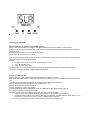
Choose 1 unit to be the master unit . usung the menu button select the desired mode eg. Auto or sound activated
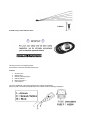
Connect a 3 pin XLR cable from the DMX output of the master unit to the DMX input of the slave unit (continue this to connect all
units in the chain)
Select all other units to slave mode SLA using the menu button
Now all lasers will copy the master unit exactly
Note you Kam XY laser has 6 different slave modes SLA –SLA5 choosing a different slave mode will add a 2 second delay to the
slave units giving a far more versatile laser show
Example
1. set the first unit to as master, and to the mode required auto / sound
2. set 2nd SLAVE unit to SLA 1
3. set the 3rd SLAVE unit to SLA 2
This will give slave (2) a 2 second delay before it mimics the movement from the master unit, and then SLA (3)will react 2
seconds after the SLA (2) unit giving a staggered lighting display effect
Connecting a DMX controller
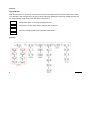
Each XY laser uses 10 DMX channels each DMX channel controls a function on the unit
When connecting a DMX controller, connect a 3pin XLR lead from the DMX output of your controller to the DMX input of the laser
unit
To control the laser with a DMX controller the unit will need to have a DMX address assigned to it
Press the menu button until the DMX address value is displayed 001 – 512
Press the up/down buttons until 001 is displayed
Press the enter button to confirm your selection
Note if the DMX address display is flashing this means that a DMX signal is NOT being received by the unit
If the display is not flashing a DMX signal is present
If more than one XY laser is to be controlled at the same time, there are 2 ways to do this
1. if all XY lasers are to be controlled the same, set all units with the same DMX address example 001
2. if individual control of each XY laser is required then each unit will need its own DMX address, example set unit 1 to 001
set unit 2 to 011 set unit 3 to 21 and so on adding 10 DMX channels to each unit
3. make sure that all units are at least 10 channels apart and that no channels cross over