1
3. Hardware Description
CPU Installation
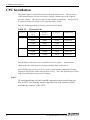
The board supports a single Intel Celeron or Pentium III processor. The processor’s
VID pin automatically sets the CPU board’s voltage variation ratio to the required
processor voltage. The host bus speed is also selected automatically.
The processor
is connected to the CPU board via a 370-pin ZIF PPGA socket.
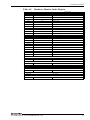
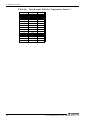
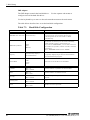
The CPU board supports the processors listed in the table below.
Table 3.1.
Processor
Celeron
Pentium III
Processor List
Processor
Host Bus
Speed
Frequency
Cache Size
CONTEC Model
433MHz
66MHz
128KB
--
566MHz
66MHz
128KB
PC686C-566
733MHz
66MHz
128KB
--
850MHz
100MHz
128KB
PC686C-850
600MHz
100MHz
256KB
--
700MHz
100MHz
256KB
PC686-700
850MHz
100MHz
256KB
PC686-850
The ZIF PPGA socket has a lever to hold the processor in place.
Ensure that the
notch on the side of the processor is aligned with the notch in the socket.
After installing the processor in the 370 socket, check that the configuration settings
relating to the processor model and speed are correct. The CPU must always be fitted
with a heat sink and fan to prevent overheating.
Note!
To avoid problems such as unstable operation and system hang-up
due to CPU overheating, ensure that the heat sink contacts firmly
with the top surface of the CPU.
14
PC-686BX(NLX)-LV, PC-686BX(NLX)-LVV