1
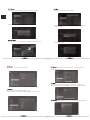
6. 2 E t h e r n e t
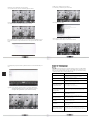
Move to "Ethernet", turn on the Ethernet configuration from the upper right corner.
6. 4 M o r e
Move to "More",press ok to set VPN and Proxy settings.
Choose "Save" to finish Ethernet configuration.
Here is the setting of VPN. You must set a lock screen PIN or password before you can
use credential storage.
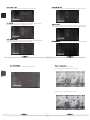
6. 3 Data u s a g e
Move to "Data usage", it is a way to account apps used data on the box for your reference.
Here is the setting of Proxy.
6 5 Sound
6. 7 S t o r a g e
Move to "Sound",press ok to set the system volumes.
Move to "Storage",press to enter into system storage interface.You can read the internal storage
and external device storage from here.
6. 8 A p p s
Move to "Apps", press to enter into system apps working interface.You can find the apps
working situation from here. Pre-installed XBMC, enable you play 1080p videos in XBMC.
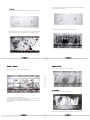
6 6 Display
Move to "Display",press to enter into system display settings.
There are four functions including Wallpaper,Output mode,Display position and Font size.
6. 9 A c c o u n t
Move to "Account" .press to enter into accounts .You can add account from the upper right corner.