1
Robot Motion
pose angle is oriented along the artifact length. More information is available from the Saphira user
manuals.
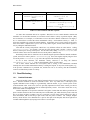
Table 6-4 Artifact types.
type
C structure
parameters
sfCORRIDOR
sfLANE
sfDOOR
sfJUNCTION
sfWALL
sfPOINT
corridor
lane
door
junction
wall
point
width, length
width, length
width
width
length
−
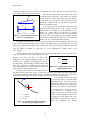
Several point artifacts are already defined by the Saphira system. sfGlobalOrigin is always
situated at the origin of G, and is displayed as a circle. sfRobotOrigin is always at the pose of the
robot, and does not display.
6.1.3
The Robot Local Frame
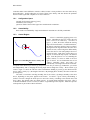
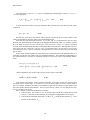
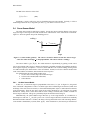
Every pose p in the LPS has an associated orientation, and thus it defines its own local coordinate
system. Of these, the most important is the robot pose R, which defines a coordinate system that is
centered on the robot, and whose x axis points along the robot’s (Figure 6-3). Consider another point p
located within the global coordinate system as shown. p also has coordinates in the robot’s frame of
reference R. To distinguish which frame of reference we’re talking about, we’ll prepend the reference
frame to the point.
G
Point p in the global frame
p = x, y , θ
Point p in the robot frame
R
p = x′, y′,θ ′
G
p: x , y , θ
R: x r , y r , θ r
G
Figure 6-3 The robot pose R in global coordinates
defines a local coordinate system
Any artifact in the LPS has both sets of coordinates in its data structure: if p is the variable name of
the point, for example, then (p.ax, p.ay, p.ath) are the global coordinates, and (p.x, p.y, p.th) are
the local coordinates.
In Saphira, you can create artifacts with the functions
38