1
■ chapter 5 trouble shooting
hardware devices in the BIOS Setup utility. A faulty setting may
cause the system to misbehave. If you are not sure of the changes
you made, try to restore all the settings to factory defaults.
Be sure all the device drivers are installed properly. For
example, without the audio driver properly installed, the speakers
and microphone will not work.
If external devices such as USB camera, scanner, printer do
not function correctly when connected to the system, it is usually
the device’s own problem. Consult the device’s manufacturer first.
Some software programs, which have not gone through
rigorous coding and testing, may cause problems during your
routine use. Consult the software vendor for problem solving.
Legacy peripheral are not plug-and-play capable. You need
to restart the system with these devices powered up and connected
first.
Be sure to go to BIOS SETUP and load DEFAULT SETTING
after BIOS re-flash.
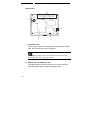
Be sure the Quick Key Lockout Switch on the bottom of the
computer is not engaged; otherwise the quick keys will not work.
5-3