1
User’s Manual ISC-P
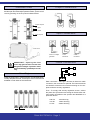
Instrument View
Output Connections
To access the jumpers for input and output range selection,
and the span and offset adjust potentiometers, open the front
cover by pressing on the A-A points indicated below.
J1
J2
J3
J4
J5
J6
Output Jumpers
Pot. Span
Pot. Offset
J7
J8
J9
J10
J11
J12
Input Connections
Input Jumpers
Front Cover
Current or voltage
generator
3 wire
transducer
Power Connections
IMPORTANT - Opening the front
cover may grant access to areas with
dangerous voltages. Operation must
be performed by qualified personnel
only.
Mounting
1 2 3
Install the instrument in vertical position, as indicated below.
To help dissipate the heat, a free space of 2mm must be left
available on both sides of the instrument.
2 wire
transducer
~
+
~
-
Earth connection - Although a terminal is offered for earth
connection, the connection is optional. The instrument does
not need this connection for correct functioning nor for compliance with the security regulations.
Fuse - To comply with security regulation 61010-1, add to
the power line a protection fuse acting as disconnection element, easily accessible to the operator and identified as a
protection device.
230 Vac
115 Vac
24 Vdc
70mA time lag
100mA time lag
250mA time lag
2 mm
FEMA ELECTRÓNICA - Page 3