1
User’s Manual ISC-P
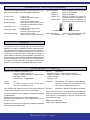
Output range selection Jumpers
Readjustment procedure
Place the jumpers in the appropriate position to select the
desired output signal range.
To change the input/output relation of the instrument, select
the appropriate jumper positions for input and output, and
recalibrate the instrument as described below :
4/20 mA
0/20 mA
0/10 Vdc
0/1 Vdc
1- Open the front cover
2- Select the appropriate output range jumpers
(Section “Output range selection Jumpers” in page 4)
J1
J2
J3
3- Select the appropriate input range jumpers
(Section “Input range selection Jumpers” in page 4)
J4
J5
J6
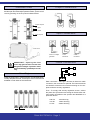
4- Connect a signal generator to the input terminals
(Section “Input Connections” in page 3)
Input range selection Jumpers
Place the jumpers in the appropriate position to select the
desired input signal range.
0/20mA
4/20mA
0/10 Vdc
7- Generate the higher input signal (20mA)
Operate the Span potentiometer, until the output is at the
high output value desired (10Vdc)
J8
J9
J10
8- Repeat steps 6 and 7, until the desired accuracy is reached
J11
J12
9.- Close the front cover
0/50 mA
10/50 mA
J8
J9
J10
(Values in brackets are examples for an input/output adjustment of 4/20mA=0/10Vdc)
6- Generate the lower input signal (4mA)
Operate the Offset potentiometer, until the output is at the
low output value desired (0Vdc)
J7
J7
5- Connect a multimeter to the output terminals
(Terminals 4 and 5 for mA or terminals 4 and 6 for Vdc)
0/5 mA
1/5 mA
0/1 Vdc
IMPORTANT - Opening the front
cover may grant access to areas with
dangerous voltages. Operation must be
performed by qualified personnel only.
J11
J12
FEMA ELECTRÓNICA - Page 4