1
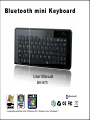
Bluetooth mini Keyboard
User Manual
BK-870
®
Bluetooth
Compatible with Mac iOS / Windows XP / Windows Vita / Windows 7.
SPECIFICATION
Product: BK-870 mini Bluetooth keyboard
Size: 239.10 x 118.29 x 14.79 mm
Number of key: 86 keys
Weight: 190 g ( inlcude rechargable Lithium battery )
Interface: Bluetooth V 3.0 Class 2
Compatibility: Mac OS x V.10.0, iOS 4.0 and later,
Windows 2000, XP, Vista & 7
Operating temperature: 32 °F~ 104 °F ( 0 °C ~ 40 °C).
Operating humidity: 85 % RH or lower
Storage temperature: 5 °F ~ 140 °F ( -15 °C ~ 60 °C).
Storage humidity: 85 % RF or lower
FEATURE :
. Bluetooth 3.0
. Compatible with PC / MAC / iphone / smart phone / tablet
PC / HTPC.
. Support standard Bluetooth HID setting.
. Working range: 10 meters.
. Super thin, portable, ideal presentation tool.
. CE & FCC approval.
1
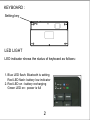
KEYBOARD :
Setting key
LED LIGHT
LED indicator shows the status of keyboard as follows:
1. Blue LED flash: Bluetooth is setting
Red LED flash: battery low indicator
2. Red LED on : battery recharging
Green LED on : power is full
2
1
2
PACKAGE CONTENTS
1. Bluetooth keyboard
2. User manual
3. USB recharging power cord
SYSTEM REQUIREMENT
1. OS: Microsoft 2000, XP, Vista, 7 and Mac OS x V10.0 or
later, iOS 4.0 or later.
2. Bluetooth module
3. keyboard is requested during Bluetooth setting
BLUETOOTH SETTING
1. Turn on computer and Bluetooth device.
2. Start Bluetooth program
3. Add new device to system and source Bluetooth keyboard
4. Key-in pairing code
5. When the setting is finished., the system will add a new device.
6. During the Bluetooth setting, the Blue LED on keyboard will
be flashing.
3
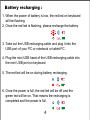
Battery recharging :
1. When the power of battery is low, the red led on keyboard
will be flashing.
2. Once the red led is flashing, please recharge the battery.
3. Take out the USB recharging cable and plug it into the
USB port of your PC or notebook or tablet PC.
4. Plug the mini USB head of the USB recharging cable into
the mini USB port on keyboard.
5. The red led will be on during battery recharging.
6. Once the power is full, the red led will be off and the
green led will be on. That means the recharging is
completed and the power is full.
4
SAFETY INFORMATION:
. Please read carefully and keep the under-mentioned
information before starting to use the device.
. Do not drop or hit the keyboard
. Please do not use the keyboard under the circumstance
of sharp vibration because it may damage the keyboard.
. Please do not take apart or modify the keyboard. Any
taking apart or modification with the keyboard may cause
the warranty invalid, or may cause fire or short circuit.
. Please do not use the keyboard under the humid
circumstance. Any liquid permeating the keyboard
may cause damage, or cause fire or short circuit.
.Please do not stick any metal into the body of keyboard.
. If you use improper charger, it may cause danger of fire
or explosion.
5
TROUBLE SHOOTING
1. Please make sure the setting between Bluetooth and
computer is successful. For more information, please
refer to Page 3 Bluetooth setting.
2. Please make sure your computer meets the system
requirement.
3. Please recharge the battery of your Bluetooth keyboard
immediately when battery low indicator is flashing.
6
FCC Information:
The Federal Communication Commission Radio Frequency Interference
Statement includes the following paragraph:
The equipment has been tested and found to comply with the limits for a Class
B Digital Device, pursuant to part 15 of the FCC Rules. These limits are
designed to provide reasonable protection against harmful interference in a
residential installation. This equipment generates, uses and can radiate radio
frequency energy and, if not installed and used in accordance with the
instruction, may cause harmful interference to radio communication. However,
there is no guarantee that interference will not occur in a particular installation.
If this equipment dose cause harmful interference to radio or television
reception, which can be determined by turning the equipment off and on, the
user is encouraged to try to correct the interference by one or more of the
following measures:
- Reorient or relocate the receiving antenna.
- Increase the separation between the equipment and receiver.
- Connect the equipment into an outlet on a circuit different from that to which
the receiver is connected.
- Consult the dealer or an experienced radio/TV technician for help.