1
Glue Tools LLC!
Phantom Cine Toolkit for MacOSX!
General Reference
Bayer Pattern
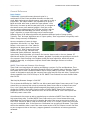
Traditionally, you would assume that each pixel is a
combination of Red, Green and Blue channels to make each
pixel. With single sensor digital cameras, each pixel is in-fact a
single color. The “Bayer Pattern” was invented by Dr. Bryce E.
Bayer at Kodak, who came up with the "bayer pattern" color
filter array. He came up with the way each color is arranged on
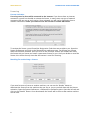
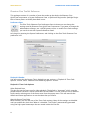
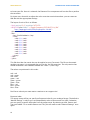
the camera sensor (see attached graphic). Each line on the
sensor contains alternating pixels of Green and Red, and the
next line below alternates Blue and Green. By using a “debayer” algorithm, a proper RGB image can be reconstructed.
Different types of de-bayer algorithms will reproduce different levels of image quality.
Typically, “fast” de-bayer algorithms are of a poor quality. “Slow” algorithms are typically much
better. (Image courtesy of Wikipedia).
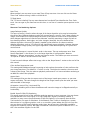
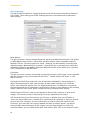
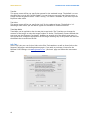
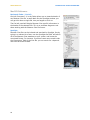
Here are examples of some de-bayer
algorithms. On the left, is a “Raw” Bayer
Pattern. In the centre is a “fast” NearestNeighbour de-bayer pattern and on the
right a “slower” Pixel Grouping de-bayer
pattern. As you can see, there will be a
substantial quality difference, depending
upon the de-bayer algorithm you choose. Our best de-bayer mode is also our slowest. GT
Hybid A will render a very nice image. However, playback is probably not possible on current 8core systems. Pixel Grouping is the highest quality de-bayer algorithm, which will permit
playback. Naturally, as computers improve, we will take advantage of them to increase
performance.
SMPTE Time Code and Phantom Cine footage
Time Code is an integral part of tracking and editing a project. For Film and Broadcast, Time
Code is an essential tool for identifying a specific frame in a specific piece of footage. Currently,
the system that is used is known as SMPTE 12M or simply SMPTE Time Code. This time code
system is designed to work with the common frame rates used for film and video. Typically this
means anywhere from 23.976 FPS up to 30 FPS. SMPTE Time Code will not track frames faster
than 30 FPS.
“But Hey! My Phantom footage is 500 FPS!”
This is where the difficulty lies. SMPTE is not able to work with higher frame rates at all. To get
around this, we came up with a way to convert the faster frame rates to a slower frame rate.
First, is isn’t likely that the high speed footage will be played at real time. (ie: You won’t
playback at 500fps.) So we don’t need to invent a 500fps SMPTE Time Code. Instead, we
playback at 24 (25 or 30) fps. Because of this, we can use the SMPTE Time Code system and
artificially create a start time.
Vision Research has come up with a standard way to calculate a SMPTE Time Code from the
high speed time code. To make SMTPE Time Code easier to use, Vision Research has now
embedded the Time Code into the Cine Header. But only if the most recent version of PCC, or
Glue Tools’ Séance for Mac is used to save the file. If PCC v2.1 or older is used, the Time Code
may not be available. Also, if the Camera or CineStation has an really old firmware, Time Code
will not be available, either, even if the most recent version of PCC or Séance is used. Feel free
to post a support ticket on the http://support.gluetools.com website, to have any questions
answered.
20